mirror of
https://github.com/Stone-Red-Code/DesktopMagic.git
synced 2026-09-04 23:39:29 +02:00
Compare commits
| Author | SHA1 | Date | |
|---|---|---|---|
 Stone_Red Stone_Red
|
7755ece3cd | ||
|
Stone_Red
|
b380e35189 | ||
|
Stone_Red
|
3fcda8e64e | ||
|
Stone_Red
|
0bc7033196 | ||
|
Stone_Red
|
10fe4c773b | ||
|
Stone_Red
|
13ed2f6a22 | ||
|
Stone_Red
|
b7139a8821 | ||
|
Stone_Red
|
302ff3aa05 | ||
|
Stone_Red
|
d285bdc489 | ||
|
Stone_Red
|
0a64184c32 | ||
|
Stone_Red
|
2df00fbeeb | ||
|
Stone_Red
|
088f51410a | ||
|
Stone_Red
|
70d08aa4c3 | ||
|
Stone_Red
|
af9aa60bd9 | ||
|
Stone_Red
|
695cb867ee | ||
|
Stone_Red
|
376176460b | ||
|
Stone_Red
|
327b79d69c | ||
|
Stone_Red
|
c74bc60209 | ||
|
Stone_Red
|
930da5d679 | ||
|
Stone_Red
|
ffd92d2259 | ||
|
Stone_Red
|
6100f444a8 | ||
|
Stone_Red
|
ead20d1279 | ||
|
Stone_Red
|
b638eff451 | ||
|
Stone_Red
|
793dcbad38 | ||
|
Stone_Red
|
c2474e6425 | ||
|
Stone_Red
|
cbeaaee88e | ||
|
Stone_Red
|
92c13c5ed0 | ||
|
Stone_Red
|
26e979af79 | ||
|
Stone_Red
|
29619dbdda | ||
|
Stone_Red
|
bc11832f9f | ||
|
Stone_Red
|
f8f06a9e2c | ||
|
Stone_Red
|
35d64ef2c3 | ||
|
Stone_Red
|
3b9d49e8da | ||
|
Stone_Red
|
aada1b8807 | ||
|
Stone_Red
|
9abfb9cb66 | ||
|
Stone_Red
|
ce1c181b14 | ||
|
Stone_Red
|
e6be5c011b | ||
|
Stone_Red
|
c6e858764f | ||
|
Stone_Red
|
f684cdb051 | ||
|
Stone_Red
|
3993e6d612 | ||
|
Stone_Red
|
8e187f91fa | ||
|
Stone_Red
|
566bcee426 | ||
|
Stone_Red
|
038074cd87 | ||
|
Stone_Red
|
7e1736696d | ||
|
Stone_Red
|
e545f27461 | ||
|
Stone_Red
|
d458feca1e | ||
|
Stone_Red
|
f899fd3e9b | ||
|
Stone_Red
|
c3b867ff67 | ||
 drenwick drenwick
|
1fe59e6338 | ||
|
Stone_Red
|
242f6a8388 | ||
|
Stone_Red
|
f7f75a4580 | ||
|
Stone_Red
|
475623f333 | ||
|
Stone_Red
|
aa1733e0c6 | ||
|
Stone_Red
|
5804bade47 | ||
|
Stone_Red
|
ca9f426bba | ||
|
Stone_Red
|
4cd8c51592 | ||
|
Stone_Red
|
d4cd384ce4 | ||
|
Stone_Red
|
414f84a024 | ||
|
Stone_Red
|
3c732117d3 | ||
|
Stone_Red
|
9a75cbd8e7 | ||
|
Stone_Red
|
536890a5e4 | ||
|
Stone_Red
|
975831eb18 | ||
|
Stone_Red
|
70a562db35 | ||
|
Stone_Red
|
71f03093d9 | ||
|
Stone_Red
|
a068f27b17 | ||
|
Stone_Red
|
481d0554c2 | ||
|
Stone_Red
|
9f1f67275c | ||
|
Stone_Red
|
9d36dbfb3c | ||
|
Stone_Red
|
6524253f52 | ||
|
Stone_Red
|
5b640280f2 | ||
|
Stone_Red
|
449e497ffa | ||
|
Stone_Red
|
4a6b34775f | ||
|
Stone_Red
|
42c89823ce | ||
|
Stone_Red
|
f46f57d11a | ||
|
Stone_Red
|
8a275caba8 | ||
|
Stone_Red
|
59c5a53aa4 | ||
|
Stone_Red
|
25769cb6db | ||
|
Stone_Red
|
1adcce95de | ||
|
Stone_Red
|
5bd2a630e0 | ||
|
Stone_Red
|
5c9613276a | ||
|
Stone_Red
|
247c374e99 | ||
|
Stone_Red
|
427f392d24 | ||
|
Stone_Red
|
8f7a12ce12 | ||
|
Stone_Red
|
11c9026fbf | ||
|
Stone_Red
|
4d8eef700f | ||
|
Stone_Red
|
bb560cd9db | ||
|
Stone_Red
|
69672da48f | ||
|
Stone_Red
|
e8de6fe9a5 | ||
|
Stone_Red
|
1f9e123893 | ||
|
Stone_Red
|
719d2ef290 | ||
|
Stone_Red
|
e6f263c83c | ||
|
Stone_Red
|
1e7f7ebb01 | ||
|
Stone_Red
|
2331544a80 | ||
|
Stone_Red
|
74bf7c2fb8 | ||
|
Stone_Red
|
3eae8bcdfc | ||
|
Stone_Red
|
336de2ca42 | ||
|
Stone_Red
|
aca4e84148 | ||
|
Stone_Red
|
2c883787f7 | ||
|
Stone_Red
|
adfedcb876 | ||
|
Stone_Red
|
f45ce21ad8 | ||
|
Stone_Red
|
ae2bee3125 | ||
|
Stone_Red
|
3d48777224 | ||
|
Stone_Red
|
0a3b4060de | ||
|
Stone_Red
|
b2dfec2ed3 | ||
|
Stone_Red
|
d1c598505e | ||
|
Stone_Red
|
441a8b00cc | ||
|
Stone_Red
|
7a8503ea9f | ||
|
Stone_Red
|
de80a58b54 | ||
|
Stone_Red
|
f62ea316a1 | ||
|
Stone-Red-Code
|
668c393a1b | ||
|
Stone-Red-Code
|
ed84fe37ed | ||
|
Stone-Red-Code
|
24dac76057 | ||
|
Stone-Red-Code
|
5e3642e539 | ||
|
Stone-Red-Code
|
2f6662caea | ||
|
Stone-Red-Code
|
aeb31af2f9 | ||
|
Stone-Red-Code
|
8f650ac35a | ||
|
Stone-Red-Code
|
b69bba68bb | ||
|
Stone-Red-Code
|
d75aef7460 | ||
|
Stone-Red-Code
|
9dd40c7ae8 | ||
|
Stone_Red
|
921d6dfc20 | ||
|
Stone-Red-Code
|
520f145eb0 | ||
|
Stone-Red-Code
|
77a1383e7b | ||
|
Stone-Red-Code
|
4e5502977d | ||
|
Stone_Red
|
7761f505b1 | ||
|
Stone_Red
|
05271e5f51 | ||
|
Stone_Red
|
3d7caf2011 | ||
|
Stone_Red
|
c25c270bd9 | ||
|
Stone_Red
|
c29d70ef0d | ||
|
Stone_Red
|
528d1161fe | ||
|
Stone-Red-Code
|
0b0f208098 | ||
|
Stone-Red-Code
|
ac49916308 | ||
|
Stone-Red-Code
|
83f5b28d5c | ||
|
Stone-Red-Code
|
d8a895b240 | ||
|
Stone-Red-Code
|
ef27ace78b | ||
|
Stone-Red-Code
|
0f6e8437fd | ||
|
Stone-Red-Code
|
5bc35cf92b | ||
|
Stone-Red-Code
|
2df2ef3b11 | ||
|
Stone-Red-Code
|
603a78935b | ||
|
Stone-Red-Code
|
40d1232e33 | ||
|
Stone-Red-Code
|
1cde9442ef | ||
|
Stone-Red-Code
|
90ee56be94 | ||
|
Stone-Red-Code
|
aed4b7de64 | ||
|
Stone_Red
|
101b516ca8 | ||
|
Stone_Red
|
c551dafeed | ||
|
Stone-Red-Code
|
7d2f68a66a | ||
|
Stone_Red
|
efd75b0a42 | ||
|
Stone_Red
|
74bff47ce3 | ||
|
Stone-Red-Code
|
6e4757adea | ||
|
Stone-Red-Code
|
e00c873bd5 | ||
|
Stone-Red-Code
|
d70e6229cc | ||
|
Stone-Red-Code
|
f94f24297e | ||
|
Stone-Red-Code
|
36e09acd0e | ||
|
Stone-Red-Code
|
24ca987ab0 | ||
|
Stone-Red-Code
|
535062e8c4 | ||
|
Stone_Red
|
69774b86a3 | ||
|
Stone-Red-Code
|
e9cf43d968 | ||
|
Stone-Red-Code
|
8df53ef190 | ||
|
Stone-Red-Code
|
ae490367ee | ||
|
Stone-Red-Code
|
3268a66d64 | ||
|
Stone-Red-Code
|
24437371ec | ||
|
Stone-Red-Code
|
8e31735032 | ||
|
Stone_Red
|
c38ea293d1 | ||
|
Stone_Red
|
ea0b79573a | ||
|
Stone_Red
|
2b4583ce5d | ||
|
Stone_Red
|
870b84a631 | ||
|
Stone_Red
|
b23571c0f7 | ||
|
Stone-Red-Code
|
d4c4b4e1ed | ||
|
Stone-Red-Code
|
41e4e03d2f | ||
|
Stone-Red-Code
|
9db60da702 | ||
|
Stone-Red-Code
|
86f07f4bf3 |
@@ -0,0 +1,27 @@
|
||||
---
|
||||
name: Bug report
|
||||
about: Create a report to help us improve
|
||||
title: ''
|
||||
labels: bug
|
||||
assignees: ''
|
||||
|
||||
---
|
||||
|
||||
**Describe the bug**
|
||||
A clear and concise description of what the bug is.
|
||||
|
||||
**To Reproduce**
|
||||
Steps to reproduce the behavior:
|
||||
1. Go to '...'
|
||||
2. Click on '....'
|
||||
3. Scroll down to '....'
|
||||
4. See error
|
||||
|
||||
**Expected behavior**
|
||||
A clear and concise description of what you expected to happen.
|
||||
|
||||
**Screenshots**
|
||||
If applicable, add screenshots to help explain your problem.
|
||||
|
||||
**Additional context**
|
||||
Add any other context about the problem here.
|
||||
@@ -0,0 +1,20 @@
|
||||
---
|
||||
name: Feature request
|
||||
about: Suggest an idea for this project
|
||||
title: ''
|
||||
labels: enhancement
|
||||
assignees: ''
|
||||
|
||||
---
|
||||
|
||||
**Is your feature request related to a problem? Please describe.**
|
||||
A clear and concise description of what the problem is. Ex. I'm always frustrated when [...]
|
||||
|
||||
**Describe the solution you'd like**
|
||||
A clear and concise description of what you want to happen.
|
||||
|
||||
**Describe alternatives you've considered**
|
||||
A clear and concise description of any alternative solutions or features you've considered.
|
||||
|
||||
**Additional context**
|
||||
Add any other context or screenshots about the feature request here.
|
||||
+4
-1
@@ -3,16 +3,19 @@
|
||||
##
|
||||
## Get latest from https://github.com/github/gitignore/blob/master/VisualStudio.gitignore
|
||||
|
||||
src/
|
||||
bin/
|
||||
obj/
|
||||
|
||||
# Project-specific files
|
||||
/src/DesktopMagicPluginAPI/DesktopMagicPluginAPI.xml
|
||||
|
||||
# User-specific files
|
||||
*.rsuser
|
||||
*.suo
|
||||
*.user
|
||||
*.userosscache
|
||||
*.sln.docstates
|
||||
*GPUCache/
|
||||
|
||||
# User-specific files (MonoDevelop/Xamarin Studio)
|
||||
*.userprefs
|
||||
|
||||
@@ -1,18 +1,34 @@
|
||||
# DesktopMagic
|
||||
|
||||
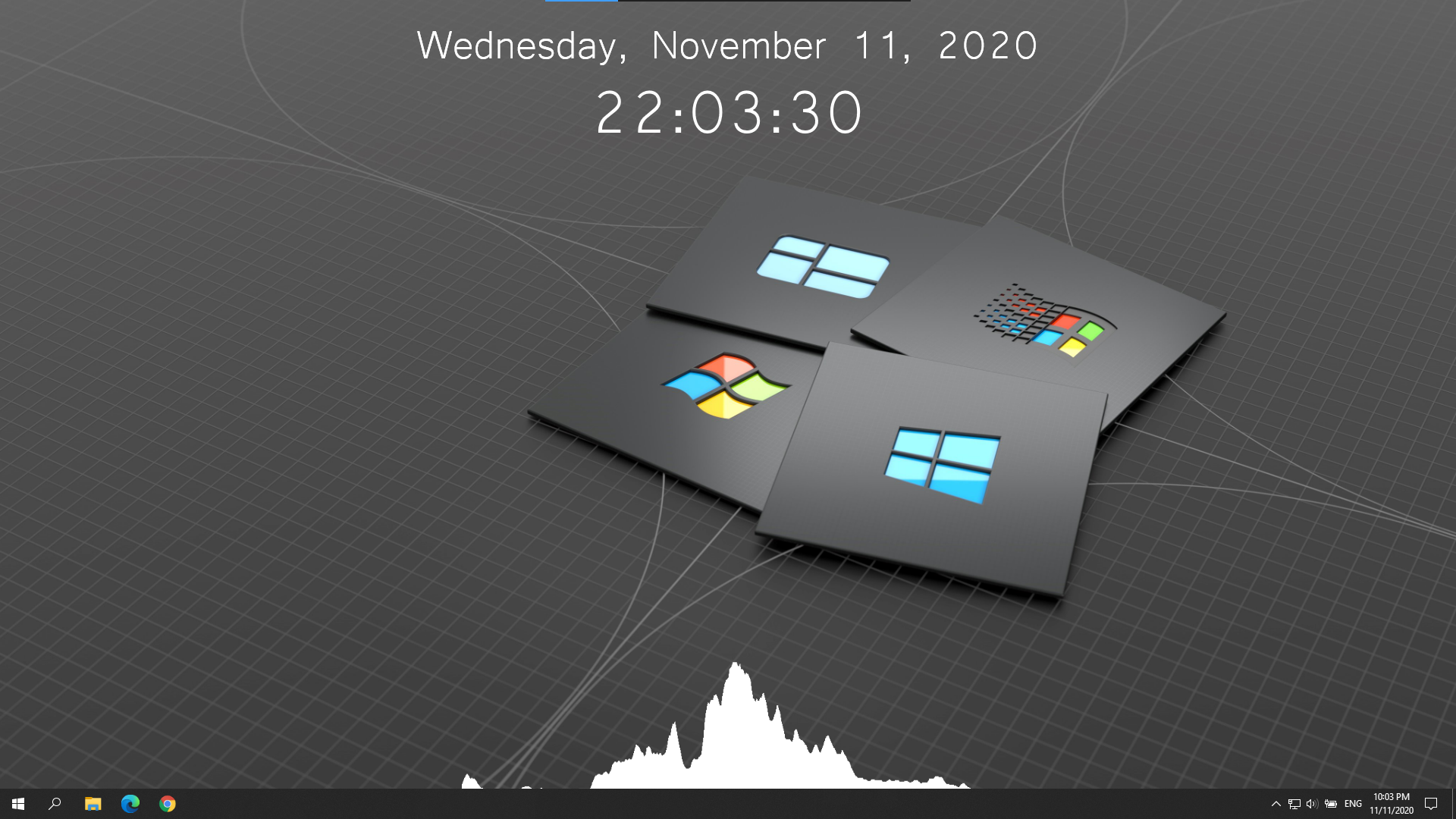
> DesktopMagic allows you to improve the looks of your Windows desktop!\
|
||||
> You can add useful elements to your desktop like a clock, a audio visualizer or even your own plugins!
|
||||
|
||||
|
||||
> You can add useful widgets to your desktop like a clock, an audio visualizer or even your own plugins using mod.io!
|
||||
|
||||
- [Releases](https://github.com/Stone-Red-Code/DesktopMagic/releases)
|
||||
- [Plugin Documentation](https://github.com/Stone-Red-Code/DesktopMagic/wiki)
|
||||
- [Browse plugins](https://mod.io/g/desktopmagic)
|
||||
- [Plugin creation guide](https://mod.io/g/desktopmagic/r/plugin-creation-guide)
|
||||
- [Licence](https://github.com/Stone-Red-Code/DesktopMagic/blob/main/LICENSE)
|
||||
|
||||
## Usage
|
||||
|
||||
1. Download one of the [releases](https://github.com/Stone-Red-Code/DesktopMagic/releases)
|
||||
2. Execute the `DesktopMagic-Installer.exe` file
|
||||
3. (Optional) Put a shortcut to the `DesktopMagic.exe` file in the install directory into the `shell:startup` directory
|
||||
1. Download & install the latest release
|
||||
- Microsoft Store: [Store Page](https://www.microsoft.com/store/productId/9NPV8F9K1CWM?ocid=pdpshare)
|
||||
- GitHub: [Releases](https://github.com/Stone-Red-Code/DesktopMagic/releases)
|
||||
1. Start the app and select the widgets you want to see on your desktop.
|
||||
1. (Optional) Check "Launch on startup" so DesktopMagic automatically starts when you log in.
|
||||
1. Check the "Edit" Checkbox to move the widgets.
|
||||
1. Open the plugin manager to install third-party plugins.
|
||||
|
||||
## Follow the development
|
||||
|
||||
[](https://x.com/search?q=from%3A%40StoneRedCode%20%23DesktopMagic)
|
||||
|
||||
## Preview
|
||||
|
||||
|
||||

|
||||

|
||||
|
||||
## Third party licenses
|
||||
|
||||
- [BusyIndicator](https://github.com/moh3ngolshani/BusyIndicator) - [MIT](https://github.com/Moh3nGolshani/BusyIndicator/blob/master/LICENSE)
|
||||
- [Material Design In XAML Toolkit](https://github.com/MaterialDesignInXAML/MaterialDesignInXamlToolkit) - [MIT](https://github.com/MaterialDesignInXAML/MaterialDesignInXamlToolkit/blob/master/LICENSE)
|
||||
- [Modio.NET](https://github.com/nickelc/modio.net) - [Apache-2.0](https://github.com/nickelc/modio.net/blob/master/LICENSE-APACHE), [MIT](https://github.com/nickelc/modio.net/blob/master/LICENSE-MIT)
|
||||
- [NAudio](https://github.com/naudio/NAudio) - [MIT](https://github.com/naudio/NAudio/blob/master/license.txt)
|
||||
|
||||
Binary file not shown.
@@ -0,0 +1,51 @@
|
||||
; Script generated by the Inno Setup Script Wizard.
|
||||
; SEE THE DOCUMENTATION FOR DETAILS ON CREATING INNO SETUP SCRIPT FILES!
|
||||
|
||||
#expr Exec('cmd.exe /C ', 'dotnet build -o "' + SourcePath + '\publish" -c Release ' + SourcePath + '..\src\DesktopMagic\')
|
||||
|
||||
#define MyAppName "DesktopMagic"
|
||||
#define MyAppVersion GetStringFileInfo("/publish/DesktopMagic.exe","ProductVersion")
|
||||
#define MyAppPublisher "Stone_Red"
|
||||
#define MyAppExeName "DesktopMagic.exe"
|
||||
|
||||
[Setup]
|
||||
; NOTE: The value of AppId uniquely identifies this application. Do not use the same AppId value in installers for other applications.
|
||||
; (To generate a new GUID, click Tools | Generate GUID inside the IDE.)
|
||||
AppId={{61FE5CE9-47C3-4255-A1F4-5BCF4ACA0879}
|
||||
AppName={#MyAppName}
|
||||
AppVersion={#MyAppVersion}
|
||||
;AppVerName={#MyAppName} {#MyAppVersion}
|
||||
AppPublisher={#MyAppPublisher}
|
||||
DefaultDirName={autopf}\{#MyAppName}
|
||||
DisableProgramGroupPage=yes
|
||||
; The [Icons] "quicklaunchicon" entry uses {userappdata} but its [Tasks] entry has a proper IsAdminInstallMode Check.
|
||||
UsedUserAreasWarning=no
|
||||
; Remove the following line to run in administrative install mode (install for all users.)
|
||||
PrivilegesRequired=lowest
|
||||
PrivilegesRequiredOverridesAllowed=dialog
|
||||
OutputBaseFilename={#MyAppName}-Installer
|
||||
OutputDir=.
|
||||
Compression=lzma
|
||||
SolidCompression=yes
|
||||
WizardStyle=modern
|
||||
|
||||
[Languages]
|
||||
Name: "english"; MessagesFile: "compiler:Default.isl"
|
||||
Name: "german"; MessagesFile: "compiler:Languages\German.isl"
|
||||
|
||||
[Tasks]
|
||||
Name: "desktopicon"; Description: "{cm:CreateDesktopIcon}"; GroupDescription: "{cm:AdditionalIcons}"; Flags: unchecked
|
||||
Name: "quicklaunchicon"; Description: "{cm:CreateQuickLaunchIcon}"; GroupDescription: "{cm:AdditionalIcons}"; Flags: unchecked; OnlyBelowVersion: 6.1; Check: not IsAdminInstallMode
|
||||
|
||||
[Files]
|
||||
Source: "publish\*"; DestDir: "{app}"; Flags: ignoreversion recursesubdirs
|
||||
; NOTE: Don't use "Flags: ignoreversion" on any shared system files
|
||||
|
||||
[Icons]
|
||||
Name: "{autoprograms}\{#MyAppName}"; Filename: "{app}\{#MyAppExeName}"
|
||||
Name: "{autodesktop}\{#MyAppName}"; Filename: "{app}\{#MyAppExeName}"; Tasks: desktopicon
|
||||
Name: "{userappdata}\Microsoft\Internet Explorer\Quick Launch\{#MyAppName}"; Filename: "{app}\{#MyAppExeName}"; Tasks: quicklaunchicon
|
||||
|
||||
[Run]
|
||||
Filename: "{app}\{#MyAppExeName}"; Description: "{cm:LaunchProgram,{#StringChange(MyAppName, '&', '&&')}}"; Flags: nowait postinstall skipifsilent
|
||||
|
||||
Binary file not shown.
Binary file not shown.
Binary file not shown.
@@ -1,21 +0,0 @@
|
||||
<Project Sdk="Microsoft.NET.Sdk">
|
||||
|
||||
<PropertyGroup>
|
||||
<TargetFramework>net5.0</TargetFramework>
|
||||
<RunPostBuildEvent>Always</RunPostBuildEvent>
|
||||
</PropertyGroup>
|
||||
|
||||
<ItemGroup>
|
||||
<Folder Include="Inno\" />
|
||||
</ItemGroup>
|
||||
|
||||
<ItemGroup>
|
||||
<None Update="Installer.iss">
|
||||
<CopyToOutputDirectory>Always</CopyToOutputDirectory>
|
||||
</None>
|
||||
</ItemGroup>
|
||||
|
||||
<Target Name="PostBuild" AfterTargets="PostBuildEvent">
|
||||
<Exec Command=""$(ProjectDir)Inno\ISCC.exe" "$(ProjectDir)Installer.iss"" />
|
||||
</Target>
|
||||
</Project>
|
||||
Binary file not shown.
@@ -1,364 +0,0 @@
|
||||
; *** Inno Setup version 6.0.3+ English messages ***
|
||||
;
|
||||
; To download user-contributed translations of this file, go to:
|
||||
; https://jrsoftware.org/files/istrans/
|
||||
;
|
||||
; Note: When translating this text, do not add periods (.) to the end of
|
||||
; messages that didn't have them already, because on those messages Inno
|
||||
; Setup adds the periods automatically (appending a period would result in
|
||||
; two periods being displayed).
|
||||
|
||||
[LangOptions]
|
||||
; The following three entries are very important. Be sure to read and
|
||||
; understand the '[LangOptions] section' topic in the help file.
|
||||
LanguageName=English
|
||||
LanguageID=$0409
|
||||
LanguageCodePage=0
|
||||
; If the language you are translating to requires special font faces or
|
||||
; sizes, uncomment any of the following entries and change them accordingly.
|
||||
;DialogFontName=
|
||||
;DialogFontSize=8
|
||||
;WelcomeFontName=Verdana
|
||||
;WelcomeFontSize=12
|
||||
;TitleFontName=Arial
|
||||
;TitleFontSize=29
|
||||
;CopyrightFontName=Arial
|
||||
;CopyrightFontSize=8
|
||||
|
||||
[Messages]
|
||||
|
||||
; *** Application titles
|
||||
SetupAppTitle=Setup
|
||||
SetupWindowTitle=Setup - %1
|
||||
UninstallAppTitle=Uninstall
|
||||
UninstallAppFullTitle=%1 Uninstall
|
||||
|
||||
; *** Misc. common
|
||||
InformationTitle=Information
|
||||
ConfirmTitle=Confirm
|
||||
ErrorTitle=Error
|
||||
|
||||
; *** SetupLdr messages
|
||||
SetupLdrStartupMessage=This will install %1. Do you wish to continue?
|
||||
LdrCannotCreateTemp=Unable to create a temporary file. Setup aborted
|
||||
LdrCannotExecTemp=Unable to execute file in the temporary directory. Setup aborted
|
||||
HelpTextNote=
|
||||
|
||||
; *** Startup error messages
|
||||
LastErrorMessage=%1.%n%nError %2: %3
|
||||
SetupFileMissing=The file %1 is missing from the installation directory. Please correct the problem or obtain a new copy of the program.
|
||||
SetupFileCorrupt=The setup files are corrupted. Please obtain a new copy of the program.
|
||||
SetupFileCorruptOrWrongVer=The setup files are corrupted, or are incompatible with this version of Setup. Please correct the problem or obtain a new copy of the program.
|
||||
InvalidParameter=An invalid parameter was passed on the command line:%n%n%1
|
||||
SetupAlreadyRunning=Setup is already running.
|
||||
WindowsVersionNotSupported=This program does not support the version of Windows your computer is running.
|
||||
WindowsServicePackRequired=This program requires %1 Service Pack %2 or later.
|
||||
NotOnThisPlatform=This program will not run on %1.
|
||||
OnlyOnThisPlatform=This program must be run on %1.
|
||||
OnlyOnTheseArchitectures=This program can only be installed on versions of Windows designed for the following processor architectures:%n%n%1
|
||||
WinVersionTooLowError=This program requires %1 version %2 or later.
|
||||
WinVersionTooHighError=This program cannot be installed on %1 version %2 or later.
|
||||
AdminPrivilegesRequired=You must be logged in as an administrator when installing this program.
|
||||
PowerUserPrivilegesRequired=You must be logged in as an administrator or as a member of the Power Users group when installing this program.
|
||||
SetupAppRunningError=Setup has detected that %1 is currently running.%n%nPlease close all instances of it now, then click OK to continue, or Cancel to exit.
|
||||
UninstallAppRunningError=Uninstall has detected that %1 is currently running.%n%nPlease close all instances of it now, then click OK to continue, or Cancel to exit.
|
||||
|
||||
; *** Startup questions
|
||||
PrivilegesRequiredOverrideTitle=Select Setup Install Mode
|
||||
PrivilegesRequiredOverrideInstruction=Select install mode
|
||||
PrivilegesRequiredOverrideText1=%1 can be installed for all users (requires administrative privileges), or for you only.
|
||||
PrivilegesRequiredOverrideText2=%1 can be installed for you only, or for all users (requires administrative privileges).
|
||||
PrivilegesRequiredOverrideAllUsers=Install for &all users
|
||||
PrivilegesRequiredOverrideAllUsersRecommended=Install for &all users (recommended)
|
||||
PrivilegesRequiredOverrideCurrentUser=Install for &me only
|
||||
PrivilegesRequiredOverrideCurrentUserRecommended=Install for &me only (recommended)
|
||||
|
||||
; *** Misc. errors
|
||||
ErrorCreatingDir=Setup was unable to create the directory "%1"
|
||||
ErrorTooManyFilesInDir=Unable to create a file in the directory "%1" because it contains too many files
|
||||
|
||||
; *** Setup common messages
|
||||
ExitSetupTitle=Exit Setup
|
||||
ExitSetupMessage=Setup is not complete. If you exit now, the program will not be installed.%n%nYou may run Setup again at another time to complete the installation.%n%nExit Setup?
|
||||
AboutSetupMenuItem=&About Setup...
|
||||
AboutSetupTitle=About Setup
|
||||
AboutSetupMessage=%1 version %2%n%3%n%n%1 home page:%n%4
|
||||
AboutSetupNote=
|
||||
TranslatorNote=
|
||||
|
||||
; *** Buttons
|
||||
ButtonBack=< &Back
|
||||
ButtonNext=&Next >
|
||||
ButtonInstall=&Install
|
||||
ButtonOK=OK
|
||||
ButtonCancel=Cancel
|
||||
ButtonYes=&Yes
|
||||
ButtonYesToAll=Yes to &All
|
||||
ButtonNo=&No
|
||||
ButtonNoToAll=N&o to All
|
||||
ButtonFinish=&Finish
|
||||
ButtonBrowse=&Browse...
|
||||
ButtonWizardBrowse=B&rowse...
|
||||
ButtonNewFolder=&Make New Folder
|
||||
|
||||
; *** "Select Language" dialog messages
|
||||
SelectLanguageTitle=Select Setup Language
|
||||
SelectLanguageLabel=Select the language to use during the installation.
|
||||
|
||||
; *** Common wizard text
|
||||
ClickNext=Click Next to continue, or Cancel to exit Setup.
|
||||
BeveledLabel=
|
||||
BrowseDialogTitle=Browse For Folder
|
||||
BrowseDialogLabel=Select a folder in the list below, then click OK.
|
||||
NewFolderName=New Folder
|
||||
|
||||
; *** "Welcome" wizard page
|
||||
WelcomeLabel1=Welcome to the [name] Setup Wizard
|
||||
WelcomeLabel2=This will install [name/ver] on your computer.%n%nIt is recommended that you close all other applications before continuing.
|
||||
|
||||
; *** "Password" wizard page
|
||||
WizardPassword=Password
|
||||
PasswordLabel1=This installation is password protected.
|
||||
PasswordLabel3=Please provide the password, then click Next to continue. Passwords are case-sensitive.
|
||||
PasswordEditLabel=&Password:
|
||||
IncorrectPassword=The password you entered is not correct. Please try again.
|
||||
|
||||
; *** "License Agreement" wizard page
|
||||
WizardLicense=License Agreement
|
||||
LicenseLabel=Please read the following important information before continuing.
|
||||
LicenseLabel3=Please read the following License Agreement. You must accept the terms of this agreement before continuing with the installation.
|
||||
LicenseAccepted=I &accept the agreement
|
||||
LicenseNotAccepted=I &do not accept the agreement
|
||||
|
||||
; *** "Information" wizard pages
|
||||
WizardInfoBefore=Information
|
||||
InfoBeforeLabel=Please read the following important information before continuing.
|
||||
InfoBeforeClickLabel=When you are ready to continue with Setup, click Next.
|
||||
WizardInfoAfter=Information
|
||||
InfoAfterLabel=Please read the following important information before continuing.
|
||||
InfoAfterClickLabel=When you are ready to continue with Setup, click Next.
|
||||
|
||||
; *** "User Information" wizard page
|
||||
WizardUserInfo=User Information
|
||||
UserInfoDesc=Please enter your information.
|
||||
UserInfoName=&User Name:
|
||||
UserInfoOrg=&Organization:
|
||||
UserInfoSerial=&Serial Number:
|
||||
UserInfoNameRequired=You must enter a name.
|
||||
|
||||
; *** "Select Destination Location" wizard page
|
||||
WizardSelectDir=Select Destination Location
|
||||
SelectDirDesc=Where should [name] be installed?
|
||||
SelectDirLabel3=Setup will install [name] into the following folder.
|
||||
SelectDirBrowseLabel=To continue, click Next. If you would like to select a different folder, click Browse.
|
||||
DiskSpaceGBLabel=At least [gb] GB of free disk space is required.
|
||||
DiskSpaceMBLabel=At least [mb] MB of free disk space is required.
|
||||
CannotInstallToNetworkDrive=Setup cannot install to a network drive.
|
||||
CannotInstallToUNCPath=Setup cannot install to a UNC path.
|
||||
InvalidPath=You must enter a full path with drive letter; for example:%n%nC:\APP%n%nor a UNC path in the form:%n%n\\server\share
|
||||
InvalidDrive=The drive or UNC share you selected does not exist or is not accessible. Please select another.
|
||||
DiskSpaceWarningTitle=Not Enough Disk Space
|
||||
DiskSpaceWarning=Setup requires at least %1 KB of free space to install, but the selected drive only has %2 KB available.%n%nDo you want to continue anyway?
|
||||
DirNameTooLong=The folder name or path is too long.
|
||||
InvalidDirName=The folder name is not valid.
|
||||
BadDirName32=Folder names cannot include any of the following characters:%n%n%1
|
||||
DirExistsTitle=Folder Exists
|
||||
DirExists=The folder:%n%n%1%n%nalready exists. Would you like to install to that folder anyway?
|
||||
DirDoesntExistTitle=Folder Does Not Exist
|
||||
DirDoesntExist=The folder:%n%n%1%n%ndoes not exist. Would you like the folder to be created?
|
||||
|
||||
; *** "Select Components" wizard page
|
||||
WizardSelectComponents=Select Components
|
||||
SelectComponentsDesc=Which components should be installed?
|
||||
SelectComponentsLabel2=Select the components you want to install; clear the components you do not want to install. Click Next when you are ready to continue.
|
||||
FullInstallation=Full installation
|
||||
; if possible don't translate 'Compact' as 'Minimal' (I mean 'Minimal' in your language)
|
||||
CompactInstallation=Compact installation
|
||||
CustomInstallation=Custom installation
|
||||
NoUninstallWarningTitle=Components Exist
|
||||
NoUninstallWarning=Setup has detected that the following components are already installed on your computer:%n%n%1%n%nDeselecting these components will not uninstall them.%n%nWould you like to continue anyway?
|
||||
ComponentSize1=%1 KB
|
||||
ComponentSize2=%1 MB
|
||||
ComponentsDiskSpaceGBLabel=Current selection requires at least [gb] GB of disk space.
|
||||
ComponentsDiskSpaceMBLabel=Current selection requires at least [mb] MB of disk space.
|
||||
|
||||
; *** "Select Additional Tasks" wizard page
|
||||
WizardSelectTasks=Select Additional Tasks
|
||||
SelectTasksDesc=Which additional tasks should be performed?
|
||||
SelectTasksLabel2=Select the additional tasks you would like Setup to perform while installing [name], then click Next.
|
||||
|
||||
; *** "Select Start Menu Folder" wizard page
|
||||
WizardSelectProgramGroup=Select Start Menu Folder
|
||||
SelectStartMenuFolderDesc=Where should Setup place the program's shortcuts?
|
||||
SelectStartMenuFolderLabel3=Setup will create the program's shortcuts in the following Start Menu folder.
|
||||
SelectStartMenuFolderBrowseLabel=To continue, click Next. If you would like to select a different folder, click Browse.
|
||||
MustEnterGroupName=You must enter a folder name.
|
||||
GroupNameTooLong=The folder name or path is too long.
|
||||
InvalidGroupName=The folder name is not valid.
|
||||
BadGroupName=The folder name cannot include any of the following characters:%n%n%1
|
||||
NoProgramGroupCheck2=&Don't create a Start Menu folder
|
||||
|
||||
; *** "Ready to Install" wizard page
|
||||
WizardReady=Ready to Install
|
||||
ReadyLabel1=Setup is now ready to begin installing [name] on your computer.
|
||||
ReadyLabel2a=Click Install to continue with the installation, or click Back if you want to review or change any settings.
|
||||
ReadyLabel2b=Click Install to continue with the installation.
|
||||
ReadyMemoUserInfo=User information:
|
||||
ReadyMemoDir=Destination location:
|
||||
ReadyMemoType=Setup type:
|
||||
ReadyMemoComponents=Selected components:
|
||||
ReadyMemoGroup=Start Menu folder:
|
||||
ReadyMemoTasks=Additional tasks:
|
||||
|
||||
; *** "Preparing to Install" wizard page
|
||||
WizardPreparing=Preparing to Install
|
||||
PreparingDesc=Setup is preparing to install [name] on your computer.
|
||||
PreviousInstallNotCompleted=The installation/removal of a previous program was not completed. You will need to restart your computer to complete that installation.%n%nAfter restarting your computer, run Setup again to complete the installation of [name].
|
||||
CannotContinue=Setup cannot continue. Please click Cancel to exit.
|
||||
ApplicationsFound=The following applications are using files that need to be updated by Setup. It is recommended that you allow Setup to automatically close these applications.
|
||||
ApplicationsFound2=The following applications are using files that need to be updated by Setup. It is recommended that you allow Setup to automatically close these applications. After the installation has completed, Setup will attempt to restart the applications.
|
||||
CloseApplications=&Automatically close the applications
|
||||
DontCloseApplications=&Do not close the applications
|
||||
ErrorCloseApplications=Setup was unable to automatically close all applications. It is recommended that you close all applications using files that need to be updated by Setup before continuing.
|
||||
PrepareToInstallNeedsRestart=Setup must restart your computer. After restarting your computer, run Setup again to complete the installation of [name].%n%nWould you like to restart now?
|
||||
|
||||
; *** "Installing" wizard page
|
||||
WizardInstalling=Installing
|
||||
InstallingLabel=Please wait while Setup installs [name] on your computer.
|
||||
|
||||
; *** "Setup Completed" wizard page
|
||||
FinishedHeadingLabel=Completing the [name] Setup Wizard
|
||||
FinishedLabelNoIcons=Setup has finished installing [name] on your computer.
|
||||
FinishedLabel=Setup has finished installing [name] on your computer. The application may be launched by selecting the installed shortcuts.
|
||||
ClickFinish=Click Finish to exit Setup.
|
||||
FinishedRestartLabel=To complete the installation of [name], Setup must restart your computer. Would you like to restart now?
|
||||
FinishedRestartMessage=To complete the installation of [name], Setup must restart your computer.%n%nWould you like to restart now?
|
||||
ShowReadmeCheck=Yes, I would like to view the README file
|
||||
YesRadio=&Yes, restart the computer now
|
||||
NoRadio=&No, I will restart the computer later
|
||||
; used for example as 'Run MyProg.exe'
|
||||
RunEntryExec=Run %1
|
||||
; used for example as 'View Readme.txt'
|
||||
RunEntryShellExec=View %1
|
||||
|
||||
; *** "Setup Needs the Next Disk" stuff
|
||||
ChangeDiskTitle=Setup Needs the Next Disk
|
||||
SelectDiskLabel2=Please insert Disk %1 and click OK.%n%nIf the files on this disk can be found in a folder other than the one displayed below, enter the correct path or click Browse.
|
||||
PathLabel=&Path:
|
||||
FileNotInDir2=The file "%1" could not be located in "%2". Please insert the correct disk or select another folder.
|
||||
SelectDirectoryLabel=Please specify the location of the next disk.
|
||||
|
||||
; *** Installation phase messages
|
||||
SetupAborted=Setup was not completed.%n%nPlease correct the problem and run Setup again.
|
||||
AbortRetryIgnoreSelectAction=Select action
|
||||
AbortRetryIgnoreRetry=&Try again
|
||||
AbortRetryIgnoreIgnore=&Ignore the error and continue
|
||||
AbortRetryIgnoreCancel=Cancel installation
|
||||
|
||||
; *** Installation status messages
|
||||
StatusClosingApplications=Closing applications...
|
||||
StatusCreateDirs=Creating directories...
|
||||
StatusExtractFiles=Extracting files...
|
||||
StatusCreateIcons=Creating shortcuts...
|
||||
StatusCreateIniEntries=Creating INI entries...
|
||||
StatusCreateRegistryEntries=Creating registry entries...
|
||||
StatusRegisterFiles=Registering files...
|
||||
StatusSavingUninstall=Saving uninstall information...
|
||||
StatusRunProgram=Finishing installation...
|
||||
StatusRestartingApplications=Restarting applications...
|
||||
StatusRollback=Rolling back changes...
|
||||
|
||||
; *** Misc. errors
|
||||
ErrorInternal2=Internal error: %1
|
||||
ErrorFunctionFailedNoCode=%1 failed
|
||||
ErrorFunctionFailed=%1 failed; code %2
|
||||
ErrorFunctionFailedWithMessage=%1 failed; code %2.%n%3
|
||||
ErrorExecutingProgram=Unable to execute file:%n%1
|
||||
|
||||
; *** Registry errors
|
||||
ErrorRegOpenKey=Error opening registry key:%n%1\%2
|
||||
ErrorRegCreateKey=Error creating registry key:%n%1\%2
|
||||
ErrorRegWriteKey=Error writing to registry key:%n%1\%2
|
||||
|
||||
; *** INI errors
|
||||
ErrorIniEntry=Error creating INI entry in file "%1".
|
||||
|
||||
; *** File copying errors
|
||||
FileAbortRetryIgnoreSkipNotRecommended=&Skip this file (not recommended)
|
||||
FileAbortRetryIgnoreIgnoreNotRecommended=&Ignore the error and continue (not recommended)
|
||||
SourceIsCorrupted=The source file is corrupted
|
||||
SourceDoesntExist=The source file "%1" does not exist
|
||||
ExistingFileReadOnly2=The existing file could not be replaced because it is marked read-only.
|
||||
ExistingFileReadOnlyRetry=&Remove the read-only attribute and try again
|
||||
ExistingFileReadOnlyKeepExisting=&Keep the existing file
|
||||
ErrorReadingExistingDest=An error occurred while trying to read the existing file:
|
||||
FileExists=The file already exists.%n%nWould you like Setup to overwrite it?
|
||||
ExistingFileNewer=The existing file is newer than the one Setup is trying to install. It is recommended that you keep the existing file.%n%nDo you want to keep the existing file?
|
||||
ErrorChangingAttr=An error occurred while trying to change the attributes of the existing file:
|
||||
ErrorCreatingTemp=An error occurred while trying to create a file in the destination directory:
|
||||
ErrorReadingSource=An error occurred while trying to read the source file:
|
||||
ErrorCopying=An error occurred while trying to copy a file:
|
||||
ErrorReplacingExistingFile=An error occurred while trying to replace the existing file:
|
||||
ErrorRestartReplace=RestartReplace failed:
|
||||
ErrorRenamingTemp=An error occurred while trying to rename a file in the destination directory:
|
||||
ErrorRegisterServer=Unable to register the DLL/OCX: %1
|
||||
ErrorRegSvr32Failed=RegSvr32 failed with exit code %1
|
||||
ErrorRegisterTypeLib=Unable to register the type library: %1
|
||||
|
||||
; *** Uninstall display name markings
|
||||
; used for example as 'My Program (32-bit)'
|
||||
UninstallDisplayNameMark=%1 (%2)
|
||||
; used for example as 'My Program (32-bit, All users)'
|
||||
UninstallDisplayNameMarks=%1 (%2, %3)
|
||||
UninstallDisplayNameMark32Bit=32-bit
|
||||
UninstallDisplayNameMark64Bit=64-bit
|
||||
UninstallDisplayNameMarkAllUsers=All users
|
||||
UninstallDisplayNameMarkCurrentUser=Current user
|
||||
|
||||
; *** Post-installation errors
|
||||
ErrorOpeningReadme=An error occurred while trying to open the README file.
|
||||
ErrorRestartingComputer=Setup was unable to restart the computer. Please do this manually.
|
||||
|
||||
; *** Uninstaller messages
|
||||
UninstallNotFound=File "%1" does not exist. Cannot uninstall.
|
||||
UninstallOpenError=File "%1" could not be opened. Cannot uninstall
|
||||
UninstallUnsupportedVer=The uninstall log file "%1" is in a format not recognized by this version of the uninstaller. Cannot uninstall
|
||||
UninstallUnknownEntry=An unknown entry (%1) was encountered in the uninstall log
|
||||
ConfirmUninstall=Are you sure you want to completely remove %1 and all of its components?
|
||||
UninstallOnlyOnWin64=This installation can only be uninstalled on 64-bit Windows.
|
||||
OnlyAdminCanUninstall=This installation can only be uninstalled by a user with administrative privileges.
|
||||
UninstallStatusLabel=Please wait while %1 is removed from your computer.
|
||||
UninstalledAll=%1 was successfully removed from your computer.
|
||||
UninstalledMost=%1 uninstall complete.%n%nSome elements could not be removed. These can be removed manually.
|
||||
UninstalledAndNeedsRestart=To complete the uninstallation of %1, your computer must be restarted.%n%nWould you like to restart now?
|
||||
UninstallDataCorrupted="%1" file is corrupted. Cannot uninstall
|
||||
|
||||
; *** Uninstallation phase messages
|
||||
ConfirmDeleteSharedFileTitle=Remove Shared File?
|
||||
ConfirmDeleteSharedFile2=The system indicates that the following shared file is no longer in use by any programs. Would you like for Uninstall to remove this shared file?%n%nIf any programs are still using this file and it is removed, those programs may not function properly. If you are unsure, choose No. Leaving the file on your system will not cause any harm.
|
||||
SharedFileNameLabel=File name:
|
||||
SharedFileLocationLabel=Location:
|
||||
WizardUninstalling=Uninstall Status
|
||||
StatusUninstalling=Uninstalling %1...
|
||||
|
||||
; *** Shutdown block reasons
|
||||
ShutdownBlockReasonInstallingApp=Installing %1.
|
||||
ShutdownBlockReasonUninstallingApp=Uninstalling %1.
|
||||
|
||||
; The custom messages below aren't used by Setup itself, but if you make
|
||||
; use of them in your scripts, you'll want to translate them.
|
||||
|
||||
[CustomMessages]
|
||||
|
||||
NameAndVersion=%1 version %2
|
||||
AdditionalIcons=Additional shortcuts:
|
||||
CreateDesktopIcon=Create a &desktop shortcut
|
||||
CreateQuickLaunchIcon=Create a &Quick Launch shortcut
|
||||
ProgramOnTheWeb=%1 on the Web
|
||||
UninstallProgram=Uninstall %1
|
||||
LaunchProgram=Launch %1
|
||||
AssocFileExtension=&Associate %1 with the %2 file extension
|
||||
AssocingFileExtension=Associating %1 with the %2 file extension...
|
||||
AutoStartProgramGroupDescription=Startup:
|
||||
AutoStartProgram=Automatically start %1
|
||||
AddonHostProgramNotFound=%1 could not be located in the folder you selected.%n%nDo you want to continue anyway?
|
||||
Binary file not shown.
Binary file not shown.
Binary file not shown.
Binary file not shown.
@@ -1,382 +0,0 @@
|
||||
; BEGIN ISPPBUILTINS.ISS
|
||||
//
|
||||
// Inno Setup Preprocessor
|
||||
//
|
||||
// Inno Setup (C) 1997-2020 Jordan Russell. All Rights Reserved.
|
||||
// Portions Copyright (C) 2000-2020 Martijn Laan. All Rights Reserved.
|
||||
// Portions Copyright (C) 2001-2004 Alex Yackimoff. All Rights Reserved.
|
||||
//
|
||||
#if defined(ISPP_INVOKED) && !defined(_BUILTINS_ISS_)
|
||||
//
|
||||
#if PREPROCVER < 0x01000000
|
||||
# error Inno Setup Preprocessor version is outdated
|
||||
#endif
|
||||
//
|
||||
#define _BUILTINS_ISS_
|
||||
//
|
||||
// ===========================================================================
|
||||
//
|
||||
// Default states for options.
|
||||
//
|
||||
//#pragma parseroption -b+ ; short circuit boolean evaluation: on
|
||||
//#pragma parseroption -m- ; short circuit multiplication evaluation (0 * A will not eval A): off
|
||||
//#pragma parseroption -p+ ; string literals without escape sequences: on
|
||||
//#pragma parseroption -u- ; allow undeclared identifiers: off
|
||||
//#pragma option -c+ ; pass script to the compiler: on
|
||||
//#pragma option -e- ; emit empty lines to translation: off
|
||||
//#pragma option -v- ; verbose mode: off
|
||||
//
|
||||
// ---------------------------------------------------------------------------
|
||||
//
|
||||
// Verbose levels:
|
||||
// 0 - #include and #file acknowledgements
|
||||
// 1 - information about any temp files created by #file
|
||||
// 2 - #insert and #append acknowledgements
|
||||
// 3 - reserved
|
||||
// 4 - #dim, #define and #undef acknowledgements
|
||||
// 5 - reserved
|
||||
// 6 - conditional inclusion acknowledgements
|
||||
// 7 - reserved
|
||||
// 8 - show strings emitted with #emit directive
|
||||
// 9 - macro and functions successful call acknowledgements
|
||||
//10 - Local macro array allocation acknowledgements
|
||||
//
|
||||
//#pragma verboselevel 0
|
||||
//
|
||||
#ifndef __POPT_P__
|
||||
# define private CStrings
|
||||
#else
|
||||
# pragma parseroption -p-
|
||||
#endif
|
||||
//
|
||||
#define NewLine "\n"
|
||||
#define Tab "\t"
|
||||
//
|
||||
#pragma parseroption -p+
|
||||
//
|
||||
#pragma spansymbol "\"
|
||||
//
|
||||
#define True 1
|
||||
#define False 0
|
||||
#define Yes True
|
||||
#define No False
|
||||
//
|
||||
#define MaxInt 0x7FFFFFFFL
|
||||
#define MinInt 0x80000000L
|
||||
//
|
||||
#define NULL
|
||||
#define void
|
||||
//
|
||||
// TypeOf constants
|
||||
//
|
||||
#define TYPE_ERROR 0
|
||||
#define TYPE_NULL 1
|
||||
#define TYPE_INTEGER 2
|
||||
#define TYPE_STRING 3
|
||||
#define TYPE_MACRO 4
|
||||
#define TYPE_FUNC 5
|
||||
#define TYPE_ARRAY 6
|
||||
//
|
||||
// Helper macro to find out the type of an array element or expression. TypeOf
|
||||
// standard function only allows identifier as its parameter. Use this macro
|
||||
// to convert an expression to identifier.
|
||||
//
|
||||
#define TypeOf2(any Expr) TypeOf(Expr)
|
||||
//
|
||||
// ReadReg constants
|
||||
//
|
||||
#define HKEY_CLASSES_ROOT 0x80000000UL
|
||||
#define HKEY_CURRENT_USER 0x80000001UL
|
||||
#define HKEY_LOCAL_MACHINE 0x80000002UL
|
||||
#define HKEY_USERS 0x80000003UL
|
||||
#define HKEY_CURRENT_CONFIG 0x80000005UL
|
||||
#define HKEY_CLASSES_ROOT_64 0x82000000UL
|
||||
#define HKEY_CURRENT_USER_64 0x82000001UL
|
||||
#define HKEY_LOCAL_MACHINE_64 0x82000002UL
|
||||
#define HKEY_USERS_64 0x82000003UL
|
||||
#define HKEY_CURRENT_CONFIG_64 0x82000005UL
|
||||
//
|
||||
#define HKCR HKEY_CLASSES_ROOT
|
||||
#define HKCU HKEY_CURRENT_USER
|
||||
#define HKLM HKEY_LOCAL_MACHINE
|
||||
#define HKU HKEY_USERS
|
||||
#define HKCC HKEY_CURRENT_CONFIG
|
||||
#define HKCR64 HKEY_CLASSES_ROOT_64
|
||||
#define HKCU64 HKEY_CURRENT_USER_64
|
||||
#define HKLM64 HKEY_LOCAL_MACHINE_64
|
||||
#define HKU64 HKEY_USERS_64
|
||||
#define HKCC64 HKEY_CURRENT_CONFIG_64
|
||||
//
|
||||
// Exec constants
|
||||
//
|
||||
#define SW_HIDE 0
|
||||
#define SW_SHOWNORMAL 1
|
||||
#define SW_NORMAL 1
|
||||
#define SW_SHOWMINIMIZED 2
|
||||
#define SW_SHOWMAXIMIZED 3
|
||||
#define SW_MAXIMIZE 3
|
||||
#define SW_SHOWNOACTIVATE 4
|
||||
#define SW_SHOW 5
|
||||
#define SW_MINIMIZE 6
|
||||
#define SW_SHOWMINNOACTIVE 7
|
||||
#define SW_SHOWNA 8
|
||||
#define SW_RESTORE 9
|
||||
#define SW_SHOWDEFAULT 10
|
||||
#define SW_MAX 10
|
||||
//
|
||||
// Find constants
|
||||
//
|
||||
#define FIND_MATCH 0x00
|
||||
#define FIND_BEGINS 0x01
|
||||
#define FIND_ENDS 0x02
|
||||
#define FIND_CONTAINS 0x03
|
||||
#define FIND_CASESENSITIVE 0x04
|
||||
#define FIND_SENSITIVE FIND_CASESENSITIVE
|
||||
#define FIND_AND 0x00
|
||||
#define FIND_OR 0x08
|
||||
#define FIND_NOT 0x10
|
||||
#define FIND_TRIM 0x20
|
||||
//
|
||||
// FindFirst constants
|
||||
//
|
||||
#define faReadOnly 0x00000001
|
||||
#define faHidden 0x00000002
|
||||
#define faSysFile 0x00000004
|
||||
#define faVolumeID 0x00000008
|
||||
#define faDirectory 0x00000010
|
||||
#define faArchive 0x00000020
|
||||
#define faSymLink 0x00000040
|
||||
#define faAnyFile 0x0000003F
|
||||
//
|
||||
// GetStringFileInfo standard names
|
||||
//
|
||||
#define COMPANY_NAME "CompanyName"
|
||||
#define FILE_DESCRIPTION "FileDescription"
|
||||
#define FILE_VERSION "FileVersion"
|
||||
#define INTERNAL_NAME "InternalName"
|
||||
#define LEGAL_COPYRIGHT "LegalCopyright"
|
||||
#define ORIGINAL_FILENAME "OriginalFilename"
|
||||
#define PRODUCT_NAME "ProductName"
|
||||
#define PRODUCT_VERSION "ProductVersion"
|
||||
//
|
||||
// GetStringFileInfo helpers
|
||||
//
|
||||
#define GetFileCompany(str FileName) GetStringFileInfo(FileName, COMPANY_NAME)
|
||||
#define GetFileDescription(str FileName) GetStringFileInfo(FileName, FILE_DESCRIPTION)
|
||||
#define GetFileVersionString(str FileName) GetStringFileInfo(FileName, FILE_VERSION)
|
||||
#define GetFileCopyright(str FileName) GetStringFileInfo(FileName, LEGAL_COPYRIGHT)
|
||||
#define GetFileOriginalFilename(str FileName) GetStringFileInfo(FileName, ORIGINAL_FILENAME)
|
||||
#define GetFileProductVersion(str FileName) GetStringFileInfo(FileName, PRODUCT_VERSION)
|
||||
//
|
||||
// ParseVersion
|
||||
//
|
||||
// Macro internally calls GetFileVersion function and parses string returned
|
||||
// by that function (in form "0.0.0.0"). All four version elements are stored
|
||||
// in by-reference parameters Major, Minor, Rev, and Build. Macro returns
|
||||
// string returned by GetFileVersion.
|
||||
//
|
||||
#define DeleteToFirstPeriod(str *S) \
|
||||
Local[1] = Copy(S, 1, (Local[0] = Pos(".", S)) - 1), \
|
||||
S = Copy(S, Local[0] + 1), \
|
||||
Local[1]
|
||||
//
|
||||
#define ParseVersion(str FileName, *Major, *Minor, *Rev, *Build) \
|
||||
Local[1] = Local[0] = GetFileVersion(FileName), \
|
||||
Local[1] == "" ? "" : ( \
|
||||
Major = Int(DeleteToFirstPeriod(Local[1])), \
|
||||
Minor = Int(DeleteToFirstPeriod(Local[1])), \
|
||||
Rev = Int(DeleteToFirstPeriod(Local[1])), \
|
||||
Build = Int(Local[1]), \
|
||||
Local[0])
|
||||
//
|
||||
// EncodeVer
|
||||
//
|
||||
// Encodes given four version elements to a 32 bit integer number (8 bits for
|
||||
// each element, i.e. elements must be within 0...255 range).
|
||||
//
|
||||
#define EncodeVer(int Major, int Minor, int Revision = 0, int Build = -1) \
|
||||
Major << 24 | (Minor & 0xFF) << 16 | (Revision & 0xFF) << 8 | (Build >= 0 ? Build & 0xFF : 0)
|
||||
//
|
||||
// DecodeVer
|
||||
//
|
||||
// Decodes given 32 bit integer encoded version to its string representation,
|
||||
// Digits parameter indicates how many elements to show (if the fourth element
|
||||
// is 0, it won't be shown anyway).
|
||||
//
|
||||
#define DecodeVer(int Ver, int Digits = 3) \
|
||||
Str(Ver >> 0x18 & 0xFF) + (Digits > 1 ? "." : "") + \
|
||||
(Digits > 1 ? \
|
||||
Str(Ver >> 0x10 & 0xFF) + (Digits > 2 ? "." : "") : "") + \
|
||||
(Digits > 2 ? \
|
||||
Str(Ver >> 0x08 & 0xFF) + (Digits > 3 && (Local = Ver & 0xFF) ? "." : "") : "") + \
|
||||
(Digits > 3 && Local ? \
|
||||
Str(Ver & 0xFF) : "")
|
||||
//
|
||||
// FindSection
|
||||
//
|
||||
// Returns index of the line following the header of the section. This macro
|
||||
// is intended to be used with #insert directive.
|
||||
//
|
||||
#define FindSection(str Section = "Files") \
|
||||
Find(0, "[" + Section + "]", FIND_MATCH | FIND_TRIM) + 1
|
||||
//
|
||||
// FindSectionEnd
|
||||
//
|
||||
// Returns index of the line following last entry of the section. This macro
|
||||
// is intended to be used with #insert directive.
|
||||
//
|
||||
#if VER >= 0x03000000
|
||||
# define FindNextSection(int Line) \
|
||||
Find(Line, "[", FIND_BEGINS | FIND_TRIM, "]", FIND_ENDS | FIND_AND)
|
||||
# define FindSectionEnd(str Section = "Files") \
|
||||
FindNextSection(FindSection(Section))
|
||||
#else
|
||||
# define FindSectionEnd(str Section = "Files") \
|
||||
FindSection(Section) + EntryCount(Section)
|
||||
#endif
|
||||
//
|
||||
// FindCode
|
||||
//
|
||||
// Returns index of the line (of translation) following either [Code] section
|
||||
// header, or "program" keyword, if any.
|
||||
//
|
||||
#define FindCode() \
|
||||
Local[1] = FindSection("Code"), \
|
||||
Local[0] = Find(Local[1] - 1, "program", FIND_BEGINS, ";", FIND_ENDS | FIND_AND), \
|
||||
(Local[0] < 0 ? Local[1] : Local[0] + 1)
|
||||
//
|
||||
// ExtractFilePath
|
||||
//
|
||||
// Returns directory portion of the given filename without backslash (unless
|
||||
// it is a root directory). If PathName doesn't contain directory portion,
|
||||
// the result is an empty string.
|
||||
//
|
||||
#define ExtractFilePath(str PathName) \
|
||||
(Local[0] = \
|
||||
!(Local[1] = RPos("\", PathName)) ? \
|
||||
"" : \
|
||||
Copy(PathName, 1, Local[1] - 1)), \
|
||||
Local[0] + \
|
||||
((Local[2] = Len(Local[0])) == 2 && Copy(Local[0], Local[2]) == ":" ? \
|
||||
"\" : \
|
||||
"")
|
||||
#define ExtractFileDir(str PathName) \
|
||||
RemoveBackslash(ExtractFilePath(PathName))
|
||||
|
||||
#define ExtractFileExt(str PathName) \
|
||||
Local[0] = RPos(".", PathName), \
|
||||
Copy(PathName, Local[0] + 1)
|
||||
//
|
||||
// ExtractFileName
|
||||
//
|
||||
// Returns name portion of the given filename. If PathName ends with
|
||||
// a backslash, the result is an empty string.
|
||||
//
|
||||
#define ExtractFileName(str PathName) \
|
||||
!(Local[0] = RPos("\", PathName)) ? \
|
||||
PathName : \
|
||||
Copy(PathName, Local[0] + 1)
|
||||
//
|
||||
// ChangeFileExt
|
||||
//
|
||||
// Changes extension in FileName with NewExt. NewExt must not contain
|
||||
// period.
|
||||
//
|
||||
#define ChangeFileExt(str FileName, str NewExt) \
|
||||
!(Local[0] = RPos(".", FileName)) ? \
|
||||
FileName + "." + NewExt : \
|
||||
Copy(FileName, 1, Local[0]) + NewExt
|
||||
//
|
||||
// RemoveFileExt
|
||||
//
|
||||
// Removes extension in FileName.
|
||||
//
|
||||
#define RemoveFileExt(str FileName) \
|
||||
!(Local[0] = RPos(".", FileName)) ? \
|
||||
FileName : \
|
||||
Copy(FileName, 1, Local[0] - 1)
|
||||
//
|
||||
// AddBackslash
|
||||
//
|
||||
// Adds a backslash to the string, if it's not already there.
|
||||
//
|
||||
#define AddBackslash(str S) \
|
||||
Copy(S, Len(S)) == "\" ? S : S + "\"
|
||||
//
|
||||
// RemoveBackslash
|
||||
//
|
||||
// Removes trailing backslash from the string unless the string points to
|
||||
// a root directory.
|
||||
//
|
||||
#define RemoveBackslash(str S) \
|
||||
Local[0] = Len(S), \
|
||||
Local[0] > 0 ? \
|
||||
Copy(S, Local[0]) == "\" ? \
|
||||
(Local[0] == 3 && Copy(S, 2, 1) == ":" ? \
|
||||
S : \
|
||||
Copy(S, 1, Local[0] - 1)) : \
|
||||
S : \
|
||||
""
|
||||
//
|
||||
// Delete
|
||||
//
|
||||
// Deletes specified number of characters beginning with Index from S. S is
|
||||
// passed by reference (therefore is modified). Acts like Delete function in
|
||||
// Delphi (from System unit).
|
||||
//
|
||||
#define Delete(str *S, int Index, int Count = MaxInt) \
|
||||
S = Copy(S, 1, Index - 1) + Copy(S, Index + Count)
|
||||
//
|
||||
// Insert
|
||||
//
|
||||
// Inserts specified Substr at Index'th character into S. S is passed by
|
||||
// reference (therefore is modified).
|
||||
//
|
||||
#define Insert(str *S, int Index, str Substr) \
|
||||
Index > Len(S) + 1 ? \
|
||||
S : \
|
||||
S = Copy(S, 1, Index - 1) + SubStr + Copy(S, Index)
|
||||
//
|
||||
// YesNo, IsDirSet
|
||||
//
|
||||
// Returns nonzero value if given string is "yes", "true" or "1". Intended to
|
||||
// be used with SetupSetting function. This macro replaces YesNo function
|
||||
// available in previous releases.
|
||||
//
|
||||
#define YesNo(str S) \
|
||||
(S = LowerCase(S)) == "yes" || S == "true" || S == "1"
|
||||
//
|
||||
#define IsDirSet(str SetupDirective) \
|
||||
YesNo(SetupSetting(SetupDirective))
|
||||
//
|
||||
//
|
||||
#define Power(int X, int P = 2) \
|
||||
!P ? 1 : X * Power(X, P - 1)
|
||||
//
|
||||
#define Min(int A, int B, int C = MaxInt) \
|
||||
A < B ? A < C ? Int(A) : Int(C) : Int(B)
|
||||
//
|
||||
#define Max(int A, int B, int C = MinInt) \
|
||||
A > B ? A > C ? Int(A) : Int(C) : Int(B)
|
||||
//
|
||||
// SameText
|
||||
//
|
||||
// Returns True if the given strings are identical, ignoring case.
|
||||
//
|
||||
#define SameText(str S1, str S2) \
|
||||
LowerCase(S1) == LowerCase(S2)
|
||||
//
|
||||
// SameStr
|
||||
//
|
||||
// Returns True if the given strings are identical, with case-sensitivity.
|
||||
//
|
||||
#define SameStr(str S1, str S2) \
|
||||
S1 == S2
|
||||
//
|
||||
|
||||
#ifdef CStrings
|
||||
# pragma parseroption -p-
|
||||
#endif
|
||||
#endif
|
||||
; END ISPPBUILTINS.ISS
|
||||
|
||||
Binary file not shown.
@@ -1,354 +0,0 @@
|
||||
; *** Inno Setup version 6.0.0+ Armenian messages ***
|
||||
;
|
||||
; Armenian translation by Hrant Ohanyan
|
||||
; E-mail: [email protected]
|
||||
; Translation home page: http://www.haysoft.org
|
||||
; Last modification date: 2016-01-28
|
||||
;
|
||||
[LangOptions]
|
||||
LanguageName=Հայերեն
|
||||
LanguageID=$042B
|
||||
LanguageCodePage=0
|
||||
; If the language you are translating to requires special font faces or
|
||||
; sizes, uncomment any of the following entries and change them accordingly.
|
||||
;DialogFontName=
|
||||
;DialogFontSize=8
|
||||
;WelcomeFontName=Verdana
|
||||
;WelcomeFontSize=12
|
||||
;TitleFontName=Arial
|
||||
;TitleFontSize=29
|
||||
;CopyrightFontName=Arial
|
||||
;CopyrightFontSize=8
|
||||
|
||||
[Messages]
|
||||
|
||||
; *** Application titles
|
||||
SetupAppTitle=Տեղադրում
|
||||
SetupWindowTitle=%1-ի տեղադրում
|
||||
UninstallAppTitle=Ապատեղադրում
|
||||
UninstallAppFullTitle=%1-ի ապատեղադրում
|
||||
|
||||
; *** Misc. common
|
||||
InformationTitle=Տեղեկություն
|
||||
ConfirmTitle=Հաստատել
|
||||
ErrorTitle=Սխալ
|
||||
|
||||
; *** SetupLdr messages
|
||||
SetupLdrStartupMessage=Այս ծրագիրը կտեղադրի %1-ը Ձեր համակարգչում։ Շարունակե՞լ։
|
||||
LdrCannotCreateTemp=Հնարավոր չէ ստեղծել ժամանակավոր ֆայլ։ Տեղադրումը կասեցված է
|
||||
LdrCannotExecTemp=Հնարավոր չէ կատարել ֆայլը ժամանակավոր թղթապանակից։ Տեղադրումը կասեցված է
|
||||
|
||||
; *** Startup error messages
|
||||
LastErrorMessage=%1.%n%nՍխալ %2: %3
|
||||
SetupFileMissing=%1 ֆայլը բացակայում է տեղադրման թղթապանակից։ Ուղղեք խնդիրը կամ ստացեք ծրագրի նոր տարբերակը։
|
||||
SetupFileCorrupt=Տեղադրվող ֆայլերը վնասված են։
|
||||
SetupFileCorruptOrWrongVer=Տեղադրվող ֆայլերը վնասված են կամ անհամատեղելի են տեղակայիչի այս տարբերակի հետ։ Ուղղեք խնդիրը կամ ստացեք ծրագրի նոր տարբերակը։
|
||||
InvalidParameter=Հրամանատողում նշված է սխալ հրաման.%n%n%1
|
||||
SetupAlreadyRunning=Տեղակայիչը արդեն աշխատում է։
|
||||
WindowsVersionNotSupported=Ծրագիրը չի աջակցում այս համակարգչում աշխատող Windows-ի տարբերակը։
|
||||
WindowsServicePackRequired=Ծրագիրը պահանջում է %1-ի Service Pack %2 կամ ավելի նոր։
|
||||
NotOnThisPlatform=Այս ծրագիրը չի աշխատի %1-ում։
|
||||
OnlyOnThisPlatform=Այս ծրագիրը հնարավոր է բացել միայն %1-ում։
|
||||
OnlyOnTheseArchitectures=Այս ծրագրի տեղադրումը հնարավոր է միայն Windows-ի մշակիչի հետևյալ կառուցվածքներում՝ %n%n%1
|
||||
WinVersionTooLowError=Այս ծրագիրը պահանջում է %1-ի տարբերակ %2 կամ ավելի նորը։
|
||||
WinVersionTooHighError=Ծրագիրը չի կարող տեղադրվել %1-ի տարբերակ %2 կամ ավելի նորում
|
||||
AdminPrivilegesRequired=Ծրագիրը տեղադրելու համար պահանջվում են Ադմինի իրավունքներ։
|
||||
PowerUserPrivilegesRequired=Ծրագիրը տեղադրելու համար պետք է մուտք գործել համակարգ որպես Ադմին կամ «Փորձառու օգտագործող» (Power Users):
|
||||
SetupAppRunningError=Տեղակայիչը հայտնաբերել է, որ %1-ը աշխատում է։%n%nՓակեք այն և սեղմեք «Լավ»՝ շարունակելու համար կամ «Չեղարկել»՝ փակելու համար։
|
||||
UninstallAppRunningError=Ապատեղադրող ծրագիրը հայտնաբերել է, որ %1-ը աշխատում է։%n%nՓակեք այն և սեղմեք «Լավ»՝ շարունակելու համար կամ «Չեղարկել»՝ փակելու համար։
|
||||
|
||||
; *** Startup questions
|
||||
PrivilegesRequiredOverrideTitle=Ընտրեք տեղակայիչի տեղադրման կերպը
|
||||
PrivilegesRequiredOverrideInstruction=Ընտրեք տեղադրման կերպը
|
||||
PrivilegesRequiredOverrideText1=%1-ը կարող է տեղադրվել բոլոր օգտվողների համար (պահանջում է վարիչի արտոնություններ) կամ միայն ձեզ համար:
|
||||
PrivilegesRequiredOverrideText2=%1-ը կարող է տեղադրվել միայն ձեզ համար կամ բոլոր օգտվողների համար (պահանջում է վարիչի արտոնություններ):
|
||||
PrivilegesRequiredOverrideAllUsers=Տեղադրել &բոլոր օգտվողների համար
|
||||
PrivilegesRequiredOverrideAllUsersRecommended=Տեղադրել &բոլոր օգտվողների համար (հանձնարարելի)
|
||||
PrivilegesRequiredOverrideCurrentUser=Տեղադրել միայն &ինձ համար
|
||||
PrivilegesRequiredOverrideCurrentUserRecommended=Տեղադրել միայն &ինձ համար (հանձնարարելի)
|
||||
|
||||
; *** Misc. errors
|
||||
ErrorCreatingDir=Հնարավոր չէ ստեղծել "%1" թղթապանակը
|
||||
ErrorTooManyFilesInDir=Հնարավոր չէ ստեղծել ֆայլ "%1" թղթապանակում, որովհետև նրանում կան չափից ավելի շատ ֆայլեր
|
||||
|
||||
; *** Setup common messages
|
||||
ExitSetupTitle=Տեղակայման ընդհատում
|
||||
ExitSetupMessage=Տեղակայումը չի ավարատվել։ Եթե ընդհատեք, ապա ծրագիրը չի տեղադրվի։%n%nԱվարտե՞լ։
|
||||
AboutSetupMenuItem=&Ծրագրի մասին...
|
||||
AboutSetupTitle=Ծրագրի մասին
|
||||
AboutSetupMessage=%1, տարբերակ՝ %2%n%3%n%nՎեբ կայք՝ %1:%n%4
|
||||
AboutSetupNote=
|
||||
TranslatorNote=Armenian translation by Hrant Ohanyan »»» http://www.haysoft.org
|
||||
|
||||
; *** Buttons
|
||||
ButtonBack=« &Նախորդը
|
||||
ButtonNext=&Հաջորդը »
|
||||
ButtonInstall=&Տեղադրել
|
||||
ButtonOK=Լավ
|
||||
ButtonCancel=Չեղարկել
|
||||
ButtonYes=&Այո
|
||||
ButtonYesToAll=Այո բոլորի &համար
|
||||
ButtonNo=&Ոչ
|
||||
ButtonNoToAll=Ո&չ բոլորի համար
|
||||
ButtonFinish=&Ավարտել
|
||||
ButtonBrowse=&Ընտրել...
|
||||
ButtonWizardBrowse=&Ընտրել...
|
||||
ButtonNewFolder=&Ստեղծել թղթապանակ
|
||||
|
||||
; *** "Select Language" dialog messages
|
||||
SelectLanguageTitle=Ընտրել տեղակայիչի լեզուն
|
||||
SelectLanguageLabel=Ընտրեք այն լեզուն, որը օգտագործվելու է տեղադրման ընթացքում:
|
||||
|
||||
; *** Common wizard text
|
||||
ClickNext=Սեղմեք «Հաջորդը»՝ շարունակելու համար կամ «Չեղարկել»՝ տեղակայիչը փակելու համար։
|
||||
BeveledLabel=
|
||||
BrowseDialogTitle=Ընտրել թղթապանակ
|
||||
BrowseDialogLabel=Ընտրեք թղթապանակը ցանկից և սեղմեք «Լավ»։
|
||||
NewFolderName=Նոր թղթապանակ
|
||||
|
||||
; *** "Welcome" wizard page
|
||||
WelcomeLabel1=Ձեզ ողջունում է [name]-ի տեղակայման օգնականը
|
||||
WelcomeLabel2=Ծրագիրը կտեղադրի [name/ver]-ը Ձեր համակարգչում։%n%nՇարունակելուց առաջ խորհուրդ ենք տալիս փակել բոլոր աշխատող ծրագրերը։
|
||||
|
||||
; *** "Password" wizard page
|
||||
WizardPassword=Գաղտնաբառ
|
||||
PasswordLabel1=Ծրագիրը պաշտպանված է գաղտնաբառով։
|
||||
PasswordLabel3=Մուտքագրեք գաղտնաբառը և սեղմեք «Հաջորդը»։
|
||||
PasswordEditLabel=&Գաղտնաբառը.
|
||||
IncorrectPassword=Մուտքագրված գաղտնաբառը սխալ է, կրկին փորձեք։
|
||||
|
||||
; *** "License Agreement" wizard page
|
||||
WizardLicense=Արտոնագրային համաձայնագիր
|
||||
LicenseLabel=Խնդրում ենք շարունակելուց առաջ կարդալ հետևյալ տեղեկությունը։
|
||||
LicenseLabel3=Կարդացեք արտոնագրային համաձայնագիրը։ Շարունակելուց առաջ պետք է ընդունեք նշված պայմանները։
|
||||
LicenseAccepted=&Ընդունում եմ արտոնագրային համաձայնագիրը
|
||||
LicenseNotAccepted=&Չեմ ընդունում արտոնագրային համաձայնագիրը
|
||||
|
||||
; *** "Information" wizard pages
|
||||
WizardInfoBefore=Տեղեկություն
|
||||
InfoBeforeLabel=Շարունակելուց առաջ կարդացեք այս տեղեկությունը։
|
||||
InfoBeforeClickLabel=Եթե պատրաստ եք սեղմեք «Հաջորդը»։
|
||||
WizardInfoAfter=Տեղեկություն
|
||||
InfoAfterLabel=Շարունակելուց առաջ կարդացեք այս տեղեկությունը։
|
||||
InfoAfterClickLabel=Երբ պատրաստ լինեք շարունակելու՝ սեղմեք «Հաջորդը»։
|
||||
|
||||
; *** "User Information" wizard page
|
||||
WizardUserInfo=Տեղեկություն օգտվողի մասին
|
||||
UserInfoDesc=Գրեք տվյալներ Ձեր մասին
|
||||
UserInfoName=&Օգտվողի անուն և ազգանուն.
|
||||
UserInfoOrg=&Կազմակերպություն.
|
||||
UserInfoSerial=&Հերթական համար.
|
||||
UserInfoNameRequired=Պետք է գրեք Ձեր անունը։
|
||||
|
||||
; *** "Select Destination Location" wizard page
|
||||
WizardSelectDir=Ընտրել տեղակայման թղթապանակը
|
||||
SelectDirDesc=Ո՞ր թղթապանակում տեղադրել [name]-ը։
|
||||
SelectDirLabel3=Ծրագիրը կտեղադրի [name]-ը հետևյալ թղթապանակում։
|
||||
SelectDirBrowseLabel=Սեղմեք «Հաջորդը»՝ շարունակելու համար։ Եթե ցանկանում եք ընտրել այլ թղթապանակ՝ սեղմեք «Ընտրել»։
|
||||
DiskSpaceMBLabel=Պահանջվում է առնվազն [mb] ՄԲ ազատ տեղ։
|
||||
CannotInstallToNetworkDrive=Հնարավոր չէ տեղադրել Ցանցային հիշասարքում։
|
||||
CannotInstallToUNCPath=Հնարավոր չէ տեղադրել UNC ուղիում։
|
||||
InvalidPath=Պետք է նշեք ամբողջական ուղին՝ հիշասարքի տառով, օրինակ՝%n%nC:\APP%n%nկամ UNC ուղի՝ %n%n\\սպասարկիչի_անունը\ռեսուրսի_անունը
|
||||
InvalidDrive=Ընտրված հիշասարքը կամ ցանցային ուղին գոյություն չունեն կամ անհասանելի են։ Ընտրեք այլ ուղի։
|
||||
DiskSpaceWarningTitle=Չկա պահանջվող չափով ազատ տեղ
|
||||
DiskSpaceWarning=Պահանջվում է առնվազն %1 ԿԲ ազատ տեղ, մինչդեռ հասանելի է ընդամենը %2 ԿԲ։%n%nԱյնուհանդերձ, շարունակե՞լ։
|
||||
DirNameTooLong=Թղթապանակի անունը կամ ուղին երկար են:
|
||||
InvalidDirName=Թղթապանակի նշված անունը անընդունելի է։
|
||||
BadDirName32=Անվան մեջ չպետք է լինեն հետևյալ գրանշանները՝ %n%n%1
|
||||
DirExistsTitle=Թղթապանակը գոյություն ունի
|
||||
DirExists=%n%n%1%n%n թղթապանակը արդեն գոյություն ունի։ Այնուհանդերձ, տեղադրե՞լ այստեղ։
|
||||
DirDoesntExistTitle=Թղթապանակ գոյություն չունի
|
||||
DirDoesntExist=%n%n%1%n%n թղթապանակը գոյություն չունի։ Ստեղծե՞լ այն։
|
||||
|
||||
; *** "Select Components" wizard page
|
||||
WizardSelectComponents=Ընտրել բաղադրիչներ
|
||||
SelectComponentsDesc=Ո՞ր ֆայլերը պետք է տեղադրվեն։
|
||||
SelectComponentsLabel2=Նշեք այն ֆայլերը, որոնք պետք է տեղադրվեն, հապանշեք այն ֆայլերը, որոնք չպետք է տեղադրվեն։ Սեղմեք «Հաջորդը»՝ շարունակելու համար։
|
||||
FullInstallation=Լրիվ տեղադրում
|
||||
; if possible don't translate 'Compact' as 'Minimal' (I mean 'Minimal' in your language)
|
||||
CompactInstallation=Սեղմված տեղադրում
|
||||
CustomInstallation=Ընտրովի տեղադրում
|
||||
NoUninstallWarningTitle=Տեղակայվող ֆայլերը
|
||||
NoUninstallWarning=Տեղակայիչ ծրագիրը հայտնաբերել է, որ հետևյալ բաղադրիչները արդեն տեղադրված են Ձեր համակարգչում։ %n%n%1%n%nԱյս բաղադրիչների ընտրության վերակայումը չի ջնջի դրանք։%n%nՇարունակե՞լ։
|
||||
ComponentSize1=%1 ԿԲ
|
||||
ComponentSize2=%1 ՄԲ
|
||||
ComponentsDiskSpaceMBLabel=Տվյալ ընտրությունը պահանջում է ամենաքիչը [mb] ՄԲ տեղ հիշասարքում:
|
||||
|
||||
; *** "Select Additional Tasks" wizard page
|
||||
WizardSelectTasks=Լրացուցիչ առաջադրանքներ
|
||||
SelectTasksDesc=Ի՞նչ լրացուցիչ առաջադրանքներ պետք է կատարվեն։
|
||||
SelectTasksLabel2=Ընտրեք լրացուցիչ առաջադրանքներ, որոնք պետք է կատարվեն [name]-ի տեղադրման ընթացքում, ապա սեղմեք «Հաջորդը».
|
||||
|
||||
; *** "Select Start Menu Folder" wizard page
|
||||
WizardSelectProgramGroup=Ընտրել «Start» ցանկի թղթապանակը
|
||||
SelectStartMenuFolderDesc=Որտե՞ղ ստեղծել դյուրանցումներ.
|
||||
SelectStartMenuFolderLabel3=Ծրագիրը կստեղծի դյուրանցումներ «Start» ցանկի հետևյալ թղթապանակում։
|
||||
SelectStartMenuFolderBrowseLabel=Սեղմեք «Հաջորդը»՝ շարունակելու համար։ Եթե ցանկանում եք ընտրեք այլ թղթապանակ՝ սեղմեք «Ընտրել»։
|
||||
MustEnterGroupName=Պետք է գրեք թղթապանակի անունը։
|
||||
GroupNameTooLong=Թղթապանակի անունը կամ ուղին շատ երկար են։
|
||||
InvalidGroupName=Նշված անունը անընդունելի է։
|
||||
BadGroupName=Անվան մեջ չպետք է լինեն հետևյալ գրանշանները՝ %n%n%1
|
||||
NoProgramGroupCheck2=&Չստեղծել թղթապանակ «Start» ցանկում
|
||||
|
||||
; *** "Ready to Install" wizard page
|
||||
WizardReady=Պատրաստ է
|
||||
ReadyLabel1=Տեղակայիչը պատրաստ է սկսել [name]-ի տեղադրումը։
|
||||
ReadyLabel2a=Սեղմեք «Տեղադրել»՝ շարունակելու համար կամ «Նախորդը»՝ եթե ցանկանում եք դիտել կամ փոփոխել տեղադրելու կարգավորումները։
|
||||
ReadyLabel2b=Սեղմեք «Տեղադրել»՝ շարունակելու համար։
|
||||
ReadyMemoUserInfo=Տեղեկություն օգտվողի մասին.
|
||||
ReadyMemoDir=Տեղադրելու թղթապանակ.
|
||||
ReadyMemoType=Տեղադրման ձև.
|
||||
ReadyMemoComponents=Ընտրված բաղադրիչներ.
|
||||
ReadyMemoGroup=Թղթապանակ «Start» ցանկում.
|
||||
ReadyMemoTasks=Լրացուցիչ առաջադրանքներ.
|
||||
|
||||
; *** "Preparing to Install" wizard page
|
||||
WizardPreparing=Նախատրաստում է տեղադրումը
|
||||
PreparingDesc=Տեղակայիչը պատրաստվում է տեղադրել [name]-ը ձեր համակարգչում։
|
||||
PreviousInstallNotCompleted=Այլ ծրագրի տեղադրումը կամ ապատեղադրումը չի ավարտվել։ Այն ավարտելու համար պետք է վերամեկնարկեք համակարգիչը։%n%nՎերամեկնարկելուց հետո կրկին բացեք տեղակայման փաթեթը՝ [name]-ի տեղադրումը ավարտելու համար։
|
||||
CannotContinue=Հնարավոր չէ շարունակել։ Սեղմեք «Չեղարկել»՝ ծրագիրը փակելու համար։
|
||||
ApplicationsFound=Հետևյալ ծրագրերը օգտագործում են ֆայլեր, որոնք պետք է թարմացվեն տեղակայիչի կողմից։ Թույլատրեք տեղակայիչին ինքնաբար փակելու այդ ծրագրերը։
|
||||
ApplicationsFound2=Հետևյալ ծրագրերը օգտագործում են ֆայլեր, որոնք պետք է թարմացվեն տեղակայիչի կողմից։ Թույլատրեք տեղակայիչին ինքնաբար փակելու այդ ծրագրերը։ Տեղադրումը ավարտելուց հետո տեղակայիչը կփորձի վերամեկնարկել այդ ծրագրերը։
|
||||
CloseApplications=&Ինքնաբար փակել ծրագրերը
|
||||
DontCloseApplications=&Չփակել ծրագրերը
|
||||
ErrorCloseApplications=Տեղակայիչը չկարողացավ ինքնաբար փակել բոլոր ծրագրերը: Խորհուրդ ենք տալիս փակել այն բոլոր ծրագրերը, որոնք պետք է թարմացվեն տեղակայիչի կողմից:
|
||||
|
||||
; *** "Installing" wizard page
|
||||
WizardInstalling=Տեղադրում
|
||||
InstallingLabel=Խնդրում ենք սպասել մինչ [name]-ը կտեղադրվի Ձեր համակարգչում։
|
||||
|
||||
; *** "Setup Completed" wizard page
|
||||
FinishedHeadingLabel=[name]-ի տեղադրման ավարտ
|
||||
FinishedLabelNoIcons=[name] ծրագիրը տեղադրվել է Ձեր համակարգչում։
|
||||
FinishedLabel=[name] ծրագիրը տեղադրվել է Ձեր համակարգչում։
|
||||
ClickFinish=Սեղմեք «Ավարտել»՝ տեղակայիչը փակելու համար։
|
||||
FinishedRestartLabel=[name]-ի տեղադրումը ավարտելու համար պետք է վերամեկնարկել համակարգիչը։ վերամեկնարկե՞լ հիմա։
|
||||
FinishedRestartMessage=[name]-ի տեղադրումը ավարտելու համար պետք է վերամեկնարկել համակարգիչը։ %n%վերամեկնարկե՞լ հիմա։
|
||||
ShowReadmeCheck=Նայել README ֆայլը։
|
||||
YesRadio=&Այո, վերամեկնարկել
|
||||
NoRadio=&Ոչ, ես հետո վերամեկնարկեմ
|
||||
; used for example as 'Run MyProg.exe'
|
||||
RunEntryExec=Աշխատեցնել %1-ը
|
||||
; used for example as 'View Readme.txt'
|
||||
RunEntryShellExec=Նայել %1-ը
|
||||
|
||||
; *** "Setup Needs the Next Disk" stuff
|
||||
ChangeDiskTitle=Տեղակայիչը պահանջում է հաջորդ սկավառակը
|
||||
SelectDiskLabel2=Զետեղեք %1 սկավառակը և սեղմեք «Լավ»։ %n%nԵթե ֆայլերի թղթապանակը գտնվում է այլ տեղ, ապա ընտրեք ճիշտ ուղին կամ սեղմեք «Ընտրել»։
|
||||
PathLabel=&Ուղին.
|
||||
FileNotInDir2="%1" ֆայլը չի գտնվել "%2"-ում։ Զետեղեք ճիշտ սկավառակ կամ ընտրեք այլ թղթապանակ։
|
||||
SelectDirectoryLabel=Խնդրում ենք նշել հաջորդ սկավառակի տեղադրությունը։
|
||||
|
||||
; *** Installation phase messages
|
||||
SetupAborted=Տեղակայումը չի ավարտվել։ %n%nՈւղղեք խնդիրը և կրկին փորձեք։
|
||||
AbortRetryIgnoreSelectAction=Ընտրեք գործողություն
|
||||
AbortRetryIgnoreRetry=&Կրկին փորձել
|
||||
AbortRetryIgnoreIgnore=&Անտեսել սխալը և շարունակել
|
||||
AbortRetryIgnoreCancel=Չեղարկել տեղադրումը
|
||||
|
||||
; *** Installation status messages
|
||||
StatusClosingApplications=Փակում է ծրագրերը...
|
||||
StatusCreateDirs=Թղթապանակների ստեղծում...
|
||||
StatusExtractFiles=Ֆայլերի դուրս բերում...
|
||||
StatusCreateIcons=Դյուրանցումների ստեղծում...
|
||||
StatusCreateIniEntries=INI ֆայլերի ստեղծում...
|
||||
StatusCreateRegistryEntries=Գրանցամատյանի գրանցումների ստեղծում...
|
||||
StatusRegisterFiles=Ֆայլերի գրանցում...
|
||||
StatusSavingUninstall=Ապատեղադրելու տեղեկության պահում...
|
||||
StatusRunProgram=Տեղադրելու ավարտ...
|
||||
StatusRestartingApplications=Ծրագրերի վերամեկնարկում...
|
||||
StatusRollback=Փոփոխությունների հետ բերում...
|
||||
|
||||
; *** Misc. errors
|
||||
ErrorInternal2=Ներքին սխալ %1
|
||||
ErrorFunctionFailedNoCode=%1. վթար
|
||||
ErrorFunctionFailed=%1. վթար, կոդը՝ %2
|
||||
ErrorFunctionFailedWithMessage=%1. վթար, կոդը՝ %2.%n%3
|
||||
ErrorExecutingProgram=Հնարավոր չէ կատարել %n%1 ֆայլը
|
||||
|
||||
; *** Registry errors
|
||||
ErrorRegOpenKey=Գրանցամատյանի բանալին բացելու սխալ՝ %n%1\%2
|
||||
ErrorRegCreateKey=Գրանցամատյանի բանալին ստեղծելու սխալ՝ %n%1\%2
|
||||
ErrorRegWriteKey=Գրանցամատյանի բանալիում գրանցում կատարելու սխալ՝ %n%1\%2
|
||||
|
||||
; *** INI errors
|
||||
ErrorIniEntry=Սխալ՝ "%1" INI ֆայլում գրառում կատարելիս։
|
||||
|
||||
; *** File copying errors
|
||||
FileAbortRetryIgnoreSkipNotRecommended=Բաց թողնել այս ֆայլը (խորհուրդ չի տրվում)
|
||||
FileAbortRetryIgnoreIgnoreNotRecommended=Անտեսել սխալը և շարունակել (խորհուրդ չի տրվում)
|
||||
SourceIsCorrupted=Սկզբնական ֆայլը վնասված է։
|
||||
SourceDoesntExist=Սկզբնական "%1" ֆայլը գոյություն չունի
|
||||
ExistingFileReadOnly2=Առկա ֆայլը չի կարող փոխարինվել, քանի որ այն նշված է որպես միայն կարդալու:
|
||||
ExistingFileReadOnlyRetry=&Հեռացրեք միայն կարդալ հատկանիշը և կրկին փորձեք
|
||||
ExistingFileReadOnlyKeepExisting=&Պահել առկա ֆայլը
|
||||
ErrorReadingExistingDest=Սխալ՝ ֆայլը կարդալիս.
|
||||
FileExists=Ֆայլը գոյություն չունի։%n%nՎրագրե՞լ։
|
||||
ExistingFileNewer=Առկա ֆայլը ավելի նոր է, քան տեղադրվողը։ Խորհուրդ ենք տալիս պահել առկա ֆայլը։ %n%nՊահե՞լ առկա ֆայլը։
|
||||
ErrorChangingAttr=Սխալ՝ ընթացիկ ֆայլի հատկանիշները փոխելիս.
|
||||
ErrorCreatingTemp=Սխալ՝ նշված թղթապանակում ֆայլ ստեղծելիս.
|
||||
ErrorReadingSource=Սխալ՝ ֆայլը կարդալիս.
|
||||
ErrorCopying=Սխալ՝ ֆայլը պատճենելիս.
|
||||
ErrorReplacingExistingFile=Սխալ՝ գոյություն ունեցող ֆայլը փոխարինելիս.
|
||||
ErrorRestartReplace=RestartReplace ձախողում.
|
||||
ErrorRenamingTemp=Սխալ՝ նպատակակետ թղթապանակում՝ ֆայլը վերանվանելիս.
|
||||
ErrorRegisterServer=Հնարավոր չէ գրանցել DLL/OCX-ը. %1
|
||||
ErrorRegSvr32Failed=RegSvr32-ի ձախողում, կոդ՝ %1
|
||||
ErrorRegisterTypeLib=Հնարավոր չէ գրանցել դարանները՝ %1
|
||||
|
||||
; *** Uninstall display name markings
|
||||
UninstallDisplayNameMark=%1 (%2)
|
||||
UninstallDisplayNameMarks=%1 (%2, %3)
|
||||
UninstallDisplayNameMark32Bit=32 բիթ
|
||||
UninstallDisplayNameMark64Bit=64 բիթ
|
||||
UninstallDisplayNameMarkAllUsers=Բոլոր օգտվողները
|
||||
UninstallDisplayNameMarkCurrentUser=Ընթացիկ օգտվողը
|
||||
|
||||
; *** Post-installation errors
|
||||
ErrorOpeningReadme=Սխալ՝ README ֆայլը բացելիս։
|
||||
ErrorRestartingComputer=Հնարավոր չեղավ վերամեկնարկել համակարգիչը։ Ինքներդ փորձեք։
|
||||
|
||||
; *** Uninstaller messages
|
||||
UninstallNotFound="%1" ֆայլը գոյություն չունի։ Հնարավոր չէ ապատեղադրել։
|
||||
UninstallOpenError="%1" ֆայլը հնարավոր չէ բացել: Հնարավոր չէ ապատեղադրել
|
||||
UninstallUnsupportedVer=Ապատեղադրելու "%1" մատյանի ֆայլը անճանաչելի է ապատեղադրող ծրագրի այս տարբերակի համար։ Հնարավոր չէ ապատեղադրել
|
||||
UninstallUnknownEntry=Անհայտ գրառում է (%1)՝ հայնաբերվել ապատեղադրելու մատյանում
|
||||
ConfirmUninstall=Ապատեղադրե՞լ %1-ը և նրա բոլոր բաղադրիչները։
|
||||
UninstallOnlyOnWin64=Հնարավոր է ապատեղադրել միայն 64 բիթանոց Windows-ում։
|
||||
OnlyAdminCanUninstall=Հնարավոր է ապատեղադրել միայն Ադմինի իրավունքներով։
|
||||
UninstallStatusLabel=Խնդրում ենք սպասել, մինչև %1-ը ապատեղադրվում է Ձեր համակարգչից։
|
||||
UninstalledAll=%1 ծրագիրը ապատեղադրվել է համակարգչից։
|
||||
UninstalledMost=%1-ը ապատեղադրվեց Ձեր համակարգչից։%n%nՈրոշ ֆայլեր հնարավոր չեղավ հեռացնել։ Ինքներդ հեռացրեք դրանք։
|
||||
UninstalledAndNeedsRestart=%1-ի ապատեղադրումը ավարտելու համար պետք է վերամեկնարկել համակարգիչը։%n%nՎերամեկնարկե՞լ։
|
||||
UninstallDataCorrupted="%1" ֆայլը վնասված է։ Հնարավոր չէ ապատեղադրել
|
||||
|
||||
; *** Uninstallation phase messages
|
||||
ConfirmDeleteSharedFileTitle=Հեռացնե՞լ համատեղ օգտագործվող ֆայլը։
|
||||
ConfirmDeleteSharedFile2=Համակարգը նշում է, որ հետևյալ համատեղ օգտագործվող ֆայլը այլևս չի օգտագործվում այլ ծրագրի կողմից։ Ապատեղադրե՞լ այն։ %n%nԵթե համոզված չեք սեղմեք «Ոչ»։
|
||||
SharedFileNameLabel=Ֆայլի անուն.
|
||||
SharedFileLocationLabel=Տեղադրություն.
|
||||
WizardUninstalling=Ապատեղադրելու վիճակ
|
||||
StatusUninstalling=%1-ի ապատեղադրում...
|
||||
|
||||
; *** Shutdown block reasons
|
||||
ShutdownBlockReasonInstallingApp=%1-ի տեղադրում։
|
||||
ShutdownBlockReasonUninstallingApp=%1-ի ապատեղադրում։
|
||||
|
||||
; The custom messages below aren't used by Setup itself, but if you make
|
||||
; use of them in your scripts, you'll want to translate them.
|
||||
|
||||
[CustomMessages]
|
||||
|
||||
NameAndVersion=%1 տարբերակ՝ %2
|
||||
AdditionalIcons=Լրացուցիչ դյուրանցումներ
|
||||
CreateDesktopIcon=Ստեղծել դյուրանցում &Աշխատասեղանին
|
||||
CreateQuickLaunchIcon=Ստեղծել դյուրանցում &Արագ թողարկման գոտում
|
||||
ProgramOnTheWeb=%1-ի վեբ կայքը
|
||||
UninstallProgram=%1-ի ապատեղադրում
|
||||
LaunchProgram=Բացել %1-ը
|
||||
AssocFileExtension=Ասո&ցիացնել %1-ը %2 ֆայլերի հետ։
|
||||
AssocingFileExtension=%1-ը ասոցիացվում է ֆայլերի %2 ընդլայնումների հետ...
|
||||
AutoStartProgramGroupDescription=Ինքնամեկնարկ.
|
||||
AutoStartProgram=Ինքնաբար մեկնարկել %1-ը
|
||||
AddonHostProgramNotFound=%1 չի կարող տեղադրվել Ձեր ընտրած թղթապանակում։%n%nՇարունակե՞լ։
|
||||
|
||||
@@ -1,361 +0,0 @@
|
||||
; *** Inno Setup version 6.0.0+ Brazilian Portuguese messages made by Felipe [email protected] ***
|
||||
;
|
||||
; To download user-contributed translations of this file, go to:
|
||||
; http://www.jrsoftware.org/files/istrans/
|
||||
;
|
||||
; Note: When translating this text, do not add periods (.) to the end of
|
||||
; messages that didn't have them already, because on those messages Inno
|
||||
; Setup adds the periods automatically (appending a period would result in
|
||||
; two periods being displayed).
|
||||
|
||||
[LangOptions]
|
||||
; The following three entries are very important. Be sure to read and
|
||||
; understand the '[LangOptions] section' topic in the help file.
|
||||
LanguageName=Português Brasileiro
|
||||
LanguageID=$0416
|
||||
LanguageCodePage=1252
|
||||
; If the language you are translating to requires special font faces or
|
||||
; sizes, uncomment any of the following entries and change them accordingly.
|
||||
;DialogFontName=
|
||||
;DialogFontSize=8
|
||||
;WelcomeFontName=Verdana
|
||||
;WelcomeFontSize=12
|
||||
;TitleFontName=Arial
|
||||
;TitleFontSize=29
|
||||
;CopyrightFontName=Arial
|
||||
;CopyrightFontSize=8
|
||||
|
||||
[Messages]
|
||||
|
||||
; *** Application titles
|
||||
SetupAppTitle=Instalador
|
||||
SetupWindowTitle=%1 - Instalador
|
||||
UninstallAppTitle=Desinstalar
|
||||
UninstallAppFullTitle=Desinstalar %1
|
||||
|
||||
; *** Misc. common
|
||||
InformationTitle=Informação
|
||||
ConfirmTitle=Confirmar
|
||||
ErrorTitle=Erro
|
||||
|
||||
; *** SetupLdr messages
|
||||
SetupLdrStartupMessage=Isto instalará o %1. Você deseja continuar?
|
||||
LdrCannotCreateTemp=Incapaz de criar um arquivo temporário. Instalação abortada
|
||||
LdrCannotExecTemp=Incapaz de executar o arquivo no diretório temporário. Instalação abortada
|
||||
HelpTextNote=
|
||||
|
||||
; *** Startup error messages
|
||||
LastErrorMessage=%1.%n%nErro %2: %3
|
||||
SetupFileMissing=Está faltando o arquivo %1 do diretório de instalação. Por favor corrija o problema ou obtenha uma nova cópia do programa.
|
||||
SetupFileCorrupt=Os arquivos de instalação estão corrompidos. Por favor obtenha uma nova cópia do programa.
|
||||
SetupFileCorruptOrWrongVer=Os arquivos de instalação estão corrompidos ou são incompatíveis com esta versão do Instalador. Por favor corrija o problema ou obtenha uma nova cópia do programa.
|
||||
InvalidParameter=Um parâmetro inválido foi passado na linha de comando:%n%n%1
|
||||
SetupAlreadyRunning=O instalador já está em execução.
|
||||
WindowsVersionNotSupported=Este programa não suporta a versão do Windows que seu computador está executando.
|
||||
WindowsServicePackRequired=Este programa requer o %1 Service Pack %2 ou superior.
|
||||
NotOnThisPlatform=Este programa não executará no %1.
|
||||
OnlyOnThisPlatform=Este programa deve ser executado no %1.
|
||||
OnlyOnTheseArchitectures=Este programa só pode ser instalado em versões do Windows projetadas para as seguintes arquiteturas de processadores:%n%n% 1
|
||||
WinVersionTooLowError=Este programa requer a %1 versão %2 ou superior.
|
||||
WinVersionTooHighError=Este programa não pode ser instalado na %1 versão %2 ou superior.
|
||||
AdminPrivilegesRequired=Você deve estar logado como administrador quando instalar este programa.
|
||||
PowerUserPrivilegesRequired=Você deve estar logado como administrador ou como um membro do grupo de Usuários Power quando instalar este programa.
|
||||
SetupAppRunningError=O Instalador detectou que o %1 está atualmente em execução.%n%nPor favor feche todas as instâncias dele agora, então clique em OK pra continuar ou em Cancelar pra sair.
|
||||
UninstallAppRunningError=O Desinstalador detectou que o %1 está atualmente em execução.%n%nPor favor feche todas as instâncias dele agora, então clique em OK pra continuar ou em Cancelar pra sair.
|
||||
|
||||
; *** Startup questions
|
||||
PrivilegesRequiredOverrideTitle=Selecione o Modo de Instalação do Instalador
|
||||
PrivilegesRequiredOverrideInstruction=Selecione o modo de instalação
|
||||
PrivilegesRequiredOverrideText1=O %1 pode ser instalado pra todos os usuários (requer privilégios administrativos) ou só pra você.
|
||||
PrivilegesRequiredOverrideText2=O %1 pode ser instalado só pra você ou pra todos os usuários (requer privilégios administrativos).
|
||||
PrivilegesRequiredOverrideAllUsers=Instalar pra &todos os usuários
|
||||
PrivilegesRequiredOverrideAllUsersRecommended=Instalar pra &todos os usuários (recomendado)
|
||||
PrivilegesRequiredOverrideCurrentUser=Instalar só &pra mim
|
||||
PrivilegesRequiredOverrideCurrentUserRecommended=Instalar só &pra mim (recomendado)
|
||||
|
||||
; *** Misc. errors
|
||||
ErrorCreatingDir=O Instalador foi incapaz de criar o diretório "%1"
|
||||
ErrorTooManyFilesInDir=Incapaz de criar um arquivo no diretório "%1" porque ele contém arquivos demais
|
||||
|
||||
; *** Setup common messages
|
||||
ExitSetupTitle=Sair do Instalador
|
||||
ExitSetupMessage=A Instalação não está completa. Se você sair agora o programa não será instalado.%n%nVocê pode executar o instalador de novo outra hora pra completar a instalação.%n%nSair do Instalador?
|
||||
AboutSetupMenuItem=&Sobre o Instalador...
|
||||
AboutSetupTitle=Sobre o Instalador
|
||||
AboutSetupMessage=%1 versão %2%n%3%n%n%1 home page:%n%4
|
||||
AboutSetupNote=
|
||||
TranslatorNote=
|
||||
|
||||
; *** Buttons
|
||||
ButtonBack=< &Voltar
|
||||
ButtonNext=&Próximo >
|
||||
ButtonInstall=&Instalar
|
||||
ButtonOK=OK
|
||||
ButtonCancel=Cancelar
|
||||
ButtonYes=&Sim
|
||||
ButtonYesToAll=Sim pra &Todos
|
||||
ButtonNo=&Não
|
||||
ButtonNoToAll=Nã&o pra Todos
|
||||
ButtonFinish=&Concluir
|
||||
ButtonBrowse=&Procurar...
|
||||
ButtonWizardBrowse=P&rocurar...
|
||||
ButtonNewFolder=&Criar Nova Pasta
|
||||
|
||||
; *** "Select Language" dialog messages
|
||||
SelectLanguageTitle=Selecione o Idioma do Instalador
|
||||
SelectLanguageLabel=Selecione o idioma pra usar durante a instalação:
|
||||
|
||||
; *** Common wizard text
|
||||
ClickNext=Clique em Próximo pra continuar ou em Cancelar pra sair do Instalador.
|
||||
BeveledLabel=
|
||||
BrowseDialogTitle=Procurar Pasta
|
||||
BrowseDialogLabel=Selecione uma pasta na lista abaixo, então clique em OK.
|
||||
NewFolderName=Nova Pasta
|
||||
|
||||
; *** "Welcome" wizard page
|
||||
WelcomeLabel1=Bem-vindo ao Assistente do Instalador do [name]
|
||||
WelcomeLabel2=Isto instalará o [name/ver] no seu computador.%n%nÉ recomendado que você feche todos os outros aplicativos antes de continuar.
|
||||
|
||||
; *** "Password" wizard page
|
||||
WizardPassword=Senha
|
||||
PasswordLabel1=Esta instalação está protegida por senha.
|
||||
PasswordLabel3=Por favor forneça a senha, então clique em Próximo pra continuar. As senhas são caso-sensitivo.
|
||||
PasswordEditLabel=&Senha:
|
||||
IncorrectPassword=A senha que você inseriu não está correta. Por favor tente de novo.
|
||||
|
||||
; *** "License Agreement" wizard page
|
||||
WizardLicense=Acordo de Licença
|
||||
LicenseLabel=Por favor leia as seguintes informações importantes antes de continuar.
|
||||
LicenseLabel3=Por favor leia o seguinte Acordo de Licença. Você deve aceitar os termos deste acordo antes de continuar com a instalação.
|
||||
LicenseAccepted=Eu &aceito o acordo
|
||||
LicenseNotAccepted=Eu &não aceito o acordo
|
||||
|
||||
; *** "Information" wizard pages
|
||||
WizardInfoBefore=Informação
|
||||
InfoBeforeLabel=Por favor leia as seguintes informações importantes antes de continuar.
|
||||
InfoBeforeClickLabel=Quando você estiver pronto pra continuar com o Instalador, clique em Próximo.
|
||||
WizardInfoAfter=Informação
|
||||
InfoAfterLabel=Por favor leia as seguintes informações importantes antes de continuar.
|
||||
InfoAfterClickLabel=Quando você estiver pronto pra continuar com o Instalador, clique em Próximo.
|
||||
|
||||
; *** "User Information" wizard page
|
||||
WizardUserInfo=Informação do Usuário
|
||||
UserInfoDesc=Por favor insira suas informações.
|
||||
UserInfoName=&Nome do Usuário:
|
||||
UserInfoOrg=&Organização:
|
||||
UserInfoSerial=&Número de Série:
|
||||
UserInfoNameRequired=Você deve inserir um nome.
|
||||
|
||||
; *** "Select Destination Location" wizard page
|
||||
WizardSelectDir=Selecione o Local de Destino
|
||||
SelectDirDesc=Aonde o [name] deve ser instalado?
|
||||
SelectDirLabel3=O Instalador instalará o [name] na seguinte pasta.
|
||||
SelectDirBrowseLabel=Pra continuar clique em Próximo. Se você gostaria de selecionar uma pasta diferente, clique em Procurar.
|
||||
DiskSpaceMBLabel=Pelo menos [mb] MBs de espaço livre em disco são requeridos.
|
||||
CannotInstallToNetworkDrive=O instalador não pode instalar em um drive de rede.
|
||||
CannotInstallToUNCPath=O instalador não pode instalar em um caminho UNC.
|
||||
InvalidPath=Você deve inserir um caminho completo com a letra do drive; por exemplo:%n%nC:\APP%n%não um caminho UNC no formulário:%n%n\\server\share
|
||||
InvalidDrive=O drive ou compartilhamento UNC que você selecionou não existe ou não está acessível. Por favor selecione outro.
|
||||
DiskSpaceWarningTitle=Sem Espaço em Disco o Bastante
|
||||
DiskSpaceWarning=O Instalador requer pelo menos %1 KBs de espaço livre pra instalar mas o drive selecionado só tem %2 KBs disponíveis.%n%nVocê quer continuar de qualquer maneira?
|
||||
DirNameTooLong=O nome ou caminho da pasta é muito longo.
|
||||
InvalidDirName=O nome da pasta não é válido.
|
||||
BadDirName32=Os nomes das pastas não pode incluir quaisquer dos seguintes caracteres:%n%n%1
|
||||
DirExistsTitle=A Pasta Existe
|
||||
DirExists=A pasta:%n%n%1%n%njá existe. Você gostaria de instalar nesta pasta de qualquer maneira?
|
||||
DirDoesntExistTitle=A Pasta Não Existe
|
||||
DirDoesntExist=A pasta:%n%n%1%n%nnão existe. Você gostaria quer a pasta fosse criada?
|
||||
|
||||
; *** "Select Components" wizard page
|
||||
WizardSelectComponents=Selecionar Componentes
|
||||
SelectComponentsDesc=Quais componentes devem ser instalados?
|
||||
SelectComponentsLabel2=Selecione os componentes que você quer instalar; desmarque os componentes que você não quer instalar. Clique em Próximo quando você estiver pronto pra continuar.
|
||||
FullInstallation=Instalação completa
|
||||
; if possible don't translate 'Compact' as 'Minimal' (I mean 'Minimal' in your language)
|
||||
CompactInstallation=Instalação compacta
|
||||
CustomInstallation=Instalação personalizada
|
||||
NoUninstallWarningTitle=O Componente Existe
|
||||
NoUninstallWarning=O Instalador detectou que os seguintes componentes já estão instalados no seu computador:%n%n%1%n%nNão selecionar estes componentes não desinstalará eles.%n%nVocê gostaria de continuar de qualquer maneira?
|
||||
ComponentSize1=%1 KBs
|
||||
ComponentSize2=%1 MBs
|
||||
ComponentsDiskSpaceMBLabel=A seleção atual requer pelo menos [mb] MBs de espaço em disco.
|
||||
|
||||
; *** "Select Additional Tasks" wizard page
|
||||
WizardSelectTasks=Selecionar Tarefas Adicionais
|
||||
SelectTasksDesc=Quais tarefas adicionais devem ser executadas?
|
||||
SelectTasksLabel2=Selecione as tarefas adicionais que você gostaria que o Instalador executasse enquanto instala o [name], então clique em Próximo.
|
||||
|
||||
; *** "Select Start Menu Folder" wizard page
|
||||
WizardSelectProgramGroup=Selecionar a Pasta do Menu Iniciar
|
||||
SelectStartMenuFolderDesc=Aonde o Instalador deve colocar os atalhos do programa?
|
||||
SelectStartMenuFolderLabel3=O Instalador criará os atalhos do programa na seguinte pasta do Menu Iniciar.
|
||||
SelectStartMenuFolderBrowseLabel=Pra continuar clique em Próximo. Se você gostaria de selecionar uma pasta diferente, clique em Procurar.
|
||||
MustEnterGroupName=Você deve inserir um nome de pasta.
|
||||
GroupNameTooLong=O nome ou caminho da pasta é muito longo.
|
||||
InvalidGroupName=O nome da pasta não é válido.
|
||||
BadGroupName=O nome da pasta não pode incluir quaisquer dos seguintes caracteres:%n%n%1
|
||||
NoProgramGroupCheck2=&Não criar uma pasta no Menu Iniciar
|
||||
|
||||
; *** "Ready to Install" wizard page
|
||||
WizardReady=Pronto pra Instalar
|
||||
ReadyLabel1=O Instalador está agora pronto pra começar a instalar o [name] no seu computador.
|
||||
ReadyLabel2a=Clique em Instalar pra continuar com a instalação ou clique em Voltar se você quer revisar ou mudar quaisquer configurações.
|
||||
ReadyLabel2b=Clique em Instalar pra continuar com a instalação.
|
||||
ReadyMemoUserInfo=Informação do usuário:
|
||||
ReadyMemoDir=Local de destino:
|
||||
ReadyMemoType=Tipo de instalação:
|
||||
ReadyMemoComponents=Componentes selecionados:
|
||||
ReadyMemoGroup=Pasta do Menu Iniciar:
|
||||
ReadyMemoTasks=Tarefas adicionais:
|
||||
|
||||
; *** "Preparing to Install" wizard page
|
||||
WizardPreparing=Preparando pra Instalar
|
||||
PreparingDesc=O Instalador está se preparando pra instalar o [name] no seu computador.
|
||||
PreviousInstallNotCompleted=A instalação/remoção de um programa anterior não foi completada. Você precisará reiniciar o computador pra completar essa instalação.%n%nApós reiniciar seu computador execute o Instalador de novo pra completar a instalação do [name].
|
||||
CannotContinue=O Instalador não pode continuar. Por favor clique em Cancelar pra sair.
|
||||
ApplicationsFound=Os aplicativos a seguir estão usando arquivos que precisam ser atualizados pelo Instalador. É recomendados que você permita ao Instalador fechar automaticamente estes aplicativos.
|
||||
ApplicationsFound2=Os aplicativos a seguir estão usando arquivos que precisam ser atualizados pelo Instalador. É recomendados que você permita ao Instalador fechar automaticamente estes aplicativos. Após a instalação ter completado, o Instalador tentará reiniciar os aplicativos.
|
||||
CloseApplications=&Fechar os aplicativos automaticamente
|
||||
DontCloseApplications=&Não fechar os aplicativos
|
||||
ErrorCloseApplications=O instalador foi incapaz de fechar automaticamente todos os aplicativos. É recomendado que você feche todos os aplicativos usando os arquivos que precisam ser atualizados pelo Instalador antes de continuar.
|
||||
|
||||
; *** "Installing" wizard page
|
||||
WizardInstalling=Instalando
|
||||
InstallingLabel=Por favor espere enquanto o Instalador instala o [name] no seu computador.
|
||||
|
||||
; *** "Setup Completed" wizard page
|
||||
FinishedHeadingLabel=Completando o Assistente do Instalador do [name]
|
||||
FinishedLabelNoIcons=O Instalador terminou de instalar o [name] no seu computador.
|
||||
FinishedLabel=O Instalador terminou de instalar o [name] no seu computador. O aplicativo pode ser iniciado selecionando os atalhos instalados.
|
||||
ClickFinish=Clique em Concluir pra sair do Instalador.
|
||||
FinishedRestartLabel=Pra completar a instalação do [name], o Instalador deve reiniciar seu computador. Você gostaria de reiniciar agora?
|
||||
FinishedRestartMessage=Pra completar a instalação do [name], o Instalador deve reiniciar seu computador.%n%nVocê gostaria de reiniciar agora?
|
||||
ShowReadmeCheck=Sim, eu gostaria de visualizar o arquivo README
|
||||
YesRadio=&Sim, reiniciar o computador agora
|
||||
NoRadio=&Não, eu reiniciarei o computador depois
|
||||
; used for example as 'Run MyProg.exe'
|
||||
RunEntryExec=Executar %1
|
||||
; used for example as 'View Readme.txt'
|
||||
RunEntryShellExec=Visualizar %1
|
||||
|
||||
; *** "Setup Needs the Next Disk" stuff
|
||||
ChangeDiskTitle=O Instalador Precisa do Próximo Disco
|
||||
SelectDiskLabel2=Por favor insira o Disco %1 e clique em OK.%n%nSe os arquivos neste disco podem ser achados numa pasta diferente do que a exibida abaixo, insira o caminho correto ou clique em Procurar.
|
||||
PathLabel=&Caminho:
|
||||
FileNotInDir2=O arquivo "%1" não pôde ser localizado em "%2". Por favor insira o disco correto ou selecione outra pasta.
|
||||
SelectDirectoryLabel=Por favor especifique o local do próximo disco.
|
||||
|
||||
; *** Installation phase messages
|
||||
SetupAborted=A instalação não foi completada.%n%nPor favor corrija o problema e execute o Instalador de novo.
|
||||
AbortRetryIgnoreSelectAction=Selecionar ação
|
||||
AbortRetryIgnoreRetry=&Tentar de novo
|
||||
AbortRetryIgnoreIgnore=&Ignorar o erro e continuar
|
||||
AbortRetryIgnoreCancel=Cancelar instalação
|
||||
|
||||
; *** Installation status messages
|
||||
StatusClosingApplications=Fechando aplicativos...
|
||||
StatusCreateDirs=Criando diretórios...
|
||||
StatusExtractFiles=Extraindo arquivos...
|
||||
StatusCreateIcons=Criando atalhos...
|
||||
StatusCreateIniEntries=Criando entradas INI...
|
||||
StatusCreateRegistryEntries=Criando entradas do registro...
|
||||
StatusRegisterFiles=Registrando arquivos...
|
||||
StatusSavingUninstall=Salvando informações de desinstalação...
|
||||
StatusRunProgram=Concluindo a instalação...
|
||||
StatusRestartingApplications=Reiniciando os aplicativos...
|
||||
StatusRollback=Desfazendo as mudanças...
|
||||
|
||||
; *** Misc. errors
|
||||
ErrorInternal2=Erro interno: %1
|
||||
ErrorFunctionFailedNoCode=%1 falhou
|
||||
ErrorFunctionFailed=%1 falhou; código %2
|
||||
ErrorFunctionFailedWithMessage=%1 falhou; código %2.%n%3
|
||||
ErrorExecutingProgram=Incapaz de executar o arquivo:%n%1
|
||||
|
||||
; *** Registry errors
|
||||
ErrorRegOpenKey=Erro ao abrir a chave do registro:%n%1\%2
|
||||
ErrorRegCreateKey=Erro ao criar a chave do registro:%n%1\%2
|
||||
ErrorRegWriteKey=Erro ao gravar a chave do registro:%n%1\%2
|
||||
|
||||
; *** INI errors
|
||||
ErrorIniEntry=Erro ao criar a entrada INI no arquivo "%1".
|
||||
|
||||
; *** File copying errors
|
||||
FileAbortRetryIgnoreSkipNotRecommended=&Ignorar este arquivo (não recomendado)
|
||||
FileAbortRetryIgnoreIgnoreNotRecommended=&Ignorar o erro e continuar (não recomendado)
|
||||
SourceIsCorrupted=O arquivo de origem está corrompido
|
||||
SourceDoesntExist=O arquivo de origem "%1" não existe
|
||||
ExistingFileReadOnly2=O arquivo existente não pôde ser substituído porque está marcado como somente-leitura.
|
||||
ExistingFileReadOnlyRetry=&Remover o atributo somente-leitura e tentar de novo
|
||||
ExistingFileReadOnlyKeepExisting=&Manter o arquivo existente
|
||||
ErrorReadingExistingDest=Um erro ocorreu enquanto tentava ler o arquivo existente:
|
||||
FileExists=O arquivo já existe.%n%nVocê gostaria que o Instalador sobrescrevesse ele?
|
||||
ExistingFileNewer=O arquivo existente é mais novo do que o arquivo que o Instalador está tentando instalar. É recomendado que você mantenha o arquivo existente.%n%nVocê quer manter o arquivo existente?
|
||||
ErrorChangingAttr=Um erro ocorreu enquanto tentava mudar os atributos do arquivo existente:
|
||||
ErrorCreatingTemp=Um erro ocorreu enquanto tentava criar um arquivo no diretório destino:
|
||||
ErrorReadingSource=Um erro ocorreu enquanto tentava ler o arquivo de origem:
|
||||
ErrorCopying=Um erro ocorreu enquanto tentava copiar um arquivo:
|
||||
ErrorReplacingExistingFile=Um erro ocorreu enquanto tentava substituir o arquivo existente:
|
||||
ErrorRestartReplace=ReiniciarSubstituir falhou:
|
||||
ErrorRenamingTemp=Um erro ocorreu enquanto tentava renomear um arquivo no diretório destino:
|
||||
ErrorRegisterServer=Incapaz de registrar a DLL/OCX: %1
|
||||
ErrorRegSvr32Failed=O RegSvr32 falhou com o código de saída %1
|
||||
ErrorRegisterTypeLib=Incapaz de registrar a biblioteca de tipos: %1
|
||||
|
||||
; *** Uninstall display name markings
|
||||
; used for example as 'My Program (32-bit)'
|
||||
UninstallDisplayNameMark=%1 (%2)
|
||||
; used for example as 'My Program (32-bit, All users)'
|
||||
UninstallDisplayNameMarks=%1 (%2, %3)
|
||||
UninstallDisplayNameMark32Bit=32 bits
|
||||
UninstallDisplayNameMark64Bit=64 bits
|
||||
UninstallDisplayNameMarkAllUsers=Todos os usuários
|
||||
UninstallDisplayNameMarkCurrentUser=Usuário atual
|
||||
|
||||
; *** Post-installation errors
|
||||
ErrorOpeningReadme=Um erro ocorreu enquanto tentava abrir o arquivo README.
|
||||
ErrorRestartingComputer=O Instalador foi incapaz de reiniciar o computador. Por favor faça isto manualmente.
|
||||
|
||||
; *** Uninstaller messages
|
||||
UninstallNotFound=O arquivo "%1" não existe. Não consegue desinstalar.
|
||||
UninstallOpenError=O arquivo "%1" não pôde ser aberto. Não consegue desinstalar
|
||||
UninstallUnsupportedVer=O arquivo do log da desinstalação "%1" está num formato não reconhecido por esta versão do desinstalador. Não consegue desinstalar
|
||||
UninstallUnknownEntry=Uma entrada desconhecida (%1) foi encontrada no log da desinstalação
|
||||
ConfirmUninstall=Você tem certeza que você quer remover completamente o %1 e todos os seus componentes?
|
||||
UninstallOnlyOnWin64=Esta instalação só pode ser desinstalada em Windows 64 bits.
|
||||
OnlyAdminCanUninstall=Esta instalação só pode ser desinstalada por um usuário com privilégios administrativos.
|
||||
UninstallStatusLabel=Por favor espere enquanto o %1 é removido do seu computador.
|
||||
UninstalledAll=O %1 foi removido com sucesso do seu computador.
|
||||
UninstalledMost=Desinstalação do %1 completa.%n%nAlguns elementos não puderam ser removidos. Estes podem ser removidos manualmente.
|
||||
UninstalledAndNeedsRestart=Pra completar a desinstalação do %1, seu computador deve ser reiniciado.%n%nVocê gostaria de reiniciar agora?
|
||||
UninstallDataCorrupted=O arquivo "%1" está corrompido. Não consegue desinstalar
|
||||
|
||||
; *** Uninstallation phase messages
|
||||
ConfirmDeleteSharedFileTitle=Remover Arquivo Compartilhado?
|
||||
ConfirmDeleteSharedFile2=O sistema indica que o seguinte arquivo compartilhado não está mais em uso por quaisquer programas. Você gostaria que a Desinstalação removesse este arquivo compartilhado?%n%nSe quaisquer programas ainda estão usando este arquivo e ele é removido, esses programas podem não funcionar apropriadamente. Se você não tiver certeza escolha Não. Deixar o arquivo no seu sistema não causará qualquer dano.
|
||||
SharedFileNameLabel=Nome do arquivo:
|
||||
SharedFileLocationLabel=Local:
|
||||
WizardUninstalling=Status da Desinstalação
|
||||
StatusUninstalling=Desinstalando o %1...
|
||||
|
||||
; *** Shutdown block reasons
|
||||
ShutdownBlockReasonInstallingApp=Instalando o %1.
|
||||
ShutdownBlockReasonUninstallingApp=Desinstalando o %1.
|
||||
|
||||
; The custom messages below aren't used by Setup itself, but if you make
|
||||
; use of them in your scripts, you'll want to translate them.
|
||||
|
||||
[CustomMessages]
|
||||
|
||||
NameAndVersion=%1 versão %2
|
||||
AdditionalIcons=Atalhos adicionais:
|
||||
CreateDesktopIcon=Criar um atalho &na área de trabalho
|
||||
CreateQuickLaunchIcon=Criar um atalho na &barra de inicialização rápida
|
||||
ProgramOnTheWeb=%1 na Web
|
||||
UninstallProgram=Desinstalar o %1
|
||||
LaunchProgram=Iniciar o %1
|
||||
AssocFileExtension=&Associar o %1 com a extensão do arquivo %2
|
||||
AssocingFileExtension=Associando o %1 com a extensão do arquivo %2...
|
||||
AutoStartProgramGroupDescription=Inicialização:
|
||||
AutoStartProgram=Iniciar o %1 automaticamente
|
||||
AddonHostProgramNotFound=O %1 não pôde ser localizado na pasta que você selecionou.%n%nVocê quer continuar de qualquer maneira?
|
||||
@@ -1,345 +0,0 @@
|
||||
; *** Inno Setup version 6.0.3+ Catalan messages ***
|
||||
;
|
||||
; Translated by Carles Millan (email: [email protected])
|
||||
|
||||
[LangOptions]
|
||||
|
||||
LanguageName=Catal<00E0>
|
||||
LanguageID=$0403
|
||||
LanguageCodePage=1252
|
||||
|
||||
[Messages]
|
||||
|
||||
; *** Application titles
|
||||
SetupAppTitle=Instal·lació
|
||||
SetupWindowTitle=Instal·lació - %1
|
||||
UninstallAppTitle=Desinstal·lació
|
||||
UninstallAppFullTitle=Desinstal·la %1
|
||||
|
||||
; *** Misc. common
|
||||
InformationTitle=Informació
|
||||
ConfirmTitle=Confirmació
|
||||
ErrorTitle=Error
|
||||
|
||||
; *** SetupLdr messages
|
||||
SetupLdrStartupMessage=Aquest programa instal·larà %1. Voleu continuar?
|
||||
LdrCannotCreateTemp=No s'ha pogut crear un fitxer temporal. Instal·lació cancel·lada
|
||||
LdrCannotExecTemp=No s'ha pogut executar el fitxer a la carpeta temporal. Instal·lació cancel·lada
|
||||
HelpTextNote=
|
||||
|
||||
; *** Startup error messages
|
||||
LastErrorMessage=%1.%n%nError %2: %3
|
||||
SetupFileMissing=El fitxer %1 no es troba a la carpeta d'instal·lació. Resoleu el problema o obteniu una nova còpia del programa.
|
||||
SetupFileCorrupt=Els fitxers d'instal·lació estan corromputs. Obteniu una nova còpia del programa.
|
||||
SetupFileCorruptOrWrongVer=Els fitxers d'instal·lació estan espatllats, o són incompatibles amb aquesta versió del programa. Resoleu el problema o obteniu una nova còpia del programa.
|
||||
InvalidParameter=Un paràmetre invàlid ha estat passat a la línia de comanda:%n%n%1
|
||||
SetupAlreadyRunning=La instal·lació ja està en curs.
|
||||
WindowsVersionNotSupported=Aquest programa no suporta la versió de Windows instal·lada al vostre ordinador.
|
||||
WindowsServicePackRequired=Aquest programa necessita %1 Service Pack %2 o posterior.
|
||||
NotOnThisPlatform=Aquest programa no funcionarà sota %1.
|
||||
OnlyOnThisPlatform=Aquest programa només pot ser executat sota %1.
|
||||
OnlyOnTheseArchitectures=Aquest programa només pot ser instal·lat en versions de Windows dissenyades per a les següents arquitectures de processador:%n%n%1
|
||||
WinVersionTooLowError=Aquest programa requereix %1 versió %2 o posterior.
|
||||
WinVersionTooHighError=Aquest programa no pot ser instal·lat sota %1 versió %2 o posterior.
|
||||
AdminPrivilegesRequired=Cal que tingueu privilegis d'administrador per poder instal·lar aquest programa.
|
||||
PowerUserPrivilegesRequired=Cal que accediu com a administrador o com a membre del grup Power Users en instal·lar aquest programa.
|
||||
SetupAppRunningError=El programa d'instal·lació ha detectat que %1 s'està executant actualment.%n%nTanqueu el programa i premeu Accepta per a continuar o Cancel·la per a sortir.
|
||||
UninstallAppRunningError=El programa de desinstal·lació ha detectat que %1 s'està executant en aquest moment.%n%nTanqueu el programa i premeu Accepta per a continuar o Cancel·la per a sortir.
|
||||
|
||||
; *** Startup questions
|
||||
PrivilegesRequiredOverrideTitle=Selecció del Mode d'Instal·lació
|
||||
PrivilegesRequiredOverrideInstruction=Trieu mode d'instal·lació
|
||||
PrivilegesRequiredOverrideText1=%1 pot ser instal·lat per a tots els usuaris (cal tenir privilegis d'administrador), o només per a vós.
|
||||
PrivilegesRequiredOverrideText2=%1 pot ser instal·lat només per a vós, o per a tots els usuaris (cal tenir privilegis d'administrador).
|
||||
PrivilegesRequiredOverrideAllUsers=Instal·lació per a &tots els usuaris
|
||||
PrivilegesRequiredOverrideAllUsersRecommended=Instal·lació per a &tots els usuaris (recomanat)
|
||||
PrivilegesRequiredOverrideCurrentUser=Instal·lació només per a &mi
|
||||
PrivilegesRequiredOverrideCurrentUserRecommended=Instal·lació només per a &mi (recomanat)
|
||||
|
||||
; *** Misc. errors
|
||||
ErrorCreatingDir=El programa d'instal·lació no ha pogut crear la carpeta "%1"
|
||||
ErrorTooManyFilesInDir=No s'ha pogut crear un fitxer a la carpeta "%1" perquè conté massa fitxers
|
||||
|
||||
; *** Setup common messages
|
||||
ExitSetupTitle=Surt
|
||||
ExitSetupMessage=La instal·lació no s'ha completat. Si sortiu ara, el programa no serà instal·lat.%n%nPer a completar-la podreu tornar a executar el programa d'instal·lació quan vulgueu.%n%nVoleu sortir-ne?
|
||||
AboutSetupMenuItem=&Sobre la instal·lació...
|
||||
AboutSetupTitle=Sobre la instal·lació
|
||||
AboutSetupMessage=%1 versió %2%n%3%n%nPàgina web de %1:%n%4
|
||||
AboutSetupNote=
|
||||
TranslatorNote=Catalan translation by Carles Millan (carles at carlesmillan.cat)
|
||||
|
||||
; *** Buttons
|
||||
ButtonBack=< &Enrere
|
||||
ButtonNext=&Següent >
|
||||
ButtonInstall=&Instal·la
|
||||
ButtonOK=Accepta
|
||||
ButtonCancel=Cancel·la
|
||||
ButtonYes=&Sí
|
||||
ButtonYesToAll=Sí a &tot
|
||||
ButtonNo=&No
|
||||
ButtonNoToAll=N&o a tot
|
||||
ButtonFinish=&Finalitza
|
||||
ButtonBrowse=&Explora...
|
||||
ButtonWizardBrowse=&Cerca...
|
||||
ButtonNewFolder=Crea &nova carpeta
|
||||
|
||||
; *** "Select Language" dialog messages
|
||||
SelectLanguageTitle=Trieu idioma
|
||||
SelectLanguageLabel=Trieu idioma a emprar durant la instal·lació.
|
||||
|
||||
; *** Common wizard text
|
||||
ClickNext=Premeu Següent per a continuar o Cancel·la per a abandonar la instal·lació.
|
||||
BeveledLabel=
|
||||
BrowseDialogTitle=Trieu una carpeta
|
||||
BrowseDialogLabel=Trieu la carpeta de destinació i premeu Accepta.
|
||||
NewFolderName=Nova carpeta
|
||||
|
||||
; *** "Welcome" wizard page
|
||||
WelcomeLabel1=Benvingut a l'assistent d'instal·lació de [name]
|
||||
WelcomeLabel2=Aquest programa instal·larà [name/ver] al vostre ordinador.%n%nÉs molt recomanable que abans de continuar tanqueu tots els altres programes oberts, per tal d'evitar conflictes durant el procés d'instal·lació.
|
||||
|
||||
; *** "Password" wizard page
|
||||
WizardPassword=Contrasenya
|
||||
PasswordLabel1=Aquesta instal·lació està protegida amb una contrasenya.
|
||||
PasswordLabel3=Indiqueu la contrasenya i premeu Següent per a continuar. Aquesta contrasenya distingeix entre majúscules i minúscules.
|
||||
PasswordEditLabel=&Contrasenya:
|
||||
IncorrectPassword=La contrasenya introduïda no és correcta. Torneu-ho a intentar.
|
||||
|
||||
; *** "License Agreement" wizard page
|
||||
WizardLicense=Acord de Llicència
|
||||
LicenseLabel=Cal que llegiu aquesta informació abans de continuar.
|
||||
LicenseLabel3=Cal que llegiu l'Acord de Llicència següent. Cal que n'accepteu els termes abans de continuar amb la instal·lació.
|
||||
LicenseAccepted=&Accepto l'acord
|
||||
LicenseNotAccepted=&No accepto l'acord
|
||||
|
||||
; *** "Information" wizard pages
|
||||
WizardInfoBefore=Informació
|
||||
InfoBeforeLabel=Llegiu la informació següent abans de continuar.
|
||||
InfoBeforeClickLabel=Quan estigueu preparat per a continuar, premeu Següent.
|
||||
WizardInfoAfter=Informació
|
||||
InfoAfterLabel=Llegiu la informació següent abans de continuar.
|
||||
InfoAfterClickLabel=Quan estigueu preparat per a continuar, premeu Següent
|
||||
|
||||
; *** "User Information" wizard page
|
||||
WizardUserInfo=Informació sobre l'usuari
|
||||
UserInfoDesc=Introduïu la vostra informació.
|
||||
UserInfoName=&Nom de l'usuari:
|
||||
UserInfoOrg=&Organització
|
||||
UserInfoSerial=&Número de sèrie:
|
||||
UserInfoNameRequired=Cal que hi introduïu un nom
|
||||
|
||||
; *** "Select Destination Location" wizard page
|
||||
WizardSelectDir=Trieu Carpeta de Destinació
|
||||
SelectDirDesc=On s'ha d'instal·lar [name]?
|
||||
SelectDirLabel3=El programa d'instal·lació instal·larà [name] a la carpeta següent.
|
||||
SelectDirBrowseLabel=Per a continuar, premeu Següent. Si desitgeu triar una altra capeta, premeu Cerca.
|
||||
DiskSpaceGBLabel=Aquest programa necessita un mínim de [gb] GB d'espai a disc.
|
||||
DiskSpaceMBLabel=Aquest programa necessita un mínim de [mb] MB d'espai a disc.
|
||||
CannotInstallToNetworkDrive=La instal·lació no es pot fer en un disc de xarxa.
|
||||
CannotInstallToUNCPath=La instal·lació no es pot fer a una ruta UNC.
|
||||
InvalidPath=Cal donar una ruta completa amb lletra d'unitat, per exemple:%n%nC:\Aplicació%n%no bé una ruta UNC en la forma:%n%n\\servidor\compartit
|
||||
InvalidDrive=El disc o ruta de xarxa seleccionat no existeix, trieu-ne un altre.
|
||||
DiskSpaceWarningTitle=No hi ha prou espai al disc
|
||||
DiskSpaceWarning=El programa d'instal·lació necessita com a mínim %1 KB d'espai lliure, però el disc seleccionat només té %2 KB disponibles.%n%nTot i amb això, desitgeu continuar?
|
||||
DirNameTooLong=El nom de la carpeta o de la ruta és massa llarg.
|
||||
InvalidDirName=El nom de la carpeta no és vàlid.
|
||||
BadDirName32=Un nom de carpeta no pot contenir cap dels caràcters següents:%n%n%1
|
||||
DirExistsTitle=La carpeta existeix
|
||||
DirExists=La carpeta:%n%n%1%n%nja existeix. Voleu instal·lar igualment el programa en aquesta carpeta?
|
||||
DirDoesntExistTitle=La Carpeta No Existeix
|
||||
DirDoesntExist=La carpeta:%n%n%1%n%nno existeix. Voleu que sigui creada?
|
||||
|
||||
; *** "Select Program Group" wizard page
|
||||
WizardSelectComponents=Trieu Components
|
||||
SelectComponentsDesc=Quins components cal instal·lar?
|
||||
SelectComponentsLabel2=Trieu els components que voleu instal·lar; elimineu els components que no voleu instal·lar. Premeu Següent per a continuar.
|
||||
FullInstallation=Instal·lació completa
|
||||
; if possible don't translate 'Compact' as 'Minimal' (I mean 'Minimal' in your language)
|
||||
CompactInstallation=Instal·lació compacta
|
||||
CustomInstallation=Instal·lació personalitzada
|
||||
NoUninstallWarningTitle=Els components Existeixen
|
||||
NoUninstallWarning=El programa d'instal·lació ha detectat que els components següents ja es troben al vostre ordinador:%n%n%1%n%nSi no estan seleccionats no seran desinstal·lats.%n%nVoleu continuar igualment?
|
||||
ComponentSize1=%1 Kb
|
||||
ComponentSize2=%1 Mb
|
||||
ComponentsDiskSpaceGBLabel=Aquesta selecció requereix un mínim de [gb] GB d'espai al disc.
|
||||
ComponentsDiskSpaceMBLabel=Aquesta selecció requereix un mínim de [mb] Mb d'espai al disc.
|
||||
|
||||
; *** "Select Additional Tasks" wizard page
|
||||
WizardSelectTasks=Trieu tasques addicionals
|
||||
SelectTasksDesc=Quines tasques addicionals cal executar?
|
||||
SelectTasksLabel2=Trieu les tasques addicionals que voleu que siguin executades mentre s'instal·la [name], i després premeu Següent.
|
||||
|
||||
; *** "Select Start Menu Folder" wizard page
|
||||
WizardSelectProgramGroup=Trieu la carpeta del Menú Inici
|
||||
SelectStartMenuFolderDesc=On cal situar els enllaços del programa?
|
||||
SelectStartMenuFolderLabel3=El programa d'instal·lació crearà l'accés directe al programa a la següent carpeta del menú d'Inici.
|
||||
SelectStartMenuFolderBrowseLabel=Per a continuar, premeu Següent. Si desitgeu triar una altra carpeta, premeu Cerca.
|
||||
MustEnterGroupName=Cal que hi introduïu un nom de carpeta.
|
||||
GroupNameTooLong=El nom de la carpeta o de la ruta és massa llarg.
|
||||
InvalidGroupName=El nom de la carpeta no és vàlid.
|
||||
BadGroupName=El nom del grup no pot contenir cap dels caràcters següents:%n%n%1
|
||||
NoProgramGroupCheck2=&No creïs una carpeta al Menú Inici
|
||||
|
||||
; *** "Ready to Install" wizard page
|
||||
WizardReady=Preparat per a instal·lar
|
||||
ReadyLabel1=El programa d'instal·lació està preparat per a iniciar la instal·lació de [name] al vostre ordinador.
|
||||
ReadyLabel2a=Premeu Instal·la per a continuar amb la instal·lació, o Enrere si voleu revisar o modificar les opcions d'instal·lació.
|
||||
ReadyLabel2b=Premeu Instal·la per a continuar amb la instal·lació.
|
||||
ReadyMemoUserInfo=Informació de l'usuari:
|
||||
ReadyMemoDir=Carpeta de destinació:
|
||||
ReadyMemoType=Tipus d'instal·lació:
|
||||
ReadyMemoComponents=Components seleccionats:
|
||||
ReadyMemoGroup=Carpeta del Menú Inici:
|
||||
ReadyMemoTasks=Tasques addicionals:
|
||||
|
||||
; *** "Preparing to Install" wizard page
|
||||
WizardPreparing=Preparant la instal·lació
|
||||
PreparingDesc=Preparant la instal·lació de [name] al vostre ordinador.
|
||||
PreviousInstallNotCompleted=La instal·lació o desinstal·lació anterior no s'ha dut a terme. Caldrà que reinicieu l'ordinador per a finalitzar aquesta instal·lació.%n%nDesprés de reiniciar l'ordinador, executeu aquest programa de nou per completar la instal·lació de [name].
|
||||
CannotContinue=La instal·lació no pot continuar. Premeu Cancel·la per a sortir.
|
||||
ApplicationsFound=Les següents aplicacions estan fent servir fitxers que necessiten ser actualitzats per la instal·lació. Es recomana que permeteu a la instal·lació tancar automàticament aquestes aplicacions.
|
||||
ApplicationsFound2=Les següents aplicacions estan fent servir fitxers que necessiten ser actualitzats per la instal·lació. Es recomana que permeteu a la instal·lació tancar automàticament aquestes aplicacions. Després de completar la instal·lació s'intentarà reiniciar les aplicacions.
|
||||
CloseApplications=&Tanca automàticament les aplicacions
|
||||
DontCloseApplications=&No tanquis les aplicacions
|
||||
ErrorCloseApplications=El programa d'instal·lació no ha pogut tancar automàticament totes les aplicacions. Es recomana que abans de continuar tanqueu totes les aplicacions que estan usant fitxers que han de ser actualitzats pel programa d'instal·lació.
|
||||
PrepareToInstallNeedsRestart=El programa d'instal·lació ha de reiniciar l'ordinador. Després del reinici, executeu de nou l'instal·lador per tal de completar la instal·lació de [name].%n%nVoleu reiniciar-lo ara?
|
||||
|
||||
; *** "Installing" wizard page
|
||||
WizardInstalling=Instal·lant
|
||||
InstallingLabel=Espereu mentre s'instal·la [name] al vostre ordinador.
|
||||
|
||||
; *** "Setup Completed" wizard page
|
||||
FinishedHeadingLabel=Completant l'assistent d'instal·lació de [name]
|
||||
FinishedLabelNoIcons=El programa ha finalitzat la instal·lació de [name] al vostre ordinador.
|
||||
FinishedLabel=El programa ha finalitzat la instal·lació de [name] al vostre ordinador. L'aplicació pot ser iniciada seleccionant les icones instal·lades.
|
||||
ClickFinish=Premeu Finalitza per a sortir de la instal·lació.
|
||||
FinishedRestartLabel=Per a completar la instal·lació de [name] cal reiniciar l'ordinador. Voleu fer-ho ara?
|
||||
FinishedRestartMessage=Per a completar la instal·lació de [name] cal reiniciar l'ordinador. Voleu fer-ho ara?
|
||||
ShowReadmeCheck=Sí, vull visualitzar el fitxer LLEGIUME.TXT
|
||||
YesRadio=&Sí, reiniciar l'ordinador ara
|
||||
NoRadio=&No, reiniciaré l'ordinador més tard
|
||||
; used for example as 'Run MyProg.exe'
|
||||
RunEntryExec=Executa %1
|
||||
; used for example as 'View Readme.txt'
|
||||
RunEntryShellExec=Visualitza %1
|
||||
|
||||
; *** "Setup Needs the Next Disk" stuff
|
||||
ChangeDiskTitle=El programa d'instal·lació necessita el disc següent
|
||||
SelectDiskLabel2=Introduiu el disc %1 i premeu Continua.%n%nSi els fitxers d'aquest disc es poden trobar en una carpeta diferent de la indicada tot seguit, introduïu-ne la ruta correcta o bé premeu Explora.
|
||||
PathLabel=&Ruta:
|
||||
FileNotInDir2=El fitxer "%1" no s'ha pogut trobar a "%2". Introduïu el disc correcte o trieu una altra carpeta.
|
||||
SelectDirectoryLabel=Indiqueu on es troba el disc següent.
|
||||
|
||||
; *** Installation phase messages
|
||||
SetupAborted=La instal·lació no s'ha completat.%n%n%Resoleu el problema i executeu de nou el programa d'instal·lació.
|
||||
AbortRetryIgnoreSelectAction=Trieu acció
|
||||
AbortRetryIgnoreRetry=&Torna-ho a intentar
|
||||
AbortRetryIgnoreIgnore=&Ignora l'error i continua
|
||||
AbortRetryIgnoreCancel=Cancel·la la instal·lació
|
||||
|
||||
; *** Installation status messages
|
||||
StatusClosingApplications=Tancant aplicacions...
|
||||
StatusCreateDirs=Creant carpetes...
|
||||
StatusExtractFiles=Extraient fitxers...
|
||||
StatusCreateIcons=Creant enllaços del programa...
|
||||
StatusCreateIniEntries=Creant entrades al fitxer INI...
|
||||
StatusCreateRegistryEntries=Creant entrades de registre...
|
||||
StatusRegisterFiles=Registrant fitxers...
|
||||
StatusSavingUninstall=Desant informació de desinstal·lació...
|
||||
StatusRunProgram=Finalitzant la instal·lació...
|
||||
StatusRestartingApplications=Reiniciant aplicacions...
|
||||
StatusRollback=Desfent els canvis...
|
||||
|
||||
; *** Misc. errors
|
||||
ErrorInternal2=Error intern: %1
|
||||
ErrorFunctionFailedNoCode=%1 ha fallat
|
||||
ErrorFunctionFailed=%1 ha fallat; codi %2
|
||||
ErrorFunctionFailedWithMessage=%1 ha fallat; codi %2.%n%3
|
||||
ErrorExecutingProgram=No es pot executar el fitxer:%n%1
|
||||
|
||||
; *** Registry errors
|
||||
ErrorRegOpenKey=Error en obrir la clau de registre:%n%1\%2
|
||||
ErrorRegCreateKey=Error en crear la clau de registre:%n%1\%2
|
||||
ErrorRegWriteKey=Error en escriure a la clau de registre:%n%1\%2
|
||||
|
||||
; *** INI errors
|
||||
ErrorIniEntry=Error en crear l'entrada INI al fitxer "%1".
|
||||
|
||||
; *** File copying errors
|
||||
FileAbortRetryIgnoreSkipNotRecommended=&Salta't aquest fitxer (no recomanat)
|
||||
FileAbortRetryIgnoreIgnoreNotRecommended=&Ignora l'error i continua (no recomanat)
|
||||
SourceIsCorrupted=El fitxer d'origen està corromput
|
||||
SourceDoesntExist=El fitxer d'origen "%1" no existeix
|
||||
ExistingFileReadOnly2=El fitxer existent no ha pogut ser substituït perquè està marcat com a només lectura.
|
||||
ExistingFileReadOnlyRetry=&Lleveu-li l'atribut de només lectura i torneu-ho a intentar
|
||||
ExistingFileReadOnlyKeepExisting=&Manteniu el fitxer existent
|
||||
ErrorReadingExistingDest=S'ha produït un error en llegir el fitxer:
|
||||
FileExists=El fitxer ja existeix.%n%nVoleu que sigui sobre-escrit?
|
||||
ExistingFileNewer=El fitxer existent és més nou que el que s'intenta instal·lar. Es recomana mantenir el fitxer existent.%n%nVoleu mantenir-lo?
|
||||
ErrorChangingAttr=Hi ha hagut un error en canviar els atributs del fitxer:
|
||||
ErrorCreatingTemp=Hi ha hagut un error en crear un fitxer a la carpeta de destinació:
|
||||
ErrorReadingSource=Hi ha hagut un error en llegir el fitxer d'origen:
|
||||
ErrorCopying=Hi ha hagut un error en copiar un fitxer:
|
||||
ErrorReplacingExistingFile=Hi ha hagut un error en reemplaçar el fitxer existent:
|
||||
ErrorRestartReplace=Ha fallat reemplaçar:
|
||||
ErrorRenamingTemp=Hi ha hagut un error en reanomenar un fitxer a la carpeta de destinació:
|
||||
ErrorRegisterServer=No s'ha pogut registrar el DLL/OCX: %1
|
||||
ErrorRegSvr32Failed=Ha fallat RegSvr32 amb el codi de sortida %1
|
||||
ErrorRegisterTypeLib=No s'ha pogut registrar la biblioteca de tipus: %1
|
||||
|
||||
; *** Uninstall display name markings
|
||||
UninstallDisplayNameMark=%1 (%2)
|
||||
UninstallDisplayNameMarks=%1 (%2, %3)
|
||||
UninstallDisplayNameMark32Bit=32-bit
|
||||
UninstallDisplayNameMark64Bit=64-bit
|
||||
UninstallDisplayNameMarkAllUsers=Tots els usuaris
|
||||
UninstallDisplayNameMarkCurrentUser=Usuari actual
|
||||
|
||||
; *** Post-installation errors
|
||||
ErrorOpeningReadme=Hi ha hagut un error en obrir el fitxer LLEGIUME.TXT.
|
||||
ErrorRestartingComputer=El programa d'instal·lació no ha pogut reiniciar l'ordinador. Cal que ho feu manualment.
|
||||
|
||||
; *** Uninstaller messages
|
||||
UninstallNotFound=El fitxer "%1" no existeix. No es pot desinstal·lar.
|
||||
UninstallOpenError=El fitxer "%1" no pot ser obert. No es pot desinstal·lar
|
||||
UninstallUnsupportedVer=El fitxer de desinstal·lació "%1" està en un format no reconegut per aquesta versió del desinstal·lador. No es pot desinstal·lar
|
||||
UninstallUnknownEntry=S'ha trobat una entrada desconeguda (%1) al fitxer de desinstal·lació.
|
||||
ConfirmUninstall=Esteu segur de voler eliminar completament %1 i tots els seus components?
|
||||
UninstallOnlyOnWin64=Aquest programa només pot ser desinstal·lat en Windows de 64 bits.
|
||||
OnlyAdminCanUninstall=Aquest programa només pot ser desinstal·lat per un usuari amb privilegis d'administrador.
|
||||
UninstallStatusLabel=Espereu mentre s'elimina %1 del vostre ordinador.
|
||||
UninstalledAll=%1 ha estat desinstal·lat correctament del vostre ordinador.
|
||||
UninstalledMost=Desinstal·lació de %1 completada.%n%nAlguns elements no s'han pogut eliminar. Poden ser eliminats manualment.
|
||||
UninstalledAndNeedsRestart=Per completar la instal·lació de %1, cal reiniciar el vostre ordinador.%n%nVoleu fer-ho ara?
|
||||
UninstallDataCorrupted=El fitxer "%1" està corromput. No es pot desinstal·lar.
|
||||
|
||||
; *** Uninstallation phase messages
|
||||
ConfirmDeleteSharedFileTitle=Eliminar fitxer compartit?
|
||||
ConfirmDeleteSharedFile2=El sistema indica que el fitxer compartit següent ja no és emprat per cap altre programa. Voleu que la desinstal·lació elimini aquest fitxer?%n%nSi algun programa encara el fa servir i és eliminat, podria no funcionar correctament. Si no n'esteu segur, trieu No. Deixar el fitxer al sistema no farà cap mal.
|
||||
SharedFileNameLabel=Nom del fitxer:
|
||||
SharedFileLocationLabel=Localització:
|
||||
WizardUninstalling=Estat de la desinstal·lació
|
||||
StatusUninstalling=Desinstal·lant %1...
|
||||
|
||||
; *** Shutdown block reasons
|
||||
ShutdownBlockReasonInstallingApp=Instal·lant %1.
|
||||
ShutdownBlockReasonUninstallingApp=Desinstal·lant %1.
|
||||
|
||||
; The custom messages below aren't used by Setup itself, but if you make
|
||||
; use of them in your scripts, you'll want to translate them.
|
||||
|
||||
[CustomMessages]
|
||||
|
||||
NameAndVersion=%1 versió %2
|
||||
AdditionalIcons=Icones addicionals:
|
||||
CreateDesktopIcon=Crea una icona a l'&Escriptori
|
||||
CreateQuickLaunchIcon=Crea una icona a la &Barra de tasques
|
||||
ProgramOnTheWeb=%1 a Internet
|
||||
UninstallProgram=Desinstal·la %1
|
||||
LaunchProgram=Obre %1
|
||||
AssocFileExtension=&Associa %1 amb l'extensió de fitxer %2
|
||||
AssocingFileExtension=Associant %1 amb l'extensió de fitxer %2...
|
||||
AutoStartProgramGroupDescription=Inici:
|
||||
AutoStartProgram=Inicia automàticament %1
|
||||
AddonHostProgramNotFound=%1 no ha pogut ser trobat a la carpeta seleccionada.%n%nVoleu continuar igualment?
|
||||
@@ -1,376 +0,0 @@
|
||||
; *** Inno Setup version 6.0.3+ Corsican messages ***
|
||||
;
|
||||
; To download user-contributed translations of this file, go to:
|
||||
; http://www.jrsoftware.org/files/istrans/
|
||||
;
|
||||
; Note: When translating this text, do not add periods (.) to the end of
|
||||
; messages that didn't have them already, because on those messages Inno
|
||||
; Setup adds the periods automatically (appending a period would result in
|
||||
; two periods being displayed).
|
||||
|
||||
; Created and maintained by Patriccollu di Santa Maria è Sichè
|
||||
; Schedariu di traduzzione in lingua corsa da Patriccollu
|
||||
; E-mail: Patrick.Santa-Maria[at]LaPoste.Net
|
||||
;
|
||||
; Changes:
|
||||
; October 6th, 2019 - Update to version 6.0.3+
|
||||
; January 20th, 2019 - Update to version 6.0.0+
|
||||
; April 9th, 2016 - Changes to current version 5.5.3+
|
||||
; January 3rd, 2013 - Update to version 5.5.3+
|
||||
; August 8th, 2012 - Update to version 5.5.0+
|
||||
; September 17th, 2011 - Creation for version 5.1.11
|
||||
|
||||
[LangOptions]
|
||||
; The following three entries are very important. Be sure to read and
|
||||
; understand the '[LangOptions] section' topic in the help file.
|
||||
LanguageName=Corsu
|
||||
LanguageID=$0483
|
||||
LanguageCodePage=1252
|
||||
; If the language you are translating to requires special font faces or
|
||||
; sizes, uncomment any of the following entries and change them accordingly.
|
||||
;DialogFontName=
|
||||
;DialogFontSize=8
|
||||
;WelcomeFontName=Verdana
|
||||
;WelcomeFontSize=12
|
||||
;TitleFontName=Arial
|
||||
;TitleFontSize=29
|
||||
;CopyrightFontName=Arial
|
||||
;CopyrightFontSize=8
|
||||
|
||||
[Messages]
|
||||
|
||||
; *** Application titles
|
||||
SetupAppTitle=Assistente d’installazione
|
||||
SetupWindowTitle=Assistente d’installazione - %1
|
||||
UninstallAppTitle=Disinstallà
|
||||
UninstallAppFullTitle=Disinstallazione di %1
|
||||
|
||||
; *** Misc. common
|
||||
InformationTitle=Infurmazione
|
||||
ConfirmTitle=Cunfirmà
|
||||
ErrorTitle=Sbagliu
|
||||
|
||||
; *** SetupLdr messages
|
||||
SetupLdrStartupMessage=St’assistente hà da installà %1. Vulete cuntinuà ?
|
||||
LdrCannotCreateTemp=Impussibule di creà un cartulare timpurariu. Assistente d’installazione interrottu
|
||||
LdrCannotExecTemp=Impussibule d’eseguisce u schedariu in u cartulare timpurariu. Assistente d’installazione interrottu
|
||||
HelpTextNote=
|
||||
|
||||
; *** Startup error messages
|
||||
LastErrorMessage=%1.%n%nSbagliu %2 : %3
|
||||
SetupFileMissing=U schedariu %1 manca in u cartulare d’installazione. Ci vole à currege u penseru o ottene una nova copia di u prugramma.
|
||||
SetupFileCorrupt=I schedarii d’installazione sò alterati. Ci vole à ottene una nova copia di u prugramma.
|
||||
SetupFileCorruptOrWrongVer=I schedarii d’installazione sò alterati, o sò incumpatibule cù sta versione di l’assistente. Ci vole à currege u penseru o ottene una nova copia di u prugramma.
|
||||
InvalidParameter=Un parametru micca accettevule hè statu passatu in a linea di cumanda :%n%n%1
|
||||
SetupAlreadyRunning=L’assistente d’installazione hè dighjà in corsu.
|
||||
WindowsVersionNotSupported=Stu prugramma ùn pò micca funziunà cù a versione di Windows installata nant’à st’urdinatore.
|
||||
WindowsServicePackRequired=Stu prugramma richiede %1 Service Pack %2 o più recente.
|
||||
NotOnThisPlatform=Stu prugramma ùn funzionerà micca cù %1.
|
||||
OnlyOnThisPlatform=Stu prugramma deve funzionà cù %1.
|
||||
OnlyOnTheseArchitectures=Stu prugramma pò solu esse installatu nant’à e versioni di Windows fatte apposta per st’architetture di prucessore :%n%n%1
|
||||
WinVersionTooLowError=Stu prugramma richiede %1 versione %2 o più recente.
|
||||
WinVersionTooHighError=Stu prugramma ùn pò micca esse installatu nant’à %1 version %2 o più recente.
|
||||
AdminPrivilegesRequired=Ci vole à esse cunnettu cum’è un amministratore quandu voi installate stu prugramma.
|
||||
PowerUserPrivilegesRequired=Ci vole à esse cunnettu cum’è un amministratore o fà parte di u gruppu « Utilizatori cù putere » quandu voi installate stu prugramma.
|
||||
SetupAppRunningError=L’assistente hà vistu chì %1 era dighjà in corsu.%n%nCi vole à chjode tutte e so finestre avà, eppò sceglie Vai per cuntinuà, o Abbandunà per compie.
|
||||
UninstallAppRunningError=A disinstallazione hà vistu chì %1 era dighjà in corsu.%n%nCi vole à chjode tutte e so finestre avà, eppò sceglie Vai per cuntinuà, o Abbandunà per compie.
|
||||
|
||||
; *** Startup questions
|
||||
PrivilegesRequiredOverrideTitle=Selezziunà u modu d’installazione di l’assistente
|
||||
PrivilegesRequiredOverrideInstruction=Selezziunà u modu d’installazione
|
||||
PrivilegesRequiredOverrideText1=%1 pò esse installatu per tutti l’utilizatore (richiede i diritti d’amministratore), o solu per voi.
|
||||
PrivilegesRequiredOverrideText2=%1 pò esse installatu solu per voi, o per tutti l’utilizatore (richiede i diritti d’amministratore).
|
||||
PrivilegesRequiredOverrideAllUsers=Installazione per &tutti l’utilizatori
|
||||
PrivilegesRequiredOverrideAllUsersRecommended=Installazione per &tutti l’utilizatori (ricumandatu)
|
||||
PrivilegesRequiredOverrideCurrentUser=Installazione solu per &mè
|
||||
PrivilegesRequiredOverrideCurrentUserRecommended=Installazione solu per &mè (ricumandatu)
|
||||
|
||||
; *** Misc. errors
|
||||
ErrorCreatingDir=L’assistente ùn hà micca pussutu creà u cartulare « %1 »
|
||||
ErrorTooManyFilesInDir=Impussibule di creà un schedariu in u cartulare « %1 » perchè ellu ne cuntene troppu
|
||||
|
||||
; *** Setup common messages
|
||||
ExitSetupTitle=Compie l’assistente
|
||||
ExitSetupMessage=L’assistente ùn hè micca compiu. S’è voi escite avà, u prugramma ùn serà micca installatu.%n%nPudete impiegà l’assistente torna un altra volta per compie l’installazione.%n%nCompie l’assistente ?
|
||||
AboutSetupMenuItem=&Apprupositu di l’assistente…
|
||||
AboutSetupTitle=Apprupositu di l’assistente
|
||||
AboutSetupMessage=%1 versione %2%n%3%n%n%1 pagina d’accolta :%n%4
|
||||
AboutSetupNote=
|
||||
TranslatorNote=Traduzzione in lingua corsa da Patriccollu di Santa Maria è Sichè
|
||||
|
||||
; *** Buttons
|
||||
ButtonBack=< &Precedente
|
||||
ButtonNext=&Seguente >
|
||||
ButtonInstall=&Installà
|
||||
ButtonOK=Vai
|
||||
ButtonCancel=Abbandunà
|
||||
ButtonYes=&Iè
|
||||
ButtonYesToAll=Iè per &tutti
|
||||
ButtonNo=I&nnò
|
||||
ButtonNoToAll=Innò per t&utti
|
||||
ButtonFinish=&Piantà
|
||||
ButtonBrowse=&Sfuglià…
|
||||
ButtonWizardBrowse=&Sfuglià…
|
||||
ButtonNewFolder=&Creà un novu cartulare
|
||||
|
||||
; *** "Select Language" dialog messages
|
||||
SelectLanguageTitle=Definisce a lingua di l’assistente
|
||||
SelectLanguageLabel=Selezziunà a lingua à impiegà per l’installazione.
|
||||
|
||||
; *** Common wizard text
|
||||
ClickNext=Sceglie Seguente per cuntinuà, o Abbandunà per compie l’assistente.
|
||||
BeveledLabel=
|
||||
BrowseDialogTitle=Sfuglià u cartulare
|
||||
BrowseDialogLabel=Selezziunà un cartulare in a lista inghjò, eppò sceglie Vai.
|
||||
NewFolderName=Novu cartulare
|
||||
|
||||
; *** "Welcome" wizard page
|
||||
WelcomeLabel1=Benvenuta in l’assistente d’installazione di [name]
|
||||
WelcomeLabel2=Quessu installerà [name/ver] nant’à l’urdinatore.%n%nHè ricumandatu di chjode tutte l’altre appiecazioni nanzu di cuntinuà.
|
||||
|
||||
; *** "Password" wizard page
|
||||
WizardPassword=Parolla d’entrata
|
||||
PasswordLabel1=L’installazione hè prutetta da una parolla d’entrata.
|
||||
PasswordLabel3=Ci vole à pruvede a parolla d’entrata, eppò sceglie Seguente per cuntinuà. E parolle d’entrata ponu cuntene maiuscule è minuscule.
|
||||
PasswordEditLabel=&Parolla d’entrata :
|
||||
IncorrectPassword=A parolla d’entrata pruvista ùn hè micca curretta. Ci vole à pruvà torna.
|
||||
|
||||
; *** "License Agreement" wizard page
|
||||
WizardLicense=Cuntrattu di licenza
|
||||
LicenseLabel=Ci vole à leghje l’infurmazione impurtante chì seguiteghja nanzu di cuntinuà.
|
||||
LicenseLabel3=Ci vole à leghje u cuntrattu di licenza chì seguiteghja. Duvete accettà i termini di stu cuntrattu nanzu di cuntinuà l’installazione.
|
||||
LicenseAccepted=Sò d’&accunsentu cù u cuntrattu
|
||||
LicenseNotAccepted=Ùn sò &micca d’accunsentu cù u cuntrattu
|
||||
|
||||
; *** "Information" wizard pages
|
||||
WizardInfoBefore=Infurmazione
|
||||
InfoBeforeLabel=Ci vole à leghje l’infurmazione impurtante chì seguiteghja nanzu di cuntinuà.
|
||||
InfoBeforeClickLabel=Quandu site prontu à cuntinuà cù l’assistente, sciglite Seguente.
|
||||
WizardInfoAfter=Infurmazione
|
||||
InfoAfterLabel=Ci vole à leghje l’infurmazione impurtante chì seguiteghja nanzu di cuntinuà.
|
||||
InfoAfterClickLabel=Quandu site prontu à cuntinuà cù l’assistente, sciglite Seguente.
|
||||
|
||||
; *** "User Information" wizard page
|
||||
WizardUserInfo=Infurmazioni di l’utilizatore
|
||||
UserInfoDesc=Ci vole à scrive e vostre infurmazioni.
|
||||
UserInfoName=&Nome d’utilizatore :
|
||||
UserInfoOrg=&Urganismu :
|
||||
UserInfoSerial=&Numeru di Seria :
|
||||
UserInfoNameRequired=Ci vole à scrive un nome.
|
||||
|
||||
; *** "Select Destination Location" wizard page
|
||||
WizardSelectDir=Selezziunà u locu di destinazione
|
||||
SelectDirDesc=Induve [name] deve esse installatu ?
|
||||
SelectDirLabel3=L’assistente installerà [name] in stu cartulare.
|
||||
SelectDirBrowseLabel=Per cuntinuà, sceglie Seguente. S’è voi preferisce selezziunà un altru cartulare, sciglite Sfuglià.
|
||||
DiskSpaceGBLabel=Hè richiestu almenu [gb] Go di spaziu liberu di discu.
|
||||
DiskSpaceMBLabel=Hè richiestu almenu [mb] Mo di spaziu liberu di discu.
|
||||
CannotInstallToNetworkDrive=L’assistente ùn pò micca installà nant’à un discu di a reta.
|
||||
CannotInstallToUNCPath=L’assistente ùn pò micca installà in un passeghju UNC.
|
||||
InvalidPath=Ci vole à scrive un passeghju cumplettu cù a lettera di u lettore ; per indettu :%n%nC:\APP%n%no un passeghju UNC in a forma :%n%n\\servu\spartu
|
||||
InvalidDrive=U lettore o u passeghju UNC spartu ùn esiste micca o ùn hè micca accessibule. Ci vole à selezziunane un altru.
|
||||
DiskSpaceWarningTitle=Ùn basta u spaziu discu
|
||||
DiskSpaceWarning=L’assistente richiede almenu %1 Ko di spaziu liberu per installà, ma u lettore selezziunatu hà solu %2 Ko dispunibule.%n%nVulete cuntinuà quantunque ?
|
||||
DirNameTooLong=U nome di cartulare o u passeghju hè troppu longu.
|
||||
InvalidDirName=U nome di cartulare ùn hè micca accettevule.
|
||||
BadDirName32=I nomi di cartulare ùn ponu micca cuntene sti caratteri :%n%n%1
|
||||
DirExistsTitle=Cartulare esistente
|
||||
DirExists=U cartulare :%n%n%1%n%nesiste dighjà. Vulete installà in stu cartulare quantunque ?
|
||||
DirDoesntExistTitle=Cartulare inesistente
|
||||
DirDoesntExist=U cartulare :%n%n%1%n%nùn esiste micca. Vulete chì stu cartulare sia creatu ?
|
||||
|
||||
; *** "Select Components" wizard page
|
||||
WizardSelectComponents=Selezzione di cumpunenti
|
||||
SelectComponentsDesc=Chì cumpunenti devenu esse installati ?
|
||||
SelectComponentsLabel2=Selezziunà i cumpunenti à installà ; deselezziunà quelli ch’ùn devenu micca esse installati. Sceglie Seguente quandu site prontu à cuntinuà.
|
||||
FullInstallation=Installazione sana
|
||||
; if possible don't translate 'Compact' as 'Minimal' (I mean 'Minimal' in your language)
|
||||
CompactInstallation=Installazione cumpatta
|
||||
CustomInstallation=Installazione persunalizata
|
||||
NoUninstallWarningTitle=Cumpunenti esistenti
|
||||
NoUninstallWarning=L’assistente hà vistu chì sti cumpunenti sò dighjà installati nant’à l’urdinatore :%n%n%1%n%nDeselezziunà sti cumpunenti ùn i disinstallerà micca.%n%nVulete cuntinuà quantunque ?
|
||||
ComponentSize1=%1 Ko
|
||||
ComponentSize2=%1 Mo
|
||||
ComponentsDiskSpaceGBLabel=A selezzione attuale richiede almenu [gb] Go di spaziu liberu nant’à u discu.
|
||||
ComponentsDiskSpaceMBLabel=A selezzione attuale richiede almenu [mb] Mo di spaziu liberu nant’à u discu.
|
||||
|
||||
; *** "Select Additional Tasks" wizard page
|
||||
WizardSelectTasks=Selezziunà trattamenti addizziunali
|
||||
SelectTasksDesc=Chì trattamenti addizziunali vulete fà ?
|
||||
SelectTasksLabel2=Selezziunà i trattamenti addizziunali chì l’assistente deve fà durante l’installazione di [name], eppò sceglie Seguente.
|
||||
|
||||
; *** "Select Start Menu Folder" wizard page
|
||||
WizardSelectProgramGroup=Selezzione di u cartulare di u listinu « Démarrer »
|
||||
SelectStartMenuFolderDesc=Induve l’assistente deve piazzà l’accurtatoghji di u prugramma ?
|
||||
SelectStartMenuFolderLabel3=L’assistente piazzerà l’accurtatoghji di u prugramma in stu cartulare di u listinu « Démarrer ».
|
||||
SelectStartMenuFolderBrowseLabel=Per cuntinuà, sceglie Seguente. S’è voi preferisce selezziunà un altru cartulare, sciglite Sfuglià.
|
||||
MustEnterGroupName=Ci vole à scrive un nome di cartulare.
|
||||
GroupNameTooLong=U nome di cartulare o u passeghju hè troppu longu.
|
||||
InvalidGroupName=U nome di cartulare ùn hè micca accettevule.
|
||||
BadGroupName=U nome di u cartulare ùn pò micca cuntene alcunu di sti caratteri :%n%n%1
|
||||
NoProgramGroupCheck2=Ùn creà &micca di cartulare in u listinu « Démarrer »
|
||||
|
||||
; *** "Ready to Install" wizard page
|
||||
WizardReady=Prontu à Installà
|
||||
ReadyLabel1=Avà l’assistente hè prontu à principià l’installazione di [name] nant’à l’urdinatore.
|
||||
ReadyLabel2a=Sceglie Installà per cuntinuà l’installazione, o nant’à Precedente per rivede o cambià qualchì preferenza.
|
||||
ReadyLabel2b=Sceglie Installà per cuntinuà l’installazione.
|
||||
ReadyMemoUserInfo=Infurmazioni di l’utilizatore :
|
||||
ReadyMemoDir=Cartulare d’installazione :
|
||||
ReadyMemoType=Tipu d’installazione :
|
||||
ReadyMemoComponents=Cumpunenti selezziunati :
|
||||
ReadyMemoGroup=Cartulare di u listinu « Démarrer » :
|
||||
ReadyMemoTasks=Trattamenti addizziunali :
|
||||
|
||||
; *** "Preparing to Install" wizard page
|
||||
WizardPreparing=Preparazione di l’installazione
|
||||
PreparingDesc=L’assistente appronta l’installazione di [name] nant’à l’urdinatore.
|
||||
PreviousInstallNotCompleted=L’installazione/A cacciatura di un prugramma precedente ùn s’hè micca compia bè. Ci vulerà à ridimarrà l’urdinatore per compie st’installazione.%n%nDopu, ci vulerà à rilancià l’assistente per compie l’installazione di [name].
|
||||
CannotContinue=L’assistente ùn pò micca cuntinuà. Sceglie Abbandunà per esce.
|
||||
ApplicationsFound=St’appiecazioni impieganu schedarii chì devenu esse mudificati da l’assistente. Hè ricumandatu di permette à l’assistente di chjode autumaticamente st’appiecazioni.
|
||||
ApplicationsFound2=St’appiecazioni impieganu schedarii chì devenu esse mudificati da l’assistente. Hè ricumandatu di permette à l’assistente di chjode autumaticamente st’appiecazioni. S’è l’installazione si compie bè, l’assistente pruverà di rilancià l’appiecazioni.
|
||||
CloseApplications=Chjode &autumaticamente l’appiecazioni
|
||||
DontCloseApplications=Ùn chjode &micca l’appiecazioni
|
||||
ErrorCloseApplications=L’assistente ùn hà micca pussutu chjode autumaticamente tutti l’appiecazioni. Nanzu di cuntinuà, hè ricumandatu di chjode tutti l’appiecazioni chì impieganu schedarii chì devenu esse mudificati da l’assistente durante l’installazione.
|
||||
PrepareToInstallNeedsRestart=L’assistente deve ridimarrà l’urdinatore. Dopu, ci vulerà à rilancià l’assistente per compie l’installazione di [name].%n%nVulete ridimarrà l’urdinatore subitu ?
|
||||
|
||||
; *** "Installing" wizard page
|
||||
WizardInstalling=Installazione in corsu
|
||||
InstallingLabel=Ci vole à aspettà durante l’installazione di [name] nant’à l’urdinatore.
|
||||
|
||||
; *** "Setup Completed" wizard page
|
||||
FinishedHeadingLabel=Fine di l’installazione di [name]
|
||||
FinishedLabelNoIcons=L’installazione di [name] nant’à l’urdinatore hè compia.
|
||||
FinishedLabel=L’assistente hà compiu linstallazione di [name] nant’à l’urdinatore. L’appiecazione pò esse lanciata selezziunendu l’accurtatoghji installati.
|
||||
ClickFinish=Sceglie Piantà per compie l’assistente.
|
||||
FinishedRestartLabel=Per compie l’installazione di [name], l’assistente deve ridimarrà l’urdinatore. Vulete ridimarrà l’urdinatore subitu ?
|
||||
FinishedRestartMessage=Per compie l’installazione di [name], l’assistente deve ridimarrà l’urdinatore.%n%nVulete ridimarrà l’urdinatore subitu ?
|
||||
ShowReadmeCheck=Iè, vogliu leghje u schedariu LISEZMOI o README
|
||||
YesRadio=&Iè, ridimarrà l’urdinatore subitu
|
||||
NoRadio=I&nnò, preferiscu ridimarrà l’urdinatore dopu
|
||||
; used for example as 'Run MyProg.exe'
|
||||
RunEntryExec=Eseguisce %1
|
||||
; used for example as 'View Readme.txt'
|
||||
RunEntryShellExec=Fighjà %1
|
||||
|
||||
; *** "Setup Needs the Next Disk" stuff
|
||||
ChangeDiskTitle=L’assistente hà bisogniu di u discu seguente
|
||||
SelectDiskLabel2=Mette u discu %1 è sceglie Vai.%n%nS’è i schedarii di stu discu si trovanu in un’altru cartulare chì quellu indicatu inghjò, scrive u passeghju currettu o sceglie Sfuglià.
|
||||
PathLabel=&Passeghju :
|
||||
FileNotInDir2=U schedariu « %1 » ùn si truva micca in « %2 ». Mette u discu curretu o sceglie un’altru cartulare.
|
||||
SelectDirectoryLabel=Ci vole à specificà induve si trova u discu seguente.
|
||||
|
||||
; *** Installation phase messages
|
||||
SetupAborted=L’installazione ùn s’hè micca compia bè.%n%nCi vole à currege u penseru è eseguisce l’assistente torna.
|
||||
AbortRetryIgnoreSelectAction=Selezziunate un’azzione
|
||||
AbortRetryIgnoreRetry=&Pruvà torna
|
||||
AbortRetryIgnoreIgnore=&Ignurà u sbagliu è cuntinuà
|
||||
AbortRetryIgnoreCancel=Abbandunà l’installazione
|
||||
|
||||
; *** Installation status messages
|
||||
StatusClosingApplications=Chjusura di l’appiecazioni…
|
||||
StatusCreateDirs=Creazione di i cartulari…
|
||||
StatusExtractFiles=Estrazzione di i schedarii…
|
||||
StatusCreateIcons=Creazione di l’accurtatoghji…
|
||||
StatusCreateIniEntries=Creazione di l’elementi INI…
|
||||
StatusCreateRegistryEntries=Creazione di l’elementi di u registru…
|
||||
StatusRegisterFiles=Arregistramentu di i schedarii…
|
||||
StatusSavingUninstall=Cunservazione di l’informazioni di disinstallazione…
|
||||
StatusRunProgram=Cumpiera di l’installazione…
|
||||
StatusRestartingApplications=Relanciu di l’appiecazioni…
|
||||
StatusRollback=Annulazione di i mudificazioni…
|
||||
|
||||
; *** Misc. errors
|
||||
ErrorInternal2=Sbagliu internu : %1
|
||||
ErrorFunctionFailedNoCode=Fiascu di %1
|
||||
ErrorFunctionFailed=Fiascu di %1 ; codice %2
|
||||
ErrorFunctionFailedWithMessage=Fiascu di %1 ; codice %2.%n%3
|
||||
ErrorExecutingProgram=Impussibule d’eseguisce u schedariu :%n%1
|
||||
|
||||
; *** Registry errors
|
||||
ErrorRegOpenKey=Sbagliu durante l’apertura di a chjave di registru :%n%1\%2
|
||||
ErrorRegCreateKey=Sbagliu durante a creazione di a chjave di registru :%n%1\%2
|
||||
ErrorRegWriteKey=Sbagliu durante a scrittura di a chjave di registru :%n%1\%2
|
||||
|
||||
; *** INI errors
|
||||
ErrorIniEntry=Sbagliu durante a creazione di l’elementu INI in u schedariu « %1 ».
|
||||
|
||||
; *** File copying errors
|
||||
FileAbortRetryIgnoreSkipNotRecommended=Ignurà stu &schedariu (micca ricumandatu)
|
||||
FileAbortRetryIgnoreIgnoreNotRecommended=&Ignurà u sbagliu è cuntinuà (micca ricumandatu)
|
||||
SourceIsCorrupted=U schedariu d’urigine hè alteratu
|
||||
SourceDoesntExist=U schedariu d’urigine « %1 » ùn esiste micca
|
||||
ExistingFileReadOnly2=U schedariu esistente hà un attributu di lettura-sola è ùn pò micca esse rimpiazzatu.
|
||||
ExistingFileReadOnlyRetry=&Caccià l’attributu di lettura-sola è pruvà torna
|
||||
ExistingFileReadOnlyKeepExisting=Cunservà u schedariu &esistente
|
||||
ErrorReadingExistingDest=Un sbagliu hè accadutu pruvendu di leghje u schedariu esistente :
|
||||
FileExists=U schedariu esiste dighjà.%n%nVulete chì l’assistente u rimpiazzi ?
|
||||
ExistingFileNewer=U schedariu esistente hè più recente chì quellu chì l’assistente prova d’installà. Hè ricumandatu di cunservà u schedariu esistente.%n%nVulete cunservà u schedariu esistente ?
|
||||
ErrorChangingAttr=Un sbagliu hè accadutu pruvendu di cambià l’attributi di u schedariu esistente :
|
||||
ErrorCreatingTemp=Un sbagliu hè accadutu pruvendu di creà un schedariu in u cartulare di destinazione :
|
||||
ErrorReadingSource=Un sbagliu hè accadutu pruvendu di leghje u schedariu d’urigine :
|
||||
ErrorCopying=Un sbagliu hè accadutu pruvendu di cupià un schedariu :
|
||||
ErrorReplacingExistingFile=Un sbagliu hè accadutu pruvendu di rimpiazzà u schedariu esistente :
|
||||
ErrorRestartReplace=Fiascu di Rimpiazzamentu di schedariu à u riavviu di l’urdinatore :
|
||||
ErrorRenamingTemp=Un sbagliu hè accadutu pruvendu di rinumà un schedariu in u cartulare di destinazione :
|
||||
ErrorRegisterServer=Impussibule d’arregistrà a bibliuteca DLL/OCX : %1
|
||||
ErrorRegSvr32Failed=Fiascu di RegSvr32 cù codice d’esciuta %1
|
||||
ErrorRegisterTypeLib=Impussibule d’arregistrà a bibliuteca di tipu : %1
|
||||
|
||||
; *** Uninstall display name markings
|
||||
; used for example as 'My Program (32-bit)'
|
||||
UninstallDisplayNameMark=%1 (%2)
|
||||
; used for example as 'My Program (32-bit, All users)'
|
||||
UninstallDisplayNameMarks=%1 (%2, %3)
|
||||
UninstallDisplayNameMark32Bit=32-bit
|
||||
UninstallDisplayNameMark64Bit=64-bit
|
||||
UninstallDisplayNameMarkAllUsers=Tutti l’utilizatori
|
||||
UninstallDisplayNameMarkCurrentUser=L’utilizatore attuale
|
||||
|
||||
; *** Post-installation errors
|
||||
ErrorOpeningReadme=Un sbagliu hè accadutu pruvendu d’apre u schedariu LISEZMOI o README.
|
||||
ErrorRestartingComputer=L’assistente ùn hà micca pussutu ridimarrà l’urdinatore. Ci vole à fallu manualmente.
|
||||
|
||||
; *** Uninstaller messages
|
||||
UninstallNotFound=U schedariu « %1 » ùn esiste micca. Impussibule di disinstallà.
|
||||
UninstallOpenError=U schedariu« %1 » ùn pò micca esse apertu. Impussibule di disinstallà
|
||||
UninstallUnsupportedVer=U ghjurnale di disinstallazione « %1 » hè in una forma scunnisciuta da sta versione di l’assistente di disinstallazione. Impussibule di disinstallà
|
||||
UninstallUnknownEntry=Un elementu scunisciutu (%1) hè statu trovu in u ghjurnale di disinstallazione
|
||||
ConfirmUninstall=Site sicuru di vulè caccià cumpletamente %1 è tutti i so cumpunenti ?
|
||||
UninstallOnlyOnWin64=St’appiecazione pò esse disinstallata solu cù una versione 64-bit di Windows.
|
||||
OnlyAdminCanUninstall=St’appiecazione pò esse disinstallata solu da un utilizatore di u gruppu d’amministratori.
|
||||
UninstallStatusLabel=Ci vole à aspettà chì %1 sia cacciatu di l’urdinatore.
|
||||
UninstalledAll=%1 hè statu cacciatu bè da l’urdinatore.
|
||||
UninstalledMost=A disinstallazione di %1 hè compia.%n%nQualchì elementu ùn pò micca esse cacciatu. Ci vole à cacciallu manualmente.
|
||||
UninstalledAndNeedsRestart=Per compie a disinstallazione di %1, l’urdinatore deve esse ridimarratu.%n%nVulete ridimarrà l’urdinatore subitu ?
|
||||
UninstallDataCorrupted=U schedariu « %1 » hè alteratu. Impussibule di disinstallà
|
||||
|
||||
; *** Uninstallation phase messages
|
||||
ConfirmDeleteSharedFileTitle=Caccià i schedarii sparti ?
|
||||
ConfirmDeleteSharedFile2=U sistema indicheghja chì u schedariu spartu ùn hè più impiegatu da nisunu prugramma. Vulete chì a disinstallazione cacci stu schedariu spartu ?%n%nS’è qualchì prugramma impiegheghja sempre stu schedariu è ch’ellu hè cacciatu, quellu prugramma ùn puderà funziunà currettamente. S’è ùn site micca sicuru, sceglie Innò. Lascià stu schedariu nant’à u sistema ùn pò micca pruduce danni.
|
||||
SharedFileNameLabel=Nome di schedariu :
|
||||
SharedFileLocationLabel=Lucalizazione :
|
||||
WizardUninstalling=Statu di disinstallazione
|
||||
StatusUninstalling=Disinstallazione di %1…
|
||||
|
||||
; *** Shutdown block reasons
|
||||
ShutdownBlockReasonInstallingApp=Installazione di %1.
|
||||
ShutdownBlockReasonUninstallingApp=Disinstallazione di %1.
|
||||
|
||||
; The custom messages below aren't used by Setup itself, but if you make
|
||||
; use of them in your scripts, you'll want to translate them.
|
||||
|
||||
[CustomMessages]
|
||||
|
||||
NameAndVersion=%1 versione %2
|
||||
AdditionalIcons=Accurtatoghji addizziunali :
|
||||
CreateDesktopIcon=Creà un accurtatoghju nant’à u &scagnu
|
||||
CreateQuickLaunchIcon=Creà un accurtatoghju nant’à a barra di &lanciu prontu
|
||||
ProgramOnTheWeb=%1 nant’à u Web
|
||||
UninstallProgram=Disinstallà %1
|
||||
LaunchProgram=Lancià %1
|
||||
AssocFileExtension=&Assucià %1 cù l’estensione di schedariu %2
|
||||
AssocingFileExtension=Associu di %1 cù l’estensione di schedariu %2…
|
||||
AutoStartProgramGroupDescription=Lanciu autumaticu :
|
||||
AutoStartProgram=Lanciu autumaticu di %1
|
||||
AddonHostProgramNotFound=Impussibule di truvà %1 in u cartulare selezziunatu.%n%nVulete cuntinuà l’installazione quantunque ?
|
||||
@@ -1,357 +0,0 @@
|
||||
; *******************************************************
|
||||
; *** ***
|
||||
; *** Inno Setup version 6.0.3+ Czech messages ***
|
||||
; *** ***
|
||||
; *** Original Author: ***
|
||||
; *** ***
|
||||
; *** Ivo Bauer ([email protected]) ***
|
||||
; *** ***
|
||||
; *** Contributors: ***
|
||||
; *** ***
|
||||
; *** Lubos Stanek ([email protected]) ***
|
||||
; *** Vitezslav Svejdar ([email protected]) ***
|
||||
; *** ***
|
||||
; *******************************************************
|
||||
|
||||
[LangOptions]
|
||||
LanguageName=<010C>e<0161>tina
|
||||
LanguageID=$0405
|
||||
LanguageCodePage=1250
|
||||
|
||||
[Messages]
|
||||
|
||||
; *** Application titles
|
||||
SetupAppTitle=Průvodce instalací
|
||||
SetupWindowTitle=Průvodce instalací - %1
|
||||
UninstallAppTitle=Průvodce odinstalací
|
||||
UninstallAppFullTitle=Průvodce odinstalací - %1
|
||||
|
||||
; *** Misc. common
|
||||
InformationTitle=Informace
|
||||
ConfirmTitle=Potvrzení
|
||||
ErrorTitle=Chyba
|
||||
|
||||
; *** SetupLdr messages
|
||||
SetupLdrStartupMessage=Vítá Vás průvodce instalací produktu %1. Chcete pokračovat?
|
||||
LdrCannotCreateTemp=Nelze vytvořit dočasný soubor. Průvodce instalací bude ukončen
|
||||
LdrCannotExecTemp=Nelze spustit soubor v dočasné složce. Průvodce instalací bude ukončen
|
||||
HelpTextNote=
|
||||
|
||||
; *** Startup error messages
|
||||
LastErrorMessage=%1.%n%nChyba %2: %3
|
||||
SetupFileMissing=Instalační složka neobsahuje soubor %1. Opravte prosím tuto chybu nebo si opatřete novou kopii tohoto produktu.
|
||||
SetupFileCorrupt=Soubory průvodce instalací jsou poškozeny. Opatřete si prosím novou kopii tohoto produktu.
|
||||
SetupFileCorruptOrWrongVer=Soubory průvodce instalací jsou poškozeny nebo se neslučují s touto verzí průvodce instalací. Opravte prosím tuto chybu nebo si opatřete novou kopii tohoto produktu.
|
||||
InvalidParameter=Příkazová řádka obsahuje neplatný parametr:%n%n%1
|
||||
SetupAlreadyRunning=Průvodce instalací je již spuštěn.
|
||||
WindowsVersionNotSupported=Tento produkt nepodporuje verzi MS Windows, která běží na Vašem počítači.
|
||||
WindowsServicePackRequired=Tento produkt vyžaduje %1 Service Pack %2 nebo vyšší.
|
||||
NotOnThisPlatform=Tento produkt nelze spustit ve %1.
|
||||
OnlyOnThisPlatform=Tento produkt musí být spuštěn ve %1.
|
||||
OnlyOnTheseArchitectures=Tento produkt lze nainstalovat pouze ve verzích MS Windows s podporou architektury procesorů:%n%n%1
|
||||
WinVersionTooLowError=Tento produkt vyžaduje %1 verzi %2 nebo vyšší.
|
||||
WinVersionTooHighError=Tento produkt nelze nainstalovat ve %1 verzi %2 nebo vyšší.
|
||||
AdminPrivilegesRequired=K instalaci tohoto produktu musíte být přihlášeni s právy administrátora.
|
||||
PowerUserPrivilegesRequired=K instalaci tohoto produktu musíte být přihlášeni s právy administrátora nebo člena skupiny Power Users.
|
||||
SetupAppRunningError=Průvodce instalací zjistil, že produkt %1 je nyní spuštěn.%n%nZavřete prosím všechny instance tohoto produktu a pak pokračujte klepnutím na tlačítko OK, nebo ukončete instalaci tlačítkem Storno.
|
||||
UninstallAppRunningError=Průvodce odinstalací zjistil, že produkt %1 je nyní spuštěn.%n%nZavřete prosím všechny instance tohoto produktu a pak pokračujte klepnutím na tlačítko OK, nebo ukončete odinstalaci tlačítkem Storno.
|
||||
|
||||
; *** Startup questions
|
||||
PrivilegesRequiredOverrideTitle=Výběr režimu průvodce instalací
|
||||
PrivilegesRequiredOverrideInstruction=Zvolte režim instalace
|
||||
PrivilegesRequiredOverrideText1=Produkt %1 lze nainstalovat pro všechny uživatele (musíte být přihlášeni s právy administrátora), nebo pouze pro Vás.
|
||||
PrivilegesRequiredOverrideText2=Produkt %1 lze nainstalovat pouze pro Vás, nebo pro všechny uživatele (musíte být přihlášeni s právy administrátora).
|
||||
PrivilegesRequiredOverrideAllUsers=Nainstalovat pro &všechny uživatele
|
||||
PrivilegesRequiredOverrideAllUsersRecommended=Nainstalovat pro &všechny uživatele (doporučuje se)
|
||||
PrivilegesRequiredOverrideCurrentUser=Nainstalovat pouze pro &mě
|
||||
PrivilegesRequiredOverrideCurrentUserRecommended=Nainstalovat pouze pro &mě (doporučuje se)
|
||||
|
||||
; *** Misc. errors
|
||||
ErrorCreatingDir=Průvodci instalací se nepodařilo vytvořit složku "%1"
|
||||
ErrorTooManyFilesInDir=Nelze vytvořit soubor ve složce "%1", protože tato složka již obsahuje příliš mnoho souborů
|
||||
|
||||
; *** Setup common messages
|
||||
ExitSetupTitle=Ukončit průvodce instalací
|
||||
ExitSetupMessage=Instalace nebyla zcela dokončena. Jestliže nyní průvodce instalací ukončíte, produkt nebude nainstalován.%n%nPrůvodce instalací můžete znovu spustit kdykoliv jindy a instalaci dokončit.%n%nChcete průvodce instalací ukončit?
|
||||
AboutSetupMenuItem=&O průvodci instalací...
|
||||
AboutSetupTitle=O průvodci instalací
|
||||
AboutSetupMessage=%1 verze %2%n%3%n%n%1 domovská stránka:%n%4
|
||||
AboutSetupNote=
|
||||
TranslatorNote=Czech translation maintained by Ivo Bauer ([email protected]), Lubos Stanek ([email protected]) and Vitezslav Svejdar ([email protected])
|
||||
|
||||
; *** Buttons
|
||||
ButtonBack=< &Zpět
|
||||
ButtonNext=&Další >
|
||||
ButtonInstall=&Instalovat
|
||||
ButtonOK=OK
|
||||
ButtonCancel=Storno
|
||||
ButtonYes=&Ano
|
||||
ButtonYesToAll=Ano &všem
|
||||
ButtonNo=&Ne
|
||||
ButtonNoToAll=N&e všem
|
||||
ButtonFinish=&Dokončit
|
||||
ButtonBrowse=&Procházet...
|
||||
ButtonWizardBrowse=&Procházet...
|
||||
ButtonNewFolder=&Vytvořit novou složku
|
||||
|
||||
; *** "Select Language" dialog messages
|
||||
SelectLanguageTitle=Výběr jazyka průvodce instalací
|
||||
SelectLanguageLabel=Zvolte jazyk, který se má použít během instalace.
|
||||
|
||||
; *** Common wizard text
|
||||
ClickNext=Pokračujte klepnutím na tlačítko Další, nebo ukončete průvodce instalací tlačítkem Storno.
|
||||
BeveledLabel=
|
||||
BrowseDialogTitle=Vyhledat složku
|
||||
BrowseDialogLabel=Z níže uvedeného seznamu vyberte složku a klepněte na tlačítko OK.
|
||||
NewFolderName=Nová složka
|
||||
|
||||
; *** "Welcome" wizard page
|
||||
WelcomeLabel1=Vítá Vás průvodce instalací produktu [name].
|
||||
WelcomeLabel2=Produkt [name/ver] bude nainstalován na Váš počítač.%n%nDříve než budete pokračovat, doporučuje se zavřít veškeré spuštěné aplikace.
|
||||
|
||||
; *** "Password" wizard page
|
||||
WizardPassword=Heslo
|
||||
PasswordLabel1=Tato instalace je chráněna heslem.
|
||||
PasswordLabel3=Zadejte prosím heslo a pokračujte klepnutím na tlačítko Další. Při zadávání hesla rozlišujte malá a velká písmena.
|
||||
PasswordEditLabel=&Heslo:
|
||||
IncorrectPassword=Zadané heslo není správné. Zkuste to prosím znovu.
|
||||
|
||||
; *** "License Agreement" wizard page
|
||||
WizardLicense=Licenční smlouva
|
||||
LicenseLabel=Dříve než budete pokračovat, přečtěte si prosím pozorně následující důležité informace.
|
||||
LicenseLabel3=Přečtěte si prosím tuto licenční smlouvu. Musíte souhlasit s podmínkami této smlouvy, aby instalace mohla pokračovat.
|
||||
LicenseAccepted=&Souhlasím s podmínkami licenční smlouvy
|
||||
LicenseNotAccepted=&Nesouhlasím s podmínkami licenční smlouvy
|
||||
|
||||
; *** "Information" wizard pages
|
||||
WizardInfoBefore=Informace
|
||||
InfoBeforeLabel=Dříve než budete pokračovat, přečtěte si prosím pozorně následující důležité informace.
|
||||
InfoBeforeClickLabel=Pokračujte v instalaci klepnutím na tlačítko Další.
|
||||
WizardInfoAfter=Informace
|
||||
InfoAfterLabel=Dříve než budete pokračovat, přečtěte si prosím pozorně následující důležité informace.
|
||||
InfoAfterClickLabel=Pokračujte v instalaci klepnutím na tlačítko Další.
|
||||
|
||||
; *** "User Information" wizard page
|
||||
WizardUserInfo=Informace o uživateli
|
||||
UserInfoDesc=Zadejte prosím požadované údaje.
|
||||
UserInfoName=&Uživatelské jméno:
|
||||
UserInfoOrg=&Společnost:
|
||||
UserInfoSerial=Sé&riové číslo:
|
||||
UserInfoNameRequired=Musíte zadat uživatelské jméno.
|
||||
|
||||
; *** "Select Destination Location" wizard page
|
||||
WizardSelectDir=Zvolte cílové umístění
|
||||
SelectDirDesc=Kam má být produkt [name] nainstalován?
|
||||
SelectDirLabel3=Průvodce nainstaluje produkt [name] do následující složky.
|
||||
SelectDirBrowseLabel=Pokračujte klepnutím na tlačítko Další. Chcete-li zvolit jinou složku, klepněte na tlačítko Procházet.
|
||||
DiskSpaceGBLabel=Instalace vyžaduje nejméně [gb] MB volného místa na disku.
|
||||
DiskSpaceMBLabel=Instalace vyžaduje nejméně [mb] MB volného místa na disku.
|
||||
CannotInstallToNetworkDrive=Průvodce instalací nemůže instalovat do síťové jednotky.
|
||||
CannotInstallToUNCPath=Průvodce instalací nemůže instalovat do cesty UNC.
|
||||
InvalidPath=Musíte zadat úplnou cestu včetně písmene jednotky; například:%n%nC:\Aplikace%n%nnebo cestu UNC ve tvaru:%n%n\\server\sdílená složka
|
||||
InvalidDrive=Vámi zvolená jednotka nebo cesta UNC neexistuje nebo není dostupná. Zvolte prosím jiné umístění.
|
||||
DiskSpaceWarningTitle=Nedostatek místa na disku
|
||||
DiskSpaceWarning=Průvodce instalací vyžaduje nejméně %1 KB volného místa pro instalaci produktu, ale na zvolené jednotce je dostupných pouze %2 KB.%n%nChcete přesto pokračovat?
|
||||
DirNameTooLong=Název složky nebo cesta jsou příliš dlouhé.
|
||||
InvalidDirName=Název složky není platný.
|
||||
BadDirName32=Název složky nemůže obsahovat žádný z následujících znaků:%n%n%1
|
||||
DirExistsTitle=Složka existuje
|
||||
DirExists=Složka:%n%n%1%n%njiž existuje. Má se přesto instalovat do této složky?
|
||||
DirDoesntExistTitle=Složka neexistuje
|
||||
DirDoesntExist=Složka:%n%n%1%n%nneexistuje. Má být tato složka vytvořena?
|
||||
|
||||
; *** "Select Components" wizard page
|
||||
WizardSelectComponents=Zvolte součásti
|
||||
SelectComponentsDesc=Jaké součásti mají být nainstalovány?
|
||||
SelectComponentsLabel2=Zaškrtněte součásti, které mají být nainstalovány; součásti, které se nemají instalovat, ponechte nezaškrtnuté. Pokračujte klepnutím na tlačítko Další.
|
||||
FullInstallation=Úplná instalace
|
||||
; if possible don't translate 'Compact' as 'Minimal' (I mean 'Minimal' in your language)
|
||||
CompactInstallation=Kompaktní instalace
|
||||
CustomInstallation=Volitelná instalace
|
||||
NoUninstallWarningTitle=Součásti existují
|
||||
NoUninstallWarning=Průvodce instalací zjistil, že následující součásti jsou již na Vašem počítači nainstalovány:%n%n%1%n%nNezahrnete-li tyto součásti do výběru, nebudou nyní odinstalovány.%n%nChcete přesto pokračovat?
|
||||
ComponentSize1=%1 KB
|
||||
ComponentSize2=%1 MB
|
||||
ComponentsDiskSpaceGBLabel=Vybrané součásti vyžadují nejméně [gb] MB místa na disku.
|
||||
ComponentsDiskSpaceMBLabel=Vybrané součásti vyžadují nejméně [mb] MB místa na disku.
|
||||
|
||||
; *** "Select Additional Tasks" wizard page
|
||||
WizardSelectTasks=Zvolte další úlohy
|
||||
SelectTasksDesc=Které další úlohy mají být provedeny?
|
||||
SelectTasksLabel2=Zvolte další úlohy, které mají být provedeny v průběhu instalace produktu [name], a pak pokračujte klepnutím na tlačítko Další.
|
||||
|
||||
; *** "Select Start Menu Folder" wizard page
|
||||
WizardSelectProgramGroup=Vyberte složku v nabídce Start
|
||||
SelectStartMenuFolderDesc=Kam má průvodce instalací umístit zástupce aplikace?
|
||||
SelectStartMenuFolderLabel3=Průvodce instalací vytvoří zástupce aplikace v následující složce nabídky Start.
|
||||
SelectStartMenuFolderBrowseLabel=Pokračujte klepnutím na tlačítko Další. Chcete-li zvolit jinou složku, klepněte na tlačítko Procházet.
|
||||
MustEnterGroupName=Musíte zadat název složky.
|
||||
GroupNameTooLong=Název složky nebo cesta jsou příliš dlouhé.
|
||||
InvalidGroupName=Název složky není platný.
|
||||
BadGroupName=Název složky nemůže obsahovat žádný z následujících znaků:%n%n%1
|
||||
NoProgramGroupCheck2=&Nevytvářet složku v nabídce Start
|
||||
|
||||
; *** "Ready to Install" wizard page
|
||||
WizardReady=Instalace je připravena
|
||||
ReadyLabel1=Průvodce instalací je nyní připraven nainstalovat produkt [name] na Váš počítač.
|
||||
ReadyLabel2a=Pokračujte v instalaci klepnutím na tlačítko Instalovat. Přejete-li si změnit některá nastavení instalace, klepněte na tlačítko Zpět.
|
||||
ReadyLabel2b=Pokračujte v instalaci klepnutím na tlačítko Instalovat.
|
||||
ReadyMemoUserInfo=Informace o uživateli:
|
||||
ReadyMemoDir=Cílové umístění:
|
||||
ReadyMemoType=Typ instalace:
|
||||
ReadyMemoComponents=Vybrané součásti:
|
||||
ReadyMemoGroup=Složka v nabídce Start:
|
||||
ReadyMemoTasks=Další úlohy:
|
||||
|
||||
; *** "Preparing to Install" wizard page
|
||||
WizardPreparing=Příprava k instalaci
|
||||
PreparingDesc=Průvodce instalací připravuje instalaci produktu [name] na Váš počítač.
|
||||
PreviousInstallNotCompleted=Instalace/odinstalace předchozího produktu nebyla zcela dokončena. Aby mohla být dokončena, musíte restartovat Váš počítač.%n%nPo restartování Vašeho počítače spusťte znovu průvodce instalací, aby bylo možné dokončit instalaci produktu [name].
|
||||
CannotContinue=Průvodce instalací nemůže pokračovat. Ukončete prosím průvodce instalací klepnutím na tlačítko Storno.
|
||||
ApplicationsFound=Následující aplikace přistupují k souborům, které je třeba během instalace aktualizovat. Doporučuje se povolit průvodci instalací, aby tyto aplikace automaticky zavřel.
|
||||
ApplicationsFound2=Následující aplikace přistupují k souborům, které je třeba během instalace aktualizovat. Doporučuje se povolit průvodci instalací, aby tyto aplikace automaticky zavřel. Po dokončení instalace se průvodce instalací pokusí aplikace restartovat.
|
||||
CloseApplications=&Zavřít aplikace automaticky
|
||||
DontCloseApplications=&Nezavírat aplikace
|
||||
ErrorCloseApplications=Průvodci instalací se nepodařilo automaticky zavřít všechny aplikace. Dříve než budete pokračovat, doporučuje se zavřít veškeré aplikace přistupující k souborům, které je třeba během instalace aktualizovat.
|
||||
PrepareToInstallNeedsRestart=Průvodce instalací musí restartovat Váš počítač. Po restartování Vašeho počítače spusťte průvodce instalací znovu, aby bylo možné dokončit instalaci produktu [name].%n%nChcete jej restartovat nyní?
|
||||
|
||||
; *** "Installing" wizard page
|
||||
WizardInstalling=Instalování
|
||||
InstallingLabel=Čekejte prosím, dokud průvodce instalací nedokončí instalaci produktu [name] na Váš počítač.
|
||||
|
||||
; *** "Setup Completed" wizard page
|
||||
FinishedHeadingLabel=Dokončuje se instalace produktu [name]
|
||||
FinishedLabelNoIcons=Průvodce instalací dokončil instalaci produktu [name] na Váš počítač.
|
||||
FinishedLabel=Průvodce instalací dokončil instalaci produktu [name] na Váš počítač. Produkt lze spustit pomocí nainstalovaných zástupců.
|
||||
ClickFinish=Ukončete průvodce instalací klepnutím na tlačítko Dokončit.
|
||||
FinishedRestartLabel=K dokončení instalace produktu [name] je nezbytné, aby průvodce instalací restartoval Váš počítač. Chcete jej restartovat nyní?
|
||||
FinishedRestartMessage=K dokončení instalace produktu [name] je nezbytné, aby průvodce instalací restartoval Váš počítač.%n%nChcete jej restartovat nyní?
|
||||
ShowReadmeCheck=Ano, chci zobrazit dokument "ČTIMNE"
|
||||
YesRadio=&Ano, chci nyní restartovat počítač
|
||||
NoRadio=&Ne, počítač restartuji později
|
||||
; used for example as 'Run MyProg.exe'
|
||||
RunEntryExec=Spustit %1
|
||||
; used for example as 'View Readme.txt'
|
||||
RunEntryShellExec=Zobrazit %1
|
||||
|
||||
; *** "Setup Needs the Next Disk" stuff
|
||||
ChangeDiskTitle=Průvodce instalací vyžaduje další disk
|
||||
SelectDiskLabel2=Vložte prosím disk %1 a klepněte na tlačítko OK.%n%nPokud se soubory na tomto disku nacházejí v jiné složce než v té, která je zobrazena níže, pak zadejte správnou cestu nebo ji zvolte klepnutím na tlačítko Procházet.
|
||||
PathLabel=&Cesta:
|
||||
FileNotInDir2=Soubor "%1" nelze najít v "%2". Vložte prosím správný disk nebo zvolte jinou složku.
|
||||
SelectDirectoryLabel=Specifikujte prosím umístění dalšího disku.
|
||||
|
||||
; *** Installation phase messages
|
||||
SetupAborted=Instalace nebyla zcela dokončena.%n%nOpravte prosím chybu a spusťte průvodce instalací znovu.
|
||||
AbortRetryIgnoreSelectAction=Zvolte akci
|
||||
AbortRetryIgnoreRetry=&Zopakovat akci
|
||||
AbortRetryIgnoreIgnore=&Ignorovat chybu a pokračovat
|
||||
AbortRetryIgnoreCancel=Zrušit instalaci
|
||||
|
||||
; *** Installation status messages
|
||||
StatusClosingApplications=Zavírají se aplikace...
|
||||
StatusCreateDirs=Vytvářejí se složky...
|
||||
StatusExtractFiles=Extrahují se soubory...
|
||||
StatusCreateIcons=Vytvářejí se zástupci...
|
||||
StatusCreateIniEntries=Vytvářejí se záznamy v inicializačních souborech...
|
||||
StatusCreateRegistryEntries=Vytvářejí se záznamy v systémovém registru...
|
||||
StatusRegisterFiles=Registrují se soubory...
|
||||
StatusSavingUninstall=Ukládají se informace pro odinstalaci produktu...
|
||||
StatusRunProgram=Dokončuje se instalace...
|
||||
StatusRestartingApplications=Restartují se aplikace...
|
||||
StatusRollback=Provedené změny se vracejí zpět...
|
||||
|
||||
; *** Misc. errors
|
||||
ErrorInternal2=Interní chyba: %1
|
||||
ErrorFunctionFailedNoCode=%1 selhala
|
||||
ErrorFunctionFailed=%1 selhala; kód %2
|
||||
ErrorFunctionFailedWithMessage=%1 selhala; kód %2.%n%3
|
||||
ErrorExecutingProgram=Nelze spustit soubor:%n%1
|
||||
|
||||
; *** Registry errors
|
||||
ErrorRegOpenKey=Došlo k chybě při otevírání klíče systémového registru:%n%1\%2
|
||||
ErrorRegCreateKey=Došlo k chybě při vytváření klíče systémového registru:%n%1\%2
|
||||
ErrorRegWriteKey=Došlo k chybě při zápisu do klíče systémového registru:%n%1\%2
|
||||
|
||||
; *** INI errors
|
||||
ErrorIniEntry=Došlo k chybě při vytváření záznamu v inicializačním souboru "%1".
|
||||
|
||||
; *** File copying errors
|
||||
FileAbortRetryIgnoreSkipNotRecommended=&Přeskočit tento soubor (nedoporučuje se)
|
||||
FileAbortRetryIgnoreIgnoreNotRecommended=&Ignorovat chybu a pokračovat (nedoporučuje se)
|
||||
SourceIsCorrupted=Zdrojový soubor je poškozen
|
||||
SourceDoesntExist=Zdrojový soubor "%1" neexistuje
|
||||
ExistingFileReadOnly2=Nelze nahradit existující soubor, protože je určen pouze pro čtení.
|
||||
ExistingFileReadOnlyRetry=&Odstranit atribut "pouze pro čtení" a zopakovat akci
|
||||
ExistingFileReadOnlyKeepExisting=&Ponechat existující soubor
|
||||
ErrorReadingExistingDest=Došlo k chybě při pokusu o čtení existujícího souboru:
|
||||
FileExists=Soubor již existuje.%n%nMá být průvodcem instalace přepsán?
|
||||
ExistingFileNewer=Existující soubor je novější než ten, který se průvodce instalací pokouší nainstalovat. Doporučuje se ponechat existující soubor.%n%nChcete jej ponechat?
|
||||
ErrorChangingAttr=Došlo k chybě při pokusu o změnu atributů existujícího souboru:
|
||||
ErrorCreatingTemp=Došlo k chybě při pokusu o vytvoření souboru v cílové složce:
|
||||
ErrorReadingSource=Došlo k chybě při pokusu o čtení zdrojového souboru:
|
||||
ErrorCopying=Došlo k chybě při pokusu o zkopírování souboru:
|
||||
ErrorReplacingExistingFile=Došlo k chybě při pokusu o nahrazení existujícího souboru:
|
||||
ErrorRestartReplace=Funkce "RestartReplace" průvodce instalací selhala:
|
||||
ErrorRenamingTemp=Došlo k chybě při pokusu o přejmenování souboru v cílové složce:
|
||||
ErrorRegisterServer=Nelze zaregistrovat DLL/OCX: %1
|
||||
ErrorRegSvr32Failed=Volání RegSvr32 selhalo s návratovým kódem %1
|
||||
ErrorRegisterTypeLib=Nelze zaregistrovat typovou knihovnu: %1
|
||||
|
||||
; *** Uninstall display name markings
|
||||
; used for example as 'My Program (32-bit)'
|
||||
UninstallDisplayNameMark=%1 (%2)
|
||||
; used for example as 'My Program (32-bit, All users)'
|
||||
UninstallDisplayNameMarks=%1 (%2, %3)
|
||||
UninstallDisplayNameMark32Bit=32bitový
|
||||
UninstallDisplayNameMark64Bit=64bitový
|
||||
UninstallDisplayNameMarkAllUsers=Všichni uživatelé
|
||||
UninstallDisplayNameMarkCurrentUser=Aktuální uživatel
|
||||
|
||||
; *** Post-installation errors
|
||||
ErrorOpeningReadme=Došlo k chybě při pokusu o otevření dokumentu "ČTIMNE".
|
||||
ErrorRestartingComputer=Průvodci instalací se nepodařilo restartovat Váš počítač. Restartujte jej prosím ručně.
|
||||
|
||||
; *** Uninstaller messages
|
||||
UninstallNotFound=Soubor "%1" neexistuje. Produkt nelze odinstalovat.
|
||||
UninstallOpenError=Soubor "%1" nelze otevřít. Produkt nelze odinstalovat.
|
||||
UninstallUnsupportedVer=Formát souboru se záznamy k odinstalaci produktu "%1" nebyl touto verzí průvodce odinstalací rozpoznán. Produkt nelze odinstalovat
|
||||
UninstallUnknownEntry=V souboru obsahujícím informace k odinstalaci produktu byla zjištěna neznámá položka (%1)
|
||||
ConfirmUninstall=Jste si opravdu jisti, že chcete produkt %1 a všechny jeho součásti odinstalovat?
|
||||
UninstallOnlyOnWin64=Tento produkt lze odinstalovat pouze v 64-bitových verzích MS Windows.
|
||||
OnlyAdminCanUninstall=K odinstalaci tohoto produktu musíte být přihlášeni s právy administrátora.
|
||||
UninstallStatusLabel=Čekejte prosím, dokud produkt %1 nebude odinstalován z Vašeho počítače.
|
||||
UninstalledAll=Produkt %1 byl z Vašeho počítače úspěšně odinstalován.
|
||||
UninstalledMost=Produkt %1 byl odinstalován.%n%nNěkteré jeho součásti se odinstalovat nepodařilo. Můžete je však odstranit ručně.
|
||||
UninstalledAndNeedsRestart=K dokončení odinstalace produktu %1 je nezbytné, aby průvodce odinstalací restartoval Váš počítač.%n%nChcete jej restartovat nyní?
|
||||
UninstallDataCorrupted=Soubor "%1" je poškozen. Produkt nelze odinstalovat
|
||||
|
||||
; *** Uninstallation phase messages
|
||||
ConfirmDeleteSharedFileTitle=Odebrat sdílený soubor?
|
||||
ConfirmDeleteSharedFile2=Systém indikuje, že následující sdílený soubor není používán žádnými jinými aplikacemi. Má být tento sdílený soubor průvodcem odinstalací odstraněn?%n%nPokud některé aplikace tento soubor používají, pak po jeho odstranění nemusejí pracovat správně. Pokud si nejste jisti, zvolte Ne. Ponechání tohoto souboru ve Vašem systému nezpůsobí žádnou škodu.
|
||||
SharedFileNameLabel=Název souboru:
|
||||
SharedFileLocationLabel=Umístění:
|
||||
WizardUninstalling=Stav odinstalace
|
||||
StatusUninstalling=Probíhá odinstalace produktu %1...
|
||||
|
||||
; *** Shutdown block reasons
|
||||
ShutdownBlockReasonInstallingApp=Probíhá instalace produktu %1.
|
||||
ShutdownBlockReasonUninstallingApp=Probíhá odinstalace produktu %1.
|
||||
|
||||
; The custom messages below aren't used by Setup itself, but if you make
|
||||
; use of them in your scripts, you'll want to translate them.
|
||||
|
||||
[CustomMessages]
|
||||
|
||||
NameAndVersion=%1 verze %2
|
||||
AdditionalIcons=Další zástupci:
|
||||
CreateDesktopIcon=Vytvořit zástupce na &ploše
|
||||
CreateQuickLaunchIcon=Vytvořit zástupce na panelu &Snadné spuštění
|
||||
ProgramOnTheWeb=Aplikace %1 na internetu
|
||||
UninstallProgram=Odinstalovat aplikaci %1
|
||||
LaunchProgram=Spustit aplikaci %1
|
||||
AssocFileExtension=Vytvořit &asociaci mezi soubory typu %2 a aplikací %1
|
||||
AssocingFileExtension=Vytváří se asociace mezi soubory typu %2 a aplikací %1...
|
||||
AutoStartProgramGroupDescription=Po spuštění:
|
||||
AutoStartProgram=Spouštět aplikaci %1 automaticky
|
||||
AddonHostProgramNotFound=Aplikace %1 nebyla ve Vámi zvolené složce nalezena.%n%nChcete přesto pokračovat?
|
||||
@@ -1,359 +0,0 @@
|
||||
; *** Inno Setup version 6.0.3+ Danish messages ***
|
||||
;
|
||||
; To download user-contributed translations of this file, go to:
|
||||
; http://www.jrsoftware.org/files/istrans/
|
||||
;
|
||||
; Note: When translating this text, do not add periods (.) to the end of
|
||||
; messages that didn't have them already, because on those messages Inno
|
||||
; Setup adds the periods automatically (appending a period would result in
|
||||
; two periods being displayed).
|
||||
;
|
||||
; ID: Danish.isl,v 6.0.3+ 2019/10/06 Thomas Vedel, [email protected]
|
||||
; Parts by scootergrisen, 2015
|
||||
|
||||
[LangOptions]
|
||||
LanguageName=Dansk
|
||||
LanguageID=$0406
|
||||
LanguageCodePage=1252
|
||||
|
||||
; If the language you are translating to requires special font faces or
|
||||
; sizes, uncomment any of the following entries and change them accordingly.
|
||||
;DialogFontName=
|
||||
;DialogFontSize=8
|
||||
;WelcomeFontName=Verdana
|
||||
;WelcomeFontSize=12
|
||||
;TitleFontName=Arial
|
||||
;TitleFontSize=29
|
||||
;CopyrightFontName=Arial
|
||||
;CopyrightFontSize=8
|
||||
|
||||
[Messages]
|
||||
; *** Application titles
|
||||
SetupAppTitle=Installationsguide
|
||||
SetupWindowTitle=Installationsguide - %1
|
||||
UninstallAppTitle=Afinstallér
|
||||
UninstallAppFullTitle=Afinstallerer %1
|
||||
|
||||
; *** Misc. common
|
||||
InformationTitle=Information
|
||||
ConfirmTitle=Bekræft
|
||||
ErrorTitle=Fejl
|
||||
|
||||
; *** SetupLdr messages
|
||||
SetupLdrStartupMessage=Denne guide installerer %1. Vil du fortsætte?
|
||||
LdrCannotCreateTemp=Kan ikke oprette en midlertidig fil. Installationen afbrydes
|
||||
LdrCannotExecTemp=Kan ikke køre et program i den midlertidige mappe. Installationen afbrydes
|
||||
HelpTextNote=
|
||||
|
||||
; *** Startup error messages
|
||||
LastErrorMessage=%1.%n%nFejl %2: %3
|
||||
SetupFileMissing=Filen %1 mangler i installationsmappen. Ret venligst problemet eller få en ny kopi af programmet.
|
||||
SetupFileCorrupt=Installationsfilerne er beskadiget. Få venligst en ny kopi af installationsprogrammet.
|
||||
SetupFileCorruptOrWrongVer=Installationsfilerne er beskadiget, eller også er de ikke kompatible med denne version af installationsprogrammet. Ret venligst problemet eller få en ny kopi af installationsprogrammet.
|
||||
InvalidParameter=En ugyldig parameter blev angivet på kommandolinjen:%n%n%1
|
||||
SetupAlreadyRunning=Installationsprogrammet kører allerede.
|
||||
WindowsVersionNotSupported=Programmet understøtter ikke den version af Windows, som denne computer kører.
|
||||
WindowsServicePackRequired=Programmet kræver %1 med Service Pack %2 eller senere.
|
||||
NotOnThisPlatform=Programmet kan ikke anvendes på %1.
|
||||
OnlyOnThisPlatform=Programmet kan kun anvendes på %1.
|
||||
OnlyOnTheseArchitectures=Programmet kan kun installeres på versioner af Windows der anvender disse processor-arkitekturer:%n%n%1
|
||||
WinVersionTooLowError=Programmet kræver %1 version %2 eller senere.
|
||||
WinVersionTooHighError=Programmet kan ikke installeres på %1 version %2 eller senere.
|
||||
AdminPrivilegesRequired=Du skal være logget på som administrator imens programmet installeres.
|
||||
PowerUserPrivilegesRequired=Du skal være logget på som administrator eller være medlem af gruppen Superbrugere imens programmet installeres.
|
||||
SetupAppRunningError=Installationsprogrammet har registreret at %1 kører.%n%nLuk venligst alle forekomster af programmet, og klik så OK for at fortsætte, eller Annuller for at afbryde.
|
||||
UninstallAppRunningError=Afinstallationsprogrammet har registreret at %1 kører.%n%nLuk venligst alle forekomster af programmet, og klik så OK for at fortsætte, eller Annuller for at afbryde.
|
||||
|
||||
; *** Startup questions
|
||||
PrivilegesRequiredOverrideTitle=Vælg guidens installationsmåde
|
||||
PrivilegesRequiredOverrideInstruction=Vælg installationsmåde
|
||||
PrivilegesRequiredOverrideText1=%1 kan installeres for alle brugere (kræver administrator-rettigheder), eller for dig alene.
|
||||
PrivilegesRequiredOverrideText2=%1 kan installeres for dig alene, eller for alle brugere på computeren (sidstnævnte kræver administrator-rettigheder).
|
||||
PrivilegesRequiredOverrideAllUsers=Installer for &alle brugere
|
||||
PrivilegesRequiredOverrideAllUsersRecommended=Installer for &alle brugere (anbefales)
|
||||
PrivilegesRequiredOverrideCurrentUser=Installer for &mig alene
|
||||
PrivilegesRequiredOverrideCurrentUserRecommended=Installer for &mig alene (anbefales)
|
||||
|
||||
; *** Misc. errors
|
||||
ErrorCreatingDir=Installationsprogrammet kan ikke oprette mappen "%1"
|
||||
ErrorTooManyFilesInDir=Kan ikke oprette en fil i mappen "%1". Mappen indeholder for mange filer
|
||||
|
||||
; *** Setup common messages
|
||||
ExitSetupTitle=Afbryd installationen
|
||||
ExitSetupMessage=Installationen er ikke fuldført. Programmet installeres ikke, hvis du afbryder nu.%n%nDu kan køre installationsprogrammet igen på et andet tidspunkt for at udføre installationen.%n%nSkal installationen afbrydes?
|
||||
AboutSetupMenuItem=&Om installationsprogrammet...
|
||||
AboutSetupTitle=Om installationsprogrammet
|
||||
AboutSetupMessage=%1 version %2%n%3%n%n%1 hjemmeside:%n%4
|
||||
AboutSetupNote=
|
||||
TranslatorNote=Danish translation maintained by Thomas Vedel ([email protected]). Parts by scootergrisen.
|
||||
|
||||
; *** Buttons
|
||||
ButtonBack=< &Tilbage
|
||||
ButtonNext=Næ&ste >
|
||||
ButtonInstall=&Installer
|
||||
ButtonOK=&OK
|
||||
ButtonCancel=&Annuller
|
||||
ButtonYes=&Ja
|
||||
ButtonYesToAll=Ja til a&lle
|
||||
ButtonNo=&Nej
|
||||
ButtonNoToAll=Nej t&il alle
|
||||
ButtonFinish=&Færdig
|
||||
ButtonBrowse=&Gennemse...
|
||||
ButtonWizardBrowse=G&ennemse...
|
||||
ButtonNewFolder=&Opret ny mappe
|
||||
|
||||
; *** "Select Language" dialog messages
|
||||
SelectLanguageTitle=Vælg installationssprog
|
||||
SelectLanguageLabel=Vælg det sprog der skal vises under installationen.
|
||||
|
||||
; *** Common wizard text
|
||||
ClickNext=Klik på Næste for at fortsætte, eller Annuller for at afbryde installationen.
|
||||
BeveledLabel=
|
||||
BrowseDialogTitle=Vælg mappe
|
||||
BrowseDialogLabel=Vælg en mappe fra nedenstående liste og klik på OK.
|
||||
NewFolderName=Ny mappe
|
||||
|
||||
; *** "Welcome" wizard page
|
||||
WelcomeLabel1=Velkommen til installationsguiden for [name]
|
||||
WelcomeLabel2=Guiden installerer [name/ver] på computeren.%n%nDet anbefales at lukke alle andre programmer inden du fortsætter.
|
||||
|
||||
; *** "Password" wizard page
|
||||
WizardPassword=Adgangskode
|
||||
PasswordLabel1=Installationen er beskyttet med adgangskode.
|
||||
PasswordLabel3=Indtast venligst adgangskoden og klik på Næste for at fortsætte. Der skelnes mellem store og små bogstaver.
|
||||
PasswordEditLabel=&Adgangskode:
|
||||
IncorrectPassword=Den indtastede kode er forkert. Prøv venligst igen.
|
||||
|
||||
; *** "License Agreement" wizard page
|
||||
WizardLicense=Licensaftale
|
||||
LicenseLabel=Læs venligst følgende vigtige oplysninger inden du fortsætter.
|
||||
LicenseLabel3=Læs venligst licensaftalen. Du skal acceptere betingelserne i aftalen for at fortsætte installationen.
|
||||
LicenseAccepted=Jeg &accepterer aftalen
|
||||
LicenseNotAccepted=Jeg accepterer &ikke aftalen
|
||||
|
||||
; *** "Information" wizard pages
|
||||
WizardInfoBefore=Information
|
||||
InfoBeforeLabel=Læs venligst følgende information inden du fortsætter.
|
||||
InfoBeforeClickLabel=Klik på Næste, når du er klar til at fortsætte installationen.
|
||||
WizardInfoAfter=Information
|
||||
InfoAfterLabel=Læs venligst følgende information inden du fortsætter.
|
||||
InfoAfterClickLabel=Klik på Næste, når du er klar til at fortsætte installationen.
|
||||
|
||||
; *** "User Information" wizard page
|
||||
WizardUserInfo=Brugerinformation
|
||||
UserInfoDesc=Indtast venligst dine oplysninger.
|
||||
UserInfoName=&Brugernavn:
|
||||
UserInfoOrg=&Organisation:
|
||||
UserInfoSerial=&Serienummer:
|
||||
UserInfoNameRequired=Du skal indtaste et navn.
|
||||
|
||||
; *** "Select Destination Directory" wizard page
|
||||
WizardSelectDir=Vælg installationsmappe
|
||||
SelectDirDesc=Hvor skal [name] installeres?
|
||||
SelectDirLabel3=Installationsprogrammet installerer [name] i følgende mappe.
|
||||
SelectDirBrowseLabel=Klik på Næste for at fortsætte. Klik på Gennemse, hvis du vil vælge en anden mappe.
|
||||
DiskSpaceGBLabel=Der skal være mindst [gb] GB fri diskplads.
|
||||
DiskSpaceMBLabel=Der skal være mindst [mb] MB fri diskplads.
|
||||
CannotInstallToNetworkDrive=Guiden kan ikke installere programmet på et netværksdrev.
|
||||
CannotInstallToUNCPath=Guiden kan ikke installere programmet til en UNC-sti.
|
||||
InvalidPath=Du skal indtaste en komplet sti med drevbogstav, f.eks.:%n%nC:\Program%n%neller et UNC-stinavn i formatet:%n%n\\server\share
|
||||
InvalidDrive=Drevet eller UNC-stien du valgte findes ikke, eller der er ikke adgang til det lige nu. Vælg venligst en anden placering.
|
||||
DiskSpaceWarningTitle=Ikke nok ledig diskplads.
|
||||
DiskSpaceWarning=Guiden kræver mindst %1 KB ledig diskplads for at kunne installere programmet, men det valgte drev har kun %2 KB ledig diskplads.%n%nVil du alligevel fortsætte installationen?
|
||||
DirNameTooLong=Navnet på mappen eller stien er for langt.
|
||||
InvalidDirName=Navnet på mappen er ikke tilladt.
|
||||
BadDirName32=Mappenavne må ikke indeholde følgende tegn:%n%n%1
|
||||
DirExistsTitle=Mappen findes
|
||||
DirExists=Mappen:%n%n%1%n%nfindes allerede. Vil du alligevel installere i denne mappe?
|
||||
DirDoesntExistTitle=Mappen findes ikke.
|
||||
DirDoesntExist=Mappen:%n%n%1%n%nfindes ikke. Vil du oprette mappen?
|
||||
|
||||
; *** "Select Components" wizard page
|
||||
WizardSelectComponents=Vælg Komponenter
|
||||
SelectComponentsDesc=Hvilke komponenter skal installeres?
|
||||
SelectComponentsLabel2=Vælg de komponenter der skal installeres, og fjern markering fra dem der ikke skal installeres. Klik så på Næste for at fortsætte.
|
||||
FullInstallation=Fuld installation
|
||||
; if possible don't translate 'Compact' as 'Minimal' (I mean 'Minimal' in your language)
|
||||
CompactInstallation=Kompakt installation
|
||||
CustomInstallation=Tilpasset installation
|
||||
NoUninstallWarningTitle=Komponenterne er installeret
|
||||
NoUninstallWarning=Installationsprogrammet har registreret at følgende komponenter allerede er installeret på computeren:%n%n%1%n%nKomponenterne bliver ikke afinstalleret hvis de fravælges.%n%nFortsæt alligevel?
|
||||
ComponentSize1=%1 KB
|
||||
ComponentSize2=%1 MB
|
||||
ComponentsDiskSpaceGBLabel=De nuværende valg kræver mindst [gb] GB ledig diskplads.
|
||||
ComponentsDiskSpaceMBLabel=De nuværende valg kræver mindst [mb] MB ledig diskplads.
|
||||
|
||||
; *** "Select Additional Tasks" wizard page
|
||||
WizardSelectTasks=Vælg supplerende opgaver
|
||||
SelectTasksDesc=Hvilke supplerende opgaver skal udføres?
|
||||
SelectTasksLabel2=Vælg de supplerende opgaver du vil have guiden til at udføre under installationen af [name] og klik på Næste.
|
||||
|
||||
; *** "Select Start Menu Folder" wizard page
|
||||
WizardSelectProgramGroup=Vælg mappe i menuen Start
|
||||
SelectStartMenuFolderDesc=Hvor skal installationsprogrammet oprette genveje til programmet?
|
||||
SelectStartMenuFolderLabel3=Installationsprogrammet opretter genveje til programmet i følgende mappe i menuen Start.
|
||||
SelectStartMenuFolderBrowseLabel=Klik på Næste for at fortsætte. Klik på Gennemse, hvis du vil vælge en anden mappe.
|
||||
MustEnterGroupName=Du skal indtaste et mappenavn.
|
||||
GroupNameTooLong=Mappens eller stiens navn er for langt.
|
||||
InvalidGroupName=Mappenavnet er ugyldigt.
|
||||
BadGroupName=Navnet på en programgruppe må ikke indeholde følgende tegn: %1. Angiv andet navn.
|
||||
NoProgramGroupCheck2=Opret &ingen programgruppe i menuen Start
|
||||
|
||||
; *** "Ready to Install" wizard page
|
||||
WizardReady=Klar til at installere
|
||||
ReadyLabel1=Installationsprogrammet er nu klar til at installere [name] på computeren.
|
||||
ReadyLabel2a=Klik på Installer for at fortsætte med installationen, eller klik på Tilbage hvis du vil se eller ændre indstillingerne.
|
||||
ReadyLabel2b=Klik på Installer for at fortsætte med installationen.
|
||||
ReadyMemoUserInfo=Brugerinformation:
|
||||
ReadyMemoDir=Installationsmappe:
|
||||
ReadyMemoType=Installationstype:
|
||||
ReadyMemoComponents=Valgte komponenter:
|
||||
ReadyMemoGroup=Mappe i menuen Start:
|
||||
ReadyMemoTasks=Valgte supplerende opgaver:
|
||||
|
||||
; *** "Preparing to Install" wizard page
|
||||
WizardPreparing=Klargøring af installationen
|
||||
PreparingDesc=Installationsprogrammet gør klar til at installere [name] på din computer.
|
||||
PreviousInstallNotCompleted=Installation eller afinstallation af et program er ikke afsluttet. Du skal genstarte computeren for at afslutte den foregående installation.%n%nNår computeren er genstartet skal du køre installationsprogrammet til [name] igen.
|
||||
CannotContinue=Installationsprogrammet kan ikke fortsætte. Klik venligst på Fortryd for at afslutte.
|
||||
ApplicationsFound=Følgende programmer bruger filer som skal opdateres. Det anbefales at du giver installationsprogrammet tilladelse til automatisk at lukke programmerne.
|
||||
ApplicationsFound2=Følgende programmer bruger filer som skal opdateres. Det anbefales at du giver installationsprogrammet tilladelse til automatisk at lukke programmerne. Installationsguiden vil forsøge at genstarte programmerne når installationen er fuldført.
|
||||
CloseApplications=&Luk programmerne automatisk
|
||||
DontCloseApplications=Luk &ikke programmerne
|
||||
ErrorCloseApplications=Installationsprogrammet kunne ikke lukke alle programmerne automatisk. Det anbefales at du lukker alle programmer som bruger filer der skal opdateres, inden installationsprogrammet fortsætter.
|
||||
PrepareToInstallNeedsRestart=Installationsprogrammet er nødt til at genstarte computeren. Efter genstarten skal du køre installationsprogrammet igen for at færdiggøre installation af [name].%n%nVil du at genstarte nu?
|
||||
|
||||
; *** "Installing" wizard page
|
||||
WizardInstalling=Installerer
|
||||
InstallingLabel=Vent venligst mens installationsprogrammet installerer [name] på computeren.
|
||||
|
||||
; *** "Setup Completed" wizard page
|
||||
FinishedHeadingLabel=Fuldfører installation af [name]
|
||||
FinishedLabelNoIcons=Installationsguiden har fuldført installation af [name] på computeren.
|
||||
FinishedLabel=Installationsguiden har fuldført installation af [name] på computeren. Programmet kan startes ved at vælge de oprettede ikoner.
|
||||
ClickFinish=Klik på Færdig for at afslutte installationsprogrammet.
|
||||
FinishedRestartLabel=Computeren skal genstartes for at fuldføre installation af [name]. Vil du genstarte computeren nu?
|
||||
FinishedRestartMessage=Computeren skal genstartes for at fuldføre installation af [name].%n%nVil du genstarte computeren nu?
|
||||
ShowReadmeCheck=Ja, jeg vil gerne se README-filen
|
||||
YesRadio=&Ja, genstart computeren nu
|
||||
NoRadio=&Nej, jeg genstarter computeren senere
|
||||
; used for example as 'Run MyProg.exe'
|
||||
RunEntryExec=Kør %1
|
||||
; used for example as 'View Readme.txt'
|
||||
RunEntryShellExec=Vis %1
|
||||
|
||||
; *** "Setup Needs the Next Disk" stuff
|
||||
ChangeDiskTitle=Installationsprogrammet skal bruge den næste disk
|
||||
SelectDiskLabel2=Indsæt disk %1 og klik på OK.%n%nHvis filerne findes i en anden mappe end den viste, så indtast stien eller klik Gennemse.
|
||||
PathLabel=&Sti:
|
||||
FileNotInDir2=Filen "%1" blev ikke fundet i "%2". Indsæt venligst den korrekte disk, eller vælg en anden mappe.
|
||||
SelectDirectoryLabel=Angiv venligst placeringen af den næste disk.
|
||||
|
||||
; *** Installation phase messages
|
||||
SetupAborted=Installationen blev ikke fuldført.%n%nRet venligst de fundne problemer og kør installationsprogrammet igen.
|
||||
AbortRetryIgnoreSelectAction=Vælg ønsket handling
|
||||
AbortRetryIgnoreRetry=&Forsøg igen
|
||||
AbortRetryIgnoreIgnore=&Ignorer fejlen og fortsæt
|
||||
AbortRetryIgnoreCancel=Afbryd installationen
|
||||
|
||||
; *** Installation status messages
|
||||
StatusClosingApplications=Lukker programmer...
|
||||
StatusCreateDirs=Opretter mapper...
|
||||
StatusExtractFiles=Udpakker filer...
|
||||
StatusCreateIcons=Opretter genveje...
|
||||
StatusCreateIniEntries=Opretter poster i INI-filer...
|
||||
StatusCreateRegistryEntries=Opretter poster i registreringsdatabasen...
|
||||
StatusRegisterFiles=Registrerer filer...
|
||||
StatusSavingUninstall=Gemmer information om afinstallation...
|
||||
StatusRunProgram=Fuldfører installation...
|
||||
StatusRestartingApplications=Genstarter programmer...
|
||||
StatusRollback=Fjerner ændringer...
|
||||
|
||||
; *** Misc. errors
|
||||
ErrorInternal2=Intern fejl: %1
|
||||
ErrorFunctionFailedNoCode=%1 fejlede
|
||||
ErrorFunctionFailed=%1 fejlede; kode %2
|
||||
ErrorFunctionFailedWithMessage=%1 fejlede; kode %2.%n%3
|
||||
ErrorExecutingProgram=Kan ikke køre programfilen:%n%1
|
||||
|
||||
; *** Registry errors
|
||||
ErrorRegOpenKey=Fejl ved åbning af nøgle i registreringsdatabase:%n%1\%2
|
||||
ErrorRegCreateKey=Fejl ved oprettelse af nøgle i registreringsdatabase:%n%1\%2
|
||||
ErrorRegWriteKey=Fejl ved skrivning til nøgle i registreringsdatabase:%n%1\%2
|
||||
|
||||
; *** INI errors
|
||||
ErrorIniEntry=Fejl ved oprettelse af post i INI-filen "%1".
|
||||
|
||||
; *** File copying errors
|
||||
FileAbortRetryIgnoreSkipNotRecommended=&Spring over denne fil (anbefales ikke)
|
||||
FileAbortRetryIgnoreIgnoreNotRecommended=&Ignorer fejlen og fortsæt (anbefales ikke)
|
||||
SourceIsCorrupted=Kildefilen er beskadiget
|
||||
SourceDoesntExist=Kildefilen "%1" findes ikke
|
||||
ExistingFileReadOnly2=Den eksisterende fil er skrivebeskyttet og kan derfor ikke overskrives.
|
||||
ExistingFileReadOnlyRetry=&Fjern skrivebeskyttelsen og forsøg igen
|
||||
ExistingFileReadOnlyKeepExisting=&Behold den eksisterende fil
|
||||
ErrorReadingExistingDest=Der opstod en fejl ved læsning af den eksisterende fil:
|
||||
FileExists=Filen findes allerede.%n%nSkal installationsprogrammet overskrive den?
|
||||
ExistingFileNewer=Den eksisterende fil er nyere end den installationsprogrammet forsøger at installere. Det anbefales at beholde den eksisterende fil.%n%n Skal den eksisterende fil beholdes?
|
||||
ErrorChangingAttr=Der opstod en fejl ved ændring af attributter for den eksisterende fil:
|
||||
ErrorCreatingTemp=Der opstod en fejl ved oprettelse af en fil i mappen:
|
||||
ErrorReadingSource=Der opstod en fejl ved læsning af kildefilen:
|
||||
ErrorCopying=Der opstod en fejl ved kopiering af en fil:
|
||||
ErrorReplacingExistingFile=Der opstod en fejl ved forsøg på at erstatte den eksisterende fil:
|
||||
ErrorRestartReplace=Erstatning af fil ved genstart mislykkedes:
|
||||
ErrorRenamingTemp=Der opstod en fejl ved forsøg på at omdøbe en fil i installationsmappen:
|
||||
ErrorRegisterServer=Kan ikke registrere DLL/OCX: %1
|
||||
ErrorRegSvr32Failed=RegSvr32 fejlede med exit kode %1
|
||||
ErrorRegisterTypeLib=Kan ikke registrere typebiblioteket: %1
|
||||
|
||||
; *** Uninstall display name markings
|
||||
UninstallDisplayNameMark=%1 (%2)
|
||||
UninstallDisplayNameMarks=%1 (%2, %3)
|
||||
UninstallDisplayNameMark32Bit=32-bit
|
||||
UninstallDisplayNameMark64Bit=64-bit
|
||||
UninstallDisplayNameMarkAllUsers=Alle brugere
|
||||
UninstallDisplayNameMarkCurrentUser=Nuværende bruger
|
||||
|
||||
; *** Post-installation errors
|
||||
ErrorOpeningReadme=Der opstod en fejl ved forsøg på at åbne README-filen.
|
||||
ErrorRestartingComputer=Installationsprogrammet kunne ikke genstarte computeren. Genstart venligst computeren manuelt.
|
||||
|
||||
; *** Uninstaller messages
|
||||
UninstallNotFound=Filen "%1" findes ikke. Kan ikke afinstalleres.
|
||||
UninstallOpenError=Filen "%1" kunne ikke åbnes. Kan ikke afinstalleres
|
||||
UninstallUnsupportedVer=Afinstallations-logfilen "%1" er i et format der ikke genkendes af denne version af afinstallations-guiden. Afinstallationen afbrydes
|
||||
UninstallUnknownEntry=Der er en ukendt post (%1) i afinstallerings-logfilen.
|
||||
ConfirmUninstall=Er du sikker på at du vil fjerne %1 og alle tilhørende komponenter?
|
||||
UninstallOnlyOnWin64=Denne installation kan kun afinstalleres på 64-bit Windows-versioner
|
||||
OnlyAdminCanUninstall=Programmet kan kun afinstalleres af en bruger med administratorrettigheder.
|
||||
UninstallStatusLabel=Vent venligst imens %1 afinstalleres fra computeren.
|
||||
UninstalledAll=%1 er nu fjernet fra computeren.
|
||||
UninstalledMost=%1 afinstallation er fuldført.%n%nNogle elementer kunne ikke fjernes. De kan fjernes manuelt.
|
||||
UninstalledAndNeedsRestart=Computeren skal genstartes for at fuldføre afinstallation af %1.%n%nVil du genstarte nu?
|
||||
UninstallDataCorrupted=Filen "%1" er beskadiget. Kan ikke afinstallere
|
||||
|
||||
; *** Uninstallation phase messages
|
||||
ConfirmDeleteSharedFileTitle=Fjern delt fil?
|
||||
ConfirmDeleteSharedFile2=Systemet indikerer at følgende delte fil ikke længere er i brug. Skal den/de delte fil(er) fjernes af guiden?%n%nHvis du er usikker så vælg Nej. Beholdes filen på maskinen, vil den ikke gøre nogen skade, men hvis filen fjernes, selv om den stadig anvendes, bliver de programmer, der anvender filen, ustabile
|
||||
SharedFileNameLabel=Filnavn:
|
||||
SharedFileLocationLabel=Placering:
|
||||
WizardUninstalling=Status for afinstallation
|
||||
StatusUninstalling=Afinstallerer %1...
|
||||
|
||||
; *** Shutdown block reasons
|
||||
ShutdownBlockReasonInstallingApp=Installerer %1.
|
||||
ShutdownBlockReasonUninstallingApp=Afinstallerer %1.
|
||||
|
||||
[CustomMessages]
|
||||
NameAndVersion=%1 version %2
|
||||
AdditionalIcons=Supplerende ikoner:
|
||||
CreateDesktopIcon=Opret ikon på skrive&bordet
|
||||
CreateQuickLaunchIcon=Opret &hurtigstart-ikon
|
||||
ProgramOnTheWeb=%1 på internettet
|
||||
UninstallProgram=Afinstaller (fjern) %1
|
||||
LaunchProgram=&Start %1
|
||||
AssocFileExtension=Sammen&kæd %1 med filtypen %2
|
||||
AssocingFileExtension=Sammenkæder %1 med filtypen %2...
|
||||
AutoStartProgramGroupDescription=Start:
|
||||
AutoStartProgram=Start automatisk %1
|
||||
AddonHostProgramNotFound=%1 blev ikke fundet i den valgte mappe.%n%nVil du alligevel fortsætte?
|
||||
@@ -1,339 +0,0 @@
|
||||
; *** Inno Setup version 6.0.3+ Dutch messages ***
|
||||
;
|
||||
; This file is based on user-contributed translations by various authors
|
||||
;
|
||||
; Maintained by Martijn Laan ([email protected])
|
||||
|
||||
[LangOptions]
|
||||
LanguageName=Nederlands
|
||||
LanguageID=$0413
|
||||
LanguageCodePage=1252
|
||||
|
||||
[Messages]
|
||||
|
||||
; *** Application titles
|
||||
SetupAppTitle=Setup
|
||||
SetupWindowTitle=Setup - %1
|
||||
UninstallAppTitle=Verwijderen
|
||||
UninstallAppFullTitle=%1 verwijderen
|
||||
|
||||
; *** Misc. common
|
||||
InformationTitle=Informatie
|
||||
ConfirmTitle=Bevestigen
|
||||
ErrorTitle=Fout
|
||||
|
||||
; *** SetupLdr messages
|
||||
SetupLdrStartupMessage=Hiermee wordt %1 geïnstalleerd. Wilt u doorgaan?
|
||||
LdrCannotCreateTemp=Kan geen tijdelijk bestand maken. Setup wordt afgesloten
|
||||
LdrCannotExecTemp=Kan een bestand in de tijdelijke map niet uitvoeren. Setup wordt afgesloten
|
||||
|
||||
; *** Startup error messages
|
||||
LastErrorMessage=%1.%n%nFout %2: %3
|
||||
SetupFileMissing=Het bestand %1 ontbreekt in de installatiemap. Corrigeer dit probleem of gebruik een andere kopie van het programma.
|
||||
SetupFileCorrupt=De installatiebestanden zijn beschadigd. Gebruik een andere kopie van het programma.
|
||||
SetupFileCorruptOrWrongVer=De installatiebestanden zijn beschadigd, of zijn niet compatibel met deze versie van Setup. Corrigeer dit probleem of gebruik een andere kopie van het programma.
|
||||
InvalidParameter=Er werd een ongeldige schakeloptie opgegeven op de opdrachtregel:%n%n%1
|
||||
SetupAlreadyRunning=Setup is al gestart.
|
||||
WindowsVersionNotSupported=Dit programma ondersteunt de versie van Windows die u gebruikt niet.
|
||||
WindowsServicePackRequired=Dit programma vereist %1 Service Pack %2 of hoger.
|
||||
NotOnThisPlatform=Dit programma kan niet worden uitgevoerd onder %1.
|
||||
OnlyOnThisPlatform=Dit programma moet worden uitgevoerd onder %1.
|
||||
OnlyOnTheseArchitectures=Dit programma kan alleen geïnstalleerd worden onder versies van Windows ontworpen voor de volgende processor architecturen:%n%n%1
|
||||
WinVersionTooLowError=Dit programma vereist %1 versie %2 of hoger.
|
||||
WinVersionTooHighError=Dit programma kan niet worden geïnstalleerd onder %1 versie %2 of hoger.
|
||||
AdminPrivilegesRequired=U moet aangemeld zijn als een systeembeheerder om dit programma te kunnen installeren.
|
||||
PowerUserPrivilegesRequired=U moet ingelogd zijn als systeembeheerder of als gebruiker met systeembeheerders rechten om dit programma te kunnen installeren.
|
||||
SetupAppRunningError=Setup heeft vastgesteld dat %1 op dit moment actief is.%n%nSluit alle vensters hiervan, en klik daarna op OK om verder te gaan, of op Annuleren om Setup af te sluiten.
|
||||
UninstallAppRunningError=Het verwijderprogramma heeft vastgesteld dat %1 op dit moment actief is.%n%nSluit alle vensters hiervan, en klik daarna op OK om verder te gaan, of op Annuleren om het verwijderen af te breken.
|
||||
|
||||
; *** Startup questions
|
||||
PrivilegesRequiredOverrideTitle=Selecteer installatie modus voor Setup
|
||||
PrivilegesRequiredOverrideInstruction=Selecteer installatie modus
|
||||
PrivilegesRequiredOverrideText1=%1 kan geïnstalleerd worden voor alle gebruikers (vereist aanmelding als een systeembeheerder), of voor u alleen.
|
||||
PrivilegesRequiredOverrideText2=%1 kan geïnstalleerd worden voor u alleen, of voor alle gebruikers (vereist aanmelding als een systeembeheerder).
|
||||
PrivilegesRequiredOverrideAllUsers=Installeer voor &alle gebruikers
|
||||
PrivilegesRequiredOverrideAllUsersRecommended=Installeer voor &alle gebruikers (aanbevolen)
|
||||
PrivilegesRequiredOverrideCurrentUser=Installeer voor &mij alleen
|
||||
PrivilegesRequiredOverrideCurrentUserRecommended=Installeer voor &mij alleen (aanbevolen)
|
||||
|
||||
; *** Misc. errors
|
||||
ErrorCreatingDir=Setup kan de map "%1" niet maken
|
||||
ErrorTooManyFilesInDir=Kan geen bestand maken in de map "%1" omdat deze te veel bestanden bevat
|
||||
|
||||
; *** Setup common messages
|
||||
ExitSetupTitle=Setup afsluiten
|
||||
ExitSetupMessage=Setup is niet voltooid. Als u nu afsluit, wordt het programma niet geïnstalleerd.%n%nU kunt Setup later opnieuw uitvoeren om de installatie te voltooien.%n%nSetup afsluiten?
|
||||
AboutSetupMenuItem=&Over Setup...
|
||||
AboutSetupTitle=Over Setup
|
||||
AboutSetupMessage=%1 versie %2%n%3%n%n%1-homepage:%n%4
|
||||
AboutSetupNote=
|
||||
TranslatorNote=Dutch translation maintained by Martijn Laan ([email protected])
|
||||
|
||||
; *** Buttons
|
||||
ButtonBack=< Vo&rige
|
||||
ButtonNext=&Volgende >
|
||||
ButtonInstall=&Installeren
|
||||
ButtonOK=OK
|
||||
ButtonCancel=Annuleren
|
||||
ButtonYes=&Ja
|
||||
ButtonYesToAll=Ja op &alles
|
||||
ButtonNo=&Nee
|
||||
ButtonNoToAll=N&ee op alles
|
||||
ButtonFinish=&Voltooien
|
||||
ButtonBrowse=&Bladeren...
|
||||
ButtonWizardBrowse=B&laderen...
|
||||
ButtonNewFolder=&Nieuwe map maken
|
||||
|
||||
; *** "Select Language" dialog messages
|
||||
SelectLanguageTitle=Selecteer taal voor Setup
|
||||
SelectLanguageLabel=Selecteer de taal die Setup gebruikt tijdens de installatie.
|
||||
|
||||
; *** Common wizard text
|
||||
ClickNext=Klik op Volgende om verder te gaan of op Annuleren om Setup af te sluiten.
|
||||
BeveledLabel=
|
||||
BrowseDialogTitle=Map Selecteren
|
||||
BrowseDialogLabel=Selecteer een map in onderstaande lijst en klik daarna op OK.
|
||||
NewFolderName=Nieuwe map
|
||||
|
||||
; *** "Welcome" wizard page
|
||||
WelcomeLabel1=Welkom bij het installatieprogramma van [name].
|
||||
WelcomeLabel2=Hiermee wordt [name/ver] geïnstalleerd op deze computer.%n%nU wordt aanbevolen alle actieve programma's af te sluiten voordat u verder gaat.
|
||||
|
||||
; *** "Password" wizard page
|
||||
WizardPassword=Wachtwoord
|
||||
PasswordLabel1=Deze installatie is beveiligd met een wachtwoord.
|
||||
PasswordLabel3=Voer het wachtwoord in en klik op Volgende om verder te gaan. Wachtwoorden zijn hoofdlettergevoelig.
|
||||
PasswordEditLabel=&Wachtwoord:
|
||||
IncorrectPassword=Het ingevoerde wachtwoord is niet correct. Probeer het opnieuw.
|
||||
|
||||
; *** "License Agreement" wizard page
|
||||
WizardLicense=Licentieovereenkomst
|
||||
LicenseLabel=Lees de volgende belangrijke informatie voordat u verder gaat.
|
||||
LicenseLabel3=Lees de volgende licentieovereenkomst. Gebruik de schuifbalk of druk op de knop Page Down om de rest van de overeenkomst te zien.
|
||||
LicenseAccepted=Ik &accepteer de licentieovereenkomst
|
||||
LicenseNotAccepted=Ik accepteer de licentieovereenkomst &niet
|
||||
|
||||
; *** "Information" wizard pages
|
||||
WizardInfoBefore=Informatie
|
||||
InfoBeforeLabel=Lees de volgende belangrijke informatie voordat u verder gaat.
|
||||
InfoBeforeClickLabel=Klik op Volgende als u gereed bent om verder te gaan met Setup.
|
||||
WizardInfoAfter=Informatie
|
||||
InfoAfterLabel=Lees de volgende belangrijke informatie voordat u verder gaat.
|
||||
InfoAfterClickLabel=Klik op Volgende als u gereed bent om verder te gaan met Setup.
|
||||
|
||||
; *** "User Information" wizard page
|
||||
WizardUserInfo=Gebruikersinformatie
|
||||
UserInfoDesc=Vul hier uw informatie in.
|
||||
UserInfoName=&Gebruikersnaam:
|
||||
UserInfoOrg=&Organisatie:
|
||||
UserInfoSerial=&Serienummer:
|
||||
UserInfoNameRequired=U moet een naam invullen.
|
||||
|
||||
; *** "Select Destination Location" wizard page
|
||||
WizardSelectDir=Kies de doelmap
|
||||
SelectDirDesc=Waar moet [name] geïnstalleerd worden?
|
||||
SelectDirLabel3=Setup zal [name] in de volgende map installeren.
|
||||
SelectDirBrowseLabel=Klik op Volgende om door te gaan. Klik op Bladeren om een andere map te kiezen.
|
||||
DiskSpaceGBLabel=Er is ten minste [gb] GB vrije schijfruimte vereist.
|
||||
DiskSpaceMBLabel=Er is ten minste [mb] MB vrije schijfruimte vereist.
|
||||
CannotInstallToNetworkDrive=Setup kan niet installeren naar een netwerkstation.
|
||||
CannotInstallToUNCPath=Setup kan niet installeren naar een UNC-pad.
|
||||
InvalidPath=U moet een volledig pad met stationsletter invoeren; bijvoorbeeld:%nC:\APP%n%nof een UNC-pad zoals:%n%n\\server\share
|
||||
InvalidDrive=Het geselecteerde station bestaat niet. Kies een ander station.
|
||||
DiskSpaceWarningTitle=Onvoldoende schijfruimte
|
||||
DiskSpaceWarning=Setup vereist ten minste %1 kB vrije schijfruimte voor het installeren, maar het geselecteerde station heeft slechts %2 kB beschikbaar.%n%nWilt u toch doorgaan?
|
||||
DirNameTooLong=De mapnaam of het pad is te lang.
|
||||
InvalidDirName=De mapnaam is ongeldig.
|
||||
BadDirName32=Mapnamen mogen geen van de volgende tekens bevatten:%n%n%1
|
||||
DirExistsTitle=Map bestaat al
|
||||
DirExists=De map:%n%n%1%n%nbestaat al. Wilt u toch naar die map installeren?
|
||||
DirDoesntExistTitle=Map bestaat niet
|
||||
DirDoesntExist=De map:%n%n%1%n%nbestaat niet. Wilt u de map aanmaken?
|
||||
|
||||
; *** "Select Components" wizard page
|
||||
WizardSelectComponents=Selecteer componenten
|
||||
SelectComponentsDesc=Welke componenten moeten geïnstalleerd worden?
|
||||
SelectComponentsLabel2=Selecteer de componenten die u wilt installeren. Klik op Volgende als u klaar bent om verder te gaan.
|
||||
FullInstallation=Volledige installatie
|
||||
CompactInstallation=Compacte installatie
|
||||
CustomInstallation=Aangepaste installatie
|
||||
NoUninstallWarningTitle=Component bestaat
|
||||
NoUninstallWarning=Setup heeft gedetecteerd dat de volgende componenten al geïnstalleerd zijn op uw computer:%n%n%1%n%nAls u de selectie van deze componenten ongedaan maakt, worden ze niet verwijderd.%n%nWilt u toch doorgaan?
|
||||
ComponentSize1=%1 KB
|
||||
ComponentSize2=%1 MB
|
||||
ComponentsDiskSpaceGBLabel=De huidige selectie vereist ten minste [gb] GB vrije schijfruimte.
|
||||
ComponentsDiskSpaceMBLabel=De huidige selectie vereist ten minste [mb] MB vrije schijfruimte.
|
||||
|
||||
; *** "Select Additional Tasks" wizard page
|
||||
WizardSelectTasks=Selecteer extra taken
|
||||
SelectTasksDesc=Welke extra taken moeten uitgevoerd worden?
|
||||
SelectTasksLabel2=Selecteer de extra taken die u door Setup wilt laten uitvoeren bij het installeren van [name], en klik vervolgens op Volgende.
|
||||
|
||||
; *** "Select Start Menu Folder" wizard page
|
||||
WizardSelectProgramGroup=Selecteer menu Start map
|
||||
SelectStartMenuFolderDesc=Waar moeten de snelkoppelingen van het programma geplaatst worden?
|
||||
SelectStartMenuFolderLabel3=Setup plaatst de snelkoppelingen van het programma in de volgende menu Start map.
|
||||
SelectStartMenuFolderBrowseLabel=Klik op Volgende om door te gaan. Klik op Bladeren om een andere map te kiezen.
|
||||
MustEnterGroupName=U moet een mapnaam invoeren.
|
||||
GroupNameTooLong=De mapnaam of het pad is te lang.
|
||||
InvalidGroupName=De mapnaam is ongeldig.
|
||||
BadGroupName=De mapnaam mag geen van de volgende tekens bevatten:%n%n%1
|
||||
NoProgramGroupCheck2=&Geen menu Start map maken
|
||||
|
||||
; *** "Ready to Install" wizard page
|
||||
WizardReady=Het voorbereiden van de installatie is gereed
|
||||
ReadyLabel1=Setup is nu gereed om te beginnen met het installeren van [name] op deze computer.
|
||||
ReadyLabel2a=Klik op Installeren om verder te gaan met installeren, of klik op Vorige als u instellingen wilt terugzien of veranderen.
|
||||
ReadyLabel2b=Klik op Installeren om verder te gaan met installeren.
|
||||
ReadyMemoUserInfo=Gebruikersinformatie:
|
||||
ReadyMemoDir=Doelmap:
|
||||
ReadyMemoType=Installatietype:
|
||||
ReadyMemoComponents=Geselecteerde componenten:
|
||||
ReadyMemoGroup=Menu Start map:
|
||||
ReadyMemoTasks=Extra taken:
|
||||
|
||||
; *** "Preparing to Install" wizard page
|
||||
WizardPreparing=Bezig met het voorbereiden van de installatie
|
||||
PreparingDesc=Setup is bezig met het voorbereiden van de installatie van [name].
|
||||
PreviousInstallNotCompleted=De installatie/verwijdering van een vorig programma is niet voltooid. U moet uw computer opnieuw opstarten om die installatie te voltooien.%n%nStart Setup nogmaals nadat uw computer opnieuw is opgestart om de installatie van [name] te voltooien.
|
||||
CannotContinue=Setup kan niet doorgaan. Klik op annuleren om af te sluiten.
|
||||
ApplicationsFound=De volgende programma's gebruiken bestanden die moeten worden bijgewerkt door Setup. U wordt aanbevolen Setup toe te staan om automatisch deze programma's af te sluiten.
|
||||
ApplicationsFound2=De volgende programma's gebruiken bestanden die moeten worden bijgewerkt door Setup. U wordt aanbevolen Setup toe te staan om automatisch deze programma's af te sluiten. Nadat de installatie is voltooid zal Setup proberen de applicaties opnieuw op te starten.
|
||||
CloseApplications=&Programma's automatisch afsluiten
|
||||
DontCloseApplications=Programma's &niet afsluiten
|
||||
ErrorCloseApplications=Setup kon niet alle programma's automatisch afsluiten. U wordt aanbevolen alle programma's die bestanden gebruiken die moeten worden bijgewerkt door Setup af te sluiten voordat u verder gaat.
|
||||
PrepareToInstallNeedsRestart=Setup moet uw computer opnieuw opstarten. Start Setup nogmaals nadat uw computer opnieuw is opgestart om de installatie van [name] te voltooien.%n%nWilt u nu opnieuw opstarten?
|
||||
|
||||
; *** "Installing" wizard page
|
||||
WizardInstalling=Bezig met installeren
|
||||
InstallingLabel=Setup installeert [name] op uw computer. Een ogenblik geduld...
|
||||
|
||||
; *** "Setup Completed" wizard page
|
||||
FinishedHeadingLabel=Setup heeft het installeren van [name] op deze computer voltooid.
|
||||
FinishedLabelNoIcons=Setup heeft het installeren van [name] op deze computer voltooid.
|
||||
FinishedLabel=Setup heeft het installeren van [name] op deze computer voltooid. U kunt het programma uitvoeren met de geïnstalleerde snelkoppelingen.
|
||||
ClickFinish=Klik op Voltooien om Setup te beëindigen.
|
||||
FinishedRestartLabel=Setup moet de computer opnieuw opstarten om de installatie van [name] te voltooien. Wilt u nu opnieuw opstarten?
|
||||
FinishedRestartMessage=Setup moet uw computer opnieuw opstarten om de installatie van [name] te voltooien.%n%nWilt u nu opnieuw opstarten?
|
||||
ShowReadmeCheck=Ja, ik wil het bestand Leesmij zien
|
||||
YesRadio=&Ja, start de computer nu opnieuw op
|
||||
NoRadio=&Nee, ik start de computer later opnieuw op
|
||||
RunEntryExec=Start %1
|
||||
RunEntryShellExec=Bekijk %1
|
||||
|
||||
; *** "Setup Needs the Next Disk" stuff
|
||||
ChangeDiskTitle=Setup heeft de volgende diskette nodig
|
||||
SelectDiskLabel2=Voer diskette %1 in en klik op OK.%n%nAls de bestanden op deze diskette in een andere map gevonden kunnen worden dan die hieronder wordt getoond, voer dan het juiste pad in of klik op Bladeren.
|
||||
PathLabel=&Pad:
|
||||
FileNotInDir2=Kan het bestand "%1" niet vinden in "%2". Voer de juiste diskette in of kies een andere map.
|
||||
SelectDirectoryLabel=Geef de locatie van de volgende diskette.
|
||||
|
||||
; *** Installation phase messages
|
||||
SetupAborted=Setup is niet voltooid.%n%nCorrigeer het probleem en voer Setup opnieuw uit.
|
||||
AbortRetryIgnoreSelectAction=Selecteer actie
|
||||
AbortRetryIgnoreRetry=&Probeer opnieuw
|
||||
AbortRetryIgnoreIgnore=&Negeer de fout en ga door
|
||||
AbortRetryIgnoreCancel=Breek installatie af
|
||||
|
||||
; *** Installation status messages
|
||||
StatusClosingApplications=Programma's afsluiten...
|
||||
StatusCreateDirs=Mappen maken...
|
||||
StatusExtractFiles=Bestanden uitpakken...
|
||||
StatusCreateIcons=Snelkoppelingen maken...
|
||||
StatusCreateIniEntries=INI-gegevens instellen...
|
||||
StatusCreateRegistryEntries=Registergegevens instellen...
|
||||
StatusRegisterFiles=Bestanden registreren...
|
||||
StatusSavingUninstall=Verwijderingsinformatie opslaan...
|
||||
StatusRunProgram=Installatie voltooien...
|
||||
StatusRestartingApplications=Programma's opnieuw starten...
|
||||
StatusRollback=Veranderingen ongedaan maken...
|
||||
|
||||
; *** Misc. errors
|
||||
ErrorInternal2=Interne fout: %1
|
||||
ErrorFunctionFailedNoCode=%1 mislukt
|
||||
ErrorFunctionFailed=%1 mislukt; code %2
|
||||
ErrorFunctionFailedWithMessage=%1 mislukt; code %2.%n%3
|
||||
ErrorExecutingProgram=Kan bestand niet uitvoeren:%n%1
|
||||
|
||||
; *** Registry errors
|
||||
ErrorRegOpenKey=Fout bij het openen van registersleutel:%n%1\%2
|
||||
ErrorRegCreateKey=Fout bij het maken van registersleutel:%n%1\%2
|
||||
ErrorRegWriteKey=Fout bij het schrijven naar registersleutel:%n%1\%2
|
||||
|
||||
; *** INI errors
|
||||
ErrorIniEntry=Fout bij het maken van een INI-instelling in bestand "%1".
|
||||
|
||||
; *** File copying errors
|
||||
FileAbortRetryIgnoreSkipNotRecommended=&Sla dit bestand over (niet aanbevolen)
|
||||
FileAbortRetryIgnoreIgnoreNotRecommended=&Negeer de fout en ga door (niet aanbevolen)
|
||||
SourceIsCorrupted=Het bronbestand is beschadigd
|
||||
SourceDoesntExist=Het bronbestand "%1" bestaat niet
|
||||
ExistingFileReadOnly2=Het bestaande bestand kon niet vervangen worden omdat het een alleen-lezen markering heeft.
|
||||
ExistingFileReadOnlyRetry=&Verwijder de alleen-lezen markering en probeer het opnieuw
|
||||
ExistingFileReadOnlyKeepExisting=&Behoud het bestaande bestand
|
||||
ErrorReadingExistingDest=Er is een fout opgetreden bij het lezen van het bestaande bestand:
|
||||
FileExists=Het bestand bestaat al.%n%nWilt u dat Setup het overschrijft?
|
||||
ExistingFileNewer=Het bestaande bestand is nieuwer dan het bestand dat Setup probeert te installeren. U wordt aanbevolen het bestaande bestand te behouden.%n%nWilt u het bestaande bestand behouden?
|
||||
ErrorChangingAttr=Er is een fout opgetreden bij het wijzigen van de kenmerken van het bestaande bestand:
|
||||
ErrorCreatingTemp=Er is een fout opgetreden bij het maken van een bestand in de doelmap:
|
||||
ErrorReadingSource=Er is een fout opgetreden bij het lezen van het bronbestand:
|
||||
ErrorCopying=Er is een fout opgetreden bij het kopiëren van een bestand:
|
||||
ErrorReplacingExistingFile=Er is een fout opgetreden bij het vervangen van het bestaande bestand:
|
||||
ErrorRestartReplace=Vervangen na opnieuw starten is mislukt:
|
||||
ErrorRenamingTemp=Er is een fout opgetreden bij het hernoemen van een bestand in de doelmap:
|
||||
ErrorRegisterServer=Kan de DLL/OCX niet registreren: %1
|
||||
ErrorRegSvr32Failed=RegSvr32 mislukt met afsluitcode %1
|
||||
ErrorRegisterTypeLib=Kan de type library niet registreren: %1
|
||||
|
||||
; *** Uninstall display name markings
|
||||
UninstallDisplayNameMark=%1 (%2)
|
||||
UninstallDisplayNameMarks=%1 (%2, %3)
|
||||
UninstallDisplayNameMark32Bit=32-bit
|
||||
UninstallDisplayNameMark64Bit=64-bit
|
||||
UninstallDisplayNameMarkAllUsers=Alle gebruikers
|
||||
UninstallDisplayNameMarkCurrentUser=Huidige gebruiker
|
||||
|
||||
; *** Post-installation errors
|
||||
ErrorOpeningReadme=Er is een fout opgetreden bij het openen van het Leesmij-bestand.
|
||||
ErrorRestartingComputer=Setup kan de computer niet opnieuw opstarten. Doe dit handmatig.
|
||||
|
||||
; *** Uninstaller messages
|
||||
UninstallNotFound=Bestand "%1" bestaat niet. Kan het programma niet verwijderen.
|
||||
UninstallUnsupportedVer=Het installatie-logbestand "%1" heeft een formaat dat niet herkend wordt door deze versie van het verwijderprogramma. Kan het programma niet verwijderen
|
||||
UninstallUnknownEntry=Er is een onbekend gegeven (%1) aangetroffen in het installatie-logbestand
|
||||
ConfirmUninstall=Weet u zeker dat u %1 en alle bijbehorende componenten wilt verwijderen?
|
||||
UninstallOnlyOnWin64=Deze installatie kan alleen worden verwijderd onder 64-bit Windows.
|
||||
OnlyAdminCanUninstall=Deze installatie kan alleen worden verwijderd door een gebruiker met administratieve rechten.
|
||||
UninstallStatusLabel=%1 wordt verwijderd van uw computer. Een ogenblik geduld.
|
||||
UninstallOpenError=Bestand "%1" kon niet worden geopend. Kan het verwijderen niet voltooien.
|
||||
UninstalledAll=%1 is met succes van deze computer verwijderd.
|
||||
UninstalledMost=Het verwijderen van %1 is voltooid.%n%nEnkele elementen konden niet verwijderd worden. Deze kunnen handmatig verwijderd worden.
|
||||
UninstalledAndNeedsRestart=Om het verwijderen van %1 te voltooien, moet uw computer opnieuw worden opgestart.%n%nWilt u nu opnieuw opstarten?
|
||||
UninstallDataCorrupted="%1" bestand is beschadigd. Kan verwijderen niet voltooien
|
||||
|
||||
; *** Uninstallation phase messages
|
||||
ConfirmDeleteSharedFileTitle=Gedeeld bestand verwijderen?
|
||||
ConfirmDeleteSharedFile2=Het systeem geeft aan dat het volgende gedeelde bestand niet langer gebruikt wordt door enig programma. Wilt u dat dit gedeelde bestand verwijderd wordt?%n%nAls dit bestand toch nog gebruikt wordt door een programma en het verwijderd wordt, werkt dat programma misschien niet meer correct. Als u het niet zeker weet, kies dan Nee. Bewaren van het bestand op dit systeem is niet schadelijk.
|
||||
SharedFileNameLabel=Bestandsnaam:
|
||||
SharedFileLocationLabel=Locatie:
|
||||
WizardUninstalling=Verwijderingsstatus
|
||||
StatusUninstalling=Verwijderen van %1...
|
||||
|
||||
; *** Shutdown block reasons
|
||||
ShutdownBlockReasonInstallingApp=Installeren van %1.
|
||||
ShutdownBlockReasonUninstallingApp=Verwijderen van %1.
|
||||
|
||||
[CustomMessages]
|
||||
|
||||
NameAndVersion=%1 versie %2
|
||||
AdditionalIcons=Extra snelkoppelingen:
|
||||
CreateDesktopIcon=Maak een snelkoppeling op het &bureaublad
|
||||
CreateQuickLaunchIcon=Maak een snelkoppeling op de &Snel starten werkbalk
|
||||
ProgramOnTheWeb=%1 op het Web
|
||||
UninstallProgram=Verwijder %1
|
||||
LaunchProgram=&Start %1
|
||||
AssocFileExtension=&Koppel %1 aan de %2 bestandsextensie
|
||||
AssocingFileExtension=Bezig met koppelen van %1 aan de %2 bestandsextensie...
|
||||
AutoStartProgramGroupDescription=Opstarten:
|
||||
AutoStartProgram=%1 automatisch starten
|
||||
AddonHostProgramNotFound=%1 kon niet worden gevonden in de geselecteerde map.%n%nWilt u toch doorgaan?
|
||||
@@ -1,336 +0,0 @@
|
||||
; *** Inno Setup version 6.0.0+ Finnish messages ***
|
||||
;
|
||||
; Finnish translation by Antti Karttunen
|
||||
; E-mail: [email protected]
|
||||
; Last modification date: 2019-01-22
|
||||
|
||||
[LangOptions]
|
||||
LanguageName=Suomi
|
||||
LanguageID=$040B
|
||||
LanguageCodePage=1252
|
||||
|
||||
[Messages]
|
||||
|
||||
; *** Application titles
|
||||
SetupAppTitle=Asennus
|
||||
SetupWindowTitle=%1 - Asennus
|
||||
UninstallAppTitle=Asennuksen poisto
|
||||
UninstallAppFullTitle=%1 - Asennuksen poisto
|
||||
|
||||
; *** Misc. common
|
||||
InformationTitle=Ilmoitus
|
||||
ConfirmTitle=Varmistus
|
||||
ErrorTitle=Virhe
|
||||
|
||||
; *** SetupLdr messages
|
||||
SetupLdrStartupMessage=Tällä asennusohjelmalla asennetaan %1. Haluatko jatkaa?
|
||||
LdrCannotCreateTemp=Väliaikaistiedostoa ei voitu luoda. Asennus keskeytettiin
|
||||
LdrCannotExecTemp=Väliaikaisessa hakemistossa olevaa tiedostoa ei voitu suorittaa. Asennus keskeytettiin
|
||||
|
||||
; *** Startup error messages
|
||||
LastErrorMessage=%1.%n%nVirhe %2: %3
|
||||
SetupFileMissing=Tiedostoa %1 ei löydy asennushakemistosta. Korjaa ongelma tai hanki uusi kopio ohjelmasta.
|
||||
SetupFileCorrupt=Asennustiedostot ovat vaurioituneet. Hanki uusi kopio ohjelmasta.
|
||||
SetupFileCorruptOrWrongVer=Asennustiedostot ovat vaurioituneet tai ovat epäyhteensopivia tämän Asennuksen version kanssa. Korjaa ongelma tai hanki uusi kopio ohjelmasta.
|
||||
InvalidParameter=Virheellinen komentoriviparametri:%n%n%1
|
||||
SetupAlreadyRunning=Asennus on jo käynnissä.
|
||||
WindowsVersionNotSupported=Tämä ohjelma ei tue käytössä olevaa Windowsin versiota.
|
||||
WindowsServicePackRequired=Tämä ohjelma vaatii %1 Service Pack %2 -päivityksen tai myöhemmän.
|
||||
NotOnThisPlatform=Tämä ohjelma ei toimi %1-käyttöjärjestelmässä.
|
||||
OnlyOnThisPlatform=Tämä ohjelma toimii vain %1-käyttöjärjestelmässä.
|
||||
OnlyOnTheseArchitectures=Tämä ohjelma voidaan asentaa vain niihin Windowsin versioihin, jotka on suunniteltu seuraaville prosessorityypeille:%n%n%1
|
||||
WinVersionTooLowError=Tämä ohjelma vaatii version %2 tai myöhemmän %1-käyttöjärjestelmästä.
|
||||
WinVersionTooHighError=Tätä ohjelmaa ei voi asentaa %1-käyttöjärjestelmän versioon %2 tai myöhempään.
|
||||
AdminPrivilegesRequired=Sinun täytyy kirjautua sisään järjestelmänvalvojana asentaaksesi tämän ohjelman.
|
||||
PowerUserPrivilegesRequired=Sinun täytyy kirjautua sisään järjestelmänvalvojana tai tehokäyttäjänä asentaaksesi tämän ohjelman.
|
||||
SetupAppRunningError=Asennus löysi käynnissä olevan kopion ohjelmasta %1.%n%nSulje kaikki käynnissä olevat kopiot ohjelmasta ja valitse OK jatkaaksesi, tai valitse Peruuta poistuaksesi.
|
||||
UninstallAppRunningError=Asennuksen poisto löysi käynnissä olevan kopion ohjelmasta %1.%n%nSulje kaikki käynnissä olevat kopiot ohjelmasta ja valitse OK jatkaaksesi, tai valitse Peruuta poistuaksesi.
|
||||
|
||||
; *** Startup questions
|
||||
PrivilegesRequiredOverrideTitle=Valitse asennustapa
|
||||
PrivilegesRequiredOverrideInstruction=Valitse, kenen käyttöön ohjelma asennetaan
|
||||
PrivilegesRequiredOverrideText1=%1 voidaan asentaa kaikille käyttäjille (vaatii järjestelmänvalvojan oikeudet) tai vain sinun käyttöösi.
|
||||
PrivilegesRequiredOverrideText2=%1 voidaan asentaa vain sinun käyttöösi tai kaikille käyttäjille (vaatii järjestelmänvalvojan oikeudet).
|
||||
PrivilegesRequiredOverrideAllUsers=Asenna &kaikille käyttäjille
|
||||
PrivilegesRequiredOverrideAllUsersRecommended=Asenna &kaikille käyttäjille (suositus)
|
||||
PrivilegesRequiredOverrideCurrentUser=Asenna vain &minun käyttööni
|
||||
PrivilegesRequiredOverrideCurrentUserRecommended=Asenna vain &minun käyttööni (suositus)
|
||||
|
||||
; *** Misc. errors
|
||||
ErrorCreatingDir=Asennus ei voinut luoda hakemistoa "%1"
|
||||
ErrorTooManyFilesInDir=Tiedoston luominen hakemistoon "%1" epäonnistui, koska se sisältää liian monta tiedostoa
|
||||
|
||||
; *** Setup common messages
|
||||
ExitSetupTitle=Poistu Asennuksesta
|
||||
ExitSetupMessage=Asennus ei ole valmis. Jos lopetat nyt, ohjelmaa ei asenneta.%n%nVoit ajaa Asennuksen toiste asentaaksesi ohjelman.%n%nLopetetaanko Asennus?
|
||||
AboutSetupMenuItem=&Tietoja Asennuksesta...
|
||||
AboutSetupTitle=Tietoja Asennuksesta
|
||||
AboutSetupMessage=%1 versio %2%n%3%n%n%1 -ohjelman kotisivu:%n%4
|
||||
AboutSetupNote=
|
||||
TranslatorNote=Suomenkielinen käännös: Antti Karttunen ([email protected])
|
||||
|
||||
; *** Buttons
|
||||
ButtonBack=< &Takaisin
|
||||
ButtonNext=&Seuraava >
|
||||
ButtonInstall=&Asenna
|
||||
ButtonOK=OK
|
||||
ButtonCancel=Peruuta
|
||||
ButtonYes=&Kyllä
|
||||
ButtonYesToAll=Kyllä k&aikkiin
|
||||
ButtonNo=&Ei
|
||||
ButtonNoToAll=E&i kaikkiin
|
||||
ButtonFinish=&Lopeta
|
||||
ButtonBrowse=S&elaa...
|
||||
ButtonWizardBrowse=S&elaa...
|
||||
ButtonNewFolder=&Luo uusi kansio
|
||||
|
||||
; *** "Select Language" dialog messages
|
||||
SelectLanguageTitle=Valitse Asennuksen kieli
|
||||
SelectLanguageLabel=Valitse asentamisen aikana käytettävä kieli.
|
||||
|
||||
; *** Common wizard text
|
||||
ClickNext=Valitse Seuraava jatkaaksesi tai Peruuta poistuaksesi.
|
||||
BeveledLabel=
|
||||
BrowseDialogTitle=Selaa kansioita
|
||||
BrowseDialogLabel=Valitse kansio allaolevasta listasta ja valitse sitten OK jatkaaksesi.
|
||||
NewFolderName=Uusi kansio
|
||||
|
||||
; *** "Welcome" wizard page
|
||||
WelcomeLabel1=Tervetuloa [name] -asennusohjelmaan.
|
||||
WelcomeLabel2=Tällä asennusohjelmalla koneellesi asennetaan [name/ver]. %n%nOn suositeltavaa, että suljet kaikki muut käynnissä olevat sovellukset ennen jatkamista. Tämä auttaa välttämään ristiriitatilanteita asennuksen aikana.
|
||||
|
||||
; *** "Password" wizard page
|
||||
WizardPassword=Salasana
|
||||
PasswordLabel1=Tämä asennusohjelma on suojattu salasanalla.
|
||||
PasswordLabel3=Anna salasana ja valitse sitten Seuraava jatkaaksesi.%n%nIsot ja pienet kirjaimet ovat eriarvoisia.
|
||||
PasswordEditLabel=&Salasana:
|
||||
IncorrectPassword=Antamasi salasana oli virheellinen. Anna salasana uudelleen.
|
||||
|
||||
; *** "License Agreement" wizard page
|
||||
WizardLicense=Käyttöoikeussopimus
|
||||
LicenseLabel=Lue seuraava tärkeä tiedotus ennen kuin jatkat.
|
||||
LicenseLabel3=Lue seuraava käyttöoikeussopimus tarkasti. Sinun täytyy hyväksyä sopimus, jos haluat jatkaa asentamista.
|
||||
LicenseAccepted=&Hyväksyn sopimuksen
|
||||
LicenseNotAccepted=&En hyväksy sopimusta
|
||||
|
||||
; *** "Information" wizard pages
|
||||
WizardInfoBefore=Tiedotus
|
||||
InfoBeforeLabel=Lue seuraava tärkeä tiedotus ennen kuin jatkat.
|
||||
InfoBeforeClickLabel=Kun olet valmis jatkamaan asentamista, valitse Seuraava.
|
||||
WizardInfoAfter=Tiedotus
|
||||
InfoAfterLabel=Lue seuraava tärkeä tiedotus ennen kuin jatkat.
|
||||
InfoAfterClickLabel=Kun olet valmis jatkamaan asentamista, valitse Seuraava.
|
||||
|
||||
; *** "Select Destination Directory" wizard page
|
||||
WizardUserInfo=Käyttäjätiedot
|
||||
UserInfoDesc=Anna pyydetyt tiedot.
|
||||
UserInfoName=Käyttäjän &nimi:
|
||||
UserInfoOrg=&Yritys:
|
||||
UserInfoSerial=&Tunnuskoodi:
|
||||
UserInfoNameRequired=Sinun täytyy antaa nimi.
|
||||
|
||||
; *** "Select Destination Location" wizard page
|
||||
WizardSelectDir=Valitse kohdekansio
|
||||
SelectDirDesc=Mihin [name] asennetaan?
|
||||
SelectDirLabel3=[name] asennetaan tähän kansioon.
|
||||
SelectDirBrowseLabel=Valitse Seuraava jatkaaksesi. Jos haluat vaihtaa kansiota, valitse Selaa.
|
||||
DiskSpaceMBLabel=Vapaata levytilaa tarvitaan vähintään [mb] Mt.
|
||||
CannotInstallToNetworkDrive=Asennus ei voi asentaa ohjelmaa verkkoasemalle.
|
||||
CannotInstallToUNCPath=Asennus ei voi asentaa ohjelmaa UNC-polun alle.
|
||||
InvalidPath=Anna täydellinen polku levyaseman kirjaimen kanssa. Esimerkiksi %nC:\OHJELMA%n%ntai UNC-polku muodossa %n%n\\palvelin\resurssi
|
||||
InvalidDrive=Valitsemaasi asemaa tai UNC-polkua ei ole olemassa tai sitä ei voi käyttää. Valitse toinen asema tai UNC-polku.
|
||||
DiskSpaceWarningTitle=Ei tarpeeksi vapaata levytilaa
|
||||
DiskSpaceWarning=Asennus vaatii vähintään %1 kt vapaata levytilaa, mutta valitulla levyasemalla on vain %2 kt vapaata levytilaa.%n%nHaluatko jatkaa tästä huolimatta?
|
||||
DirNameTooLong=Kansion nimi tai polku on liian pitkä.
|
||||
InvalidDirName=Virheellinen kansion nimi.
|
||||
BadDirName32=Kansion nimessä ei saa olla seuraavia merkkejä:%n%n%1
|
||||
DirExistsTitle=Kansio on olemassa
|
||||
DirExists=Kansio:%n%n%1%n%non jo olemassa. Haluatko kuitenkin suorittaa asennuksen tähän kansioon?
|
||||
DirDoesntExistTitle=Kansiota ei ole olemassa
|
||||
DirDoesntExist=Kansiota%n%n%1%n%nei ole olemassa. Luodaanko kansio?
|
||||
|
||||
; *** "Select Components" wizard page
|
||||
WizardSelectComponents=Valitse asennettavat osat
|
||||
SelectComponentsDesc=Mitkä osat asennetaan?
|
||||
SelectComponentsLabel2=Valitse ne osat, jotka haluat asentaa, ja poista niiden osien valinta, joita et halua asentaa. Valitse Seuraava, kun olet valmis.
|
||||
FullInstallation=Normaali asennus
|
||||
CompactInstallation=Suppea asennus
|
||||
CustomInstallation=Mukautettu asennus
|
||||
NoUninstallWarningTitle=Asennettuja osia löydettiin
|
||||
NoUninstallWarning=Seuraavat osat on jo asennettu koneelle:%n%n%1%n%nNäiden osien valinnan poistaminen ei poista niitä koneelta.%n%nHaluatko jatkaa tästä huolimatta?
|
||||
ComponentSize1=%1 kt
|
||||
ComponentSize2=%1 Mt
|
||||
ComponentsDiskSpaceMBLabel=Nykyiset valinnat vaativat vähintään [mb] Mt levytilaa.
|
||||
|
||||
; *** "Select Additional Tasks" wizard page
|
||||
WizardSelectTasks=Valitse muut toiminnot
|
||||
SelectTasksDesc=Mitä muita toimintoja suoritetaan?
|
||||
SelectTasksLabel2=Valitse muut toiminnot, jotka haluat Asennuksen suorittavan samalla kun [name] asennetaan. Valitse Seuraava, kun olet valmis.
|
||||
|
||||
; *** "Select Start Menu Folder" wizard page
|
||||
WizardSelectProgramGroup=Valitse Käynnistä-valikon kansio
|
||||
SelectStartMenuFolderDesc=Mihin ohjelman pikakuvakkeet sijoitetaan?
|
||||
SelectStartMenuFolderLabel3=Ohjelman pikakuvakkeet luodaan tähän Käynnistä-valikon kansioon.
|
||||
SelectStartMenuFolderBrowseLabel=Valitse Seuraava jatkaaksesi. Jos haluat vaihtaa kansiota, valitse Selaa.
|
||||
MustEnterGroupName=Kansiolle pitää antaa nimi.
|
||||
GroupNameTooLong=Kansion nimi tai polku on liian pitkä.
|
||||
InvalidGroupName=Virheellinen kansion nimi.
|
||||
BadGroupName=Kansion nimessä ei saa olla seuraavia merkkejä:%n%n%1
|
||||
NoProgramGroupCheck2=Älä luo k&ansiota Käynnistä-valikkoon
|
||||
|
||||
; *** "Ready to Install" wizard page
|
||||
WizardReady=Valmiina asennukseen
|
||||
ReadyLabel1=[name] on nyt valmis asennettavaksi.
|
||||
ReadyLabel2a=Valitse Asenna jatkaaksesi asentamista tai valitse Takaisin, jos haluat tarkastella tekemiäsi asetuksia tai muuttaa niitä.
|
||||
ReadyLabel2b=Valitse Asenna jatkaaksesi asentamista.
|
||||
ReadyMemoUserInfo=Käyttäjätiedot:
|
||||
ReadyMemoDir=Kohdekansio:
|
||||
ReadyMemoType=Asennustyyppi:
|
||||
ReadyMemoComponents=Asennettavaksi valitut osat:
|
||||
ReadyMemoGroup=Käynnistä-valikon kansio:
|
||||
ReadyMemoTasks=Muut toiminnot:
|
||||
|
||||
; *** "Preparing to Install" wizard page
|
||||
WizardPreparing=Valmistellaan asennusta
|
||||
PreparingDesc=Valmistaudutaan asentamaan [name] koneellesi.
|
||||
PreviousInstallNotCompleted=Edellisen ohjelman asennus tai asennuksen poisto ei ole valmis. Sinun täytyy käynnistää kone uudelleen viimeistelläksesi edellisen asennuksen.%n%nAja [name] -asennusohjelma uudestaan, kun olet käynnistänyt koneen uudelleen.
|
||||
CannotContinue=Asennusta ei voida jatkaa. Valitse Peruuta poistuaksesi.
|
||||
ApplicationsFound=Seuraavat sovellukset käyttävät tiedostoja, joita Asennuksen pitää päivittää. On suositeltavaa, että annat Asennuksen sulkea nämä sovellukset automaattisesti.
|
||||
ApplicationsFound2=Seuraavat sovellukset käyttävät tiedostoja, joita Asennuksen pitää päivittää. On suositeltavaa, että annat Asennuksen sulkea nämä sovellukset automaattisesti. Valmistumisen jälkeen Asennus yrittää uudelleenkäynnistää sovellukset.
|
||||
CloseApplications=&Sulje sovellukset automaattisesti
|
||||
DontCloseApplications=&Älä sulje sovelluksia
|
||||
ErrorCloseApplications=Asennus ei pystynyt sulkemaan tarvittavia sovelluksia automaattisesti. On suositeltavaa, että ennen jatkamista suljet sovellukset, jotka käyttävät asennuksen aikana päivitettäviä tiedostoja.
|
||||
|
||||
; *** "Installing" wizard page
|
||||
WizardInstalling=Asennus käynnissä
|
||||
InstallingLabel=Odota, kun [name] asennetaan koneellesi.
|
||||
|
||||
; *** "Setup Completed" wizard page
|
||||
FinishedHeadingLabel=[name] - Asennuksen viimeistely
|
||||
FinishedLabelNoIcons=[name] on nyt asennettu koneellesi.
|
||||
FinishedLabel=[name] on nyt asennettu. Sovellus voidaan käynnistää valitsemalla jokin asennetuista kuvakkeista.
|
||||
ClickFinish=Valitse Lopeta poistuaksesi Asennuksesta.
|
||||
FinishedRestartLabel=Jotta [name] saataisiin asennettua loppuun, pitää kone käynnistää uudelleen. Haluatko käynnistää koneen uudelleen nyt?
|
||||
FinishedRestartMessage=Jotta [name] saataisiin asennettua loppuun, pitää kone käynnistää uudelleen.%n%nHaluatko käynnistää koneen uudelleen nyt?
|
||||
ShowReadmeCheck=Kyllä, haluan nähdä LUEMINUT-tiedoston
|
||||
YesRadio=&Kyllä, käynnistä kone uudelleen
|
||||
NoRadio=&Ei, käynnistän koneen uudelleen myöhemmin
|
||||
RunEntryExec=Käynnistä %1
|
||||
RunEntryShellExec=Näytä %1
|
||||
|
||||
; *** "Setup Needs the Next Disk" stuff
|
||||
ChangeDiskTitle=Asennus tarvitsee seuraavan levykkeen
|
||||
SelectDiskLabel2=Aseta levyke %1 asemaan ja valitse OK. %n%nJos joku toinen kansio sisältää levykkeen tiedostot, anna oikea polku tai valitse Selaa.
|
||||
PathLabel=&Polku:
|
||||
FileNotInDir2=Tiedostoa "%1" ei löytynyt lähteestä "%2". Aseta oikea levyke asemaan tai valitse toinen kansio.
|
||||
SelectDirectoryLabel=Määritä seuraavan levykkeen sisällön sijainti.
|
||||
|
||||
; *** Installation phase messages
|
||||
SetupAborted=Asennusta ei suoritettu loppuun.%n%nKorjaa ongelma ja suorita Asennus uudelleen.
|
||||
AbortRetryIgnoreSelectAction=Valitse toiminto
|
||||
AbortRetryIgnoreRetry=&Yritä uudelleen
|
||||
AbortRetryIgnoreIgnore=&Jatka virheestä huolimatta
|
||||
AbortRetryIgnoreCancel=Peruuta asennus
|
||||
|
||||
; *** Installation status messages
|
||||
StatusClosingApplications=Suljetaan sovellukset...
|
||||
StatusCreateDirs=Luodaan hakemistoja...
|
||||
StatusExtractFiles=Puretaan tiedostoja...
|
||||
StatusCreateIcons=Luodaan pikakuvakkeita...
|
||||
StatusCreateIniEntries=Luodaan INI-merkintöjä...
|
||||
StatusCreateRegistryEntries=Luodaan rekisterimerkintöjä...
|
||||
StatusRegisterFiles=Rekisteröidään tiedostoja...
|
||||
StatusSavingUninstall=Tallennetaan Asennuksen poiston tietoja...
|
||||
StatusRunProgram=Viimeistellään asennusta...
|
||||
StatusRestartingApplications=Uudelleenkäynnistetään sovellukset...
|
||||
StatusRollback=Peruutetaan tehdyt muutokset...
|
||||
|
||||
; *** Misc. errors
|
||||
ErrorInternal2=Sisäinen virhe: %1
|
||||
ErrorFunctionFailedNoCode=%1 epäonnistui
|
||||
ErrorFunctionFailed=%1 epäonnistui; virhekoodi %2
|
||||
ErrorFunctionFailedWithMessage=%1 epäonnistui; virhekoodi %2.%n%3
|
||||
ErrorExecutingProgram=Virhe suoritettaessa tiedostoa%n%1
|
||||
|
||||
; *** Shutdown block reasons
|
||||
ShutdownBlockReasonInstallingApp=Asennetaan %1.
|
||||
ShutdownBlockReasonUninstallingApp=Poistetaan %1.
|
||||
|
||||
; *** Registry errors
|
||||
ErrorRegOpenKey=Virhe avattaessa rekisteriavainta%n%1\%2
|
||||
ErrorRegCreateKey=Virhe luotaessa rekisteriavainta%n%1\%2
|
||||
ErrorRegWriteKey=Virhe kirjoitettaessa rekisteriavaimeen%n%1\%2
|
||||
|
||||
; *** INI errors
|
||||
ErrorIniEntry=Virhe luotaessa INI-merkintää tiedostoon "%1".
|
||||
|
||||
; *** File copying errors
|
||||
FileAbortRetryIgnoreSkipNotRecommended=&Ohita tämä tiedosto (ei suositeltavaa)
|
||||
FileAbortRetryIgnoreIgnoreNotRecommended=&Jatka virheestä huolimatta (ei suositeltavaa)
|
||||
SourceIsCorrupted=Lähdetiedosto on vaurioitunut
|
||||
SourceDoesntExist=Lähdetiedostoa "%1" ei ole olemassa
|
||||
ExistingFileReadOnly2=Nykyistä tiedostoa ei voitu korvata, koska se on Vain luku -tiedosto.
|
||||
ExistingFileReadOnlyRetry=&Poista Vain luku -asetus ja yritä uudelleen
|
||||
ExistingFileReadOnlyKeepExisting=&Säilytä nykyinen tiedosto
|
||||
ErrorReadingExistingDest=Virhe luettaessa nykyistä tiedostoa:
|
||||
FileExists=Tiedosto on jo olemassa.%n%nKorvataanko se?
|
||||
ExistingFileNewer=Nykyinen tiedosto on uudempi kuin asennettava tiedosto. Nykyisen tiedoston säilyttäminen on suositeltavaa.n%nHaluatko säilyttää nykyisen tiedoston?
|
||||
ErrorChangingAttr=Virhe vaihdettaessa nykyisen tiedoston määritteitä:
|
||||
ErrorCreatingTemp=Virhe luotaessa tiedostoa kohdehakemistoon:
|
||||
ErrorReadingSource=Virhe luettaessa lähdetiedostoa:
|
||||
ErrorCopying=Virhe kopioitaessa tiedostoa:
|
||||
ErrorReplacingExistingFile=Virhe korvattaessa nykyistä tiedostoa:
|
||||
ErrorRestartReplace=RestartReplace-komento epäonnistui:
|
||||
ErrorRenamingTemp=Virhe uudelleennimettäessä tiedostoa kohdehakemistossa:
|
||||
ErrorRegisterServer=DLL/OCX -laajennuksen rekisteröinti epäonnistui: %1
|
||||
ErrorRegSvr32Failed=RegSvr32-toiminto epäonnistui. Virhekoodi: %1
|
||||
ErrorRegisterTypeLib=Tyyppikirjaston rekisteröiminen epäonnistui: %1
|
||||
|
||||
; *** Uninstall display name markings
|
||||
UninstallDisplayNameMark=%1 (%2)
|
||||
UninstallDisplayNameMarks=%1 (%2, %3)
|
||||
UninstallDisplayNameMark32Bit=32-bittinen
|
||||
UninstallDisplayNameMark64Bit=64-bittinen
|
||||
UninstallDisplayNameMarkAllUsers=Kaikki käyttäjät
|
||||
UninstallDisplayNameMarkCurrentUser=Tämänhetkinen käyttäjä
|
||||
|
||||
; *** Post-installation errors
|
||||
ErrorOpeningReadme=Virhe avattaessa LUEMINUT-tiedostoa.
|
||||
ErrorRestartingComputer=Koneen uudelleenkäynnistäminen ei onnistunut. Suorita uudelleenkäynnistys itse.
|
||||
|
||||
; *** Uninstaller messages
|
||||
UninstallNotFound=Tiedostoa "%1" ei löytynyt. Asennuksen poisto ei onnistu.
|
||||
UninstallOpenError=Tiedostoa "%1" ei voitu avata. Asennuksen poisto ei onnistu.
|
||||
UninstallUnsupportedVer=Tämä versio Asennuksen poisto-ohjelmasta ei pysty lukemaan lokitiedostoa "%1". Asennuksen poisto ei onnistu
|
||||
UninstallUnknownEntry=Asennuksen poisto-ohjelman lokitiedostosta löytyi tuntematon merkintä (%1)
|
||||
ConfirmUninstall=Poistetaanko %1 ja kaikki sen osat?
|
||||
UninstallOnlyOnWin64=Tämä ohjelma voidaan poistaa vain 64-bittisestä Windowsista käsin.
|
||||
OnlyAdminCanUninstall=Tämän asennuksen poistaminen vaatii järjestelmänvalvojan oikeudet.
|
||||
UninstallStatusLabel=Odota, kun %1 poistetaan koneeltasi.
|
||||
UninstalledAll=%1 poistettiin onnistuneesti.
|
||||
UninstalledMost=%1 poistettiin koneelta.%n%nJoitakin osia ei voitu poistaa. Voit poistaa osat itse.
|
||||
UninstalledAndNeedsRestart=Kone täytyy käynnistää uudelleen, jotta %1 voidaan poistaa kokonaan.%n%nHaluatko käynnistää koneen uudeelleen nyt?
|
||||
UninstallDataCorrupted=Tiedosto "%1" on vaurioitunut. Asennuksen poisto ei onnistu.
|
||||
|
||||
; *** Uninstallation phase messages
|
||||
ConfirmDeleteSharedFileTitle=Poistetaanko jaettu tiedosto?
|
||||
ConfirmDeleteSharedFile2=Järjestelmän mukaan seuraava jaettu tiedosto ei ole enää minkään muun sovelluksen käytössä. Poistetaanko tiedosto?%n%nJos jotkut sovellukset käyttävät vielä tätä tiedostoa ja se poistetaan, ne eivät välttämättä toimi enää kunnolla. Jos olet epävarma, valitse Ei. Tiedoston jättäminen koneelle ei aiheuta ongelmia.
|
||||
SharedFileNameLabel=Tiedoston nimi:
|
||||
SharedFileLocationLabel=Sijainti:
|
||||
WizardUninstalling=Asennuksen poiston tila
|
||||
StatusUninstalling=Poistetaan %1...
|
||||
|
||||
[CustomMessages]
|
||||
|
||||
NameAndVersion=%1 versio %2
|
||||
AdditionalIcons=Lisäkuvakkeet:
|
||||
CreateDesktopIcon=Lu&o kuvake työpöydälle
|
||||
CreateQuickLaunchIcon=Luo kuvake &pikakäynnistyspalkkiin
|
||||
ProgramOnTheWeb=%1 Internetissä
|
||||
UninstallProgram=Poista %1
|
||||
LaunchProgram=&Käynnistä %1
|
||||
AssocFileExtension=&Yhdistä %1 tiedostopäätteeseen %2
|
||||
AssocingFileExtension=Yhdistetään %1 tiedostopäätteeseen %2 ...
|
||||
AutoStartProgramGroupDescription=Käynnistys:
|
||||
AutoStartProgram=Käynnistä %1 automaattisesti
|
||||
AddonHostProgramNotFound=%1 ei ole valitsemassasi kansiossa.%n%nHaluatko jatkaa tästä huolimatta?
|
||||
@@ -1,383 +0,0 @@
|
||||
; *** Inno Setup version 6.0.3+ French messages ***
|
||||
;
|
||||
; To download user-contributed translations of this file, go to:
|
||||
; http://www.jrsoftware.org/files/istrans/
|
||||
;
|
||||
; Note: When translating this text, do not add periods (.) to the end of
|
||||
; messages that didn't have them already, because on those messages Inno
|
||||
; Setup adds the periods automatically (appending a period would result in
|
||||
; two periods being displayed).
|
||||
;
|
||||
; Maintained by Pierre Yager ([email protected])
|
||||
;
|
||||
; Contributors : Frédéric Bonduelle, Francis Pallini, Lumina, Pascal Peyrot
|
||||
;
|
||||
; Changes :
|
||||
; + Accents on uppercase letters
|
||||
; http://www.academie-francaise.fr/langue/questions.html#accentuation (lumina)
|
||||
; + Typography quotes [see ISBN: 978-2-7433-0482-9]
|
||||
; http://fr.wikipedia.org/wiki/Guillemet (lumina)
|
||||
; + Binary units (Kio, Mio) [IEC 80000-13:2008]
|
||||
; http://fr.wikipedia.org/wiki/Octet (lumina)
|
||||
; + Reverted to standard units (Ko, Mo) to follow Windows Explorer Standard
|
||||
; http://blogs.msdn.com/b/oldnewthing/archive/2009/06/11/9725386.aspx
|
||||
; + Use more standard verbs for click and retry
|
||||
; "click": "Clicker" instead of "Appuyer"
|
||||
; "retry": "Recommencer" au lieu de "Réessayer"
|
||||
; + Added new 6.0.0 messages
|
||||
|
||||
[LangOptions]
|
||||
; The following three entries are very important. Be sure to read and
|
||||
; understand the '[LangOptions] section' topic in the help file.
|
||||
LanguageName=Français
|
||||
LanguageID=$040C
|
||||
LanguageCodePage=1252
|
||||
; If the language you are translating to requires special font faces or
|
||||
; sizes, uncomment any of the following entries and change them accordingly.
|
||||
;DialogFontName=
|
||||
;DialogFontSize=8
|
||||
;WelcomeFontName=Verdana
|
||||
;WelcomeFontSize=12
|
||||
;TitleFontName=Arial
|
||||
;TitleFontSize=29
|
||||
;CopyrightFontName=Arial
|
||||
;CopyrightFontSize=8
|
||||
|
||||
[Messages]
|
||||
|
||||
; *** Application titles
|
||||
SetupAppTitle=Installation
|
||||
SetupWindowTitle=Installation - %1
|
||||
UninstallAppTitle=Désinstallation
|
||||
UninstallAppFullTitle=Désinstallation - %1
|
||||
|
||||
; *** Misc. common
|
||||
InformationTitle=Information
|
||||
ConfirmTitle=Confirmation
|
||||
ErrorTitle=Erreur
|
||||
|
||||
; *** SetupLdr messages
|
||||
SetupLdrStartupMessage=Cet assistant va installer %1. Voulez-vous continuer ?
|
||||
LdrCannotCreateTemp=Impossible de créer un fichier temporaire. Abandon de l'installation
|
||||
LdrCannotExecTemp=Impossible d'exécuter un fichier depuis le dossier temporaire. Abandon de l'installation
|
||||
HelpTextNote=
|
||||
|
||||
; *** Startup error messages
|
||||
LastErrorMessage=%1.%n%nErreur %2 : %3
|
||||
SetupFileMissing=Le fichier %1 est absent du dossier d'installation. Veuillez corriger le problème ou vous procurer une nouvelle copie du programme.
|
||||
SetupFileCorrupt=Les fichiers d'installation sont altérés. Veuillez vous procurer une nouvelle copie du programme.
|
||||
SetupFileCorruptOrWrongVer=Les fichiers d'installation sont altérés ou ne sont pas compatibles avec cette version de l'assistant d'installation. Veuillez corriger le problème ou vous procurer une nouvelle copie du programme.
|
||||
InvalidParameter=Un paramètre non valide a été passé à la ligne de commande :%n%n%1
|
||||
SetupAlreadyRunning=L'assistant d'installation est déjà en cours d'exécution.
|
||||
WindowsVersionNotSupported=Ce programme n'est pas prévu pour fonctionner avec la version de Windows utilisée sur votre ordinateur.
|
||||
WindowsServicePackRequired=Ce programme a besoin de %1 Service Pack %2 ou d'une version plus récente.
|
||||
NotOnThisPlatform=Ce programme ne fonctionne pas sous %1.
|
||||
OnlyOnThisPlatform=Ce programme ne peut fonctionner que sous %1.
|
||||
OnlyOnTheseArchitectures=Ce programme ne peut être installé que sur des versions de Windows qui supportent ces architectures : %n%n%1
|
||||
WinVersionTooLowError=Ce programme requiert la version %2 ou supérieure de %1.
|
||||
WinVersionTooHighError=Ce programme ne peut pas être installé sous %1 version %2 ou supérieure.
|
||||
AdminPrivilegesRequired=Vous devez disposer des droits d'administration de cet ordinateur pour installer ce programme.
|
||||
PowerUserPrivilegesRequired=Vous devez disposer des droits d'administration ou faire partie du groupe « Utilisateurs avec pouvoir » de cet ordinateur pour installer ce programme.
|
||||
SetupAppRunningError=L'assistant d'installation a détecté que %1 est actuellement en cours d'exécution.%n%nVeuillez fermer toutes les instances de cette application puis cliquer sur OK pour continuer, ou bien cliquer sur Annuler pour abandonner l'installation.
|
||||
UninstallAppRunningError=La procédure de désinstallation a détecté que %1 est actuellement en cours d'exécution.%n%nVeuillez fermer toutes les instances de cette application puis cliquer sur OK pour continuer, ou bien cliquer sur Annuler pour abandonner la désinstallation.
|
||||
|
||||
; *** Startup questions
|
||||
PrivilegesRequiredOverrideTitle=Choix du Mode d'Installation
|
||||
PrivilegesRequiredOverrideInstruction=Choisissez le mode d'installation
|
||||
PrivilegesRequiredOverrideText1=%1 peut être installé pour tous les utilisateurs (nécessite des privilèges administrateur), ou seulement pour vous.
|
||||
PrivilegesRequiredOverrideText2=%1 peut-être installé seulement pour vous, ou pour tous les utilisateurs (nécessite des privilèges administrateur).
|
||||
PrivilegesRequiredOverrideAllUsers=Installer pour &tous les utilisateurs
|
||||
PrivilegesRequiredOverrideAllUsersRecommended=Installer pour &tous les utilisateurs (recommandé)
|
||||
PrivilegesRequiredOverrideCurrentUser=Installer seulement pour &moi
|
||||
PrivilegesRequiredOverrideCurrentUserRecommended=Installer seulement pour &moi (recommandé)
|
||||
|
||||
; *** Misc. errors
|
||||
ErrorCreatingDir=L'assistant d'installation n'a pas pu créer le dossier "%1"
|
||||
ErrorTooManyFilesInDir=L'assistant d'installation n'a pas pu créer un fichier dans le dossier "%1" car celui-ci contient trop de fichiers
|
||||
|
||||
; *** Setup common messages
|
||||
ExitSetupTitle=Quitter l'installation
|
||||
ExitSetupMessage=L'installation n'est pas terminée. Si vous abandonnez maintenant, le programme ne sera pas installé.%n%nVous devrez relancer cet assistant pour finir l'installation.%n%nVoulez-vous quand même quitter l'assistant d'installation ?
|
||||
AboutSetupMenuItem=&À propos...
|
||||
AboutSetupTitle=À Propos de l'assistant d'installation
|
||||
AboutSetupMessage=%1 version %2%n%3%n%nPage d'accueil de %1 :%n%4
|
||||
AboutSetupNote=
|
||||
TranslatorNote=Traduction française maintenue par Pierre Yager ([email protected])
|
||||
|
||||
; *** Buttons
|
||||
ButtonBack=< &Précédent
|
||||
ButtonNext=&Suivant >
|
||||
ButtonInstall=&Installer
|
||||
ButtonOK=OK
|
||||
ButtonCancel=Annuler
|
||||
ButtonYes=&Oui
|
||||
ButtonYesToAll=Oui pour &tout
|
||||
ButtonNo=&Non
|
||||
ButtonNoToAll=N&on pour tout
|
||||
ButtonFinish=&Terminer
|
||||
ButtonBrowse=Pa&rcourir...
|
||||
ButtonWizardBrowse=Pa&rcourir...
|
||||
ButtonNewFolder=Nouveau &dossier
|
||||
|
||||
; *** "Select Language" dialog messages
|
||||
SelectLanguageTitle=Langue de l'assistant d'installation
|
||||
SelectLanguageLabel=Veuillez sélectionner la langue qui sera utilisée par l'assistant d'installation.
|
||||
|
||||
; *** Common wizard text
|
||||
ClickNext=Cliquez sur Suivant pour continuer ou sur Annuler pour abandonner l'installation.
|
||||
BeveledLabel=
|
||||
BrowseDialogTitle=Parcourir les dossiers
|
||||
BrowseDialogLabel=Veuillez choisir un dossier de destination, puis cliquez sur OK.
|
||||
NewFolderName=Nouveau dossier
|
||||
|
||||
; *** "Welcome" wizard page
|
||||
WelcomeLabel1=Bienvenue dans l'assistant d'installation de [name]
|
||||
WelcomeLabel2=Cet assistant va vous guider dans l'installation de [name/ver] sur votre ordinateur.%n%nIl est recommandé de fermer toutes les applications actives avant de continuer.
|
||||
|
||||
; *** "Password" wizard page
|
||||
WizardPassword=Mot de passe
|
||||
PasswordLabel1=Cette installation est protégée par un mot de passe.
|
||||
PasswordLabel3=Veuillez saisir le mot de passe (attention à la distinction entre majuscules et minuscules) puis cliquez sur Suivant pour continuer.
|
||||
PasswordEditLabel=&Mot de passe :
|
||||
IncorrectPassword=Le mot de passe saisi n'est pas valide. Veuillez essayer à nouveau.
|
||||
|
||||
; *** "License Agreement" wizard page
|
||||
WizardLicense=Accord de licence
|
||||
LicenseLabel=Les informations suivantes sont importantes. Veuillez les lire avant de continuer.
|
||||
LicenseLabel3=Veuillez lire le contrat de licence suivant. Vous devez en accepter tous les termes avant de continuer l'installation.
|
||||
LicenseAccepted=Je comprends et j'&accepte les termes du contrat de licence
|
||||
LicenseNotAccepted=Je &refuse les termes du contrat de licence
|
||||
|
||||
; *** "Information" wizard pages
|
||||
WizardInfoBefore=Information
|
||||
InfoBeforeLabel=Les informations suivantes sont importantes. Veuillez les lire avant de continuer.
|
||||
InfoBeforeClickLabel=Lorsque vous êtes prêt à continuer, cliquez sur Suivant.
|
||||
WizardInfoAfter=Information
|
||||
InfoAfterLabel=Les informations suivantes sont importantes. Veuillez les lire avant de continuer.
|
||||
InfoAfterClickLabel=Lorsque vous êtes prêt à continuer, cliquez sur Suivant.
|
||||
|
||||
; *** "User Information" wizard page
|
||||
WizardUserInfo=Informations sur l'Utilisateur
|
||||
UserInfoDesc=Veuillez saisir les informations qui vous concernent.
|
||||
UserInfoName=&Nom d'utilisateur :
|
||||
UserInfoOrg=&Organisation :
|
||||
UserInfoSerial=Numéro de &série :
|
||||
UserInfoNameRequired=Vous devez au moins saisir un nom.
|
||||
|
||||
; *** "Select Destination Location" wizard page
|
||||
WizardSelectDir=Dossier de destination
|
||||
SelectDirDesc=Où [name] doit-il être installé ?
|
||||
SelectDirLabel3=L'assistant va installer [name] dans le dossier suivant.
|
||||
SelectDirBrowseLabel=Pour continuer, cliquez sur Suivant. Si vous souhaitez choisir un dossier différent, cliquez sur Parcourir.
|
||||
DiskSpaceGBLabel=Le programme requiert au moins [gb] Go d'espace disque disponible.
|
||||
DiskSpaceMBLabel=Le programme requiert au moins [mb] Mo d'espace disque disponible.
|
||||
CannotInstallToNetworkDrive=L'assistant ne peut pas installer sur un disque réseau.
|
||||
CannotInstallToUNCPath=L'assistant ne peut pas installer sur un chemin UNC.
|
||||
InvalidPath=Vous devez saisir un chemin complet avec sa lettre de lecteur ; par exemple :%n%nC:\APP%n%nou un chemin réseau de la forme :%n%n\\serveur\partage
|
||||
InvalidDrive=L'unité ou l'emplacement réseau que vous avez sélectionné n'existe pas ou n'est pas accessible. Veuillez choisir une autre destination.
|
||||
DiskSpaceWarningTitle=Espace disponible insuffisant
|
||||
DiskSpaceWarning=L'assistant a besoin d'au moins %1 Ko d'espace disponible pour effectuer l'installation, mais l'unité que vous avez sélectionnée ne dispose que de %2 Ko d'espace disponible.%n%nSouhaitez-vous continuer malgré tout ?
|
||||
DirNameTooLong=Le nom ou le chemin du dossier est trop long.
|
||||
InvalidDirName=Le nom du dossier est invalide.
|
||||
BadDirName32=Le nom du dossier ne doit contenir aucun des caractères suivants :%n%n%1
|
||||
DirExistsTitle=Dossier existant
|
||||
DirExists=Le dossier :%n%n%1%n%nexiste déjà. Souhaitez-vous installer dans ce dossier malgré tout ?
|
||||
DirDoesntExistTitle=Le dossier n'existe pas
|
||||
DirDoesntExist=Le dossier %n%n%1%n%nn'existe pas. Souhaitez-vous que ce dossier soit créé ?
|
||||
|
||||
; *** "Select Components" wizard page
|
||||
WizardSelectComponents=Composants à installer
|
||||
SelectComponentsDesc=Quels composants de l'application souhaitez-vous installer ?
|
||||
SelectComponentsLabel2=Sélectionnez les composants que vous désirez installer ; décochez les composants que vous ne désirez pas installer. Cliquez ensuite sur Suivant pour continuer l'installation.
|
||||
FullInstallation=Installation complète
|
||||
; if possible don't translate 'Compact' as 'Minimal' (I mean 'Minimal' in your language)
|
||||
CompactInstallation=Installation compacte
|
||||
CustomInstallation=Installation personnalisée
|
||||
NoUninstallWarningTitle=Composants existants
|
||||
NoUninstallWarning=L'assistant d'installation a détecté que les composants suivants sont déjà installés sur votre système :%n%n%1%n%nDésélectionner ces composants ne les désinstallera pas pour autant.%n%nVoulez-vous continuer malgré tout ?
|
||||
ComponentSize1=%1 Ko
|
||||
ComponentSize2=%1 Mo
|
||||
ComponentsDiskSpaceGBLabel=Les composants sélectionnés nécessitent au moins [gb] Go d'espace disponible.
|
||||
ComponentsDiskSpaceMBLabel=Les composants sélectionnés nécessitent au moins [mb] Mo d'espace disponible.
|
||||
|
||||
; *** "Select Additional Tasks" wizard page
|
||||
WizardSelectTasks=Tâches supplémentaires
|
||||
SelectTasksDesc=Quelles sont les tâches supplémentaires qui doivent être effectuées ?
|
||||
SelectTasksLabel2=Sélectionnez les tâches supplémentaires que l'assistant d'installation doit effectuer pendant l'installation de [name], puis cliquez sur Suivant.
|
||||
|
||||
; *** "Select Start Menu Folder" wizard page
|
||||
WizardSelectProgramGroup=Sélection du dossier du menu Démarrer
|
||||
SelectStartMenuFolderDesc=Où l'assistant d'installation doit-il placer les raccourcis du programme ?
|
||||
SelectStartMenuFolderLabel3=L'assistant va créer les raccourcis du programme dans le dossier du menu Démarrer indiqué ci-dessous.
|
||||
SelectStartMenuFolderBrowseLabel=Cliquez sur Suivant pour continuer. Cliquez sur Parcourir si vous souhaitez sélectionner un autre dossier du menu Démarrer.
|
||||
MustEnterGroupName=Vous devez saisir un nom de dossier du menu Démarrer.
|
||||
GroupNameTooLong=Le nom ou le chemin du dossier est trop long.
|
||||
InvalidGroupName=Le nom du dossier n'est pas valide.
|
||||
BadGroupName=Le nom du dossier ne doit contenir aucun des caractères suivants :%n%n%1
|
||||
NoProgramGroupCheck2=Ne pas créer de &dossier dans le menu Démarrer
|
||||
|
||||
; *** "Ready to Install" wizard page
|
||||
WizardReady=Prêt à installer
|
||||
ReadyLabel1=L'assistant dispose à présent de toutes les informations pour installer [name] sur votre ordinateur.
|
||||
ReadyLabel2a=Cliquez sur Installer pour procéder à l'installation ou sur Précédent pour revoir ou modifier une option d'installation.
|
||||
ReadyLabel2b=Cliquez sur Installer pour procéder à l'installation.
|
||||
ReadyMemoUserInfo=Informations sur l'utilisateur :
|
||||
ReadyMemoDir=Dossier de destination :
|
||||
ReadyMemoType=Type d'installation :
|
||||
ReadyMemoComponents=Composants sélectionnés :
|
||||
ReadyMemoGroup=Dossier du menu Démarrer :
|
||||
ReadyMemoTasks=Tâches supplémentaires :
|
||||
|
||||
; *** "Preparing to Install" wizard page
|
||||
WizardPreparing=Préparation de l'installation
|
||||
PreparingDesc=L'assistant d'installation prépare l'installation de [name] sur votre ordinateur.
|
||||
PreviousInstallNotCompleted=L'installation ou la suppression d'un programme précédent n'est pas totalement achevée. Veuillez redémarrer votre ordinateur pour achever cette installation ou suppression.%n%nUne fois votre ordinateur redémarré, veuillez relancer cet assistant pour reprendre l'installation de [name].
|
||||
CannotContinue=L'assistant ne peut pas continuer. Veuillez cliquer sur Annuler pour abandonner l'installation.
|
||||
ApplicationsFound=Les applications suivantes utilisent des fichiers qui doivent être mis à jour par l'assistant. Il est recommandé d'autoriser l'assistant à fermer ces applications automatiquement.
|
||||
ApplicationsFound2=Les applications suivantes utilisent des fichiers qui doivent être mis à jour par l'assistant. Il est recommandé d'autoriser l'assistant à fermer ces applications automatiquement. Une fois l'installation terminée, l'assistant essaiera de relancer ces applications.
|
||||
CloseApplications=&Arrêter les applications automatiquement
|
||||
DontCloseApplications=&Ne pas arrêter les applications
|
||||
ErrorCloseApplications=L'assistant d'installation n'a pas pu arrêter toutes les applications automatiquement. Nous vous recommandons de fermer toutes les applications qui utilisent des fichiers devant être mis à jour par l'assistant d'installation avant de continuer.
|
||||
PrepareToInstallNeedsRestart=L'assistant d'installation doit redémarrer votre ordinateur. Une fois votre ordinateur redémarré, veuillez relancer cet assistant d'installation pour terminer l'installation de [name].%n%nVoulez-vous redémarrer votre ordinateur maintenant ?
|
||||
|
||||
; *** "Installing" wizard page
|
||||
WizardInstalling=Installation en cours
|
||||
InstallingLabel=Veuillez patienter pendant que l'assistant installe [name] sur votre ordinateur.
|
||||
|
||||
; *** "Setup Completed" wizard page
|
||||
FinishedHeadingLabel=Fin de l'installation de [name]
|
||||
FinishedLabelNoIcons=L'assistant a terminé l'installation de [name] sur votre ordinateur.
|
||||
FinishedLabel=L'assistant a terminé l'installation de [name] sur votre ordinateur. L'application peut être lancée à l'aide des icônes créées sur le Bureau par l'installation.
|
||||
ClickFinish=Veuillez cliquer sur Terminer pour quitter l'assistant d'installation.
|
||||
FinishedRestartLabel=L'assistant doit redémarrer votre ordinateur pour terminer l'installation de [name].%n%nVoulez-vous redémarrer maintenant ?
|
||||
FinishedRestartMessage=L'assistant doit redémarrer votre ordinateur pour terminer l'installation de [name].%n%nVoulez-vous redémarrer maintenant ?
|
||||
ShowReadmeCheck=Oui, je souhaite lire le fichier LISEZMOI
|
||||
YesRadio=&Oui, redémarrer mon ordinateur maintenant
|
||||
NoRadio=&Non, je préfère redémarrer mon ordinateur plus tard
|
||||
; used for example as 'Run MyProg.exe'
|
||||
RunEntryExec=Exécuter %1
|
||||
; used for example as 'View Readme.txt'
|
||||
RunEntryShellExec=Voir %1
|
||||
|
||||
; *** "Setup Needs the Next Disk" stuff
|
||||
ChangeDiskTitle=L'assistant a besoin du disque suivant
|
||||
SelectDiskLabel2=Veuillez insérer le disque %1 et cliquer sur OK.%n%nSi les fichiers de ce disque se trouvent à un emplacement différent de celui indiqué ci-dessous, veuillez saisir le chemin correspondant ou cliquez sur Parcourir.
|
||||
PathLabel=&Chemin :
|
||||
FileNotInDir2=Le fichier "%1" ne peut pas être trouvé dans "%2". Veuillez insérer le bon disque ou sélectionner un autre dossier.
|
||||
SelectDirectoryLabel=Veuillez indiquer l'emplacement du disque suivant.
|
||||
|
||||
; *** Installation phase messages
|
||||
SetupAborted=L'installation n'est pas terminée.%n%nVeuillez corriger le problème et relancer l'installation.
|
||||
AbortRetryIgnoreSelectAction=Choisissez une action
|
||||
AbortRetryIgnoreRetry=&Recommencer
|
||||
AbortRetryIgnoreIgnore=&Ignorer l'erreur et continuer
|
||||
AbortRetryIgnoreCancel=Annuler l'installation
|
||||
|
||||
; *** Installation status messages
|
||||
StatusClosingApplications=Ferme les applications...
|
||||
StatusCreateDirs=Création des dossiers...
|
||||
StatusExtractFiles=Extraction des fichiers...
|
||||
StatusCreateIcons=Création des raccourcis...
|
||||
StatusCreateIniEntries=Création des entrées du fichier INI...
|
||||
StatusCreateRegistryEntries=Création des entrées de registre...
|
||||
StatusRegisterFiles=Enregistrement des fichiers...
|
||||
StatusSavingUninstall=Sauvegarde des informations de désinstallation...
|
||||
StatusRunProgram=Finalisation de l'installation...
|
||||
StatusRestartingApplications=Relance les applications...
|
||||
StatusRollback=Annulation des modifications...
|
||||
|
||||
; *** Misc. errors
|
||||
ErrorInternal2=Erreur interne : %1
|
||||
ErrorFunctionFailedNoCode=%1 a échoué
|
||||
ErrorFunctionFailed=%1 a échoué ; code %2
|
||||
ErrorFunctionFailedWithMessage=%1 a échoué ; code %2.%n%3
|
||||
ErrorExecutingProgram=Impossible d'exécuter le fichier :%n%1
|
||||
|
||||
; *** Registry errors
|
||||
ErrorRegOpenKey=Erreur lors de l'ouverture de la clé de registre :%n%1\%2
|
||||
ErrorRegCreateKey=Erreur lors de la création de la clé de registre :%n%1\%2
|
||||
ErrorRegWriteKey=Erreur lors de l'écriture de la clé de registre :%n%1\%2
|
||||
|
||||
; *** INI errors
|
||||
ErrorIniEntry=Erreur d'écriture d'une entrée dans le fichier INI "%1".
|
||||
|
||||
; *** File copying errors
|
||||
FileAbortRetryIgnoreSkipNotRecommended=&Ignorer ce fichier (non recommandé)
|
||||
FileAbortRetryIgnoreIgnoreNotRecommended=&Ignorer l'erreur et continuer (non recommandé)
|
||||
SourceIsCorrupted=Le fichier source est altéré
|
||||
SourceDoesntExist=Le fichier source "%1" n'existe pas
|
||||
ExistingFileReadOnly2=Le fichier existant ne peut pas être remplacé parce qu'il est protégé par l'attribut lecture seule.
|
||||
ExistingFileReadOnlyRetry=&Supprimer l'attribut lecture seule et réessayer
|
||||
ExistingFileReadOnlyKeepExisting=&Conserver le fichier existant
|
||||
ErrorReadingExistingDest=Une erreur s'est produite lors de la tentative de lecture du fichier existant :
|
||||
FileExists=Le fichier existe déjà.%n%nSouhaitez-vous que l'installation le remplace ?
|
||||
ExistingFileNewer=Le fichier existant est plus récent que celui que l'assistant essaie d'installer. Il est recommandé de conserver le fichier existant.%n%nSouhaitez-vous conserver le fichier existant ?
|
||||
ErrorChangingAttr=Une erreur est survenue en essayant de modifier les attributs du fichier existant :
|
||||
ErrorCreatingTemp=Une erreur est survenue en essayant de créer un fichier dans le dossier de destination :
|
||||
ErrorReadingSource=Une erreur est survenue lors de la lecture du fichier source :
|
||||
ErrorCopying=Une erreur est survenue lors de la copie d'un fichier :
|
||||
ErrorReplacingExistingFile=Une erreur est survenue lors du remplacement d'un fichier existant :
|
||||
ErrorRestartReplace=Le marquage d'un fichier pour remplacement au redémarrage de l'ordinateur a échoué :
|
||||
ErrorRenamingTemp=Une erreur est survenue en essayant de renommer un fichier dans le dossier de destination :
|
||||
ErrorRegisterServer=Impossible d'enregistrer la bibliothèque DLL/OCX : %1
|
||||
ErrorRegSvr32Failed=RegSvr32 a échoué et a retourné le code d'erreur %1
|
||||
ErrorRegisterTypeLib=Impossible d'enregistrer la bibliothèque de type : %1
|
||||
|
||||
; *** Nom d'affichage pour la désinstallaton
|
||||
; par exemple 'Mon Programme (32-bit)'
|
||||
UninstallDisplayNameMark=%1 (%2)
|
||||
; ou par exemple 'Mon Programme (32-bit, Tous les utilisateurs)'
|
||||
UninstallDisplayNameMarks=%1 (%2, %3)
|
||||
UninstallDisplayNameMark32Bit=32-bit
|
||||
UninstallDisplayNameMark64Bit=64-bit
|
||||
UninstallDisplayNameMarkAllUsers=Tous les utilisateurs
|
||||
UninstallDisplayNameMarkCurrentUser=Utilisateur courant
|
||||
|
||||
; *** Post-installation errors
|
||||
ErrorOpeningReadme=Une erreur est survenue à l'ouverture du fichier LISEZMOI.
|
||||
ErrorRestartingComputer=L'installation n'a pas pu redémarrer l'ordinateur. Merci de bien vouloir le faire vous-même.
|
||||
|
||||
; *** Uninstaller messages
|
||||
UninstallNotFound=Le fichier "%1" n'existe pas. Impossible de désinstaller.
|
||||
UninstallOpenError=Le fichier "%1" n'a pas pu être ouvert. Impossible de désinstaller
|
||||
UninstallUnsupportedVer=Le format du fichier journal de désinstallation "%1" n'est pas reconnu par cette version de la procédure de désinstallation. Impossible de désinstaller
|
||||
UninstallUnknownEntry=Une entrée inconnue (%1) a été rencontrée dans le fichier journal de désinstallation
|
||||
ConfirmUninstall=Voulez-vous vraiment désinstaller complètement %1 ainsi que tous ses composants ?
|
||||
UninstallOnlyOnWin64=La désinstallation de ce programme ne fonctionne qu'avec une version 64 bits de Windows.
|
||||
OnlyAdminCanUninstall=Ce programme ne peut être désinstallé que par un utilisateur disposant des droits d'administration.
|
||||
UninstallStatusLabel=Veuillez patienter pendant que %1 est retiré de votre ordinateur.
|
||||
UninstalledAll=%1 a été correctement désinstallé de cet ordinateur.
|
||||
UninstalledMost=La désinstallation de %1 est terminée.%n%nCertains éléments n'ont pas pu être supprimés automatiquement. Vous pouvez les supprimer manuellement.
|
||||
UninstalledAndNeedsRestart=Vous devez redémarrer l'ordinateur pour terminer la désinstallation de %1.%n%nVoulez-vous redémarrer maintenant ?
|
||||
UninstallDataCorrupted=Le ficher "%1" est altéré. Impossible de désinstaller
|
||||
|
||||
; *** Uninstallation phase messages
|
||||
ConfirmDeleteSharedFileTitle=Supprimer les fichiers partagés ?
|
||||
ConfirmDeleteSharedFile2=Le système indique que le fichier partagé suivant n'est plus utilisé par aucun programme. Souhaitez-vous que la désinstallation supprime ce fichier partagé ?%n%nSi des programmes utilisent encore ce fichier et qu'il est supprimé, ces programmes ne pourront plus fonctionner correctement. Si vous n'êtes pas sûr, choisissez Non. Laisser ce fichier dans votre système ne posera pas de problème.
|
||||
SharedFileNameLabel=Nom du fichier :
|
||||
SharedFileLocationLabel=Emplacement :
|
||||
WizardUninstalling=État de la désinstallation
|
||||
StatusUninstalling=Désinstallation de %1...
|
||||
|
||||
; *** Shutdown block reasons
|
||||
ShutdownBlockReasonInstallingApp=Installe %1.
|
||||
ShutdownBlockReasonUninstallingApp=Désinstalle %1.
|
||||
|
||||
; Les messages personnalisés suivants ne sont pas utilisé par l'installation
|
||||
; elle-même, mais si vous les utilisez dans vos scripts, vous devez les
|
||||
; traduire
|
||||
|
||||
[CustomMessages]
|
||||
|
||||
NameAndVersion=%1 version %2
|
||||
AdditionalIcons=Icônes supplémentaires :
|
||||
CreateDesktopIcon=Créer une icône sur le &Bureau
|
||||
CreateQuickLaunchIcon=Créer une icône dans la barre de &Lancement rapide
|
||||
ProgramOnTheWeb=Page d'accueil de %1
|
||||
UninstallProgram=Désinstaller %1
|
||||
LaunchProgram=Exécuter %1
|
||||
AssocFileExtension=&Associer %1 avec l'extension de fichier %2
|
||||
AssocingFileExtension=Associe %1 avec l'extension de fichier %2...
|
||||
AutoStartProgramGroupDescription=Démarrage :
|
||||
AutoStartProgram=Démarrer automatiquement %1
|
||||
AddonHostProgramNotFound=%1 n'a pas été trouvé dans le dossier que vous avez choisi.%n%nVoulez-vous continuer malgré tout ?
|
||||
@@ -1,383 +0,0 @@
|
||||
; ******************************************************
|
||||
; *** ***
|
||||
; *** Inno Setup version 6.0.3+ German messages ***
|
||||
; *** ***
|
||||
; *** Changes 6.0.0+ Author: ***
|
||||
; *** ***
|
||||
; *** Jens Brand ([email protected]) ***
|
||||
; *** ***
|
||||
; *** Original Authors: ***
|
||||
; *** ***
|
||||
; *** Peter Stadler ([email protected]) ***
|
||||
; *** Michael Reitz ([email protected]) ***
|
||||
; *** ***
|
||||
; *** Contributors: ***
|
||||
; *** ***
|
||||
; *** Roland Ruder ([email protected]) ***
|
||||
; *** Hans Sperber ([email protected]) ***
|
||||
; *** LaughingMan ([email protected]) ***
|
||||
; *** ***
|
||||
; ******************************************************
|
||||
;
|
||||
; Diese Übersetzung hält sich an die neue deutsche Rechtschreibung.
|
||||
|
||||
; Note: When translating this text, do not add periods (.) to the end of
|
||||
; messages that didn't have them already, because on those messages Inno
|
||||
; Setup adds the periods automatically (appending a period would result in
|
||||
; two periods being displayed).
|
||||
|
||||
[LangOptions]
|
||||
; The following three entries are very important. Be sure to read and
|
||||
; understand the '[LangOptions] section' topic in the help file.
|
||||
LanguageName=Deutsch
|
||||
LanguageID=$0407
|
||||
LanguageCodePage=1252
|
||||
; If the language you are translating to requires special font faces or
|
||||
; sizes, uncomment any of the following entries and change them accordingly.
|
||||
;DialogFontName=
|
||||
;DialogFontSize=8
|
||||
;WelcomeFontName=Verdana
|
||||
;WelcomeFontSize=12
|
||||
;TitleFontName=Arial
|
||||
;TitleFontSize=29
|
||||
;CopyrightFontName=Arial
|
||||
;CopyrightFontSize=8
|
||||
|
||||
[Messages]
|
||||
|
||||
; *** Application titles
|
||||
SetupAppTitle=Setup
|
||||
SetupWindowTitle=Setup - %1
|
||||
UninstallAppTitle=Entfernen
|
||||
UninstallAppFullTitle=%1 entfernen
|
||||
|
||||
; *** Misc. common
|
||||
InformationTitle=Information
|
||||
ConfirmTitle=Bestätigen
|
||||
ErrorTitle=Fehler
|
||||
|
||||
; *** SetupLdr messages
|
||||
SetupLdrStartupMessage=%1 wird jetzt installiert. Möchten Sie fortfahren?
|
||||
LdrCannotCreateTemp=Es konnte keine temporäre Datei erstellt werden. Das Setup wurde abgebrochen
|
||||
LdrCannotExecTemp=Die Datei konnte nicht im temporären Ordner ausgeführt werden. Das Setup wurde abgebrochen
|
||||
HelpTextNote=
|
||||
|
||||
; *** Startup error messages
|
||||
LastErrorMessage=%1.%n%nFehler %2: %3
|
||||
SetupFileMissing=Die Datei %1 fehlt im Installationsordner. Bitte beheben Sie das Problem oder besorgen Sie sich eine neue Kopie des Programms.
|
||||
SetupFileCorrupt=Die Setup-Dateien sind beschädigt. Besorgen Sie sich bitte eine neue Kopie des Programms.
|
||||
SetupFileCorruptOrWrongVer=Die Setup-Dateien sind beschädigt oder inkompatibel zu dieser Version des Setups. Bitte beheben Sie das Problem oder besorgen Sie sich eine neue Kopie des Programms.
|
||||
InvalidParameter=Ein ungültiger Parameter wurde auf der Kommandozeile übergeben:%n%n%1
|
||||
SetupAlreadyRunning=Setup läuft bereits.
|
||||
WindowsVersionNotSupported=Dieses Programm unterstützt die auf Ihrem Computer installierte Windows-Version nicht.
|
||||
WindowsServicePackRequired=Dieses Programm benötigt %1 Service Pack %2 oder höher.
|
||||
NotOnThisPlatform=Dieses Programm kann nicht unter %1 ausgeführt werden.
|
||||
OnlyOnThisPlatform=Dieses Programm muss unter %1 ausgeführt werden.
|
||||
OnlyOnTheseArchitectures=Dieses Programm kann nur auf Windows-Versionen installiert werden, die folgende Prozessor-Architekturen unterstützen:%n%n%1
|
||||
WinVersionTooLowError=Dieses Programm benötigt %1 Version %2 oder höher.
|
||||
WinVersionTooHighError=Dieses Programm kann nicht unter %1 Version %2 oder höher installiert werden.
|
||||
AdminPrivilegesRequired=Sie müssen als Administrator angemeldet sein, um dieses Programm installieren zu können.
|
||||
PowerUserPrivilegesRequired=Sie müssen als Administrator oder als Mitglied der Hauptbenutzer-Gruppe angemeldet sein, um dieses Programm installieren zu können.
|
||||
SetupAppRunningError=Das Setup hat entdeckt, dass %1 zur Zeit ausgeführt wird.%n%nBitte schließen Sie jetzt alle laufenden Instanzen und klicken Sie auf "OK", um fortzufahren, oder auf "Abbrechen", um zu beenden.
|
||||
UninstallAppRunningError=Die Deinstallation hat entdeckt, dass %1 zur Zeit ausgeführt wird.%n%nBitte schließen Sie jetzt alle laufenden Instanzen und klicken Sie auf "OK", um fortzufahren, oder auf "Abbrechen", um zu beenden.
|
||||
|
||||
; *** Startup questions
|
||||
PrivilegesRequiredOverrideTitle=Installationsmodus auswählen
|
||||
PrivilegesRequiredOverrideInstruction=Bitte wählen Sie den Installationsmodus
|
||||
PrivilegesRequiredOverrideText1=%1 kann für alle Benutzer (erfordert Administrationsrechte) oder nur für Sie installiert werden.
|
||||
PrivilegesRequiredOverrideText2=%1 kann nur für Sie oder für alle Benutzer (erfordert Administrationsrechte) installiert werden.
|
||||
PrivilegesRequiredOverrideAllUsers=Installation für &alle Benutzer
|
||||
PrivilegesRequiredOverrideAllUsersRecommended=Installation für &alle Benutzer (empfohlen)
|
||||
PrivilegesRequiredOverrideCurrentUser=Installation nur für &Sie
|
||||
PrivilegesRequiredOverrideCurrentUserRecommended=Installation nur für &Sie (empfohlen)
|
||||
|
||||
; *** Misc. errors
|
||||
ErrorCreatingDir=Das Setup konnte den Ordner "%1" nicht erstellen.
|
||||
ErrorTooManyFilesInDir=Das Setup konnte eine Datei im Ordner "%1" nicht erstellen, weil er zu viele Dateien enthält.
|
||||
|
||||
; *** Setup common messages
|
||||
ExitSetupTitle=Setup verlassen
|
||||
ExitSetupMessage=Das Setup ist noch nicht abgeschlossen. Wenn Sie jetzt beenden, wird das Programm nicht installiert.%n%nSie können das Setup zu einem späteren Zeitpunkt nochmals ausführen, um die Installation zu vervollständigen.%n%nSetup verlassen?
|
||||
AboutSetupMenuItem=&Über das Setup ...
|
||||
AboutSetupTitle=Über das Setup
|
||||
AboutSetupMessage=%1 Version %2%n%3%n%n%1 Webseite:%n%4
|
||||
AboutSetupNote=
|
||||
TranslatorNote=German translation maintained by Jens Brand ([email protected])
|
||||
|
||||
; *** Buttons
|
||||
ButtonBack=< &Zurück
|
||||
ButtonNext=&Weiter >
|
||||
ButtonInstall=&Installieren
|
||||
ButtonOK=OK
|
||||
ButtonCancel=Abbrechen
|
||||
ButtonYes=&Ja
|
||||
ButtonYesToAll=J&a für Alle
|
||||
ButtonNo=&Nein
|
||||
ButtonNoToAll=N&ein für Alle
|
||||
ButtonFinish=&Fertigstellen
|
||||
ButtonBrowse=&Durchsuchen ...
|
||||
ButtonWizardBrowse=Du&rchsuchen ...
|
||||
ButtonNewFolder=&Neuen Ordner erstellen
|
||||
|
||||
; *** "Select Language" dialog messages
|
||||
SelectLanguageTitle=Setup-Sprache auswählen
|
||||
SelectLanguageLabel=Wählen Sie die Sprache aus, die während der Installation benutzt werden soll:
|
||||
|
||||
; *** Common wizard text
|
||||
ClickNext="Weiter" zum Fortfahren, "Abbrechen" zum Verlassen.
|
||||
BeveledLabel=
|
||||
BrowseDialogTitle=Ordner suchen
|
||||
BrowseDialogLabel=Wählen Sie einen Ordner aus und klicken Sie danach auf "OK".
|
||||
NewFolderName=Neuer Ordner
|
||||
|
||||
; *** "Welcome" wizard page
|
||||
WelcomeLabel1=Willkommen zum [name] Setup-Assistenten
|
||||
WelcomeLabel2=Dieser Assistent wird jetzt [name/ver] auf Ihrem Computer installieren.%n%nSie sollten alle anderen Anwendungen beenden, bevor Sie mit dem Setup fortfahren.
|
||||
|
||||
; *** "Password" wizard page
|
||||
WizardPassword=Passwort
|
||||
PasswordLabel1=Diese Installation wird durch ein Passwort geschützt.
|
||||
PasswordLabel3=Bitte geben Sie das Passwort ein und klicken Sie danach auf "Weiter". Achten Sie auf korrekte Groß-/Kleinschreibung.
|
||||
PasswordEditLabel=&Passwort:
|
||||
IncorrectPassword=Das eingegebene Passwort ist nicht korrekt. Bitte versuchen Sie es noch einmal.
|
||||
|
||||
; *** "License Agreement" wizard page
|
||||
WizardLicense=Lizenzvereinbarung
|
||||
LicenseLabel=Lesen Sie bitte folgende wichtige Informationen, bevor Sie fortfahren.
|
||||
LicenseLabel3=Lesen Sie bitte die folgenden Lizenzvereinbarungen. Benutzen Sie bei Bedarf die Bildlaufleiste oder drücken Sie die "Bild Ab"-Taste.
|
||||
LicenseAccepted=Ich &akzeptiere die Vereinbarung
|
||||
LicenseNotAccepted=Ich &lehne die Vereinbarung ab
|
||||
|
||||
; *** "Information" wizard pages
|
||||
WizardInfoBefore=Information
|
||||
InfoBeforeLabel=Lesen Sie bitte folgende wichtige Informationen, bevor Sie fortfahren.
|
||||
InfoBeforeClickLabel=Klicken Sie auf "Weiter", sobald Sie bereit sind, mit dem Setup fortzufahren.
|
||||
WizardInfoAfter=Information
|
||||
InfoAfterLabel=Lesen Sie bitte folgende wichtige Informationen, bevor Sie fortfahren.
|
||||
InfoAfterClickLabel=Klicken Sie auf "Weiter", sobald Sie bereit sind, mit dem Setup fortzufahren.
|
||||
|
||||
; *** "User Information" wizard page
|
||||
WizardUserInfo=Benutzerinformationen
|
||||
UserInfoDesc=Bitte tragen Sie Ihre Daten ein.
|
||||
UserInfoName=&Name:
|
||||
UserInfoOrg=&Organisation:
|
||||
UserInfoSerial=&Seriennummer:
|
||||
UserInfoNameRequired=Sie müssen einen Namen eintragen.
|
||||
|
||||
; *** "Select Destination Location" wizard page
|
||||
WizardSelectDir=Ziel-Ordner wählen
|
||||
SelectDirDesc=Wohin soll [name] installiert werden?
|
||||
SelectDirLabel3=Das Setup wird [name] in den folgenden Ordner installieren.
|
||||
SelectDirBrowseLabel=Klicken Sie auf "Weiter", um fortzufahren. Klicken Sie auf "Durchsuchen", falls Sie einen anderen Ordner auswählen möchten.
|
||||
DiskSpaceGBLabel=Mindestens [gb] GB freier Speicherplatz ist erforderlich.
|
||||
DiskSpaceMBLabel=Mindestens [mb] MB freier Speicherplatz ist erforderlich.
|
||||
CannotInstallToNetworkDrive=Das Setup kann nicht in einen Netzwerk-Pfad installieren.
|
||||
CannotInstallToUNCPath=Das Setup kann nicht in einen UNC-Pfad installieren. Wenn Sie auf ein Netzlaufwerk installieren möchten, müssen Sie dem Netzwerkpfad einen Laufwerksbuchstaben zuordnen.
|
||||
InvalidPath=Sie müssen einen vollständigen Pfad mit einem Laufwerksbuchstaben angeben, z. B.:%n%nC:\Beispiel%n%noder einen UNC-Pfad in der Form:%n%n\\Server\Freigabe
|
||||
InvalidDrive=Das angegebene Laufwerk bzw. der UNC-Pfad existiert nicht oder es kann nicht darauf zugegriffen werden. Wählen Sie bitte einen anderen Ordner.
|
||||
DiskSpaceWarningTitle=Nicht genug freier Speicherplatz
|
||||
DiskSpaceWarning=Das Setup benötigt mindestens %1 KB freien Speicherplatz zum Installieren, aber auf dem ausgewählten Laufwerk sind nur %2 KB verfügbar.%n%nMöchten Sie trotzdem fortfahren?
|
||||
DirNameTooLong=Der Ordnername/Pfad ist zu lang.
|
||||
InvalidDirName=Der Ordnername ist nicht gültig.
|
||||
BadDirName32=Ordnernamen dürfen keine der folgenden Zeichen enthalten:%n%n%1
|
||||
DirExistsTitle=Ordner existiert bereits
|
||||
DirExists=Der Ordner:%n%n%1%n%n existiert bereits. Möchten Sie trotzdem in diesen Ordner installieren?
|
||||
DirDoesntExistTitle=Ordner ist nicht vorhanden
|
||||
DirDoesntExist=Der Ordner:%n%n%1%n%nist nicht vorhanden. Soll der Ordner erstellt werden?
|
||||
|
||||
; *** "Select Components" wizard page
|
||||
WizardSelectComponents=Komponenten auswählen
|
||||
SelectComponentsDesc=Welche Komponenten sollen installiert werden?
|
||||
SelectComponentsLabel2=Wählen Sie die Komponenten aus, die Sie installieren möchten. Klicken Sie auf "Weiter", wenn Sie bereit sind, fortzufahren.
|
||||
FullInstallation=Vollständige Installation
|
||||
; if possible don't translate 'Compact' as 'Minimal' (I mean 'Minimal' in your language)
|
||||
CompactInstallation=Kompakte Installation
|
||||
CustomInstallation=Benutzerdefinierte Installation
|
||||
NoUninstallWarningTitle=Komponenten vorhanden
|
||||
NoUninstallWarning=Das Setup hat festgestellt, dass die folgenden Komponenten bereits auf Ihrem Computer installiert sind:%n%n%1%n%nDiese nicht mehr ausgewählten Komponenten werden nicht vom Computer entfernt.%n%nMöchten Sie trotzdem fortfahren?
|
||||
ComponentSize1=%1 KB
|
||||
ComponentSize2=%1 MB
|
||||
ComponentsDiskSpaceGBLabel=Die aktuelle Auswahl erfordert mindestens [gb] GB Speicherplatz.
|
||||
ComponentsDiskSpaceMBLabel=Die aktuelle Auswahl erfordert mindestens [mb] MB Speicherplatz.
|
||||
|
||||
; *** "Select Additional Tasks" wizard page
|
||||
WizardSelectTasks=Zusätzliche Aufgaben auswählen
|
||||
SelectTasksDesc=Welche zusätzlichen Aufgaben sollen ausgeführt werden?
|
||||
SelectTasksLabel2=Wählen Sie die zusätzlichen Aufgaben aus, die das Setup während der Installation von [name] ausführen soll, und klicken Sie danach auf "Weiter".
|
||||
|
||||
; *** "Select Start Menu Folder" wizard page
|
||||
WizardSelectProgramGroup=Startmenü-Ordner auswählen
|
||||
SelectStartMenuFolderDesc=Wo soll das Setup die Programm-Verknüpfungen erstellen?
|
||||
SelectStartMenuFolderLabel3=Das Setup wird die Programm-Verknüpfungen im folgenden Startmenü-Ordner erstellen.
|
||||
SelectStartMenuFolderBrowseLabel=Klicken Sie auf "Weiter", um fortzufahren. Klicken Sie auf "Durchsuchen", falls Sie einen anderen Ordner auswählen möchten.
|
||||
MustEnterGroupName=Sie müssen einen Ordnernamen eingeben.
|
||||
GroupNameTooLong=Der Ordnername/Pfad ist zu lang.
|
||||
InvalidGroupName=Der Ordnername ist nicht gültig.
|
||||
BadGroupName=Der Ordnername darf keine der folgenden Zeichen enthalten:%n%n%1
|
||||
NoProgramGroupCheck2=&Keinen Ordner im Startmenü erstellen
|
||||
|
||||
; *** "Ready to Install" wizard page
|
||||
WizardReady=Bereit zur Installation.
|
||||
ReadyLabel1=Das Setup ist jetzt bereit, [name] auf Ihrem Computer zu installieren.
|
||||
ReadyLabel2a=Klicken Sie auf "Installieren", um mit der Installation zu beginnen, oder auf "Zurück", um Ihre Einstellungen zu überprüfen oder zu ändern.
|
||||
ReadyLabel2b=Klicken Sie auf "Installieren", um mit der Installation zu beginnen.
|
||||
ReadyMemoUserInfo=Benutzerinformationen:
|
||||
ReadyMemoDir=Ziel-Ordner:
|
||||
ReadyMemoType=Setup-Typ:
|
||||
ReadyMemoComponents=Ausgewählte Komponenten:
|
||||
ReadyMemoGroup=Startmenü-Ordner:
|
||||
ReadyMemoTasks=Zusätzliche Aufgaben:
|
||||
|
||||
; *** "Preparing to Install" wizard page
|
||||
WizardPreparing=Vorbereitung der Installation
|
||||
PreparingDesc=Das Setup bereitet die Installation von [name] auf diesem Computer vor.
|
||||
PreviousInstallNotCompleted=Eine vorherige Installation/Deinstallation eines Programms wurde nicht abgeschlossen. Der Computer muss neu gestartet werden, um die Installation/Deinstallation zu beenden.%n%nStarten Sie das Setup nach dem Neustart Ihres Computers erneut, um die Installation von [name] durchzuführen.
|
||||
CannotContinue=Das Setup kann nicht fortfahren. Bitte klicken Sie auf "Abbrechen" zum Verlassen.
|
||||
ApplicationsFound=Die folgenden Anwendungen benutzen Dateien, die aktualisiert werden müssen. Es wird empfohlen, Setup zu erlauben, diese Anwendungen zu schließen.
|
||||
ApplicationsFound2=Die folgenden Anwendungen benutzen Dateien, die aktualisiert werden müssen. Es wird empfohlen, Setup zu erlauben, diese Anwendungen zu schließen. Nachdem die Installation fertiggestellt wurde, versucht Setup, diese Anwendungen wieder zu starten.
|
||||
CloseApplications=&Schließe die Anwendungen automatisch
|
||||
DontCloseApplications=Schließe die A&nwendungen nicht
|
||||
ErrorCloseApplications=Das Setup konnte nicht alle Anwendungen automatisch schließen. Es wird empfohlen, alle Anwendungen zu schließen, die Dateien benutzen, die vom Setup vor einer Fortsetzung aktualisiert werden müssen.
|
||||
PrepareToInstallNeedsRestart=Das Setup muss Ihren Computer neu starten. Führen Sie nach dem Neustart Setup erneut aus, um die Installation von [name] abzuschließen.%n%nWollen Sie jetzt neu starten?
|
||||
|
||||
; *** "Installing" wizard page
|
||||
WizardInstalling=Installiere ...
|
||||
InstallingLabel=Warten Sie bitte, während [name] auf Ihrem Computer installiert wird.
|
||||
|
||||
; *** "Setup Completed" wizard page
|
||||
FinishedHeadingLabel=Beenden des [name] Setup-Assistenten
|
||||
FinishedLabelNoIcons=Das Setup hat die Installation von [name] auf Ihrem Computer abgeschlossen.
|
||||
FinishedLabel=Das Setup hat die Installation von [name] auf Ihrem Computer abgeschlossen. Die Anwendung kann über die installierten Programm-Verknüpfungen gestartet werden.
|
||||
ClickFinish=Klicken Sie auf "Fertigstellen", um das Setup zu beenden.
|
||||
FinishedRestartLabel=Um die Installation von [name] abzuschließen, muss das Setup Ihren Computer neu starten. Möchten Sie jetzt neu starten?
|
||||
FinishedRestartMessage=Um die Installation von [name] abzuschließen, muss das Setup Ihren Computer neu starten.%n%nMöchten Sie jetzt neu starten?
|
||||
ShowReadmeCheck=Ja, ich möchte die LIESMICH-Datei sehen
|
||||
YesRadio=&Ja, Computer jetzt neu starten
|
||||
NoRadio=&Nein, ich werde den Computer später neu starten
|
||||
; used for example as 'Run MyProg.exe'
|
||||
RunEntryExec=%1 starten
|
||||
; used for example as 'View Readme.txt'
|
||||
RunEntryShellExec=%1 anzeigen
|
||||
|
||||
; *** "Setup Needs the Next Disk" stuff
|
||||
ChangeDiskTitle=Nächsten Datenträger einlegen
|
||||
SelectDiskLabel2=Legen Sie bitte Datenträger %1 ein und klicken Sie auf "OK".%n%nWenn sich die Dateien von diesem Datenträger in einem anderen als dem angezeigten Ordner befinden, dann geben Sie bitte den korrekten Pfad ein oder klicken auf "Durchsuchen".
|
||||
PathLabel=&Pfad:
|
||||
FileNotInDir2=Die Datei "%1" befindet sich nicht in "%2". Bitte Ordner ändern oder richtigen Datenträger einlegen.
|
||||
SelectDirectoryLabel=Geben Sie bitte an, wo der nächste Datenträger eingelegt wird.
|
||||
|
||||
; *** Installation phase messages
|
||||
SetupAborted=Das Setup konnte nicht abgeschlossen werden.%n%nBeheben Sie bitte das Problem und starten Sie das Setup erneut.
|
||||
AbortRetryIgnoreSelectAction=Bitte auswählen
|
||||
AbortRetryIgnoreRetry=&Nochmals versuchen
|
||||
AbortRetryIgnoreIgnore=&Den Fehler ignorieren und fortfahren
|
||||
AbortRetryIgnoreCancel=Installation abbrechen
|
||||
|
||||
; *** Installation status messages
|
||||
StatusClosingApplications=Anwendungen werden geschlossen ...
|
||||
StatusCreateDirs=Ordner werden erstellt ...
|
||||
StatusExtractFiles=Dateien werden entpackt ...
|
||||
StatusCreateIcons=Verknüpfungen werden erstellt ...
|
||||
StatusCreateIniEntries=INI-Einträge werden erstellt ...
|
||||
StatusCreateRegistryEntries=Registry-Einträge werden erstellt ...
|
||||
StatusRegisterFiles=Dateien werden registriert ...
|
||||
StatusSavingUninstall=Deinstallationsinformationen werden gespeichert ...
|
||||
StatusRunProgram=Installation wird beendet ...
|
||||
StatusRestartingApplications=Neustart der Anwendungen ...
|
||||
StatusRollback=Änderungen werden rückgängig gemacht ...
|
||||
|
||||
; *** Misc. errors
|
||||
ErrorInternal2=Interner Fehler: %1
|
||||
ErrorFunctionFailedNoCode=%1 schlug fehl
|
||||
ErrorFunctionFailed=%1 schlug fehl; Code %2
|
||||
ErrorFunctionFailedWithMessage=%1 schlug fehl; Code %2.%n%3
|
||||
ErrorExecutingProgram=Datei kann nicht ausgeführt werden:%n%1
|
||||
|
||||
; *** Registry errors
|
||||
ErrorRegOpenKey=Registry-Schlüssel konnte nicht geöffnet werden:%n%1\%2
|
||||
ErrorRegCreateKey=Registry-Schlüssel konnte nicht erstellt werden:%n%1\%2
|
||||
ErrorRegWriteKey=Fehler beim Schreiben des Registry-Schlüssels:%n%1\%2
|
||||
|
||||
; *** INI errors
|
||||
ErrorIniEntry=Fehler beim Erstellen eines INI-Eintrages in der Datei "%1".
|
||||
|
||||
; *** File copying errors
|
||||
FileAbortRetryIgnoreSkipNotRecommended=Diese Datei &überspringen (nicht empfohlen)
|
||||
FileAbortRetryIgnoreIgnoreNotRecommended=Den Fehler &ignorieren und fortfahren (nicht empfohlen)
|
||||
SourceIsCorrupted=Die Quelldatei ist beschädigt
|
||||
SourceDoesntExist=Die Quelldatei "%1" existiert nicht
|
||||
ExistingFileReadOnly2=Die vorhandene Datei kann nicht ersetzt werden, da sie schreibgeschützt ist.
|
||||
ExistingFileReadOnlyRetry=&Den Schreibschutz entfernen und noch einmal versuchen
|
||||
ExistingFileReadOnlyKeepExisting=Die &vorhandene Datei behalten
|
||||
ErrorReadingExistingDest=Lesefehler in Datei:
|
||||
FileExists=Die Datei ist bereits vorhanden.%n%nSoll sie überschrieben werden?
|
||||
ExistingFileNewer=Die vorhandene Datei ist neuer als die Datei, die installiert werden soll. Es wird empfohlen, die vorhandene Datei beizubehalten.%n%n Möchten Sie die vorhandene Datei beibehalten?
|
||||
ErrorChangingAttr=Fehler beim Ändern der Datei-Attribute:
|
||||
ErrorCreatingTemp=Fehler beim Erstellen einer Datei im Ziel-Ordner:
|
||||
ErrorReadingSource=Fehler beim Lesen der Quelldatei:
|
||||
ErrorCopying=Fehler beim Kopieren einer Datei:
|
||||
ErrorReplacingExistingFile=Fehler beim Ersetzen einer vorhandenen Datei:
|
||||
ErrorRestartReplace="Ersetzen nach Neustart" fehlgeschlagen:
|
||||
ErrorRenamingTemp=Fehler beim Umbenennen einer Datei im Ziel-Ordner:
|
||||
ErrorRegisterServer=DLL/OCX konnte nicht registriert werden: %1
|
||||
ErrorRegSvr32Failed=RegSvr32-Aufruf scheiterte mit Exit-Code %1
|
||||
ErrorRegisterTypeLib=Typen-Bibliothek konnte nicht registriert werden: %1
|
||||
|
||||
; *** Uninstall display name markings
|
||||
; used for example as 'Mein Programm (32 Bit)'
|
||||
UninstallDisplayNameMark=%1 (%2)
|
||||
; used for example as 'Mein Programm (32 Bit, Alle Benutzer)'
|
||||
UninstallDisplayNameMarks=%1 (%2, %3)
|
||||
UninstallDisplayNameMark32Bit=32 Bit
|
||||
UninstallDisplayNameMark64Bit=64 Bit
|
||||
UninstallDisplayNameMarkAllUsers=Alle Benutzer
|
||||
UninstallDisplayNameMarkCurrentUser=Aktueller Benutzer
|
||||
|
||||
; *** Post-installation errors
|
||||
ErrorOpeningReadme=Fehler beim Öffnen der LIESMICH-Datei.
|
||||
ErrorRestartingComputer=Das Setup konnte den Computer nicht neu starten. Bitte führen Sie den Neustart manuell durch.
|
||||
|
||||
; *** Uninstaller messages
|
||||
UninstallNotFound=Die Datei "%1" existiert nicht. Entfernen der Anwendung fehlgeschlagen.
|
||||
UninstallOpenError=Die Datei "%1" konnte nicht geöffnet werden. Entfernen der Anwendung fehlgeschlagen.
|
||||
UninstallUnsupportedVer=Das Format der Deinstallationsdatei "%1" konnte nicht erkannt werden. Entfernen der Anwendung fehlgeschlagen.
|
||||
UninstallUnknownEntry=In der Deinstallationsdatei wurde ein unbekannter Eintrag (%1) gefunden.
|
||||
ConfirmUninstall=Sind Sie sicher, dass Sie %1 und alle zugehörigen Komponenten entfernen möchten?
|
||||
UninstallOnlyOnWin64=Diese Installation kann nur unter 64-Bit-Windows-Versionen entfernt werden.
|
||||
OnlyAdminCanUninstall=Diese Installation kann nur von einem Benutzer mit Administrator-Rechten entfernt werden.
|
||||
UninstallStatusLabel=Warten Sie bitte, während %1 von Ihrem Computer entfernt wird.
|
||||
UninstalledAll=%1 wurde erfolgreich von Ihrem Computer entfernt.
|
||||
UninstalledMost=Entfernen von %1 beendet.%n%nEinige Komponenten konnten nicht entfernt werden. Diese können von Ihnen manuell gelöscht werden.
|
||||
UninstalledAndNeedsRestart=Um die Deinstallation von %1 abzuschließen, muss Ihr Computer neu gestartet werden.%n%nMöchten Sie jetzt neu starten?
|
||||
UninstallDataCorrupted="%1"-Datei ist beschädigt. Entfernen der Anwendung fehlgeschlagen.
|
||||
|
||||
; *** Uninstallation phase messages
|
||||
ConfirmDeleteSharedFileTitle=Gemeinsame Datei entfernen?
|
||||
ConfirmDeleteSharedFile2=Das System zeigt an, dass die folgende gemeinsame Datei von keinem anderen Programm mehr benutzt wird. Möchten Sie diese Datei entfernen lassen?%nSollte es doch noch Programme geben, die diese Datei benutzen und sie wird entfernt, funktionieren diese Programme vielleicht nicht mehr richtig. Wenn Sie unsicher sind, wählen Sie "Nein", um die Datei im System zu belassen. Es schadet Ihrem System nicht, wenn Sie die Datei behalten.
|
||||
SharedFileNameLabel=Dateiname:
|
||||
SharedFileLocationLabel=Ordner:
|
||||
WizardUninstalling=Entfernen (Status)
|
||||
StatusUninstalling=Entferne %1 ...
|
||||
|
||||
; *** Shutdown block reasons
|
||||
ShutdownBlockReasonInstallingApp=Installation von %1.
|
||||
ShutdownBlockReasonUninstallingApp=Deinstallation von %1.
|
||||
|
||||
; The custom messages below aren't used by Setup itself, but if you make
|
||||
; use of them in your scripts, you'll want to translate them.
|
||||
|
||||
[CustomMessages]
|
||||
|
||||
NameAndVersion=%1 Version %2
|
||||
AdditionalIcons=Zusätzliche Symbole:
|
||||
CreateDesktopIcon=&Desktop-Symbol erstellen
|
||||
CreateQuickLaunchIcon=Symbol in der Schnellstartleiste erstellen
|
||||
ProgramOnTheWeb=%1 im Internet
|
||||
UninstallProgram=%1 entfernen
|
||||
LaunchProgram=%1 starten
|
||||
AssocFileExtension=&Registriere %1 mit der %2-Dateierweiterung
|
||||
AssocingFileExtension=%1 wird mit der %2-Dateierweiterung registriert...
|
||||
AutoStartProgramGroupDescription=Beginn des Setups:
|
||||
AutoStartProgram=Starte automatisch%1
|
||||
AddonHostProgramNotFound=%1 konnte im ausgewählten Ordner nicht gefunden werden.%n%nMöchten Sie dennoch fortfahren?
|
||||
|
||||
@@ -1,354 +0,0 @@
|
||||
; *** Inno Setup version 6.0.0+ Hebrew messages (stilgar(at)divrei-tora.com) ***
|
||||
;
|
||||
;
|
||||
; Translated by s_h ([email protected]) (c) 2005
|
||||
;
|
||||
|
||||
|
||||
[LangOptions]
|
||||
LanguageName=<05E2><05D1><05E8><05D9><05EA>
|
||||
LanguageID=$040D
|
||||
LanguageCodePage=1255
|
||||
; If the language you are translating to requires special font faces or
|
||||
; sizes, uncomment any of the following entries and change them accordingly.
|
||||
;DialogFontName=
|
||||
;DialogFontSize=8
|
||||
WelcomeFontName=Tahoma
|
||||
WelcomeFontSize=11
|
||||
;TitleFontName=Arial
|
||||
;TitleFontSize=29
|
||||
;CopyrightFontName=Arial
|
||||
;CopyrightFontSize=8
|
||||
RightToLeft=yes
|
||||
|
||||
[Messages]
|
||||
|
||||
; *** Application titles
|
||||
SetupAppTitle=התקנה
|
||||
SetupWindowTitle=התקנה - %1
|
||||
UninstallAppTitle=הסרה
|
||||
UninstallAppFullTitle=הסרת %1
|
||||
|
||||
; *** Misc. common
|
||||
InformationTitle=מידע
|
||||
ConfirmTitle=אישור
|
||||
ErrorTitle=שגיאה
|
||||
|
||||
; *** SetupLdr messages
|
||||
SetupLdrStartupMessage=תוכנה זו תתקין את %1 על מחשבך. האם ברצונך להמשיך?
|
||||
LdrCannotCreateTemp=שגיאה בעת יצירת קובץ זמני. ההתקנה תיסגר
|
||||
LdrCannotExecTemp=לא ניתן להריץ קובץ בתיקיה הזמנית. לא ניתן להמשיך בהתקנה
|
||||
|
||||
; *** Startup error messages
|
||||
LastErrorMessage=%1.%n%nשגיאה %2: %3
|
||||
SetupFileMissing=לא ניתן לאתר את הקובץ %1 בתיקיית ההתקנה. אנא תקן את הבעיה או נסה שוב עם עותק חדש של התוכנה.
|
||||
SetupFileCorrupt=קבצי ההתקנה קטועים. אנא נסה להתקין עם עותק חדש של התוכנה.
|
||||
SetupFileCorruptOrWrongVer=קבצי ההתקנה קטועים, או שאינם תואמים לגירסה זו של תוכנת ההתקנה. אנא תקן את הבעיה או התקן את התוכנה מהתקנה חדשה.
|
||||
InvalidParameter=הוכנס פרמט לא חוקי לשורת הפקודה:%n%n%1
|
||||
SetupAlreadyRunning=התקנה אחרת כבר עובדת.
|
||||
WindowsVersionNotSupported=תוכנה זו אינה נתמכת במערכת ההפעלה שלך.
|
||||
WindowsServicePackRequired=התוכנה דורשת שיהיה מותקן %1 חבילת עדכונים %2 או יותר.
|
||||
NotOnThisPlatform=תוכנה זו לא תפעל על %1.
|
||||
OnlyOnThisPlatform=תוכנה זו חייבת לפעול על %1.
|
||||
OnlyOnTheseArchitectures=ניתן להתקין תוכנה זו רק על גירסאות של 'חלונות' שתוכננות לארכיטקטורות מעבד אלו:%n%n%1
|
||||
WinVersionTooLowError=תוכנה זו מצריכה %1 לפחות בגרסה %2.
|
||||
WinVersionTooHighError=לא ניתן להתקין תוכנה זו על %1 בגירסה %2 או מאוחרת יותר
|
||||
AdminPrivilegesRequired=אתה חייב להתחבר כמנהל המחשב כדי להתקין תוכנה זו.
|
||||
PowerUserPrivilegesRequired=עליך להתחבר כמנהל המחשב, או כחבר של קבוצת 'משתמשי על' כדי להתקין תוכנה זו.
|
||||
SetupAppRunningError=תוכנת ההתקנה איבחנה כי %1 כרגע פועלת ברקע.%n%nאנא סגור את כל החלונות שלה, ולחץ על 'אישור' להמשך, או 'ביטול' ליציאה.
|
||||
UninstallAppRunningError=תוכנת ההסרה איבחנה כי %1 כרגע פועלת ברקע.%n%nאנא סגור את כל החלונות שלה, ולחץ על 'אישור' להמשך, או 'ביטול' ליציאה.
|
||||
|
||||
; *** Startup questions
|
||||
PrivilegesRequiredOverrideTitle=בחר את מצה ההתקנה
|
||||
PrivilegesRequiredOverrideInstruction=בחר מצב התקנה
|
||||
PrivilegesRequiredOverrideText1=%1 יכול להיות מותקן עבור כל המשתמשים (נדרש הרשאות מנהל), או עבורך בלבד.
|
||||
PrivilegesRequiredOverrideText2=%1 יכול להיות מותקן עבורך בלבד, או עבור על המשתמשים (נדרש הרשאות מנהל).
|
||||
PrivilegesRequiredOverrideAllUsers=התקן עבור &כל המשתמשים
|
||||
PrivilegesRequiredOverrideAllUsersRecommended=התקן עבור &כל המשתמשים (מומלץ)
|
||||
PrivilegesRequiredOverrideCurrentUser=התקן רק &עבורי
|
||||
PrivilegesRequiredOverrideCurrentUserRecommended=התקן רק &עבורי (מומלץ)
|
||||
|
||||
; *** Misc. errors
|
||||
ErrorCreatingDir=תוכנת ההתקנה לא הצליחה ליצור את התיקיה "%1"
|
||||
ErrorTooManyFilesInDir=לא ניתן ליצור קובץ בתיקיה "%1" בגלל שהיא מכילה יותר מדי קבצים
|
||||
|
||||
; *** Setup common messages
|
||||
ExitSetupTitle=יציאה מההתקנה
|
||||
ExitSetupMessage=ההתקנה עוד לא הסתיימה. אם תצא ממנה עכשיו, התוכנה לא תותקן על מחשבך.%n%nבאפשרותך להפעיל את תוכנת ההתקנה בזמן אחר כדי לסיים את תהליך ההתקנה.%n%nהאם אתה בטוח שברצונך לצאת?
|
||||
AboutSetupMenuItem=&אודות ההתקנה...
|
||||
AboutSetupTitle=אודות ההתקנה
|
||||
AboutSetupMessage=%1 גירסה %2%n%3%n%n%1 דף הבית:%n%4
|
||||
AboutSetupNote=
|
||||
TranslatorNote=סטילגאר
|
||||
|
||||
; *** Buttons
|
||||
ButtonBack=< &הקודם
|
||||
ButtonNext=&הבא >
|
||||
ButtonInstall=&התקן
|
||||
ButtonOK=אישור
|
||||
ButtonCancel=ביטול
|
||||
ButtonYes=&כן
|
||||
ButtonYesToAll=כן ל&הכל
|
||||
ButtonNo=&לא
|
||||
ButtonNoToAll=ל&א להכל
|
||||
ButtonFinish=&סיים
|
||||
ButtonBrowse=&עיון...
|
||||
ButtonWizardBrowse=עיון...
|
||||
ButtonNewFolder=&צור תיקיה חדשה
|
||||
|
||||
; *** "Select Language" dialog messages
|
||||
SelectLanguageTitle=בחר שפת התקנה
|
||||
SelectLanguageLabel=בחר את שפת ההתקנה של תוכנת ההתקנה.
|
||||
|
||||
; *** Common wizard text
|
||||
ClickNext=לחץ על 'הבא' כדי להמשיך בתהליך ההתקנה, או 'ביטול' ליציאה.
|
||||
BeveledLabel=
|
||||
BrowseDialogTitle=בחר תיקיה
|
||||
BrowseDialogLabel=בחר תיקיה מהרשימה ולחץ על 'אישור'
|
||||
NewFolderName=תיקיה חדשה
|
||||
|
||||
; *** "Welcome" wizard page
|
||||
WelcomeLabel1=ברוכים הבאים לתוכנת ההתקנה של [name]
|
||||
WelcomeLabel2=אשף זה ידריך אותך במהלך תהליך התקנת [name/ver] על מחשבך.%n%nמומלץ שתסגור את כל היישומים הפעילים במחשבך לפני ההתקנה.
|
||||
|
||||
; *** "Password" wizard page
|
||||
WizardPassword=סיסמה
|
||||
PasswordLabel1=ההתקנה מוגנת בסיסמה.
|
||||
PasswordLabel3=אנא הזן את הסיסמה, ולחץ על 'הבא' כדי להמשיך. באותיות לועזיות, ישנו הבדל בין אותיות קטנות לגדולות.
|
||||
PasswordEditLabel=&סיסמה:
|
||||
IncorrectPassword=הסיסמה שהקלדת שגויה. אנא נסה שוב.
|
||||
|
||||
; *** "License Agreement" wizard page
|
||||
WizardLicense=רשיון שימוש
|
||||
LicenseLabel=אנא קרא את המידע החשוב הבא לפני המשך ההתקנה.
|
||||
LicenseLabel3=אנא קרא את רשיון השימוש הבא. עליך לקבל את התנאים שבהסכם זה לפני המשך ההתקנה.
|
||||
LicenseAccepted=אני &מקבל את ההסכם
|
||||
LicenseNotAccepted=אני &לא מקבל את ההסכם
|
||||
|
||||
; *** "Information" wizard pages
|
||||
WizardInfoBefore=מידע
|
||||
InfoBeforeLabel=אנא קרא את המידע החשוב הבא לפני המשך ההתקנה.
|
||||
InfoBeforeClickLabel=כשתהיה מוכן להמשיך בהתקנה, לחץ על 'הבא'.
|
||||
WizardInfoAfter=מידע
|
||||
InfoAfterLabel=אנא קרא את המידע החשוב הבא לפני המשך ההתקנה
|
||||
InfoAfterClickLabel=כשתהיה מוכן להמשיך בהתקנה, לחץ על 'הבא'.
|
||||
|
||||
; *** "User Information" wizard page
|
||||
WizardUserInfo=פרטי המשתמש
|
||||
UserInfoDesc=אנא הזן את נתוניך.
|
||||
UserInfoName=&שם משתמש:
|
||||
UserInfoOrg=&אירגון:
|
||||
UserInfoSerial=&מספר סידורי:
|
||||
UserInfoNameRequired=עליך להזין שם.
|
||||
|
||||
; *** "Select Destination Location" wizard page
|
||||
WizardSelectDir=בחר יעד להתקנה
|
||||
SelectDirDesc=היכן להתקין את [name]?
|
||||
SelectDirLabel3=תוכנת ההתקנה תתקין את [name] לתוך התיקייה הבאה.
|
||||
SelectDirBrowseLabel=להמשך, לחץ על 'הבא'. אם ברצונך לבחור תיקיה אחרת להתקנה, לחץ על 'עיון'.
|
||||
DiskSpaceMBLabel=דרושים להתקנה לפחות [mb] MB של שטח דיסק פנוי.
|
||||
CannotInstallToNetworkDrive=לא ניתן להתקין את התוכנה על כונן רשת.
|
||||
CannotInstallToUNCPath=לא ניתן להתקין את התוכנה בנתיב UNC.
|
||||
InvalidPath=עליך לספק נתיב מלא עם אות הכונן; לדוגמה:%n%nC:\APP%n%nאו נתיב UNC בתצורה:%n%n\\server\share
|
||||
InvalidDrive=הכונן או שיתופית ה-UNC שבחרת לא קיימים או שאינם נגישים. אנא בחר כונן או שיתופית אחרים.
|
||||
DiskSpaceWarningTitle=שטח פנוי אינו מספיק
|
||||
DiskSpaceWarning=דרוש לפחות %1KB שטח דיסק פנוי להתקנה, אך לכונן שנבחר יש רק %2KB זמינים. האם ברצונך להמשיך למרות זאת?
|
||||
DirNameTooLong=שם התיקיה או נתיבה ארוך מדי
|
||||
InvalidDirName=שם התיקיה איננו חוקי.
|
||||
BadDirName32=שם התיקיה אינו יכול לכלול תווים אלו:%n%n%1
|
||||
DirExistsTitle=התיקיה קיימת
|
||||
DirExists=התיקיה:%n%n%1%n%nכבר קיימת. האם ברצונך להתקין לתיקיה זו בכל אופן?
|
||||
DirDoesntExistTitle=התיקייה אינה קיימת
|
||||
DirDoesntExist=התיקיה:%n%n%1%n%nאינה קיימת. האם ברצונך שתוכנת ההתקנה תיצור אותה?
|
||||
|
||||
; *** "Select Components" wizard page
|
||||
WizardSelectComponents=בחר רכיבים
|
||||
SelectComponentsDesc=אילו רכיבים ברצונך להתקין?
|
||||
SelectComponentsLabel2=בחר את הרכיבים שברצונך להתקין; הסר את הסימון מהרכיבים אותם אין ברצונך להתקין. לחץ על 'הבא' כאשר תהיה מוכן להמשיך.
|
||||
FullInstallation=התקנה מלאה
|
||||
; if possible don't translate 'Compact' as 'Minimal' (I mean 'Minimal' in your language)
|
||||
CompactInstallation=התקנה בסיסית
|
||||
CustomInstallation=התקנה מותאמת אישית
|
||||
NoUninstallWarningTitle=רכיבים קיימים
|
||||
NoUninstallWarning=תוכנת ההתקנה זיהתה שהרכיבים הבאים כבר מותקנים על מחשבך:%n%n%1%nהסרת הסימון מרכיבים אלו לא תסיר אותם ממחשבך.%n%nהאם ברצונך להמשיך בכל זאת?
|
||||
ComponentSize1=%1 KB
|
||||
ComponentSize2=%1 MB
|
||||
ComponentsDiskSpaceMBLabel=להתקנת הרכיבים שנבחרו דרושים לפחות [mb] MB פנויים על כונן היעד.
|
||||
|
||||
; *** "Select Additional Tasks" wizard page
|
||||
WizardSelectTasks=בחר משימות נוספות
|
||||
SelectTasksDesc=אילו משימות נוספות על תוכנת ההתקנה לבצע?
|
||||
SelectTasksLabel2=בחר את המשימות הנוספות שברצונך שתוכנת ההתקנה תבצע בעת התקנת [name], ולאחר מכן לחץ על 'הבא'.
|
||||
|
||||
; *** "Select Start Menu Folder" wizard page
|
||||
WizardSelectProgramGroup=בחר תיקייה בתפריט 'התחל'
|
||||
SelectStartMenuFolderDesc=היכן למקם את קיצורי הדרך לתוכנה?
|
||||
SelectStartMenuFolderLabel3=תוכנת ההתקנה תיצור קיצורי דרך לתוכנה בתיקיה הבאה בתפריט ה'התחל'.
|
||||
SelectStartMenuFolderBrowseLabel=להמשך, לחץ על 'הבא'. אם ברצונך לבחור תיקיה אחרת להתקנה, לחץ על 'עיון'.
|
||||
MustEnterGroupName=אתה חייב לציין שם תיקיה.
|
||||
GroupNameTooLong=שם התיקיה או נתיבה ארוך מדי
|
||||
InvalidGroupName=שם התיקיה אינו בר-תוקף.
|
||||
BadGroupName=שם התיקיה אינו יכול לכלול תווים אלו:%n%n%1
|
||||
NoProgramGroupCheck2=&אל תיצור תיקיה בתפריט 'התחל'
|
||||
|
||||
; *** "Ready to Install" wizard page
|
||||
WizardReady=מוכן להתקנה
|
||||
ReadyLabel1=תוכנת ההתקנה מוכנה כעת להתקין את [name] על מחשבך.
|
||||
ReadyLabel2a=לחץ על 'התקן' להמשיך בהתקנה, או 'חזור' אם ברצונך לשנות הגדרות כלשהן.
|
||||
ReadyLabel2b=לחץ על 'התקן' כדי להמשיך בהתקנה
|
||||
ReadyMemoUserInfo=פרטי המשתמש:
|
||||
ReadyMemoDir=מיקום יעד:
|
||||
ReadyMemoType=סוג ההתקנה:
|
||||
ReadyMemoComponents=רכיבים שנבחרו:
|
||||
ReadyMemoGroup=תיקיה בתפריט 'התחל':
|
||||
ReadyMemoTasks=משימות נוספות לביצוע:
|
||||
|
||||
; *** "Preparing to Install" wizard page
|
||||
WizardPreparing=מתכונן להתקנה
|
||||
PreparingDesc=תוכנת ההתקנה מתכוננת להתקנת [name] על מחשבך.
|
||||
PreviousInstallNotCompleted=התקנת/הסרת יישום קודם לא הושלמה. עליך להפעיל את מחשבך מחדש כדי להשלימה.%n%nלאחר הפעלת המחשב מחדש, הפעל את תוכנת ההתקנה שוב כדי להתקין את [name].
|
||||
CannotContinue=אין באפשרות תוכנת ההתקנה להמשיך בתהליך ההתקנה. נא לחץ 'ביטול' ליציאה.
|
||||
ApplicationsFound=היישומים הבאים עושים שימוש בקבצים שצריכים להתעדכן על ידי תוכנת ההתקנה. מומלץ שתאפשר לתוכנת ההתקנה לסגור יישומים אלו אוטומטית.
|
||||
ApplicationsFound2=היישומים הבאים עושים שימוש בקבצים שצריכים להתעדכן על ידי תוכנת ההתקנה. מומלץ שתאפשר לתוכנת ההתקנה לסגור יישומים אלו אוטומטית. לאחר שההתקנה תסתיים, תוכנית ההתקנה תנסה לפתוח מחדש את אותם יישומים.
|
||||
CloseApplications=&סגור יישומים אוטומטית
|
||||
DontCloseApplications=&אל תסגור יישומים אלו
|
||||
ErrorCloseApplications=המתקין אינו יכול לסגור אוטומטית את התהליכים. מומלץ שתסגור את כל התוכניות שעושות שימוש בקבצים שנדרשים לעדכון על ידי תהליך ההתקנה ולאחר מכן תמשיך בהתקנה.
|
||||
|
||||
; *** "Installing" wizard page
|
||||
WizardInstalling=מתקין
|
||||
InstallingLabel=אנא המתן בשעה שתוכנת ההתקנה מתקינה את [name] על מחשבך.
|
||||
|
||||
; *** "Setup Completed" wizard page
|
||||
FinishedHeadingLabel=מסיים את התקנת [name]
|
||||
FinishedLabelNoIcons=התקנת [name] על מחשבך הסתיימה בהצלחה.
|
||||
FinishedLabel=התקנת [name] על מחשבך הסתיימה בהצלחה. להפעלת התוכנה לחץ על קיצורי הדרך שהועתקו למחשבך.
|
||||
ClickFinish=לחץ על 'סיום' ליציאה.
|
||||
FinishedRestartLabel=להשלמת ההתקנה של [name], על תוכנת ההתקנה להפעיל מחדש את מחשבך. האם ברצונך להפעילו מחדש עכשיו?
|
||||
FinishedRestartMessage=להשלמת ההתקנה של [name], על תוכנת ההתקנה להפעיל מחדש את מחשבך.%n%nהאם ברצונך להפעילו מחדש עכשיו?
|
||||
ShowReadmeCheck=כן, ברצוני לראות את קובץ ה-'קרא אותי'
|
||||
YesRadio=&כן, הפעל מחדש את המחשב עכשיו
|
||||
NoRadio=&לא, אפעילו מחדש ידנית מאוחר יותר
|
||||
; used for example as 'Run MyProg.exe'
|
||||
RunEntryExec=הפעל את %1
|
||||
; used for example as 'View Readme.txt'
|
||||
RunEntryShellExec=הצג %1
|
||||
|
||||
; *** "Setup Needs the Next Disk" stuff
|
||||
ChangeDiskTitle=דרוש הדיסק הבא להמשך ההתקנה
|
||||
SelectDiskLabel2=אנא הכנס את דיסק מס' %1 ולחץ על 'אישור'.%n%nאם הקבצים שעל הדיסק נמצאים בתיקיה אחרת מזו המוצגת כאן, אנא הזן את הנתיב הנכון או לחץ על 'עיון'.
|
||||
PathLabel=&נתיב:
|
||||
FileNotInDir2=הקובץ "%1" לא נמצא ב"%2". אנא הכנס את הדיסק הנכון או בחר תיקיה אחרת.
|
||||
SelectDirectoryLabel=אנא בחר את מיקומו של הדיסק הבא.
|
||||
|
||||
; *** Installation phase messages
|
||||
SetupAborted=תהליך ההתקנה לא הושלם.%n%nאנא תקן את הבעיה והפעל את תהליך ההתקנה שוב.
|
||||
AbortRetryIgnoreSelectAction=בחר פעולה
|
||||
AbortRetryIgnoreRetry=&נסה שוב
|
||||
AbortRetryIgnoreIgnore=&התעלם מהשגיאה והמשך בהתקנה
|
||||
AbortRetryIgnoreCancel=בטל התקנה
|
||||
|
||||
; *** Installation status messages
|
||||
StatusClosingApplications=סוגר יישומים...
|
||||
StatusCreateDirs=יוצר תיקיות...
|
||||
StatusExtractFiles=מעתיק קבצים...
|
||||
StatusCreateIcons=יוצר קיצורי דרך...
|
||||
StatusCreateIniEntries=יוצר רשומות INI...
|
||||
StatusCreateRegistryEntries=יוצר רשומות בקובץ הרישום...
|
||||
StatusRegisterFiles=רושם קבצים...
|
||||
StatusSavingUninstall=שומר מידע החיוני להסרת התוכנה...
|
||||
StatusRunProgram=מסיים התקנה...
|
||||
StatusRestartingApplications=מפעיל יישומים מחדש...
|
||||
StatusRollback=מבטל שינויים...
|
||||
|
||||
; *** Misc. errors
|
||||
ErrorInternal2=שגיאה פנימית: %1
|
||||
ErrorFunctionFailedNoCode=%1 נכשל
|
||||
ErrorFunctionFailed=%1 נכשל; קוד %2
|
||||
ErrorFunctionFailedWithMessage=%1 נכשל; קוד %2.%n%3
|
||||
ErrorExecutingProgram=שגיאה בעת נסיון להריץ את הקובץ:%n%1
|
||||
|
||||
; *** Registry errors
|
||||
ErrorRegOpenKey=שגיאה בעת פתיחת מפתח רישום:%n%1\%2
|
||||
ErrorRegCreateKey=שגיאה בעת יצירת מפתח רישום:%n%1\%2
|
||||
ErrorRegWriteKey=שגיאה בעת כתיבה למפתח רישום:%n%1\%2
|
||||
|
||||
; *** INI errors
|
||||
ErrorIniEntry=שגיאה בעת כתיבת רשומת INI לקובץ "%1".
|
||||
|
||||
; *** File copying errors
|
||||
FileAbortRetryIgnoreSkipNotRecommended=&דלג על קובץ זה (לא מומלץ)
|
||||
FileAbortRetryIgnoreIgnoreNotRecommended=&התעלם מהשגיאה והמשך (לא מומלץ)
|
||||
SourceIsCorrupted=קובץ המקור קטוע
|
||||
SourceDoesntExist=קובץ המקור "%1" אינו קיים
|
||||
ExistingFileReadOnly2=לא ניתן לשכתב את הקובץ הקיים כיון שהוא מוגדר לקריאה בלבד.
|
||||
ExistingFileReadOnlyRetry=&הסר את תוכנת קריאה בלבד ונסה שוב
|
||||
ExistingFileReadOnlyKeepExisting=&השאר את הקובץ הקיים
|
||||
ErrorReadingExistingDest=שגיאה בעת נסיון לקרוא את הקובץ הקיים:
|
||||
FileExists=הקובץ כבר קיים.%n%nהאם ברצונך שתוכנת ההתקנה תשכתב אותו?
|
||||
ExistingFileNewer=הקובץ הקיים חדש יותר מהקובץ שתוכנת ההתקנה רוצה להתקין. המלצתנו היא שתשמור על הקובץ הקיים.%n%nהאם ברצונך לשמור את הקובץ הקיים?
|
||||
ErrorChangingAttr=שגיאה בעת נסיון לשנות מאפיינים של הקובץ הקיים:
|
||||
ErrorCreatingTemp=שגיאה בעת נסיון ליצור קובץ בתיקיית היעד:
|
||||
ErrorReadingSource=שגיאה בעת קריאת קובץ המקור:
|
||||
ErrorCopying=שגיאה בעת העתקת קובץ:
|
||||
ErrorReplacingExistingFile=שגיאה בעת נסיון להחליף את הקובץ הקיים:
|
||||
ErrorRestartReplace=כשל ב-RestartReplace:
|
||||
ErrorRenamingTemp=שגיאה בעת נסיון לשנות שם קובץ בתיקיית היעד:
|
||||
ErrorRegisterServer=שגיאה בעת רישום DLL/OCX: %1
|
||||
ErrorRegSvr32Failed=RegSvr32 כשל עם קוד יציאה %1
|
||||
ErrorRegisterTypeLib=לא ניתן לרשום את ספריית הטיפוס: %1
|
||||
|
||||
; *** Uninstall display name markings
|
||||
UninstallDisplayNameMark=%1 (%2)
|
||||
UninstallDisplayNameMarks=%1 (%2, %3)
|
||||
UninstallDisplayNameMark32Bit=32-bit
|
||||
UninstallDisplayNameMark64Bit=64-bit
|
||||
UninstallDisplayNameMarkAllUsers=כל המשתמשים
|
||||
UninstallDisplayNameMarkCurrentUser=משתמש נוכחי
|
||||
|
||||
; *** Post-installation errors
|
||||
ErrorOpeningReadme=שגיאה בנסיון פתיחת קובץ 'קרא אותי'.
|
||||
ErrorRestartingComputer=תוכנת ההתקנה לא הצליחה להפעיל מחדש את מחשבך. אנא עשה זאת ידנית.
|
||||
|
||||
; *** Uninstaller messages
|
||||
UninstallNotFound=הקובץ "%1" לא קיים. לא ניתן להמשיך בהתקנה.
|
||||
UninstallOpenError=לא ניתן לפתוח את הקובץ "%1". לא ניתן להמשיך בהתקנה.
|
||||
UninstallUnsupportedVer=קובץ תיעוד ההסרה "%1" הוא בפורמט שאינו מזוהה ע"י גירסה זו של תוכנת ההסרה. לא ניתן להמשיך בתהליך ההסרה
|
||||
UninstallUnknownEntry=רשומה לא מזוהה (%1) זוהתה בתיעוד ההסרה.
|
||||
ConfirmUninstall=האם אתה בטוח שברצונך להסיר לחלוטין את %1 ואת כל מרכיביו הנלווים?
|
||||
UninstallOnlyOnWin64=התקנה זו יכולה להיות מוסרת רק על 'חלונות' בגירסת 64-ביט.
|
||||
OnlyAdminCanUninstall=רק משתמש בעל זכויות ניהול יכול להסיר התקנה זו.
|
||||
UninstallStatusLabel=אנא המתן בעת ש%1 מוסרת ממחשבך.
|
||||
UninstalledAll=%1 הוסרה ממחשבך בהצלחה.
|
||||
UninstalledMost=הסרת %1 הסתיימה.%n%nמספר רכיבים לא הוסרו ע"י התוכנה, אך ניתן להסירם ידנית.
|
||||
UninstalledAndNeedsRestart=כדי להשלים את תהליך ההסרה של %1, עליך להפעיל מחדש את מחשבך.%n%nהאם ברצונך להפעילו מחדש עכשיו?
|
||||
UninstallDataCorrupted=הקובץ "%1" קטוע. לא ניתן להמשיך בתהליך ההתקנה
|
||||
|
||||
; *** Uninstallation phase messages
|
||||
ConfirmDeleteSharedFileTitle=האם להסיר את קובץ משותף?
|
||||
ConfirmDeleteSharedFile2=המערכת איבחנה כי הקובץ המשותף הזה אינו בשימוש עוד על ידי אף תוכנה. האם להסיר את הקובץ המשותף?%n%nאם ישנן תוכנות שעדיין משתמשות בקובץ זה והוא יוסר, תפקודן של תוכנות אלו עלול להיפגע. אם אינך בטוח, בחר 'לא'. השארת הקובץ על מחשבך לא תזיק.
|
||||
SharedFileNameLabel=שם הקובץ:
|
||||
SharedFileLocationLabel=מיקום:
|
||||
WizardUninstalling=מצב תהליך ההסרה
|
||||
StatusUninstalling=מסיר את %1...
|
||||
|
||||
; *** Shutdown block reasons
|
||||
ShutdownBlockReasonInstallingApp=מתקין %1.
|
||||
ShutdownBlockReasonUninstallingApp=מסיר %1.
|
||||
|
||||
; The custom messages below aren't used by Setup itself, but if you make
|
||||
; use of them in your scripts, you'll want to translate them.
|
||||
|
||||
[CustomMessages]
|
||||
|
||||
NameAndVersion=%1 גירסה %2
|
||||
AdditionalIcons=סימלונים נוספים:
|
||||
CreateDesktopIcon=צור קיצור דרך על &שולחן העבודה
|
||||
CreateQuickLaunchIcon=צור סימלון בשורת ההרצה המהירה
|
||||
ProgramOnTheWeb=%1 ברשת
|
||||
UninstallProgram=הסר את %1
|
||||
LaunchProgram=הפעל %1
|
||||
AssocFileExtension=&קשר את %1 עם סיומת הקובץ %2
|
||||
AssocingFileExtension=מקשר את %1 עם סיומת הקובץ %2
|
||||
AutoStartProgramGroupDescription=הפעלה אוטומטית:
|
||||
AutoStartProgram=הפעל אוטומטית %1
|
||||
AddonHostProgramNotFound=%1 לא נמצא בתיקיה שבחרת.%n%nאתה רוצה להמשיך בכל זאת?
|
||||
@@ -1,338 +0,0 @@
|
||||
; *** Inno Setup version 6.0.3+ Icelandic messages ***
|
||||
;
|
||||
; Translator: Stefán Örvar Sigmundsson, eMedia Intellect
|
||||
; Contact: [email protected]
|
||||
; Date: 2019-10-03
|
||||
|
||||
[LangOptions]
|
||||
LanguageName=<00CD>slenska
|
||||
LanguageID=$040F
|
||||
LanguageCodePage=1252
|
||||
|
||||
[Messages]
|
||||
; *** Application titles
|
||||
SetupAppTitle=Uppsetning
|
||||
SetupWindowTitle=Uppsetning - %1
|
||||
UninstallAppTitle=Niðurtaka
|
||||
UninstallAppFullTitle=%1-niðurtaka
|
||||
|
||||
; *** Misc. common
|
||||
InformationTitle=Upplýsingar
|
||||
ConfirmTitle=Staðfesta
|
||||
ErrorTitle=Villa
|
||||
|
||||
; *** SetupLdr messages
|
||||
SetupLdrStartupMessage=Þetta mun uppsetja %1. Vilt þú halda áfram?
|
||||
LdrCannotCreateTemp=Ófært um að skapa tímabundna skrá. Uppsetningu hætt
|
||||
LdrCannotExecTemp=Ófært um að keyra skrá í tímabundna skráasafninu. Uppsetningu hætt
|
||||
HelpTextNote=
|
||||
|
||||
; *** Startup error messages
|
||||
LastErrorMessage=%1.%n%nVilla %2: %3
|
||||
SetupFileMissing=Skrána %1 vantar úr uppsetningarskráasafninu. Vinsamlega leiðréttu vandamálið eða fáðu nýtt afrita af forritinu.
|
||||
SetupFileCorrupt=Uppsetningarskrárnar eru spilltar. Vinsamlega fáðu nýtt afrita af forritinu.
|
||||
SetupFileCorruptOrWrongVer=Uppsetningarskrárnar eru spilltar eða eru ósamrýmanlegar við þessa útgáfu af Uppsetningu. Vinsamlega leiðréttu vandamálið eða fáðu nýtt afrit af forritinu.
|
||||
InvalidParameter=Ógild færibreyta var afhend á skipanalínunni:%n%n%1
|
||||
SetupAlreadyRunning=Uppsetning er nú þegar keyrandi.
|
||||
WindowsVersionNotSupported=Þetta forrit styður ekki útgáfuna af Windows sem tölvan þín er keyrandi.
|
||||
WindowsServicePackRequired=Þetta forrit krefst Þjónustupakka %2 eða síðari.
|
||||
NotOnThisPlatform=Þetta forrit mun ekki keyra á %1.
|
||||
OnlyOnThisPlatform=Þetta forrit verður að keyra á %1.
|
||||
OnlyOnTheseArchitectures=Þetta forrit er einungis hægt að uppsetja á útgáfur af Windows hannaðar fyrir eftirfarandi gjörvahannanir:%n%n%1
|
||||
WinVersionTooLowError=Þetta forrit krefst %1-útgáfu %2 eða síðari.
|
||||
WinVersionTooHighError=Þetta forrit er ekki hægt að uppsetja á %1-útgáfu %2 eða síðari.
|
||||
AdminPrivilegesRequired=Þú verður að vera innskráð(ur) sem stjórnandi meðan þú uppsetur þetta forrit.
|
||||
PowerUserPrivilegesRequired=Þú verður að vera innskráð(ur) sem stjórnandi eða sem meðlimur Power Users-hópsins meðan þú uppsetur þetta forrit.
|
||||
SetupAppRunningError=Uppsetning hefur greint að %1 er eins og er keyrandi.%n%nVinsamlega lokaðu öllum tilvikum þess núna, smelltu síðan á Í lagi til að halda áfram eða Hætta við til að hætta.
|
||||
UninstallAppRunningError=Niðurtaka hefur greint að %1 er eins og er keyrandi.%n%nVinsamlega lokaðu öllum tilvikum þess núna, smelltu síðan á Í lagi til að halda áfram eða Hætta við til að hætta.
|
||||
|
||||
; *** Startup questions
|
||||
PrivilegesRequiredOverrideTitle=Veldu uppsetningarham
|
||||
PrivilegesRequiredOverrideInstruction=Veldu uppsetningarham
|
||||
PrivilegesRequiredOverrideText1=%1 er hægt að setja upp fyrir alla notendur (krefst stjórnandaréttinda) eða fyrir þig einungis.
|
||||
PrivilegesRequiredOverrideText2=%1 er hægt að setja upp fyrir þig einungis eða fyrir alla notendur (krefst stjórnandaréttinda).
|
||||
PrivilegesRequiredOverrideAllUsers=Uppsetja fyrir &alla notendur
|
||||
PrivilegesRequiredOverrideAllUsersRecommended=Uppsetja fyrir &alla notendur (ráðlagt)
|
||||
PrivilegesRequiredOverrideCurrentUser=Uppsetja fyrir &mig einungis
|
||||
PrivilegesRequiredOverrideCurrentUserRecommended=Uppsetja fyrir &mig einungis (ráðlagt)
|
||||
|
||||
; *** Misc. errors
|
||||
ErrorCreatingDir=Uppsetningunni var ófært um að skapa skráasafnið „%1“
|
||||
ErrorTooManyFilesInDir=Ófært um að skapa skrá í skráasafninu „%1“ vegna þess það inniheldur of margar skrár
|
||||
|
||||
; *** Setup common messages
|
||||
ExitSetupTitle=Hætta í Uppsetningu
|
||||
ExitSetupMessage=Uppsetningu er ekki lokið. Ef þú hættir núna mun forritið ekki vera uppsett.%n%nÞú getur keyrt Uppsetningu aftur síðar til að ljúka uppsetningunni.%n%nHætta í Uppsetningu?
|
||||
AboutSetupMenuItem=&Um Uppsetningu…
|
||||
AboutSetupTitle=Um Uppsetningu
|
||||
AboutSetupMessage=%1 útgáfa %2%n%3%n%n%1 heimasíðu:%n%4
|
||||
AboutSetupNote=
|
||||
TranslatorNote=Stefán Örvar Sigmundsson, eMedia Intellect
|
||||
|
||||
; *** Buttons
|
||||
ButtonBack=< &Fyrri
|
||||
ButtonNext=&Næst >
|
||||
ButtonInstall=&Uppsetja
|
||||
ButtonOK=Í lagi
|
||||
ButtonCancel=Hætta við
|
||||
ButtonYes=&Já
|
||||
ButtonYesToAll=Já við &öllu
|
||||
ButtonNo=&Nei
|
||||
ButtonNoToAll=&Nei við öllu
|
||||
ButtonFinish=&Ljúka
|
||||
ButtonBrowse=&Vafra…
|
||||
ButtonWizardBrowse=&Vafra…
|
||||
ButtonNewFolder=&Skapa nýja möppu
|
||||
|
||||
; *** "Select Language" dialog messages
|
||||
SelectLanguageTitle=Veldu tungumál Uppsetningar
|
||||
SelectLanguageLabel=Veldu tungumálið sem nota á við uppsetninguna.
|
||||
|
||||
; *** Common wizard text
|
||||
ClickNext=Smelltu á Næst til að halda áfram eða Hætta við til að hætta Uppsetningu.
|
||||
BeveledLabel=
|
||||
BrowseDialogTitle=Vafra eftir möppu
|
||||
BrowseDialogLabel=Veldu möppu í listanum fyrir neðan, smelltu síðan á Í lagi.
|
||||
NewFolderName=Ný mappa
|
||||
|
||||
; *** "Welcome" wizard page
|
||||
WelcomeLabel1=Velkomin(n) í [name]-uppsetningaraðstoðarann
|
||||
WelcomeLabel2=Þetta mun uppsetja [name/ver] á þína tölvu.%n%nÞað er ráðlagt að þú lokir öllum öðrum hugbúnaði áður en haldið er áfram.
|
||||
|
||||
; *** "Password" wizard page
|
||||
WizardPassword=Aðgangsorð
|
||||
PasswordLabel1=Þessi uppsetning er aðgangsorðsvarin.
|
||||
PasswordLabel3=Vinsamlega veitu aðgangsorðið, smelltu síðan á Næst til að halda áfram. Aðgangsorð eru hástafanæm.
|
||||
PasswordEditLabel=&Aðgangsorð:
|
||||
IncorrectPassword=Aðgangsorðið sem þú innslóst er ekki rétt. Vinsamlega reyndu aftur.
|
||||
|
||||
; *** "License Agreement" wizard page
|
||||
WizardLicense=Leyfissamningur
|
||||
LicenseLabel=Vinsamlega lestu hinar eftirfarandi mikilvægu upplýsingar áður en haldið er áfram.
|
||||
LicenseLabel3=Vinsamlega lestu eftirfarandi leyfissamning. Þú verður að samþykkja skilmála samningsins áður en haldið er áfram með uppsetninguna.
|
||||
LicenseAccepted=Ég &samþykki samninginn
|
||||
LicenseNotAccepted=Ég samþykki &ekki samninginn
|
||||
|
||||
; *** "Information" wizard pages
|
||||
WizardInfoBefore=Upplýsingar
|
||||
InfoBeforeLabel=Vinsamlega lestu hinar eftirfarandi mikilvægu upplýsingar áður en haldið er áfram.
|
||||
InfoBeforeClickLabel=Þegar þú ert tilbúin(n) til að halda áfram með Uppsetninguna, smelltu á Næst.
|
||||
WizardInfoAfter=Upplýsingar
|
||||
InfoAfterLabel=Vinsamlega lestu hinar eftirfarandi mikilvægu upplýsingar áður en haldið er áfram.
|
||||
InfoAfterClickLabel=Þegar þú ert tilbúin(n) til að halda áfram með Uppsetninguna, smelltu á Næst.
|
||||
|
||||
; *** "User Information" wizard page
|
||||
WizardUserInfo=Notandaupplýsingar
|
||||
UserInfoDesc=Vinsamlega innsláðu upplýsingarnar þínar.
|
||||
UserInfoName=&Notandanafn:
|
||||
UserInfoOrg=&Stofnun:
|
||||
UserInfoSerial=&Raðnúmer:
|
||||
UserInfoNameRequired=Þú verður að innslá nafn.
|
||||
|
||||
; *** "Select Destination Location" wizard page
|
||||
WizardSelectDir=Velja staðsetningu
|
||||
SelectDirDesc=Hvar ætti [name] að vera uppsettur?
|
||||
SelectDirLabel3=Uppsetning mun uppsetja [name] í hina eftirfarandi möppu.
|
||||
SelectDirBrowseLabel=Til að halda áfram, smelltu á Næst. Ef þú vilt velja aðra möppu, smelltu á Vafra.
|
||||
DiskSpaceGBLabel=Að minnsta kosti [gb] GB af lausu diskplássi er krafist.
|
||||
DiskSpaceMBLabel=Að minnsta kosti [mb] MB af lausu diskplássi er krafist.
|
||||
CannotInstallToNetworkDrive=Uppsetning getur ekki uppsett á netdrif.
|
||||
CannotInstallToUNCPath=Uppsetning getur ekki uppsett á UNC-slóð.
|
||||
InvalidPath=Þú verður að innslá fulla slóð með drifstaf; til dæmis:%n%nC:\APP%n%neða UNC-slóð samkvæmt sniðinu:%n%n\\server\share
|
||||
InvalidDrive=Drifið eða UNC-deilingin sem þú valdir er ekki til eða er ekki aðgengileg. Vinsamlega veldu annað.
|
||||
DiskSpaceWarningTitle=Ekki nóg diskpláss
|
||||
DiskSpaceWarning=Uppsetning krefst að minnsta kosti %1 KB af lausu plássi til að uppsetja, en hið valda drif hefur einungis %2 KB tiltæk.%n%nVilt þú halda áfram hvort sem er?
|
||||
DirNameTooLong=Möppunafnið eða slóðin er of löng.
|
||||
InvalidDirName=Möppunafnið er ekki gilt.
|
||||
BadDirName32=Möppunöfn geta ekki innihaldið nein af hinum eftirfarandi rittáknum:%n%n%1
|
||||
DirExistsTitle=Mappa er til
|
||||
DirExists=Mappan:%n%n%1%n%ner nú þegar til. Vilt þú uppsetja í þá möppu hvort sem er?
|
||||
DirDoesntExistTitle=Mappa er ekki til
|
||||
DirDoesntExist=Mappan:%n%n%1%n%ner ekki til. Vilt þú að mappan sé sköpuð?
|
||||
|
||||
; *** "Select Components" wizard page
|
||||
WizardSelectComponents=Velja atriði
|
||||
SelectComponentsDesc=Hvaða atriði ætti að uppsetja?
|
||||
SelectComponentsLabel2=Veldu atriðin sem þú vilt uppsetja; hreinsaðu atriðin sem þú vilt ekki uppsetja. Smelltu á Næst þegar þú ert tilbúin(n) til að halda áfram.
|
||||
FullInstallation=Full uppsetning
|
||||
CompactInstallation=Samanþjöppuð uppsetning
|
||||
CustomInstallation=Sérsnídd uppsetning
|
||||
NoUninstallWarningTitle=Atriði eru til
|
||||
NoUninstallWarning=Uppsetning hefur greint það að eftirfarandi atriði eru nú þegar uppsett á tölvunni þinni:%n%n%1%n%nAð afvelja þessi atriði mun ekki niðurtaka þau.%n%nVilt þú halda áfram hvort sem er?
|
||||
ComponentSize1=%1 KB
|
||||
ComponentSize2=%1 MB
|
||||
ComponentsDiskSpaceGBLabel=Núverandi val krefst að minnsta kosti [gb] GB af diskplássi.
|
||||
ComponentsDiskSpaceMBLabel=Núverandi val krefst að minnsta kosti [mb] MB af diskplássi.
|
||||
|
||||
; *** "Select Additional Tasks" wizard page
|
||||
WizardSelectTasks=Veldu aukaleg verk
|
||||
SelectTasksDesc=Hvaða aukalegu verk ættu að vera framkvæmd?
|
||||
SelectTasksLabel2=Veldu hin aukalegu verk sem þú vilt að Uppsetning framkvæmi meðan [name] er uppsettur, ýttu síðan á Næst.
|
||||
|
||||
; *** "Select Start Menu Folder" wizard page
|
||||
WizardSelectProgramGroup=Veldu Upphafsvalmyndarmöppu
|
||||
SelectStartMenuFolderDesc=Hvert ætti Uppsetning að setja skyndivísa forritsins?
|
||||
SelectStartMenuFolderLabel3=Uppsetning mun skapa skyndivísa forritsins í hina eftirfarandi Upphafsvalmyndarmöppu.
|
||||
SelectStartMenuFolderBrowseLabel=Til að halda áfram, smelltu á Næst. Ef þú vilt velja aðra möppu, smelltu á Vafra.
|
||||
MustEnterGroupName=Þú verður að innslá möppunafn.
|
||||
GroupNameTooLong=Möppunafnið eða slóðin er of löng.
|
||||
InvalidGroupName=Möppunafnið er ekki gilt.
|
||||
BadGroupName=Möppunafnið getur ekki innihaldið neitt af hinum eftirfarandi rittáknum:%n%n%1
|
||||
NoProgramGroupCheck2=&Ekki skapa Upphafsvalmyndarmöppu
|
||||
|
||||
; *** "Ready to Install" wizard page
|
||||
WizardReady=Tilbúin til að uppsetja
|
||||
ReadyLabel1=Uppsetning er núna tilbúin til að hefja uppsetningu [name] á tölvuna þína.
|
||||
ReadyLabel2a=Smelltu á Uppsetja til að halda áfram uppsetningunni eða smelltu á Til baka ef þú vilt endurskoða eða breyta einhverjum stillingum.
|
||||
ReadyLabel2b=Smelltu á Uppsetja til að halda áfram uppsetningunni.
|
||||
ReadyMemoUserInfo=Notandaupplýsingar:
|
||||
ReadyMemoDir=Staðsetning:
|
||||
ReadyMemoType=Uppsetningartegund:
|
||||
ReadyMemoComponents=Valin atriði:
|
||||
ReadyMemoGroup=Upphafsvalmyndarmappa:
|
||||
ReadyMemoTasks=Aukaleg verk:
|
||||
|
||||
; *** "Preparing to Install" wizard page
|
||||
WizardPreparing=Undirbúandi uppsetningu
|
||||
PreparingDesc=Uppsetning er undirbúandi uppsetningu [name] á tölvuna þína.
|
||||
PreviousInstallNotCompleted=Uppsetningu/Fjarlægingu eftirfarandi forrits var ekki lokið. Þú þarft að endurræsa tölvuna þína til að ljúka þeirri uppsetningu.%n%nEftir endurræsingu tölvunnar þinnar, keyrðu Uppsetningu aftur til að ljúka uppsetningu [name].
|
||||
CannotContinue=Uppsetning getur ekki haldið áfram. Vinsamlega smelltu á Hætta við til að hætta.
|
||||
ApplicationsFound=Eftirfarandi hugbúnaður er notandi skrár sem þurfa að vera uppfærðar af Uppsetningu. Það er ráðlagt að þú leyfir Uppsetningu sjálfvirkt að loka þessum hugbúnaði.
|
||||
ApplicationsFound2=Eftirfarandi hugbúnaður er notandi skrár sem þurfa að vera uppfærðar af Uppsetningu. Það er ráðlagt að þú leyfir Uppsetningu sjálfvirkt að loka þessum hugbúnaði. Eftir að uppsetningunni lýkur mun Uppsetning reyna að endurræsa hugbúnaðinn.
|
||||
CloseApplications=&Sjálfvirkt loka hugbúnaðinum
|
||||
DontCloseApplications=&Ekki loka hugbúnaðinum
|
||||
ErrorCloseApplications=Uppsetningu var ófært um að sjálfvirkt loka öllum hugbúnaði. Það er ráðlagt að þú lokir öllum hugbúnaði notandi skrár sem þurfa að vera uppfærðar af Uppsetningu áður en haldið er áfram.
|
||||
PrepareToInstallNeedsRestart=Þú verður að endurræsa tölvuna þína. Eftir að hafa endurræst tölvuna þína, keyrðu Uppsetningu aftur til að ljúka uppsetningu [name].%n%nVilt þú endurræsa núna?
|
||||
|
||||
; *** "Installing" wizard page
|
||||
WizardInstalling=Uppsetjandi
|
||||
InstallingLabel=Vinsamlega bíddu meðan Uppsetning uppsetur [name] á tölvuna þína.
|
||||
|
||||
; *** "Setup Completed" wizard page
|
||||
FinishedHeadingLabel=Ljúkandi [name]-uppsetningaraðstoðaranum
|
||||
FinishedLabelNoIcons=Uppsetning hefur lokið uppsetningu [name] á tölvuna þína.
|
||||
FinishedLabel=Uppsetning hefur lokið uppsetningu [name] á þinni tölvu. Hugbúnaðurinn getur verið ræstur með því að velja hina uppsettu skyndivísa.
|
||||
ClickFinish=Smelltu á Ljúka til að hætta í Uppsetningu.
|
||||
FinishedRestartLabel=Til að ljúka uppsetningu [name] þarft Uppsetning að endurræsa tölvuna þína. Vilt þú endurræsa núna?
|
||||
FinishedRestartMessage=Til að ljúka uppsetningu [name] þarf Uppsetning að endurræsa tölvuna þína.%n%nVilt þú endurræsa núna?
|
||||
ShowReadmeCheck=Já, ég vil skoða README-skrána
|
||||
YesRadio=&Já, endurræsa tölvuna núna
|
||||
NoRadio=&Nei, ég mun endurræsa tölvuna síðar
|
||||
RunEntryExec=Keyra %1
|
||||
RunEntryShellExec=Skoða %1
|
||||
|
||||
; *** "Setup Needs the Next Disk" stuff
|
||||
ChangeDiskTitle=Uppsetning þarfnast næsta disks
|
||||
SelectDiskLabel2=Vinsamlega settu inn disk %1 og smelltu á Í lagi.%n%nEf skrárnar á þessum disk er hægt að finna í annarri möppu en þeirri sem birt er fyrir neðan, innsláðu réttu slóðina og smelltu á Vafra.
|
||||
PathLabel=&Slóð:
|
||||
FileNotInDir2=Skrána „%1“ var ekki hægt að staðsetja í „%2“. Vinsamlega settu inn rétta diskinn eða veldu aðra möppu.
|
||||
SelectDirectoryLabel=Vinsamlega tilgreindu staðsetningu næsta disks.
|
||||
|
||||
; *** Installation phase messages
|
||||
SetupAborted=Uppsetningu var ekki lokið.%n%nVinsamlega leiðréttu vandamálið og keyrðu Uppsetningu aftur.
|
||||
AbortRetryIgnoreSelectAction=Velja aðgerð
|
||||
AbortRetryIgnoreRetry=&Reyna aftur
|
||||
AbortRetryIgnoreIgnore=&Hunsa villuna og halda áfram
|
||||
AbortRetryIgnoreCancel=Hætta við uppsetningu
|
||||
|
||||
; *** Installation status messages
|
||||
StatusClosingApplications=Lokandi hugbúnaði…
|
||||
StatusCreateDirs=Skapandi skráasöfn…
|
||||
StatusExtractFiles=Útdragandi skrár…
|
||||
StatusCreateIcons=Skapandi skyndivísa…
|
||||
StatusCreateIniEntries=Skapandi INI-færslur…
|
||||
StatusCreateRegistryEntries=Skapandi Windows Registry-færslur…
|
||||
StatusRegisterFiles=Skrásetjandi skrár…
|
||||
StatusSavingUninstall=Vistandi niðurtekningarupplýsingar…
|
||||
StatusRunProgram=Ljúkandi uppsetningu…
|
||||
StatusRestartingApplications=Endurræsandi hugbúnað…
|
||||
StatusRollback=Rúllandi aftur breytingum…
|
||||
|
||||
; *** Misc. errors
|
||||
ErrorInternal2=Innri villa: %1
|
||||
ErrorFunctionFailedNoCode=%1 mistókst
|
||||
ErrorFunctionFailed=%1 mistókst; kóði %2
|
||||
ErrorFunctionFailedWithMessage=%1 mistókst; kóði %2.%n%3
|
||||
ErrorExecutingProgram=Ófært um að keyra skrá:%n%1
|
||||
|
||||
; *** Registry errors
|
||||
ErrorRegOpenKey=Villa við opnun Windows Registry-lykils:%n%1\%2
|
||||
ErrorRegCreateKey=Villa við sköpun Windows Registry-lykils:%n%1\%2
|
||||
ErrorRegWriteKey=Villa við ritun í Windows Registry-lykil:%n%1\%2
|
||||
|
||||
; *** INI errors
|
||||
ErrorIniEntry=Villa við sköpun INI-færslu í skrána „%1“.
|
||||
|
||||
; *** File copying errors
|
||||
FileAbortRetryIgnoreSkipNotRecommended=&Sleppa þessari skrá (ekki ráðlagt)
|
||||
FileAbortRetryIgnoreIgnoreNotRecommended=&Hunsa villuna og halda áfram (ekki ráðlagt)
|
||||
SourceIsCorrupted=Upprunaskráin er spillt
|
||||
SourceDoesntExist=Upprunaskráin „%1“ er ekki til
|
||||
ExistingFileReadOnly2=Hina gildandi skrá var ekki hægt að yfirrita því hún er merkt sem lesa-einungis.
|
||||
ExistingFileReadOnlyRetry=&Fjarlægja lesa-einungis eigindi og reyna aftur
|
||||
ExistingFileReadOnlyKeepExisting=&Halda gildandi skrá
|
||||
ErrorReadingExistingDest=Villa kom upp meðan reynt var að lesa gildandi skrána:
|
||||
FileExists=Skráin er nú þegar til.%n%nVilt þú að Uppsetning yfirriti hana?
|
||||
ExistingFileNewer=Hin gildandi skrá er nýrri en sú sem Uppsetning er reynandi að uppsetja. Það er ráðlagt að þú haldir hinni gildandi skrá.%n%nVilt þú halda hinni gildandi skrá?
|
||||
ErrorChangingAttr=Villa kom upp meðan reynt var að breyta eigindum gildandi skráarinnar:
|
||||
ErrorCreatingTemp=Villa kom upp meðan reynt var að skapa skrá í staðsetningarskráasafninu:
|
||||
ErrorReadingSource=Villa kom upp meðan reynt var að lesa upprunaskrána:
|
||||
ErrorCopying=Villa kom upp meðan reynt var að afrita skrána:
|
||||
ErrorReplacingExistingFile=Villa kom upp meðan reynt var að yfirrita gildandi skrána:
|
||||
ErrorRestartReplace=RestartReplace mistókst:
|
||||
ErrorRenamingTemp=Villa kom upp meðan reynt var að endurnefna skrá í staðsetningarskráasafninu:
|
||||
ErrorRegisterServer=Ófært um að skrá DLL/OCX: %1
|
||||
ErrorRegSvr32Failed=RegSvr32 mistókst með skilakóðann %1
|
||||
ErrorRegisterTypeLib=Ófært um að skrá tegundasafnið: $1
|
||||
|
||||
; *** Uninstall display name markings
|
||||
UninstallDisplayNameMark=%1 (%2)
|
||||
UninstallDisplayNameMarks=%1 (%2, %3)
|
||||
UninstallDisplayNameMark32Bit=32-bita
|
||||
UninstallDisplayNameMark64Bit=64-bita
|
||||
UninstallDisplayNameMarkAllUsers=Allir notendur
|
||||
UninstallDisplayNameMarkCurrentUser=Núverandi notandi
|
||||
|
||||
; *** Post-installation errors
|
||||
ErrorOpeningReadme=Villa kom upp meðan reynt var að opna README-skrána.
|
||||
ErrorRestartingComputer=Uppsetningu tókst ekki að endurræsa tölvuna. Vinsamlega gerðu þetta handvirkt.
|
||||
|
||||
; *** Uninstaller messages
|
||||
UninstallNotFound=Skráin „%1“ er ekki til. Getur ekki niðurtekið.
|
||||
UninstallOpenError=Skrána „%1“ var ekki hægt að opna. Getur ekki niðurtekið
|
||||
UninstallUnsupportedVer=Niðurtökuatburðaskráin „%1“ er á sniði sem er ekki þekkt af þessari útgáfu af niðurtakaranum. Getur ekki niðurtekið
|
||||
UninstallUnknownEntry=Óþekkt færsla (%1) var fundin í niðurtökuatburðaskránni
|
||||
ConfirmUninstall=Ert þú viss um að þú viljir algjörlega fjarlægja %1 og öll atriði þess?
|
||||
UninstallOnlyOnWin64=Þessa uppsetningu er einungis hægt að niðurtaka á 64-bita Windows.
|
||||
OnlyAdminCanUninstall=Þessi uppsetning getur einungis verið niðurtekin af notanda með stjórnandaréttindi.
|
||||
UninstallStatusLabel=Vinsamlega bíddu meðan %1 er fjarlægt úr tölvunni þinni.
|
||||
UninstalledAll=%1 var færsællega fjarlægt af tölvunni þinni.
|
||||
UninstalledMost=%1-niðurtöku lokið.%n%nSuma liði var ekki hægt að fjarlægja. Þá er hægt að fjarlægja handvirkt.
|
||||
UninstalledAndNeedsRestart=Til að ljúka niðurtöku %1 þarf að endurræsa tölvuna þína.%n%nVilt þú endurræsa núna?
|
||||
UninstallDataCorrupted=„%1“-skráin er spillt. Getur ekki niðurtekið
|
||||
|
||||
; *** Uninstallation phase messages
|
||||
ConfirmDeleteSharedFileTitle=Fjarlægja deilda skrá?
|
||||
ConfirmDeleteSharedFile2=Kerfið gefur til kynna að hin eftirfarandi deilda skrá er ekki lengur í notkun hjá neinu forriti. Vilt þú að Niðurtakari fjarlægi þessa deildu skrá?%n%nEf einhver forrit eru enn notandi þessa skrá og hún er fjarlægð, kann að vera að þau forrit munu ekki virka almennilega. Ef þú ert óviss, veldu Nei. Að skilja skrána eftir á kerfinu þínu mun ekki valda skaða.
|
||||
SharedFileNameLabel=Skráarnafn:
|
||||
SharedFileLocationLabel=Staðsetning:
|
||||
WizardUninstalling=Niðurtökustaða
|
||||
StatusUninstalling=Niðurtakandi %1…
|
||||
|
||||
; *** Shutdown block reasons
|
||||
ShutdownBlockReasonInstallingApp=Uppsetjandi %1.
|
||||
ShutdownBlockReasonUninstallingApp=Niðurtakandi %1.
|
||||
|
||||
[CustomMessages]
|
||||
NameAndVersion=%1 útgáfa %2
|
||||
AdditionalIcons=Aukalegir skyndivísir:
|
||||
CreateDesktopIcon=Skapa &skjáborðsskyndivísi
|
||||
CreateQuickLaunchIcon=Skapa &Skyndiræsitáknmynd
|
||||
ProgramOnTheWeb=%1 á Vefnum
|
||||
UninstallProgram=Niðurtaka %1
|
||||
LaunchProgram=Ræsa %1
|
||||
AssocFileExtension=&Tengja %1 við %2-skráarframlenginguna
|
||||
AssocingFileExtension=&Tengjandi %1 við %2-skráarframlenginguna…
|
||||
AutoStartProgramGroupDescription=Ræsing:
|
||||
AutoStartProgram=Sjálfvikt ræsa %1
|
||||
AddonHostProgramNotFound=%1 gat ekki staðsett möppuna sem þú valdir.%n%nVilt þú halda áfram hvort sem er?
|
||||
@@ -1,370 +0,0 @@
|
||||
; [email protected]
|
||||
; *** Inno Setup version 6.0.3+ Italian messages ***
|
||||
;
|
||||
; To download user-contributed translations of this file, go to:
|
||||
; http://www.jrsoftware.org/files/istrans/
|
||||
;
|
||||
; Note: When translating this text, do not add periods (.) to the end of
|
||||
; messages that didn't have them already, because on those messages Inno
|
||||
; Setup adds the periods automatically (appending a period would result in
|
||||
; two periods being displayed).
|
||||
;
|
||||
; Italian.isl - Last Update: 03.10.2019 by bovirus ([email protected])
|
||||
;
|
||||
; Translator name: bovirus
|
||||
; Translator e-mail: [email protected]
|
||||
; Based on previous translations of Rinaldo M. aka Whiteshark (based on ale5000 5.1.11+ translation)
|
||||
;
|
||||
[LangOptions]
|
||||
; The following three entries are very important. Be sure to read and
|
||||
; understand the '[LangOptions] section' topic in the help file.
|
||||
LanguageName=Italiano
|
||||
LanguageID=$0410
|
||||
LanguageCodePage=1252
|
||||
; If the language you are translating to requires special font faces or
|
||||
; sizes, uncomment any of the following entries and change them accordingly.
|
||||
;DialogFontName=
|
||||
;DialogFontSize=8
|
||||
;WelcomeFontName=Verdana
|
||||
;WelcomeFontSize=12
|
||||
;TitleFontName=Arial
|
||||
;TitleFontSize=29
|
||||
;CopyrightFontName=Arial
|
||||
;CopyrightFontSize=8
|
||||
|
||||
[Messages]
|
||||
|
||||
; *** Application titles
|
||||
SetupAppTitle=Installazione
|
||||
SetupWindowTitle=Installazione di %1
|
||||
UninstallAppTitle=Disinstallazione
|
||||
UninstallAppFullTitle=Disinstallazione di %1
|
||||
|
||||
; *** Misc. common
|
||||
InformationTitle=Informazioni
|
||||
ConfirmTitle=Conferma
|
||||
ErrorTitle=Errore
|
||||
|
||||
; *** SetupLdr messages
|
||||
SetupLdrStartupMessage=Questa è l'installazione di %1.%n%nVuoi continuare?
|
||||
LdrCannotCreateTemp=Impossibile creare un file temporaneo.%n%nInstallazione annullata.
|
||||
LdrCannotExecTemp=Impossibile eseguire un file nella cartella temporanea.%n%nInstallazione annullata.
|
||||
|
||||
; *** Startup error messages
|
||||
LastErrorMessage=%1.%n%nErrore %2: %3
|
||||
SetupFileMissing=File %1 non trovato nella cartella di installazione.%n%nCorreggi il problema o richiedi una nuova copia del programma.
|
||||
SetupFileCorrupt=I file di installazione sono danneggiati.%n%nRichiedi una nuova copia del programma.
|
||||
SetupFileCorruptOrWrongVer=I file di installazione sono danneggiati, o sono incompatibili con questa versione del programma di installazione.%n%nCorreggi il problema o richiedi una nuova copia del programma.
|
||||
InvalidParameter=È stato inserito nella riga di comando un parametro non valido:%n%n%1
|
||||
SetupAlreadyRunning=Il processo di installazione è già in funzione.
|
||||
WindowsVersionNotSupported=Questo programma non supporta la versione di Windows installata nel computer.
|
||||
WindowsServicePackRequired=Questo programma richiede %1 Service Pack %2 o successivo.
|
||||
NotOnThisPlatform=Questo programma non è compatibile con %1.
|
||||
OnlyOnThisPlatform=Questo programma richiede %1.
|
||||
OnlyOnTheseArchitectures=Questo programma può essere installato solo su versioni di Windows progettate per le seguenti architetture della CPU:%n%n%1
|
||||
WinVersionTooLowError=Questo programma richiede %1 versione %2 o successiva.
|
||||
WinVersionTooHighError=Questo programma non può essere installato su %1 versione %2 o successiva.
|
||||
AdminPrivilegesRequired=Per installare questo programma sono richiesti privilegi di amministratore.
|
||||
PowerUserPrivilegesRequired=Per poter installare questo programma sono richiesti i privilegi di amministratore o di Power Users.
|
||||
SetupAppRunningError=%1 è attualmente in esecuzione.%n%nChiudi adesso tutte le istanze del programma e poi seleziona "OK", o seleziona "Annulla" per uscire.
|
||||
UninstallAppRunningError=%1 è attualmente in esecuzione.%n%nChiudi adesso tutte le istanze del programma e poi seleziona "OK", o seleziona "Annulla" per uscire.
|
||||
|
||||
; *** Startup questions
|
||||
PrivilegesRequiredOverrideTitle=Seleziona modo installazione
|
||||
PrivilegesRequiredOverrideInstruction=Seleziona modo installazione
|
||||
PrivilegesRequiredOverrideText1=%1 può essere installato per tutti gli utenti (richiede privilegi di amministratore), o solo per l'utente attuale.
|
||||
PrivilegesRequiredOverrideText2=%1 può essere installato solo per l'utente attuale, o per tutti gli utenti (richiede privilegi di amministratore).
|
||||
PrivilegesRequiredOverrideAllUsers=Inst&alla per tutti gli utenti
|
||||
PrivilegesRequiredOverrideAllUsersRecommended=Inst&alla per tutti gli utenti (suggerito)
|
||||
PrivilegesRequiredOverrideCurrentUser=Installa solo per l'&utente attuale
|
||||
PrivilegesRequiredOverrideCurrentUserRecommended=Installa solo per l'&utente attuale (suggerito)
|
||||
|
||||
; *** Misc. errors
|
||||
ErrorCreatingDir=Impossibile creare la cartella "%1"
|
||||
ErrorTooManyFilesInDir=Impossibile creare i file nella cartella "%1" perché contiene troppi file.
|
||||
|
||||
; *** Setup common messages
|
||||
ExitSetupTitle=Uscita dall'installazione
|
||||
ExitSetupMessage=L'installazione non è completa.%n%nUscendo dall'installazione in questo momento, il programma non sarà installato.%n%nÈ possibile eseguire l'installazione in un secondo tempo.%n%nVuoi uscire dall'installazione?
|
||||
AboutSetupMenuItem=&Informazioni sull'installazione...
|
||||
AboutSetupTitle=Informazioni sull'installazione
|
||||
AboutSetupMessage=%1 versione %2%n%3%n%n%1 sito web:%n%4
|
||||
AboutSetupNote=
|
||||
TranslatorNote=Traduzione italiana a cura di Rinaldo M. aka Whiteshark e bovirus (v. 11.09.2018)
|
||||
|
||||
; *** Buttons
|
||||
ButtonBack=< &Indietro
|
||||
ButtonNext=&Avanti >
|
||||
ButtonInstall=Inst&alla
|
||||
ButtonOK=OK
|
||||
ButtonCancel=Annulla
|
||||
ButtonYes=&Si
|
||||
ButtonYesToAll=Sì a &tutto
|
||||
ButtonNo=&No
|
||||
ButtonNoToAll=N&o a tutto
|
||||
ButtonFinish=&Fine
|
||||
ButtonBrowse=&Sfoglia...
|
||||
ButtonWizardBrowse=S&foglia...
|
||||
ButtonNewFolder=&Crea nuova cartella
|
||||
|
||||
; *** "Select Language" dialog messages
|
||||
SelectLanguageTitle=Seleziona la lingua dell'installazione
|
||||
SelectLanguageLabel=Seleziona la lingua da usare durante l'installazione.
|
||||
|
||||
; *** Common wizard text
|
||||
ClickNext=Seleziona "Avanti" per continuare, o "Annulla" per uscire.
|
||||
BeveledLabel=
|
||||
BrowseDialogTitle=Sfoglia cartelle
|
||||
BrowseDialogLabel=Seleziona una cartella nell'elenco, e quindi seleziona "OK".
|
||||
NewFolderName=Nuova cartella
|
||||
|
||||
; *** "Welcome" wizard page
|
||||
WelcomeLabel1=Installazione di [name]
|
||||
WelcomeLabel2=[name/ver] sarà installato sul computer.%n%nPrima di procedere chiudi tutte le applicazioni attive.
|
||||
|
||||
; *** "Password" wizard page
|
||||
WizardPassword=Password
|
||||
PasswordLabel1=Questa installazione è protetta da password.
|
||||
PasswordLabel3=Inserisci la password, quindi per continuare seleziona "Avanti".%nLe password sono sensibili alle maiuscole/minuscole.
|
||||
PasswordEditLabel=&Password:
|
||||
IncorrectPassword=La password inserita non è corretta. Riprova.
|
||||
|
||||
; *** "License Agreement" wizard page
|
||||
WizardLicense=Contratto di licenza
|
||||
LicenseLabel=Prima di procedere leggi con attenzione le informazioni che seguono.
|
||||
LicenseLabel3=Leggi il seguente contratto di licenza.%nPer procedere con l'installazione è necessario accettare tutti i termini del contratto.
|
||||
LicenseAccepted=Accetto i termini del &contratto di licenza
|
||||
LicenseNotAccepted=&Non accetto i termini del contratto di licenza
|
||||
|
||||
; *** "Information" wizard pages
|
||||
WizardInfoBefore=Informazioni
|
||||
InfoBeforeLabel=Prima di procedere leggi le importanti informazioni che seguono.
|
||||
InfoBeforeClickLabel=Quando sei pronto per proseguire, seleziona "Avanti".
|
||||
WizardInfoAfter=Informazioni
|
||||
InfoAfterLabel=Prima di procedere leggi le importanti informazioni che seguono.
|
||||
InfoAfterClickLabel=Quando sei pronto per proseguire, seleziona "Avanti".
|
||||
|
||||
; *** "User Information" wizard page
|
||||
WizardUserInfo=Informazioni utente
|
||||
UserInfoDesc=Inserisci le seguenti informazioni.
|
||||
UserInfoName=&Nome:
|
||||
UserInfoOrg=&Società:
|
||||
UserInfoSerial=&Numero di serie:
|
||||
UserInfoNameRequired=È necessario inserire un nome.
|
||||
|
||||
; *** "Select Destination Location" wizard page
|
||||
WizardSelectDir=Selezione cartella di installazione
|
||||
SelectDirDesc=Dove vuoi installare [name]?
|
||||
SelectDirLabel3=[name] sarà installato nella seguente cartella.
|
||||
SelectDirBrowseLabel=Per continuare seleziona "Avanti".%nPer scegliere un'altra cartella seleziona "Sfoglia".
|
||||
DiskSpaceGBLabel=Sono richiesti almeno [gb] GB di spazio libero nel disco.
|
||||
DiskSpaceMBLabel=Sono richiesti almeno [mb] MB di spazio libero nel disco.
|
||||
CannotInstallToNetworkDrive=Non è possibile effettuare l'installazione in un disco in rete.
|
||||
CannotInstallToUNCPath=Non è possibile effettuare l'installazione in un percorso UNC.
|
||||
InvalidPath=Va inserito un percorso completo di lettera di unità; per esempio:%n%nC:\APP%n%no un percorso di rete nella forma:%n%n\\server\condivisione
|
||||
InvalidDrive=L'unità o il percorso di rete selezionato non esiste o non è accessibile.%n%nSelezionane un altro.
|
||||
DiskSpaceWarningTitle=Spazio su disco insufficiente
|
||||
DiskSpaceWarning=L'installazione richiede per eseguire l'installazione almeno %1 KB di spazio libero, ma l'unità selezionata ha solo %2 KB disponibili.%n%nVuoi continuare comunque?
|
||||
DirNameTooLong=Il nome della cartella o il percorso sono troppo lunghi.
|
||||
InvalidDirName=Il nome della cartella non è valido.
|
||||
BadDirName32=Il nome della cartella non può includere nessuno dei seguenti caratteri:%n%n%1
|
||||
DirExistsTitle=Cartella già esistente
|
||||
DirExists=La cartella%n%n %1%n%nesiste già.%n%nVuoi comunque installare l'applicazione in questa cartella?
|
||||
DirDoesntExistTitle=Cartella inesistente
|
||||
DirDoesntExist=La cartella%n%n %1%n%nnon esiste. Vuoi creare la cartella?
|
||||
|
||||
; *** "Select Components" wizard page
|
||||
WizardSelectComponents=Selezione componenti
|
||||
SelectComponentsDesc=Quali componenti vuoi installare?
|
||||
SelectComponentsLabel2=Seleziona i componenti da installare, deseleziona quelli che non vuoi installare.%nPer continuare seleziona "Avanti".
|
||||
FullInstallation=Installazione completa
|
||||
; if possible don't translate 'Compact' as 'Minimal' (I mean 'Minimal' in your language)
|
||||
CompactInstallation=Installazione compatta
|
||||
CustomInstallation=Installazione personalizzata
|
||||
NoUninstallWarningTitle=Componente esistente
|
||||
NoUninstallWarning=I seguenti componenti sono già installati nel computer:%n%n%1%n%nDeselezionando questi componenti essi non verranno rimossi.%n%nVuoi continuare comunque?
|
||||
ComponentSize1=%1 KB
|
||||
ComponentSize2=%1 MB
|
||||
ComponentsDiskSpaceGBLabel=La selezione attuale richiede almeno [gb] GB di spazio nel disco.
|
||||
ComponentsDiskSpaceMBLabel=La selezione attuale richiede almeno [mb] MB di spazio nel disco.
|
||||
|
||||
; *** "Select Additional Tasks" wizard page
|
||||
WizardSelectTasks=Selezione processi aggiuntivi
|
||||
SelectTasksDesc=Quali processi aggiuntivi vuoi eseguire?
|
||||
SelectTasksLabel2=Seleziona i processi aggiuntivi che verranno eseguiti durante l'installazione di [name], quindi seleziona "Avanti".
|
||||
|
||||
; *** "Select Start Menu Folder" wizard page
|
||||
WizardSelectProgramGroup=Selezione della cartella nel menu Avvio/Start
|
||||
SelectStartMenuFolderDesc=Dove vuoi inserire i collegamenti al programma?
|
||||
SelectStartMenuFolderLabel3=Verranno creati i collegamenti al programma nella seguente cartella del menu Avvio/Start.
|
||||
SelectStartMenuFolderBrowseLabel=Per continuare, seleziona "Avanti".%nPer selezionare un'altra cartella, seleziona "Sfoglia".
|
||||
MustEnterGroupName=Devi inserire il nome della cartella.
|
||||
GroupNameTooLong=Il nome della cartella o il percorso sono troppo lunghi.
|
||||
InvalidGroupName=Il nome della cartella non è valido.
|
||||
BadGroupName=Il nome della cartella non può includere nessuno dei seguenti caratteri:%n%n%1
|
||||
NoProgramGroupCheck2=&Non creare una cartella nel menu Avvio/Start
|
||||
|
||||
; *** "Ready to Install" wizard page
|
||||
WizardReady=Pronto per l'installazione
|
||||
ReadyLabel1=Il programma è pronto per iniziare l'installazione di [name] nel computer.
|
||||
ReadyLabel2a=Seleziona "Installa" per continuare con l'installazione, o "Indietro" per rivedere o modificare le impostazioni.
|
||||
ReadyLabel2b=Per procedere con l'installazione seleziona "Installa".
|
||||
ReadyMemoUserInfo=Informazioni utente:
|
||||
ReadyMemoDir=Cartella di installazione:
|
||||
ReadyMemoType=Tipo di installazione:
|
||||
ReadyMemoComponents=Componenti selezionati:
|
||||
ReadyMemoGroup=Cartella del menu Avvio/Start:
|
||||
ReadyMemoTasks=Processi aggiuntivi:
|
||||
|
||||
; *** "Preparing to Install" wizard page
|
||||
WizardPreparing=Preparazione all'installazione
|
||||
PreparingDesc=Preparazione all'installazione di [name] nel computer.
|
||||
PreviousInstallNotCompleted=L'installazione/rimozione precedente del programma non è stata completata.%n%nÈ necessario riavviare il sistema per completare l'installazione.%n%nDopo il riavvio del sistema esegui di nuovo l'installazione di [name].
|
||||
CannotContinue=L'installazione non può continuare. Seleziona "Annulla" per uscire.
|
||||
ApplicationsFound=Le seguenti applicazioni stanno usando file che devono essere aggiornati dall'installazione.%n%nTi consigliamo di permettere al processo di chiudere automaticamente queste applicazioni.
|
||||
ApplicationsFound2=Le seguenti applicazioni stanno usando file che devono essere aggiornati dall'installazione.%n%nTi consigliamo di permettere al processo di chiudere automaticamente queste applicazioni.%n%nAl completamento dell'installazione, il processo tenterà di riavviare le applicazioni.
|
||||
CloseApplications=Chiudi &automaticamente le applicazioni
|
||||
DontCloseApplications=&Non chiudere le applicazioni
|
||||
ErrorCloseApplications=L'installazione non è riuscita a chiudere automaticamente tutte le applicazioni.%n%nPrima di proseguire ti raccomandiamo di chiudere tutte le applicazioni che usano file che devono essere aggiornati durante l'installazione.
|
||||
PrepareToInstallNeedsRestart=Il programma di installazione deve riavviare il computer.%nDopo aver riavviato il computer esegui di nuovo il programma di installazione per completare l'installazione di [name].%n%nVuoi riavviare il computer ora?
|
||||
|
||||
; *** "Installing" wizard page
|
||||
WizardInstalling=Installazione in corso
|
||||
InstallingLabel=Attendi il completamento dell'installazione di [name] nel computer.
|
||||
|
||||
; *** "Setup Completed" wizard page
|
||||
FinishedHeadingLabel=Installazione di [name] completata
|
||||
FinishedLabelNoIcons=Installazione di [name] completata.
|
||||
FinishedLabel=Installazione di [name] completata.%n%nL'applicazione può essere eseguita selezionando le relative icone.
|
||||
ClickFinish=Seleziona "Fine" per uscire dall'installazione.
|
||||
FinishedRestartLabel=Per completare l'installazione di [name], è necessario riavviare il sistema.%n%nVuoi riavviare adesso?
|
||||
FinishedRestartMessage=Per completare l'installazione di [name], è necessario riavviare il sistema.%n%nVuoi riavviare adesso?
|
||||
ShowReadmeCheck=Si, visualizza ora il file LEGGIMI
|
||||
YesRadio=&Si, riavvia il sistema adesso
|
||||
NoRadio=&No, riavvia il sistema più tardi
|
||||
; used for example as 'Run MyProg.exe'
|
||||
RunEntryExec=Esegui %1
|
||||
; used for example as 'View Readme.txt'
|
||||
RunEntryShellExec=Visualizza %1
|
||||
|
||||
; *** "Setup Needs the Next Disk" stuff
|
||||
ChangeDiskTitle=L'installazione necessita del disco successivo
|
||||
SelectDiskLabel2=Inserisci il disco %1 e seleziona "OK".%n%nSe i file di questo disco si trovano in una cartella diversa da quella visualizzata sotto, inserisci il percorso corretto o seleziona "Sfoglia".
|
||||
PathLabel=&Percorso:
|
||||
FileNotInDir2=Il file "%1" non è stato trovato in "%2".%n%nInserisci il disco corretto o seleziona un'altra cartella.
|
||||
SelectDirectoryLabel=Specifica il percorso del prossimo disco.
|
||||
|
||||
; *** Installation phase messages
|
||||
SetupAborted=L'installazione non è stata completata.%n%nCorreggi il problema e riesegui nuovamente l'installazione.
|
||||
AbortRetryIgnoreSelectAction=Seleziona azione
|
||||
AbortRetryIgnoreRetry=&Riprova
|
||||
AbortRetryIgnoreIgnore=&Ignora questo errore e continua
|
||||
AbortRetryIgnoreCancel=Annulla installazione
|
||||
|
||||
; *** Installation status messages
|
||||
StatusClosingApplications=Chiusura applicazioni...
|
||||
StatusCreateDirs=Creazione cartelle...
|
||||
StatusExtractFiles=Estrazione file...
|
||||
StatusCreateIcons=Creazione icone...
|
||||
StatusCreateIniEntries=Creazione voci nei file INI...
|
||||
StatusCreateRegistryEntries=Creazione voci di registro...
|
||||
StatusRegisterFiles=Registrazione file...
|
||||
StatusSavingUninstall=Salvataggio delle informazioni di disinstallazione...
|
||||
StatusRunProgram=Termine dell'installazione...
|
||||
StatusRestartingApplications=Riavvio applicazioni...
|
||||
StatusRollback=Recupero delle modifiche...
|
||||
|
||||
; *** Misc. errors
|
||||
ErrorInternal2=Errore interno %1
|
||||
ErrorFunctionFailedNoCode=%1 fallito
|
||||
ErrorFunctionFailed=%1 fallito; codice %2
|
||||
ErrorFunctionFailedWithMessage=%1 fallito; codice %2.%n%3
|
||||
ErrorExecutingProgram=Impossibile eseguire il file:%n%1
|
||||
|
||||
; *** Registry errors
|
||||
ErrorRegOpenKey=Errore di apertura della chiave di registro:%n%1\%2
|
||||
ErrorRegCreateKey=Errore di creazione della chiave di registro:%n%1\%2
|
||||
ErrorRegWriteKey=Errore di scrittura della chiave di registro:%n%1\%2
|
||||
|
||||
; *** INI errors
|
||||
ErrorIniEntry=Errore nella creazione delle voci INI nel file "%1".
|
||||
|
||||
; *** File copying errors
|
||||
FileAbortRetryIgnoreSkipNotRecommended=&Salta questo file (non suggerito)
|
||||
FileAbortRetryIgnoreIgnoreNotRecommended=&Ignora questo errore e continua (non suggerito)
|
||||
SourceIsCorrupted=Il file sorgente è danneggiato
|
||||
SourceDoesntExist=Il file sorgente "%1" non esiste
|
||||
ExistingFileReadOnly2=Il file esistente non può essere sostituito in quanto segnato come in sola lettura.
|
||||
ExistingFileReadOnlyRetry=&Rimuovi attributo di sola lettura e riprova
|
||||
ExistingFileReadOnlyKeepExisting=&Mantieni il file esistente
|
||||
ErrorReadingExistingDest=Si è verificato un errore durante la lettura del file esistente:
|
||||
FileExists=Il file esiste già.%n%nVuoi sovrascrivere il file?
|
||||
ExistingFileNewer=Il file esistente è più recente di quello che si sta installando.%n%nTi raccomandiamo di mantenere il file esistente.%n%nVuoi mantenere il file esistente?
|
||||
ErrorChangingAttr=Si è verificato un errore durante il tentativo di modifica dell'attributo del file esistente:
|
||||
ErrorCreatingTemp=Si è verificato un errore durante la creazione di un file nella cartella di installazione:
|
||||
ErrorReadingSource=Si è verificato un errore durante la lettura del file sorgente:
|
||||
ErrorCopying=Si è verificato un errore durante la copia di un file:
|
||||
ErrorReplacingExistingFile=Si è verificato un errore durante la sovrascrittura del file esistente:
|
||||
ErrorRestartReplace=Errore durante riavvio o sostituzione:
|
||||
ErrorRenamingTemp=Si è verificato un errore durante il tentativo di rinominare un file nella cartella di installazione:
|
||||
ErrorRegisterServer=Impossibile registrare la DLL/OCX: %1
|
||||
ErrorRegSvr32Failed=RegSvr32 è fallito con codice di uscita %1
|
||||
ErrorRegisterTypeLib=Impossibile registrare la libreria di tipo: %1
|
||||
|
||||
; *** Uninstall display name markings
|
||||
; used for example as 'My Program (32-bit)'
|
||||
UninstallDisplayNameMark=%1 (%2)
|
||||
; used for example as 'My Program (32-bit, All users)'
|
||||
UninstallDisplayNameMarks=%1 (%2, %3)
|
||||
UninstallDisplayNameMark32Bit=32bit
|
||||
UninstallDisplayNameMark64Bit=64bit
|
||||
UninstallDisplayNameMarkAllUsers=Tutti gli utenti
|
||||
UninstallDisplayNameMarkCurrentUser=Utente attuale
|
||||
|
||||
; *** Post-installation errors
|
||||
ErrorOpeningReadme=Si è verificato un errore durante l'apertura del file LEGGIMI.
|
||||
ErrorRestartingComputer=Impossibile riavviare il sistema. Riavvia il sistema manualmente.
|
||||
|
||||
; *** Uninstaller messages
|
||||
UninstallNotFound=Il file "%1" non esiste.%n%nImpossibile disinstallare.
|
||||
UninstallOpenError=Il file "%1" non può essere aperto.%n%nImpossibile disinstallare
|
||||
UninstallUnsupportedVer=Il file registro di disinstallazione "%1" è in un formato non riconosciuto da questa versione del programma di disinstallazione.%n%nImpossibile disinstallare
|
||||
UninstallUnknownEntry=Trovata una voce sconosciuta (%1) nel file registro di disinstallazione
|
||||
ConfirmUninstall=Vuoi rimuovere completamente %1 e tutti i suoi componenti?
|
||||
UninstallOnlyOnWin64=Questa applicazione può essere disinstallata solo in Windows a 64-bit.
|
||||
OnlyAdminCanUninstall=Questa applicazione può essere disinstallata solo da un utente con privilegi di amministratore.
|
||||
UninstallStatusLabel=Attendi fino a che %1 è stato rimosso dal computer.
|
||||
UninstalledAll=Disinstallazione di %1 completata.
|
||||
UninstalledMost=Disinstallazione di %1 completata.%n%nAlcuni elementi non possono essere rimossi.%n%nDovranno essere rimossi manualmente.
|
||||
UninstalledAndNeedsRestart=Per completare la disinstallazione di %1, è necessario riavviare il sistema.%n%nVuoi riavviare il sistema adesso?
|
||||
UninstallDataCorrupted=Il file "%1" è danneggiato. Impossibile disinstallare
|
||||
|
||||
; *** Uninstallation phase messages
|
||||
ConfirmDeleteSharedFileTitle=Vuoi rimuovere il file condiviso?
|
||||
ConfirmDeleteSharedFile2=Il sistema indica che il seguente file condiviso non è più usato da nessun programma.%nVuoi rimuovere questo file condiviso?%nSe qualche programma usasse questo file, potrebbe non funzionare più correttamente.%nSe non sei sicuro, seleziona "No".%nLasciare il file nel sistema non può causare danni.
|
||||
SharedFileNameLabel=Nome del file:
|
||||
SharedFileLocationLabel=Percorso:
|
||||
WizardUninstalling=Stato disinstallazione
|
||||
StatusUninstalling=Disinstallazione di %1...
|
||||
|
||||
; *** Shutdown block reasons
|
||||
ShutdownBlockReasonInstallingApp=Installazione di %1.
|
||||
ShutdownBlockReasonUninstallingApp=Disinstallazione di %1.
|
||||
|
||||
; The custom messages below aren't used by Setup itself, but if you make
|
||||
; use of them in your scripts, you'll want to translate them.
|
||||
|
||||
[CustomMessages]
|
||||
|
||||
NameAndVersion=%1 versione %2
|
||||
AdditionalIcons=Icone aggiuntive:
|
||||
CreateDesktopIcon=Crea un'icona sul &desktop
|
||||
CreateQuickLaunchIcon=Crea un'icona nella &barra 'Avvio veloce'
|
||||
ProgramOnTheWeb=Sito web di %1
|
||||
UninstallProgram=Disinstalla %1
|
||||
LaunchProgram=Avvia %1
|
||||
AssocFileExtension=&Associa i file con estensione %2 a %1
|
||||
AssocingFileExtension=Associazione dei file con estensione %2 a %1...
|
||||
AutoStartProgramGroupDescription=Esecuzione automatica:
|
||||
AutoStartProgram=Esegui automaticamente %1
|
||||
AddonHostProgramNotFound=Impossibile individuare %1 nella cartella selezionata.%n%nVuoi continuare ugualmente?
|
||||
@@ -1,347 +0,0 @@
|
||||
; *** Inno Setup version 6.0.3+ Japanese messages ***
|
||||
;
|
||||
; Maintained by Koichi Shirasuka ([email protected])
|
||||
;
|
||||
; Translation based on Ryou Minakami ([email protected])
|
||||
;
|
||||
; $jrsoftware: issrc/Files/Languages/Japanese.isl,v 1.6 2010/03/08 07:50:01 mlaan Exp $
|
||||
|
||||
[LangOptions]
|
||||
LanguageName=<65E5><672C><8A9E>
|
||||
LanguageID=$0411
|
||||
LanguageCodePage=932
|
||||
|
||||
[Messages]
|
||||
|
||||
; *** Application titles
|
||||
SetupAppTitle=セットアップ
|
||||
SetupWindowTitle=%1 セットアップ
|
||||
UninstallAppTitle=アンインストール
|
||||
UninstallAppFullTitle=%1 アンインストール
|
||||
|
||||
; *** Misc. common
|
||||
InformationTitle=情報
|
||||
ConfirmTitle=確認
|
||||
ErrorTitle=エラー
|
||||
|
||||
; *** SetupLdr messages
|
||||
SetupLdrStartupMessage=%1 をインストールします。続行しますか?
|
||||
LdrCannotCreateTemp=一時ファイルを作成できません。セットアップを中止します。
|
||||
LdrCannotExecTemp=一時フォルダーのファイルを実行できません。セットアップを中止します。
|
||||
|
||||
; *** Startup error messages
|
||||
LastErrorMessage=%1.%n%nエラー %2: %3
|
||||
SetupFileMissing=ファイル %1 が見つかりません。問題を解決するか新しいセットアッププログラムを入手してください。
|
||||
SetupFileCorrupt=セットアップファイルが壊れています。新しいセットアッププログラムを入手してください。
|
||||
SetupFileCorruptOrWrongVer=セットアップファイルが壊れているか、このバージョンのセットアップと互換性がありません。問題を解決するか新しいセットアッププログラムを入手してください。
|
||||
InvalidParameter=コマンドラインに不正なパラメーターが渡されました:%n%n%1
|
||||
SetupAlreadyRunning=セットアップは既に実行中です。
|
||||
WindowsVersionNotSupported=このプログラムはお使いのバージョンの Windows をサポートしていません。
|
||||
WindowsServicePackRequired=このプログラムの実行には %1 Service Pack %2 以降が必要です。
|
||||
NotOnThisPlatform=このプログラムは %1 では動作しません。
|
||||
OnlyOnThisPlatform=このプログラムの実行には %1 が必要です。
|
||||
OnlyOnTheseArchitectures=このプログラムは%n%n%1プロセッサー向けの Windows にしかインストールできません。
|
||||
WinVersionTooLowError=このプログラムの実行には %1 %2 以降が必要です。
|
||||
WinVersionTooHighError=このプログラムは %1 %2 以降では動作しません。
|
||||
AdminPrivilegesRequired=このプログラムをインストールするためには管理者としてログインする必要があります。
|
||||
PowerUserPrivilegesRequired=このプログラムをインストールするためには管理者またはパワーユーザーとしてログインする必要があります。
|
||||
SetupAppRunningError=セットアップは実行中の %1 を検出しました。%n%n開いているアプリケーションをすべて閉じてから「OK」をクリックしてください。「キャンセル」をクリックすると、セットアップを終了します。
|
||||
UninstallAppRunningError=アンインストールは実行中の %1 を検出しました。%n%n開いているアプリケーションをすべて閉じてから「OK」をクリックしてください。「キャンセル」をクリックすると、セットアップを終了します。
|
||||
|
||||
; *** Startup questions
|
||||
PrivilegesRequiredOverrideTitle=インストールモードの選択
|
||||
PrivilegesRequiredOverrideInstruction=インストールモードを選択してください
|
||||
PrivilegesRequiredOverrideText1=%1 はすべてのユーザー (管理者権限が必要です) または現在のユーザー用にインストールできます。
|
||||
PrivilegesRequiredOverrideText2=%1 は現在のユーザーまたはすべてのユーザー用 (管理者権限が必要です) にインストールできます。
|
||||
PrivilegesRequiredOverrideAllUsers=すべてのユーザー用にインストール(&A)
|
||||
PrivilegesRequiredOverrideAllUsersRecommended=すべてのユーザー用にインストール(&A) (推奨)
|
||||
PrivilegesRequiredOverrideCurrentUser=現在のユーザー用にインストール(&M)
|
||||
PrivilegesRequiredOverrideCurrentUserRecommended=現在のユーザー用にインストール(&M) (推奨)
|
||||
|
||||
; *** Misc. errors
|
||||
ErrorCreatingDir=ディレクトリ %1 を作成中にエラーが発生しました。
|
||||
ErrorTooManyFilesInDir=ディレクトリ %1 にファイルを作成中にエラーが発生しました。ファイルの数が多すぎます。
|
||||
|
||||
; *** Setup common messages
|
||||
ExitSetupTitle=セットアップ終了
|
||||
ExitSetupMessage=セットアップ作業は完了していません。ここでセットアップを中止するとプログラムはインストールされません。%n%n改めてインストールする場合は、もう一度セットアップを実行してください。%n%nセットアップを終了しますか?
|
||||
AboutSetupMenuItem=セットアップについて(&A)...
|
||||
AboutSetupTitle=セットアップについて
|
||||
AboutSetupMessage=%1 %2%n%3%n%n%1 ホームページ:%n%4
|
||||
AboutSetupNote=
|
||||
TranslatorNote=
|
||||
|
||||
; *** Buttons
|
||||
ButtonBack=< 戻る(&B)
|
||||
ButtonNext=次へ(&N) >
|
||||
ButtonInstall=インストール(&I)
|
||||
ButtonOK=OK
|
||||
ButtonCancel=キャンセル
|
||||
ButtonYes=はい(&Y)
|
||||
ButtonYesToAll=すべてはい(&A)
|
||||
ButtonNo=いいえ(&N)
|
||||
ButtonNoToAll=すべていいえ(&O)
|
||||
ButtonFinish=完了(&F)
|
||||
ButtonBrowse=参照(&B)...
|
||||
ButtonWizardBrowse=参照(&R)
|
||||
ButtonNewFolder=新しいフォルダー(&M)
|
||||
|
||||
; *** "Select Language" dialog messages
|
||||
SelectLanguageTitle=セットアップに使用する言語の選択
|
||||
SelectLanguageLabel=インストール中に利用する言語を選んでください。
|
||||
|
||||
; *** Common wizard text
|
||||
ClickNext=続行するには「次へ」、セットアップを終了するには「キャンセル」をクリックしてください。
|
||||
BeveledLabel=
|
||||
BrowseDialogTitle=フォルダー参照
|
||||
BrowseDialogLabel=リストからフォルダーを選び OK を押してください。
|
||||
NewFolderName=新しいフォルダー
|
||||
|
||||
; *** "Welcome" wizard page
|
||||
WelcomeLabel1=[name] セットアップウィザードの開始
|
||||
WelcomeLabel2=このプログラムはご使用のコンピューターへ [name/ver] をインストールします。%n%n続行する前に他のアプリケーションをすべて終了してください。
|
||||
|
||||
; *** "Password" wizard page
|
||||
WizardPassword=パスワード
|
||||
PasswordLabel1=このインストールプログラムはパスワードによって保護されています。
|
||||
PasswordLabel3=パスワードを入力して「次へ」をクリックしてください。パスワードは大文字と小文字が区別されます。
|
||||
PasswordEditLabel=パスワード(&P):
|
||||
IncorrectPassword=入力されたパスワードが正しくありません。もう一度入力しなおしてください。
|
||||
|
||||
; *** "License Agreement" wizard page
|
||||
WizardLicense=使用許諾契約書の同意
|
||||
LicenseLabel=続行する前に以下の重要な情報をお読みください。
|
||||
LicenseLabel3=以下の使用許諾契約書をお読みください。インストールを続行するにはこの契約書に同意する必要があります。
|
||||
LicenseAccepted=同意する(&A)
|
||||
LicenseNotAccepted=同意しない(&D)
|
||||
|
||||
; *** "Information" wizard pages
|
||||
WizardInfoBefore=情報
|
||||
InfoBeforeLabel=続行する前に以下の重要な情報をお読みください。
|
||||
InfoBeforeClickLabel=セットアップを続行するには「次へ」をクリックしてください。
|
||||
WizardInfoAfter=情報
|
||||
InfoAfterLabel=続行する前に以下の重要な情報をお読みください。
|
||||
InfoAfterClickLabel=セットアップを続行するには「次へ」をクリックしてください。
|
||||
|
||||
; *** "User Information" wizard page
|
||||
WizardUserInfo=ユーザー情報
|
||||
UserInfoDesc=ユーザー情報を入力してください。
|
||||
UserInfoName=ユーザー名(&U):
|
||||
UserInfoOrg=組織(&O):
|
||||
UserInfoSerial=シリアル番号(&S):
|
||||
UserInfoNameRequired=ユーザー名を入力してください。
|
||||
|
||||
; *** "Select Destination Location" wizard page
|
||||
WizardSelectDir=インストール先の指定
|
||||
SelectDirDesc=[name] のインストール先を指定してください。
|
||||
SelectDirLabel3=[name] をインストールするフォルダを指定して、「次へ」をクリックしてください。
|
||||
SelectDirBrowseLabel=続けるには「次へ」をクリックしてください。別のフォルダーを選択するには「参照」をクリックしてください。
|
||||
DiskSpaceGBLabel=このプログラムは最低 [gb] GB のディスク空き領域を必要とします。
|
||||
DiskSpaceMBLabel=このプログラムは最低 [mb] MB のディスク空き領域を必要とします。
|
||||
CannotInstallToNetworkDrive=ネットワークドライブにインストールすることはできません。
|
||||
CannotInstallToUNCPath=UNC パスにインストールすることはできません。
|
||||
InvalidPath=ドライブ文字を含む完全なパスを入力してください。%n%n例:C:\APP%n%nまたは UNC 形式のパスを入力してください。%n%n例:\\server\share
|
||||
InvalidDrive=指定したドライブまたは UNC パスが見つからないかアクセスできません。別のパスを指定してください。
|
||||
DiskSpaceWarningTitle=ディスク空き領域の不足
|
||||
DiskSpaceWarning=インストールには最低 %1 KB のディスク空き領域が必要ですが、指定されたドライブには %2 KB の空き領域しかありません。%n%nこのまま続行しますか?
|
||||
DirNameTooLong=ドライブ名またはパスが長過ぎます。
|
||||
InvalidDirName=フォルダー名が無効です。
|
||||
BadDirName32=以下の文字を含むフォルダー名は指定できません。:%n%n%1
|
||||
DirExistsTitle=既存のフォルダー
|
||||
DirExists=フォルダー %n%n%1%n%nが既に存在します。このままこのフォルダーへインストールしますか?
|
||||
DirDoesntExistTitle=フォルダーが見つかりません。
|
||||
DirDoesntExist=フォルダー %n%n%1%n%nが見つかりません。新しいフォルダーを作成しますか?
|
||||
|
||||
; *** "Select Components" wizard page
|
||||
WizardSelectComponents=コンポーネントの選択
|
||||
SelectComponentsDesc=インストールコンポーネントを選択してください。
|
||||
SelectComponentsLabel2=インストールするコンポーネントを選択してください。インストールする必要のないコンポーネントはチェックを外してください。続行するには「次へ」をクリックしてください。
|
||||
FullInstallation=フルインストール
|
||||
; if possible don't translate 'Compact' as 'Minimal' (I mean 'Minimal' in your language)
|
||||
CompactInstallation=コンパクトインストール
|
||||
CustomInstallation=カスタムインストール
|
||||
NoUninstallWarningTitle=既存のコンポーネント
|
||||
NoUninstallWarning=セットアップは以下のコンポーネントが既にインストールされていることを検出しました。%n%n%1%n%nこれらのコンポーネントの選択を解除してもアンインストールはされません。%n%nこのまま続行しますか?
|
||||
ComponentSize1=%1 KB
|
||||
ComponentSize2=%1 MB
|
||||
ComponentsDiskSpaceGBLabel=現在の選択は最低 [gb] GB のディスク空き領域を必要とします。
|
||||
ComponentsDiskSpaceMBLabel=現在の選択は最低 [mb] MB のディスク空き領域を必要とします。
|
||||
|
||||
; *** "Select Additional Tasks" wizard page
|
||||
WizardSelectTasks=追加タスクの選択
|
||||
SelectTasksDesc=実行する追加タスクを選択してください。
|
||||
SelectTasksLabel2=[name] インストール時に実行する追加タスクを選択して、「次へ」をクリックしてください。
|
||||
|
||||
; *** "Select Start Menu Folder" wizard page
|
||||
WizardSelectProgramGroup=スタートメニューフォルダーの指定
|
||||
SelectStartMenuFolderDesc=プログラムのショートカットを作成する場所を指定してください。
|
||||
SelectStartMenuFolderLabel3=セットアップは次のスタートメニューフォルダーにプログラムのショートカットを作成します。
|
||||
SelectStartMenuFolderBrowseLabel=続けるには「次へ」をクリックしてください。違うフォルダーを選択するには「参照」をクリックしてください。
|
||||
MustEnterGroupName=フォルダー名を指定してください。
|
||||
GroupNameTooLong=フォルダー名またはパスが長過ぎます。
|
||||
InvalidGroupName=フォルダー名が無効です。
|
||||
BadGroupName=次の文字を含むフォルダー名は指定できません:%n%n%1
|
||||
NoProgramGroupCheck2=スタートメニューフォルダーを作成しない(&D)
|
||||
|
||||
; *** "Ready to Install" wizard page
|
||||
WizardReady=インストール準備完了
|
||||
ReadyLabel1=ご使用のコンピュータへ [name] をインストールする準備ができました。
|
||||
ReadyLabel2a=インストールを続行するには「インストール」を、設定の確認や変更を行うには「戻る」をクリックしてください。
|
||||
ReadyLabel2b=インストールを続行するには「インストール」をクリックしてください。
|
||||
ReadyMemoUserInfo=ユーザー情報:
|
||||
ReadyMemoDir=インストール先:
|
||||
ReadyMemoType=セットアップの種類:
|
||||
ReadyMemoComponents=選択コンポーネント:
|
||||
ReadyMemoGroup=スタートメニューフォルダー:
|
||||
ReadyMemoTasks=追加タスク一覧:
|
||||
|
||||
; *** "Preparing to Install" wizard page
|
||||
WizardPreparing=インストール準備中
|
||||
PreparingDesc=ご使用のコンピューターへ [name] をインストールする準備をしています。
|
||||
PreviousInstallNotCompleted=前回行ったアプリケーションのインストールまたは削除が完了していません。完了するにはコンピューターを再起動する必要があります。%n%n[name] のインストールを完了するためには、再起動後にもう一度セットアップを実行してください。
|
||||
CannotContinue=セットアップを続行できません。「キャンセル」をクリックしてセットアップを終了してください。
|
||||
ApplicationsFound=以下のアプリケーションがセットアップに必要なファイルを使用しています。セットアップに自動的にアプリケーションを終了させることを推奨します。
|
||||
ApplicationsFound2=以下のアプリケーションがセットアップに必要なファイルを使用しています。セットアップに自動的にアプリケーションを終了させることを推奨します。インストールの完了後、セットアップはアプリケーションの再起動を試みます。
|
||||
CloseApplications=自動的にアプリケーションを終了する(&A)
|
||||
DontCloseApplications=アプリケーションを終了しない(&D)
|
||||
ErrorCloseApplications=セットアップはすべてのアプリケーションを自動的に終了することができませんでした。セットアップを続行する前に、更新の必要なファイルを使用しているすべてのアプリケーションを終了することを推奨します。
|
||||
PrepareToInstallNeedsRestart=セットアップはコンピューターを再起動する必要があります。コンピューターを再起動した後、セットアップを再度実行して [name] のインストールを完了してください。%n%nすぐに再起動しますか??
|
||||
|
||||
; *** "Installing" wizard page
|
||||
WizardInstalling=インストール状況
|
||||
InstallingLabel=ご使用のコンピューターに [name] をインストールしています。しばらくお待ちください。
|
||||
|
||||
; *** "Setup Completed" wizard page
|
||||
FinishedHeadingLabel=[name] セットアップウィザードの完了
|
||||
FinishedLabelNoIcons=ご使用のコンピューターに [name] がセットアップされました。
|
||||
FinishedLabel=ご使用のコンピューターに [name] がセットアップされました。アプリケーションを実行するにはインストールされたショートカットを選択してください。
|
||||
ClickFinish=セットアップを終了するには「完了」をクリックしてください。
|
||||
FinishedRestartLabel=[name] のインストールを完了するためには、コンピューターを再起動する必要があります。すぐに再起動しますか?
|
||||
FinishedRestartMessage=[name] のインストールを完了するためには、コンピューターを再起動する必要があります。%n%nすぐに再起動しますか?
|
||||
ShowReadmeCheck=README ファイルを表示する。
|
||||
YesRadio=すぐに再起動(&Y)
|
||||
NoRadio=後で手動で再起動(&N)
|
||||
; used for example as 'Run MyProg.exe'
|
||||
RunEntryExec=%1 の実行
|
||||
; used for example as 'View Readme.txt'
|
||||
RunEntryShellExec=%1 の表示
|
||||
|
||||
; *** "Setup Needs the Next Disk" stuff
|
||||
ChangeDiskTitle=ディスクの挿入
|
||||
SelectDiskLabel2=ディスク %1 を挿入し、「OK」をクリックしてください。%n%nこのディスクのファイルが下に表示されているフォルダー以外の場所にある場合は、正しいパスを入力するか「参照」ボタンをクリックしてください。
|
||||
PathLabel=パス(&P):
|
||||
FileNotInDir2=ファイル %1 が %2 に見つかりません。正しいディスクを挿入するか、別のフォルダーを指定してください。
|
||||
SelectDirectoryLabel=次のディスクのある場所を指定してください。
|
||||
|
||||
; *** Installation phase messages
|
||||
SetupAborted=セットアップは完了していません。%n%n問題を解決してから、もう一度セットアップを実行してください。
|
||||
AbortRetryIgnoreSelectAction=アクションを選択してください
|
||||
AbortRetryIgnoreRetry=再試行(&T)
|
||||
AbortRetryIgnoreIgnore=エラーを無視して続行(&I)
|
||||
AbortRetryIgnoreCancel=インストールをキャンセル
|
||||
|
||||
; *** Installation status messages
|
||||
StatusClosingApplications=アプリケーションを終了しています...
|
||||
StatusCreateDirs=フォルダーを作成しています...
|
||||
StatusExtractFiles=ファイルを展開しています...
|
||||
StatusCreateIcons=ショ-トカットを作成しています...
|
||||
StatusCreateIniEntries=INIファイルを設定しています...
|
||||
StatusCreateRegistryEntries=レジストリを設定しています...
|
||||
StatusRegisterFiles=ファイルを登録しています...
|
||||
StatusSavingUninstall=アンインストール情報を保存しています...
|
||||
StatusRunProgram=インストールを完了しています...
|
||||
StatusRestartingApplications=アプリケーションを再起動しています...
|
||||
StatusRollback=変更を元に戻しています...
|
||||
|
||||
; *** Misc. errors
|
||||
ErrorInternal2=内部エラー: %1
|
||||
ErrorFunctionFailedNoCode=%1 エラー
|
||||
ErrorFunctionFailed=%1 エラー: コード %2
|
||||
ErrorFunctionFailedWithMessage=%1 エラー: コード %2.%n%3
|
||||
ErrorExecutingProgram=ファイル実行エラー:%n%1
|
||||
|
||||
; *** Registry errors
|
||||
ErrorRegOpenKey=レジストリキーオープンエラー:%n%1\%2
|
||||
ErrorRegCreateKey=レジストリキー作成エラー:%n%1\%2
|
||||
ErrorRegWriteKey=レジストリキー書き込みエラー:%n%1\%2
|
||||
|
||||
; *** INI errors
|
||||
ErrorIniEntry=INIファイルエントリ作成エラー: ファイル %1
|
||||
|
||||
; *** File copying errors
|
||||
FileAbortRetryIgnoreSkipNotRecommended=このファイルをスキップ(&S) (推奨されません)
|
||||
FileAbortRetryIgnoreIgnoreNotRecommended=エラーを無視して続行(&I) (推奨されません)
|
||||
SourceIsCorrupted=コピー元のファイルが壊れています。
|
||||
SourceDoesntExist=コピー元のファイル %1 が見つかりません。
|
||||
ExistingFileReadOnly2=既存のファイルは読み取り専用のため置き換えできません。
|
||||
ExistingFileReadOnlyRetry=読み取り専用属性を解除してもう一度やりなおす(&R)
|
||||
ExistingFileReadOnlyKeepExisting=既存のファイルを残す(&K)
|
||||
ErrorReadingExistingDest=既存のファイルを読み込み中にエラーが発生しました:
|
||||
FileExists=ファイルは既に存在します。%n%n上書きしますか?
|
||||
ExistingFileNewer=インストールしようとしているファイルよりも新しいファイルが存在します。既存のファイルを残すことをお奨めします。%n%n既存のファイルを残しますか?
|
||||
ErrorChangingAttr=既存ファイルの属性を変更中にエラーが発生しました:
|
||||
ErrorCreatingTemp=コピー先のフォルダーにファイルを作成中にエラーが発生しました:
|
||||
ErrorReadingSource=コピー元のファイルを読み込み中にエラーが発生しました:
|
||||
ErrorCopying=ファイルをコピー中にエラーが発生しました:
|
||||
ErrorReplacingExistingFile=既存のファイルを置き換え中にエラーが発生しました:
|
||||
ErrorRestartReplace=再起動による置き換えの実行に失敗しました:
|
||||
ErrorRenamingTemp=コピー先フォルダーのファイル名を変更中にエラーが発生しました:
|
||||
ErrorRegisterServer=DLL/OCXの登録に失敗しました: %1
|
||||
ErrorRegSvr32Failed=RegSvr32は終了コード %1 により失敗しました
|
||||
ErrorRegisterTypeLib=タイプライブラリへの登録に失敗しました: %1
|
||||
|
||||
; *** Uninstall display name markings
|
||||
UninstallDisplayNameMark=%1 (%2)
|
||||
UninstallDisplayNameMarks=%1 (%2, %3)
|
||||
UninstallDisplayNameMark32Bit=32 ビット
|
||||
UninstallDisplayNameMark64Bit=64 ビット
|
||||
UninstallDisplayNameMarkAllUsers=すべてのユーザー
|
||||
UninstallDisplayNameMarkCurrentUser=現在のユーザー
|
||||
|
||||
; *** Post-installation errors
|
||||
ErrorOpeningReadme=README ファイルのオープンに失敗しました。
|
||||
ErrorRestartingComputer=コンピューターの再起動に失敗しました。手動で再起動してください。
|
||||
|
||||
; *** Uninstaller messages
|
||||
UninstallNotFound=ファイル "%1" が見つかりません。アンインストールを実行できません。
|
||||
UninstallOpenError=ファイル "%1" を開くことができません。アンインストールを実行できません。
|
||||
UninstallUnsupportedVer=アンインストールログファイル "%1" は、このバージョンのアンインストールプログラムが認識できない形式です。アンインストールを実行できません。
|
||||
UninstallUnknownEntry=アンインストールログに不明のエントリ (%1) が見つかりました。
|
||||
ConfirmUninstall=%1 とその関連コンポーネントをすべて削除します。よろしいですか?
|
||||
UninstallOnlyOnWin64=このプログラムは64 ビット版Windows上でのみアンインストールすることができます。
|
||||
OnlyAdminCanUninstall=アンインストールするためには管理者権限が必要です。
|
||||
UninstallStatusLabel=ご使用のコンピューターから %1 を削除しています。しばらくお待ちください。
|
||||
UninstalledAll=%1 はご使用のコンピューターから正常に削除されました。
|
||||
UninstalledMost=%1 のアンインストールが完了しました。%n%nいくつかの項目が削除できませんでした。手動で削除してください。
|
||||
UninstalledAndNeedsRestart=%1 の削除を完了するためには、コンピューターを再起動する必要があります。すぐに再起動しますか?
|
||||
UninstallDataCorrupted=ファイル "%1" が壊れています。アンインストールを実行できません。
|
||||
|
||||
; *** Uninstallation phase messages
|
||||
ConfirmDeleteSharedFileTitle=共有ファイルの削除
|
||||
ConfirmDeleteSharedFile2=システム上で、次の共有ファイルはどのプログラムでも使用されていません。この共有ファイルを削除しますか?%n%n他のプログラムがまだこのファイルを使用する場合、削除するとプログラムが動作しなくなる恐れがあります。あまり確実でない場合は「いいえ」を選択してください。システムにファイルを残しても問題を引き起こすことはありません。
|
||||
SharedFileNameLabel=ファイル名:
|
||||
SharedFileLocationLabel=場所:
|
||||
WizardUninstalling=アンインストール状況
|
||||
StatusUninstalling=%1 をアンインストールしています...
|
||||
|
||||
; *** Shutdown block reasons
|
||||
ShutdownBlockReasonInstallingApp=%1 をインストール中です。
|
||||
ShutdownBlockReasonUninstallingApp=%1 をアンインストール中です。
|
||||
|
||||
; The custom messages below aren't used by Setup itself, but if you make
|
||||
; use of them in your scripts, you'll want to translate them.
|
||||
|
||||
[CustomMessages]
|
||||
|
||||
NameAndVersion=%1 バージョン %2
|
||||
AdditionalIcons=アイコンを追加する:
|
||||
CreateDesktopIcon=デスクトップ上にアイコンを作成する(&D)
|
||||
CreateQuickLaunchIcon=クイック起動アイコンを作成する(&Q)
|
||||
ProgramOnTheWeb=%1 on the Web
|
||||
UninstallProgram=%1 をアンインストールする
|
||||
LaunchProgram=%1 を実行する
|
||||
AssocFileExtension=ファイル拡張子 %2 に %1 を関連付けます。
|
||||
AssocingFileExtension=ファイル拡張子 %2 に %1 を関連付けています...
|
||||
AutoStartProgramGroupDescription=スタートアップ:
|
||||
AutoStartProgram=%1 を自動的に開始する
|
||||
AddonHostProgramNotFound=選択されたフォルダーに %1 が見つかりませんでした。%n%nこのまま続行しますか?
|
||||
@@ -1,355 +0,0 @@
|
||||
; *** Inno Setup version 6.0.3+ Norwegian (bokmål) messages ***
|
||||
;
|
||||
; Note: When translating this text, do not add periods (.) to the end of
|
||||
; messages that didn't have them already, because on those messages Inno
|
||||
; Setup adds the periods automatically (appending a period would result in
|
||||
; two periods being displayed).
|
||||
;
|
||||
; Norwegian translation by Eivind Bakkestuen
|
||||
; E-mail: [email protected]
|
||||
; Many thanks to the following people for language improvements and comments:
|
||||
;
|
||||
; Harald Habberstad, Frode Weum, Morten Johnsen,
|
||||
; Tore Ottinsen, Kristian Hyllestad, Thomas Kelso, Jostein Christoffer Andersen
|
||||
;
|
||||
; $jrsoftware: issrc/Files/Languages/Norwegian.isl,v 1.15 2007/04/23 15:03:35 josander+ Exp $
|
||||
|
||||
[LangOptions]
|
||||
LanguageName=Norsk
|
||||
LanguageID=$0414
|
||||
LanguageCodePage=1252
|
||||
|
||||
[Messages]
|
||||
|
||||
; *** Application titles
|
||||
SetupAppTitle=Installasjon
|
||||
SetupWindowTitle=Installere - %1
|
||||
UninstallAppTitle=Avinstaller
|
||||
UninstallAppFullTitle=%1 Avinstallere
|
||||
|
||||
; *** Misc. common
|
||||
InformationTitle=Informasjon
|
||||
ConfirmTitle=Bekreft
|
||||
ErrorTitle=Feil
|
||||
|
||||
; *** SetupLdr messages
|
||||
SetupLdrStartupMessage=Dette vil installere %1. Vil du fortsette?
|
||||
LdrCannotCreateTemp=Kan ikke lage midlertidig fil, installasjonen er avbrutt
|
||||
LdrCannotExecTemp=Kan ikke kjøre fil i den midlertidige mappen, installasjonen er avbrutt
|
||||
|
||||
; *** Startup error messages
|
||||
LastErrorMessage=%1.%n%nFeil %2: %3
|
||||
SetupFileMissing=Filen %1 mangler i installasjonskatalogen. Vennligst korriger problemet eller skaff deg en ny kopi av programmet.
|
||||
SetupFileCorrupt=Installasjonsfilene er ødelagte. Vennligst skaff deg en ny kopi av programmet.
|
||||
SetupFileCorruptOrWrongVer=Installasjonsfilene er ødelagte eller ikke kompatible med dette installasjonsprogrammet. Vennligst korriger problemet eller skaff deg en ny kopi av programmet.
|
||||
InvalidParameter=Kommandolinjen hadde en ugyldig parameter:%n%n%1
|
||||
SetupAlreadyRunning=Dette programmet kjører allerede.
|
||||
WindowsVersionNotSupported=Dette programmet støtter ikke Windows-versjonen på denne maskinen.
|
||||
WindowsServicePackRequired=Dette programmet krever %1 Service Pack %2 eller nyere.
|
||||
NotOnThisPlatform=Dette programmet kjører ikke på %1.
|
||||
OnlyOnThisPlatform=Dette programmet kjører kun på %1.
|
||||
OnlyOnTheseArchitectures=Dette programmet kan kun installeres i Windows-versjoner som er beregnet på følgende prossessorarkitekturer:%n%n%1
|
||||
WinVersionTooLowError=Dette programmet krever %1 versjon %2 eller nyere.
|
||||
WinVersionTooHighError=Dette programmet kan ikke installeres på %1 versjon %2 eller nyere.
|
||||
AdminPrivilegesRequired=Administrator-rettigheter kreves for å installere dette programmet.
|
||||
PowerUserPrivilegesRequired=Du må være logget inn som administrator eller ha administrator-rettigheter når du installerer dette programmet.
|
||||
SetupAppRunningError=Installasjonsprogrammet har funnet ut at %1 kjører.%n%nVennligst avslutt det nå og klikk deretter OK for å fortsette, eller Avbryt for å avslutte.
|
||||
UninstallAppRunningError=Avinstallasjonsprogrammet har funnet ut at %1 kjører.%n%nVennligst avslutt det nå og klikk deretter OK for å fortsette, eller Avbryt for å avslutte.
|
||||
|
||||
; *** Startup questions
|
||||
PrivilegesRequiredOverrideTitle=Velg Installasjon Type
|
||||
PrivilegesRequiredOverrideInstruction=Installasjons Type
|
||||
PrivilegesRequiredOverrideText1=%1 kan installeres for alle brukere (krever administrator-rettigheter), eller bare for deg.
|
||||
PrivilegesRequiredOverrideText2=%1 kan installeres bare for deg, eller for alle brukere (krever administrator-rettigheter).
|
||||
PrivilegesRequiredOverrideAllUsers=Installer for &alle brukere
|
||||
PrivilegesRequiredOverrideAllUsersRecommended=Installer for &alle brukere (anbefalt)
|
||||
PrivilegesRequiredOverrideCurrentUser=Installer bare for &meg
|
||||
PrivilegesRequiredOverrideCurrentUserRecommended=Installer bare for &meg (anbefalt)
|
||||
|
||||
; *** Misc. errors
|
||||
ErrorCreatingDir=Installasjonsprogrammet kunne ikke lage mappen "%1"
|
||||
ErrorTooManyFilesInDir=Kunne ikke lage en fil i mappen "%1" fordi den inneholder for mange filer
|
||||
|
||||
; *** Setup common messages
|
||||
ExitSetupTitle=Avslutt installasjonen
|
||||
ExitSetupMessage=Installasjonen er ikke ferdig. Programmet installeres ikke hvis du avslutter nå.%n%nDu kan installere programmet igjen senere hvis du vil.%n%nVil du avslutte?
|
||||
AboutSetupMenuItem=&Om installasjonsprogrammet...
|
||||
AboutSetupTitle=Om installasjonsprogrammet
|
||||
AboutSetupMessage=%1 versjon %2%n%3%n%n%1 hjemmeside:%n%4
|
||||
AboutSetupNote=
|
||||
TranslatorNote=Norwegian translation maintained by Eivind Bakkestuen ([email protected])
|
||||
|
||||
; *** Buttons
|
||||
ButtonBack=< &Tilbake
|
||||
ButtonNext=&Neste >
|
||||
ButtonInstall=&Installer
|
||||
ButtonOK=OK
|
||||
ButtonCancel=Avbryt
|
||||
ButtonYes=&Ja
|
||||
ButtonYesToAll=Ja til &alle
|
||||
ButtonNo=&Nei
|
||||
ButtonNoToAll=N&ei til alle
|
||||
ButtonFinish=&Ferdig
|
||||
ButtonBrowse=&Bla gjennom...
|
||||
ButtonWizardBrowse=&Bla gjennom...
|
||||
ButtonNewFolder=&Lag ny mappe
|
||||
|
||||
; *** "Select Language" dialog messages
|
||||
SelectLanguageTitle=Velg installasjonsspråk
|
||||
SelectLanguageLabel=Velg språket som skal brukes under installasjonen.
|
||||
|
||||
; *** Common wizard text
|
||||
ClickNext=Klikk på Neste for å fortsette, eller Avbryt for å avslutte installasjonen.
|
||||
BeveledLabel=
|
||||
BrowseDialogTitle=Bla etter mappe
|
||||
BrowseDialogLabel=Velg en mappe fra listen nedenfor, klikk deretter OK.
|
||||
NewFolderName=Ny mappe
|
||||
|
||||
; *** "Welcome" wizard page
|
||||
WelcomeLabel1=Velkommen til installasjonsprogrammet for [name].
|
||||
WelcomeLabel2=Dette vil installere [name/ver] på din maskin.%n%nDet anbefales at du avslutter alle programmer som kjører før du fortsetter.
|
||||
|
||||
; *** "Password" wizard page
|
||||
WizardPassword=Passord
|
||||
PasswordLabel1=Denne installasjonen er passordbeskyttet.
|
||||
PasswordLabel3=Vennligst oppgi ditt passord og klikk på Neste for å fortsette. Små og store bokstaver behandles ulikt.
|
||||
PasswordEditLabel=&Passord:
|
||||
IncorrectPassword=Det angitte passordet er feil, vennligst prøv igjen.
|
||||
|
||||
; *** "License Agreement" wizard page
|
||||
WizardLicense=Lisensbetingelser
|
||||
LicenseLabel=Vennligst les følgende viktig informasjon før du fortsetter.
|
||||
LicenseLabel3=Vennligst les følgende lisensbetingelser. Du må godta innholdet i lisensbetingelsene før du fortsetter med installasjonen.
|
||||
LicenseAccepted=Jeg &aksepterer lisensbetingelsene
|
||||
LicenseNotAccepted=Jeg aksepterer &ikke lisensbetingelsene
|
||||
|
||||
; *** "Information" wizard pages
|
||||
WizardInfoBefore=Informasjon
|
||||
InfoBeforeLabel=Vennligst les følgende viktige informasjon før du fortsetter.
|
||||
InfoBeforeClickLabel=Klikk på Neste når du er klar til å fortsette.
|
||||
WizardInfoAfter=Informasjon
|
||||
InfoAfterLabel=Vennligst les følgende viktige informasjon før du fortsetter.
|
||||
InfoAfterClickLabel=Klikk på Neste når du er klar til å fortsette.
|
||||
|
||||
; *** "User Information" wizard page
|
||||
WizardUserInfo=Brukerinformasjon
|
||||
UserInfoDesc=Vennligst angi informasjon.
|
||||
UserInfoName=&Brukernavn:
|
||||
UserInfoOrg=&Organisasjon:
|
||||
UserInfoSerial=&Serienummer:
|
||||
UserInfoNameRequired=Du må angi et navn.
|
||||
|
||||
; *** "Select Destination Location" wizard page
|
||||
WizardSelectDir=Velg mappen hvor filene skal installeres:
|
||||
SelectDirDesc=Hvor skal [name] installeres?
|
||||
SelectDirLabel3=Installasjonsprogrammet vil installere [name] i følgende mappe.
|
||||
SelectDirBrowseLabel=Klikk på Neste for å fortsette. Klikk på Bla gjennom hvis du vil velge en annen mappe.
|
||||
DiskSpaceGBLabel=Programmet krever minst [gb] MB med diskplass.
|
||||
DiskSpaceMBLabel=Programmet krever minst [mb] MB med diskplass.
|
||||
CannotInstallToNetworkDrive=Kan ikke installere på en nettverksstasjon.
|
||||
CannotInstallToUNCPath=Kan ikke installere på en UNC-bane. Du må tilordne nettverksstasjonen hvis du vil installere i et nettverk.
|
||||
InvalidPath=Du må angi en full bane med stasjonsbokstav, for eksempel:%n%nC:\APP%n%Du kan ikke bruke formen:%n%n\\server\share
|
||||
InvalidDrive=Den valgte stasjonen eller UNC-delingen finnes ikke, eller er ikke tilgjengelig. Vennligst velg en annen
|
||||
DiskSpaceWarningTitle=For lite diskplass
|
||||
DiskSpaceWarning=Installasjonprogrammet krever minst %1 KB med ledig diskplass, men det er bare %2 KB ledig på den valgte stasjonen.%n%nvil du fortsette likevel?
|
||||
DirNameTooLong=Det er for langt navn på mappen eller banen.
|
||||
InvalidDirName=Navnet på mappen er ugyldig.
|
||||
BadDirName32=Mappenavn må ikke inneholde noen av følgende tegn:%n%n%1
|
||||
DirExistsTitle=Eksisterende mappe
|
||||
DirExists=Mappen:%n%n%1%n%nfinnes allerede. Vil du likevel installere der?
|
||||
DirDoesntExistTitle=Mappen eksisterer ikke
|
||||
DirDoesntExist=Mappen:%n%n%1%n%nfinnes ikke. Vil du at den skal lages?
|
||||
|
||||
; *** "Select Components" wizard page
|
||||
WizardSelectComponents=Velg komponenter
|
||||
SelectComponentsDesc=Hvilke komponenter skal installeres?
|
||||
SelectComponentsLabel2=Velg komponentene du vil installere; velg bort de komponentene du ikke vil installere. Når du er klar, klikker du på Neste for å fortsette.
|
||||
FullInstallation=Full installasjon
|
||||
; if possible don't translate 'Compact' as 'Minimal' (I mean 'Minimal' in your language)
|
||||
CompactInstallation=Kompakt installasjon
|
||||
CustomInstallation=Egendefinert installasjon
|
||||
NoUninstallWarningTitle=Komponenter eksisterer
|
||||
NoUninstallWarning=Installasjonsprogrammet har funnet ut at følgende komponenter allerede er på din maskin:%n%n%1%n%nDisse komponentene avinstalleres ikke selv om du ikke velger dem.%n%nVil du likevel fortsette?
|
||||
ComponentSize1=%1 KB
|
||||
ComponentSize2=%1 MB
|
||||
ComponentsDiskSpaceGBLabel=Valgte alternativer krever minst [gb] GB med diskplass.
|
||||
ComponentsDiskSpaceMBLabel=Valgte alternativer krever minst [mb] MB med diskplass.
|
||||
|
||||
; *** "Select Additional Tasks" wizard page
|
||||
WizardSelectTasks=Velg tilleggsoppgaver
|
||||
SelectTasksDesc=Hvilke tilleggsoppgaver skal utføres?
|
||||
SelectTasksLabel2=Velg tilleggsoppgavene som skal utføres mens [name] installeres, klikk deretter på Neste.
|
||||
|
||||
; *** "Select Start Menu Folder" wizard page
|
||||
WizardSelectProgramGroup=Velg mappe på start-menyen
|
||||
SelectStartMenuFolderDesc=Hvor skal installasjonsprogrammet plassere snarveiene?
|
||||
SelectStartMenuFolderLabel3=Installasjonsprogrammet vil opprette snarveier på følgende startmeny-mappe.
|
||||
SelectStartMenuFolderBrowseLabel=Klikk på Neste for å fortsette. Klikk på Bla igjennom hvis du vil velge en annen mappe.
|
||||
MustEnterGroupName=Du må skrive inn et mappenavn.
|
||||
GroupNameTooLong=Det er for langt navn på mappen eller banen.
|
||||
InvalidGroupName=Navnet på mappen er ugyldig.
|
||||
BadGroupName=Mappenavnet må ikke inneholde følgende tegn:%n%n%1
|
||||
NoProgramGroupCheck2=&Ikke legg til mappe på start-menyen
|
||||
|
||||
; *** "Ready to Install" wizard page
|
||||
WizardReady=Klar til å installere
|
||||
ReadyLabel1=Installasjonsprogrammet er nå klar til å installere [name] på din maskin.
|
||||
ReadyLabel2a=Klikk Installer for å fortsette, eller Tilbake for å se på eller forandre instillingene.
|
||||
ReadyLabel2b=Klikk Installer for å fortsette.
|
||||
ReadyMemoUserInfo=Brukerinformasjon:
|
||||
ReadyMemoDir=Installer i mappen:
|
||||
ReadyMemoType=Installasjonstype:
|
||||
ReadyMemoComponents=Valgte komponenter:
|
||||
ReadyMemoGroup=Programgruppe:
|
||||
ReadyMemoTasks=Tilleggsoppgaver:
|
||||
|
||||
; *** "Preparing to Install" wizard page
|
||||
WizardPreparing=Forbereder installasjonen
|
||||
PreparingDesc=Installasjonsprogrammet forbereder installasjon av [name] på den maskin.
|
||||
PreviousInstallNotCompleted=Installasjonen/fjerningen av et tidligere program ble ikke ferdig. Du må starte maskinen på nytt.%n%nEtter omstarten må du kjøre installasjonsprogrammet på nytt for å fullføre installasjonen av [name].
|
||||
CannotContinue=Installasjonsprogrammet kan ikke fortsette. Klikk på Avbryt for å avslutte.
|
||||
ApplicationsFound=Disse applikasjonene bruker filer som vil oppdateres av installasjonen. Det anbefales å la installasjonen automatisk avslutte disse applikasjonene.
|
||||
ApplicationsFound2=Disse applikasjonene bruker filer som vil oppdateres av installasjonen. Det anbefales å la installasjonen automatisk avslutte disse applikasjonene. Installasjonen vil prøve å starte applikasjonene på nytt etter at installasjonen er avsluttet.
|
||||
CloseApplications=Lukk applikasjonene &automatisk
|
||||
DontCloseApplications=&Ikke lukk applikasjonene
|
||||
ErrorCloseApplications=Installasjonsprogrammet kunne ikke lukke alle applikasjonene &automatisk. Det anbefales å lukke alle applikasjoner som bruker filer som installasjonsprogrammet trenger å oppdatere før du fortsetter installasjonen.
|
||||
PrepareToInstallNeedsRestart=Installasjonsprogrammet må gjøre omstart av maskinen. Etter omstart av maskinen, kjør installasjonsprogrammet på nytt for å ferdigstille installasjonen av [name].%n%nVil du gjøre omstart av maskinen nå?
|
||||
|
||||
; *** "Installing" wizard page
|
||||
WizardInstalling=Installerer
|
||||
InstallingLabel=Vennligst vent mens [name] installeres på din maskin.
|
||||
|
||||
; *** "Setup Completed" wizard page
|
||||
FinishedHeadingLabel=Fullfører installasjonsprogrammet for [name]
|
||||
FinishedLabelNoIcons=[name] er installert på din maskin.
|
||||
FinishedLabel=[name] er installert på din maskin. Programmet kan kjøres ved at du klikker på ett av de installerte ikonene.
|
||||
ClickFinish=Klikk Ferdig for å avslutte installasjonen.
|
||||
FinishedRestartLabel=Maskinen må startes på nytt for at installasjonen skal fullføres. Vil du starte på nytt nå?
|
||||
FinishedRestartMessage=Maskinen må startes på nytt for at installasjonen skal fullføres.%n%nVil du starte på nytt nå?
|
||||
ShowReadmeCheck=Ja, jeg vil se på LESMEG-filen
|
||||
YesRadio=&Ja, start maskinen på nytt nå
|
||||
NoRadio=&Nei, jeg vil starte maskinen på nytt senere
|
||||
; used for example as 'Run MyProg.exe'
|
||||
RunEntryExec=Kjør %1
|
||||
; used for example as 'View Readme.txt'
|
||||
RunEntryShellExec=Se på %1
|
||||
|
||||
; *** "Setup Needs the Next Disk" stuff
|
||||
ChangeDiskTitle=Trenger neste diskett
|
||||
SelectDiskLabel2=Vennligst sett inn diskett %1 og klikk OK.%n%nHvis filene på finnes et annet sted enn det som er angitt nedenfor, kan du skrive inn korrekt bane eller klikke på Bla Gjennom.
|
||||
PathLabel=&Bane:
|
||||
FileNotInDir2=Finner ikke filen "%1" i "%2". Vennligst sett inn riktig diskett eller velg en annen mappe.
|
||||
SelectDirectoryLabel=Vennligst angi hvor den neste disketten er.
|
||||
|
||||
; *** Installation phase messages
|
||||
SetupAborted=Installasjonen ble avbrutt.%n%nVennligst korriger problemet og prøv igjen.
|
||||
AbortRetryIgnoreSelectAction=Velg aksjon
|
||||
AbortRetryIgnoreRetry=&Prøv Igjen
|
||||
AbortRetryIgnoreIgnore=&Ignorer feil og fortsett
|
||||
AbortRetryIgnoreCancel=Cancel installation
|
||||
|
||||
; *** Installation status messages
|
||||
StatusClosingApplications=Lukker applikasjoner...
|
||||
StatusCreateDirs=Lager mapper...
|
||||
StatusExtractFiles=Pakker ut filer...
|
||||
StatusCreateIcons=Lager programikoner...
|
||||
StatusCreateIniEntries=Lager INI-instillinger...
|
||||
StatusCreateRegistryEntries=Lager innstillinger i registeret...
|
||||
StatusRegisterFiles=Registrerer filer...
|
||||
StatusSavingUninstall=Lagrer info for avinstallering...
|
||||
StatusRunProgram=Gjør ferdig installasjonen...
|
||||
StatusRestartingApplications=Restarter applikasjoner...
|
||||
StatusRollback=Tilbakestiller forandringer...
|
||||
|
||||
; *** Misc. errors
|
||||
ErrorInternal2=Intern feil %1
|
||||
ErrorFunctionFailedNoCode=%1 gikk galt
|
||||
ErrorFunctionFailed=%1 gikk galt; kode %2
|
||||
ErrorFunctionFailedWithMessage=%1 gikk galt; kode %2.%n%3
|
||||
ErrorExecutingProgram=Kan ikke kjøre filen:%n%1
|
||||
|
||||
; *** Registry errors
|
||||
ErrorRegOpenKey=Feil under åpning av registernøkkel:%n%1\%2
|
||||
ErrorRegCreateKey=Feil under laging av registernøkkel:%n%1\%2
|
||||
ErrorRegWriteKey=Feil under skriving til registernøkkel:%n%1\%2
|
||||
|
||||
; *** INI errors
|
||||
ErrorIniEntry=Feil under laging av innstilling i filen "%1".
|
||||
|
||||
; *** File copying errors
|
||||
FileAbortRetryIgnoreSkipNotRecommended=&Hopp over denne filen (ikke anbefalt)
|
||||
FileAbortRetryIgnoreIgnoreNotRecommended=&Ignorer feilen og fortsett (ikke anbefalt)
|
||||
SourceIsCorrupted=Kildefilen er ødelagt
|
||||
SourceDoesntExist=Kildefilen "%1" finnes ikke
|
||||
ExistingFileReadOnly2=Den eksisterende filen er skrivebeskyttet og kan ikke erstattes.
|
||||
ExistingFileReadOnlyRetry=&Fjern skrivebeskyttelse og prøv igjen
|
||||
ExistingFileReadOnlyKeepExisting=&Behold eksisterende fil
|
||||
ErrorReadingExistingDest=En feil oppsto under lesing av den eksisterende filen:
|
||||
FileExists=Filen eksisterer allerede.%n%nVil du overskrive den?
|
||||
ExistingFileNewer=Den eksisterende filen er nyere enn den som blir forsøkt installert. Det anbefales at du beholder den eksisterende filen.%n%nVil du beholde den eksisterende filen?
|
||||
ErrorChangingAttr=En feil oppsto da attributtene ble forsøkt forandret på den eksisterende filen:
|
||||
ErrorCreatingTemp=En feil oppsto under forsøket på å lage en fil i mål-mappen:
|
||||
ErrorReadingSource=En feil oppsto under forsøket på å lese kildefilen:
|
||||
ErrorCopying=En feil oppsto under forsøk på å kopiere en fil:
|
||||
ErrorReplacingExistingFile=En feil oppsto under forsøket på å erstatte den eksisterende filen:
|
||||
ErrorRestartReplace=RestartReplace gikk galt:
|
||||
ErrorRenamingTemp=En feil oppsto under omdøping av fil i mål-mappen:
|
||||
ErrorRegisterServer=Kan ikke registrere DLL/OCX: %1
|
||||
ErrorRegSvr32Failed=RegSvr32 gikk galt med avslutte kode %1
|
||||
ErrorRegisterTypeLib=Kan ikke registrere typebiblioteket: %1
|
||||
|
||||
; *** Uninstall display name markings
|
||||
UninstallDisplayNameMark=%1 (%2)
|
||||
UninstallDisplayNameMarks=%1 (%2, %3)
|
||||
UninstallDisplayNameMark32Bit=32-bit
|
||||
UninstallDisplayNameMark64Bit=64-bit
|
||||
UninstallDisplayNameMarkAllUsers=Alle brukere
|
||||
UninstallDisplayNameMarkCurrentUser=Aktiv bruker
|
||||
|
||||
; *** Post-installation errors
|
||||
ErrorOpeningReadme=En feil oppsto under forsøket på å åpne LESMEG-filen.
|
||||
ErrorRestartingComputer=Installasjonsprogrammet kunne ikke starte maskinen på nytt. Vennligst gjør dette manuelt.
|
||||
|
||||
; *** Uninstaller messages
|
||||
UninstallNotFound=Filen "%1" finnes ikke. Kan ikke avinstallere.
|
||||
UninstallOpenError=Filen "%1" kunne ikke åpnes. Kan ikke avinstallere.
|
||||
UninstallUnsupportedVer=Kan ikke avinstallere. Avinstallasjons-loggfilen "%1" har et format som ikke gjenkjennes av denne versjonen av avinstallasjons-programmet
|
||||
UninstallUnknownEntry=Et ukjent parameter (%1) ble funnet i Avinstallasjons-loggfilen
|
||||
ConfirmUninstall=Er du sikker på at du helt vil fjerne %1 og alle tilhørende komponenter?
|
||||
UninstallOnlyOnWin64=Denne installasjonen kan bare uføres på 64-bit Windows.
|
||||
OnlyAdminCanUninstall=Denne installasjonen kan bare avinstalleres av en bruker med Administrator-rettigheter.
|
||||
UninstallStatusLabel=Vennligst vent mens %1 fjernes fra maskinen.
|
||||
UninstalledAll=Avinstallasjonen av %1 var vellykket
|
||||
UninstalledMost=Avinstallasjonen av %1 er ferdig.%n%nEnkelte elementer kunne ikke fjernes. Disse kan fjernes manuelt.
|
||||
UninstalledAndNeedsRestart=Du må starte maskinen på nytt for å fullføre installasjonen av %1.%n%nVil du starte på nytt nå?
|
||||
UninstallDataCorrupted="%1"-filen er ødelagt. Kan ikke avinstallere.
|
||||
|
||||
; *** Uninstallation phase messages
|
||||
ConfirmDeleteSharedFileTitle=Fjerne delte filer?
|
||||
ConfirmDeleteSharedFile2=Systemet indikerer at den følgende filen ikke lengre brukes av andre programmer. Vil du at avinstalleringsprogrammet skal fjerne den delte filen?%n%nHvis andre programmer bruker denne filen, kan du risikere at de ikke lengre vil virke som de skal. Velg Nei hvis du er usikker. Det vil ikke gjøre noen skade hvis denne filen ligger på din maskin.
|
||||
SharedFileNameLabel=Filnavn:
|
||||
SharedFileLocationLabel=Plassering:
|
||||
WizardUninstalling=Avinstallerings-status:
|
||||
StatusUninstalling=Avinstallerer %1...
|
||||
|
||||
; *** Shutdown block reasons
|
||||
ShutdownBlockReasonInstallingApp=Installerer %1.
|
||||
ShutdownBlockReasonUninstallingApp=Avinstallerer %1.
|
||||
|
||||
; The custom messages below aren't used by Setup itself, but if you make
|
||||
; use of them in your scripts, you'll want to translate them.
|
||||
|
||||
[CustomMessages]
|
||||
|
||||
NameAndVersion=%1 versjon %2
|
||||
AdditionalIcons=Ekstra-ikoner:
|
||||
CreateDesktopIcon=Lag ikon på &skrivebordet
|
||||
CreateQuickLaunchIcon=Lag et &Hurtigstarts-ikon
|
||||
ProgramOnTheWeb=%1 på nettet
|
||||
UninstallProgram=Avinstaller %1
|
||||
LaunchProgram=Kjør %1
|
||||
AssocFileExtension=&Koble %1 med filetternavnet %2
|
||||
AssocingFileExtension=Kobler %1 med filetternavnet %2...
|
||||
AutoStartProgramGroupDescription=Oppstart:
|
||||
AutoStartProgram=Start %1 automatisk
|
||||
AddonHostProgramNotFound=%1 ble ikke funnet i katalogen du valgte.%n%nVil du fortsette likevel?
|
||||
@@ -1,358 +0,0 @@
|
||||
; *** Inno Setup version 6.0.3+ Polish messages ***
|
||||
; Krzysztof Cynarski <krzysztof at cynarski.net>
|
||||
; Proofreading, corrections and 6.0.0+ updates:
|
||||
; Łukasz Abramczuk <lukasz.abramczuk at gmail.com>
|
||||
; To download user-contributed translations of this file, go to:
|
||||
; http://www.jrsoftware.org/is3rdparty.php
|
||||
;
|
||||
; Note: When translating this text, do not add periods (.) to the end of
|
||||
; messages that didn't have them already, because on those messages Inno
|
||||
; Setup adds the periods automatically (appending a period would result in
|
||||
; two periods being displayed).
|
||||
; last update: 2019/10/03
|
||||
|
||||
[LangOptions]
|
||||
; The following three entries are very important. Be sure to read and
|
||||
; understand the '[LangOptions] section' topic in the help file.
|
||||
LanguageName=Polski
|
||||
LanguageID=$0415
|
||||
LanguageCodePage=1250
|
||||
|
||||
|
||||
[Messages]
|
||||
|
||||
; *** Application titles
|
||||
SetupAppTitle=Instalator
|
||||
SetupWindowTitle=Instalacja - %1
|
||||
UninstallAppTitle=Dezinstalator
|
||||
UninstallAppFullTitle=Dezinstalacja - %1
|
||||
|
||||
; *** Misc. common
|
||||
InformationTitle=Informacja
|
||||
ConfirmTitle=Potwierdź
|
||||
ErrorTitle=Błąd
|
||||
|
||||
; *** SetupLdr messages
|
||||
SetupLdrStartupMessage=Ten program zainstaluje aplikację %1. Czy chcesz kontynuować?
|
||||
LdrCannotCreateTemp=Nie można utworzyć pliku tymczasowego. Instalacja przerwana
|
||||
LdrCannotExecTemp=Nie można uruchomić pliku z folderu tymczasowego. Instalacja przerwana
|
||||
HelpTextNote=
|
||||
|
||||
; *** Startup error messages
|
||||
LastErrorMessage=%1.%n%nBłąd %2: %3
|
||||
SetupFileMissing=W folderze instalacyjnym brakuje pliku %1.%nProszę o przywrócenie brakujących plików lub uzyskanie nowej kopii programu instalacyjnego.
|
||||
SetupFileCorrupt=Pliki instalacyjne są uszkodzone. Zaleca się uzyskanie nowej kopii programu instalacyjnego.
|
||||
SetupFileCorruptOrWrongVer=Pliki instalacyjne są uszkodzone lub niezgodne z tą wersją instalatora. Proszę rozwiązać problem lub uzyskać nową kopię programu instalacyjnego.
|
||||
InvalidParameter=W linii komend przekazano nieprawidłowy parametr:%n%n%1
|
||||
SetupAlreadyRunning=Instalator jest już uruchomiony.
|
||||
WindowsVersionNotSupported=Ta aplikacja nie wspiera aktualnie uruchomionej wersji Windows.
|
||||
WindowsServicePackRequired=Ta aplikacja wymaga systemu %1 z dodatkiem Service Pack %2 lub nowszym.
|
||||
NotOnThisPlatform=Tej aplikacji nie można uruchomić w systemie %1.
|
||||
OnlyOnThisPlatform=Ta aplikacja wymaga systemu %1.
|
||||
OnlyOnTheseArchitectures=Ta aplikacja może być uruchomiona tylko w systemie Windows zaprojektowanym dla procesorów o architekturze:%n%n%1
|
||||
WinVersionTooLowError=Ta aplikacja wymaga systemu %1 w wersji %2 lub nowszej.
|
||||
WinVersionTooHighError=Ta aplikacja nie może być zainstalowana w systemie %1 w wersji %2 lub nowszej.
|
||||
AdminPrivilegesRequired=Aby przeprowadzić instalację tej aplikacji, konto użytkownika systemu musi posiadać uprawnienia administratora.
|
||||
PowerUserPrivilegesRequired=Aby przeprowadzić instalację tej aplikacji, konto użytkownika systemu musi posiadać uprawnienia administratora lub użytkownika zaawansowanego.
|
||||
SetupAppRunningError=Instalator wykrył, iż aplikacja %1 jest aktualnie uruchomiona.%n%nPrzed wciśnięciem przycisku OK zamknij wszystkie procesy aplikacji. Kliknij przycisk Anuluj, aby przerwać instalację.
|
||||
UninstallAppRunningError=Dezinstalator wykrył, iż aplikacja %1 jest aktualnie uruchomiona.%n%nPrzed wciśnięciem przycisku OK zamknij wszystkie procesy aplikacji. Kliknij przycisk Anuluj, aby przerwać dezinstalację.
|
||||
|
||||
; *** Startup questions ---
|
||||
PrivilegesRequiredOverrideTitle=Wybierz typ instalacji aplikacji
|
||||
PrivilegesRequiredOverrideInstruction=Wybierz typ instalacji
|
||||
PrivilegesRequiredOverrideText1=Aplikacja %1 może zostać zainstalowana dla wszystkich użytkowników (wymagane są uprawnienia administratora) lub tylko dla bieżącego użytkownika.
|
||||
PrivilegesRequiredOverrideText2=Aplikacja %1 może zostać zainstalowana dla bieżącego użytkownika lub wszystkich użytkowników (wymagane są uprawnienia administratora).
|
||||
PrivilegesRequiredOverrideAllUsers=Zainstaluj dla &wszystkich użytkowników
|
||||
PrivilegesRequiredOverrideAllUsersRecommended=Zainstaluj dla &wszystkich użytkowników (zalecane)
|
||||
PrivilegesRequiredOverrideCurrentUser=Zainstaluj dla &bieżącego użytkownika
|
||||
PrivilegesRequiredOverrideCurrentUserRecommended=Zainstaluj dla &bieżącego użytkownika (zalecane)
|
||||
|
||||
; *** Misc. errors
|
||||
ErrorCreatingDir=Instalator nie mógł utworzyć katalogu "%1"
|
||||
ErrorTooManyFilesInDir=Nie można utworzyć pliku w katalogu %1, ponieważ zawiera on zbyt wiele plików
|
||||
|
||||
; *** Setup common messages
|
||||
ExitSetupTitle=Zakończ instalację
|
||||
ExitSetupMessage=Instalacja nie została zakończona. Jeżeli przerwiesz ją teraz, aplikacja nie zostanie zainstalowana. Można ponowić instalację później poprzez uruchamianie instalatora.%n%nCzy chcesz przerwać instalację?
|
||||
AboutSetupMenuItem=&O instalatorze...
|
||||
AboutSetupTitle=O instalatorze
|
||||
AboutSetupMessage=%1 wersja %2%n%3%n%n Strona domowa %1:%n%4
|
||||
AboutSetupNote=
|
||||
TranslatorNote=Wersja polska: Krzysztof Cynarski%n<krzysztof at cynarski.net>%nKorekta: Łukasz Abramczuk%n<lukasz.abramczuk at gmail.com>
|
||||
|
||||
; *** Buttons
|
||||
ButtonBack=< &Wstecz
|
||||
ButtonNext=&Dalej >
|
||||
ButtonInstall=&Instaluj
|
||||
ButtonOK=OK
|
||||
ButtonCancel=Anuluj
|
||||
ButtonYes=&Tak
|
||||
ButtonYesToAll=Tak na &wszystkie
|
||||
ButtonNo=&Nie
|
||||
ButtonNoToAll=N&ie na wszystkie
|
||||
ButtonFinish=&Zakończ
|
||||
ButtonBrowse=&Przeglądaj...
|
||||
ButtonWizardBrowse=P&rzeglądaj...
|
||||
ButtonNewFolder=&Utwórz nowy folder
|
||||
|
||||
; *** "Select Language" dialog messages
|
||||
SelectLanguageTitle=Język instalacji
|
||||
SelectLanguageLabel=Wybierz język używany podczas instalacji:
|
||||
|
||||
; *** Common wizard text
|
||||
ClickNext=Kliknij przycisk Dalej, aby kontynuować, lub Anuluj, aby zakończyć instalację.
|
||||
BeveledLabel=
|
||||
BrowseDialogTitle=Wskaż folder
|
||||
BrowseDialogLabel=Wybierz folder z poniższej listy, a następnie kliknij przycisk OK.
|
||||
NewFolderName=Nowy folder
|
||||
|
||||
; *** "Welcome" wizard page
|
||||
WelcomeLabel1=Witamy w instalatorze aplikacji [name]
|
||||
WelcomeLabel2=Aplikacja [name/ver] zostanie teraz zainstalowana na komputerze.%n%nZalecane jest zamknięcie wszystkich innych uruchomionych programów przed rozpoczęciem procesu instalacji.
|
||||
|
||||
; *** "Password" wizard page
|
||||
WizardPassword=Hasło
|
||||
PasswordLabel1=Ta instalacja jest zabezpieczona hasłem.
|
||||
PasswordLabel3=Podaj hasło, a następnie kliknij przycisk Dalej, aby kontynuować. W hasłach rozróżniane są wielkie i małe litery.
|
||||
PasswordEditLabel=&Hasło:
|
||||
IncorrectPassword=Wprowadzone hasło jest nieprawidłowe. Spróbuj ponownie.
|
||||
|
||||
; *** "License Agreement" wizard page
|
||||
WizardLicense=Umowa Licencyjna
|
||||
LicenseLabel=Przed kontynuacją należy zapoznać się z poniższą ważną informacją.
|
||||
LicenseLabel3=Proszę przeczytać tekst Umowy Licencyjnej. Przed kontynuacją instalacji należy zaakceptować warunki umowy.
|
||||
LicenseAccepted=&Akceptuję warunki umowy
|
||||
LicenseNotAccepted=&Nie akceptuję warunków umowy
|
||||
|
||||
; *** "Information" wizard pages
|
||||
WizardInfoBefore=Informacja
|
||||
InfoBeforeLabel=Przed kontynuacją należy zapoznać się z poniższą informacją.
|
||||
InfoBeforeClickLabel=Kiedy będziesz gotowy do instalacji, kliknij przycisk Dalej.
|
||||
WizardInfoAfter=Informacja
|
||||
InfoAfterLabel=Przed kontynuacją należy zapoznać się z poniższą informacją.
|
||||
InfoAfterClickLabel=Gdy będziesz gotowy do zakończenia instalacji, kliknij przycisk Dalej.
|
||||
|
||||
; *** "User Information" wizard page
|
||||
WizardUserInfo=Dane użytkownika
|
||||
UserInfoDesc=Proszę podać swoje dane.
|
||||
UserInfoName=Nazwa &użytkownika:
|
||||
UserInfoOrg=&Organizacja:
|
||||
UserInfoSerial=Numer &seryjny:
|
||||
UserInfoNameRequired=Nazwa użytkownika jest wymagana.
|
||||
|
||||
; *** "Select Destination Location" wizard page
|
||||
WizardSelectDir=Lokalizacja docelowa
|
||||
SelectDirDesc=Gdzie ma zostać zainstalowana aplikacja [name]?
|
||||
SelectDirLabel3=Instalator zainstaluje aplikację [name] do wskazanego poniżej folderu.
|
||||
SelectDirBrowseLabel=Kliknij przycisk Dalej, aby kontynuować. Jeśli chcesz wskazać inny folder, kliknij przycisk Przeglądaj.
|
||||
DiskSpaceGBLabel=Instalacja wymaga przynajmniej [gb] GB wolnego miejsca na dysku.
|
||||
DiskSpaceMBLabel=Instalacja wymaga przynajmniej [mb] MB wolnego miejsca na dysku.
|
||||
CannotInstallToNetworkDrive=Instalator nie może zainstalować aplikacji na dysku sieciowym.
|
||||
CannotInstallToUNCPath=Instalator nie może zainstalować aplikacji w ścieżce UNC.
|
||||
InvalidPath=Należy wprowadzić pełną ścieżkę wraz z literą dysku, np.:%n%nC:\PROGRAM%n%nlub ścieżkę sieciową (UNC) w formacie:%n%n\\serwer\udział
|
||||
InvalidDrive=Wybrany dysk lub udostępniony folder sieciowy nie istnieje. Proszę wybrać inny.
|
||||
DiskSpaceWarningTitle=Niewystarczająca ilość wolnego miejsca na dysku
|
||||
DiskSpaceWarning=Instalator wymaga co najmniej %1 KB wolnego miejsca na dysku. Wybrany dysk posiada tylko %2 KB dostępnego miejsca.%n%nCzy mimo to chcesz kontynuować?
|
||||
DirNameTooLong=Nazwa folderu lub ścieżki jest za długa.
|
||||
InvalidDirName=Niepoprawna nazwa folderu.
|
||||
BadDirName32=Nazwa folderu nie może zawierać żadnego z następujących znaków:%n%n%1
|
||||
DirExistsTitle=Folder już istnieje
|
||||
DirExists=Poniższy folder już istnieje:%n%n%1%n%nCzy mimo to chcesz zainstalować aplikację w tym folderze?
|
||||
DirDoesntExistTitle=Folder nie istnieje
|
||||
DirDoesntExist=Poniższy folder nie istnieje:%n%n%1%n%nCzy chcesz, aby został utworzony?
|
||||
|
||||
; *** "Select Components" wizard page
|
||||
WizardSelectComponents=Komponenty instalacji
|
||||
SelectComponentsDesc=Które komponenty mają zostać zainstalowane?
|
||||
SelectComponentsLabel2=Zaznacz komponenty, które chcesz zainstalować i odznacz te, których nie chcesz zainstalować. Kliknij przycisk Dalej, aby kontynuować.
|
||||
FullInstallation=Instalacja pełna
|
||||
; if possible don't translate 'Compact' as 'Minimal' (I mean 'Minimal' in your language)
|
||||
CompactInstallation=Instalacja podstawowa
|
||||
CustomInstallation=Instalacja użytkownika
|
||||
NoUninstallWarningTitle=Zainstalowane komponenty
|
||||
NoUninstallWarning=Instalator wykrył, że na komputerze są już zainstalowane następujące komponenty:%n%n%1%n%nOdznaczenie któregokolwiek z nich nie spowoduje ich dezinstalacji.%n%nCzy pomimo tego chcesz kontynuować?
|
||||
ComponentSize1=%1 KB
|
||||
ComponentSize2=%1 MB
|
||||
ComponentsDiskSpaceGBLabel=Wybrane komponenty wymagają co najmniej [gb] GB na dysku.
|
||||
ComponentsDiskSpaceMBLabel=Wybrane komponenty wymagają co najmniej [mb] MB na dysku.
|
||||
|
||||
; *** "Select Additional Tasks" wizard page
|
||||
WizardSelectTasks=Zadania dodatkowe
|
||||
SelectTasksDesc=Które zadania dodatkowe mają zostać wykonane?
|
||||
SelectTasksLabel2=Zaznacz dodatkowe zadania, które instalator ma wykonać podczas instalacji aplikacji [name], a następnie kliknij przycisk Dalej, aby kontynuować.
|
||||
|
||||
; *** "Select Start Menu Folder" wizard page
|
||||
WizardSelectProgramGroup=Folder Menu Start
|
||||
SelectStartMenuFolderDesc=Gdzie mają zostać umieszczone skróty do aplikacji?
|
||||
SelectStartMenuFolderLabel3=Instalator utworzy skróty do aplikacji we wskazanym poniżej folderze Menu Start.
|
||||
SelectStartMenuFolderBrowseLabel=Kliknij przycisk Dalej, aby kontynuować. Jeśli chcesz wskazać inny folder, kliknij przycisk Przeglądaj.
|
||||
MustEnterGroupName=Musisz wprowadzić nazwę folderu.
|
||||
GroupNameTooLong=Nazwa folderu lub ścieżki jest za długa.
|
||||
InvalidGroupName=Niepoprawna nazwa folderu.
|
||||
BadGroupName=Nazwa folderu nie może zawierać żadnego z następujących znaków:%n%n%1
|
||||
NoProgramGroupCheck2=&Nie twórz folderu w Menu Start
|
||||
|
||||
; *** "Ready to Install" wizard page
|
||||
WizardReady=Gotowy do rozpoczęcia instalacji
|
||||
ReadyLabel1=Instalator jest już gotowy do rozpoczęcia instalacji aplikacji [name] na komputerze.
|
||||
ReadyLabel2a=Kliknij przycisk Instaluj, aby rozpocząć instalację lub Wstecz, jeśli chcesz przejrzeć lub zmienić ustawienia.
|
||||
ReadyLabel2b=Kliknij przycisk Instaluj, aby kontynuować instalację.
|
||||
ReadyMemoUserInfo=Dane użytkownika:
|
||||
ReadyMemoDir=Lokalizacja docelowa:
|
||||
ReadyMemoType=Rodzaj instalacji:
|
||||
ReadyMemoComponents=Wybrane komponenty:
|
||||
ReadyMemoGroup=Folder w Menu Start:
|
||||
ReadyMemoTasks=Dodatkowe zadania:
|
||||
|
||||
; *** "Preparing to Install" wizard page
|
||||
WizardPreparing=Przygotowanie do instalacji
|
||||
PreparingDesc=Instalator przygotowuje instalację aplikacji [name] na komputerze.
|
||||
PreviousInstallNotCompleted=Instalacja/dezinstalacja poprzedniej wersji aplikacji nie została zakończona. Aby zakończyć instalację, należy ponownie uruchomić komputer. %n%nNastępnie ponownie uruchom instalator, aby zakończyć instalację aplikacji [name].
|
||||
CannotContinue=Instalator nie może kontynuować. Kliknij przycisk Anuluj, aby przerwać instalację.
|
||||
ApplicationsFound=Poniższe aplikacje używają plików, które muszą zostać uaktualnione przez instalator. Zaleca się zezwolić na automatyczne zamknięcie tych aplikacji przez program instalacyjny.
|
||||
ApplicationsFound2=Poniższe aplikacje używają plików, które muszą zostać uaktualnione przez instalator. Zaleca się zezwolić na automatyczne zamknięcie tych aplikacji przez program instalacyjny. Po zakończonej instalacji instalator podejmie próbę ich ponownego uruchomienia.
|
||||
CloseApplications=&Automatycznie zamknij aplikacje
|
||||
DontCloseApplications=&Nie zamykaj aplikacji
|
||||
ErrorCloseApplications=Instalator nie był w stanie automatycznie zamknąć wymaganych aplikacji. Zalecane jest zamknięcie wszystkich aplikacji, które aktualnie używają uaktualnianych przez program instalacyjny plików.
|
||||
PrepareToInstallNeedsRestart=Instalator wymaga ponownego uruchomienia komputera. Po zrestartowaniu komputera uruchom instalator ponownie, by dokończyć proces instalacji aplikacji [name].%n%nCzy chcesz teraz uruchomić komputer ponownie?
|
||||
|
||||
; *** "Installing" wizard page
|
||||
WizardInstalling=Instalacja
|
||||
InstallingLabel=Poczekaj, aż instalator zainstaluje aplikację [name] na komputerze.
|
||||
|
||||
; *** "Setup Completed" wizard page
|
||||
FinishedHeadingLabel=Zakończono instalację aplikacji [name]
|
||||
FinishedLabelNoIcons=Instalator zakończył instalację aplikacji [name] na komputerze.
|
||||
FinishedLabel=Instalator zakończył instalację aplikacji [name] na komputerze. Aplikacja może być uruchomiona poprzez użycie zainstalowanych skrótów.
|
||||
ClickFinish=Kliknij przycisk Zakończ, aby zakończyć instalację.
|
||||
FinishedRestartLabel=Aby zakończyć instalację aplikacji [name], instalator musi ponownie uruchomić komputer. Czy chcesz teraz uruchomić komputer ponownie?
|
||||
FinishedRestartMessage=Aby zakończyć instalację aplikacji [name], instalator musi ponownie uruchomić komputer.%n%nCzy chcesz teraz uruchomić komputer ponownie?
|
||||
ShowReadmeCheck=Tak, chcę przeczytać dodatkowe informacje
|
||||
YesRadio=&Tak, uruchom ponownie teraz
|
||||
NoRadio=&Nie, uruchomię ponownie później
|
||||
; used for example as 'Run MyProg.exe'
|
||||
RunEntryExec=Uruchom aplikację %1
|
||||
; used for example as 'View Readme.txt'
|
||||
RunEntryShellExec=Wyświetl plik %1
|
||||
|
||||
; *** "Setup Needs the Next Disk" stuff
|
||||
ChangeDiskTitle=Instalator potrzebuje kolejnego archiwum
|
||||
SelectDiskLabel2=Proszę włożyć dysk %1 i kliknąć przycisk OK.%n%nJeśli wymieniony poniżej folder nie określa położenia plików z tego dysku, proszę wprowadzić poprawną ścieżkę lub kliknąć przycisk Przeglądaj.
|
||||
PathLabel=Ś&cieżka:
|
||||
FileNotInDir2=Ścieżka "%2" nie zawiera pliku "%1". Proszę włożyć właściwy dysk lub wybrać inny folder.
|
||||
SelectDirectoryLabel=Proszę określić lokalizację kolejnego archiwum instalatora.
|
||||
|
||||
; *** Installation phase messages
|
||||
SetupAborted=Instalacja nie została zakończona.%n%nProszę rozwiązać problem i ponownie rozpocząć instalację.
|
||||
AbortRetryIgnoreSelectAction=Wybierz operację
|
||||
AbortRetryIgnoreRetry=Spróbuj &ponownie
|
||||
AbortRetryIgnoreIgnore=Z&ignoruj błąd i kontynuuj
|
||||
AbortRetryIgnoreCancel=Przerwij instalację
|
||||
|
||||
; *** Installation status messages
|
||||
StatusClosingApplications=Zamykanie aplikacji...
|
||||
StatusCreateDirs=Tworzenie folderów...
|
||||
StatusExtractFiles=Dekompresja plików...
|
||||
StatusCreateIcons=Tworzenie skrótów aplikacji...
|
||||
StatusCreateIniEntries=Tworzenie zapisów w plikach INI...
|
||||
StatusCreateRegistryEntries=Tworzenie zapisów w rejestrze...
|
||||
StatusRegisterFiles=Rejestracja plików...
|
||||
StatusSavingUninstall=Zapisywanie informacji o dezinstalacji...
|
||||
StatusRunProgram=Kończenie instalacji...
|
||||
StatusRestartingApplications=Ponowne uruchamianie aplikacji...
|
||||
StatusRollback=Cofanie zmian...
|
||||
|
||||
; *** Misc. errors
|
||||
ErrorInternal2=Wewnętrzny błąd: %1
|
||||
ErrorFunctionFailedNoCode=Błąd podczas wykonywania %1
|
||||
ErrorFunctionFailed=Błąd podczas wykonywania %1; kod %2
|
||||
ErrorFunctionFailedWithMessage=Błąd podczas wykonywania %1; kod %2.%n%3
|
||||
ErrorExecutingProgram=Nie można uruchomić:%n%1
|
||||
|
||||
; *** Registry errors
|
||||
ErrorRegOpenKey=Błąd podczas otwierania klucza rejestru:%n%1\%2
|
||||
ErrorRegCreateKey=Błąd podczas tworzenia klucza rejestru:%n%1\%2
|
||||
ErrorRegWriteKey=Błąd podczas zapisu do klucza rejestru:%n%1\%2
|
||||
|
||||
; *** INI errors
|
||||
ErrorIniEntry=Błąd podczas tworzenia pozycji w pliku INI: "%1".
|
||||
|
||||
; *** File copying errors
|
||||
FileAbortRetryIgnoreSkipNotRecommended=&Pomiń plik (niezalecane)
|
||||
FileAbortRetryIgnoreIgnoreNotRecommended=Z&ignoruj błąd i kontynuuj (niezalecane)
|
||||
SourceIsCorrupted=Plik źródłowy jest uszkodzony
|
||||
SourceDoesntExist=Plik źródłowy "%1" nie istnieje
|
||||
ExistingFileReadOnly2=Istniejący plik nie może zostać zastąpiony, gdyż jest oznaczony jako "Tylko do odczytu".
|
||||
ExistingFileReadOnlyRetry=&Usuń atrybut "Tylko do odczytu" i spróbuj ponownie
|
||||
ExistingFileReadOnlyKeepExisting=&Zachowaj istniejący plik
|
||||
ErrorReadingExistingDest=Wystąpił błąd podczas próby odczytu istniejącego pliku:
|
||||
FileExists=Plik już istnieje.%n%nCzy chcesz, aby instalator nadpisał go własną wersją?
|
||||
ExistingFileNewer=Istniejący plik jest nowszy niż ten, który instalator próbuje skopiować. Zalecanym jest zachowanie istniejącego pliku.%n%nCzy chcesz zachować istniejący plik?
|
||||
ErrorChangingAttr=Wystąpił błąd podczas próby zmiany atrybutów pliku docelowego:
|
||||
ErrorCreatingTemp=Wystąpił błąd podczas próby utworzenia pliku w folderze docelowym:
|
||||
ErrorReadingSource=Wystąpił błąd podczas próby odczytu pliku źródłowego:
|
||||
ErrorCopying=Wystąpił błąd podczas próby kopiowania pliku:
|
||||
ErrorReplacingExistingFile=Wystąpił błąd podczas próby zamiany istniejącego pliku:
|
||||
ErrorRestartReplace=Próba zastąpienia plików przy ponownym uruchomieniu komputera nie powiodła się.
|
||||
ErrorRenamingTemp=Wystąpił błąd podczas próby zmiany nazwy pliku w folderze docelowym:
|
||||
ErrorRegisterServer=Nie można zarejestrować DLL/OCX: %1
|
||||
ErrorRegSvr32Failed=Funkcja RegSvr32 zakończyła się z kodem błędu %1
|
||||
ErrorRegisterTypeLib=Nie mogę zarejestrować biblioteki typów: %1
|
||||
|
||||
; *** Uninstall display name markings
|
||||
; used for example as 'My Program (32-bit)'
|
||||
UninstallDisplayNameMark=%1 (%2)
|
||||
; used for example as 'My Program (32-bit, All users)'
|
||||
UninstallDisplayNameMarks=%1 (%2, %3)
|
||||
UninstallDisplayNameMark32Bit=wersja 32-bitowa
|
||||
UninstallDisplayNameMark64Bit=wersja 64-bitowa
|
||||
UninstallDisplayNameMarkAllUsers=wszyscy użytkownicy
|
||||
UninstallDisplayNameMarkCurrentUser=bieżący użytkownik
|
||||
|
||||
; *** Post-installation errors
|
||||
ErrorOpeningReadme=Wystąpił błąd podczas próby otwarcia pliku z informacjami dodatkowymi.
|
||||
ErrorRestartingComputer=Instalator nie mógł ponownie uruchomić tego komputera. Proszę wykonać tę czynność samodzielnie.
|
||||
|
||||
; *** Uninstaller messages
|
||||
UninstallNotFound=Plik "%1" nie istnieje. Nie można przeprowadzić dezinstalacji.
|
||||
UninstallOpenError=Plik "%1" nie mógł zostać otwarty. Nie można przeprowadzić dezinstalacji.
|
||||
UninstallUnsupportedVer=Ta wersja programu dezinstalacyjnego nie rozpoznaje formatu logu dezinstalacji w pliku "%1". Nie można przeprowadzić dezinstalacji.
|
||||
UninstallUnknownEntry=W logu dezinstalacji wystąpiła nieznana pozycja (%1)
|
||||
ConfirmUninstall=Czy na pewno chcesz usunąć aplikację %1 i wszystkie jej składniki?
|
||||
UninstallOnlyOnWin64=Ta aplikacja może być odinstalowana tylko w 64-bitowej wersji systemu Windows.
|
||||
OnlyAdminCanUninstall=Ta instalacja może być odinstalowana tylko przez użytkownika z uprawnieniami administratora.
|
||||
UninstallStatusLabel=Poczekaj, aż aplikacja %1 zostanie usunięta z komputera.
|
||||
UninstalledAll=Aplikacja %1 została usunięta z komputera.
|
||||
UninstalledMost=Dezinstalacja aplikacji %1 zakończyła się.%n%nNiektóre elementy nie mogły zostać usunięte. Należy usunąć je samodzielnie.
|
||||
UninstalledAndNeedsRestart=Komputer musi zostać ponownie uruchomiony, aby zakończyć proces dezinstalacji aplikacji %1.%n%nCzy chcesz teraz ponownie uruchomić komputer?
|
||||
UninstallDataCorrupted=Plik "%1" jest uszkodzony. Nie można przeprowadzić dezinstalacji.
|
||||
|
||||
; *** Uninstallation phase messages
|
||||
ConfirmDeleteSharedFileTitle=Usunąć plik współdzielony?
|
||||
ConfirmDeleteSharedFile2=System wskazuje, iż następujący plik nie jest już używany przez żaden program. Czy chcesz odinstalować ten plik współdzielony?%n%nJeśli inne programy nadal używają tego pliku, a zostanie on usunięty, mogą one przestać działać prawidłowo. W przypadku braku pewności, kliknij przycisk Nie. Pozostawienie tego pliku w systemie nie spowoduje żadnych szkód.
|
||||
SharedFileNameLabel=Nazwa pliku:
|
||||
SharedFileLocationLabel=Położenie:
|
||||
WizardUninstalling=Stan dezinstalacji
|
||||
StatusUninstalling=Dezinstalacja aplikacji %1...
|
||||
|
||||
; *** Shutdown block reasons
|
||||
ShutdownBlockReasonInstallingApp=Instalacja aplikacji %1.
|
||||
ShutdownBlockReasonUninstallingApp=Dezinstalacja aplikacji %1.
|
||||
|
||||
; The custom messages below aren't used by Setup itself, but if you make
|
||||
; use of them in your scripts, you'll want to translate them.
|
||||
|
||||
[CustomMessages]
|
||||
|
||||
NameAndVersion=%1 (wersja %2)
|
||||
AdditionalIcons=Dodatkowe skróty:
|
||||
CreateDesktopIcon=Utwórz skrót na &pulpicie
|
||||
CreateQuickLaunchIcon=Utwórz skrót na pasku &szybkiego uruchamiania
|
||||
ProgramOnTheWeb=Strona internetowa aplikacji %1
|
||||
UninstallProgram=Dezinstalacja aplikacji %1
|
||||
LaunchProgram=Uruchom aplikację %1
|
||||
AssocFileExtension=&Przypisz aplikację %1 do rozszerzenia pliku %2
|
||||
AssocingFileExtension=Przypisywanie aplikacji %1 do rozszerzenia pliku %2...
|
||||
AutoStartProgramGroupDescription=Autostart:
|
||||
AutoStartProgram=Automatycznie uruchamiaj aplikację %1
|
||||
AddonHostProgramNotFound=Aplikacja %1 nie została znaleziona we wskazanym przez Ciebie folderze.%n%nCzy pomimo tego chcesz kontynuować?
|
||||
@@ -1,346 +0,0 @@
|
||||
; *** Inno Setup version 6.0.3+ Portuguese (Portugal) messages ***
|
||||
;
|
||||
; Maintained by Nuno Silva (nars AT gmx.net)
|
||||
|
||||
[LangOptions]
|
||||
LanguageName=Portugu<00EA>s (Portugal)
|
||||
LanguageID=$0816
|
||||
LanguageCodePage=1252
|
||||
|
||||
[Messages]
|
||||
|
||||
; *** Application titles
|
||||
SetupAppTitle=Instalação
|
||||
SetupWindowTitle=%1 - Instalação
|
||||
UninstallAppTitle=Desinstalação
|
||||
UninstallAppFullTitle=%1 - Desinstalação
|
||||
|
||||
; *** Misc. common
|
||||
InformationTitle=Informação
|
||||
ConfirmTitle=Confirmação
|
||||
ErrorTitle=Erro
|
||||
|
||||
; *** SetupLdr messages
|
||||
SetupLdrStartupMessage=Irá ser instalado o %1. Deseja continuar?
|
||||
LdrCannotCreateTemp=Não foi possível criar um ficheiro temporário. Instalação cancelada
|
||||
LdrCannotExecTemp=Não foi possível executar um ficheiro na directoria temporária. Instalação cancelada
|
||||
HelpTextNote=
|
||||
|
||||
; *** Startup error messages
|
||||
LastErrorMessage=%1.%n%nErro %2: %3
|
||||
SetupFileMissing=O ficheiro %1 não foi encontrado na pasta de instalação. Corrija o problema ou obtenha uma nova cópia do programa.
|
||||
SetupFileCorrupt=Os ficheiros de instalação estão corrompidos. Obtenha uma nova cópia do programa.
|
||||
SetupFileCorruptOrWrongVer=Os ficheiros de instalação estão corrompidos, ou são incompatíveis com esta versão do Assistente de Instalação. Corrija o problema ou obtenha uma nova cópia do programa.
|
||||
InvalidParameter=Foi especificado um parâmetro inválido na linha de comando:%n%n%1
|
||||
SetupAlreadyRunning=A instalação já está em execução.
|
||||
WindowsVersionNotSupported=Este programa não suporta a versão do Windows que está a utilizar.
|
||||
WindowsServicePackRequired=Este programa necessita de %1 Service Pack %2 ou mais recente.
|
||||
NotOnThisPlatform=Este programa não pode ser executado no %1.
|
||||
OnlyOnThisPlatform=Este programa deve ser executado no %1.
|
||||
OnlyOnTheseArchitectures=Este programa só pode ser instalado em versões do Windows preparadas para as seguintes arquitecturas:%n%n%1
|
||||
WinVersionTooLowError=Este programa necessita do %1 versão %2 ou mais recente.
|
||||
WinVersionTooHighError=Este programa não pode ser instalado no %1 versão %2 ou mais recente.
|
||||
AdminPrivilegesRequired=Deve iniciar sessão como administrador para instalar este programa.
|
||||
PowerUserPrivilegesRequired=Deve iniciar sessão como administrador ou membro do grupo de Super Utilizadores para instalar este programa.
|
||||
SetupAppRunningError=O Assistente de Instalação detectou que o %1 está em execução. Feche-o e de seguida clique em OK para continuar, ou clique em Cancelar para cancelar a instalação.
|
||||
UninstallAppRunningError=O Assistente de Desinstalação detectou que o %1 está em execução. Feche-o e de seguida clique em OK para continuar, ou clique em Cancelar para cancelar a desinstalação.
|
||||
|
||||
; *** Startup questions
|
||||
PrivilegesRequiredOverrideTitle=Seleccione o Modo de Instalação
|
||||
PrivilegesRequiredOverrideInstruction=Seleccione o Modo de Instalação
|
||||
PrivilegesRequiredOverrideText1=%1 pode ser instalado para todos os utilizadores (necessita de privilégios administrativos), ou só para si.
|
||||
PrivilegesRequiredOverrideText2=%1 pode ser instalado só para si, ou para todos os utilizadores (necessita de privilégios administrativos).
|
||||
PrivilegesRequiredOverrideAllUsers=Instalar para &todos os utilizadores
|
||||
PrivilegesRequiredOverrideAllUsersRecommended=Instalar para &todos os utilizadores (recomendado)
|
||||
PrivilegesRequiredOverrideCurrentUser=Instalar apenas para &mim
|
||||
PrivilegesRequiredOverrideCurrentUserRecommended=Instalar apenas para &mim (recomendado)
|
||||
|
||||
; *** Misc. errors
|
||||
ErrorCreatingDir=O Assistente de Instalação não consegue criar a directoria "%1"
|
||||
ErrorTooManyFilesInDir=Não é possível criar um ficheiro na directoria "%1" porque esta contém demasiados ficheiros
|
||||
|
||||
; *** Setup common messages
|
||||
ExitSetupTitle=Terminar a instalação
|
||||
ExitSetupMessage=A instalação não está completa. Se terminar agora, o programa não será instalado.%n%nMais tarde poderá executar novamente este Assistente de Instalação e concluir a instalação.%n%nDeseja terminar a instalação?
|
||||
AboutSetupMenuItem=&Acerca de...
|
||||
AboutSetupTitle=Acerca do Assistente de Instalação
|
||||
AboutSetupMessage=%1 versão %2%n%3%n%n%1 home page:%n%4
|
||||
AboutSetupNote=
|
||||
TranslatorNote=Portuguese translation maintained by NARS ([email protected])
|
||||
|
||||
; *** Buttons
|
||||
ButtonBack=< &Anterior
|
||||
ButtonNext=&Seguinte >
|
||||
ButtonInstall=&Instalar
|
||||
ButtonOK=OK
|
||||
ButtonCancel=Cancelar
|
||||
ButtonYes=&Sim
|
||||
ButtonYesToAll=Sim para &todos
|
||||
ButtonNo=&Não
|
||||
ButtonNoToAll=Nã&o para todos
|
||||
ButtonFinish=&Concluir
|
||||
ButtonBrowse=&Procurar...
|
||||
ButtonWizardBrowse=P&rocurar...
|
||||
ButtonNewFolder=&Criar Nova Pasta
|
||||
|
||||
; *** "Select Language" dialog messages
|
||||
SelectLanguageTitle=Seleccione o Idioma do Assistente de Instalação
|
||||
SelectLanguageLabel=Seleccione o idioma para usar durante a Instalação.
|
||||
|
||||
; *** Common wizard text
|
||||
ClickNext=Clique em Seguinte para continuar ou em Cancelar para cancelar a instalação.
|
||||
BeveledLabel=
|
||||
BrowseDialogTitle=Procurar Pasta
|
||||
BrowseDialogLabel=Seleccione uma pasta na lista abaixo e clique em OK.
|
||||
NewFolderName=Nova Pasta
|
||||
|
||||
; *** "Welcome" wizard page
|
||||
WelcomeLabel1=Bem-vindo ao Assistente de Instalação do [name]
|
||||
WelcomeLabel2=O Assistente de Instalação irá instalar o [name/ver] no seu computador.%n%nÉ recomendado que feche todas as outras aplicações antes de continuar.
|
||||
|
||||
; *** "Password" wizard page
|
||||
WizardPassword=Palavra-passe
|
||||
PasswordLabel1=Esta instalação está protegida por palavra-passe.
|
||||
PasswordLabel3=Insira a palavra-passe e de seguida clique em Seguinte para continuar. Na palavra-passe existe diferença entre maiúsculas e minúsculas.
|
||||
PasswordEditLabel=&Palavra-passe:
|
||||
IncorrectPassword=A palavra-passe que introduziu não está correcta. Tente novamente.
|
||||
|
||||
; *** "License Agreement" wizard page
|
||||
WizardLicense=Contrato de licença
|
||||
LicenseLabel=É importante que leia as seguintes informações antes de continuar.
|
||||
LicenseLabel3=Leia atentamente o seguinte contrato de licença. Deve aceitar os termos do contrato antes de continuar a instalação.
|
||||
LicenseAccepted=A&ceito o contrato
|
||||
LicenseNotAccepted=&Não aceito o contrato
|
||||
|
||||
; *** "Information" wizard pages
|
||||
WizardInfoBefore=Informação
|
||||
InfoBeforeLabel=É importante que leia as seguintes informações antes de continuar.
|
||||
InfoBeforeClickLabel=Quando estiver pronto para continuar clique em Seguinte.
|
||||
WizardInfoAfter=Informação
|
||||
InfoAfterLabel=É importante que leia as seguintes informações antes de continuar.
|
||||
InfoAfterClickLabel=Quando estiver pronto para continuar clique em Seguinte.
|
||||
|
||||
; *** "User Information" wizard page
|
||||
WizardUserInfo=Informações do utilizador
|
||||
UserInfoDesc=Introduza as suas informações.
|
||||
UserInfoName=Nome do &utilizador:
|
||||
UserInfoOrg=&Organização:
|
||||
UserInfoSerial=&Número de série:
|
||||
UserInfoNameRequired=Deve introduzir um nome.
|
||||
|
||||
; *** "Select Destination Location" wizard page
|
||||
WizardSelectDir=Seleccione a localização de destino
|
||||
SelectDirDesc=Onde deverá ser instalado o [name]?
|
||||
SelectDirLabel3=O [name] será instalado na seguinte pasta.
|
||||
SelectDirBrowseLabel=Para continuar, clique em Seguinte. Se desejar seleccionar uma pasta diferente, clique em Procurar.
|
||||
DiskSpaceGBLabel=É necessário pelo menos [gb] GB de espaço livre em disco.
|
||||
DiskSpaceMBLabel=É necessário pelo menos [mb] MB de espaço livre em disco.
|
||||
CannotInstallToNetworkDrive=O Assistente de Instalação não pode instalar numa unidade de rede.
|
||||
CannotInstallToUNCPath=O Assistente de Instalação não pode instalar num caminho UNC.
|
||||
InvalidPath=É necessário indicar o caminho completo com a letra de unidade; por exemplo:%n%nC:\APP%n%nou um caminho UNC no formato:%n%n\\servidor\partilha
|
||||
InvalidDrive=A unidade ou partilha UNC seleccionada não existe ou não está acessível. Seleccione outra.
|
||||
DiskSpaceWarningTitle=Não há espaço suficiente no disco
|
||||
DiskSpaceWarning=O Assistente de Instalação necessita de pelo menos %1 KB de espaço livre, mas a unidade seleccionada tem apenas %2 KB disponíveis.%n%nDeseja continuar de qualquer forma?
|
||||
DirNameTooLong=O nome ou caminho para a pasta é demasiado longo.
|
||||
InvalidDirName=O nome da pasta não é válido.
|
||||
BadDirName32=O nome da pasta não pode conter nenhum dos seguintes caracteres:%n%n%1
|
||||
DirExistsTitle=A pasta já existe
|
||||
DirExists=A pasta:%n%n%1%n%njá existe. Pretende instalar nesta pasta?
|
||||
DirDoesntExistTitle=A pasta não existe
|
||||
DirDoesntExist=A pasta:%n%n%1%n%nnão existe. Pretende que esta pasta seja criada?
|
||||
|
||||
; *** "Select Components" wizard page
|
||||
WizardSelectComponents=Seleccione os componentes
|
||||
SelectComponentsDesc=Que componentes deverão ser instalados?
|
||||
SelectComponentsLabel2=Seleccione os componentes que quer instalar e desseleccione os componentes que não quer instalar. Clique em Seguinte quando estiver pronto para continuar.
|
||||
FullInstallation=Instalação Completa
|
||||
; if possible don't translate 'Compact' as 'Minimal' (I mean 'Minimal' in your language)
|
||||
CompactInstallation=Instalação Compacta
|
||||
CustomInstallation=Instalação Personalizada
|
||||
NoUninstallWarningTitle=Componentes Encontrados
|
||||
NoUninstallWarning=O Assistente de Instalação detectou que os seguintes componentes estão instalados no seu computador:%n%n%1%n%nSe desseleccionar estes componentes eles não serão desinstalados.%n%nDeseja continuar?
|
||||
ComponentSize1=%1 KB
|
||||
ComponentSize2=%1 MB
|
||||
ComponentsDiskSpaceGBLabel=A selecção actual necessita de pelo menos [gb] GB de espaço em disco.
|
||||
ComponentsDiskSpaceMBLabel=A selecção actual necessita de pelo menos [mb] MB de espaço em disco.
|
||||
|
||||
; *** "Select Additional Tasks" wizard page
|
||||
WizardSelectTasks=Seleccione tarefas adicionais
|
||||
SelectTasksDesc=Que tarefas adicionais deverão ser executadas?
|
||||
SelectTasksLabel2=Seleccione as tarefas adicionais que deseja que o Assistente de Instalação execute na instalação do [name] e em seguida clique em Seguinte.
|
||||
|
||||
; *** "Select Start Menu Folder" wizard page
|
||||
WizardSelectProgramGroup=Seleccione a pasta do Menu Iniciar
|
||||
SelectStartMenuFolderDesc=Onde deverão ser colocados os ícones de atalho do programa?
|
||||
SelectStartMenuFolderLabel3=Os ícones de atalho do programa serão criados na seguinte pasta do Menu Iniciar.
|
||||
SelectStartMenuFolderBrowseLabel=Para continuar, clique em Seguinte. Se desejar seleccionar uma pasta diferente, clique em Procurar.
|
||||
MustEnterGroupName=É necessário introduzir um nome para a pasta.
|
||||
GroupNameTooLong=O nome ou caminho para a pasta é demasiado longo.
|
||||
InvalidGroupName=O nome da pasta não é válido.
|
||||
BadGroupName=O nome da pasta não pode conter nenhum dos seguintes caracteres:%n%n%1
|
||||
NoProgramGroupCheck2=&Não criar nenhuma pasta no Menu Iniciar
|
||||
|
||||
; *** "Ready to Install" wizard page
|
||||
WizardReady=Pronto para Instalar
|
||||
ReadyLabel1=O Assistente de Instalação está pronto para instalar o [name] no seu computador.
|
||||
ReadyLabel2a=Clique em Instalar para continuar a instalação, ou clique em Anterior se desejar rever ou alterar alguma das configurações.
|
||||
ReadyLabel2b=Clique em Instalar para continuar a instalação.
|
||||
ReadyMemoUserInfo=Informações do utilizador:
|
||||
ReadyMemoDir=Localização de destino:
|
||||
ReadyMemoType=Tipo de instalação:
|
||||
ReadyMemoComponents=Componentes seleccionados:
|
||||
ReadyMemoGroup=Pasta do Menu Iniciar:
|
||||
ReadyMemoTasks=Tarefas adicionais:
|
||||
|
||||
; *** "Preparing to Install" wizard page
|
||||
WizardPreparing=Preparando-se para instalar
|
||||
PreparingDesc=Preparando-se para instalar o [name] no seu computador.
|
||||
PreviousInstallNotCompleted=A instalação/remoção de um programa anterior não foi completada. Necessitará de reiniciar o computador para completar essa instalação.%n%nDepois de reiniciar o computador, execute novamente este Assistente de Instalação para completar a instalação do [name].
|
||||
CannotContinue=A instalação não pode continuar. Clique em Cancelar para sair.
|
||||
ApplicationsFound=As seguintes aplicações estão a utilizar ficheiros que necessitam ser actualizados pelo Assistente de Instalação. É recomendado que permita que o Assistente de Instalação feche estas aplicações.
|
||||
ApplicationsFound2=As seguintes aplicações estão a utilizar ficheiros que necessitam ser actualizados pelo Assistente de Instalação. É recomendado que permita que o Assistente de Instalação feche estas aplicações. Depois de completar a instalação, o Assistente de Instalação tentará reiniciar as aplicações.
|
||||
CloseApplications=&Fechar as aplicações automaticamente
|
||||
DontCloseApplications=&Não fechar as aplicações
|
||||
ErrorCloseApplications=O Assistente de Instalação não conseguiu fechar todas as aplicações automaticamente. Antes de continuar é recomendado que feche todas as aplicações que utilizem ficheiros que necessitem de ser actualizados pelo Assistente de Instalação.
|
||||
PrepareToInstallNeedsRestart=O Assistente de Instalação necessita reiniciar o seu computador. Depois de reiniciar o computador, execute novamente o Assistente de Instalação para completar a instalação do [name].%n%nDeseja reiniciar agora?
|
||||
|
||||
; *** "Installing" wizard page
|
||||
WizardInstalling=A instalar
|
||||
InstallingLabel=Aguarde enquanto o Assistente de Instalação instala o [name] no seu computador.
|
||||
|
||||
; *** "Setup Completed" wizard page
|
||||
FinishedHeadingLabel=Instalação do [name] concluída
|
||||
FinishedLabelNoIcons=O Assistente de Instalação concluiu a instalação do [name] no seu computador.
|
||||
FinishedLabel=O Assistente de Instalação concluiu a instalação do [name] no seu computador. A aplicação pode ser iniciada através dos ícones de atalho instalados.
|
||||
ClickFinish=Clique em Concluir para finalizar o Assistente de Instalação.
|
||||
FinishedRestartLabel=Para completar a instalação do [name], o Assistente de Instalação deverá reiniciar o seu computador. Deseja reiniciar agora?
|
||||
FinishedRestartMessage=Para completar a instalação do [name], o Assistente de Instalação deverá reiniciar o seu computador.%n%nDeseja reiniciar agora?
|
||||
ShowReadmeCheck=Sim, desejo ver o ficheiro LEIAME
|
||||
YesRadio=&Sim, desejo reiniciar o computador agora
|
||||
NoRadio=&Não, desejo reiniciar o computador mais tarde
|
||||
; used for example as 'Run MyProg.exe'
|
||||
RunEntryExec=Executar %1
|
||||
; used for example as 'View Readme.txt'
|
||||
RunEntryShellExec=Visualizar %1
|
||||
|
||||
; *** "Setup Needs the Next Disk" stuff
|
||||
ChangeDiskTitle=O Assistente de Instalação precisa do disco seguinte
|
||||
SelectDiskLabel2=Introduza o disco %1 e clique em OK.%n%nSe os ficheiros deste disco estiverem num local diferente do mostrado abaixo, indique o caminho correcto ou clique em Procurar.
|
||||
PathLabel=&Caminho:
|
||||
FileNotInDir2=O ficheiro "%1" não foi encontrado em "%2". Introduza o disco correcto ou seleccione outra pasta.
|
||||
SelectDirectoryLabel=Indique a localização do disco seguinte.
|
||||
|
||||
; *** Installation phase messages
|
||||
SetupAborted=A instalação não está completa.%n%nCorrija o problema e execute o Assistente de Instalação novamente.
|
||||
AbortRetryIgnoreSelectAction=Seleccione uma acção
|
||||
AbortRetryIgnoreRetry=&Tentar novamente
|
||||
AbortRetryIgnoreIgnore=&Ignorar o erro e continuar
|
||||
AbortRetryIgnoreCancel=Cancelar a instalação
|
||||
|
||||
; *** Installation status messages
|
||||
StatusClosingApplications=A fechar aplicações...
|
||||
StatusCreateDirs=A criar directorias...
|
||||
StatusExtractFiles=A extrair ficheiros...
|
||||
StatusCreateIcons=A criar atalhos...
|
||||
StatusCreateIniEntries=A criar entradas em INI...
|
||||
StatusCreateRegistryEntries=A criar entradas no registo...
|
||||
StatusRegisterFiles=A registar ficheiros...
|
||||
StatusSavingUninstall=A guardar informações para desinstalação...
|
||||
StatusRunProgram=A concluir a instalação...
|
||||
StatusRestartingApplications=A reiniciar aplicações...
|
||||
StatusRollback=A anular as alterações...
|
||||
|
||||
; *** Misc. errors
|
||||
ErrorInternal2=Erro interno: %1
|
||||
ErrorFunctionFailedNoCode=%1 falhou
|
||||
ErrorFunctionFailed=%1 falhou; código %2
|
||||
ErrorFunctionFailedWithMessage=%1 falhou; código %2.%n%3
|
||||
ErrorExecutingProgram=Não é possível executar o ficheiro:%n%1
|
||||
|
||||
; *** Registry errors
|
||||
ErrorRegOpenKey=Erro ao abrir a chave de registo:%n%1\%2
|
||||
ErrorRegCreateKey=Erro ao criar a chave de registo:%n%1\%2
|
||||
ErrorRegWriteKey=Erro ao escrever na chave de registo:%n%1\%2
|
||||
|
||||
; *** INI errors
|
||||
ErrorIniEntry=Erro ao criar entradas em INI no ficheiro "%1".
|
||||
|
||||
; *** File copying errors
|
||||
FileAbortRetryIgnoreSkipNotRecommended=&Ignorar este ficheiro (não recomendado)
|
||||
FileAbortRetryIgnoreIgnoreNotRecommended=&Ignorar este erro e continuar (não recomendado)
|
||||
SourceIsCorrupted=O ficheiro de origem está corrompido
|
||||
SourceDoesntExist=O ficheiro de origem "%1" não existe
|
||||
ExistingFileReadOnly2=O ficheiro existente não pode ser substituído porque tem o atributo "só de leitura".
|
||||
ExistingFileReadOnlyRetry=&Remover o atributo "só de leitura" e tentar novamente
|
||||
ExistingFileReadOnlyKeepExisting=&Manter o ficheiro existente
|
||||
ErrorReadingExistingDest=Ocorreu um erro ao tentar ler o ficheiro existente:
|
||||
FileExists=O ficheiro já existe.%n%nDeseja substituí-lo?
|
||||
ExistingFileNewer=O ficheiro existente é mais recente que o que está a ser instalado. É recomendado que mantenha o ficheiro existente.%n%nDeseja manter o ficheiro existente?
|
||||
ErrorChangingAttr=Ocorreu um erro ao tentar alterar os atributos do ficheiro existente:
|
||||
ErrorCreatingTemp=Ocorreu um erro ao tentar criar um ficheiro na directoria de destino:
|
||||
ErrorReadingSource=Ocorreu um erro ao tentar ler o ficheiro de origem:
|
||||
ErrorCopying=Ocorreu um erro ao tentar copiar um ficheiro:
|
||||
ErrorReplacingExistingFile=Ocorreu um erro ao tentar substituir o ficheiro existente:
|
||||
ErrorRestartReplace=RestartReplace falhou:
|
||||
ErrorRenamingTemp=Ocorreu um erro ao tentar mudar o nome de um ficheiro na directoria de destino:
|
||||
ErrorRegisterServer=Não é possível registar o DLL/OCX: %1
|
||||
ErrorRegSvr32Failed=O RegSvr32 falhou com o código de saída %1
|
||||
ErrorRegisterTypeLib=Não foi possível registar a livraria de tipos: %1
|
||||
|
||||
; *** Uninstall display name markings
|
||||
; used for example as 'My Program (32-bit)'
|
||||
UninstallDisplayNameMark=%1 (%2)
|
||||
; used for example as 'My Program (32-bit, All users)'
|
||||
UninstallDisplayNameMarks=%1 (%2, %3)
|
||||
UninstallDisplayNameMark32Bit=32-bit
|
||||
UninstallDisplayNameMark64Bit=64-bit
|
||||
UninstallDisplayNameMarkAllUsers=Todos os utilizadores
|
||||
UninstallDisplayNameMarkCurrentUser=Utilizador actual
|
||||
|
||||
; *** Post-installation errors
|
||||
ErrorOpeningReadme=Ocorreu um erro ao tentar abrir o ficheiro LEIAME.
|
||||
ErrorRestartingComputer=O Assistente de Instalação não consegue reiniciar o computador. Por favor reinicie manualmente.
|
||||
|
||||
; *** Uninstaller messages
|
||||
UninstallNotFound=O ficheiro "%1" não existe. Não é possível desinstalar.
|
||||
UninstallOpenError=Não foi possível abrir o ficheiro "%1". Não é possível desinstalar.
|
||||
UninstallUnsupportedVer=O ficheiro log de desinstalação "%1" está num formato que não é reconhecido por esta versão do desinstalador. Não é possível desinstalar
|
||||
UninstallUnknownEntry=Foi encontrada uma entrada desconhecida (%1) no ficheiro log de desinstalação
|
||||
ConfirmUninstall=Tem a certeza que deseja remover completamente o %1 e todos os seus componentes?
|
||||
UninstallOnlyOnWin64=Esta desinstalação só pode ser realizada na versão de 64-bit's do Windows.
|
||||
OnlyAdminCanUninstall=Esta desinstalação só pode ser realizada por um utilizador com privilégios administrativos.
|
||||
UninstallStatusLabel=Por favor aguarde enquanto o %1 está a ser removido do seu computador.
|
||||
UninstalledAll=O %1 foi removido do seu computador com sucesso.
|
||||
UninstalledMost=A desinstalação do %1 está concluída.%n%nAlguns elementos não puderam ser removidos. Estes elementos podem ser removidos manualmente.
|
||||
UninstalledAndNeedsRestart=Para completar a desinstalação do %1, o computador deve ser reiniciado.%n%nDeseja reiniciar agora?
|
||||
UninstallDataCorrupted=O ficheiro "%1" está corrompido. Não é possível desinstalar
|
||||
|
||||
; *** Uninstallation phase messages
|
||||
ConfirmDeleteSharedFileTitle=Remover ficheiro partilhado?
|
||||
ConfirmDeleteSharedFile2=O sistema indica que o seguinte ficheiro partilhado já não está a ser utilizado por nenhum programa. Deseja removê-lo?%n%nSe algum programa ainda necessitar deste ficheiro, poderá não funcionar correctamente depois de o remover. Se não tiver a certeza, seleccione Não. Manter o ficheiro não causará nenhum problema.
|
||||
SharedFileNameLabel=Nome do ficheiro:
|
||||
SharedFileLocationLabel=Localização:
|
||||
WizardUninstalling=Estado da desinstalação
|
||||
StatusUninstalling=A desinstalar o %1...
|
||||
|
||||
; *** Shutdown block reasons
|
||||
ShutdownBlockReasonInstallingApp=A instalar %1.
|
||||
ShutdownBlockReasonUninstallingApp=A desinstalar %1.
|
||||
|
||||
; The custom messages below aren't used by Setup itself, but if you make
|
||||
; use of them in your scripts, you'll want to translate them.
|
||||
|
||||
[CustomMessages]
|
||||
|
||||
NameAndVersion=%1 versão %2
|
||||
AdditionalIcons=Atalhos adicionais:
|
||||
CreateDesktopIcon=Criar atalho no Ambiente de &Trabalho
|
||||
CreateQuickLaunchIcon=&Criar atalho na barra de Iniciação Rápida
|
||||
ProgramOnTheWeb=%1 na Web
|
||||
UninstallProgram=Desinstalar o %1
|
||||
LaunchProgram=Executar o %1
|
||||
AssocFileExtension=Associa&r o %1 aos ficheiros com a extensão %2
|
||||
AssocingFileExtension=A associar o %1 aos ficheiros com a extensão %2...
|
||||
AutoStartProgramGroupDescription=Inicialização Automática:
|
||||
AutoStartProgram=Iniciar %1 automaticamente
|
||||
AddonHostProgramNotFound=Não foi possível localizar %1 na pasta seleccionada.%n%nDeseja continuar de qualquer forma?
|
||||
@@ -1,347 +0,0 @@
|
||||
; *** Inno Setup version 6.0.3+ Russian messages ***
|
||||
;
|
||||
; Translated from English by Dmitry Kann, yktooo at gmail.com
|
||||
;
|
||||
; Note: When translating this text, do not add periods (.) to the end of
|
||||
; messages that didn't have them already, because on those messages Inno
|
||||
; Setup adds the periods automatically (appending a period would result in
|
||||
; two periods being displayed).
|
||||
|
||||
[LangOptions]
|
||||
LanguageName=<0420><0443><0441><0441><043A><0438><0439>
|
||||
LanguageID=$0419
|
||||
LanguageCodePage=1251
|
||||
|
||||
[Messages]
|
||||
|
||||
; *** Application titles
|
||||
SetupAppTitle=Установка
|
||||
SetupWindowTitle=Установка — %1
|
||||
UninstallAppTitle=Деинсталляция
|
||||
UninstallAppFullTitle=Деинсталляция — %1
|
||||
|
||||
; *** Misc. common
|
||||
InformationTitle=Информация
|
||||
ConfirmTitle=Подтверждение
|
||||
ErrorTitle=Ошибка
|
||||
|
||||
; *** SetupLdr messages
|
||||
SetupLdrStartupMessage=Данная программа установит %1 на ваш компьютер, продолжить?
|
||||
LdrCannotCreateTemp=Невозможно создать временный файл. Установка прервана
|
||||
LdrCannotExecTemp=Невозможно выполнить файл во временном каталоге. Установка прервана
|
||||
|
||||
; *** Startup error messages
|
||||
LastErrorMessage=%1.%n%nОшибка %2: %3
|
||||
SetupFileMissing=Файл %1 отсутствует в папке установки. Пожалуйста, устраните проблему или получите новую версию программы.
|
||||
SetupFileCorrupt=Установочные файлы повреждены. Пожалуйста, получите новую копию программы.
|
||||
SetupFileCorruptOrWrongVer=Эти установочные файлы повреждены или несовместимы с данной версией программы установки. Пожалуйста, устраните проблему или получите новую копию программы.
|
||||
InvalidParameter=Командная строка содержит недопустимый параметр:%n%n%1
|
||||
SetupAlreadyRunning=Программа установки уже запущена.
|
||||
WindowsVersionNotSupported=Эта программа не поддерживает версию Windows, установленную на этом компьютере.
|
||||
WindowsServicePackRequired=Эта программа требует %1 Service Pack %2 или более позднюю версию.
|
||||
NotOnThisPlatform=Эта программа не будет работать в %1.
|
||||
OnlyOnThisPlatform=Эту программу можно запускать только в %1.
|
||||
OnlyOnTheseArchitectures=Установка этой программы возможна только в версиях Windows для следующих архитектур процессоров:%n%n%1
|
||||
WinVersionTooLowError=Эта программа требует %1 версии %2 или выше.
|
||||
WinVersionTooHighError=Программа не может быть установлена в %1 версии %2 или выше.
|
||||
AdminPrivilegesRequired=Чтобы установить данную программу, вы должны выполнить вход в систему как Администратор.
|
||||
PowerUserPrivilegesRequired=Чтобы установить эту программу, вы должны выполнить вход в систему как Администратор или член группы «Опытные пользователи» (Power Users).
|
||||
SetupAppRunningError=Обнаружен запущенный экземпляр %1.%n%nПожалуйста, закройте все экземпляры приложения, затем нажмите «OK», чтобы продолжить, или «Отмена», чтобы выйти.
|
||||
UninstallAppRunningError=Деинсталлятор обнаружил запущенный экземпляр %1.%n%nПожалуйста, закройте все экземпляры приложения, затем нажмите «OK», чтобы продолжить, или «Отмена», чтобы выйти.
|
||||
|
||||
; *** Startup questions
|
||||
PrivilegesRequiredOverrideTitle=Выбор режима установки
|
||||
PrivilegesRequiredOverrideInstruction=Выберите режим установки
|
||||
PrivilegesRequiredOverrideText1=%1 может быть установлена либо для всех пользователей (требуются привилегии администратора), либо только для вас.
|
||||
PrivilegesRequiredOverrideText2=%1 может быть установлена либо только для вас, либо для всех пользователей (требуются привилегии администратора).
|
||||
PrivilegesRequiredOverrideAllUsers=Установить для &всех пользователей
|
||||
PrivilegesRequiredOverrideAllUsersRecommended=Установить для &всех пользователей (рекомендуется)
|
||||
PrivilegesRequiredOverrideCurrentUser=Установить только для &меня
|
||||
PrivilegesRequiredOverrideCurrentUserRecommended=Установить только для &меня (рекомендуется)
|
||||
|
||||
; *** Misc. errors
|
||||
ErrorCreatingDir=Невозможно создать папку "%1"
|
||||
ErrorTooManyFilesInDir=Невозможно создать файл в каталоге "%1", так как в нём слишком много файлов
|
||||
|
||||
; *** Setup common messages
|
||||
ExitSetupTitle=Выход из программы установки
|
||||
ExitSetupMessage=Установка не завершена. Если вы выйдете, программа не будет установлена.%n%nВы сможете завершить установку, запустив программу установки позже.%n%nВыйти из программы установки?
|
||||
AboutSetupMenuItem=&О программе...
|
||||
AboutSetupTitle=О программе
|
||||
AboutSetupMessage=%1, версия %2%n%3%n%nСайт %1:%n%4
|
||||
AboutSetupNote=
|
||||
TranslatorNote=Russian translation by Dmitry Kann, http://www.dk-soft.org/
|
||||
|
||||
; *** Buttons
|
||||
ButtonBack=< &Назад
|
||||
ButtonNext=&Далее >
|
||||
ButtonInstall=&Установить
|
||||
ButtonOK=OK
|
||||
ButtonCancel=Отмена
|
||||
ButtonYes=&Да
|
||||
ButtonYesToAll=Да для &Всех
|
||||
ButtonNo=&Нет
|
||||
ButtonNoToAll=Н&ет для Всех
|
||||
ButtonFinish=&Завершить
|
||||
ButtonBrowse=&Обзор...
|
||||
ButtonWizardBrowse=&Обзор...
|
||||
ButtonNewFolder=&Создать папку
|
||||
|
||||
; *** "Select Language" dialog messages
|
||||
SelectLanguageTitle=Выберите язык установки
|
||||
SelectLanguageLabel=Выберите язык, который будет использован в процессе установки.
|
||||
|
||||
; *** Common wizard text
|
||||
ClickNext=Нажмите «Далее», чтобы продолжить, или «Отмена», чтобы выйти из программы установки.
|
||||
BeveledLabel=
|
||||
BrowseDialogTitle=Обзор папок
|
||||
BrowseDialogLabel=Выберите папку из списка и нажмите «ОК».
|
||||
NewFolderName=Новая папка
|
||||
|
||||
; *** "Welcome" wizard page
|
||||
WelcomeLabel1=Вас приветствует Мастер установки [name]
|
||||
WelcomeLabel2=Программа установит [name/ver] на ваш компьютер.%n%nРекомендуется закрыть все прочие приложения перед тем, как продолжить.
|
||||
|
||||
; *** "Password" wizard page
|
||||
WizardPassword=Пароль
|
||||
PasswordLabel1=Эта программа защищена паролем.
|
||||
PasswordLabel3=Пожалуйста, наберите пароль, потом нажмите «Далее». Пароли необходимо вводить с учётом регистра.
|
||||
PasswordEditLabel=&Пароль:
|
||||
IncorrectPassword=Введенный вами пароль неверен. Пожалуйста, попробуйте снова.
|
||||
|
||||
; *** "License Agreement" wizard page
|
||||
WizardLicense=Лицензионное Соглашение
|
||||
LicenseLabel=Пожалуйста, прочтите следующую важную информацию перед тем, как продолжить.
|
||||
LicenseLabel3=Пожалуйста, прочтите следующее Лицензионное Соглашение. Вы должны принять условия этого соглашения перед тем, как продолжить.
|
||||
LicenseAccepted=Я &принимаю условия соглашения
|
||||
LicenseNotAccepted=Я &не принимаю условия соглашения
|
||||
|
||||
; *** "Information" wizard pages
|
||||
WizardInfoBefore=Информация
|
||||
InfoBeforeLabel=Пожалуйста, прочитайте следующую важную информацию перед тем, как продолжить.
|
||||
InfoBeforeClickLabel=Когда вы будете готовы продолжить установку, нажмите «Далее».
|
||||
WizardInfoAfter=Информация
|
||||
InfoAfterLabel=Пожалуйста, прочитайте следующую важную информацию перед тем, как продолжить.
|
||||
InfoAfterClickLabel=Когда вы будете готовы продолжить установку, нажмите «Далее».
|
||||
|
||||
; *** "User Information" wizard page
|
||||
WizardUserInfo=Информация о пользователе
|
||||
UserInfoDesc=Пожалуйста, введите данные о себе.
|
||||
UserInfoName=&Имя и фамилия пользователя:
|
||||
UserInfoOrg=&Организация:
|
||||
UserInfoSerial=&Серийный номер:
|
||||
UserInfoNameRequired=Вы должны ввести имя.
|
||||
|
||||
; *** "Select Destination Location" wizard page
|
||||
WizardSelectDir=Выбор папки установки
|
||||
SelectDirDesc=В какую папку вы хотите установить [name]?
|
||||
SelectDirLabel3=Программа установит [name] в следующую папку.
|
||||
SelectDirBrowseLabel=Нажмите «Далее», чтобы продолжить. Если вы хотите выбрать другую папку, нажмите «Обзор».
|
||||
DiskSpaceMBLabel=Требуется как минимум [mb] Мб свободного дискового пространства.
|
||||
CannotInstallToNetworkDrive=Установка не может производиться на сетевой диск.
|
||||
CannotInstallToUNCPath=Установка не может производиться в папку по UNC-пути.
|
||||
InvalidPath=Вы должны указать полный путь с буквой диска; например:%n%nC:\APP%n%nили в форме UNC:%n%n\\имя_сервера\имя_ресурса
|
||||
InvalidDrive=Выбранный вами диск или сетевой путь не существует или недоступен. Пожалуйста, выберите другой.
|
||||
DiskSpaceWarningTitle=Недостаточно места на диске
|
||||
DiskSpaceWarning=Установка требует не менее %1 Кб свободного места, а на выбранном вами диске доступно только %2 Кб.%n%nВы желаете тем не менее продолжить установку?
|
||||
DirNameTooLong=Имя папки или путь к ней превышают допустимую длину.
|
||||
InvalidDirName=Указанное имя папки недопустимо.
|
||||
BadDirName32=Имя папки не может содержать символов: %n%n%1
|
||||
DirExistsTitle=Папка существует
|
||||
DirExists=Папка%n%n%1%n%nуже существует. Всё равно установить в эту папку?
|
||||
DirDoesntExistTitle=Папка не существует
|
||||
DirDoesntExist=Папка%n%n%1%n%nне существует. Вы хотите создать её?
|
||||
|
||||
; *** "Select Components" wizard page
|
||||
WizardSelectComponents=Выбор компонентов
|
||||
SelectComponentsDesc=Какие компоненты должны быть установлены?
|
||||
SelectComponentsLabel2=Выберите компоненты, которые вы хотите установить; снимите флажки с компонентов, устанавливать которые не требуется. Нажмите «Далее», когда вы будете готовы продолжить.
|
||||
FullInstallation=Полная установка
|
||||
; if possible don't translate 'Compact' as 'Minimal' (I mean 'Minimal' in your language)
|
||||
CompactInstallation=Компактная установка
|
||||
CustomInstallation=Выборочная установка
|
||||
NoUninstallWarningTitle=Установленные компоненты
|
||||
NoUninstallWarning=Программа установки обнаружила, что следующие компоненты уже установлены на вашем компьютере:%n%n%1%n%nОтмена выбора этих компонент не удалит их.%n%nПродолжить?
|
||||
ComponentSize1=%1 Кб
|
||||
ComponentSize2=%1 Мб
|
||||
ComponentsDiskSpaceMBLabel=Текущий выбор требует не менее [mb] Мб на диске.
|
||||
|
||||
; *** "Select Additional Tasks" wizard page
|
||||
WizardSelectTasks=Выберите дополнительные задачи
|
||||
SelectTasksDesc=Какие дополнительные задачи необходимо выполнить?
|
||||
SelectTasksLabel2=Выберите дополнительные задачи, которые должны выполниться при установке [name], после этого нажмите «Далее»:
|
||||
|
||||
; *** "Select Start Menu Folder" wizard page
|
||||
WizardSelectProgramGroup=Выберите папку в меню «Пуск»
|
||||
SelectStartMenuFolderDesc=Где программа установки должна создать ярлыки?
|
||||
SelectStartMenuFolderLabel3=Программа создаст ярлыки в следующей папке меню «Пуск».
|
||||
SelectStartMenuFolderBrowseLabel=Нажмите «Далее», чтобы продолжить. Если вы хотите выбрать другую папку, нажмите «Обзор».
|
||||
MustEnterGroupName=Вы должны ввести имя папки.
|
||||
GroupNameTooLong=Имя папки группы или путь к ней превышают допустимую длину.
|
||||
InvalidGroupName=Указанное имя папки недопустимо.
|
||||
BadGroupName=Имя папки не может содержать символов:%n%n%1
|
||||
NoProgramGroupCheck2=&Не создавать папку в меню «Пуск»
|
||||
|
||||
; *** "Ready to Install" wizard page
|
||||
WizardReady=Всё готово к установке
|
||||
ReadyLabel1=Программа установки готова начать установку [name] на ваш компьютер.
|
||||
ReadyLabel2a=Нажмите «Установить», чтобы продолжить, или «Назад», если вы хотите просмотреть или изменить опции установки.
|
||||
ReadyLabel2b=Нажмите «Установить», чтобы продолжить.
|
||||
ReadyMemoUserInfo=Информация о пользователе:
|
||||
ReadyMemoDir=Папка установки:
|
||||
ReadyMemoType=Тип установки:
|
||||
ReadyMemoComponents=Выбранные компоненты:
|
||||
ReadyMemoGroup=Папка в меню «Пуск»:
|
||||
ReadyMemoTasks=Дополнительные задачи:
|
||||
|
||||
; *** "Preparing to Install" wizard page
|
||||
WizardPreparing=Подготовка к установке
|
||||
PreparingDesc=Программа установки подготавливается к установке [name] на ваш компьютер.
|
||||
PreviousInstallNotCompleted=Установка или удаление предыдущей программы не были завершены. Вам потребуется перезагрузить компьютер, чтобы завершить ту установку.%n%nПосле перезагрузки запустите вновь Программу установки, чтобы завершить установку [name].
|
||||
CannotContinue=Невозможно продолжить установку. Нажмите «Отмена» для выхода из программы.
|
||||
ApplicationsFound=Следующие приложения используют файлы, которые программа установки должна обновить. Рекомендуется позволить программе установки автоматически закрыть эти приложения.
|
||||
ApplicationsFound2=Следующие приложения используют файлы, которые программа установки должна обновить. Рекомендуется позволить программе установки автоматически закрыть эти приложения. Когда установка будет завершена, программа установки попытается вновь запустить их.
|
||||
CloseApplications=&Автоматически закрыть эти приложения
|
||||
DontCloseApplications=&Не закрывать эти приложения
|
||||
ErrorCloseApplications=Программе установки не удалось автоматически закрыть все приложения. Рекомендуется закрыть все приложения, которые используют подлежащие обновлению файлы, прежде чем продолжить установку.
|
||||
PrepareToInstallNeedsRestart=Программе установки требуется перезагрузить ваш компьютер. Когда перезагрузка завершится, пожалуйста, запустите программу установки вновь, чтобы завершить процесс установки [name].%n%nПроизвести перезагрузку сейчас?
|
||||
|
||||
; *** "Installing" wizard page
|
||||
WizardInstalling=Установка...
|
||||
InstallingLabel=Пожалуйста, подождите, пока [name] установится на ваш компьютер.
|
||||
|
||||
; *** "Setup Completed" wizard page
|
||||
FinishedHeadingLabel=Завершение Мастера установки [name]
|
||||
FinishedLabelNoIcons=Программа [name] установлена на ваш компьютер.
|
||||
FinishedLabel=Программа [name] установлена на ваш компьютер. Приложение можно запустить с помощью соответствующего значка.
|
||||
ClickFinish=Нажмите «Завершить», чтобы выйти из программы установки.
|
||||
FinishedRestartLabel=Для завершения установки [name] требуется перезагрузить компьютер. Произвести перезагрузку сейчас?
|
||||
FinishedRestartMessage=Для завершения установки [name] требуется перезагрузить компьютер.%n%nПроизвести перезагрузку сейчас?
|
||||
ShowReadmeCheck=Я хочу просмотреть файл README
|
||||
YesRadio=&Да, перезагрузить компьютер сейчас
|
||||
NoRadio=&Нет, я произведу перезагрузку позже
|
||||
; used for example as 'Run MyProg.exe'
|
||||
RunEntryExec=Запустить %1
|
||||
; used for example as 'View Readme.txt'
|
||||
RunEntryShellExec=Просмотреть %1
|
||||
|
||||
; *** "Setup Needs the Next Disk" stuff
|
||||
ChangeDiskTitle=Необходимо вставить следующий диск
|
||||
SelectDiskLabel2=Пожалуйста, вставьте диск %1 и нажмите «OK».%n%nЕсли файлы этого диска могут быть найдены в папке, отличающейся от показанной ниже, введите правильный путь или нажмите «Обзор».
|
||||
PathLabel=&Путь:
|
||||
FileNotInDir2=Файл "%1" не найден в "%2". Пожалуйста, вставьте правильный диск или выберите другую папку.
|
||||
SelectDirectoryLabel=Пожалуйста, укажите путь к следующему диску.
|
||||
|
||||
; *** Installation phase messages
|
||||
SetupAborted=Установка не была завершена.%n%nПожалуйста, устраните проблему и запустите установку снова.
|
||||
AbortRetryIgnoreSelectAction=Выберите действие
|
||||
AbortRetryIgnoreRetry=Попробовать &снова
|
||||
AbortRetryIgnoreIgnore=&Игнорировать ошибку и продолжить
|
||||
AbortRetryIgnoreCancel=Отменить установку
|
||||
|
||||
; *** Installation status messages
|
||||
StatusClosingApplications=Закрытие приложений...
|
||||
StatusCreateDirs=Создание папок...
|
||||
StatusExtractFiles=Распаковка файлов...
|
||||
StatusCreateIcons=Создание ярлыков программы...
|
||||
StatusCreateIniEntries=Создание INI-файлов...
|
||||
StatusCreateRegistryEntries=Создание записей реестра...
|
||||
StatusRegisterFiles=Регистрация файлов...
|
||||
StatusSavingUninstall=Сохранение информации для деинсталляции...
|
||||
StatusRunProgram=Завершение установки...
|
||||
StatusRestartingApplications=Перезапуск приложений...
|
||||
StatusRollback=Откат изменений...
|
||||
|
||||
; *** Misc. errors
|
||||
ErrorInternal2=Внутренняя ошибка: %1
|
||||
ErrorFunctionFailedNoCode=%1: сбой
|
||||
ErrorFunctionFailed=%1: сбой; код %2
|
||||
ErrorFunctionFailedWithMessage=%1: сбой; код %2.%n%3
|
||||
ErrorExecutingProgram=Невозможно выполнить файл:%n%1
|
||||
|
||||
; *** Registry errors
|
||||
ErrorRegOpenKey=Ошибка открытия ключа реестра:%n%1\%2
|
||||
ErrorRegCreateKey=Ошибка создания ключа реестра:%n%1\%2
|
||||
ErrorRegWriteKey=Ошибка записи в ключ реестра:%n%1\%2
|
||||
|
||||
; *** INI errors
|
||||
ErrorIniEntry=Ошибка создания записи в INI-файле "%1".
|
||||
|
||||
; *** File copying errors
|
||||
FileAbortRetryIgnoreSkipNotRecommended=&Пропустить этот файл (не рекомендуется)
|
||||
FileAbortRetryIgnoreIgnoreNotRecommended=&Игнорировать ошибку и продолжить (не рекомендуется)
|
||||
SourceIsCorrupted=Исходный файл поврежден
|
||||
SourceDoesntExist=Исходный файл "%1" не существует
|
||||
ExistingFileReadOnly2=Невозможно заменить существующий файл, так как он помечен как «файл только для чтения».
|
||||
ExistingFileReadOnlyRetry=&Удалить атрибут «только для чтения» и повторить попытку
|
||||
ExistingFileReadOnlyKeepExisting=&Оставить файл на месте
|
||||
ErrorReadingExistingDest=Произошла ошибка при попытке чтения существующего файла:
|
||||
FileExists=Файл уже существует.%n%nПерезаписать его?
|
||||
ExistingFileNewer=Существующий файл более новый, чем устанавливаемый. Рекомендуется сохранить существующий файл.%n%nВы хотите сохранить существующий файл?
|
||||
ErrorChangingAttr=Произошла ошибка при попытке изменения атрибутов существующего файла:
|
||||
ErrorCreatingTemp=Произошла ошибка при попытке создания файла в папке назначения:
|
||||
ErrorReadingSource=Произошла ошибка при попытке чтения исходного файла:
|
||||
ErrorCopying=Произошла ошибка при попытке копирования файла:
|
||||
ErrorReplacingExistingFile=Произошла ошибка при попытке замены существующего файла:
|
||||
ErrorRestartReplace=Ошибка RestartReplace:
|
||||
ErrorRenamingTemp=Произошла ошибка при попытке переименования файла в папке назначения:
|
||||
ErrorRegisterServer=Невозможно зарегистрировать DLL/OCX: %1
|
||||
ErrorRegSvr32Failed=Ошибка при выполнении RegSvr32, код возврата %1
|
||||
ErrorRegisterTypeLib=Невозможно зарегистрировать библиотеку типов (Type Library): %1
|
||||
|
||||
; *** Uninstall display name markings
|
||||
UninstallDisplayNameMark=%1 (%2)
|
||||
UninstallDisplayNameMarks=%1 (%2, %3)
|
||||
UninstallDisplayNameMark32Bit=32 бита
|
||||
UninstallDisplayNameMark64Bit=64 бита
|
||||
UninstallDisplayNameMarkAllUsers=Все пользователи
|
||||
UninstallDisplayNameMarkCurrentUser=Текущий пользователь
|
||||
|
||||
; *** Post-installation errors
|
||||
ErrorOpeningReadme=Произошла ошибка при попытке открытия файла README.
|
||||
ErrorRestartingComputer=Программе установки не удалось перезапустить компьютер. Пожалуйста, выполните это самостоятельно.
|
||||
|
||||
; *** Uninstaller messages
|
||||
UninstallNotFound=Файл "%1" не существует, деинсталляция невозможна.
|
||||
UninstallOpenError=Невозможно открыть файл "%1". Деинсталляция невозможна
|
||||
UninstallUnsupportedVer=Файл протокола для деинсталляции "%1" не распознан данной версией программы-деинсталлятора. Деинсталляция невозможна
|
||||
UninstallUnknownEntry=Встретился неизвестный пункт (%1) в файле протокола для деинсталляции
|
||||
ConfirmUninstall=Вы действительно хотите удалить %1 и все компоненты программы?
|
||||
UninstallOnlyOnWin64=Данную программу возможно деинсталлировать только в среде 64-битной Windows.
|
||||
OnlyAdminCanUninstall=Эта программа может быть деинсталлирована только пользователем с административными привилегиями.
|
||||
UninstallStatusLabel=Пожалуйста, подождите, пока %1 будет удалена с вашего компьютера.
|
||||
UninstalledAll=Программа %1 была полностью удалена с вашего компьютера.
|
||||
UninstalledMost=Деинсталляция %1 завершена.%n%nЧасть элементов не удалось удалить. Вы можете удалить их самостоятельно.
|
||||
UninstalledAndNeedsRestart=Для завершения деинсталляции %1 необходимо произвести перезагрузку вашего компьютера.%n%nВыполнить перезагрузку сейчас?
|
||||
UninstallDataCorrupted=Файл "%1" поврежден. Деинсталляция невозможна
|
||||
|
||||
; *** Uninstallation phase messages
|
||||
ConfirmDeleteSharedFileTitle=Удалить совместно используемый файл?
|
||||
ConfirmDeleteSharedFile2=Система указывает, что следующий совместно используемый файл больше не используется никакими другими приложениями. Подтверждаете удаление файла?%n%nЕсли какие-либо программы всё еще используют этот файл, и он будет удалён, они не смогут работать правильно. Если Вы не уверены, выберите «Нет». Оставленный файл не навредит вашей системе.
|
||||
SharedFileNameLabel=Имя файла:
|
||||
SharedFileLocationLabel=Расположение:
|
||||
WizardUninstalling=Состояние деинсталляции
|
||||
StatusUninstalling=Деинсталляция %1...
|
||||
|
||||
|
||||
; *** Shutdown block reasons
|
||||
ShutdownBlockReasonInstallingApp=Установка %1.
|
||||
ShutdownBlockReasonUninstallingApp=Деинсталляция %1.
|
||||
|
||||
; The custom messages below aren't used by Setup itself, but if you make
|
||||
; use of them in your scripts, you'll want to translate them.
|
||||
|
||||
[CustomMessages]
|
||||
|
||||
NameAndVersion=%1, версия %2
|
||||
AdditionalIcons=Дополнительные значки:
|
||||
CreateDesktopIcon=Создать значок на &Рабочем столе
|
||||
CreateQuickLaunchIcon=Создать значок в &Панели быстрого запуска
|
||||
ProgramOnTheWeb=Сайт %1 в Интернете
|
||||
UninstallProgram=Деинсталлировать %1
|
||||
LaunchProgram=Запустить %1
|
||||
AssocFileExtension=Св&язать %1 с файлами, имеющими расширение %2
|
||||
AssocingFileExtension=Связывание %1 с файлами %2...
|
||||
AutoStartProgramGroupDescription=Автозапуск:
|
||||
AutoStartProgram=Автоматически запускать %1
|
||||
AddonHostProgramNotFound=%1 не найден в указанной вами папке.%n%nВы всё равно хотите продолжить?
|
||||
@@ -1,293 +0,0 @@
|
||||
; ******************************************************
|
||||
; *** ***
|
||||
; *** Inno Setup version 6.0.3+ Slovak messages ***
|
||||
; *** ***
|
||||
; *** Original Author: ***
|
||||
; *** ***
|
||||
; *** Milan Potancok (milan.potancok AT gmail.com) ***
|
||||
; *** ***
|
||||
; *** Contributors: ***
|
||||
; *** ***
|
||||
; *** Ivo Bauer (bauer AT ozm.cz) ***
|
||||
; *** ***
|
||||
; *** Tomas Falb (tomasf AT pobox.sk) ***
|
||||
; *** Slappy (slappy AT pobox.sk) ***
|
||||
; *** ***
|
||||
; *** Update: 24.10.2019 ***
|
||||
; *** ***
|
||||
; ******************************************************
|
||||
;
|
||||
;
|
||||
|
||||
[LangOptions]
|
||||
LanguageName=Sloven<010D>ina
|
||||
LanguageID=$041b
|
||||
LanguageCodePage=1250
|
||||
|
||||
[Messages]
|
||||
SetupAppTitle=Sprievodca inštaláciou
|
||||
SetupWindowTitle=Sprievodca inštaláciou - %1
|
||||
UninstallAppTitle=Sprievodca odinštaláciou
|
||||
UninstallAppFullTitle=Sprievodca odinštaláciou - %1
|
||||
InformationTitle=Informácie
|
||||
ConfirmTitle=Potvrdenie
|
||||
ErrorTitle=Chyba
|
||||
SetupLdrStartupMessage=Toto je sprievodca inštaláciou produktu %1. Prajete si pokračovať?
|
||||
LdrCannotCreateTemp=Nie je možné vytvoriť dočasný súbor. Sprievodca inštaláciou sa ukončí
|
||||
LdrCannotExecTemp=Nie je možné spustiť súbor v dočasnom adresári. Sprievodca inštaláciou sa ukončí
|
||||
LastErrorMessage=%1.%n%nChyba %2: %3
|
||||
SetupFileMissing=Inštalačný adresár neobsahuje súbor %1. Opravte, prosím, túto chybu alebo si zaobstarajte novú kópiu tohto produktu.
|
||||
SetupFileCorrupt=Súbory sprievodcu inštaláciou sú poškodené. Zaobstarajte si, prosím, novú kópiu tohto produktu.
|
||||
SetupFileCorruptOrWrongVer=Súbory sprievodcu inštaláciou sú poškodené alebo sa nezhodujú s touto verziou sprievodcu inštaláciou. Opravte, prosím, túto chybu alebo si zaobstarajte novú kópiu tohto produktu.
|
||||
InvalidParameter=Nesprávny parameter na príkazovom riadku:%n%n%1
|
||||
SetupAlreadyRunning=Inštalácia už beží.
|
||||
WindowsVersionNotSupported=Tento program nepodporuje vašu verziu Windows.
|
||||
WindowsServicePackRequired=Tento program vyžaduje %1 Service Pack %2 alebo novší.
|
||||
NotOnThisPlatform=Tento produkt sa nedá spustiť v %1.
|
||||
OnlyOnThisPlatform=Tento produkt musí byť spustený v %1.
|
||||
OnlyOnTheseArchitectures=Tento produkt je možné nainštalovať iba vo verziách MS Windows s podporou architektúry procesorov:%n%n%1
|
||||
|
||||
WinVersionTooLowError=Tento produkt vyžaduje %1 verzie %2 alebo vyššej.
|
||||
WinVersionTooHighError=Tento produkt sa nedá nainštalovať vo %1 verzie %2 alebo vyššej.
|
||||
AdminPrivilegesRequired=Na inštaláciu tohto produktu musíte byť prihlásený s právami administrátora.
|
||||
PowerUserPrivilegesRequired=Na inštaláciu tohto produktu musíte byť prihlásený s právami administrátora alebo člena skupiny Power Users.
|
||||
SetupAppRunningError=Sprievodca inštaláciou zistil, že produkt %1 je teraz spustený.%n%nUkončite, prosím, všetky spustené inštancie tohto produktu a pokračujte kliknutím na tlačidlo OK alebo ukončite inštaláciu tlačidlom Zrušiť.
|
||||
UninstallAppRunningError=Sprievodca odinštaláciou zistil, že produkt %1 je teraz spustený.%n%nUkončite, prosím, všetky spustené inštancie tohto produktu a pokračujte kliknutím na tlačidlo OK alebo ukončite inštaláciu tlačidlom Zrušiť.
|
||||
|
||||
; *** Startup questions
|
||||
PrivilegesRequiredOverrideTitle=Vyberte inštalačný mód inštalátora
|
||||
PrivilegesRequiredOverrideInstruction=Vyberte inštalačný mód
|
||||
PrivilegesRequiredOverrideText1=%1 sa môže nainštalovať pre Všetkých užívateľov (vyžaduje administrátorské práva), alebo len pre Vás.
|
||||
PrivilegesRequiredOverrideText2=%1 sa môže nainštalovať len pre Vás, alebo pre Všetkých užívateľov (vyžaduje administrátorské práva).
|
||||
PrivilegesRequiredOverrideAllUsers=Inštalovať pre &Všetkých užívateľov
|
||||
PrivilegesRequiredOverrideAllUsersRecommended=Inštalovať pre &Všetkých užívateľov (odporúčané)
|
||||
PrivilegesRequiredOverrideCurrentUser=Inštalovať len pre &mňa
|
||||
PrivilegesRequiredOverrideCurrentUserRecommended=Inštalovať len pre &mňa (odporúčané)
|
||||
|
||||
ErrorCreatingDir=Sprievodca inštaláciou nemohol vytvoriť adresár "%1"
|
||||
ErrorTooManyFilesInDir=Nedá sa vytvoriť súbor v adresári "%1", pretože tento adresár už obsahuje príliš veľa súborov
|
||||
ExitSetupTitle=Ukončiť sprievodcu inštaláciou
|
||||
ExitSetupMessage=Inštalácia nebola celkom dokončená. Ak teraz ukončíte sprievodcu inštaláciou, produkt nebude nainštalovaný.%n%nSprievodcu inštaláciou môžete znovu spustiť neskôr a dokončiť tak inštaláciu.%n%nUkončiť sprievodcu inštaláciou?
|
||||
AboutSetupMenuItem=&O sprievodcovi inštalácie...
|
||||
AboutSetupTitle=O sprievodcovi inštalácie
|
||||
AboutSetupMessage=%1 verzia %2%n%3%n%n%1 domovská stránka:%n%4
|
||||
AboutSetupNote=
|
||||
TranslatorNote=Slovak translation maintained by Milan Potancok (milan.potancok AT gmail.com), Ivo Bauer (bauer AT ozm.cz) and Tomas Falb (tomasf AT pobox.sk) + Slappy (slappy AT pobox.sk)
|
||||
ButtonBack=< &Späť
|
||||
ButtonNext=&Ďalej >
|
||||
ButtonInstall=&Inštalovať
|
||||
ButtonOK=OK
|
||||
ButtonCancel=Zrušiť
|
||||
ButtonYes=&Áno
|
||||
ButtonYesToAll=Áno &všetkým
|
||||
ButtonNo=&Nie
|
||||
ButtonNoToAll=Ni&e všetkým
|
||||
ButtonFinish=&Dokončiť
|
||||
ButtonBrowse=&Prechádzať...
|
||||
ButtonWizardBrowse=&Prechádzať...
|
||||
ButtonNewFolder=&Vytvoriť nový adresár
|
||||
SelectLanguageTitle=Výber jazyka sprievodcu inštaláciou
|
||||
SelectLanguageLabel=Zvoľte jazyk, ktorý sa má použiť pri inštalácii.
|
||||
ClickNext=Pokračujte kliknutím na tlačidlo Ďalej alebo ukončite sprievodcu inštaláciou tlačidlom Zrušiť.
|
||||
BeveledLabel=
|
||||
BrowseDialogTitle=Nájsť adresár
|
||||
BrowseDialogLabel=Z dole uvedeného zoznamu vyberte adresár a kliknite na OK.
|
||||
NewFolderName=Nový adresár
|
||||
WelcomeLabel1=Vítá Vás sprievodca inštaláciou produktu [name].
|
||||
WelcomeLabel2=Produkt [name/ver] sa nainštaluje na Váš počítač.%n%nSkôr, ako budete pokračovať, odporúčame Vám ukončiť všetky spustené aplikácie.
|
||||
WizardPassword=Heslo
|
||||
PasswordLabel1=Táto inštalácia je chránená heslom.
|
||||
PasswordLabel3=Zadajte, prosím, heslo a pokračujte kliknutím na tlačidlo Ďalej. Pri zadávání hesla rozlišujte malé a veľké písmená.
|
||||
PasswordEditLabel=&Heslo:
|
||||
IncorrectPassword=Zadané heslo nie je správne. Skúste to, prosím, ešte raz.
|
||||
WizardLicense=Licenčná zmluva
|
||||
LicenseLabel=Skôr, ako budete pokračovať, prečítajte si, prosím, tieto dôležité informácie.
|
||||
LicenseLabel3=Prečítajte si, prosím, túto Licenčnú zmluvu. Aby mohla inštalácia pokračovať, musíte súhlasiť s podmienkami tejto zmluvy.
|
||||
LicenseAccepted=&Súhlasím s podmienkami Licenčnej zmluvy
|
||||
LicenseNotAccepted=&Nesúhlasím s podmienkami Licenčnej zmluvy
|
||||
WizardInfoBefore=Informácie
|
||||
InfoBeforeLabel=Skôr, ako budete pokračovať, prečítajte si, prosím, tieto dôležité informácie.
|
||||
InfoBeforeClickLabel=Pokračujte v inštalácii kliknutím na tlačidlo Ďalej.
|
||||
WizardInfoAfter=Informácie
|
||||
InfoAfterLabel=Skôr, ako budete pokračovať, prečítajte si, prosím, tieto dôležité informácie.
|
||||
InfoAfterClickLabel=Pokračujte v inštalácii kliknutím na tlačidlo Ďalej.
|
||||
WizardUserInfo=Informácie o používateľovi
|
||||
UserInfoDesc=Zadajte, prosím, požadované informácie.
|
||||
UserInfoName=&Používateľské meno:
|
||||
UserInfoOrg=&Organizácia:
|
||||
UserInfoSerial=&Sériove číslo:
|
||||
UserInfoNameRequired=Používateľské meno musí byť zadané.
|
||||
WizardSelectDir=Vyberte cieľový adresár
|
||||
SelectDirDesc=Kam má byť produkt [name] nainštalovaný?
|
||||
SelectDirLabel3=Sprievodca nainštaluje produkt [name] do nasledujúceho adresára.
|
||||
SelectDirBrowseLabel=Pokračujte kliknutím na tlačidlo Ďalej. Ak chcete vybrať iný adresár, kliknite na tlačidlo Prechádzať.
|
||||
DiskSpaceGBLabel=Inštalácia vyžaduje najmenej [gb] GB miesta na disku.
|
||||
DiskSpaceMBLabel=Inštalácia vyžaduje najmenej [mb] MB miesta na disku.
|
||||
CannotInstallToNetworkDrive=Inštalátor nemôže inštalovať na sieťovú jednotku.
|
||||
CannotInstallToUNCPath=Inštalátor nemôže inštalovať na UNC cestu.
|
||||
InvalidPath=Musíte zadat úplnú cestu vrátane písmena jednotky; napríklad:%n%nC:\Aplikácia%n%nalebo cestu UNC v tvare:%n%n\\Server\Zdieľaný adresár
|
||||
InvalidDrive=Vami vybraná jednotka alebo cesta UNC neexistuje alebo nie je dostupná. Vyberte, prosím, iné umiestnenie.
|
||||
DiskSpaceWarningTitle=Nedostatok miesta na disku
|
||||
DiskSpaceWarning=Sprievodca inštaláciou vyžaduje najmenej %1 KB voľného miesta na inštaláciu produktu, ale na vybranej jednotke je dostupných len %2 KB.%n%nPrajete si napriek tomu pokračovať?
|
||||
DirNameTooLong=Názov adresára alebo cesta sú príliš dlhé.
|
||||
InvalidDirName=Názov adresára nie je platný.
|
||||
BadDirName32=Názvy adresárov nesmú obsahovať žiadny z nasledujúcich znakov:%n%n%1
|
||||
DirExistsTitle=Adresár existuje
|
||||
DirExists=Adresár:%n%n%1%n%nuž existuje. Má sa napriek tomu inštalovať do tohto adresára?
|
||||
DirDoesntExistTitle=Adresár neexistuje
|
||||
DirDoesntExist=Adresár:%n%n%1%n%nešte neexistuje. Má sa tento adresár vytvoriť?
|
||||
WizardSelectComponents=Vyberte komponenty
|
||||
SelectComponentsDesc=Aké komponenty majú byť nainštalované?
|
||||
SelectComponentsLabel2=Zaškrtnite komponenty, ktoré majú byť nainštalované; komponenty, ktoré se nemajú inštalovať, nechajte nezaškrtnuté. Pokračujte kliknutím na tlačidlo Ďalej.
|
||||
FullInstallation=Úplná inštalácia
|
||||
CompactInstallation=Kompaktná inštalácia
|
||||
CustomInstallation=Voliteľná inštalácia
|
||||
NoUninstallWarningTitle=Komponenty existujú
|
||||
NoUninstallWarning=Sprievodca inštaláciou zistil, že nasledujúce komponenty sú už na Vašom počítači nainštalované:%n%n%1%n%nAk ich teraz nezahrniete do výberu, nebudú neskôr odinštalované.%n%nPrajete si napriek tomu pokračovať?
|
||||
ComponentSize1=%1 KB
|
||||
ComponentSize2=%1 MB
|
||||
ComponentsDiskSpaceGBLabel=Vybrané komponenty vyžadujú najmenej [gb] GB miesta na disku.
|
||||
ComponentsDiskSpaceMBLabel=Vybrané komponenty vyžadujú najmenej [mb] MB miesta na disku.
|
||||
WizardSelectTasks=Vyberte ďalšie úlohy
|
||||
SelectTasksDesc=Ktoré ďalšie úlohy majú byť vykonané?
|
||||
SelectTasksLabel2=Vyberte ďalšie úlohy, ktoré majú byť vykonané v priebehu inštalácie produktu [name] a pokračujte kliknutím na tlačidlo Ďalej.
|
||||
WizardSelectProgramGroup=Vyberte skupinu v ponuke Štart
|
||||
SelectStartMenuFolderDesc=Kam má sprievodca inštalácie umiestniť zástupcov aplikácie?
|
||||
SelectStartMenuFolderLabel3=Sprievodca inštaláciou vytvorí zástupcov aplikácie v nasledujúcom adresári ponuky Štart.
|
||||
SelectStartMenuFolderBrowseLabel=Pokračujte kliknutím na tlačidlo Ďalej. Ak chcete zvoliť iný adresár, kliknite na tlačidlo Prechádzať.
|
||||
MustEnterGroupName=Musíte zadať názov skupiny.
|
||||
GroupNameTooLong=Názov adresára alebo cesta sú príliš dlhé.
|
||||
InvalidGroupName=Názov adresára nie je platný.
|
||||
BadGroupName=Názov skupiny nesmie obsahovať žiadny z nasledujúcich znakov:%n%n%1
|
||||
NoProgramGroupCheck2=&Nevytvárať skupinu v ponuke Štart
|
||||
WizardReady=Inštalácia je pripravená
|
||||
ReadyLabel1=Sprievodca inštaláciou je teraz pripravený nainštalovať produkt [name] na Váš počítač.
|
||||
ReadyLabel2a=Pokračujte v inštalácii kliknutím na tlačidlo Inštalovať. Ak si prajete zmeniť niektoré nastavenia inštalácie, kliknite na tlačidlo Späť.
|
||||
ReadyLabel2b=Pokračujte v inštalácii kliknutím na tlačidlo Inštalovať.
|
||||
ReadyMemoUserInfo=Informácie o používateľovi:
|
||||
ReadyMemoDir=Cieľový adresár:
|
||||
ReadyMemoType=Typ inštalácie:
|
||||
ReadyMemoComponents=Vybrané komponenty:
|
||||
ReadyMemoGroup=Skupina v ponuke Štart:
|
||||
ReadyMemoTasks=Ďalšie úlohy:
|
||||
WizardPreparing=Príprava inštalácie
|
||||
PreparingDesc=Sprievodca inštaláciou pripravuje inštaláciu produktu [name] na Váš počítač.
|
||||
PreviousInstallNotCompleted=Inštalácia/odinštalácia predošlého produktu nebola úplne dokončená. Dokončenie tohto procesu vyžaduje reštart počítača.%n%nPo reštartovaní počítača spustite znovu sprievodcu inštaláciou, aby bolo možné dokončiť inštaláciu produktu [name].
|
||||
CannotContinue=Sprievodca inštaláciou nemôže pokračovať. Ukončite, prosím, sprievodcu inštaláciou kliknutím na tlačidlo Zrušiť.
|
||||
ApplicationsFound=Nasledujúce aplikácie pracujú so súbormi, ktoré musí inštalátor aktualizovať. Odporúčame Vám, aby ste povolili inštalátoru automaticky ukončiť tieto aplikácie.
|
||||
ApplicationsFound2=Nasledujúce aplikácie pracujú so súbormi, ktoré musí inštalátor aktualizovať. Odporúčame Vám, aby ste povolili inštalátoru automaticky ukončiť tieto aplikácie. Po skončení inštalácie sa inštalátor pokúsi tieto aplikácie opätovne spustiť.
|
||||
CloseApplications=&Automaticky ukončiť aplikácie
|
||||
DontCloseApplications=&Neukončovať aplikácie
|
||||
ErrorCloseApplications=Sprievodca nemohol automaticky zatvoriť všetky aplikácie. Odporúčame Vám, aby ste ručne uzavreli všetky aplikácie, ktoré používajú súbory, ktoré má Sprievodca aktualizovať.
|
||||
PrepareToInstallNeedsRestart=Sprievodca potrebuje reštartovať Váš počítač. Po reštartovaní spusťte tohto Sprievodcu opäť, aby sa inštalácia [name] dokončila.%n%nChcete reštartovať teraz?
|
||||
WizardInstalling=Inštalujem
|
||||
InstallingLabel=Počkajte prosím, kým sprievodca inštaláciou nedokončí inštaláciu produktu [name] na Váš počítač.
|
||||
FinishedHeadingLabel=Dokončuje sa inštalácia produktu [name]
|
||||
FinishedLabelNoIcons=Sprievodca inštaláciou dokončil inštaláciu produktu [name] na Váš počítač.
|
||||
FinishedLabel=Sprievodca inštaláciou dokončil inštaláciu produktu [name] na Váš počítač. Produkt je možné spustiť pomocou nainštalovaných ikon a zástupcov.
|
||||
ClickFinish=Ukončite sprievodcu inštaláciou kliknutím na tlačidlo Dokončiť.
|
||||
FinishedRestartLabel=Na dokončenie inštalácie produktu [name] je nutné reštartovať Váš počítač. Prajete si teraz reštartovať Váš počítač?
|
||||
FinishedRestartMessage=Na dokončenie inštalácie produktu [name] je nutné reštartovať Váš počítač.%n%nPrajete si teraz reštartovať Váš počítač?
|
||||
ShowReadmeCheck=Áno, chcem zobraziť dokument "ČITAJMA"
|
||||
YesRadio=&Áno, chcem teraz reštartovať počítač
|
||||
NoRadio=&Nie, počítač reštartujem neskôr
|
||||
RunEntryExec=Spustiť %1
|
||||
RunEntryShellExec=Zobraziť %1
|
||||
ChangeDiskTitle=Sprievodca inštaláciou vyžaduje ďalší disk
|
||||
SelectDiskLabel2=Vložte, prosím, disk %1 a kliknite na tlačidlo OK.%n%nAk sa súbory na tomto disku nachádzajú v inom adresári, ako v tom, ktorý je zobrazený nižšie, zadajte správnu cestu alebo kliknite na tlačidlo Prechádzať.
|
||||
PathLabel=&Cesta:
|
||||
FileNotInDir2=Súbor "%1" sa nedá nájsť v "%2". Vložte, prosím, správny disk alebo zvoľte iný adresár.
|
||||
SelectDirectoryLabel=Špecifikujte, prosím, umiestnenie ďalšieho disku.
|
||||
SetupAborted=Inštalácia nebola úplne dokončená.%n%nOpravte, prosím, chybu a spustite sprievodcu inštaláciou znova.
|
||||
AbortRetryIgnoreSelectAction=Vyberte akciu
|
||||
AbortRetryIgnoreRetry=&Skúsiť znova
|
||||
AbortRetryIgnoreIgnore=&Ignorovať chybu a pokračovať
|
||||
AbortRetryIgnoreCancel=Zrušiť inštaláciu
|
||||
|
||||
StatusClosingApplications=Ukončovanie aplikácií...
|
||||
StatusCreateDirs=Vytvárajú sa adresáre...
|
||||
StatusExtractFiles=Rozbaľujú sa súbory...
|
||||
StatusCreateIcons=Vytvárajú sa ikony a zástupcovia...
|
||||
StatusCreateIniEntries=Vytvárajú sa záznamy v konfiguračných súboroch...
|
||||
StatusCreateRegistryEntries=Vytvárajú sa záznamy v systémovom registri...
|
||||
StatusRegisterFiles=Registrujú sa súbory...
|
||||
StatusSavingUninstall=Ukladajú sa informácie potrebné pre neskoršie odinštalovanie produktu...
|
||||
StatusRunProgram=Dokončuje sa inštalácia...
|
||||
StatusRestartingApplications=Reštartovanie aplikácií...
|
||||
StatusRollback=Vykonané zmeny sa vracajú späť...
|
||||
ErrorInternal2=Interná chyba: %1
|
||||
ErrorFunctionFailedNoCode=%1 zlyhala
|
||||
ErrorFunctionFailed=%1 zlyhala; kód %2
|
||||
ErrorFunctionFailedWithMessage=%1 zlyhala; kód %2.%n%3
|
||||
ErrorExecutingProgram=Nedá sa spustiť súbor:%n%1
|
||||
ErrorRegOpenKey=Došlo k chybe pri otváraní kľúča systémového registra:%n%1\%2
|
||||
ErrorRegCreateKey=Došlo k chybe pri vytváraní kľúča systémového registra:%n%1\%2
|
||||
ErrorRegWriteKey=Došlo k chybe pri zápise do kľúča systémového registra:%n%1\%2
|
||||
ErrorIniEntry=Došlo k chybe pri vytváraní záznamu v konfiguračnom súbore "%1".
|
||||
FileAbortRetryIgnoreSkipNotRecommended=&Preskočiť tento súbor (neodporúčané)
|
||||
FileAbortRetryIgnoreIgnoreNotRecommended=&Ignorovať chybu a pokračovať (neodporúčané)
|
||||
SourceIsCorrupted=Zdrojový súbor je poškodený
|
||||
SourceDoesntExist=Zdrojový súbor "%1" neexistuje
|
||||
|
||||
ExistingFileReadOnly2=Existujúci súbor nie je možné prepísať, pretože je označený atribútom len na čítanie.
|
||||
ExistingFileReadOnlyRetry=&Odstrániť atribút len na čítanie a skúsiť znova
|
||||
ExistingFileReadOnlyKeepExisting=&Ponechať existujúci súbor
|
||||
|
||||
ErrorReadingExistingDest=Došlo k chybe pri pokuse o čítanie existujúceho súboru:
|
||||
FileExists=Súbor už existuje.%n%nMá ho sprievodca inštaláciou prepísať?
|
||||
ExistingFileNewer=Existujúci súbor je novší ako ten, ktorý sa sprievodca inštaláciou pokúša nainštalovať. Odporúča sa ponechať existujúci súbor.%n%nPrajete si ponechať existujúci súbor?
|
||||
ErrorChangingAttr=Došlo k chybe pri pokuse o modifikáciu atribútov existujúceho súboru:
|
||||
ErrorCreatingTemp=Došlo k chybe pri pokuse o vytvorenie súboru v cieľovom adresári:
|
||||
ErrorReadingSource=Došlo k chybe pri pokuse o čítanie zdrojového súboru:
|
||||
ErrorCopying=Došlo k chybe pri pokuse o skopírovanie súboru:
|
||||
ErrorReplacingExistingFile=Došlo k chybe pri pokuse o nahradenie existujúceho súboru:
|
||||
ErrorRestartReplace=Zlyhala funkcia "RestartReplace" sprievodcu inštaláciou:
|
||||
ErrorRenamingTemp=Došlo k chybe pri pokuse o premenovanie súboru v cieľovom adresári:
|
||||
ErrorRegisterServer=Nedá sa vykonať registrácia DLL/OCX: %1
|
||||
ErrorRegSvr32Failed=Volanie RegSvr32 zlyhalo s návratovým kódom %1
|
||||
ErrorRegisterTypeLib=Nedá sa vykonať registrácia typovej knižnice: %1
|
||||
ErrorOpeningReadme=Došlo k chybe pri pokuse o otvorenie dokumentu "ČITAJMA".
|
||||
ErrorRestartingComputer=Sprievodcovi inštaláciou sa nepodarilo reštartovať Váš počítač. Reštartujte ho, prosím, manuálne.
|
||||
UninstallNotFound=Súbor "%1" neexistuje. Produkt sa nedá odinštalovať.
|
||||
UninstallOpenError=Súbor "%1" nie je možné otvoriť. Produkt nie je možné odinštalovať.
|
||||
UninstallUnsupportedVer=Sprievodcovi odinštaláciou sa nepodarilo rozpoznať formát súboru obsahujúceho informácie na odinštalovanie produktu "%1". Produkt sa nedá odinštalovať
|
||||
UninstallUnknownEntry=V súbore obsahujúcom informácie na odinštalovanie produktu bola zistená neznáma položka (%1)
|
||||
ConfirmUninstall=Ste si naozaj istý, že chcete odinštalovať %1 a všetky jeho komponenty?
|
||||
UninstallOnlyOnWin64=Tento produkt je možné odinštalovať iba v 64-bitových verziách MS Windows.
|
||||
OnlyAdminCanUninstall=K odinštalovaniu tohto produktu musíte byť prihlásený s právami administrátora.
|
||||
UninstallStatusLabel=Počkajte prosím, kým produkt %1 nebude odinštalovaný z Vášho počítača.
|
||||
UninstalledAll=%1 bol úspešne odinštalovaný z Vášho počítača.
|
||||
UninstalledMost=%1 bol odinštalovaný z Vášho počítača.%n%nNiektoré jeho komponenty sa však nepodarilo odinštalovať. Môžete ich odinštalovať manuálne.
|
||||
UninstalledAndNeedsRestart=Na dokončenie odinštalácie produktu %1 je potrebné reštartovať Váš počítač.%n%nPrajete si teraz reštartovať Váš počítač?
|
||||
UninstallDataCorrupted=Súbor "%1" je poškodený. Produkt sa nedá odinštalovať
|
||||
ConfirmDeleteSharedFileTitle=Odinštalovať zdieľaný súbor?
|
||||
ConfirmDeleteSharedFile2=Systém indikuje, že nasledujúci zdieľaný súbor nie je používaný žiadnymi inými aplikáciami. Má sprievodca odinštalácie tento zdieľaný súbor odstrániť?%n%nAk niektoré aplikácie tento súbor používajú, nemusia po jeho odinštalovaní pracovať správne. Ak si nie ste istý, zvoľte Nie. Ponechanie tohoto súboru vo Vašom systéme nespôsobí žiadnu škodu.
|
||||
SharedFileNameLabel=Názov súboru:
|
||||
SharedFileLocationLabel=Umiestnenie:
|
||||
WizardUninstalling=Stav odinštalovania
|
||||
StatusUninstalling=Odinštalujem %1...
|
||||
ShutdownBlockReasonInstallingApp=Inštalovanie %1.
|
||||
ShutdownBlockReasonUninstallingApp=Odinštalovanie %1.
|
||||
|
||||
; *** Uninstall display name markings
|
||||
UninstallDisplayNameMark=%1 (%2)
|
||||
UninstallDisplayNameMarks=%1 (%2, %3)
|
||||
UninstallDisplayNameMark32Bit=32-bit
|
||||
UninstallDisplayNameMark64Bit=64-bit
|
||||
UninstallDisplayNameMarkAllUsers=Všetci užívatelia
|
||||
UninstallDisplayNameMarkCurrentUser=Aktuálny užívateľ
|
||||
|
||||
|
||||
[CustomMessages]
|
||||
NameAndVersion=%1 verzia %2
|
||||
AdditionalIcons=Ďalší zástupcovia:
|
||||
CreateDesktopIcon=Vytvoriť zástupcu na &ploche
|
||||
CreateQuickLaunchIcon=Vytvoriť zástupcu na paneli &Rýchle spustenie
|
||||
ProgramOnTheWeb=Aplikácia %1 na internete
|
||||
UninstallProgram=Odinštalovať aplikáciu %1
|
||||
LaunchProgram=Spustiť aplikáciu %1
|
||||
AssocFileExtension=Vytvoriť &asociáciu medzi súbormi typu %2 a aplikáciou %1
|
||||
AssocingFileExtension=Vytvára sa asociácia medzi súbormi typu %2 a aplikáciou %1...
|
||||
AutoStartProgramGroupDescription=Po spustení:
|
||||
AutoStartProgram=Automaticky spustiť %1
|
||||
AddonHostProgramNotFound=Nepodarilo sa nájsť %1 v priečinku, ktorý ste zvolili.%n%nChcete napriek tomu pokračovať?
|
||||
@@ -1,352 +0,0 @@
|
||||
; *** Inno Setup version 6.0.3+ Slovenian messages ***
|
||||
;
|
||||
; To download user-contributed translations of this file, go to:
|
||||
; http://www.jrsoftware.org/is3rdparty.php
|
||||
;
|
||||
; Note: When translating this text, do not add periods (.) to the end of
|
||||
; messages that didn't have them already, because on those messages Inno
|
||||
; Setup adds the periods automatically (appending a period would result in
|
||||
; two periods being displayed).
|
||||
;
|
||||
; Maintained by Jernej Simoncic ([email protected])
|
||||
;
|
||||
; $jrsoftware: issrc/Files/Languages/Slovenian.isl,v 1.14 2007/02/27 18:22:41 jr Exp $
|
||||
|
||||
[LangOptions]
|
||||
LanguageName=Slovenski
|
||||
LanguageID=$0424
|
||||
LanguageCodePage=1250
|
||||
|
||||
DialogFontName=
|
||||
[Messages]
|
||||
|
||||
; *** Application titles
|
||||
SetupAppTitle=Namestitev
|
||||
SetupWindowTitle=Namestitev - %1
|
||||
UninstallAppTitle=Odstranitev
|
||||
UninstallAppFullTitle=Odstranitev programa %1
|
||||
|
||||
; *** Misc. common
|
||||
InformationTitle=Informacija
|
||||
ConfirmTitle=Potrditev
|
||||
ErrorTitle=Napaka
|
||||
|
||||
; *** SetupLdr messages
|
||||
SetupLdrStartupMessage=V računalnik boste namestili program %1. Želite nadaljevati?
|
||||
LdrCannotCreateTemp=Ni bilo mogoče ustvariti začasne datoteke. Namestitev je prekinjena
|
||||
LdrCannotExecTemp=Ni bilo mogoče zagnati datoteke v začasni mapi. Namestitev je prekinjena
|
||||
|
||||
; *** Startup error messages
|
||||
LastErrorMessage=%1.%n%nNapaka %2: %3
|
||||
SetupFileMissing=Datoteka %1 manjka. Odpravite napako ali si priskrbite drugo kopijo programa.
|
||||
SetupFileCorrupt=Datoteke namestitvenega programa so okvarjene. Priskrbite si drugo kopijo programa.
|
||||
SetupFileCorruptOrWrongVer=Datoteke so okvarjene ali nezdružljive s to različico namestitvenega programa. Odpravite napako ali si priskrbite drugo kopijo programa.
|
||||
InvalidParameter=Naveden je bil napačen parameter ukazne vrstice:%n%n%1
|
||||
SetupAlreadyRunning=Namestitveni program se že izvaja.
|
||||
WindowsVersionNotSupported=Program ne deluje na vaši različici sistema Windows.
|
||||
WindowsServicePackRequired=Program potrebuje %1 s servisnim paketom %2 ali novejšo različico.
|
||||
NotOnThisPlatform=Program ni namenjen za uporabo v %1.
|
||||
OnlyOnThisPlatform=Program je namenjen le za uporabo v %1.
|
||||
OnlyOnTheseArchitectures=Program lahko namestite le na Windows sistemih, na naslednjih vrstah procesorjev:%n%n%1
|
||||
WinVersionTooLowError=Ta program zahteva %1 različico %2 ali novejšo.
|
||||
WinVersionTooHighError=Tega programa ne morete namestiti v %1 različice %2 ali novejše.
|
||||
AdminPrivilegesRequired=Za namestitev programa morate biti prijavljeni v račun s skrbniškimi pravicami.
|
||||
PowerUserPrivilegesRequired=Za namestitev programa morate biti prijavljeni v račun s skrbniškimi ali power user pravicami.
|
||||
SetupAppRunningError=Program %1 je trenutno odprt.%n%nZaprite program, nato kliknite V redu za nadaljevanje ali Prekliči za izhod.
|
||||
UninstallAppRunningError=Program %1 je trenutno odprt.%n%nZaprite program, nato kliknite V redu za nadaljevanje ali Prekliči za izhod.
|
||||
|
||||
; *** Startup questions
|
||||
PrivilegesRequiredOverrideTitle=Izberite način namestitve
|
||||
PrivilegesRequiredOverrideInstruction=Izberite način namestitve
|
||||
PrivilegesRequiredOverrideText1=Program %1 lahko namestite za vse uporabnike (potrebujete skrbniške pravice), ali pa samo za vas.
|
||||
PrivilegesRequiredOverrideText2=Program %1 lahko namestite samo za vas, ali pa za vse uporabnike (potrebujete skrbniške pravice).
|
||||
PrivilegesRequiredOverrideAllUsers=N&amesti za vse uporabnike
|
||||
PrivilegesRequiredOverrideAllUsersRecommended=N&amesti za vse uporabnike (priporočeno)
|
||||
PrivilegesRequiredOverrideCurrentUser=Namesti samo za&me
|
||||
PrivilegesRequiredOverrideCurrentUserRecommended=Namesti samo za&me (priporočeno)
|
||||
|
||||
; *** Misc. errors
|
||||
ErrorCreatingDir=Namestitveni program ni mogel ustvariti mape »%1«
|
||||
ErrorTooManyFilesInDir=Namestitveni program ne more ustvariti nove datoteke v mapi »%1«, ker vsebuje preveč datotek
|
||||
|
||||
; *** Setup common messages
|
||||
ExitSetupTitle=Prekini namestitev
|
||||
ExitSetupMessage=Namestitev ni končana. Če jo boste prekinili, program ne bo nameščen.%n%nPonovno namestitev lahko izvedete kasneje.%n%nŽelite prekiniti namestitev?
|
||||
AboutSetupMenuItem=&O namestitvenem programu...
|
||||
AboutSetupTitle=O namestitvenem programu
|
||||
AboutSetupMessage=%1 različica %2%n%3%n%n%1 domača stran:%n%4
|
||||
AboutSetupNote=
|
||||
TranslatorNote=Slovenski prevod:%nMiha Remec%nJernej Simončič <jernej|[email protected]>
|
||||
|
||||
; *** Buttons
|
||||
ButtonBack=< Na&zaj
|
||||
ButtonNext=&Naprej >
|
||||
ButtonInstall=&Namesti
|
||||
ButtonOK=V redu
|
||||
ButtonCancel=Prekliči
|
||||
ButtonYes=&Da
|
||||
ButtonYesToAll=Da za &vse
|
||||
ButtonNo=&Ne
|
||||
ButtonNoToAll=N&e za vse
|
||||
ButtonFinish=&Končaj
|
||||
ButtonBrowse=Pre&brskaj...
|
||||
ButtonWizardBrowse=Pre&brskaj...
|
||||
ButtonNewFolder=&Ustvari novo mapo
|
||||
|
||||
; *** "Select Language" dialog messages
|
||||
SelectLanguageTitle=Izbira jezika namestitve
|
||||
SelectLanguageLabel=Izberite jezik, ki ga želite uporabljati med namestitvijo.
|
||||
|
||||
; *** Common wizard text
|
||||
ClickNext=Kliknite Naprej za nadaljevanje namestitve ali Prekliči za prekinitev namestitve.
|
||||
BeveledLabel=
|
||||
BrowseDialogTitle=Izbira mape
|
||||
BrowseDialogLabel=Izberite mapo s spiska, nato kliknite V redu.
|
||||
NewFolderName=Nova mapa
|
||||
|
||||
; *** "Welcome" wizard page
|
||||
WelcomeLabel1=Dobrodošli v namestitev programa [name].
|
||||
WelcomeLabel2=V računalnik boste namestili program [name/ver].%n%nPriporočljivo je, da pred začetkom namestitve zaprete vse odprte programe.
|
||||
|
||||
; *** "Password" wizard page
|
||||
WizardPassword=Geslo
|
||||
PasswordLabel1=Namestitev je zaščitena z geslom.
|
||||
PasswordLabel3=Vnesite geslo, nato kliknite Naprej za nadaljevanje. Pri vnašanju pazite na male in velike črke.
|
||||
PasswordEditLabel=&Geslo:
|
||||
IncorrectPassword=Vneseno geslo ni pravilno. Poizkusite ponovno.
|
||||
|
||||
; *** "License Agreement" wizard page
|
||||
WizardLicense=Licenčna pogodba
|
||||
LicenseLabel=Pred nadaljevanjem preberite licenčno pogodbo za uporabo programa.
|
||||
LicenseLabel3=Preberite licenčno pogodbo za uporabo programa. Program lahko namestite le, če se s pogodbo v celoti strinjate.
|
||||
LicenseAccepted=&Da, sprejemam vse pogoje licenčne pogodbe
|
||||
LicenseNotAccepted=N&e, pogojev licenčne pogodbe ne sprejmem
|
||||
|
||||
; *** "Information" wizard pages
|
||||
WizardInfoBefore=Informacije
|
||||
InfoBeforeLabel=Pred nadaljevanjem preberite naslednje pomembne informacije.
|
||||
InfoBeforeClickLabel=Ko boste pripravljeni na nadaljevanje namestitve, kliknite Naprej.
|
||||
WizardInfoAfter=Informacije
|
||||
InfoAfterLabel=Pred nadaljevanjem preberite naslednje pomembne informacije.
|
||||
InfoAfterClickLabel=Ko boste pripravljeni na nadaljevanje namestitve, kliknite Naprej.
|
||||
|
||||
; *** "User Information" wizard page
|
||||
WizardUserInfo=Podatki o uporabniku
|
||||
UserInfoDesc=Vnesite svoje podatke.
|
||||
UserInfoName=&Ime:
|
||||
UserInfoOrg=&Podjetje:
|
||||
UserInfoSerial=&Serijska številka:
|
||||
UserInfoNameRequired=Vnos imena je obvezen.
|
||||
|
||||
; *** "Select Destination Location" wizard page
|
||||
WizardSelectDir=Izbira ciljnega mesta
|
||||
SelectDirDesc=Kam želite namestiti program [name]?
|
||||
SelectDirLabel3=Program [name] bo nameščen v naslednjo mapo.
|
||||
SelectDirBrowseLabel=Za nadaljevanje kliknite Naprej. Če želite izbrati drugo mapo, kliknite Prebrskaj.
|
||||
DiskSpaceGBLabel=Na disku mora biti vsaj [gb] GB prostora.
|
||||
DiskSpaceMBLabel=Na disku mora biti vsaj [mb] MB prostora.
|
||||
CannotInstallToNetworkDrive=Programa ni mogoče namestiti na mrežni pogon.
|
||||
CannotInstallToUNCPath=Programa ni mogoče namestiti v UNC pot.
|
||||
InvalidPath=Vpisati morate polno pot vključno z oznako pogona. Primer:%n%nC:\PROGRAM%n%nali UNC pot v obliki:%n%n\\strežnik\mapa_skupne_rabe
|
||||
InvalidDrive=Izbrani pogon ali omrežno sredstvo UNC ne obstaja ali ni dostopno. Izberite drugega.
|
||||
DiskSpaceWarningTitle=Na disku ni dovolj prostora
|
||||
DiskSpaceWarning=Namestitev potrebuje vsaj %1 KB prostora, toda na izbranem pogonu je na voljo le %2 KB.%n%nŽelite kljub temu nadaljevati?
|
||||
DirNameTooLong=Ime mape ali poti je predolgo.
|
||||
InvalidDirName=Ime mape ni veljavno.
|
||||
BadDirName32=Ime mape ne sme vsebovati naslednjih znakov:%n%n%1
|
||||
DirExistsTitle=Mapa že obstaja
|
||||
DirExists=Mapa%n%n%1%n%nže obstaja. Želite program vseeno namestiti v to mapo?
|
||||
DirDoesntExistTitle=Mapa ne obstaja
|
||||
DirDoesntExist=Mapa %n%n%1%n%nne obstaja. Ali jo želite ustvariti?
|
||||
|
||||
; *** "Select Components" wizard page
|
||||
WizardSelectComponents=Izbira komponent
|
||||
SelectComponentsDesc=Katere komponente želite namestiti?
|
||||
SelectComponentsLabel2=Označite komponente, ki jih želite namestiti; odznačite komponente, ki jih ne želite namestiti. Kliknite Naprej, ko boste pripravljeni za nadaljevanje.
|
||||
FullInstallation=Popolna namestitev
|
||||
; if possible don't translate 'Compact' as 'Minimal' (I mean 'Minimal' in your language)
|
||||
CompactInstallation=Osnovna namestitev
|
||||
CustomInstallation=Namestitev po meri
|
||||
NoUninstallWarningTitle=Komponente že obstajajo
|
||||
NoUninstallWarning=Namestitveni program je ugotovil, da so naslednje komponente že nameščene v računalniku:%n%n%1%n%nNamestitveni program teh že nameščenih komponent ne bo odstranil.%n%nŽelite vseeno nadaljevati?
|
||||
ComponentSize1=%1 KB
|
||||
ComponentSize2=%1 MB
|
||||
ComponentsDiskSpaceGBLabel=Za izbrano namestitev potrebujete vsaj [gb] GB prostora na disku.
|
||||
ComponentsDiskSpaceMBLabel=Za izbrano namestitev potrebujete vsaj [mb] MB prostora na disku.
|
||||
|
||||
; *** "Select Additional Tasks" wizard page
|
||||
WizardSelectTasks=Izbira dodatnih opravil
|
||||
SelectTasksDesc=Katera dodatna opravila želite izvesti?
|
||||
SelectTasksLabel2=Izberite dodatna opravila, ki jih bo namestitveni program opravil med namestitvijo programa [name], nato kliknite Naprej.
|
||||
|
||||
; *** "Select Start Menu Folder" wizard page
|
||||
WizardSelectProgramGroup=Izbira mape v meniju »Začetek«
|
||||
SelectStartMenuFolderDesc=Kje naj namestitveni program ustvari bližnjice?
|
||||
SelectStartMenuFolderLabel3=Namestitveni program bo ustvaril bližnjice v naslednji mapi v meniju »Start«.
|
||||
SelectStartMenuFolderBrowseLabel=Za nadaljevanje kliknite Naprej. Če želite izbrati drugo mapo, kliknite Prebrskaj.
|
||||
MustEnterGroupName=Ime skupine mora biti vpisano.
|
||||
GroupNameTooLong=Ime mape ali poti je predolgo.
|
||||
InvalidGroupName=Ime mape ni veljavno.
|
||||
BadGroupName=Ime skupine ne sme vsebovati naslednjih znakov:%n%n%1
|
||||
NoProgramGroupCheck2=&Ne ustvari mape v meniju »Start«
|
||||
|
||||
; *** "Ready to Install" wizard page
|
||||
WizardReady=Pripravljen za namestitev
|
||||
ReadyLabel1=Namestitveni program je pripravljen za namestitev programa [name] v vaš računalnik.
|
||||
ReadyLabel2a=Kliknite Namesti za začetek nameščanja. Kliknite Nazaj, če želite pregledati ali spremeniti katerokoli nastavitev.
|
||||
ReadyLabel2b=Kliknite Namesti za začetek nameščanja.
|
||||
ReadyMemoUserInfo=Podatki o uporabniku:
|
||||
ReadyMemoDir=Ciljno mesto:
|
||||
ReadyMemoType=Vrsta namestitve:
|
||||
ReadyMemoComponents=Izbrane komponente:
|
||||
ReadyMemoGroup=Mapa v meniju »Začetek«:
|
||||
ReadyMemoTasks=Dodatna opravila:
|
||||
|
||||
; *** "Preparing to Install" wizard page
|
||||
WizardPreparing=Pripravljam za namestitev
|
||||
PreparingDesc=Namestitveni program je pripravljen za namestitev programa [name] v vaš računalnik.
|
||||
PreviousInstallNotCompleted=Namestitev ali odstranitev prejšnjega programa ni bila končana. Da bi jo dokončali, morate računalnik znova zagnati.%n%nPo ponovnem zagonu računalnika znova zaženite namestitveni program, da boste končali namestitev programa [name].
|
||||
CannotContinue=Namestitveni program ne more nadaljevati. Pritisnite Prekliči za izhod.
|
||||
|
||||
; *** "Installing" wizard page
|
||||
ApplicationsFound=Naslednji programi uporabljajo datoteke, ki jih mora namestitveni program posodobiti. Priporočljivo je, da namestitvenemu programu dovolite, da te programe konča.
|
||||
ApplicationsFound2=Naslednji programi uporabljajo datoteke, ki jih mora namestitveni program posodobiti. Priporočljivo je, da namestitvenemu programu dovolite, da te programe konča. Po koncu namestitve bo namestitveni program poizkusil znova zagnati te programe.
|
||||
CloseApplications=S&amodejno zapri programe
|
||||
DontCloseApplications=&Ne zapri programov
|
||||
ErrorCloseApplications=Namestitvenemu programu ni uspelo samodejno zapreti vseh programov. Priporočljivo je, da pred nadaljevanjem zaprete vse programe, ki uporabljajo datoteke, katere mora namestitev posodobiti.
|
||||
PrepareToInstallNeedsRestart=Namestitveni program mora znova zagnati vaš računalnik. Za dokončanje namestitve programa [name], po ponovnem zagonu znova zaženite namestitveni program.%n%nAli želite zdaj znova zagnati računalnik?
|
||||
|
||||
WizardInstalling=Nameščanje
|
||||
InstallingLabel=Počakajte, da bo program [name] nameščen v vaš računalnik.
|
||||
|
||||
; *** "Setup Completed" wizard page
|
||||
FinishedHeadingLabel=Zaključek namestitve programa [name]
|
||||
FinishedLabelNoIcons=Program [name] je nameščen v vaš računalnik.
|
||||
FinishedLabel=Program [name] je nameščen v vaš računalnik. Program zaženete tako, da odprete pravkar ustvarjene programske ikone.
|
||||
ClickFinish=Kliknite tipko Končaj za zaključek namestitve.
|
||||
FinishedRestartLabel=Za dokončanje namestitve programa [name] morate računalnik znova zagnati. Ali ga želite znova zagnati zdaj?
|
||||
FinishedRestartMessage=Za dokončanje namestitve programa [name] morate računalnik znova zagnati. %n%nAli ga želite znova zagnati zdaj?
|
||||
ShowReadmeCheck=Želim prebrati datoteko BERIME
|
||||
YesRadio=&Da, računalnik znova zaženi zdaj
|
||||
NoRadio=&Ne, računalnik bom znova zagnal pozneje
|
||||
|
||||
; used for example as 'Run MyProg.exe'
|
||||
RunEntryExec=Zaženi %1
|
||||
; used for example as 'View Readme.txt'
|
||||
RunEntryShellExec=Preglej %1
|
||||
|
||||
; *** "Setup Needs the Next Disk" stuff
|
||||
ChangeDiskTitle=Namestitveni program potrebuje naslednji disk
|
||||
SelectDiskLabel2=Vstavite disk %1 in kliknite V redu.%n%nČe se datoteke s tega diska nahajajo v drugi mapi kot je navedena spodaj, vnesite pravilno pot ali kliknite Prebrskaj.
|
||||
PathLabel=&Pot:
|
||||
FileNotInDir2=Datoteke »%1« ni v mapi »%2«. Vstavite pravilni disk ali izberite drugo mapo.
|
||||
SelectDirectoryLabel=Vnesite mesto naslednjega diska.
|
||||
|
||||
; *** Installation phase messages
|
||||
SetupAborted=Namestitev ni bila končana.%n%nOdpravite težavo in znova odprite namestitveni program.
|
||||
AbortRetryIgnoreSelectAction=Izberite dejanje
|
||||
AbortRetryIgnoreRetry=Poizkusi &znova
|
||||
AbortRetryIgnoreIgnore=&Prezri napako in nadaljuj
|
||||
AbortRetryIgnoreCancel=Prekliči namestitev
|
||||
|
||||
; *** Installation status messages
|
||||
StatusClosingApplications=Zapiranje programov...
|
||||
StatusCreateDirs=Ustvarjanje map...
|
||||
StatusExtractFiles=Razširjanje datotek...
|
||||
StatusCreateIcons=Ustvarjanje bližnjic...
|
||||
StatusCreateIniEntries=Vpisovanje v INI datoteke...
|
||||
StatusCreateRegistryEntries=Ustvarjanje vnosov v register...
|
||||
StatusRegisterFiles=Registriranje datotek...
|
||||
StatusSavingUninstall=Zapisovanje podatkov za odstranitev...
|
||||
StatusRunProgram=Zaključevanje namestitve...
|
||||
StatusRestartingApplications=Zaganjanje programov...
|
||||
StatusRollback=Obnavljanje prvotnega stanja...
|
||||
|
||||
; *** Misc. errors
|
||||
ErrorInternal2=Interna napaka: %1
|
||||
ErrorFunctionFailedNoCode=%1 ni uspel(a)
|
||||
ErrorFunctionFailed=%1 ni uspel(a); koda %2
|
||||
ErrorFunctionFailedWithMessage=%1 ni uspela; koda %2.%n%3
|
||||
ErrorExecutingProgram=Ne morem zagnati programa:%n%1
|
||||
|
||||
; *** Registry errors
|
||||
ErrorRegOpenKey=Napaka pri odpiranju ključa v registru:%n%1\%2
|
||||
ErrorRegCreateKey=Napaka pri ustvarjanju ključa v registru:%n%1\%2
|
||||
ErrorRegWriteKey=Napaka pri pisanju ključa v registru:%n%1\%2
|
||||
|
||||
; *** INI errors
|
||||
ErrorIniEntry=Napaka pri vpisu v INI datoteko »%1«.
|
||||
|
||||
; *** File copying errors
|
||||
FileAbortRetryIgnoreSkipNotRecommended=Pre&skoči to datoteko (ni priporočeno)
|
||||
FileAbortRetryIgnoreIgnoreNotRecommended=Prezr&i napako in nadaljuj (ni priporočeno)
|
||||
SourceIsCorrupted=Izvorna datoteka je okvarjena
|
||||
SourceDoesntExist=Izvorna datoteka »%1« ne obstaja
|
||||
ExistingFileReadOnly2=Obstoječe datoteke ni mogoče nadomestiti, ker ima oznako samo za branje.
|
||||
ExistingFileReadOnlyRetry=Odst&rani oznako samo za branje in poizkusi ponovno
|
||||
ExistingFileReadOnlyKeepExisting=&Ohrani obstoječo datoteko
|
||||
ErrorReadingExistingDest=Pri branju obstoječe datoteke je prišlo do napake:
|
||||
FileExists=Datoteka že obstaja.%n%nŽelite, da jo namestitveni program prepiše?
|
||||
ExistingFileNewer=V računalniku je nameščena različica datoteke, ki je novejša, kot ta, ki je v namestitvenem programu. Priporočljivo je, da obdržite obstoječo datoteko.%n%nŽelite obdržati obstoječo datoteko?
|
||||
ErrorChangingAttr=Pri poskusu spremembe lastnosti datoteke je prišlo do napake:
|
||||
ErrorCreatingTemp=Pri ustvarjanju datoteke v ciljni mapi je prišlo do napake:
|
||||
ErrorReadingSource=Pri branju izvorne datoteke je prišlo do napake:
|
||||
ErrorCopying=Pri kopiranju datoteke je prišlo do napake:
|
||||
ErrorReplacingExistingFile=Pri poskusu zamenjave obstoječe datoteke je prišlo do napake:
|
||||
ErrorRestartReplace=Napaka RestartReplace:
|
||||
ErrorRenamingTemp=Pri poskusu preimenovanja datoteke v ciljni mapi je prišlo do napake:
|
||||
ErrorRegisterServer=Registracija DLL/OCX ni uspela: %1
|
||||
ErrorRegSvr32Failed=RegSvr32 ni uspel s kodo napake %1
|
||||
ErrorRegisterTypeLib=Registracija TypeLib ni uspela: %1
|
||||
|
||||
; *** Uninstall display name markings
|
||||
UninstallDisplayNameMark=%1 (%2)
|
||||
UninstallDisplayNameMarks=%1 (%2, %3)
|
||||
UninstallDisplayNameMark32Bit=32-bitno
|
||||
UninstallDisplayNameMark64Bit=64-bitno
|
||||
UninstallDisplayNameMarkAllUsers=vsi uporabniki
|
||||
UninstallDisplayNameMarkCurrentUser=trenutni uporabnik
|
||||
|
||||
; *** Post-installation errors
|
||||
ErrorOpeningReadme=Pri odpiranju datoteke BERIME je prišlo do napake.
|
||||
ErrorRestartingComputer=Namestitvenemu programu ni uspelo znova zagnati računalnika. Sami znova zaženite računalnik.
|
||||
|
||||
; *** Uninstaller messages
|
||||
UninstallNotFound=Datoteka »%1« ne obstaja. Odstranitev ni mogoča.
|
||||
UninstallOpenError=Datoteke »%1« ne morem odpreti. Ne morem odstraniti
|
||||
UninstallUnsupportedVer=Dnevniška datoteka »%1« je v obliki, ki je ta različica odstranitvenega programa ne razume. Programa ni mogoče odstraniti
|
||||
UninstallUnknownEntry=V dnevniški datoteki je bil najden neznani vpis (%1)
|
||||
ConfirmUninstall=Ste prepričani, da želite v celoti odstraniti program %1 in pripadajoče komponente?
|
||||
UninstallOnlyOnWin64=To namestitev je mogoče odstraniti le v 64-bitni različici sistema Windows.
|
||||
OnlyAdminCanUninstall=Za odstranitev tega programa morate imeti skrbniške pravice.
|
||||
UninstallStatusLabel=Počakajte, da se program %1 odstrani iz vašega računalnika.
|
||||
UninstalledAll=Program %1 je bil uspešno odstranjen iz vašega računalnika.
|
||||
UninstalledMost=Odstranjevanje programa %1 je končano.%n%nNekatere datoteke niso bile odstranjene in jih lahko odstranite ročno.
|
||||
UninstalledAndNeedsRestart=Za dokončanje odstranitve programa %1 morate računalnik znova zagnati.%n%nAli ga želite znova zagnati zdaj?
|
||||
UninstallDataCorrupted=Datoteka »%1« je okvarjena. Odstranitev ni možna
|
||||
|
||||
; *** Uninstallation phase messages
|
||||
ConfirmDeleteSharedFileTitle=Želite odstraniti datoteko v skupni rabi?
|
||||
ConfirmDeleteSharedFile2=Spodaj izpisane datoteke v skupni rabi ne uporablja več noben program. Želite odstraniti to datoteko?%n%nČe jo uporablja katerikoli program in jo boste odstranili, ta program verjetno ne bo več deloval pravilno. Če niste prepričani, kliknite Ne. Če boste datoteko ohranili v računalniku, ne bo nič narobe.
|
||||
SharedFileNameLabel=Ime datoteke:
|
||||
SharedFileLocationLabel=Mesto:
|
||||
WizardUninstalling=Odstranjevanje programa
|
||||
StatusUninstalling=Odstranjujem %1...
|
||||
|
||||
ShutdownBlockReasonInstallingApp=Nameščam %1.
|
||||
ShutdownBlockReasonUninstallingApp=Odstranjujem %1.
|
||||
|
||||
[CustomMessages]
|
||||
|
||||
NameAndVersion=%1 različica %2
|
||||
AdditionalIcons=Dodatne ikone:
|
||||
CreateDesktopIcon=Ustvari ikono na &namizju
|
||||
CreateQuickLaunchIcon=Ustvari ikono za &hitri zagon
|
||||
ProgramOnTheWeb=%1 na spletu
|
||||
UninstallProgram=Odstrani %1
|
||||
LaunchProgram=Odpri %1
|
||||
AssocFileExtension=&Poveži %1 s pripono %2
|
||||
AssocingFileExtension=Povezujem %1 s pripono %2...
|
||||
AutoStartProgramGroupDescription=Zagon:
|
||||
AutoStartProgram=Samodejno zaženi %1
|
||||
AddonHostProgramNotFound=Programa %1 ni bilo mogoče najti v izbrani mapi.%n%nAli želite vseeno nadaljevati?
|
||||
@@ -1,358 +0,0 @@
|
||||
; *** Inno Setup version 6.0.0+ Spanish messages ***
|
||||
;
|
||||
; Maintained by Jorge Andres Brugger ([email protected])
|
||||
; Spanish.isl version 1.4 (20180208)
|
||||
; Default.isl version 6.0.0
|
||||
;
|
||||
; Thanks to Germán Giraldo, Jordi Latorre, Ximo Tamarit, Emiliano Llano,
|
||||
; Ramón Verduzco, Graciela García, Carles Millan and Rafael Barranco-Droege
|
||||
|
||||
[LangOptions]
|
||||
; The following three entries are very important. Be sure to read and
|
||||
; understand the '[LangOptions] section' topic in the help file.
|
||||
LanguageName=Espa<00F1>ol
|
||||
LanguageID=$0c0a
|
||||
LanguageCodePage=1252
|
||||
; If the language you are translating to requires special font faces or
|
||||
; sizes, uncomment any of the following entries and change them accordingly.
|
||||
;DialogFontName=
|
||||
;DialogFontSize=8
|
||||
;WelcomeFontName=Verdana
|
||||
;WelcomeFontSize=12
|
||||
;TitleFontName=Arial
|
||||
;TitleFontSize=29
|
||||
;CopyrightFontName=Arial
|
||||
;CopyrightFontSize=8
|
||||
|
||||
[Messages]
|
||||
|
||||
; *** Application titles
|
||||
SetupAppTitle=Instalar
|
||||
SetupWindowTitle=Instalar - %1
|
||||
UninstallAppTitle=Desinstalar
|
||||
UninstallAppFullTitle=Desinstalar - %1
|
||||
|
||||
; *** Misc. common
|
||||
InformationTitle=Información
|
||||
ConfirmTitle=Confirmar
|
||||
ErrorTitle=Error
|
||||
|
||||
; *** SetupLdr messages
|
||||
SetupLdrStartupMessage=Este programa instalará %1. ¿Desea continuar?
|
||||
LdrCannotCreateTemp=Imposible crear archivo temporal. Instalación interrumpida
|
||||
LdrCannotExecTemp=Imposible ejecutar archivo en la carpeta temporal. Instalación interrumpida
|
||||
HelpTextNote=
|
||||
|
||||
; *** Startup error messages
|
||||
LastErrorMessage=%1.%n%nError %2: %3
|
||||
SetupFileMissing=El archivo %1 no se encuentra en la carpeta de instalación. Por favor, solucione el problema u obtenga una copia nueva del programa.
|
||||
SetupFileCorrupt=Los archivos de instalación están dañados. Por favor, obtenga una copia nueva del programa.
|
||||
SetupFileCorruptOrWrongVer=Los archivos de instalación están dañados o son incompatibles con esta versión del programa de instalación. Por favor, solucione el problema u obtenga una copia nueva del programa.
|
||||
InvalidParameter=Se ha utilizado un parámetro no válido en la línea de comandos:%n%n%1
|
||||
SetupAlreadyRunning=El programa de instalación aún está ejecutándose.
|
||||
WindowsVersionNotSupported=Este programa no es compatible con la versión de Windows de su equipo.
|
||||
WindowsServicePackRequired=Este programa requiere %1 Service Pack %2 o posterior.
|
||||
NotOnThisPlatform=Este programa no se ejecutará en %1.
|
||||
OnlyOnThisPlatform=Este programa debe ejecutarse en %1.
|
||||
OnlyOnTheseArchitectures=Este programa sólo puede instalarse en versiones de Windows diseñadas para las siguientes arquitecturas de procesadores:%n%n%1
|
||||
WinVersionTooLowError=Este programa requiere %1 versión %2 o posterior.
|
||||
WinVersionTooHighError=Este programa no puede instalarse en %1 versión %2 o posterior.
|
||||
AdminPrivilegesRequired=Debe iniciar la sesión como administrador para instalar este programa.
|
||||
PowerUserPrivilegesRequired=Debe iniciar la sesión como administrador o como miembro del grupo de Usuarios Avanzados para instalar este programa.
|
||||
SetupAppRunningError=El programa de instalación ha detectado que %1 está ejecutándose.%n%nPor favor, ciérrelo ahora, luego haga clic en Aceptar para continuar o en Cancelar para salir.
|
||||
UninstallAppRunningError=El desinstalador ha detectado que %1 está ejecutándose.%n%nPor favor, ciérrelo ahora, luego haga clic en Aceptar para continuar o en Cancelar para salir.
|
||||
|
||||
; *** Startup questions
|
||||
PrivilegesRequiredOverrideTitle=Selección del Modo de Instalación
|
||||
PrivilegesRequiredOverrideInstruction=Seleccione el modo de instalación
|
||||
PrivilegesRequiredOverrideText1=%1 puede ser instalado para todos los usuarios (requiere privilegios administrativos), o solo para Ud.
|
||||
PrivilegesRequiredOverrideText2=%1 puede ser instalado solo para Ud, o para todos los usuarios (requiere privilegios administrativos).
|
||||
PrivilegesRequiredOverrideAllUsers=Instalar para &todos los usuarios
|
||||
PrivilegesRequiredOverrideAllUsersRecommended=Instalar para &todos los usuarios (recomendado)
|
||||
PrivilegesRequiredOverrideCurrentUser=Instalar para &mí solamente
|
||||
PrivilegesRequiredOverrideCurrentUserRecommended=Instalar para &mí solamente (recomendado)
|
||||
|
||||
; *** Misc. errors
|
||||
ErrorCreatingDir=El programa de instalación no pudo crear la carpeta "%1"
|
||||
ErrorTooManyFilesInDir=Imposible crear un archivo en la carpeta "%1" porque contiene demasiados archivos
|
||||
|
||||
; *** Setup common messages
|
||||
ExitSetupTitle=Salir de la Instalación
|
||||
ExitSetupMessage=La instalación no se ha completado aún. Si cancela ahora, el programa no se instalará.%n%nPuede ejecutar nuevamente el programa de instalación en otra ocasión para completarla.%n%n¿Salir de la instalación?
|
||||
AboutSetupMenuItem=&Acerca de Instalar...
|
||||
AboutSetupTitle=Acerca de Instalar
|
||||
AboutSetupMessage=%1 versión %2%n%3%n%n%1 sitio Web:%n%4
|
||||
AboutSetupNote=
|
||||
TranslatorNote=Spanish translation maintained by Jorge Andres Brugger ([email protected])
|
||||
|
||||
; *** Buttons
|
||||
ButtonBack=< &Atrás
|
||||
ButtonNext=&Siguiente >
|
||||
ButtonInstall=&Instalar
|
||||
ButtonOK=Aceptar
|
||||
ButtonCancel=Cancelar
|
||||
ButtonYes=&Sí
|
||||
ButtonYesToAll=Sí a &Todo
|
||||
ButtonNo=&No
|
||||
ButtonNoToAll=N&o a Todo
|
||||
ButtonFinish=&Finalizar
|
||||
ButtonBrowse=&Examinar...
|
||||
ButtonWizardBrowse=&Examinar...
|
||||
ButtonNewFolder=&Crear Nueva Carpeta
|
||||
|
||||
; *** "Select Language" dialog messages
|
||||
SelectLanguageTitle=Seleccione el Idioma de la Instalación
|
||||
SelectLanguageLabel=Seleccione el idioma a utilizar durante la instalación.
|
||||
|
||||
; *** Common wizard text
|
||||
ClickNext=Haga clic en Siguiente para continuar o en Cancelar para salir de la instalación.
|
||||
BeveledLabel=
|
||||
BrowseDialogTitle=Buscar Carpeta
|
||||
BrowseDialogLabel=Seleccione una carpeta y luego haga clic en Aceptar.
|
||||
NewFolderName=Nueva Carpeta
|
||||
|
||||
; *** "Welcome" wizard page
|
||||
WelcomeLabel1=Bienvenido al asistente de instalación de [name]
|
||||
WelcomeLabel2=Este programa instalará [name/ver] en su sistema.%n%nSe recomienda cerrar todas las demás aplicaciones antes de continuar.
|
||||
|
||||
; *** "Password" wizard page
|
||||
WizardPassword=Contraseña
|
||||
PasswordLabel1=Esta instalación está protegida por contraseña.
|
||||
PasswordLabel3=Por favor, introduzca la contraseña y haga clic en Siguiente para continuar. En las contraseñas se hace diferencia entre mayúsculas y minúsculas.
|
||||
PasswordEditLabel=&Contraseña:
|
||||
IncorrectPassword=La contraseña introducida no es correcta. Por favor, inténtelo nuevamente.
|
||||
|
||||
; *** "License Agreement" wizard page
|
||||
WizardLicense=Acuerdo de Licencia
|
||||
LicenseLabel=Es importante que lea la siguiente información antes de continuar.
|
||||
LicenseLabel3=Por favor, lea el siguiente acuerdo de licencia. Debe aceptar las cláusulas de este acuerdo antes de continuar con la instalación.
|
||||
LicenseAccepted=A&cepto el acuerdo
|
||||
LicenseNotAccepted=&No acepto el acuerdo
|
||||
|
||||
; *** "Information" wizard pages
|
||||
WizardInfoBefore=Información
|
||||
InfoBeforeLabel=Es importante que lea la siguiente información antes de continuar.
|
||||
InfoBeforeClickLabel=Cuando esté listo para continuar con la instalación, haga clic en Siguiente.
|
||||
WizardInfoAfter=Información
|
||||
InfoAfterLabel=Es importante que lea la siguiente información antes de continuar.
|
||||
InfoAfterClickLabel=Cuando esté listo para continuar, haga clic en Siguiente.
|
||||
|
||||
; *** "User Information" wizard page
|
||||
WizardUserInfo=Información de Usuario
|
||||
UserInfoDesc=Por favor, introduzca sus datos.
|
||||
UserInfoName=Nombre de &Usuario:
|
||||
UserInfoOrg=&Organización:
|
||||
UserInfoSerial=Número de &Serie:
|
||||
UserInfoNameRequired=Debe introducir un nombre.
|
||||
|
||||
; *** "Select Destination Location" wizard page
|
||||
WizardSelectDir=Seleccione la Carpeta de Destino
|
||||
SelectDirDesc=¿Dónde debe instalarse [name]?
|
||||
SelectDirLabel3=El programa instalará [name] en la siguiente carpeta.
|
||||
SelectDirBrowseLabel=Para continuar, haga clic en Siguiente. Si desea seleccionar una carpeta diferente, haga clic en Examinar.
|
||||
DiskSpaceMBLabel=Se requieren al menos [mb] MB de espacio libre en el disco.
|
||||
CannotInstallToNetworkDrive=El programa de instalación no puede realizar la instalación en una unidad de red.
|
||||
CannotInstallToUNCPath=El programa de instalación no puede realizar la instalación en una ruta de acceso UNC.
|
||||
InvalidPath=Debe introducir una ruta completa con la letra de la unidad; por ejemplo:%n%nC:\APP%n%no una ruta de acceso UNC de la siguiente forma:%n%n\\servidor\compartido
|
||||
InvalidDrive=La unidad o ruta de acceso UNC que seleccionó no existe o no es accesible. Por favor, seleccione otra.
|
||||
DiskSpaceWarningTitle=Espacio Insuficiente en Disco
|
||||
DiskSpaceWarning=La instalación requiere al menos %1 KB de espacio libre, pero la unidad seleccionada sólo cuenta con %2 KB disponibles.%n%n¿Desea continuar de todas formas?
|
||||
DirNameTooLong=El nombre de la carpeta o la ruta son demasiado largos.
|
||||
InvalidDirName=El nombre de la carpeta no es válido.
|
||||
BadDirName32=Los nombres de carpetas no pueden incluir los siguientes caracteres:%n%n%1
|
||||
DirExistsTitle=La Carpeta Ya Existe
|
||||
DirExists=La carpeta:%n%n%1%n%nya existe. ¿Desea realizar la instalación en esa carpeta de todas formas?
|
||||
DirDoesntExistTitle=La Carpeta No Existe
|
||||
DirDoesntExist=La carpeta:%n%n%1%n%nno existe. ¿Desea crear esa carpeta?
|
||||
|
||||
; *** "Select Components" wizard page
|
||||
WizardSelectComponents=Seleccione los Componentes
|
||||
SelectComponentsDesc=¿Qué componentes deben instalarse?
|
||||
SelectComponentsLabel2=Seleccione los componentes que desea instalar y desmarque los componentes que no desea instalar. Haga clic en Siguiente cuando esté listo para continuar.
|
||||
FullInstallation=Instalación Completa
|
||||
; if possible don't translate 'Compact' as 'Minimal' (I mean 'Minimal' in your language)
|
||||
CompactInstallation=Instalación Compacta
|
||||
CustomInstallation=Instalación Personalizada
|
||||
NoUninstallWarningTitle=Componentes Encontrados
|
||||
NoUninstallWarning=El programa de instalación ha detectado que los siguientes componentes ya están instalados en su sistema:%n%n%1%n%nDesmarcar estos componentes no los desinstalará.%n%n¿Desea continuar de todos modos?
|
||||
ComponentSize1=%1 KB
|
||||
ComponentSize2=%1 MB
|
||||
ComponentsDiskSpaceMBLabel=La selección actual requiere al menos [mb] MB de espacio en disco.
|
||||
|
||||
; *** "Select Additional Tasks" wizard page
|
||||
WizardSelectTasks=Seleccione las Tareas Adicionales
|
||||
SelectTasksDesc=¿Qué tareas adicionales deben realizarse?
|
||||
SelectTasksLabel2=Seleccione las tareas adicionales que desea que se realicen durante la instalación de [name] y haga clic en Siguiente.
|
||||
|
||||
; *** "Select Start Menu Folder" wizard page
|
||||
WizardSelectProgramGroup=Seleccione la Carpeta del Menú Inicio
|
||||
SelectStartMenuFolderDesc=¿Dónde deben colocarse los accesos directos del programa?
|
||||
SelectStartMenuFolderLabel3=El programa de instalación creará los accesos directos del programa en la siguiente carpeta del Menú Inicio.
|
||||
SelectStartMenuFolderBrowseLabel=Para continuar, haga clic en Siguiente. Si desea seleccionar una carpeta distinta, haga clic en Examinar.
|
||||
MustEnterGroupName=Debe proporcionar un nombre de carpeta.
|
||||
GroupNameTooLong=El nombre de la carpeta o la ruta son demasiado largos.
|
||||
InvalidGroupName=El nombre de la carpeta no es válido.
|
||||
BadGroupName=El nombre de la carpeta no puede incluir ninguno de los siguientes caracteres:%n%n%1
|
||||
NoProgramGroupCheck2=&No crear una carpeta en el Menú Inicio
|
||||
|
||||
; *** "Ready to Install" wizard page
|
||||
WizardReady=Listo para Instalar
|
||||
ReadyLabel1=Ahora el programa está listo para iniciar la instalación de [name] en su sistema.
|
||||
ReadyLabel2a=Haga clic en Instalar para continuar con el proceso o haga clic en Atrás si desea revisar o cambiar alguna configuración.
|
||||
ReadyLabel2b=Haga clic en Instalar para continuar con el proceso.
|
||||
ReadyMemoUserInfo=Información del usuario:
|
||||
ReadyMemoDir=Carpeta de Destino:
|
||||
ReadyMemoType=Tipo de Instalación:
|
||||
ReadyMemoComponents=Componentes Seleccionados:
|
||||
ReadyMemoGroup=Carpeta del Menú Inicio:
|
||||
ReadyMemoTasks=Tareas Adicionales:
|
||||
|
||||
; *** "Preparing to Install" wizard page
|
||||
WizardPreparing=Preparándose para Instalar
|
||||
PreparingDesc=El programa de instalación está preparándose para instalar [name] en su sistema.
|
||||
PreviousInstallNotCompleted=La instalación/desinstalación previa de un programa no se completó. Deberá reiniciar el sistema para completar esa instalación.%n%nUna vez reiniciado el sistema, ejecute el programa de instalación nuevamente para completar la instalación de [name].
|
||||
CannotContinue=El programa de instalación no puede continuar. Por favor, presione Cancelar para salir.
|
||||
ApplicationsFound=Las siguientes aplicaciones están usando archivos que necesitan ser actualizados por el programa de instalación. Se recomienda que permita al programa de instalación cerrar automáticamente estas aplicaciones.
|
||||
ApplicationsFound2=Las siguientes aplicaciones están usando archivos que necesitan ser actualizados por el programa de instalación. Se recomienda que permita al programa de instalación cerrar automáticamente estas aplicaciones. Al completarse la instalación, el programa de instalación intentará reiniciar las aplicaciones.
|
||||
CloseApplications=&Cerrar automáticamente las aplicaciones
|
||||
DontCloseApplications=&No cerrar las aplicaciones
|
||||
ErrorCloseApplications=El programa de instalación no pudo cerrar de forma automática todas las aplicaciones. Se recomienda que, antes de continuar, cierre todas las aplicaciones que utilicen archivos que necesitan ser actualizados por el programa de instalación.
|
||||
|
||||
; *** "Installing" wizard page
|
||||
WizardInstalling=Instalando
|
||||
InstallingLabel=Por favor, espere mientras se instala [name] en su sistema.
|
||||
|
||||
; *** "Setup Completed" wizard page
|
||||
FinishedHeadingLabel=Completando la instalación de [name]
|
||||
FinishedLabelNoIcons=El programa completó la instalación de [name] en su sistema.
|
||||
FinishedLabel=El programa completó la instalación de [name] en su sistema. Puede ejecutar la aplicación utilizando los accesos directos creados.
|
||||
ClickFinish=Haga clic en Finalizar para salir del programa de instalación.
|
||||
FinishedRestartLabel=Para completar la instalación de [name], su sistema debe reiniciarse. ¿Desea reiniciarlo ahora?
|
||||
FinishedRestartMessage=Para completar la instalación de [name], su sistema debe reiniciarse.%n%n¿Desea reiniciarlo ahora?
|
||||
ShowReadmeCheck=Sí, deseo ver el archivo LÉAME
|
||||
YesRadio=&Sí, deseo reiniciar el sistema ahora
|
||||
NoRadio=&No, reiniciaré el sistema más tarde
|
||||
; used for example as 'Run MyProg.exe'
|
||||
RunEntryExec=Ejecutar %1
|
||||
; used for example as 'View Readme.txt'
|
||||
RunEntryShellExec=Ver %1
|
||||
|
||||
; *** "Setup Needs the Next Disk" stuff
|
||||
ChangeDiskTitle=El Programa de Instalación Necesita el Siguiente Disco
|
||||
SelectDiskLabel2=Por favor, inserte el Disco %1 y haga clic en Aceptar.%n%nSi los archivos pueden ser hallados en una carpeta diferente a la indicada abajo, introduzca la ruta correcta o haga clic en Examinar.
|
||||
PathLabel=&Ruta:
|
||||
FileNotInDir2=El archivo "%1" no se ha podido hallar en "%2". Por favor, inserte el disco correcto o seleccione otra carpeta.
|
||||
SelectDirectoryLabel=Por favor, especifique la ubicación del siguiente disco.
|
||||
|
||||
; *** Installation phase messages
|
||||
SetupAborted=La instalación no se ha completado.%n%nPor favor solucione el problema y ejecute nuevamente el programa de instalación.
|
||||
AbortRetryIgnoreSelectAction=Seleccione acción
|
||||
AbortRetryIgnoreRetry=&Reintentar
|
||||
AbortRetryIgnoreIgnore=&Ignorar el error y continuar
|
||||
AbortRetryIgnoreCancel=Cancelar instalación
|
||||
|
||||
; *** Installation status messages
|
||||
StatusClosingApplications=Cerrando aplicaciones...
|
||||
StatusCreateDirs=Creando carpetas...
|
||||
StatusExtractFiles=Extrayendo archivos...
|
||||
StatusCreateIcons=Creando accesos directos...
|
||||
StatusCreateIniEntries=Creando entradas INI...
|
||||
StatusCreateRegistryEntries=Creando entradas de registro...
|
||||
StatusRegisterFiles=Registrando archivos...
|
||||
StatusSavingUninstall=Guardando información para desinstalar...
|
||||
StatusRunProgram=Terminando la instalación...
|
||||
StatusRestartingApplications=Reiniciando aplicaciones...
|
||||
StatusRollback=Deshaciendo cambios...
|
||||
|
||||
; *** Misc. errors
|
||||
ErrorInternal2=Error interno: %1
|
||||
ErrorFunctionFailedNoCode=%1 falló
|
||||
ErrorFunctionFailed=%1 falló; código %2
|
||||
ErrorFunctionFailedWithMessage=%1 falló; código %2.%n%3
|
||||
ErrorExecutingProgram=Imposible ejecutar el archivo:%n%1
|
||||
|
||||
; *** Registry errors
|
||||
ErrorRegOpenKey=Error al abrir la clave del registro:%n%1\%2
|
||||
ErrorRegCreateKey=Error al crear la clave del registro:%n%1\%2
|
||||
ErrorRegWriteKey=Error al escribir la clave del registro:%n%1\%2
|
||||
|
||||
; *** INI errors
|
||||
ErrorIniEntry=Error al crear entrada INI en el archivo "%1".
|
||||
|
||||
; *** File copying errors
|
||||
FileAbortRetryIgnoreSkipNotRecommended=&Omitir este archivo (no recomendado)
|
||||
FileAbortRetryIgnoreIgnoreNotRecommended=&Ignorar el error y continuar (no recomendado)
|
||||
SourceIsCorrupted=El archivo de origen está dañado
|
||||
SourceDoesntExist=El archivo de origen "%1" no existe
|
||||
ExistingFileReadOnly2=El archivo existente no puede ser reemplazado debido a que está marcado como sólo-lectura.
|
||||
ExistingFileReadOnlyRetry=&Elimine el atributo de sólo-lectura y reintente
|
||||
ExistingFileReadOnlyKeepExisting=&Mantener el archivo existente
|
||||
ErrorReadingExistingDest=Ocurrió un error mientras se intentaba leer el archivo:
|
||||
FileExists=El archivo ya existe.%n%n¿Desea sobreescribirlo?
|
||||
ExistingFileNewer=El archivo existente es más reciente que el que está tratando de instalar. Se recomienda que mantenga el archivo existente.%n%n¿Desea mantener el archivo existente?
|
||||
ErrorChangingAttr=Ocurrió un error al intentar cambiar los atributos del archivo:
|
||||
ErrorCreatingTemp=Ocurrió un error al intentar crear un archivo en la carpeta de destino:
|
||||
ErrorReadingSource=Ocurrió un error al intentar leer el archivo de origen:
|
||||
ErrorCopying=Ocurrió un error al intentar copiar el archivo:
|
||||
ErrorReplacingExistingFile=Ocurrió un error al intentar reemplazar el archivo existente:
|
||||
ErrorRestartReplace=Falló reintento de reemplazar:
|
||||
ErrorRenamingTemp=Ocurrió un error al intentar renombrar un archivo en la carpeta de destino:
|
||||
ErrorRegisterServer=Imposible registrar el DLL/OCX: %1
|
||||
ErrorRegSvr32Failed=RegSvr32 falló con el código de salida %1
|
||||
ErrorRegisterTypeLib=Imposible registrar la librería de tipos: %1
|
||||
|
||||
; *** Uninstall display name markings
|
||||
UninstallDisplayNameMark=%1 (%2)
|
||||
UninstallDisplayNameMarks=%1 (%2, %3)
|
||||
UninstallDisplayNameMark32Bit=32-bit
|
||||
UninstallDisplayNameMark64Bit=64-bit
|
||||
UninstallDisplayNameMarkAllUsers=Todos los usuarios
|
||||
UninstallDisplayNameMarkCurrentUser=Usuario actual
|
||||
|
||||
; *** Post-installation errors
|
||||
ErrorOpeningReadme=Ocurrió un error al intentar abrir el archivo LÉAME.
|
||||
ErrorRestartingComputer=El programa de instalación no pudo reiniciar el equipo. Por favor, hágalo manualmente.
|
||||
|
||||
; *** Uninstaller messages
|
||||
UninstallNotFound=El archivo "%1" no existe. Imposible desinstalar.
|
||||
UninstallOpenError=El archivo "%1" no pudo ser abierto. Imposible desinstalar
|
||||
UninstallUnsupportedVer=El archivo de registro para desinstalar "%1" está en un formato no reconocido por esta versión del desinstalador. Imposible desinstalar
|
||||
UninstallUnknownEntry=Se encontró una entrada desconocida (%1) en el registro de desinstalación
|
||||
ConfirmUninstall=¿Está seguro que desea desinstalar completamente %1 y todos sus componentes?
|
||||
UninstallOnlyOnWin64=Este programa sólo puede ser desinstalado en Windows de 64-bits.
|
||||
OnlyAdminCanUninstall=Este programa sólo puede ser desinstalado por un usuario con privilegios administrativos.
|
||||
UninstallStatusLabel=Por favor, espere mientras %1 es desinstalado de su sistema.
|
||||
UninstalledAll=%1 se desinstaló satisfactoriamente de su sistema.
|
||||
UninstalledMost=La desinstalación de %1 ha sido completada.%n%nAlgunos elementos no pudieron eliminarse, pero podrá eliminarlos manualmente si lo desea.
|
||||
UninstalledAndNeedsRestart=Para completar la desinstalación de %1, su sistema debe reiniciarse.%n%n¿Desea reiniciarlo ahora?
|
||||
UninstallDataCorrupted=El archivo "%1" está dañado. No puede desinstalarse
|
||||
|
||||
; *** Uninstallation phase messages
|
||||
ConfirmDeleteSharedFileTitle=¿Eliminar Archivo Compartido?
|
||||
ConfirmDeleteSharedFile2=El sistema indica que el siguiente archivo compartido no es utilizado por ningún otro programa. ¿Desea eliminar este archivo compartido?%n%nSi elimina el archivo y hay programas que lo utilizan, esos programas podrían dejar de funcionar correctamente. Si no está seguro, elija No. Dejar el archivo en su sistema no producirá ningún daño.
|
||||
SharedFileNameLabel=Archivo:
|
||||
SharedFileLocationLabel=Ubicación:
|
||||
WizardUninstalling=Estado de la Desinstalación
|
||||
StatusUninstalling=Desinstalando %1...
|
||||
|
||||
; *** Shutdown block reasons
|
||||
ShutdownBlockReasonInstallingApp=Instalando %1.
|
||||
ShutdownBlockReasonUninstallingApp=Desinstalando %1.
|
||||
|
||||
; The custom messages below aren't used by Setup itself, but if you make
|
||||
; use of them in your scripts, you'll want to translate them.
|
||||
|
||||
[CustomMessages]
|
||||
|
||||
NameAndVersion=%1 versión %2
|
||||
AdditionalIcons=Accesos directos adicionales:
|
||||
CreateDesktopIcon=Crear un acceso directo en el &escritorio
|
||||
CreateQuickLaunchIcon=Crear un acceso directo en &Inicio Rápido
|
||||
ProgramOnTheWeb=%1 en la Web
|
||||
UninstallProgram=Desinstalar %1
|
||||
LaunchProgram=Ejecutar %1
|
||||
AssocFileExtension=&Asociar %1 con la extensión de archivo %2
|
||||
AssocingFileExtension=Asociando %1 con la extensión de archivo %2...
|
||||
AutoStartProgramGroupDescription=Inicio:
|
||||
AutoStartProgram=Iniciar automáticamente %1
|
||||
AddonHostProgramNotFound=%1 no pudo ser localizado en la carpeta seleccionada.%n%n¿Desea continuar de todas formas?
|
||||
@@ -1,364 +0,0 @@
|
||||
; *** Inno Setup version 6.0.3+ Turkish messages ***
|
||||
; Language "Turkce" Turkish Translate by "Ceviren" Kaya Zeren [email protected]
|
||||
; To download user-contributed translations of this file, go to:
|
||||
; http://www.jrsoftware.org/files/istrans/
|
||||
;
|
||||
; Note: When translating this text, do not add periods (.) to the end of
|
||||
; messages that didn't have them already, because on those messages Inno
|
||||
; Setup adds the periods automatically (appending a period would result in
|
||||
; two periods being displayed).
|
||||
|
||||
[LangOptions]
|
||||
; The following three entries are very important. Be sure to read and
|
||||
; understand the '[LangOptions] section' topic in the help file.
|
||||
LanguageName=T<00FC>rk<00E7>e
|
||||
LanguageID=$041f
|
||||
LanguageCodePage=1254
|
||||
; If the language you are translating to requires special font faces or
|
||||
; sizes, uncomment any of the following entries and change them accordingly.
|
||||
;DialogFontName=
|
||||
;DialogFontSize=8
|
||||
;WelcomeFontName=Verdana
|
||||
;WelcomeFontSize=12
|
||||
;TitleFontName=Arial
|
||||
;TitleFontSize=29
|
||||
;CopyrightFontName=Arial
|
||||
;CopyrightFontSize=8
|
||||
|
||||
[Messages]
|
||||
|
||||
; *** Uygulama başlıkları
|
||||
SetupAppTitle=Kurulum Yardımcısı
|
||||
SetupWindowTitle=%1 - Kurulum Yardımcısı
|
||||
UninstallAppTitle=Kaldırma Yardımcısı
|
||||
UninstallAppFullTitle=%1 Kaldırma Yardımcısı
|
||||
|
||||
; *** Çeşitli ortak metinler
|
||||
InformationTitle=Bilgi
|
||||
ConfirmTitle=Onay
|
||||
ErrorTitle=Hata
|
||||
|
||||
; *** Kurulum yükleyici iletileri
|
||||
SetupLdrStartupMessage=%1 uygulaması kurulacak. Devam etmek istiyor musunuz?
|
||||
LdrCannotCreateTemp=Geçici dosya oluşturulamadığından kurulum iptal edildi
|
||||
LdrCannotExecTemp=Geçici klasördeki dosya çalıştırılamadığından kurulum iptal edildi
|
||||
HelpTextNote=
|
||||
|
||||
; *** Başlangıç hata iletileri
|
||||
LastErrorMessage=%1.%n%nHata %2: %3
|
||||
SetupFileMissing=Kurulum klasöründe %1 dosyası eksik. Lütfen sorunu çözün ya da uygulamanın yeni bir kopyasıyla yeniden deneyin.
|
||||
SetupFileCorrupt=Kurulum dosyaları bozulmuş. Lütfen uygulamanın yeni bir kopyasıyla yeniden kurmayı deneyin.
|
||||
SetupFileCorruptOrWrongVer=Kurulum dosyaları bozulmuş ya da bu kurulum yardımcısı sürümü ile uyumlu değil. Lütfen sorunu çözün ya da uygulamanın yeni bir kopyasıyla yeniden kurmayı deneyin.
|
||||
InvalidParameter=Komut satırında geçersiz bir parametre yazılmış:%n%n%1
|
||||
SetupAlreadyRunning=Kurulum yardımcısı zaten çalışıyor.
|
||||
WindowsVersionNotSupported=Bu uygulama, bilgisayarınızda yüklü olan Windows sürümü ile uyumlu değil.
|
||||
WindowsServicePackRequired=Bu uygulama, %1 Hizmet Paketi %2 ve üzerindeki sürümler ile çalışır.
|
||||
NotOnThisPlatform=Bu uygulama, %1 üzerinde çalışmaz.
|
||||
OnlyOnThisPlatform=Bu uygulama, %1 üzerinde çalıştırılmalıdır.
|
||||
OnlyOnTheseArchitectures=Bu uygulama, yalnız şu işlemci mimarileri için tasarlanmış Windows sürümleriyle çalışır:%n%n%1
|
||||
WinVersionTooLowError=Bu uygulama için %1 sürüm %2 ya da üzeri gereklidir.
|
||||
WinVersionTooHighError=Bu uygulama, '%1' sürüm '%2' ya da üzerine kurulamaz.
|
||||
AdminPrivilegesRequired=Bu uygulamayı kurmak için Yönetici olarak oturum açılmış olması gereklidir.
|
||||
PowerUserPrivilegesRequired=Bu uygulamayı kurarken, Yönetici ya da Güçlü Kullanıcılar grubunun bir üyesi olarak oturum açılmış olması gereklidir.
|
||||
SetupAppRunningError=Kurulum yardımcısı %1 uygulamasının çalışmakta olduğunu algıladı.%n%nLütfen uygulamanın çalışan tüm kopyalarını kapatıp, devam etmek için Tamam, kurulum yardımcısından çıkmak için İptal üzerine tıklayın.
|
||||
UninstallAppRunningError=Kaldırma yardımcısı, %1 uygulamasının çalışmakta olduğunu algıladı.%n%nLütfen uygulamanın çalışan tüm kopyalarını kapatıp, devam etmek için Tamam ya da kaldırma yardımcısından çıkmak için İptal üzerine tıklayın.
|
||||
|
||||
; *** Başlangıç soruları
|
||||
PrivilegesRequiredOverrideTitle=Kurulum Kipini Seçin
|
||||
PrivilegesRequiredOverrideInstruction=Kurulum kipini seçin
|
||||
PrivilegesRequiredOverrideText1=%1 tüm kullanıcılar için (yönetici izinleri gerekir) ya da yalnız sizin hesabınız için kurulabilir.
|
||||
PrivilegesRequiredOverrideText2=%1 yalnız sizin hesabınız için ya da tüm kullanıcılar için (yönetici izinleri gerekir) kurulabilir.
|
||||
PrivilegesRequiredOverrideAllUsers=&Tüm kullanıcılar için kurulsun
|
||||
PrivilegesRequiredOverrideAllUsersRecommended=&Tüm kullanıcılar için kurulsun (önerilir)
|
||||
PrivilegesRequiredOverrideCurrentUser=&Yalnız benim kullanıcım için kurulsun
|
||||
PrivilegesRequiredOverrideCurrentUserRecommended=&Yalnız benim kullanıcım için kurulsun (önerilir)
|
||||
|
||||
; *** Çeşitli hata metinleri
|
||||
ErrorCreatingDir=Kurulum yardımcısı "%1" klasörünü oluşturamadı.
|
||||
ErrorTooManyFilesInDir="%1" klasörü içinde çok sayıda dosya olduğundan bir dosya oluşturulamadı
|
||||
|
||||
; *** Ortak kurulum iletileri
|
||||
ExitSetupTitle=Kurulum Yardımcısından Çık
|
||||
ExitSetupMessage=Kurulum tamamlanmadı. Şimdi çıkarsanız, uygulama kurulmayacak.%n%nKurulumu tamamlamak için istediğiniz zaman kurulum yardımcısını yeniden çalıştırabilirsiniz.%n%nKurulum yardımcısından çıkılsın mı?
|
||||
AboutSetupMenuItem=Kurulum H&akkında...
|
||||
AboutSetupTitle=Kurulum Hakkında
|
||||
AboutSetupMessage=%1 %2 sürümü%n%3%n%n%1 ana sayfa:%n%4
|
||||
AboutSetupNote=
|
||||
TranslatorNote=
|
||||
|
||||
; *** Düğmeler
|
||||
ButtonBack=< Ö&nceki
|
||||
ButtonNext=&Sonraki >
|
||||
ButtonInstall=&Kur
|
||||
ButtonOK=Tamam
|
||||
ButtonCancel=İptal
|
||||
ButtonYes=E&vet
|
||||
ButtonYesToAll=&Tümüne Evet
|
||||
ButtonNo=&Hayır
|
||||
ButtonNoToAll=Tümüne Ha&yır
|
||||
ButtonFinish=&Bitti
|
||||
ButtonBrowse=&Gözat...
|
||||
ButtonWizardBrowse=Göza&t...
|
||||
ButtonNewFolder=Ye&ni Klasör Oluştur
|
||||
|
||||
; *** "Kurulum Dilini Seçin" sayfası iletileri
|
||||
SelectLanguageTitle=Kurulum Yardımcısı Dilini Seçin
|
||||
SelectLanguageLabel=Kurulum süresince kullanılacak dili seçin.
|
||||
|
||||
; *** Ortak metinler
|
||||
ClickNext=Devam etmek için Sonraki, çıkmak için İptal üzerine tıklayın.
|
||||
BeveledLabel=
|
||||
BrowseDialogTitle=Klasöre Gözat
|
||||
BrowseDialogLabel=Aşağıdaki listeden bir klasör seçip, Tamam üzerine tıklayın.
|
||||
NewFolderName=Yeni Klasör
|
||||
|
||||
; *** "Hoş geldiniz" sayfası
|
||||
WelcomeLabel1=[name] Kurulum Yardımcısına Hoşgeldiniz.
|
||||
WelcomeLabel2=Bilgisayarınıza [name/ver] uygulaması kurulacak.%n%nDevam etmeden önce çalışan diğer tüm uygulamaları kapatmanız önerilir.
|
||||
|
||||
; *** "Parola" sayfası
|
||||
WizardPassword=Parola
|
||||
PasswordLabel1=Bu kurulum parola korumalıdır.
|
||||
PasswordLabel3=Lütfen parolayı yazın ve devam etmek için Sonraki üzerine tıklayın. Parolalar büyük küçük harflere duyarlıdır.
|
||||
PasswordEditLabel=&Parola:
|
||||
IncorrectPassword=Yazdığınız parola doğru değil. Lütfen yeniden deneyin.
|
||||
|
||||
; *** "Lisans Anlaşması" sayfası
|
||||
WizardLicense=Lisans Anlaşması
|
||||
LicenseLabel=Lütfen devam etmeden önce aşağıdaki önemli bilgileri okuyun.
|
||||
LicenseLabel3=Lütfen Aşağıdaki Lisans Anlaşmasını okuyun. Kuruluma devam edebilmek için bu anlaşmayı kabul etmelisiniz.
|
||||
LicenseAccepted=Anlaşmayı kabul &ediyorum.
|
||||
LicenseNotAccepted=Anlaşmayı kabul et&miyorum.
|
||||
|
||||
; *** "Bilgiler" sayfası
|
||||
WizardInfoBefore=Bilgiler
|
||||
InfoBeforeLabel=Lütfen devam etmeden önce aşağıdaki önemli bilgileri okuyun.
|
||||
InfoBeforeClickLabel=Kuruluma devam etmeye hazır olduğunuzda Sonraki üzerine tıklayın.
|
||||
WizardInfoAfter=Bilgiler
|
||||
InfoAfterLabel=Lütfen devam etmeden önce aşağıdaki önemli bilgileri okuyun.
|
||||
InfoAfterClickLabel=Kuruluma devam etmeye hazır olduğunuzda Sonraki üzerine tıklayın.
|
||||
|
||||
; *** "Kullanıcı Bilgileri" sayfası
|
||||
WizardUserInfo=Kullanıcı Bilgileri
|
||||
UserInfoDesc=Lütfen bilgilerinizi yazın.
|
||||
UserInfoName=K&ullanıcı Adı:
|
||||
UserInfoOrg=Ku&rum:
|
||||
UserInfoSerial=&Seri Numarası:
|
||||
UserInfoNameRequired=Bir ad yazmalısınız.
|
||||
|
||||
; *** "Hedef Konumunu Seçin" sayfası
|
||||
WizardSelectDir=Hedef Konumunu Seçin
|
||||
SelectDirDesc=[name] nereye kurulsun?
|
||||
SelectDirLabel3=[name] uygulaması şu klasöre kurulacak.
|
||||
SelectDirBrowseLabel=Devam etmek icin Sonraki üzerine tıklayın. Farklı bir klasör seçmek için Gözat üzerine tıklayın.
|
||||
DiskSpaceGBLabel=En az [gb] GB boş disk alanı gereklidir.
|
||||
DiskSpaceMBLabel=En az [mb] MB boş disk alanı gereklidir.
|
||||
CannotInstallToNetworkDrive=Uygulama bir ağ sürücüsü üzerine kurulamaz.
|
||||
CannotInstallToUNCPath=Uygulama bir UNC yolu üzerine (\\yol gibi) kurulamaz.
|
||||
InvalidPath=Sürücü adı ile tam yolu yazmalısınız; örneğin: %n%nC:\APP%n%n ya da şu şekilde bir UNC yolu:%n%n\\sunucu\paylaşım
|
||||
InvalidDrive=Sürücü ya da UNC paylaşımı yok ya da erişilemiyor. Lütfen başka bir tane seçin.
|
||||
DiskSpaceWarningTitle=Yeterli Boş Disk Alanı Yok
|
||||
DiskSpaceWarning=Kurulum için %1 KB boş alan gerekli, ancak seçilmiş sürücüde yalnız %2 KB boş alan var.%n%nGene de devam etmek istiyor musunuz?
|
||||
DirNameTooLong=Klasör adı ya da yol çok uzun.
|
||||
InvalidDirName=Klasör adı geçersiz.
|
||||
BadDirName32=Klasör adlarında şu karakterler bulunamaz:%n%n%1
|
||||
DirExistsTitle=Klasör Zaten Var"
|
||||
DirExists=Klasör:%n%n%1%n%zaten var. Kurulum için bu klasörü kullanmak ister misiniz?
|
||||
DirDoesntExistTitle=Klasör Bulunamadı
|
||||
DirDoesntExist=Klasör:%n%n%1%n%nbulunamadı.Klasörün oluşturmasını ister misiniz?
|
||||
|
||||
; *** "Bileşenleri Seçin" sayfası
|
||||
WizardSelectComponents=Bileşenleri Seçin
|
||||
SelectComponentsDesc=Hangi bileşenler kurulacak?
|
||||
SelectComponentsLabel2=Kurmak istediğiniz bileşenleri seçin; kurmak istemediğiniz bileşenlerin işaretini kaldırın. Devam etmeye hazır olduğunuzda Sonraki üzerine tıklayın.
|
||||
FullInstallation=Tam Kurulum
|
||||
; Mümkünse 'Compact' ifadesini kendi dilinizde 'Minimal' anlamında çevirmeyin
|
||||
CompactInstallation=Normal kurulum
|
||||
CustomInstallation=Özel kurulum
|
||||
NoUninstallWarningTitle=Bileşenler Zaten Var
|
||||
NoUninstallWarning=Şu bileşenlerin bilgisayarınızda zaten kurulu olduğu algılandı:%n%n%1%n%n Bu bileşenlerin işaretlerinin kaldırılması bileşenleri kaldırmaz.%n%nGene de devam etmek istiyor musunuz?
|
||||
ComponentSize1=%1 KB
|
||||
ComponentSize2=%1 MB
|
||||
ComponentsDiskSpaceGBLabel=Seçili bileşenler için diskte en az [gb] GB boş alan bulunması gerekli.
|
||||
ComponentsDiskSpaceMBLabel=Seçili bileşenler için diskte en az [mb] MB boş alan bulunması gerekli.
|
||||
|
||||
; *** "Ek İşlemleri Seçin" sayfası
|
||||
WizardSelectTasks=Ek İşlemleri Seçin
|
||||
SelectTasksDesc=Başka hangi işlemler yapılsın?
|
||||
SelectTasksLabel2=[name] kurulumu sırasında yapılmasını istediğiniz ek işleri seçin ve Sonraki üzerine tıklayın.
|
||||
|
||||
; *** "Başlat Menüsü Klasörünü Seçin" sayfası
|
||||
WizardSelectProgramGroup=Başlat Menüsü Klasörünü Seçin
|
||||
SelectStartMenuFolderDesc=Uygulamanın kısayolları nereye eklensin?
|
||||
SelectStartMenuFolderLabel3=Kurulum yardımcısı uygulama kısayollarını aşağıdaki Başlat Menüsü klasörüne ekleyecek.
|
||||
SelectStartMenuFolderBrowseLabel=Devam etmek için Sonraki üzerine tıklayın. Farklı bir klasör seçmek için Gözat üzerine tıklayın.
|
||||
MustEnterGroupName=Bir klasör adı yazmalısınız.
|
||||
GroupNameTooLong=Klasör adı ya da yol çok uzun.
|
||||
InvalidGroupName=Klasör adı geçersiz.
|
||||
BadGroupName=Klasör adında şu karakterler bulunamaz:%n%n%1
|
||||
NoProgramGroupCheck2=Başlat Menüsü klasörü &oluşturulmasın
|
||||
|
||||
; *** "Kurulmaya Hazır" sayfası
|
||||
WizardReady=Kurulmaya Hazır
|
||||
ReadyLabel1=[name] bilgisayarınıza kurulmaya hazır.
|
||||
ReadyLabel2a=Kuruluma devam etmek için Sonraki üzerine, ayarları gözden geçirip değiştirmek için Önceki üzerine tıklayın.
|
||||
ReadyLabel2b=Kuruluma devam etmek için Sonraki üzerine tıklayın.
|
||||
ReadyMemoUserInfo=Kullanıcı bilgileri:
|
||||
ReadyMemoDir=Hedef konumu:
|
||||
ReadyMemoType=Kurulum türü:
|
||||
ReadyMemoComponents=Seçilmiş bileşenler:
|
||||
ReadyMemoGroup=Başlat Menüsü klasörü:
|
||||
ReadyMemoTasks=Ek işlemler:
|
||||
|
||||
; *** "Kuruluma Hazırlanılıyor" sayfası
|
||||
WizardPreparing=Kuruluma Hazırlanılıyor
|
||||
PreparingDesc=[name] bilgisayarınıza kurulmaya hazırlanıyor.
|
||||
PreviousInstallNotCompleted=Önceki uygulama kurulumu ya da kaldırılması tamamlanmamış. Bu kurulumun tamamlanması için bilgisayarınızı yeniden başlatmalısınız.%n%nBilgisayarınızı yeniden başlattıktan sonra işlemi tamamlamak için [name] kurulum yardımcısını yeniden çalıştırın.
|
||||
CannotContinue=Kuruluma devam edilemiyor. Çıkmak için İptal üzerine tıklayın.
|
||||
ApplicationsFound=Kurulum yardımcısı tarafından güncellenmesi gereken dosyalar, şu uygulamalar tarafından kullanıyor. Kurulum yardımcısının bu uygulamaları otomatik olarak kapatmasına izin vermeniz önerilir.
|
||||
ApplicationsFound2=Kurulum yardımcısı tarafından güncellenmesi gereken dosyalar, şu uygulamalar tarafından kullanıyor. Kurulum yardımcısının bu uygulamaları otomatik olarak kapatmasına izin vermeniz önerilir. Kurulum tamamlandıktan sonra, uygulamalar yeniden başlatılmaya çalışılacak.
|
||||
CloseApplications=&Uygulamalar kapatılsın
|
||||
DontCloseApplications=Uygulamalar &kapatılmasın
|
||||
ErrorCloseApplications=Kurulum yardımcısı uygulamaları kapatamadı. Kurulum yardımcısı tarafından güncellenmesi gereken dosyaları kullanan uygulamaları el ile kapatmanız önerilir.
|
||||
PrepareToInstallNeedsRestart=Kurulum için bilgisayarın yeniden başlatılması gerekiyor. Bilgisayarı yeniden başlattıktan sonra [name] kurulumunu tamamlamak için kurulum yardımcısını yeniden çalıştırın.%n%nBilgisayarı şimdi yeniden başlatmak ister misiniz?
|
||||
|
||||
; *** "Kuruluyor" sayfası
|
||||
WizardInstalling=Kuruluyor
|
||||
InstallingLabel=Lütfen [name] bilgisayarınıza kurulurken bekleyin.
|
||||
|
||||
; *** "Kurulum Tamamlandı" sayfası
|
||||
FinishedHeadingLabel=[name] kurulum yardımcısı tamamlanıyor
|
||||
FinishedLabelNoIcons=Bilgisayarınıza [name] kurulumu tamamlandı.
|
||||
FinishedLabel=Bilgisayarınıza [name] kurulumu tamamlandı. Simgeleri yüklemeyi seçtiyseniz, simgelere tıklayarak uygulamayı başlatabilirsiniz.
|
||||
ClickFinish=Kurulum yardımcısından çıkmak için Bitti üzerine tıklayın.
|
||||
FinishedRestartLabel=[name] kurulumunun tamamlanması için, bilgisayarınız yeniden başlatılmalı. Şimdi yeniden başlatmak ister misiniz?
|
||||
FinishedRestartMessage=[name] kurulumunun tamamlanması için, bilgisayarınız yeniden başlatılmalı.%n%nŞimdi yeniden başlatmak ister misiniz?
|
||||
ShowReadmeCheck=Evet README dosyası görüntülensin
|
||||
YesRadio=&Evet, bilgisayar şimdi yeniden başlatılsın
|
||||
NoRadio=&Hayır, bilgisayarı daha sonra yeniden başlatacağım
|
||||
; used for example as 'Run MyProg.exe'
|
||||
RunEntryExec=%1 çalıştırılsın
|
||||
; used for example as 'View Readme.txt'
|
||||
RunEntryShellExec=%1 görüntülensin
|
||||
|
||||
; *** "Kurulum için Sıradaki Disk Gerekli" iletileri
|
||||
ChangeDiskTitle=Kurulum Yardımcısı Sıradaki Diske Gerek Duyuyor
|
||||
SelectDiskLabel2=Lütfen %1 numaralı diski takıp Tamam üzerine tıklayın.%n%nDiskteki dosyalar aşağıdakinden farklı bir klasörde bulunuyorsa, doğru yolu yazın ya da Gözat üzerine tıklayarak doğru klasörü seçin.
|
||||
PathLabel=&Yol:
|
||||
FileNotInDir2="%1" dosyası "%2" içinde bulunamadı. Lütfen doğru diski takın ya da başka bir klasör seçin.
|
||||
SelectDirectoryLabel=Lütfen sonraki diskin konumunu belirtin.
|
||||
|
||||
; *** Kurulum aşaması iletileri
|
||||
SetupAborted=Kurulum tamamlanamadı.%n%nLütfen sorunu düzelterek kurulum yardımcısını yeniden çalıştırın.
|
||||
AbortRetryIgnoreSelectAction=Yapılacak işlemi seçin
|
||||
AbortRetryIgnoreRetry=&Yeniden denensin
|
||||
AbortRetryIgnoreIgnore=&Sorun yok sayılıp devam edilsin
|
||||
AbortRetryIgnoreCancel=Kurulum iptal edilsin
|
||||
|
||||
; *** Kurulum durumu iletileri
|
||||
StatusClosingApplications=Uygulamalar kapatılıyor...
|
||||
StatusCreateDirs=Klasörler oluşturuluyor...
|
||||
StatusExtractFiles=Dosyalar ayıklanıyor...
|
||||
StatusCreateIcons=Kısayollar oluşturuluyor...
|
||||
StatusCreateIniEntries=INI kayıtları oluşturuluyor...
|
||||
StatusCreateRegistryEntries=Kayıt Defteri kayıtları oluşturuluyor...
|
||||
StatusRegisterFiles=Dosyalar kaydediliyor...
|
||||
StatusSavingUninstall=Kaldırma bilgileri kaydediliyor...
|
||||
StatusRunProgram=Kurulum tamamlanıyor...
|
||||
StatusRestartingApplications=Uygulamalar yeniden başlatılıyor...
|
||||
StatusRollback=Değişiklikler geri alınıyor...
|
||||
|
||||
; *** Çeşitli hata iletileri
|
||||
ErrorInternal2=İç hata: %1
|
||||
ErrorFunctionFailedNoCode=%1 tamamlanamadı.
|
||||
ErrorFunctionFailed=%1 tamamlanamadı; kod %2
|
||||
ErrorFunctionFailedWithMessage=%1 tamamlanamadı; kod %2.%n%3
|
||||
ErrorExecutingProgram=Şu dosya yürütülemedi:%n%1
|
||||
|
||||
; *** Kayıt defteri hataları
|
||||
ErrorRegOpenKey=Kayıt defteri anahtarı açılırken bir sorun çıktı:%n%1%2
|
||||
ErrorRegCreateKey=Kayıt defteri anahtarı eklenirken bir sorun çıktı:%n%1%2
|
||||
ErrorRegWriteKey=Kayıt defteri anahtarı yazılırken bir sorun çıktı:%n%1%2
|
||||
|
||||
; *** INI hataları
|
||||
ErrorIniEntry="%1" dosyasına INI kaydı eklenirken bir sorun çıktı.
|
||||
|
||||
; *** Dosya kopyalama hataları
|
||||
FileAbortRetryIgnoreSkipNotRecommended=&Bu dosya atlansın (önerilmez)
|
||||
FileAbortRetryIgnoreIgnoreNotRecommended=&Sorun yok sayılıp devam edilsin (önerilmez)
|
||||
SourceIsCorrupted=Kaynak dosya bozulmuş
|
||||
SourceDoesntExist="%1" kaynak dosyası bulunamadı
|
||||
ExistingFileReadOnly2=Var olan dosya salt okunabilir olarak işaretlenmiş olduğundan üzerine yazılamadı.
|
||||
ExistingFileReadOnlyRetry=&Salt okunur işareti kaldırılıp yeniden denensin
|
||||
ExistingFileReadOnlyKeepExisting=&Var olan dosya korunsun
|
||||
ErrorReadingExistingDest=Var olan dosya okunmaya çalışılırken bir sorun çıktı.
|
||||
FileExists=Dosya zaten var.%n%nKurulum yardımcısı bu dosyanın üzerine yazsın mı?
|
||||
ExistingFileNewer=Var olan dosya, kurulum yardımcısı tarafından yazılmaya çalışılandan daha yeni. Var olan dosyayı korumanız önerilir %n%nVar olan dosya korunsun mu?
|
||||
ErrorChangingAttr=Var olan dosyanın öznitelikleri değiştirilirken bir sorun çıktı:
|
||||
ErrorCreatingTemp=Hedef klasörde bir dosya oluşturulurken sorun çıktı:
|
||||
ErrorReadingSource=Kaynak dosya okunurken bir sorun çıktı:
|
||||
ErrorCopying=Dosya kopyalanırken bir sorun çıktı:
|
||||
ErrorReplacingExistingFile=Var olan dosya değiştirilirken bir sorun çıktı:
|
||||
ErrorRestartReplace=Yeniden başlatmada üzerine yazılamadı:
|
||||
ErrorRenamingTemp=Hedef klasördeki bir dosyanın adı değiştirilirken sorun çıktı:
|
||||
ErrorRegisterServer=DLL/OCX kayıt edilemedi: %1
|
||||
ErrorRegSvr32Failed=RegSvr32 işlemi şu kod ile tamamlanamadı: %1
|
||||
ErrorRegisterTypeLib=Tür kitaplığı kayıt defterine eklenemedi: %1
|
||||
|
||||
; *** Kaldırma sırasında görüntülenecek ad işaretleri
|
||||
; used for example as 'My Program (32-bit)'
|
||||
UninstallDisplayNameMark=%1 (%2)
|
||||
; used for example as 'My Program (32-bit, All users)'
|
||||
UninstallDisplayNameMarks=%1 (%2, %3)
|
||||
UninstallDisplayNameMark32Bit=32 bit
|
||||
UninstallDisplayNameMark64Bit=64 bit
|
||||
UninstallDisplayNameMarkAllUsers=Tüm kullanıcılar
|
||||
UninstallDisplayNameMarkCurrentUser=Geçerli kullanıcı
|
||||
|
||||
; *** Kurulum sonrası hataları
|
||||
ErrorOpeningReadme=README dosyası açılırken bir sorun çıktı.
|
||||
ErrorRestartingComputer=Kurulum yardımcısı bilgisayarınızı yeniden başlatamıyor. Lütfen bilgisayarınızı yeniden başlatın.
|
||||
|
||||
; *** Kaldırma yardımcısı iletileri
|
||||
UninstallNotFound="%1" dosyası bulunamadı. Uygulama kaldırılamıyor.
|
||||
UninstallOpenError="%1" dosyası açılamadı. Uygulama kaldırılamıyor.
|
||||
UninstallUnsupportedVer="%1" uygulama kaldırma günlük dosyasının biçimi, bu kaldırma yardımcısı sürümü tarafından anlaşılamadı. Uygulama kaldırılamıyor.
|
||||
UninstallUnknownEntry=Kaldırma günlüğünde bilinmeyen bir kayıt (%1) bulundu.
|
||||
ConfirmUninstall=%1 uygulamasını tüm bileşenleri ile birlikte tamamen kaldırmak istediğinize emin misiniz?
|
||||
UninstallOnlyOnWin64=Bu kurulum yalnız 64 bit Windows üzerinden kaldırılabilir.
|
||||
OnlyAdminCanUninstall=Bu kurulum yalnız yönetici haklarına sahip bir kullanıcı tarafından kaldırılabilir.
|
||||
UninstallStatusLabel=Lütfen %1 uygulaması bilgisayarınızdan kaldırılırken bekleyin.
|
||||
UninstalledAll=%1 uygulaması bilgisayarınızdan kaldırıldı.
|
||||
UninstalledMost=%1 uygulaması kaldırıldı.%n%nBazı bileşenler kaldırılamadı. Bunları el ile silebilirsiniz.
|
||||
UninstalledAndNeedsRestart=%1 kaldırma işleminin tamamlanması için bilgisayarınızın yeniden başlatılması gerekli.%n%nŞimdi yeniden başlatmak ister misiniz?
|
||||
UninstallDataCorrupted="%1" dosyası bozulmuş. Kaldırılamıyor.
|
||||
|
||||
; *** Kaldırma aşaması iletileri
|
||||
ConfirmDeleteSharedFileTitle=Paylaşılan Dosya Silinsin mi?
|
||||
ConfirmDeleteSharedFile2=Sisteme göre, paylaşılan şu dosya başka bir uygulama tarafından kullanılmıyor ve kaldırılabilir. Bu paylaşılmış dosyayı silmek ister misiniz?%n%nBu dosya, başka herhangi bir uygulama tarafından kullanılıyor ise, silindiğinde diğer uygulama düzgün çalışmayabilir. Emin değilseniz Hayır üzerine tıklayın. Dosyayı sisteminizde bırakmanın bir zararı olmaz.
|
||||
SharedFileNameLabel=Dosya adı:
|
||||
SharedFileLocationLabel=Konum:
|
||||
WizardUninstalling=Kaldırma Durumu
|
||||
StatusUninstalling=%1 kaldırılıyor...
|
||||
|
||||
; *** Kapatmayı engelleme nedenleri
|
||||
ShutdownBlockReasonInstallingApp=%1 kuruluyor.
|
||||
ShutdownBlockReasonUninstallingApp=%1 kaldırılıyor.
|
||||
|
||||
; The custom messages below aren't used by Setup itself, but if you make
|
||||
; use of them in your scripts, you'll want to translate them.
|
||||
|
||||
[CustomMessages]
|
||||
|
||||
NameAndVersion=%1 %2 sürümü
|
||||
AdditionalIcons=Ek simgeler:
|
||||
CreateDesktopIcon=Masaüstü simg&esi oluşturulsun
|
||||
CreateQuickLaunchIcon=Hızlı Başlat simgesi &oluşturulsun
|
||||
ProgramOnTheWeb=%1 Web Sitesi
|
||||
UninstallProgram=%1 Uygulamasını Kaldır
|
||||
LaunchProgram=%1 Uygulamasını Çalıştır
|
||||
AssocFileExtension=%1 &uygulaması ile %2 dosya uzantısı ilişkilendirilsin
|
||||
AssocingFileExtension=%1 uygulaması ile %2 dosya uzantısı ilişkilendiriliyor...
|
||||
AutoStartProgramGroupDescription=Başlangıç:
|
||||
AutoStartProgram=%1 otomatik olarak başlatılsın
|
||||
AddonHostProgramNotFound=%1 seçtiğiniz klasörde bulunamadı.%n%nYine de devam etmek istiyor musunuz?
|
||||
@@ -1,366 +0,0 @@
|
||||
; *** Inno Setup version 6.0.3+ Ukrainian messages ***
|
||||
; Author: Dmytro Onyshchuk
|
||||
; E-Mail: [email protected]
|
||||
; Web: http://counter-strike.com.ua/
|
||||
; Please report all spelling/grammar errors, and observations.
|
||||
; Version 2019.10.04
|
||||
|
||||
; *** Український переклад Inno Setup для версії 6.0.3 та вище***
|
||||
; Автор перекладу: Дмитро Онищук
|
||||
; E-Mail: [email protected]
|
||||
; Сайт: http://counter-strike.com.ua/
|
||||
; Будь ласка, повідомляйте про всі знайдені помилки та зауваження.
|
||||
; Версія перекладу 2019.10.04
|
||||
|
||||
[LangOptions]
|
||||
; The following three entries are very important. Be sure to read and
|
||||
; understand the '[LangOptions] section' topic in the help file.
|
||||
LanguageName=<0423><043A><0440><0430><0457><043D><0441><044C><043A><0430>
|
||||
LanguageID=$0422
|
||||
LanguageCodePage=1251
|
||||
; If the language you are translating to requires special font faces or
|
||||
; sizes, uncomment any of the following entries and change them accordingly.
|
||||
;DialogFontName=
|
||||
;DialogFontSize=8
|
||||
;WelcomeFontName=Verdana
|
||||
;WelcomeFontSize=12
|
||||
;TitleFontName=Arial
|
||||
;TitleFontSize=29
|
||||
;CopyrightFontName=Arial
|
||||
;CopyrightFontSize=8
|
||||
|
||||
[Messages]
|
||||
|
||||
; *** Заголовки програми
|
||||
SetupAppTitle=Встановлення
|
||||
SetupWindowTitle=Встановлення — %1
|
||||
UninstallAppTitle=Видалення
|
||||
UninstallAppFullTitle=Видалення — %1
|
||||
|
||||
; *** Misc. common
|
||||
InformationTitle=Інформація
|
||||
ConfirmTitle=Підтвердження
|
||||
ErrorTitle=Помилка
|
||||
|
||||
; *** SetupLdr messages
|
||||
SetupLdrStartupMessage=Ця програма встановить %1 на ваш комп'ютер, бажаєте продовжити?
|
||||
LdrCannotCreateTemp=Неможливо створити тимчасовий файл. Встановлення перервано
|
||||
LdrCannotExecTemp=Неможливо виконати файл в тимчасовій папці. Встановлення перервано
|
||||
HelpTextNote=
|
||||
|
||||
; *** Startup error messages
|
||||
LastErrorMessage=%1.%n%nПомилка %2: %3
|
||||
SetupFileMissing=Файл %1 відсутній в папці встановлення. Будь ласка, виправте цю помилку або отримайте нову копію програми.
|
||||
SetupFileCorrupt=Файли встановлення пошкоджені. Будь ласка, отримайте нову копію програми.
|
||||
SetupFileCorruptOrWrongVer=Файли встановлення пошкоджені або несумісні з цією версією програми встановлення. Будь ласка, виправте цю помилку або отримайте нову копію програми.
|
||||
InvalidParameter=Командний рядок містить недопустимий параметр:%n%n%1
|
||||
SetupAlreadyRunning=Програма встановлення вже запущена.
|
||||
WindowsVersionNotSupported=Ця програма не підтримує версію Windows, встановлену на цьому комп'ютері.
|
||||
WindowsServicePackRequired=Ця програма вимагає %1 Service Pack %2 або більш пізню версію.
|
||||
NotOnThisPlatform=Ця програма не буде працювати під %1.
|
||||
OnlyOnThisPlatform=Ця програма повинна бути відкрита під %1.
|
||||
OnlyOnTheseArchitectures=Ця програма може бути встановлена лише на комп'ютерах під управлінням Windows для наступних архітектур процесорів:%n%n%1
|
||||
WinVersionTooLowError=Ця програма вимагає %1 версії %2 або більш пізню версію.
|
||||
WinVersionTooHighError=Ця програма не може бути встановлена на %1 версії %2 або більш пізню версію.
|
||||
AdminPrivilegesRequired=Щоб встановити цю програму ви повинні увійти до системи як адміністратор.
|
||||
PowerUserPrivilegesRequired=Щоб встановити цю програму ви повинні увійти до системи як адміністратор або як член групи «Досвідчені користувачі».
|
||||
SetupAppRunningError=Виявлено, що %1 вже відкрита.%n%nБудь ласка, закрийте всі копії програми та натисніть «OK» для продовження, або «Скасувати» для виходу.
|
||||
UninstallAppRunningError=Виявлено, що %1 вже відкрита.%n%nБудь ласка, закрийте всі копії програми та натисніть «OK» для продовження, або «Скасувати» для виходу.
|
||||
|
||||
; *** Startup questions
|
||||
PrivilegesRequiredOverrideTitle=Вибір режиму встановлення
|
||||
PrivilegesRequiredOverrideInstruction=Виберіть режим встановлення
|
||||
PrivilegesRequiredOverrideText1=%1 може бути встановлено для всіх користувачів (потребує права адміністратора), або тільки для вас.
|
||||
PrivilegesRequiredOverrideText2=%1 може бути встановлено тільки для вас, або для всіх користувачів (потребує права адміністратора).
|
||||
PrivilegesRequiredOverrideAllUsers=Встановити для &всіх користувачів
|
||||
PrivilegesRequiredOverrideAllUsersRecommended=Встановити для &всіх користувачів (рекомендується)
|
||||
PrivilegesRequiredOverrideCurrentUser=Встановити тільки для мене
|
||||
PrivilegesRequiredOverrideCurrentUserRecommended=Встановити тільки для &мене (рекомендується)
|
||||
|
||||
; *** Різні помилки
|
||||
ErrorCreatingDir=Програмі встановлення не вдалося створити папку "%1"
|
||||
ErrorTooManyFilesInDir=Програмі встановлення не вдалося створити файл в папці "%1", тому що в ньому занадто багато файлів
|
||||
|
||||
; *** Спільні повідомлення програми
|
||||
ExitSetupTitle=Вихід з програми встановлення
|
||||
ExitSetupMessage=Встановлення не закінчено. Якщо ви вийдете зараз, програму не буде встановлено.%n%nВи можете відкрити програму встановлення в інший час.%n%nВийти з програми встановлення?
|
||||
AboutSetupMenuItem=&Про програму встановлення...
|
||||
AboutSetupTitle=Про програму встановлення
|
||||
AboutSetupMessage=%1 версія %2%n%3%n%n%1 домашня сторінка:%n%4
|
||||
AboutSetupNote=
|
||||
TranslatorNote=Ukrainian translation by Dmitry Onischuk: http://counter-strike.com.ua/
|
||||
|
||||
; *** Кнопки
|
||||
ButtonBack=< &Назад
|
||||
ButtonNext=&Далі >
|
||||
ButtonInstall=&Встановити
|
||||
ButtonOK=OK
|
||||
ButtonCancel=Скасувати
|
||||
ButtonYes=&Так
|
||||
ButtonYesToAll=Так для &Всіх
|
||||
ButtonNo=&Ні
|
||||
ButtonNoToAll=Н&і для Всіх
|
||||
ButtonFinish=&Готово
|
||||
ButtonBrowse=&Огляд...
|
||||
ButtonWizardBrowse=О&гляд...
|
||||
ButtonNewFolder=&Створити папку
|
||||
|
||||
; *** Діалогове повідомлення "Вибір мови"
|
||||
SelectLanguageTitle=Виберіть мову встановлення
|
||||
SelectLanguageLabel=Виберіть мову, яка буде використовуватися під час встановлення.
|
||||
|
||||
; *** Спільний тест програми
|
||||
ClickNext=Натисніть «Далі», щоб продовжити, або «Скасувати» для виходу з програми встановлення.
|
||||
BeveledLabel=
|
||||
BrowseDialogTitle=Огляд папок
|
||||
BrowseDialogLabel=Виберіть папку зі списку та натисніть «ОК».
|
||||
NewFolderName=Нова папка
|
||||
|
||||
; *** Сторінка "Привітання"
|
||||
WelcomeLabel1=Ласкаво просимо до програми встановлення [name].
|
||||
WelcomeLabel2=Ця програма встановить [name/ver] на ваш комп’ютер.%n%nРекомендується закрити всі інші програми перед продовженням.
|
||||
|
||||
; *** Сторінка "Пароль"
|
||||
WizardPassword=Пароль
|
||||
PasswordLabel1=Ця програма встановлення захищена паролем.
|
||||
PasswordLabel3=Будь ласка, введіть пароль та натисніть «Далі», щоб продовжити. Пароль чутливий до регістру.
|
||||
PasswordEditLabel=&Пароль:
|
||||
IncorrectPassword=Ви ввели неправильний пароль. Будь ласка, спробуйте ще раз.
|
||||
|
||||
; *** Сторінка "Ліцензійна угода"
|
||||
WizardLicense=Ліцензійна угода
|
||||
LicenseLabel=Будь ласка, прочитайте ліцензійну угоду.
|
||||
LicenseLabel3=Будь ласка, прочитайте ліцензійну угоду. Ви повинні прийняти умови цієї угоди, перш ніж продовжити встановлення.
|
||||
LicenseAccepted=Я &приймаю умови угоди
|
||||
LicenseNotAccepted=Я &не приймаю умови угоди
|
||||
|
||||
; *** Сторінка "Інформація"
|
||||
WizardInfoBefore=Інформація
|
||||
InfoBeforeLabel=Будь ласка, прочитайте наступну важливу інформацію, перш ніж продовжити.
|
||||
InfoBeforeClickLabel=Якщо ви готові продовжити встановлення, натисніть «Далі».
|
||||
WizardInfoAfter=Інформація
|
||||
InfoAfterLabel=Будь ласка, прочитайте наступну важливу інформацію, перш ніж продовжити.
|
||||
InfoAfterClickLabel=Якщо ви готові продовжити встановлення, натисніть «Далі».
|
||||
|
||||
; *** Сторінка "Інформація про користувача"
|
||||
WizardUserInfo=Інформація про користувача
|
||||
UserInfoDesc=Будь ласка, введіть дані про себе.
|
||||
UserInfoName=&Ім’я користувача:
|
||||
UserInfoOrg=&Організація:
|
||||
UserInfoSerial=&Серійний номер:
|
||||
UserInfoNameRequired=Ви повинні ввести ім'я.
|
||||
|
||||
; *** Сторінка "Вибір шляху встановлення"
|
||||
WizardSelectDir=Вибір шляху встановлення
|
||||
SelectDirDesc=Куди ви бажаєте встановити [name]?
|
||||
SelectDirLabel3=Програма встановить [name] у наступну папку.
|
||||
SelectDirBrowseLabel=Натисніть «Далі», щоб продовжити. Якщо ви бажаєте вибрати іншу папку, натисніть «Огляд».
|
||||
DiskSpaceGBLabel=Необхідно як мінімум [gb] Гб вільного дискового простору.
|
||||
DiskSpaceMBLabel=Необхідно як мінімум [mb] Mб вільного дискового простору.
|
||||
CannotInstallToNetworkDrive=Встановлення не може проводитися на мережевий диск.
|
||||
CannotInstallToUNCPath=Встановлення не може проводитися по мережевому шляху.
|
||||
InvalidPath=Ви повинні вказати повний шлях з буквою диску, наприклад:%n%nC:\APP%n%nабо в форматі UNC:%n%n\\сервер\ресурс
|
||||
InvalidDrive=Обраний Вами диск чи мережевий шлях не існує, або не доступний. Будь ласка, виберіть інший.
|
||||
DiskSpaceWarningTitle=Недостатньо дискового простору
|
||||
DiskSpaceWarning=Для встановлення необхідно як мінімум %1 Кб вільного простору, а на вибраному диску доступно лише %2 Кб.%n%nВи все одно бажаєте продовжити?
|
||||
DirNameTooLong=Ім'я папки або шлях до неї перевищують допустиму довжину.
|
||||
InvalidDirName=Вказане ім’я папки недопустиме.
|
||||
BadDirName32=Ім'я папки не може включати наступні символи:%n%n%1
|
||||
DirExistsTitle=Папка існує
|
||||
DirExists=Папка:%n%n%1%n%nвже існує. Ви все одно бажаєте встановити в цю папку?
|
||||
DirDoesntExistTitle=Папка не існує
|
||||
DirDoesntExist=Папка:%n%n%1%n%nне існує. Ви бажаєте створити її?
|
||||
|
||||
; *** Сторінка "Вибір компонентів"
|
||||
WizardSelectComponents=Вибір компонентів
|
||||
SelectComponentsDesc=Які компоненти ви бажаєте встановити?
|
||||
SelectComponentsLabel2=Виберіть компоненти які ви бажаєте встановити; зніміть відмітку з компонентів які ви не бажаєте встановлювати. Натисніть «Далі», щоб продовжити.
|
||||
FullInstallation=Повне встановлення
|
||||
; if possible don't translate 'Compact' as 'Minimal' (I mean 'Minimal' in your language)
|
||||
CompactInstallation=Компактне встановлення
|
||||
CustomInstallation=Вибіркове встановлення
|
||||
NoUninstallWarningTitle=Компоненти існують
|
||||
NoUninstallWarning=Виявлено, що наступні компоненти вже встановленні на вашому комп’ютері:%n%n%1%n%nВідміна вибору цих компонентів не видалить їх.%n%nВи бажаєте продовжити?
|
||||
ComponentSize1=%1 Kб
|
||||
ComponentSize2=%1 Mб
|
||||
ComponentsDiskSpaceGBLabel=Даний вибір вимагає як мінімум [gb] Гб дискового простору.
|
||||
ComponentsDiskSpaceMBLabel=Даний вибір вимагає як мінімум [mb] Mб дискового простору.
|
||||
|
||||
; *** Сторінка "Вибір додаткових завдань"
|
||||
WizardSelectTasks=Вибір додаткових завдань
|
||||
SelectTasksDesc=Які додаткові завдання ви бажаєте виконати?
|
||||
SelectTasksLabel2=Виберіть додаткові завдання які програма встановлення [name] повинна виконати, потім натисніть «Далі».
|
||||
|
||||
; *** Сторінка "Вибір папки в меню «Пуск»"
|
||||
WizardSelectProgramGroup=Вибір папки в меню «Пуск»
|
||||
SelectStartMenuFolderDesc=Де ви бажаєте створити ярлики?
|
||||
SelectStartMenuFolderLabel3=Програма встановлення створить ярлики у наступній папці меню «Пуск».
|
||||
SelectStartMenuFolderBrowseLabel=Натисніть «Далі», щоб продовжити. Якщо ви бажаєте вибрати іншу папку, натисніть «Огляд».
|
||||
MustEnterGroupName=Ви повинні ввести ім'я папки.
|
||||
GroupNameTooLong=Ім’я папки або шлях до неї перевищують допустиму довжину.
|
||||
InvalidGroupName=Вказане ім’я папки недопустиме.
|
||||
BadGroupName=Ім'я папки не може включати наступні символи:%n%n%1
|
||||
NoProgramGroupCheck2=&Не створювати папку в меню «Пуск»
|
||||
|
||||
; *** Сторінка "Усе готово до встановлення"
|
||||
WizardReady=Усе готово до встановлення
|
||||
ReadyLabel1=Програма готова розпочати встановлення [name] на ваш комп’ютер.
|
||||
ReadyLabel2a=Натисніть «Встановити» для продовження встановлення, або «Назад», якщо ви бажаєте переглянути або змінити налаштування встановлення.
|
||||
ReadyLabel2b=Натисніть «Встановити» для продовження.
|
||||
ReadyMemoUserInfo=Дані про користувача:
|
||||
ReadyMemoDir=Шлях встановлення:
|
||||
ReadyMemoType=Тип встановлення:
|
||||
ReadyMemoComponents=Вибрані компоненти:
|
||||
ReadyMemoGroup=Папка в меню «Пуск»:
|
||||
ReadyMemoTasks=Додаткові завдання:
|
||||
|
||||
; *** Сторінка "Підготовка до встановлення"
|
||||
WizardPreparing=Підготовка до встановлення
|
||||
PreparingDesc=Програма встановлення готується до встановлення [name] на ваш комп’ютер.
|
||||
PreviousInstallNotCompleted=Встановлення або видалення попередньої програми не було закінчено. Вам потрібно перезавантажити ваш комп’ютер для завершення минулого встановлення.%n%nПісля перезавантаження відкрийте програму встановлення знову, щоб завершити встановлення [name].
|
||||
CannotContinue=Встановлення неможливо продовжити. Будь ласка, натисніть «Скасувати» для виходу.
|
||||
ApplicationsFound=Наступні програми використовують файли, які повинні бути оновлені програмою встановлення. Рекомендується дозволили програмі встановлення автоматично закрити ці програми.
|
||||
ApplicationsFound2=Наступні програми використовують файли, які повинні бути оновлені програмою встановлення. Рекомендується дозволили програмі встановлення автоматично закрити ці програми. Після завершення встановлення, програма встановлення спробує знову запустити їх.
|
||||
CloseApplications=&Автоматично закрити програми
|
||||
DontCloseApplications=&Не закривати програми
|
||||
ErrorCloseApplications=Програма встановлення не може автоматично закрити всі програми. Рекомендується закрити всі програми, що використовують файли, які повинні бути оновлені програмою встановлення, перш ніж продовжити.
|
||||
PrepareToInstallNeedsRestart=Програмі встановлення необхідно перезавантажити ваш ПК. Після перезавантаження ПК, запустіть встановлення знову для завершення встановлення [name]%n%nВи бажаєте перезавантажити зараз?
|
||||
|
||||
; *** Сторінка "Встановлення"
|
||||
WizardInstalling=Встановлення
|
||||
InstallingLabel=Будь ласка, зачекайте, поки [name] встановиться на ваш комп'ютер.
|
||||
|
||||
; *** Сторінка "Встановлення завершено"
|
||||
FinishedHeadingLabel=Завершення встановлення [name]
|
||||
FinishedLabelNoIcons=Встановлення [name] на ваш комп’ютер закінчено.
|
||||
FinishedLabel=Встановлення [name] на ваш комп’ютер закінчено. Встановлені програми можна відкрити за допомогою створених ярликів.
|
||||
ClickFinish=Натисніть «Готово» для виходу з програми встановлення.
|
||||
FinishedRestartLabel=Для завершення встановлення [name] необхідно перезавантажити ваш комп’ютер. Перезавантажити комп’ютер зараз?
|
||||
FinishedRestartMessage=Для завершення встановлення [name] необхідно перезавантажити ваш комп’ютер.%n%nПерезавантажити комп’ютер зараз?
|
||||
ShowReadmeCheck=Так, я хочу переглянути файл README
|
||||
YesRadio=&Так, перезавантажити комп’ютер зараз
|
||||
NoRadio=&Ні, я перезавантажу комп’ютер пізніше
|
||||
; used for example as 'Run MyProg.exe'
|
||||
RunEntryExec=Відкрити %1
|
||||
; used for example as 'View Readme.txt'
|
||||
RunEntryShellExec=Переглянути %1
|
||||
|
||||
; *** "Setup Needs the Next Disk" stuff
|
||||
ChangeDiskTitle=Необхідно вставити наступний диск
|
||||
SelectDiskLabel2=Будь ласка, вставте диск %1 і натисніть «OK».%n%nЯкщо потрібні файли можуть знаходитися в іншій папці, на відміну від вказаної нижче, введіть правильний шлях або натисніть «Огляд».
|
||||
PathLabel=&Шлях:
|
||||
FileNotInDir2=Файл "%1" не знайдений в "%2". Будь ласка, вставте належний диск або вкажіть іншу папку.
|
||||
SelectDirectoryLabel=Будь ласка, вкажіть шлях до наступного диску.
|
||||
|
||||
; *** Installation phase messages
|
||||
SetupAborted=Встановлення не завершено.%n%nБудь ласка, усуньте проблему і відкрийте програму встановлення знову.
|
||||
AbortRetryIgnoreSelectAction=Виберіть дію
|
||||
AbortRetryIgnoreRetry=&Спробувати знову
|
||||
AbortRetryIgnoreIgnore=&Ігнорувати помилку та продовжити
|
||||
AbortRetryIgnoreCancel=Відмінити встановлення
|
||||
|
||||
; *** Повідомлення стану встановлення
|
||||
StatusClosingApplications=Закриття програм...
|
||||
StatusCreateDirs=Створення папок...
|
||||
StatusExtractFiles=Розпакування файлів...
|
||||
StatusCreateIcons=Створення ярликів...
|
||||
StatusCreateIniEntries=Створення INI записів...
|
||||
StatusCreateRegistryEntries=Створення записів реєстру...
|
||||
StatusRegisterFiles=Реєстрація файлів...
|
||||
StatusSavingUninstall=Збереження інформації для видалення...
|
||||
StatusRunProgram=Завершення встановлення...
|
||||
StatusRestartingApplications=Перезапуск програм...
|
||||
StatusRollback=Скасування змін...
|
||||
|
||||
; *** Різні помилки
|
||||
ErrorInternal2=Внутрішня помилка: %1
|
||||
ErrorFunctionFailedNoCode=%1 збій
|
||||
ErrorFunctionFailed=%1 збій; код %2
|
||||
ErrorFunctionFailedWithMessage=%1 збій; код %2.%n%3
|
||||
ErrorExecutingProgram=Неможливо виконати файл:%n%1
|
||||
|
||||
; *** Помилки реєстру
|
||||
ErrorRegOpenKey=Помилка відкриття ключа реєстру:%n%1\%2
|
||||
ErrorRegCreateKey=Помилка створення ключа реєстру:%n%1\%2
|
||||
ErrorRegWriteKey=Помилка запису в ключ реєстру:%n%1\%2
|
||||
|
||||
; *** Помилки INI
|
||||
ErrorIniEntry=Помилка при створенні запису в INI-файлі "%1".
|
||||
|
||||
; *** Помилки копіювання файлів
|
||||
FileAbortRetryIgnoreSkipNotRecommended=&Пропустити файл (не рекомендується)
|
||||
FileAbortRetryIgnoreIgnoreNotRecommended=&Ігнорувати помилку та продовжити (не рекомендується)
|
||||
SourceIsCorrupted=Вихідний файл пошкоджений
|
||||
SourceDoesntExist=Вихідний файл "%1" не існує
|
||||
ExistingFileReadOnly2=Неможливо замінити існуючий файл, оскільки він позначений лише для читання.
|
||||
ExistingFileReadOnlyRetry=&Видалити атрибут "лише читання" та спробувати знову
|
||||
ExistingFileReadOnlyKeepExisting=&Залишити існуючий файл
|
||||
ErrorReadingExistingDest=Виникла помилка при спробі читання існуючого файлу:
|
||||
FileExists=Файл вже існує.%n%nПерезаписати його?
|
||||
ExistingFileNewer=Існуючий файл новіший, чим встановлюваний. Рекомендується зберегти існуючий файл.%n%nВи бажаєте зберегти існуючий файл?
|
||||
ErrorChangingAttr=Виникла помилка при спробі зміни атрибутів існуючого файлу:
|
||||
ErrorCreatingTemp=Виникла помилка при спробі створення файлу в папці встановлення:
|
||||
ErrorReadingSource=Виникла помилка при спробі читання вихідного файлу:
|
||||
ErrorCopying=Виникла помилка при спробі копіювання файлу:
|
||||
ErrorReplacingExistingFile=Виникла помилка при спробі заміни існуючого файлу:
|
||||
ErrorRestartReplace=Помилка RestartReplace:
|
||||
ErrorRenamingTemp=Виникла помилка при спробі перейменування файлу в папці встановлення:
|
||||
ErrorRegisterServer=Неможливо зареєструвати DLL/OCX: %1
|
||||
ErrorRegSvr32Failed=Помилка при виконанні RegSvr32, код повернення %1
|
||||
ErrorRegisterTypeLib=Неможливо зареєструвати бібліотеку типів: %1
|
||||
|
||||
; *** Uninstall display name markings
|
||||
UninstallDisplayNameMark=%1 (%2)
|
||||
UninstallDisplayNameMarks=%1 (%2, %3)
|
||||
UninstallDisplayNameMark32Bit=32-біт
|
||||
UninstallDisplayNameMark64Bit=64-біт
|
||||
UninstallDisplayNameMarkAllUsers=Всі користувачі
|
||||
UninstallDisplayNameMarkCurrentUser=Поточний користувач
|
||||
|
||||
; *** Post-installation errors
|
||||
ErrorOpeningReadme=Виникла помилка при спробі відкриття файлу README.
|
||||
ErrorRestartingComputer=Програмі встановлення не вдалося перезавантажити комп'ютер. Будь ласка, виконайте це самостійно.
|
||||
|
||||
; *** Повідомлення видалення
|
||||
UninstallNotFound=Файл "%1" не існує, видалення неможливе.
|
||||
UninstallOpenError=Неможливо відкрити файл "%1". Видалення неможливе
|
||||
UninstallUnsupportedVer=Файл протоколу для видалення "%1" не розпізнаний даною версією програми видалення. Видалення неможливе
|
||||
UninstallUnknownEntry=Невідомий запис (%1) в файлі протоколу для видалення
|
||||
ConfirmUninstall=Ви впевнені, що бажаєте видалити %1 і всі його компоненти?
|
||||
UninstallOnlyOnWin64=Цю програму можливо видалити лише у середовищі 64-бітної версії Windows.
|
||||
OnlyAdminCanUninstall=Ця програма може бути видалена лише користувачем з правами адміністратора.
|
||||
UninstallStatusLabel=Будь ласка, зачекайте, поки %1 видалиться з вашого комп'ютера.
|
||||
UninstalledAll=%1 успішно видалено з вашого комп'ютера.
|
||||
UninstalledMost=Видалення %1 закінчено.%n%nДеякі елемент неможливо видалити. Ви можете видалити їх вручну.
|
||||
UninstalledAndNeedsRestart=Для завершення видалення %1 необхідно перезавантажити ваш комп’ютер.%n%nПерезавантажити комп’ютер зараз?
|
||||
UninstallDataCorrupted=Файл "%1" пошкоджений. Видалення неможливе
|
||||
|
||||
; *** Uninstallation phase messages
|
||||
ConfirmDeleteSharedFileTitle=Видалити загальні файли?
|
||||
ConfirmDeleteSharedFile2=Система свідчить, що наступний спільний файл більше не використовується іншими програмами. Ви бажаєте видалити цей спільний файл?%n%nЯкщо інші програми все ще використовують цей файл і він видалиться, то ці програми можуть функціонувати неправильно. Якщо ви не впевнені, виберіть «Ні». Залишений файл не нашкодить вашій системі.
|
||||
SharedFileNameLabel=Ім'я файлу:
|
||||
SharedFileLocationLabel=Розміщення:
|
||||
WizardUninstalling=Стан видалення
|
||||
StatusUninstalling=Видалення %1...
|
||||
|
||||
; *** Причини блокування вимкнення
|
||||
ShutdownBlockReasonInstallingApp=Встановлення %1.
|
||||
ShutdownBlockReasonUninstallingApp=Видалення %1.
|
||||
|
||||
; The custom messages below aren't used by Setup itself, but if you make
|
||||
; use of them in your scripts, you'll want to translate them.
|
||||
|
||||
[CustomMessages]
|
||||
|
||||
NameAndVersion=%1, версія %2
|
||||
AdditionalIcons=Додаткові ярлики:
|
||||
CreateDesktopIcon=Створити ярлики на &Робочому столі
|
||||
CreateQuickLaunchIcon=Створити ярлики на &Панелі швидкого запуску
|
||||
ProgramOnTheWeb=Сайт %1 в Інтернеті
|
||||
UninstallProgram=Видалити %1
|
||||
LaunchProgram=Відкрити %1
|
||||
AssocFileExtension=&Асоціювати %1 з розширенням файлу %2
|
||||
AssocingFileExtension=Асоціювання %1 з розширенням файлу %2...
|
||||
AutoStartProgramGroupDescription=Автозавантаження:
|
||||
AutoStartProgram=Автоматично завантажувати %1
|
||||
AddonHostProgramNotFound=%1 не знайдений у вказаній вами папці%n%nВи все одно бажаєте продовжити?
|
||||
Binary file not shown.
Binary file not shown.

Binary file not shown.
|
Before Width: | Height: | Size: 51 KiB |

Binary file not shown.
|
Before Width: | Height: | Size: 26 KiB |

Binary file not shown.
|
Before Width: | Height: | Size: 4.1 KiB |

Binary file not shown.
|
Before Width: | Height: | Size: 1.6 KiB |
Binary file not shown.
Binary file not shown.
@@ -1,2 +0,0 @@
|
||||
[InternetShortcut]
|
||||
URL=https://jrsoftware.org/isfaq.php
|
||||
Binary file not shown.
Binary file not shown.
Binary file not shown.
Binary file not shown.
Binary file not shown.
Binary file not shown.
@@ -1,32 +0,0 @@
|
||||
Inno Setup License
|
||||
==================
|
||||
|
||||
Except where otherwise noted, all of the documentation and software included in the Inno Setup
|
||||
package is copyrighted by Jordan Russell.
|
||||
|
||||
Copyright (C) 1997-2020 Jordan Russell. All rights reserved.
|
||||
Portions Copyright (C) 2000-2020 Martijn Laan. All rights reserved.
|
||||
|
||||
This software is provided "as-is," without any express or implied warranty. In no event shall the
|
||||
author be held liable for any damages arising from the use of this software.
|
||||
|
||||
Permission is granted to anyone to use this software for any purpose, including commercial
|
||||
applications, and to alter and redistribute it, provided that the following conditions are met:
|
||||
|
||||
1. All redistributions of source code files must retain all copyright notices that are currently in
|
||||
place, and this list of conditions without modification.
|
||||
|
||||
2. All redistributions in binary form must retain all occurrences of the above copyright notice and
|
||||
web site addresses that are currently in place (for example, in the About boxes).
|
||||
|
||||
3. The origin of this software must not be misrepresented; you must not claim that you wrote the
|
||||
original software. If you use this software to distribute a product, an acknowledgment in the
|
||||
product documentation would be appreciated but is not required.
|
||||
|
||||
4. Modified versions in source or binary form must be plainly marked as such, and must not be
|
||||
misrepresented as being the original software.
|
||||
|
||||
|
||||
Jordan Russell
|
||||
jr-2010 AT jrsoftware.org
|
||||
https://jrsoftware.org/
|
||||
Binary file not shown.
Binary file not shown.
Binary file not shown.
@@ -1,265 +0,0 @@
|
||||
<!DOCTYPE html PUBLIC "-//W3C//DTD XHTML 1.0 Transitional//EN" "http://www.w3.org/TR/xhtml1/DTD/xhtml1-transitional.dtd">
|
||||
<html xmlns="http://www.w3.org/1999/xhtml" xml:lang="en" lang="en">
|
||||
<head>
|
||||
<title>Inno Setup 6 Revision History</title>
|
||||
<meta http-equiv="Content-Type" content="text/html; charset=iso-8859-1" />
|
||||
<style type="text/css">
|
||||
body { font: small verdana, arial, sans-serif; color: black; background-color: white }
|
||||
a:link { color: #264b99; background-color: white }
|
||||
a:active { color: #7799dd; background-color: white }
|
||||
a:visited { color: #5e85d7; background-color: white }
|
||||
tt { font: small "courier new", monospace }
|
||||
li { margin-top: 0.15em; margin-bottom: 0.15em }
|
||||
div.bluehead { text-align: center; color: white; background-color: #264b99; padding: 5px; font-weight: bold }
|
||||
.date { font-size: x-small; font-weight: bold }
|
||||
.head1 { font-size: xx-large }
|
||||
.head2 { font-size: large }
|
||||
.ver { font-size: large; font-weight: bold }
|
||||
</style>
|
||||
</head>
|
||||
<body>
|
||||
|
||||
<div class="bluehead"><span class="head1">Inno Setup 6</span><br /><span class="head2">Revision History</span></div>
|
||||
|
||||
<p>Copyright © 1997-2020 <a href="https://jrsoftware.org/">Jordan Russell</a>. All rights reserved.<br />
|
||||
Portions Copyright © 2000-2020 Martijn Laan. All rights reserved.<br />
|
||||
For conditions of distribution and use, see <a href="https://jrsoftware.org/files/is/license.txt">LICENSE.TXT</a>.
|
||||
</p>
|
||||
|
||||
<p><b>Want to be notified by e-mail of updates?</b> Then <a href="https://jrsoftware.org/ismail.php">click here to subscribe</a> to the Inno Setup announcements mailing list.<br /><b>If you subscribed before October 2019, please resubscribe.</b></p>
|
||||
|
||||
<p><a name="6.0.4"></a><span class="ver">6.0.4 </span><span class="date">(2020-03-12)</span></p>
|
||||
<ul>
|
||||
<li>[Setup] section directives <tt>LicenseFile</tt>, <tt>InfoBeforeFile</tt> and <tt>InfoAfterFile</tt> now support objects such as images in .rtf (rich text) files.</li>
|
||||
<li>Added new constant: <tt>{usersavedgames}</tt>.</li>
|
||||
<li>Compiler IDE changes:
|
||||
<ul>
|
||||
<li>The Welcome dialog is now higher and wider by default and also resizable.</li>
|
||||
<li>Added Dark theme support to the scrollbars (on newer versions of Windows) and the bottom tab set.</li>
|
||||
</ul>
|
||||
</li>
|
||||
<li>Restart Manager changes:
|
||||
<ul>
|
||||
<li>Setup now ignores attempts by the script to register Setup itself with Restart Manager for a being in use check.</li>
|
||||
<li>If all files are excluded by [Setup] section directive <tt>CloseApplicationsFilter</tt>, Setup now no longer calls Restart Manager's RmGetList asking it to check 0 files.</li>
|
||||
<li>/LOG: Now logs how many files Setup asked Restart Manager's RmGetList to check.</li>
|
||||
<li>Added new command line parameter /LOGCLOSEAPPLICATIONS. Instructs Setup to create extra logging when closing applications for debugging purposes.</li>
|
||||
<li><i>Fix:</i> [Setup] section directive <tt>CloseApplicationsFilter</tt> was ignored by checks for [InstallDelete] entries.</li>
|
||||
</ul>
|
||||
</li>
|
||||
<li>Windows AppLocker publisher conditions are now supported by Setup up to and including the file name level.</li>
|
||||
<li>Pascal Scripting change: Added new <tt>IsDotNetInstalled</tt> support function, based on code by <a href="http://www.kynosarges.de/DotNetVersion.html">Cristoph Nahr</a>.</li>
|
||||
<li>Inno Setup Preprocessor (ISPP) change: Added new <tt>UpperCase</tt> support function.</li>
|
||||
<li><i>Fix:</i> Event attributes for uninstall event functions now actually work.</li>
|
||||
<li>Minor tweaks and documentations improvements.</li>
|
||||
<li>Enabled HTTPS on <a href="https://jrsoftware.org/">jrsoftware.org</a>.</li>
|
||||
</ul>
|
||||
|
||||
<p><a name="6.0.3"></a><span class="ver">6.0.3 </span><span class="date">(2019-10-11)</span></p>
|
||||
<ul>
|
||||
<li>/LOG: Now logs Windows compatibility mode when this is activated by the user.</li>
|
||||
<li>Added new [Setup] section directive: <tt>SignToolRunMinimized</tt>.</li>
|
||||
<li>[Setup] section directive <tt>UsePreviousLanguage</tt> now also has an effect when the <i>Select Language</i> dialog is not displayed because Setup is for example running silently.</li>
|
||||
<li>Checkboxes displayed by lists now look better on high DPI systems.</li>
|
||||
<li>Compiler IDE changes:
|
||||
<ul>
|
||||
<li>Added Dark theme support to the toolbar.</li>
|
||||
<li>When paused on a breakpoint in the [Code] section the new "Debug Call Stack" view now shows the call stack.</li>
|
||||
<li>The "Compiler Output" and "Debug Output" views now support multi selection, an extra <i>Select All</i> popup menu item and <i>Ctrl+C</i> and <i>Ctrl+A</i> keyboard shortcuts. The <i>Copy</i> action now only copies the selected lines instead of all lines.</li>
|
||||
</ul>
|
||||
</li>
|
||||
<li>Inno Setup Preprocessor (ISPP) changes:
|
||||
<ul>
|
||||
<li>Array variables declared with <tt>#dim</tt> can now be initialized directly, like <tt>#dim MyArray[3] {1, 2, 3}</tt> for example.</li>
|
||||
<li>Added new predefined variable <tt>Tab</tt>.</li>
|
||||
</ul>
|
||||
</li>
|
||||
<li>Pascal Scripting change: Added new <tt>Set8087CW</tt> and <tt>Get8087CW</tt> support functions.</li>
|
||||
<li>Some messages have been added in this version: (<a href="https://github.com/jrsoftware/issrc/commit/dfdf02aef168be458b64e77afb20ae53a5b4f2ec">View differences in Default.isl</a>).
|
||||
<ul>
|
||||
<li>PrepareToInstallNeedsRestart: This message is used by the <i>Preparing to Install</i> wizard page if a restart is needed. If this message is not set by a translation, Setup will instead use FinishedRestartLabel and FinishedRestartMessage as before.</li>
|
||||
<li>ComponentsDiskSpaceGBLabel and DiskSpaceGBLabel: These messages are used by Setup to display required disk spaces of 1000.0 MB or more in gigabytes instead of in megabytes. If these messages are not set by a translation, Setup will instead use ComponentsDiskSpaceMBLabel and DiskSpaceMBLabel as before.</li>
|
||||
</ul>
|
||||
</li>
|
||||
<li>Added official Slovak translation.</li>
|
||||
<li>Minor tweaks and cosmetic fixes.</li>
|
||||
</ul>
|
||||
|
||||
<p>Contributions via <a href="https://github.com/jrsoftware/issrc" target="_blank">GitHub</a>: Thanks to Vizit0r for their contributions.</p>
|
||||
|
||||
<p><a name="6.0.2"></a><span class="ver">6.0.2 </span><span class="date">(2019-04-26)</span></p>
|
||||
<ul>
|
||||
<li>Added new <tt>{sysnative}</tt> constant.</li>
|
||||
<li>Pascal Scripting changes:
|
||||
<ul>
|
||||
<li>Added new <tt>WizardSelectComponents</tt> and <tt>WizardSelectTasks</tt> support functions.</li>
|
||||
<li>Renamed the <tt>IsComponentSelected</tt> and <tt>IsTaskSelected</tt> support functions to <tt>WizardIsComponentSelected</tt> and <tt>WizardIsTaskSelected</tt>. The old names are still supported, but it is recommended to update your scripts to the new names and the compiler will issue a warning if you don't.</li>
|
||||
</ul>
|
||||
</li>
|
||||
<li>Minor cosmetic fixes.</li>
|
||||
</ul>
|
||||
|
||||
<p><a name="6.0.1"></a><span class="ver">6.0.1-beta </span><span class="date">(2019-03-07)</span></p>
|
||||
<ul>
|
||||
<li><i>Fix:</i> In 6.0.0 it was no longer possible to use [Setup] section directive <tt>InfoAfterFile</tt>.</li>
|
||||
<li>Pascal Scripting changes:
|
||||
<ul>
|
||||
<li><i>Fix:</i> Added <tt>Anchors</tt> properties to all controls created by the <tt>Create...Page</tt> support functions to add full support for <tt>WizardResizable</tt> and <tt>WizardSizePercent</tt>.</li>
|
||||
<li>Updated the <i>AllPagesExample.iss</i> example script with examples of all <tt>Create...Page</tt> support functions.</li>
|
||||
<li>The multi-line edit control created by the <tt>CreateOutputMsgMemoPage</tt> support function now has a more modern look.</li>
|
||||
</ul>
|
||||
</li>
|
||||
<li>Added official German translation.</li>
|
||||
<li>Demoted the official <a href="https://raw.github.com/jrsoftware/issrc/master/Files/Languages/Unofficial/Greek.isl">Greek</a>, <a href="https://raw.github.com/jrsoftware/issrc/master/Files/Languages/Unofficial/Hungarian.isl">Hungarian</a>, and <a href="https://raw.github.com/jrsoftware/issrc/master/Files/Languages/Unofficial/ScottishGaelic.isl">Scottish Gaelic</a> translations to unofficial because of a no longer available maintainer. To send updates yourself, see <a href="http://news.jrsoftware.org/read/article.php?id=2514&group=jrsoftware.innosetup.translations#2514">this post</a> for what needs updating and use <a href="https://jrsoftware.org/files/istrans/send2.php">this form</a> to send updates (or use <a href="https://github.com/jrsoftware/issrc" target="_blank">GitHub</a>). See the <a href="https://jrsoftware.org/files/istrans/">Inno Setup Translations</a> page for more information.</li>
|
||||
<li>Other documentation improvements.</li>
|
||||
</ul>
|
||||
|
||||
<p><a name="6.0.0"></a><span class="ver">6.0.0-beta </span><span class="date">(2019-02-11)</span></p>
|
||||
<p>Inno Setup 6 introduces a large number of changes:</p>
|
||||
<p><span class="head2">Administrative vs. non administrative install mode</span></p>
|
||||
<p>A number of changes have been made to the administrative vs. non administrative install mode functionality:</p>
|
||||
<ul>
|
||||
<li>Added new "auto" constants which automatically map to their "common" form unless the installation is running in non administrative install mode, in which case they map to their "user" form. It is recommended to update your scripts to use these "auto" constants as much as possible to avoid mistakes. The list of added "auto" constants is: <tt>{autoappdata}</tt>, <tt>{autocf}</tt>, <tt>{autocf32}</tt>, <tt>{autocf64}</tt>, <tt>{autodesktop}</tt>, <tt>{autodocs}</tt>, <tt>{autopf}</tt>, <tt>{autopf32}</tt>, <tt>{autopf64}</tt>, <tt>{autoprograms}</tt>, <tt>{autostartmenu}</tt><tt>, {autostartup}</tt>, and <tt>{autotemplates}</tt>.</li>
|
||||
<li>Updated all examples and the Compiler IDE's New Script Wizard to use <tt>{autopf}</tt> instead of <tt>{pf}</tt>, etc.</li>
|
||||
<li><b>Change in default behavior:</b> The "common" shell folder constants are no longer mapped to their "user" form if the installation is running in non administrative install mode. Instead they simply return the requested common directory. The list of affected "common" constants is: <tt>{commonappdata}</tt>, <tt>{commondesktop}</tt>, <tt>{commondocs}</tt>, <tt>{commonprograms}</tt>, <tt>{commonstartmenu}</tt><tt>, {commonstartup}</tt>, and <tt>{commontemplates}</tt>.</li>
|
||||
<li>The <tt>{pf}</tt> and <tt>{cf}</tt> constants have been renamed to <tt>{commonpf}</tt> and <tt>{commoncf}</tt>. This includes <tt>{pf32}</tt> to <tt>{commonpf32}</tt>, etc. The old names are still supported, but it is recommended to update your scripts to the new names and the compiler will issue a warning if you don't.</tt>
|
||||
<li>The <tt>{commonfavorites}</tt> constant has been removed: this directory doesn't exist anymore in Windows.</li>
|
||||
<li>The <tt>{userpf}</tt>, <tt>{usercf}</tt>, and <tt>{username}</tt> constants and the <tt>AlwaysUsePersonalGroup</tt> [Setup] section directive can now correctly trigger a <a href="https://jrsoftware.org/files/is5-whatsnew.htm#useduserareaswarnings">used user areas warning</a>.</li>
|
||||
<li>Pascal Scripting change: Removed the <tt>GetShellFolder</tt> support function. As the help file already recommended, use <tt>ExpandConstant</tt> instead.</li>
|
||||
</ul>
|
||||
<ul>
|
||||
<li>Added new [Registry] section <tt>Root</tt> value <tt>HKA</tt>. Equals <tt>HKLM</tt> in administrative install mode, and <tt>HKCU</tt> otherwise. Also supported by <tt>{reg:...}</tt> constants and <tt>HKA32</tt>/<tt>HKA64</tt> are also supported. Note: <tt>HKA</tt> (like <tt>HKCU</tt>) should only be used for settings which are compatible with roaming profiles.</li>
|
||||
<li>Using [Registry] section <tt>Root</tt> value <tt>HKCR</tt> is no longer recommended, use <tt>HKA</tt> with the <tt>Subkey</tt> parameter set to "Software\Classes" instead.</li>
|
||||
<li>Pascal Scripting change: Added <tt>HKA</tt> and <tt>HKEY_AUTO</tt> constants. <tt>HKA32</tt>, <tt>HKA64</tt>, <tt>HKEY_AUTO_32</tt>, and <tt>HKEY_AUTO_64</tt> are also supported.</li>
|
||||
</ul>
|
||||
<ul>
|
||||
<li>The Compiler IDE's New Script Wizard now offers an option to select administrative or non administrative install mode and outputs scripts which work in both modes.</li>
|
||||
<li>Pascal Scripting change: Added new <tt>IsAdminInstallMode</tt> support function.</li>
|
||||
<li>Added a <a href="https://jrsoftware.org/ishelp/index.php?topic=admininstallmode">Non Administrative Install Mode</a> topic to the help file.</li>
|
||||
</ul>
|
||||
<p><span class="head2">Overridable install mode</span></p>
|
||||
<p>Once your script is fully updated to support both administrative and non administrative install mode (for example by using the new "auto" constants and the new [Registry] section <tt>Root</tt> value <tt>HKA</tt>) you can then use the following:</p>
|
||||
<ul>
|
||||
<li>Added new [Setup] section directive: <tt>PrivilegesRequiredOverridesAllowed</tt>, which can be set to one or more overrides which allow the end user to override the script's default <tt>PrivilegesRequired</tt> setting. The following overrides are supported: <tt>commandline</tt> and <tt>dialog</tt>.</li>
|
||||
<ul>
|
||||
<li>If override <tt>commandline</tt> is allowed then Setup will support two additional command line parameters to override the script's default <tt>PrivilegesRequired</tt> setting: /ALLUSERS and /CURRENTUSER.</li>
|
||||
<li>If override <tt>dialog</tt> is allowed then Setup will ask the user to choose the install mode based on the script's default <tt>PrivilegesRequired</tt> setting using a suppressible dialog (<a href="https://i.imgur.com/up287vq.png">example</a> if <tt>PrivilegesRequired</tt> is set to <tt>admin</tt>). Allowing <tt>dialog</tt> automatically allows <tt>commandline</tt> and when one of the command line parameters is used then Setup will not ask the user.</li>
|
||||
</ul>
|
||||
<li>Added new [Setup] section directive: <tt>UsePreviousPrivileges</tt>. If this directive is set to <tt>yes</tt> (which it is by default) and <tt>PrivilegesRequiredOverridesAllowed</tt> is set to <tt>dialog</tt>, at startup Setup will look in the registry to see if the <a href="https://jrsoftware.org/ishelp/index.php?topic=sameappnotes">same application</a> is already installed in one of the two install modes, and if so, it will use that install mode and not ask the user.</li>
|
||||
</ul>
|
||||
<ul>
|
||||
<li>The Compiler IDE's New Script Wizard now offers options to allow the <tt>commandline</tt> and <tt>dialog</tt> overrides.</li>
|
||||
<li>Inno Setup's own installer script now supports both administrative and non administrative install mode and allows the <tt>dialog</tt> override.</li>
|
||||
</ul>
|
||||
<p><span class="head2">Side-by-side installations</span></p>
|
||||
<p>Support for <a href="https://jrsoftware.org/ishelp/index.php?topic=sidebyside">side-by-side</a> installations has been improved:</p>
|
||||
<ul>
|
||||
<li>Two separate installation runs that do not share the same administrative or non administrative install mode no longer count as the <a href="https://jrsoftware.org/ishelp/index.php?topic=sameappnotes">same application</a>. This means you can now install these modes <a href="https://jrsoftware.org/ishelp/index.php?topic=sidebyside">side-by-side</a> even if the installers share the same <tt>AppId</tt> setting (or if <tt>AppId</tt> is not set, the same <tt>AppName</tt> setting) without the odd side effects you would get in previous versions.</li>
|
||||
<li><b>Change in default behavior:</b> To avoid entries with identical names in the <i>Add/Remove Programs</i> Control Panel applet Setup will now automatically mark the new entry with a text like "Current user" or "64-bit" when necessary during a <a href="https://jrsoftware.org/ishelp/index.php?topic=sidebyside">side-by-side</a> installation.</a>
|
||||
<li>Added a <a href="https://jrsoftware.org/ishelp/index.php?topic=sidebyside">Side-by-side installation</a> topic to the help file.</li>
|
||||
</ul>
|
||||
<p><span class="head2">Resizable wizard window</span></p>
|
||||
<p>The wizard window is now optionally resizable:</p>
|
||||
<ul>
|
||||
<li>Added new [Setup] section directive: <tt>WizardResizable</tt>. If this directive is set to <tt>yes</tt>, the user will be able to resize the main Setup wizard window.</li>
|
||||
<li>Added new [Setup] section directive: <tt>WizardSizePercent</tt>, which can be used to increase the default size of all Setup and Uninstall wizard windows without increasing the font size.</li>
|
||||
<li>Pascal Scripting changes:
|
||||
<ul>
|
||||
<li>Added new <tt>Anchors</tt> property to all controls and new <tt>KeepSizeY</tt> property to <tt>TSetupForm</tt> which allows you to add full support for <tt>WizardResizable</tt> and <tt>WizardSizePercent</tt> to all your custom controls, custom wizard pages and <tt>TSetupForm</tt> forms if you have any. See the <i>CodeClasses.iss</i> example script for an example. This example also shows other changes done to <tt>TSetupForm</tt>.</li>
|
||||
<li>Added new <tt>Constraints</tt> property to the <tt>TForm</tt> support class.</li>
|
||||
</ul>
|
||||
</li>
|
||||
</ul>
|
||||
<p><span class="head2">New modern wizard style</span></p>
|
||||
<p>The wizard window now supports a more modern look:</p>
|
||||
<ul>
|
||||
<li>Added new [Setup] section directive: <tt>WizardStyle</tt>. If this directive is set to <tt>modern</tt>, Setup and Uninstall will show a more modern look and also the defaults for <tt>WizardResizable</tt> and <tt>WizardSizePercent</tt> change to respectively <tt>yes</tt> and <tt>120,120</tt>.</li>
|
||||
<li><b>Change in default behavior:</b> Earlier versions of Inno Setup also supported <tt>WizardStyle</tt> and if you still have <tt>WizardStyle=modern</tt> in your script (which was allowed for backward compatibility but didn't actually change anything) and don't want to new modern look, you should remove this line or change it to <tt>WizardStyle=classic</tt>.</li>
|
||||
<li>Updated all examples and the Compiler IDE's New Script Wizard to use <tt>WizardStyle=modern</tt>.</li>
|
||||
<li>Pascal Scripting change: Added new <tt>SurfaceColor</tt> property to the <tt>TWizardPage</tt> support class.</li>
|
||||
</ul>
|
||||
<p>A few elements now always have a more modern look regardless of the <tt>WizardStyle</tt> setting:</p>
|
||||
<ul>
|
||||
<li>The <i>Select Language</i> dialog now has more modern look, consistent with Windows 10 task dialogs and message boxes (<a href="https://i.imgur.com/4xWv5tw.png">example</a>).</li>
|
||||
<li>Flattened a few elements of Setup's interface for a more modern look.</li>
|
||||
</ul>
|
||||
<p><span class="head2">Compiler IDE updates</span></p>
|
||||
<p>The look and feel of the Compiler IDE has been updated:</p>
|
||||
<ul>
|
||||
<li>Updated all toolbar icons and flattened the interface of the Compiler IDE for a more modern look.</li>
|
||||
<li>The Compiler IDE now supports three themes: Light (<a href="https://i.imgur.com/NVhZ0ml.png">example</a>), Dark (<a href="https://i.imgur.com/J4LMPAa.png">example</a>) and Classic (<a href="https://i.imgur.com/x513SpW.png">example</a>). The Light theme is the new default theme, unless the system is running Windows 10 and dark mode is enabled in which case the Dark theme is the default theme. The active theme can be changed in the options.</li>
|
||||
<li>The Compiler IDE now uses per-monitor DPI awareness mode and also allows the "Segoe UI" font for its interface elements.</li>
|
||||
<li>The "Compiler Output" view is now colorized. This can be turned off in the options.</li>
|
||||
<li>The "Debug Output" view now uses bold text for any entry lines such as '-- File entry --'.</li>
|
||||
<li>Options button <i>Associate .iss files with this compiler</i> can now associate for the current user instead of displaying an error if administrative privileges are not available.</li>
|
||||
<li>Options <i>Allow Undo after save</i> and <i>Show indentation guides</i> are now on by default for new installations.</li>
|
||||
<li>The "Configure Sign Tools" window is now wider by default and also resizable.</li>
|
||||
</ul>
|
||||
<p><span class="head2">Other changes</span></p>
|
||||
<ul>
|
||||
<li><b>OS requirements change:</b> Windows 2000, XP, and Server 2003 are no longer supported. Windows Vista is now the minimum supported operating system.</li>
|
||||
<li><b>Change in default behavior:</b> Starting with Inno Setup 6 there's only one version available: Unicode Inno Setup. Unicode Inno Setup has been available for 9 years but in case you have not yet updated to it: please see the <a href="https://jrsoftware.org/ishelp/index.php?topic=unicode">Unicode Inno Setup</a> topic in the help file for more information. Basically, unless you're using [Code] to make DLL calls with string parameters you shouldn't have to make any changes to your script.</li>
|
||||
</ul>
|
||||
<ul>
|
||||
<li>Added support for 64-bit mode on Windows 10 on ARM which can be used to install ARM64 binaries. See the <i>64BitThreeArch.iss</i> example script for an example which demonstrates how to install a program built for three different architectures (x86, x64, ARM64) using a single installer.</li>
|
||||
</ul>
|
||||
<ul>
|
||||
<li>The Abort/Retry/Ignore dialogs shown by Setup now display task dialogs. These task dialogs are much more user friendly than the message boxes previously used (example: <a href="https://i.imgur.com/NfbJAsS.png">task dialog</a> versus <a href="https://i.imgur.com/n7wh2UC.png">message box</a>).</li>
|
||||
<li>Added new [Setup] section directive: <tt>VersionInfoOriginalFileName</tt>, which sets the original filename version value.</li>
|
||||
<li>The <tt>Permissions</tt> parameter supported by [Files], [Dirs] and [Registry] entries now also allows you to grant permission to the Guests group, the Local Service account, the Network Service account, and to the Creator Owner.</li>
|
||||
<li>Added new special-purpose <i>HelpTextNote</i> message that can be used to specify one or more lines of text that are added to the list of parameters in the summary shown when passing /HELP on the command line. This message defaults to an empty string so make sure to provide a non-empty default for all languages from your main script if you want to use it.</li>
|
||||
<li>The compiler now supports UTF-8 encoded .isl files without requiring a special extension. Translators should still always set <tt>LanguageCodePage</tt> when possible.</li>
|
||||
<li>The compiler will now throw an error if the $f sequence is missing in a Sign Tool command instead of executing it anyway.</li>
|
||||
<li>Fix: The compiler now checks <tt>OutputBaseFileName</tt> and <tt>OutputManifestFile</tt> for bad characters even if <tt>Output</tt> is set to <tt>no</tt>.</li>
|
||||
<li>/LOG: Now logs some additional information about Restart Manager.</li>
|
||||
</ul>
|
||||
<ul>
|
||||
<li>Pascal Scripting changes:
|
||||
<ul>
|
||||
<li>Using event attributes it is now possible to have multiple implementations of the same event function in your script. This is especially useful in included scripts implementing an event function to avoid conflicts with the main script. See the help file for more information and the <i>CodeExample1.iss</i> example script for an example.</li>
|
||||
<li>Added new <tt>TaskDialogMsgBox</tt> and <tt>SuppressibleTaskDialogMsgBox</tt> support functions which display a message box using a task dialog (<a href="https://i.imgur.com/hU4RQP2.png">example</a>). See the help file for more information and the <i>CodeClasses.iss</i> example script for an example.</li>
|
||||
<li>Added new <tt>CreateCallback</tt> support function which allows you to perform direct callbacks from DLL functions (like Windows API functions) to functions in your script. See the help file and the <i>CodeDll.iss</i> example script for an example.</li>
|
||||
<li>[Setup] section directives <tt>ChangesAssociations</tt> and <tt>ChangesEnvironment</tt> may now be set to a boolean expression, which may contain calls to check functions.</li>
|
||||
<li>Many properties which did not support mouseover evaluation from the Compiler IDE now do.</li>
|
||||
<li>To enable mouseover evaluation of their properties from the Compiler IDE, support objects <tt>MainForm</tt>, <tt>WizardForm</tt>, and <tt>UninstallProgressForm</tt> no longer raise an internal error if you try to access them before the forms are created. To get the old behaviour use new support functions <tt>GetMainForm</tt>, <tt>GetWizardForm</tt>, and <tt>GetUninstallProgressForm</tt> instead.</li>
|
||||
<li>Added new <tt>BevelKind</tt> property to the <tt>TPanel</tt> support class and new <tt>BevelKind</tt> and <tt>BorderStyle</tt> properties to the <tt>TRichEditViewer</tt> support class, allowing you to enable a flatter interface for a more modern look. See the <i>CodeClasses.iss</i> example script for an example.</li>
|
||||
<li>Added new <tt>SameStr</tt> and <tt>SameText</tt> support functions.</li>
|
||||
<li>Renamed the <tt>IsAdminLoggedOn</tt> support function to <tt>IsAdmin</tt>. The old name is still supported, but it is recommended to update your scripts to the new name and the compiler will issue a warning if you don't. Also consider using <tt>IsAdminInstallMode</tt> instead.</li>
|
||||
<li>Removed the <tt>TAlphaBitmap</tt> support class. Its functionality is now provided directly by <tt>TBitmap</tt>.</li>
|
||||
<li>Fix: On Windows 10 on ARM, the <tt>IsWin64</tt> support function now correctly returns <tt>True</tt>, and the <tt>ProcessorArchitecture</tt> support function now correctly returns <tt>paARM64</tt>.</li>
|
||||
</ul>
|
||||
</li>
|
||||
</ul>
|
||||
<ul>
|
||||
<li>Inno Setup Preprocessor (ISPP) changes:
|
||||
<ul>
|
||||
<li>Inno Setup Preprocessor is now always installed.</li>
|
||||
<li>Added new predefined variable <tt>NewLine</tt>.</li>
|
||||
<li>Added new <tt>IsWin64</tt>, <tt>SameStr</tt> and <tt>SameText</tt> support functions.</li>
|
||||
</ul>
|
||||
</li>
|
||||
</ul>
|
||||
<ul>
|
||||
<li>Added new <i>AllPagesExample.iss</i> example script which shows all the wizard pages Setup may potentially display.</li>
|
||||
<li>All documentation referring to the Power Users group has been removed: this group is not special anymore in Windows.</li>
|
||||
<li>Other documentation and examples improvements.</li>
|
||||
<li>Added official Icelandic translation.</li>
|
||||
<li>Delphi compiler updated from Delphi 2009 to Delphi 10.3 Rio. This change increases the size of Setup but decreases development, testing and deployment times. It also makes it easier to compile Inno Setup yourself using the free Delphi Community Edition.</li>
|
||||
<li>Minor tweaks.</li>
|
||||
</ul>
|
||||
|
||||
<p>Contributions via <a href="https://github.com/jrsoftware/issrc" target="_blank">GitHub</a>: Thanks to jogo-, Martin Prikryl, dscharrer, Kleuter, Gavin Lambert, Stefán Örvar Sigmundsson, DRON, Kevin Puetz, and Sherlock Software for their contributions.</p>
|
||||
|
||||
<p>Some messages have been added and changed in this version: (<a href="https://github.com/jrsoftware/issrc/commit/1d6d6869b225c73cde4d3e0541b87264c36f3954">View differences in Default.isl</a>).</p>
|
||||
<ul>
|
||||
<li><b>New messages:</b> AbortRetryIgnoreSelectAction, AbortRetryIgnoreRetry, AbortRetryIgnoreIgnore, AbortRetryIgnoreCancel, ExistingFileReadOnly2, ExistingFileReadOnlyRetry, ExistingFileReadOnlyKeepExisting, FileAbortRetryIgnoreIgnoreNotRecommended, FileAbortRetryIgnoreSkipNotRecommended, PrivilegesRequiredOverrideTitle, PrivilegesRequiredOverrideInstruction, PrivilegesRequiredOverrideText1, PrivilegesRequiredOverrideText2, PrivilegesRequiredOverrideAllUsers, PrivilegesRequiredOverrideAllUsersRecommended, PrivilegesRequiredOverrideCurrentUser, PrivilegesRequiredOverrideCurrentUserRecommended, UninstallDisplayNameMark, UninstallDisplayNameMarks, UninstallDisplayNameMark32Bit, UninstallDisplayNameMark64Bit, UninstallDisplayNameMarkAllUsers, UninstallDisplayNameCurrentUser.</li>
|
||||
<li><b>Changed message:</b> SelectLanguageLabel.</li>
|
||||
<li><b>Removed messages:</b> EntryAbortRetryIgnore, ExistingFileReadOnly, ExistingFileReadOnlyAbortRetryIgnore, FileAbortRetryIgnore, FileAbortRetryIgnore2, MissingWOW64APIs.</li>
|
||||
</ul>
|
||||
|
||||
<p>Note: Not all official translations have been updated for these changes at this moment. Demoted the official <a href="https://raw.github.com/jrsoftware/issrc/master/Files/Languages/Unofficial/German.isl">German</a>, <a href="https://raw.github.com/jrsoftware/issrc/master/Files/Languages/Unofficial/Nepali.islu">Nepali</a>, <a href="https://raw.github.com/jrsoftware/issrc/master/Files/Languages/Unofficial/SerbianCyrillic.isl">Serbian (Cyrillic)</a> and <a href="https://raw.github.com/jrsoftware/issrc/master/Files/Languages/Unofficial/SerbianLatin.isl">Serbian (Latin)</a> translations to unofficial because of a no longer available maintainer. To send updates yourself, see <a href="http://news.jrsoftware.org/read/article.php?id=2514&group=jrsoftware.innosetup.translations#2514">this post</a> for what needs updating and use <a href="https://jrsoftware.org/files/istrans/send2.php">this form</a> to send updates (or use <a href="https://github.com/jrsoftware/issrc" target="_blank">GitHub</a>). See the <a href="https://jrsoftware.org/files/istrans/">Inno Setup Translations</a> page for more information.</li>
|
||||
|
||||
<p><a href="https://jrsoftware.org/files/is5-whatsnew.htm">Inno Setup 5.6 Revision History</a></p>
|
||||
|
||||
</body>
|
||||
</html>
|
||||
@@ -1,82 +0,0 @@
|
||||
; Script generated by the Inno Setup Script Wizard.
|
||||
; SEE THE DOCUMENTATION FOR DETAILS ON CREATING INNO SETUP SCRIPT FILES!
|
||||
|
||||
#define MyAppName "DesktopMagic"
|
||||
#define MyAppVersion "0.0.2.1"
|
||||
#define MyAppPublisher "Stone_Red"
|
||||
#define MyAppExeName "DesktopMagic.exe"
|
||||
|
||||
[Setup]
|
||||
; NOTE: The value of AppId uniquely identifies this application. Do not use the same AppId value in installers for other applications.
|
||||
; (To generate a new GUID, click Tools | Generate GUID inside the IDE.)
|
||||
AppId={{61FE5CE9-47C3-4255-A1F4-5BCF4ACA0876}
|
||||
AppName={#MyAppName}
|
||||
AppVersion={#MyAppVersion}
|
||||
;AppVerName={#MyAppName} {#MyAppVersion}
|
||||
AppPublisher={#MyAppPublisher}
|
||||
DefaultDirName={autopf}\{#MyAppName}
|
||||
DisableProgramGroupPage=yes
|
||||
; The [Icons] "quicklaunchicon" entry uses {userappdata} but its [Tasks] entry has a proper IsAdminInstallMode Check.
|
||||
UsedUserAreasWarning=no
|
||||
; Remove the following line to run in administrative install mode (install for all users.)
|
||||
PrivilegesRequired=lowest
|
||||
PrivilegesRequiredOverridesAllowed=dialog
|
||||
OutputBaseFilename=DesktopMagic-Installer
|
||||
OutputDir=.
|
||||
Compression=lzma
|
||||
SolidCompression=yes
|
||||
WizardStyle=modern
|
||||
|
||||
[Languages]
|
||||
Name: "english"; MessagesFile: "compiler:Default.isl"
|
||||
Name: "german"; MessagesFile: "compiler:Languages\German.isl"
|
||||
|
||||
[Tasks]
|
||||
Name: "desktopicon"; Description: "{cm:CreateDesktopIcon}"; GroupDescription: "{cm:AdditionalIcons}"; Flags: unchecked
|
||||
Name: "quicklaunchicon"; Description: "{cm:CreateQuickLaunchIcon}"; GroupDescription: "{cm:AdditionalIcons}"; Flags: unchecked; OnlyBelowVersion: 6.1; Check: not IsAdminInstallMode
|
||||
|
||||
[Files]
|
||||
Source: "..\DesktopMagic\bin\Release\net5.0-windows\DesktopMagic.exe"; DestDir: "{app}"; Flags: ignoreversion
|
||||
Source: "..\DesktopMagic\bin\Release\net5.0-windows\Stone_Red-C-Sharp-Utilities.dll"; DestDir: "{app}"; Flags: ignoreversion
|
||||
Source: "..\DesktopMagic\bin\Release\net5.0-windows\DesktopMagic.deps.json"; DestDir: "{app}"; Flags: ignoreversion
|
||||
Source: "..\DesktopMagic\bin\Release\net5.0-windows\DesktopMagic.dll"; DestDir: "{app}"; Flags: ignoreversion
|
||||
Source: "..\DesktopMagic\bin\Release\net5.0-windows\DesktopMagic.exe"; DestDir: "{app}"; Flags: ignoreversion
|
||||
Source: "..\DesktopMagic\bin\Release\net5.0-windows\DesktopMagic.pdb"; DestDir: "{app}"; Flags: ignoreversion
|
||||
Source: "..\DesktopMagic\bin\Release\net5.0-windows\DesktopMagic.runtimeconfig.dev.json"; DestDir: "{app}"; Flags: ignoreversion
|
||||
Source: "..\DesktopMagic\bin\Release\net5.0-windows\DesktopMagic.runtimeconfig.json"; DestDir: "{app}"; Flags: ignoreversion
|
||||
Source: "..\DesktopMagic\bin\Release\net5.0-windows\DesktopMagicPluginAPI.dll"; DestDir: "{app}"; Flags: ignoreversion
|
||||
Source: "..\DesktopMagic\bin\Release\net5.0-windows\DesktopMagicPluginAPI.pdb"; DestDir: "{app}"; Flags: ignoreversion
|
||||
Source: "..\DesktopMagic\bin\Release\net5.0-windows\Google.Apis.Auth.dll"; DestDir: "{app}"; Flags: ignoreversion
|
||||
Source: "..\DesktopMagic\bin\Release\net5.0-windows\Google.Apis.Auth.PlatformServices.dll"; DestDir: "{app}"; Flags: ignoreversion
|
||||
Source: "..\DesktopMagic\bin\Release\net5.0-windows\Google.Apis.Calendar.v3.dll"; DestDir: "{app}"; Flags: ignoreversion
|
||||
Source: "..\DesktopMagic\bin\Release\net5.0-windows\Google.Apis.Core.dll"; DestDir: "{app}"; Flags: ignoreversion
|
||||
Source: "..\DesktopMagic\bin\Release\net5.0-windows\Google.Apis.dll"; DestDir: "{app}"; Flags: ignoreversion
|
||||
Source: "..\DesktopMagic\bin\Release\net5.0-windows\Hardcodet.NotifyIcon.Wpf.dll"; DestDir: "{app}"; Flags: ignoreversion
|
||||
Source: "..\DesktopMagic\bin\Release\net5.0-windows\MaterialDesignColors.dll"; DestDir: "{app}"; Flags: ignoreversion
|
||||
Source: "..\DesktopMagic\bin\Release\net5.0-windows\MaterialDesignThemes.Wpf.dll"; DestDir: "{app}"; Flags: ignoreversion
|
||||
Source: "..\DesktopMagic\bin\Release\net5.0-windows\NAudio.Asio.dll"; DestDir: "{app}"; Flags: ignoreversion
|
||||
Source: "..\DesktopMagic\bin\Release\net5.0-windows\NAudio.Core.dll"; DestDir: "{app}"; Flags: ignoreversion
|
||||
Source: "..\DesktopMagic\bin\Release\net5.0-windows\NAudio.dll"; DestDir: "{app}"; Flags: ignoreversion
|
||||
Source: "..\DesktopMagic\bin\Release\net5.0-windows\NAudio.Midi.dll"; DestDir: "{app}"; Flags: ignoreversion
|
||||
Source: "..\DesktopMagic\bin\Release\net5.0-windows\NAudio.Wasapi.dll"; DestDir: "{app}"; Flags: ignoreversion
|
||||
Source: "..\DesktopMagic\bin\Release\net5.0-windows\NAudio.WinForms.dll"; DestDir: "{app}"; Flags: ignoreversion
|
||||
Source: "..\DesktopMagic\bin\Release\net5.0-windows\NAudio.WinMM.dll"; DestDir: "{app}"; Flags: ignoreversion
|
||||
Source: "..\DesktopMagic\bin\Release\net5.0-windows\Newtonsoft.Json.dll"; DestDir: "{app}"; Flags: ignoreversion
|
||||
Source: "..\DesktopMagic\bin\Release\net5.0-windows\System.Drawing.Common.dll"; DestDir: "{app}"; Flags: ignoreversion
|
||||
Source: "..\DesktopMagic\bin\Release\net5.0-windows\System.Management.dll"; DestDir: "{app}"; Flags: ignoreversion
|
||||
Source: "..\DesktopMagic\bin\Release\net5.0-windows\Xceed.Wpf.AvalonDock.dll"; DestDir: "{app}"; Flags: ignoreversion
|
||||
Source: "..\DesktopMagic\bin\Release\net5.0-windows\Xceed.Wpf.AvalonDock.Themes.Aero.dll"; DestDir: "{app}"; Flags: ignoreversion
|
||||
Source: "..\DesktopMagic\bin\Release\net5.0-windows\Xceed.Wpf.AvalonDock.Themes.Metro.dll"; DestDir: "{app}"; Flags: ignoreversion
|
||||
Source: "..\DesktopMagic\bin\Release\net5.0-windows\Xceed.Wpf.AvalonDock.Themes.VS2010.dll"; DestDir: "{app}"; Flags: ignoreversion
|
||||
Source: "..\DesktopMagic\bin\Release\net5.0-windows\Xceed.Wpf.Toolkit.dll"; DestDir: "{app}"; Flags: ignoreversion
|
||||
Source: "..\DesktopMagic\bin\Release\net5.0-windows\runtimes\*"; DestDir: "{app}"; Flags: ignoreversion recursesubdirs createallsubdirs
|
||||
; NOTE: Don't use "Flags: ignoreversion" on any shared system files
|
||||
|
||||
[Icons]
|
||||
Name: "{autoprograms}\{#MyAppName}"; Filename: "{app}\{#MyAppExeName}"
|
||||
Name: "{autodesktop}\{#MyAppName}"; Filename: "{app}\{#MyAppExeName}"; Tasks: desktopicon
|
||||
Name: "{userappdata}\Microsoft\Internet Explorer\Quick Launch\{#MyAppName}"; Filename: "{app}\{#MyAppExeName}"; Tasks: quicklaunchicon
|
||||
|
||||
[Run]
|
||||
Filename: "{app}\{#MyAppExeName}"; Description: "{cm:LaunchProgram,{#StringChange(MyAppName, '&', '&&')}}"; Flags: nowait postinstall skipifsilent
|
||||
|
||||
@@ -1,23 +0,0 @@
|
||||
{
|
||||
"runtimeTarget": {
|
||||
"name": ".NETCoreApp,Version=v5.0",
|
||||
"signature": ""
|
||||
},
|
||||
"compilationOptions": {},
|
||||
"targets": {
|
||||
".NETCoreApp,Version=v5.0": {
|
||||
"DesktopMagic.Installer/1.0.0": {
|
||||
"runtime": {
|
||||
"DesktopMagic.Installer.dll": {}
|
||||
}
|
||||
}
|
||||
}
|
||||
},
|
||||
"libraries": {
|
||||
"DesktopMagic.Installer/1.0.0": {
|
||||
"type": "project",
|
||||
"serviceable": false,
|
||||
"sha512": ""
|
||||
}
|
||||
}
|
||||
}
|
||||
Binary file not shown.
Binary file not shown.
@@ -1,82 +0,0 @@
|
||||
; Script generated by the Inno Setup Script Wizard.
|
||||
; SEE THE DOCUMENTATION FOR DETAILS ON CREATING INNO SETUP SCRIPT FILES!
|
||||
|
||||
#define MyAppName "DesktopMagic"
|
||||
#define MyAppVersion "0.0.2.0"
|
||||
#define MyAppPublisher "Stone_Red"
|
||||
#define MyAppExeName "DesktopMagic.exe"
|
||||
|
||||
[Setup]
|
||||
; NOTE: The value of AppId uniquely identifies this application. Do not use the same AppId value in installers for other applications.
|
||||
; (To generate a new GUID, click Tools | Generate GUID inside the IDE.)
|
||||
AppId={{61FE5CE9-47C3-4255-A1F4-5BCF4ACA0876}
|
||||
AppName={#MyAppName}
|
||||
AppVersion={#MyAppVersion}
|
||||
;AppVerName={#MyAppName} {#MyAppVersion}
|
||||
AppPublisher={#MyAppPublisher}
|
||||
DefaultDirName={autopf}\{#MyAppName}
|
||||
DisableProgramGroupPage=yes
|
||||
; The [Icons] "quicklaunchicon" entry uses {userappdata} but its [Tasks] entry has a proper IsAdminInstallMode Check.
|
||||
UsedUserAreasWarning=no
|
||||
; Remove the following line to run in administrative install mode (install for all users.)
|
||||
PrivilegesRequired=lowest
|
||||
PrivilegesRequiredOverridesAllowed=dialog
|
||||
OutputBaseFilename=DesktopMagic-Installer
|
||||
OutputDir=.
|
||||
Compression=lzma
|
||||
SolidCompression=yes
|
||||
WizardStyle=modern
|
||||
|
||||
[Languages]
|
||||
Name: "english"; MessagesFile: "compiler:Default.isl"
|
||||
Name: "german"; MessagesFile: "compiler:Languages\German.isl"
|
||||
|
||||
[Tasks]
|
||||
Name: "desktopicon"; Description: "{cm:CreateDesktopIcon}"; GroupDescription: "{cm:AdditionalIcons}"; Flags: unchecked
|
||||
Name: "quicklaunchicon"; Description: "{cm:CreateQuickLaunchIcon}"; GroupDescription: "{cm:AdditionalIcons}"; Flags: unchecked; OnlyBelowVersion: 6.1; Check: not IsAdminInstallMode
|
||||
|
||||
[Files]
|
||||
Source: "..\DesktopMagic\bin\Release\net5.0-windows\DesktopMagic.exe"; DestDir: "{app}"; Flags: ignoreversion
|
||||
Source: "..\DesktopMagic\bin\Release\net5.0-windows\Stone_Red-C-Sharp-Utilities.dll"; DestDir: "{app}"; Flags: ignoreversion
|
||||
Source: "..\DesktopMagic\bin\Release\net5.0-windows\DesktopMagic.deps.json"; DestDir: "{app}"; Flags: ignoreversion
|
||||
Source: "..\DesktopMagic\bin\Release\net5.0-windows\DesktopMagic.dll"; DestDir: "{app}"; Flags: ignoreversion
|
||||
Source: "..\DesktopMagic\bin\Release\net5.0-windows\DesktopMagic.exe"; DestDir: "{app}"; Flags: ignoreversion
|
||||
Source: "..\DesktopMagic\bin\Release\net5.0-windows\DesktopMagic.pdb"; DestDir: "{app}"; Flags: ignoreversion
|
||||
Source: "..\DesktopMagic\bin\Release\net5.0-windows\DesktopMagic.runtimeconfig.dev.json"; DestDir: "{app}"; Flags: ignoreversion
|
||||
Source: "..\DesktopMagic\bin\Release\net5.0-windows\DesktopMagic.runtimeconfig.json"; DestDir: "{app}"; Flags: ignoreversion
|
||||
Source: "..\DesktopMagic\bin\Release\net5.0-windows\DesktopMagicPluginAPI.dll"; DestDir: "{app}"; Flags: ignoreversion
|
||||
Source: "..\DesktopMagic\bin\Release\net5.0-windows\DesktopMagicPluginAPI.pdb"; DestDir: "{app}"; Flags: ignoreversion
|
||||
Source: "..\DesktopMagic\bin\Release\net5.0-windows\Google.Apis.Auth.dll"; DestDir: "{app}"; Flags: ignoreversion
|
||||
Source: "..\DesktopMagic\bin\Release\net5.0-windows\Google.Apis.Auth.PlatformServices.dll"; DestDir: "{app}"; Flags: ignoreversion
|
||||
Source: "..\DesktopMagic\bin\Release\net5.0-windows\Google.Apis.Calendar.v3.dll"; DestDir: "{app}"; Flags: ignoreversion
|
||||
Source: "..\DesktopMagic\bin\Release\net5.0-windows\Google.Apis.Core.dll"; DestDir: "{app}"; Flags: ignoreversion
|
||||
Source: "..\DesktopMagic\bin\Release\net5.0-windows\Google.Apis.dll"; DestDir: "{app}"; Flags: ignoreversion
|
||||
Source: "..\DesktopMagic\bin\Release\net5.0-windows\Hardcodet.NotifyIcon.Wpf.dll"; DestDir: "{app}"; Flags: ignoreversion
|
||||
Source: "..\DesktopMagic\bin\Release\net5.0-windows\MaterialDesignColors.dll"; DestDir: "{app}"; Flags: ignoreversion
|
||||
Source: "..\DesktopMagic\bin\Release\net5.0-windows\MaterialDesignThemes.Wpf.dll"; DestDir: "{app}"; Flags: ignoreversion
|
||||
Source: "..\DesktopMagic\bin\Release\net5.0-windows\NAudio.Asio.dll"; DestDir: "{app}"; Flags: ignoreversion
|
||||
Source: "..\DesktopMagic\bin\Release\net5.0-windows\NAudio.Core.dll"; DestDir: "{app}"; Flags: ignoreversion
|
||||
Source: "..\DesktopMagic\bin\Release\net5.0-windows\NAudio.dll"; DestDir: "{app}"; Flags: ignoreversion
|
||||
Source: "..\DesktopMagic\bin\Release\net5.0-windows\NAudio.Midi.dll"; DestDir: "{app}"; Flags: ignoreversion
|
||||
Source: "..\DesktopMagic\bin\Release\net5.0-windows\NAudio.Wasapi.dll"; DestDir: "{app}"; Flags: ignoreversion
|
||||
Source: "..\DesktopMagic\bin\Release\net5.0-windows\NAudio.WinForms.dll"; DestDir: "{app}"; Flags: ignoreversion
|
||||
Source: "..\DesktopMagic\bin\Release\net5.0-windows\NAudio.WinMM.dll"; DestDir: "{app}"; Flags: ignoreversion
|
||||
Source: "..\DesktopMagic\bin\Release\net5.0-windows\Newtonsoft.Json.dll"; DestDir: "{app}"; Flags: ignoreversion
|
||||
Source: "..\DesktopMagic\bin\Release\net5.0-windows\System.Drawing.Common.dll"; DestDir: "{app}"; Flags: ignoreversion
|
||||
Source: "..\DesktopMagic\bin\Release\net5.0-windows\System.Management.dll"; DestDir: "{app}"; Flags: ignoreversion
|
||||
Source: "..\DesktopMagic\bin\Release\net5.0-windows\Xceed.Wpf.AvalonDock.dll"; DestDir: "{app}"; Flags: ignoreversion
|
||||
Source: "..\DesktopMagic\bin\Release\net5.0-windows\Xceed.Wpf.AvalonDock.Themes.Aero.dll"; DestDir: "{app}"; Flags: ignoreversion
|
||||
Source: "..\DesktopMagic\bin\Release\net5.0-windows\Xceed.Wpf.AvalonDock.Themes.Metro.dll"; DestDir: "{app}"; Flags: ignoreversion
|
||||
Source: "..\DesktopMagic\bin\Release\net5.0-windows\Xceed.Wpf.AvalonDock.Themes.VS2010.dll"; DestDir: "{app}"; Flags: ignoreversion
|
||||
Source: "..\DesktopMagic\bin\Release\net5.0-windows\Xceed.Wpf.Toolkit.dll"; DestDir: "{app}"; Flags: ignoreversion
|
||||
Source: "..\DesktopMagic\bin\Release\net5.0-windows\runtimes\*"; DestDir: "{app}"; Flags: ignoreversion recursesubdirs createallsubdirs
|
||||
; NOTE: Don't use "Flags: ignoreversion" on any shared system files
|
||||
|
||||
[Icons]
|
||||
Name: "{autoprograms}\{#MyAppName}"; Filename: "{app}\{#MyAppExeName}"
|
||||
Name: "{autodesktop}\{#MyAppName}"; Filename: "{app}\{#MyAppExeName}"; Tasks: desktopicon
|
||||
Name: "{userappdata}\Microsoft\Internet Explorer\Quick Launch\{#MyAppName}"; Filename: "{app}\{#MyAppExeName}"; Tasks: quicklaunchicon
|
||||
|
||||
[Run]
|
||||
Filename: "{app}\{#MyAppExeName}"; Description: "{cm:LaunchProgram,{#StringChange(MyAppName, '&', '&&')}}"; Flags: nowait postinstall skipifsilent
|
||||
|
||||
Binary file not shown.
@@ -1,23 +0,0 @@
|
||||
{
|
||||
"runtimeTarget": {
|
||||
"name": ".NETCoreApp,Version=v5.0",
|
||||
"signature": ""
|
||||
},
|
||||
"compilationOptions": {},
|
||||
"targets": {
|
||||
".NETCoreApp,Version=v5.0": {
|
||||
"DesktopMagic.Installer/1.0.0": {
|
||||
"runtime": {
|
||||
"DesktopMagic.Installer.dll": {}
|
||||
}
|
||||
}
|
||||
}
|
||||
},
|
||||
"libraries": {
|
||||
"DesktopMagic.Installer/1.0.0": {
|
||||
"type": "project",
|
||||
"serviceable": false,
|
||||
"sha512": ""
|
||||
}
|
||||
}
|
||||
}
|
||||
Binary file not shown.
Binary file not shown.
@@ -1,82 +0,0 @@
|
||||
; Script generated by the Inno Setup Script Wizard.
|
||||
; SEE THE DOCUMENTATION FOR DETAILS ON CREATING INNO SETUP SCRIPT FILES!
|
||||
|
||||
#define MyAppName "DesktopMagic"
|
||||
#define MyAppVersion "0.0.2.1"
|
||||
#define MyAppPublisher "Stone_Red"
|
||||
#define MyAppExeName "DesktopMagic.exe"
|
||||
|
||||
[Setup]
|
||||
; NOTE: The value of AppId uniquely identifies this application. Do not use the same AppId value in installers for other applications.
|
||||
; (To generate a new GUID, click Tools | Generate GUID inside the IDE.)
|
||||
AppId={{61FE5CE9-47C3-4255-A1F4-5BCF4ACA0876}
|
||||
AppName={#MyAppName}
|
||||
AppVersion={#MyAppVersion}
|
||||
;AppVerName={#MyAppName} {#MyAppVersion}
|
||||
AppPublisher={#MyAppPublisher}
|
||||
DefaultDirName={autopf}\{#MyAppName}
|
||||
DisableProgramGroupPage=yes
|
||||
; The [Icons] "quicklaunchicon" entry uses {userappdata} but its [Tasks] entry has a proper IsAdminInstallMode Check.
|
||||
UsedUserAreasWarning=no
|
||||
; Remove the following line to run in administrative install mode (install for all users.)
|
||||
PrivilegesRequired=lowest
|
||||
PrivilegesRequiredOverridesAllowed=dialog
|
||||
OutputBaseFilename=DesktopMagic-Installer
|
||||
OutputDir=.
|
||||
Compression=lzma
|
||||
SolidCompression=yes
|
||||
WizardStyle=modern
|
||||
|
||||
[Languages]
|
||||
Name: "english"; MessagesFile: "compiler:Default.isl"
|
||||
Name: "german"; MessagesFile: "compiler:Languages\German.isl"
|
||||
|
||||
[Tasks]
|
||||
Name: "desktopicon"; Description: "{cm:CreateDesktopIcon}"; GroupDescription: "{cm:AdditionalIcons}"; Flags: unchecked
|
||||
Name: "quicklaunchicon"; Description: "{cm:CreateQuickLaunchIcon}"; GroupDescription: "{cm:AdditionalIcons}"; Flags: unchecked; OnlyBelowVersion: 6.1; Check: not IsAdminInstallMode
|
||||
|
||||
[Files]
|
||||
Source: "..\DesktopMagic\bin\Release\net5.0-windows\DesktopMagic.exe"; DestDir: "{app}"; Flags: ignoreversion
|
||||
Source: "..\DesktopMagic\bin\Release\net5.0-windows\Stone_Red-C-Sharp-Utilities.dll"; DestDir: "{app}"; Flags: ignoreversion
|
||||
Source: "..\DesktopMagic\bin\Release\net5.0-windows\DesktopMagic.deps.json"; DestDir: "{app}"; Flags: ignoreversion
|
||||
Source: "..\DesktopMagic\bin\Release\net5.0-windows\DesktopMagic.dll"; DestDir: "{app}"; Flags: ignoreversion
|
||||
Source: "..\DesktopMagic\bin\Release\net5.0-windows\DesktopMagic.exe"; DestDir: "{app}"; Flags: ignoreversion
|
||||
Source: "..\DesktopMagic\bin\Release\net5.0-windows\DesktopMagic.pdb"; DestDir: "{app}"; Flags: ignoreversion
|
||||
Source: "..\DesktopMagic\bin\Release\net5.0-windows\DesktopMagic.runtimeconfig.dev.json"; DestDir: "{app}"; Flags: ignoreversion
|
||||
Source: "..\DesktopMagic\bin\Release\net5.0-windows\DesktopMagic.runtimeconfig.json"; DestDir: "{app}"; Flags: ignoreversion
|
||||
Source: "..\DesktopMagic\bin\Release\net5.0-windows\DesktopMagicPluginAPI.dll"; DestDir: "{app}"; Flags: ignoreversion
|
||||
Source: "..\DesktopMagic\bin\Release\net5.0-windows\DesktopMagicPluginAPI.pdb"; DestDir: "{app}"; Flags: ignoreversion
|
||||
Source: "..\DesktopMagic\bin\Release\net5.0-windows\Google.Apis.Auth.dll"; DestDir: "{app}"; Flags: ignoreversion
|
||||
Source: "..\DesktopMagic\bin\Release\net5.0-windows\Google.Apis.Auth.PlatformServices.dll"; DestDir: "{app}"; Flags: ignoreversion
|
||||
Source: "..\DesktopMagic\bin\Release\net5.0-windows\Google.Apis.Calendar.v3.dll"; DestDir: "{app}"; Flags: ignoreversion
|
||||
Source: "..\DesktopMagic\bin\Release\net5.0-windows\Google.Apis.Core.dll"; DestDir: "{app}"; Flags: ignoreversion
|
||||
Source: "..\DesktopMagic\bin\Release\net5.0-windows\Google.Apis.dll"; DestDir: "{app}"; Flags: ignoreversion
|
||||
Source: "..\DesktopMagic\bin\Release\net5.0-windows\Hardcodet.NotifyIcon.Wpf.dll"; DestDir: "{app}"; Flags: ignoreversion
|
||||
Source: "..\DesktopMagic\bin\Release\net5.0-windows\MaterialDesignColors.dll"; DestDir: "{app}"; Flags: ignoreversion
|
||||
Source: "..\DesktopMagic\bin\Release\net5.0-windows\MaterialDesignThemes.Wpf.dll"; DestDir: "{app}"; Flags: ignoreversion
|
||||
Source: "..\DesktopMagic\bin\Release\net5.0-windows\NAudio.Asio.dll"; DestDir: "{app}"; Flags: ignoreversion
|
||||
Source: "..\DesktopMagic\bin\Release\net5.0-windows\NAudio.Core.dll"; DestDir: "{app}"; Flags: ignoreversion
|
||||
Source: "..\DesktopMagic\bin\Release\net5.0-windows\NAudio.dll"; DestDir: "{app}"; Flags: ignoreversion
|
||||
Source: "..\DesktopMagic\bin\Release\net5.0-windows\NAudio.Midi.dll"; DestDir: "{app}"; Flags: ignoreversion
|
||||
Source: "..\DesktopMagic\bin\Release\net5.0-windows\NAudio.Wasapi.dll"; DestDir: "{app}"; Flags: ignoreversion
|
||||
Source: "..\DesktopMagic\bin\Release\net5.0-windows\NAudio.WinForms.dll"; DestDir: "{app}"; Flags: ignoreversion
|
||||
Source: "..\DesktopMagic\bin\Release\net5.0-windows\NAudio.WinMM.dll"; DestDir: "{app}"; Flags: ignoreversion
|
||||
Source: "..\DesktopMagic\bin\Release\net5.0-windows\Newtonsoft.Json.dll"; DestDir: "{app}"; Flags: ignoreversion
|
||||
Source: "..\DesktopMagic\bin\Release\net5.0-windows\System.Drawing.Common.dll"; DestDir: "{app}"; Flags: ignoreversion
|
||||
Source: "..\DesktopMagic\bin\Release\net5.0-windows\System.Management.dll"; DestDir: "{app}"; Flags: ignoreversion
|
||||
Source: "..\DesktopMagic\bin\Release\net5.0-windows\Xceed.Wpf.AvalonDock.dll"; DestDir: "{app}"; Flags: ignoreversion
|
||||
Source: "..\DesktopMagic\bin\Release\net5.0-windows\Xceed.Wpf.AvalonDock.Themes.Aero.dll"; DestDir: "{app}"; Flags: ignoreversion
|
||||
Source: "..\DesktopMagic\bin\Release\net5.0-windows\Xceed.Wpf.AvalonDock.Themes.Metro.dll"; DestDir: "{app}"; Flags: ignoreversion
|
||||
Source: "..\DesktopMagic\bin\Release\net5.0-windows\Xceed.Wpf.AvalonDock.Themes.VS2010.dll"; DestDir: "{app}"; Flags: ignoreversion
|
||||
Source: "..\DesktopMagic\bin\Release\net5.0-windows\Xceed.Wpf.Toolkit.dll"; DestDir: "{app}"; Flags: ignoreversion
|
||||
Source: "..\DesktopMagic\bin\Release\net5.0-windows\runtimes\*"; DestDir: "{app}"; Flags: ignoreversion recursesubdirs createallsubdirs
|
||||
; NOTE: Don't use "Flags: ignoreversion" on any shared system files
|
||||
|
||||
[Icons]
|
||||
Name: "{autoprograms}\{#MyAppName}"; Filename: "{app}\{#MyAppExeName}"
|
||||
Name: "{autodesktop}\{#MyAppName}"; Filename: "{app}\{#MyAppExeName}"; Tasks: desktopicon
|
||||
Name: "{userappdata}\Microsoft\Internet Explorer\Quick Launch\{#MyAppName}"; Filename: "{app}\{#MyAppExeName}"; Tasks: quicklaunchicon
|
||||
|
||||
[Run]
|
||||
Filename: "{app}\{#MyAppExeName}"; Description: "{cm:LaunchProgram,{#StringChange(MyAppName, '&', '&&')}}"; Flags: nowait postinstall skipifsilent
|
||||
|
||||
Binary file not shown.
@@ -1,67 +0,0 @@
|
||||
{
|
||||
"format": 1,
|
||||
"restore": {
|
||||
"C:\\Users\\David\\Programmieren\\DesktopMagic\\src\\DesktopMagic.Installer\\DesktopMagic.Installer.csproj": {}
|
||||
},
|
||||
"projects": {
|
||||
"C:\\Users\\David\\Programmieren\\DesktopMagic\\src\\DesktopMagic.Installer\\DesktopMagic.Installer.csproj": {
|
||||
"version": "1.0.0",
|
||||
"restore": {
|
||||
"projectUniqueName": "C:\\Users\\David\\Programmieren\\DesktopMagic\\src\\DesktopMagic.Installer\\DesktopMagic.Installer.csproj",
|
||||
"projectName": "DesktopMagic.Installer",
|
||||
"projectPath": "C:\\Users\\David\\Programmieren\\DesktopMagic\\src\\DesktopMagic.Installer\\DesktopMagic.Installer.csproj",
|
||||
"packagesPath": "C:\\Users\\David\\.nuget\\packages\\",
|
||||
"outputPath": "C:\\Users\\David\\Programmieren\\DesktopMagic\\src\\DesktopMagic.Installer\\obj\\",
|
||||
"projectStyle": "PackageReference",
|
||||
"fallbackFolders": [
|
||||
"C:\\Program Files (x86)\\Microsoft Visual Studio\\Shared\\NuGetPackages"
|
||||
],
|
||||
"configFilePaths": [
|
||||
"C:\\Users\\David\\AppData\\Roaming\\NuGet\\NuGet.Config",
|
||||
"C:\\Program Files (x86)\\NuGet\\Config\\Microsoft.VisualStudio.FallbackLocation.config",
|
||||
"C:\\Program Files (x86)\\NuGet\\Config\\Microsoft.VisualStudio.Offline.config"
|
||||
],
|
||||
"originalTargetFrameworks": [
|
||||
"net5.0"
|
||||
],
|
||||
"sources": {
|
||||
"C:\\Program Files (x86)\\Microsoft SDKs\\NuGetPackages\\": {},
|
||||
"C:\\Users\\David\\AppData\\Roaming\\Cosmos User Kit\\packages\\": {},
|
||||
"https://api.nuget.org/v3/index.json": {}
|
||||
},
|
||||
"frameworks": {
|
||||
"net5.0": {
|
||||
"targetAlias": "net5.0",
|
||||
"projectReferences": {}
|
||||
}
|
||||
},
|
||||
"warningProperties": {
|
||||
"warnAsError": [
|
||||
"NU1605"
|
||||
]
|
||||
}
|
||||
},
|
||||
"frameworks": {
|
||||
"net5.0": {
|
||||
"targetAlias": "net5.0",
|
||||
"imports": [
|
||||
"net461",
|
||||
"net462",
|
||||
"net47",
|
||||
"net471",
|
||||
"net472",
|
||||
"net48"
|
||||
],
|
||||
"assetTargetFallback": true,
|
||||
"warn": true,
|
||||
"frameworkReferences": {
|
||||
"Microsoft.NETCore.App": {
|
||||
"privateAssets": "all"
|
||||
}
|
||||
},
|
||||
"runtimeIdentifierGraphPath": "C:\\Program Files\\dotnet\\sdk\\5.0.400\\RuntimeIdentifierGraph.json"
|
||||
}
|
||||
}
|
||||
}
|
||||
}
|
||||
}
|
||||
@@ -1,19 +0,0 @@
|
||||
<?xml version="1.0" encoding="utf-8" standalone="no"?>
|
||||
<Project ToolsVersion="14.0" xmlns="http://schemas.microsoft.com/developer/msbuild/2003">
|
||||
<PropertyGroup Condition=" '$(ExcludeRestorePackageImports)' != 'true' ">
|
||||
<RestoreSuccess Condition=" '$(RestoreSuccess)' == '' ">True</RestoreSuccess>
|
||||
<RestoreTool Condition=" '$(RestoreTool)' == '' ">NuGet</RestoreTool>
|
||||
<ProjectAssetsFile Condition=" '$(ProjectAssetsFile)' == '' ">$(MSBuildThisFileDirectory)project.assets.json</ProjectAssetsFile>
|
||||
<NuGetPackageRoot Condition=" '$(NuGetPackageRoot)' == '' ">$(UserProfile)\.nuget\packages\</NuGetPackageRoot>
|
||||
<NuGetPackageFolders Condition=" '$(NuGetPackageFolders)' == '' ">C:\Users\David\.nuget\packages\;C:\Program Files (x86)\Microsoft Visual Studio\Shared\NuGetPackages</NuGetPackageFolders>
|
||||
<NuGetProjectStyle Condition=" '$(NuGetProjectStyle)' == '' ">PackageReference</NuGetProjectStyle>
|
||||
<NuGetToolVersion Condition=" '$(NuGetToolVersion)' == '' ">5.11.0</NuGetToolVersion>
|
||||
</PropertyGroup>
|
||||
<ItemGroup Condition=" '$(ExcludeRestorePackageImports)' != 'true' ">
|
||||
<SourceRoot Include="C:\Users\David\.nuget\packages\" />
|
||||
<SourceRoot Include="C:\Program Files (x86)\Microsoft Visual Studio\Shared\NuGetPackages\" />
|
||||
</ItemGroup>
|
||||
<PropertyGroup>
|
||||
<MSBuildAllProjects>$(MSBuildAllProjects);$(MSBuildThisFileFullPath)</MSBuildAllProjects>
|
||||
</PropertyGroup>
|
||||
</Project>
|
||||
@@ -1,6 +0,0 @@
|
||||
<?xml version="1.0" encoding="utf-8" standalone="no"?>
|
||||
<Project ToolsVersion="14.0" xmlns="http://schemas.microsoft.com/developer/msbuild/2003">
|
||||
<PropertyGroup>
|
||||
<MSBuildAllProjects>$(MSBuildAllProjects);$(MSBuildThisFileFullPath)</MSBuildAllProjects>
|
||||
</PropertyGroup>
|
||||
</Project>
|
||||
@@ -1,23 +0,0 @@
|
||||
//------------------------------------------------------------------------------
|
||||
// <auto-generated>
|
||||
// Dieser Code wurde von einem Tool generiert.
|
||||
// Laufzeitversion:4.0.30319.42000
|
||||
//
|
||||
// Änderungen an dieser Datei können falsches Verhalten verursachen und gehen verloren, wenn
|
||||
// der Code erneut generiert wird.
|
||||
// </auto-generated>
|
||||
//------------------------------------------------------------------------------
|
||||
|
||||
using System;
|
||||
using System.Reflection;
|
||||
|
||||
[assembly: System.Reflection.AssemblyCompanyAttribute("DesktopMagic.Installer")]
|
||||
[assembly: System.Reflection.AssemblyConfigurationAttribute("Release")]
|
||||
[assembly: System.Reflection.AssemblyFileVersionAttribute("1.0.0.0")]
|
||||
[assembly: System.Reflection.AssemblyInformationalVersionAttribute("1.0.0")]
|
||||
[assembly: System.Reflection.AssemblyProductAttribute("DesktopMagic.Installer")]
|
||||
[assembly: System.Reflection.AssemblyTitleAttribute("DesktopMagic.Installer")]
|
||||
[assembly: System.Reflection.AssemblyVersionAttribute("1.0.0.0")]
|
||||
|
||||
// Von der MSBuild WriteCodeFragment-Klasse generiert.
|
||||
|
||||
-1
@@ -1 +0,0 @@
|
||||
cd6667c25d7a4534637b1fde3b018e93109dbcda
|
||||
-10
@@ -1,10 +0,0 @@
|
||||
is_global = true
|
||||
build_property.TargetFramework = net5.0
|
||||
build_property.TargetPlatformMinVersion =
|
||||
build_property.UsingMicrosoftNETSdkWeb =
|
||||
build_property.ProjectTypeGuids =
|
||||
build_property.PublishSingleFile =
|
||||
build_property.IncludeAllContentForSelfExtract =
|
||||
build_property._SupportedPlatformList = Android,iOS,Linux,macOS,Windows
|
||||
build_property.RootNamespace = DesktopMagic.Installer
|
||||
build_property.ProjectDir = C:\Users\David\Programmieren\DesktopMagic\src\DesktopMagic.Installer\
|
||||
Binary file not shown.
-1
@@ -1 +0,0 @@
|
||||
3de46dc0a7a50425c2c2e0f6ae9305c5c446a680
|
||||
-13
@@ -1,13 +0,0 @@
|
||||
C:\Users\David\Programmieren\DesktopMagic\src\DesktopMagic.Installer\bin\Release\net5.0\Installer.iss
|
||||
C:\Users\David\Programmieren\DesktopMagic\src\DesktopMagic.Installer\bin\Release\net5.0\DesktopMagic.Installer.deps.json
|
||||
C:\Users\David\Programmieren\DesktopMagic\src\DesktopMagic.Installer\bin\Release\net5.0\DesktopMagic.Installer.dll
|
||||
C:\Users\David\Programmieren\DesktopMagic\src\DesktopMagic.Installer\bin\Release\net5.0\ref\DesktopMagic.Installer.dll
|
||||
C:\Users\David\Programmieren\DesktopMagic\src\DesktopMagic.Installer\bin\Release\net5.0\DesktopMagic.Installer.pdb
|
||||
C:\Users\David\Programmieren\DesktopMagic\src\DesktopMagic.Installer\obj\Release\net5.0\DesktopMagic.Installer.GeneratedMSBuildEditorConfig.editorconfig
|
||||
C:\Users\David\Programmieren\DesktopMagic\src\DesktopMagic.Installer\obj\Release\net5.0\DesktopMagic.Installer.AssemblyInfoInputs.cache
|
||||
C:\Users\David\Programmieren\DesktopMagic\src\DesktopMagic.Installer\obj\Release\net5.0\DesktopMagic.Installer.AssemblyInfo.cs
|
||||
C:\Users\David\Programmieren\DesktopMagic\src\DesktopMagic.Installer\obj\Release\net5.0\DesktopMagic.Installer.csproj.CoreCompileInputs.cache
|
||||
C:\Users\David\Programmieren\DesktopMagic\src\DesktopMagic.Installer\obj\Release\net5.0\DesktopMagic.Installer.dll
|
||||
C:\Users\David\Programmieren\DesktopMagic\src\DesktopMagic.Installer\obj\Release\net5.0\ref\DesktopMagic.Installer.dll
|
||||
C:\Users\David\Programmieren\DesktopMagic\src\DesktopMagic.Installer\obj\Release\net5.0\DesktopMagic.Installer.pdb
|
||||
C:\Users\David\Programmieren\DesktopMagic\src\DesktopMagic.Installer\obj\Release\net5.0\DesktopMagic.Installer.csproj.AssemblyReference.cache
|
||||
Binary file not shown.
Binary file not shown.
Binary file not shown.
@@ -1,73 +0,0 @@
|
||||
{
|
||||
"version": 3,
|
||||
"targets": {
|
||||
"net5.0": {}
|
||||
},
|
||||
"libraries": {},
|
||||
"projectFileDependencyGroups": {
|
||||
"net5.0": []
|
||||
},
|
||||
"packageFolders": {
|
||||
"C:\\Users\\David\\.nuget\\packages\\": {},
|
||||
"C:\\Program Files (x86)\\Microsoft Visual Studio\\Shared\\NuGetPackages": {}
|
||||
},
|
||||
"project": {
|
||||
"version": "1.0.0",
|
||||
"restore": {
|
||||
"projectUniqueName": "C:\\Users\\David\\Programmieren\\DesktopMagic\\src\\DesktopMagic.Installer\\DesktopMagic.Installer.csproj",
|
||||
"projectName": "DesktopMagic.Installer",
|
||||
"projectPath": "C:\\Users\\David\\Programmieren\\DesktopMagic\\src\\DesktopMagic.Installer\\DesktopMagic.Installer.csproj",
|
||||
"packagesPath": "C:\\Users\\David\\.nuget\\packages\\",
|
||||
"outputPath": "C:\\Users\\David\\Programmieren\\DesktopMagic\\src\\DesktopMagic.Installer\\obj\\",
|
||||
"projectStyle": "PackageReference",
|
||||
"fallbackFolders": [
|
||||
"C:\\Program Files (x86)\\Microsoft Visual Studio\\Shared\\NuGetPackages"
|
||||
],
|
||||
"configFilePaths": [
|
||||
"C:\\Users\\David\\AppData\\Roaming\\NuGet\\NuGet.Config",
|
||||
"C:\\Program Files (x86)\\NuGet\\Config\\Microsoft.VisualStudio.FallbackLocation.config",
|
||||
"C:\\Program Files (x86)\\NuGet\\Config\\Microsoft.VisualStudio.Offline.config"
|
||||
],
|
||||
"originalTargetFrameworks": [
|
||||
"net5.0"
|
||||
],
|
||||
"sources": {
|
||||
"C:\\Program Files (x86)\\Microsoft SDKs\\NuGetPackages\\": {},
|
||||
"C:\\Users\\David\\AppData\\Roaming\\Cosmos User Kit\\packages\\": {},
|
||||
"https://api.nuget.org/v3/index.json": {}
|
||||
},
|
||||
"frameworks": {
|
||||
"net5.0": {
|
||||
"targetAlias": "net5.0",
|
||||
"projectReferences": {}
|
||||
}
|
||||
},
|
||||
"warningProperties": {
|
||||
"warnAsError": [
|
||||
"NU1605"
|
||||
]
|
||||
}
|
||||
},
|
||||
"frameworks": {
|
||||
"net5.0": {
|
||||
"targetAlias": "net5.0",
|
||||
"imports": [
|
||||
"net461",
|
||||
"net462",
|
||||
"net47",
|
||||
"net471",
|
||||
"net472",
|
||||
"net48"
|
||||
],
|
||||
"assetTargetFallback": true,
|
||||
"warn": true,
|
||||
"frameworkReferences": {
|
||||
"Microsoft.NETCore.App": {
|
||||
"privateAssets": "all"
|
||||
}
|
||||
},
|
||||
"runtimeIdentifierGraphPath": "C:\\Program Files\\dotnet\\sdk\\5.0.400\\RuntimeIdentifierGraph.json"
|
||||
}
|
||||
}
|
||||
}
|
||||
}
|
||||
@@ -1,8 +0,0 @@
|
||||
{
|
||||
"version": 2,
|
||||
"dgSpecHash": "S2SSTiH9oDfmVBwTIyHj2/TbaJJ3f/T7hIDEaZd4bVbTBDEHTye5g0XRPRjrJt4DCgBJQJi4G11CGKAOt1g8ag==",
|
||||
"success": true,
|
||||
"projectFilePath": "C:\\Users\\David\\Programmieren\\DesktopMagic\\src\\DesktopMagic.Installer\\DesktopMagic.Installer.csproj",
|
||||
"expectedPackageFiles": [],
|
||||
"logs": []
|
||||
}
|
||||
+95
-21
@@ -1,46 +1,120 @@
|
||||
|
||||
Microsoft Visual Studio Solution File, Format Version 12.00
|
||||
# Visual Studio Version 16
|
||||
VisualStudioVersion = 16.0.31205.134
|
||||
# Visual Studio Version 17
|
||||
VisualStudioVersion = 17.8.34309.116
|
||||
MinimumVisualStudioVersion = 10.0.40219.1
|
||||
Project("{9A19103F-16F7-4668-BE54-9A1E7A4F7556}") = "DesktopMagic", "DesktopMagic\DesktopMagic.csproj", "{B56B4CCC-CF92-4C05-9DEA-57666D81889A}"
|
||||
ProjectSection(ProjectDependencies) = postProject
|
||||
{A06BD685-7F92-4799-846B-3EC38345108E} = {A06BD685-7F92-4799-846B-3EC38345108E}
|
||||
EndProjectSection
|
||||
EndProject
|
||||
Project("{9A19103F-16F7-4668-BE54-9A1E7A4F7556}") = "DesktopMagicPluginAPI", "DesktopMagicPluginAPI\DesktopMagicPluginAPI.csproj", "{9D193A10-3E8E-447F-89F1-4B316C2EE37D}"
|
||||
Project("{9A19103F-16F7-4668-BE54-9A1E7A4F7556}") = "DesktopMagic.Api", "DesktopMagicPluginAPI\DesktopMagic.Api.csproj", "{9D193A10-3E8E-447F-89F1-4B316C2EE37D}"
|
||||
EndProject
|
||||
Project("{9A19103F-16F7-4668-BE54-9A1E7A4F7556}") = "DesktopMagicPlugin.Test", "DesktopMagicPlugin.Test\DesktopMagicPlugin.Test.csproj", "{EF8407AB-28AE-4B5E-AC2E-D4C4A575FBC7}"
|
||||
Project("{9A19103F-16F7-4668-BE54-9A1E7A4F7556}") = "DesktopMagic.PluginTest", "DesktopMagicPlugin.Test\DesktopMagic.PluginTest.csproj", "{EF8407AB-28AE-4B5E-AC2E-D4C4A575FBC7}"
|
||||
EndProject
|
||||
Project("{9A19103F-16F7-4668-BE54-9A1E7A4F7556}") = "DesktopMagic.Installer", "DesktopMagic.Installer\DesktopMagic.Installer.csproj", "{A06BD685-7F92-4799-846B-3EC38345108E}"
|
||||
EndProject
|
||||
Project("{2150E333-8FDC-42A3-9474-1A3956D46DE8}") = "Solution Items", "Solution Items", "{10A138D6-41F0-4DBB-BC39-D93467B4D982}"
|
||||
ProjectSection(SolutionItems) = preProject
|
||||
.editorconfig = .editorconfig
|
||||
EndProjectSection
|
||||
Project("{C7167F0D-BC9F-4E6E-AFE1-012C56B48DB5}") = "MsixPackaging", "MsixPackaging\MsixPackaging.wapproj", "{CC2850EF-1451-4D0C-9474-4CBEBB28A2C8}"
|
||||
EndProject
|
||||
Global
|
||||
GlobalSection(SolutionConfigurationPlatforms) = preSolution
|
||||
Debug|Any CPU = Debug|Any CPU
|
||||
Debug|ARM = Debug|ARM
|
||||
Debug|ARM64 = Debug|ARM64
|
||||
Debug|x64 = Debug|x64
|
||||
Debug|x86 = Debug|x86
|
||||
Release|Any CPU = Release|Any CPU
|
||||
Release|ARM = Release|ARM
|
||||
Release|ARM64 = Release|ARM64
|
||||
Release|x64 = Release|x64
|
||||
Release|x86 = Release|x86
|
||||
EndGlobalSection
|
||||
GlobalSection(ProjectConfigurationPlatforms) = postSolution
|
||||
{B56B4CCC-CF92-4C05-9DEA-57666D81889A}.Debug|Any CPU.ActiveCfg = Debug|Any CPU
|
||||
{B56B4CCC-CF92-4C05-9DEA-57666D81889A}.Debug|Any CPU.Build.0 = Debug|Any CPU
|
||||
{B56B4CCC-CF92-4C05-9DEA-57666D81889A}.Release|Any CPU.ActiveCfg = Release|Any CPU
|
||||
{B56B4CCC-CF92-4C05-9DEA-57666D81889A}.Release|Any CPU.Build.0 = Release|Any CPU
|
||||
{B56B4CCC-CF92-4C05-9DEA-57666D81889A}.Debug|Any CPU.ActiveCfg = Debug|x64
|
||||
{B56B4CCC-CF92-4C05-9DEA-57666D81889A}.Debug|Any CPU.Build.0 = Debug|x64
|
||||
{B56B4CCC-CF92-4C05-9DEA-57666D81889A}.Debug|ARM.ActiveCfg = Debug|Any CPU
|
||||
{B56B4CCC-CF92-4C05-9DEA-57666D81889A}.Debug|ARM.Build.0 = Debug|Any CPU
|
||||
{B56B4CCC-CF92-4C05-9DEA-57666D81889A}.Debug|ARM64.ActiveCfg = Debug|Any CPU
|
||||
{B56B4CCC-CF92-4C05-9DEA-57666D81889A}.Debug|ARM64.Build.0 = Debug|Any CPU
|
||||
{B56B4CCC-CF92-4C05-9DEA-57666D81889A}.Debug|x64.ActiveCfg = Debug|x64
|
||||
{B56B4CCC-CF92-4C05-9DEA-57666D81889A}.Debug|x64.Build.0 = Debug|x64
|
||||
{B56B4CCC-CF92-4C05-9DEA-57666D81889A}.Debug|x86.ActiveCfg = Debug|Any CPU
|
||||
{B56B4CCC-CF92-4C05-9DEA-57666D81889A}.Debug|x86.Build.0 = Debug|Any CPU
|
||||
{B56B4CCC-CF92-4C05-9DEA-57666D81889A}.Release|Any CPU.ActiveCfg = Release|x64
|
||||
{B56B4CCC-CF92-4C05-9DEA-57666D81889A}.Release|Any CPU.Build.0 = Release|x64
|
||||
{B56B4CCC-CF92-4C05-9DEA-57666D81889A}.Release|ARM.ActiveCfg = Release|Any CPU
|
||||
{B56B4CCC-CF92-4C05-9DEA-57666D81889A}.Release|ARM.Build.0 = Release|Any CPU
|
||||
{B56B4CCC-CF92-4C05-9DEA-57666D81889A}.Release|ARM64.ActiveCfg = Release|Any CPU
|
||||
{B56B4CCC-CF92-4C05-9DEA-57666D81889A}.Release|ARM64.Build.0 = Release|Any CPU
|
||||
{B56B4CCC-CF92-4C05-9DEA-57666D81889A}.Release|x64.ActiveCfg = Release|x64
|
||||
{B56B4CCC-CF92-4C05-9DEA-57666D81889A}.Release|x64.Build.0 = Release|x64
|
||||
{B56B4CCC-CF92-4C05-9DEA-57666D81889A}.Release|x86.ActiveCfg = Release|Any CPU
|
||||
{B56B4CCC-CF92-4C05-9DEA-57666D81889A}.Release|x86.Build.0 = Release|Any CPU
|
||||
{9D193A10-3E8E-447F-89F1-4B316C2EE37D}.Debug|Any CPU.ActiveCfg = Debug|Any CPU
|
||||
{9D193A10-3E8E-447F-89F1-4B316C2EE37D}.Debug|Any CPU.Build.0 = Debug|Any CPU
|
||||
{9D193A10-3E8E-447F-89F1-4B316C2EE37D}.Debug|ARM.ActiveCfg = Debug|Any CPU
|
||||
{9D193A10-3E8E-447F-89F1-4B316C2EE37D}.Debug|ARM.Build.0 = Debug|Any CPU
|
||||
{9D193A10-3E8E-447F-89F1-4B316C2EE37D}.Debug|ARM64.ActiveCfg = Debug|Any CPU
|
||||
{9D193A10-3E8E-447F-89F1-4B316C2EE37D}.Debug|ARM64.Build.0 = Debug|Any CPU
|
||||
{9D193A10-3E8E-447F-89F1-4B316C2EE37D}.Debug|x64.ActiveCfg = Debug|x64
|
||||
{9D193A10-3E8E-447F-89F1-4B316C2EE37D}.Debug|x64.Build.0 = Debug|x64
|
||||
{9D193A10-3E8E-447F-89F1-4B316C2EE37D}.Debug|x86.ActiveCfg = Debug|Any CPU
|
||||
{9D193A10-3E8E-447F-89F1-4B316C2EE37D}.Debug|x86.Build.0 = Debug|Any CPU
|
||||
{9D193A10-3E8E-447F-89F1-4B316C2EE37D}.Release|Any CPU.ActiveCfg = Release|Any CPU
|
||||
{9D193A10-3E8E-447F-89F1-4B316C2EE37D}.Release|Any CPU.Build.0 = Release|Any CPU
|
||||
{9D193A10-3E8E-447F-89F1-4B316C2EE37D}.Release|ARM.ActiveCfg = Release|Any CPU
|
||||
{9D193A10-3E8E-447F-89F1-4B316C2EE37D}.Release|ARM.Build.0 = Release|Any CPU
|
||||
{9D193A10-3E8E-447F-89F1-4B316C2EE37D}.Release|ARM64.ActiveCfg = Release|Any CPU
|
||||
{9D193A10-3E8E-447F-89F1-4B316C2EE37D}.Release|ARM64.Build.0 = Release|Any CPU
|
||||
{9D193A10-3E8E-447F-89F1-4B316C2EE37D}.Release|x64.ActiveCfg = Release|x64
|
||||
{9D193A10-3E8E-447F-89F1-4B316C2EE37D}.Release|x64.Build.0 = Release|x64
|
||||
{9D193A10-3E8E-447F-89F1-4B316C2EE37D}.Release|x86.ActiveCfg = Release|Any CPU
|
||||
{9D193A10-3E8E-447F-89F1-4B316C2EE37D}.Release|x86.Build.0 = Release|Any CPU
|
||||
{EF8407AB-28AE-4B5E-AC2E-D4C4A575FBC7}.Debug|Any CPU.ActiveCfg = Debug|Any CPU
|
||||
{EF8407AB-28AE-4B5E-AC2E-D4C4A575FBC7}.Debug|Any CPU.Build.0 = Debug|Any CPU
|
||||
{EF8407AB-28AE-4B5E-AC2E-D4C4A575FBC7}.Debug|ARM.ActiveCfg = Debug|Any CPU
|
||||
{EF8407AB-28AE-4B5E-AC2E-D4C4A575FBC7}.Debug|ARM.Build.0 = Debug|Any CPU
|
||||
{EF8407AB-28AE-4B5E-AC2E-D4C4A575FBC7}.Debug|ARM64.ActiveCfg = Debug|Any CPU
|
||||
{EF8407AB-28AE-4B5E-AC2E-D4C4A575FBC7}.Debug|ARM64.Build.0 = Debug|Any CPU
|
||||
{EF8407AB-28AE-4B5E-AC2E-D4C4A575FBC7}.Debug|x64.ActiveCfg = Debug|x64
|
||||
{EF8407AB-28AE-4B5E-AC2E-D4C4A575FBC7}.Debug|x64.Build.0 = Debug|x64
|
||||
{EF8407AB-28AE-4B5E-AC2E-D4C4A575FBC7}.Debug|x86.ActiveCfg = Debug|Any CPU
|
||||
{EF8407AB-28AE-4B5E-AC2E-D4C4A575FBC7}.Debug|x86.Build.0 = Debug|Any CPU
|
||||
{EF8407AB-28AE-4B5E-AC2E-D4C4A575FBC7}.Release|Any CPU.ActiveCfg = Release|Any CPU
|
||||
{EF8407AB-28AE-4B5E-AC2E-D4C4A575FBC7}.Release|Any CPU.Build.0 = Release|Any CPU
|
||||
{A06BD685-7F92-4799-846B-3EC38345108E}.Debug|Any CPU.ActiveCfg = Debug|Any CPU
|
||||
{A06BD685-7F92-4799-846B-3EC38345108E}.Debug|Any CPU.Build.0 = Debug|Any CPU
|
||||
{A06BD685-7F92-4799-846B-3EC38345108E}.Release|Any CPU.ActiveCfg = Release|Any CPU
|
||||
{A06BD685-7F92-4799-846B-3EC38345108E}.Release|Any CPU.Build.0 = Release|Any CPU
|
||||
{EF8407AB-28AE-4B5E-AC2E-D4C4A575FBC7}.Release|ARM.ActiveCfg = Release|Any CPU
|
||||
{EF8407AB-28AE-4B5E-AC2E-D4C4A575FBC7}.Release|ARM.Build.0 = Release|Any CPU
|
||||
{EF8407AB-28AE-4B5E-AC2E-D4C4A575FBC7}.Release|ARM64.ActiveCfg = Release|Any CPU
|
||||
{EF8407AB-28AE-4B5E-AC2E-D4C4A575FBC7}.Release|ARM64.Build.0 = Release|Any CPU
|
||||
{EF8407AB-28AE-4B5E-AC2E-D4C4A575FBC7}.Release|x64.ActiveCfg = Release|x64
|
||||
{EF8407AB-28AE-4B5E-AC2E-D4C4A575FBC7}.Release|x64.Build.0 = Release|x64
|
||||
{EF8407AB-28AE-4B5E-AC2E-D4C4A575FBC7}.Release|x86.ActiveCfg = Release|Any CPU
|
||||
{EF8407AB-28AE-4B5E-AC2E-D4C4A575FBC7}.Release|x86.Build.0 = Release|Any CPU
|
||||
{CC2850EF-1451-4D0C-9474-4CBEBB28A2C8}.Debug|Any CPU.ActiveCfg = Debug|Any CPU
|
||||
{CC2850EF-1451-4D0C-9474-4CBEBB28A2C8}.Debug|Any CPU.Build.0 = Debug|Any CPU
|
||||
{CC2850EF-1451-4D0C-9474-4CBEBB28A2C8}.Debug|Any CPU.Deploy.0 = Debug|Any CPU
|
||||
{CC2850EF-1451-4D0C-9474-4CBEBB28A2C8}.Debug|ARM.ActiveCfg = Debug|ARM
|
||||
{CC2850EF-1451-4D0C-9474-4CBEBB28A2C8}.Debug|ARM.Build.0 = Debug|ARM
|
||||
{CC2850EF-1451-4D0C-9474-4CBEBB28A2C8}.Debug|ARM.Deploy.0 = Debug|ARM
|
||||
{CC2850EF-1451-4D0C-9474-4CBEBB28A2C8}.Debug|ARM64.ActiveCfg = Debug|ARM64
|
||||
{CC2850EF-1451-4D0C-9474-4CBEBB28A2C8}.Debug|ARM64.Build.0 = Debug|ARM64
|
||||
{CC2850EF-1451-4D0C-9474-4CBEBB28A2C8}.Debug|ARM64.Deploy.0 = Debug|ARM64
|
||||
{CC2850EF-1451-4D0C-9474-4CBEBB28A2C8}.Debug|x64.ActiveCfg = Debug|x64
|
||||
{CC2850EF-1451-4D0C-9474-4CBEBB28A2C8}.Debug|x64.Build.0 = Debug|x64
|
||||
{CC2850EF-1451-4D0C-9474-4CBEBB28A2C8}.Debug|x64.Deploy.0 = Debug|x64
|
||||
{CC2850EF-1451-4D0C-9474-4CBEBB28A2C8}.Debug|x86.ActiveCfg = Debug|x86
|
||||
{CC2850EF-1451-4D0C-9474-4CBEBB28A2C8}.Debug|x86.Build.0 = Debug|x86
|
||||
{CC2850EF-1451-4D0C-9474-4CBEBB28A2C8}.Debug|x86.Deploy.0 = Debug|x86
|
||||
{CC2850EF-1451-4D0C-9474-4CBEBB28A2C8}.Release|Any CPU.ActiveCfg = Release|x64
|
||||
{CC2850EF-1451-4D0C-9474-4CBEBB28A2C8}.Release|Any CPU.Build.0 = Release|x64
|
||||
{CC2850EF-1451-4D0C-9474-4CBEBB28A2C8}.Release|Any CPU.Deploy.0 = Release|x64
|
||||
{CC2850EF-1451-4D0C-9474-4CBEBB28A2C8}.Release|ARM.ActiveCfg = Release|ARM
|
||||
{CC2850EF-1451-4D0C-9474-4CBEBB28A2C8}.Release|ARM.Build.0 = Release|ARM
|
||||
{CC2850EF-1451-4D0C-9474-4CBEBB28A2C8}.Release|ARM.Deploy.0 = Release|ARM
|
||||
{CC2850EF-1451-4D0C-9474-4CBEBB28A2C8}.Release|ARM64.ActiveCfg = Release|ARM64
|
||||
{CC2850EF-1451-4D0C-9474-4CBEBB28A2C8}.Release|ARM64.Build.0 = Release|ARM64
|
||||
{CC2850EF-1451-4D0C-9474-4CBEBB28A2C8}.Release|ARM64.Deploy.0 = Release|ARM64
|
||||
{CC2850EF-1451-4D0C-9474-4CBEBB28A2C8}.Release|x64.ActiveCfg = Release|x64
|
||||
{CC2850EF-1451-4D0C-9474-4CBEBB28A2C8}.Release|x64.Build.0 = Release|x64
|
||||
{CC2850EF-1451-4D0C-9474-4CBEBB28A2C8}.Release|x64.Deploy.0 = Release|x64
|
||||
{CC2850EF-1451-4D0C-9474-4CBEBB28A2C8}.Release|x86.ActiveCfg = Release|x86
|
||||
{CC2850EF-1451-4D0C-9474-4CBEBB28A2C8}.Release|x86.Build.0 = Release|x86
|
||||
{CC2850EF-1451-4D0C-9474-4CBEBB28A2C8}.Release|x86.Deploy.0 = Release|x86
|
||||
EndGlobalSection
|
||||
GlobalSection(SolutionProperties) = preSolution
|
||||
HideSolutionNode = FALSE
|
||||
|
||||
@@ -6,9 +6,13 @@
|
||||
<Application.Resources>
|
||||
<ResourceDictionary>
|
||||
<ResourceDictionary.MergedDictionaries>
|
||||
<ResourceDictionary Source="Resources\StringResources.en.xaml" />
|
||||
<ResourceDictionary Source="Resources\Strings\StringResources.en.xaml" />
|
||||
<materialDesign:BundledTheme BaseTheme="Light" PrimaryColor="Grey" SecondaryColor="LightBlue" />
|
||||
<ResourceDictionary Source="pack://application:,,,/MaterialDesignThemes.Wpf;component/Themes/MaterialDesignTheme.Defaults.xaml" />
|
||||
<ResourceDictionary Source="pack://application:,,,/MaterialDesignThemes.Wpf;component/Themes/MaterialDesign3.Defaults.xaml" />
|
||||
<ResourceDictionary Source="pack://application:,,,/BusyIndicator;component/Theme/Default.xaml" />
|
||||
<ResourceDictionary Source="pack://application:,,,/MaterialDesignThemes.Wpf;component/Themes/MaterialDesignTheme.ObsoleteBrushes.xaml" />
|
||||
<ResourceDictionary Source="pack://application:,,,/MaterialDesignThemes.Wpf;component/Themes/MaterialDesignTheme.ObsoleteStyles.xaml" />
|
||||
<ResourceDictionary Source="Resources\Images\ImageResources.xaml" />
|
||||
</ResourceDictionary.MergedDictionaries>
|
||||
<Thickness x:Key="DefaultMargin" Top="6" Left="6" Right="6" Bottom ="6"></Thickness>
|
||||
</ResourceDictionary>
|
||||
|
||||
@@ -1,11 +1,170 @@
|
||||
using System.Windows;
|
||||
using CuteUtils.Logging;
|
||||
|
||||
namespace DesktopMagic
|
||||
using System;
|
||||
using System.IO;
|
||||
using System.Threading;
|
||||
using System.Windows;
|
||||
|
||||
namespace DesktopMagic;
|
||||
|
||||
/// <summary>
|
||||
/// Interaction logic for App.xaml
|
||||
/// </summary>
|
||||
public partial class App : Application
|
||||
{
|
||||
/// <summary>
|
||||
/// Interaction logic for App.xaml
|
||||
/// </summary>
|
||||
public partial class App : Application
|
||||
public const string AppGuid = "{{61FE5CE9-47C3-4255-A1F4-5BCF4ACA0879}";
|
||||
|
||||
public const string AppName = "DesktopMagic";
|
||||
|
||||
// This is the previous name of the application, used to migrate the application data folder
|
||||
private const string PreviousAppName = "Desktop Magic";
|
||||
|
||||
private static readonly string logFilePath = Path.Combine(ApplicationDataPath, $"{AppName}.log");
|
||||
private readonly Thread? eventThread;
|
||||
private readonly EventWaitHandle eventWaitHandle;
|
||||
public static string ApplicationDataPath => Path.Combine(Environment.GetFolderPath(Environment.SpecialFolder.LocalApplicationData), "StoneRed", AppName);
|
||||
|
||||
public static string PluginsPath => Path.Combine(ApplicationDataPath, "Plugins");
|
||||
|
||||
public static Logger Logger { get; } = new Logger()
|
||||
{
|
||||
Config = new()
|
||||
{
|
||||
FatalConfig = new OutputConfig()
|
||||
{
|
||||
ConsoleColor = ConsoleColor.DarkRed,
|
||||
LogTarget = LogTarget.DebugConsole | LogTarget.File,
|
||||
FilePath = logFilePath
|
||||
},
|
||||
ErrorConfig = new OutputConfig()
|
||||
{
|
||||
ConsoleColor = ConsoleColor.Red,
|
||||
LogTarget = LogTarget.DebugConsole | LogTarget.File,
|
||||
FilePath = logFilePath
|
||||
},
|
||||
WarnConfig = new OutputConfig()
|
||||
{
|
||||
ConsoleColor = ConsoleColor.Yellow,
|
||||
LogTarget = LogTarget.DebugConsole | LogTarget.File,
|
||||
FilePath = logFilePath
|
||||
},
|
||||
InfoConfig = new OutputConfig()
|
||||
{
|
||||
ConsoleColor = ConsoleColor.White,
|
||||
LogTarget = LogTarget.DebugConsole | LogTarget.File,
|
||||
FilePath = logFilePath
|
||||
},
|
||||
DebugConfig = new OutputConfig()
|
||||
{
|
||||
ConsoleColor = ConsoleColor.Gray,
|
||||
LogTarget = LogTarget.DebugConsole,
|
||||
},
|
||||
FormatConfig = new FormatConfig()
|
||||
{
|
||||
DebugConsoleFormat = $"> {{{LogFormatType.DateTime}:HH:mm:ss}} | {{{LogFormatType.LogSeverity},-5}} | {{{LogFormatType.Message}}}\nat {{{LogFormatType.LineNumber}}} | {{{LogFormatType.FilePath}}}"
|
||||
}
|
||||
}
|
||||
};
|
||||
|
||||
public static ResourceDictionary LanguageDictionary
|
||||
{
|
||||
get
|
||||
{
|
||||
ResourceDictionary dict = [];
|
||||
string currentCulture = Thread.CurrentThread.CurrentUICulture.ToString();
|
||||
|
||||
if (currentCulture.Contains("de"))
|
||||
{
|
||||
dict.Source = new Uri("..\\Resources\\Strings\\StringResources.de.xaml", UriKind.Relative);
|
||||
}
|
||||
else
|
||||
{
|
||||
dict.Source = new Uri("..\\Resources\\Strings\\StringResources.en.xaml", UriKind.Relative);
|
||||
}
|
||||
|
||||
return dict;
|
||||
}
|
||||
}
|
||||
|
||||
private static string PreviousApplicationDataPath => Path.Combine(Environment.GetFolderPath(Environment.SpecialFolder.LocalApplicationData), "StoneRed", PreviousAppName);
|
||||
|
||||
public App()
|
||||
{
|
||||
// Setup global event handler
|
||||
eventWaitHandle = new EventWaitHandle(false, EventResetMode.AutoReset, AppGuid, out bool createdNew);
|
||||
|
||||
// Check if creating new was successful
|
||||
if (!createdNew)
|
||||
{
|
||||
Setup(false);
|
||||
Logger.LogWarn("Shutting down because other instance already running.", source: "Setup");
|
||||
// Shutdown Application
|
||||
_ = eventWaitHandle.Set();
|
||||
Current.Shutdown();
|
||||
}
|
||||
else
|
||||
{
|
||||
eventThread = new Thread(() =>
|
||||
{
|
||||
while (eventWaitHandle.WaitOne())
|
||||
{
|
||||
_ = Current.Dispatcher.BeginInvoke(() => ((MainWindow)Current.MainWindow).RestoreWindow());
|
||||
}
|
||||
});
|
||||
eventThread.Start();
|
||||
|
||||
Setup(true);
|
||||
Exit += CloseHandler;
|
||||
}
|
||||
}
|
||||
|
||||
protected void CloseHandler(object sender, EventArgs e)
|
||||
{
|
||||
eventWaitHandle.Close();
|
||||
eventThread?.Interrupt();
|
||||
}
|
||||
|
||||
private static void CurrentDomain_UnhandledException(object sender, UnhandledExceptionEventArgs e)
|
||||
{
|
||||
Exception exception = (Exception)e.ExceptionObject;
|
||||
Logger.LogFatal(exception + (e.IsTerminating ? "\t Process terminating!" : ""), source: exception.Source ?? "Unknown");
|
||||
}
|
||||
|
||||
private static void Setup(bool clearLogFile)
|
||||
{
|
||||
AppDomain.CurrentDomain.UnhandledException += CurrentDomain_UnhandledException;
|
||||
|
||||
try
|
||||
{
|
||||
if (Directory.Exists(PreviousApplicationDataPath) && !Directory.Exists(ApplicationDataPath))
|
||||
{
|
||||
Directory.Move(PreviousApplicationDataPath, ApplicationDataPath);
|
||||
Logger.LogInfo("Migrated ApplicationData folder", source: "Setup");
|
||||
}
|
||||
|
||||
if (!Directory.Exists(ApplicationDataPath))
|
||||
{
|
||||
_ = Directory.CreateDirectory(ApplicationDataPath);
|
||||
Logger.LogInfo("Created ApplicationData folder", source: "Setup");
|
||||
}
|
||||
|
||||
if (!Directory.Exists(PluginsPath))
|
||||
{
|
||||
_ = Directory.CreateDirectory(PluginsPath);
|
||||
Logger.LogInfo("Created Plugins folder", source: "Setup");
|
||||
}
|
||||
}
|
||||
catch (Exception ex)
|
||||
{
|
||||
_ = MessageBox.Show(ex.ToString(), AppName, MessageBoxButton.OK, MessageBoxImage.Error);
|
||||
Logger.Log(ex.Message, "Setup", LogSeverity.Error);
|
||||
}
|
||||
|
||||
if (clearLogFile)
|
||||
{
|
||||
Logger.ClearLogFile(LogSeverity.Info);
|
||||
}
|
||||
|
||||
Logger.LogInfo("Setup complete", source: "Setup");
|
||||
}
|
||||
}
|
||||
@@ -0,0 +1,64 @@
|
||||
using DesktopMagic.Api;
|
||||
using DesktopMagic.Api.Settings;
|
||||
|
||||
using System.Diagnostics;
|
||||
using System.Drawing;
|
||||
using System.Drawing.Text;
|
||||
|
||||
using SettingAttribute = DesktopMagic.Api.Settings.SettingAttribute;
|
||||
|
||||
namespace DesktopMagic.BuiltInPlugins;
|
||||
|
||||
internal class CpuMonitorPlugin : Plugin
|
||||
{
|
||||
[Setting("usage-circle", "Show pie")]
|
||||
private readonly CheckBox usageCircleCheckBox = new CheckBox(false);
|
||||
|
||||
private PerformanceCounter cpuCounter = null!;
|
||||
public override int UpdateInterval => 1000;
|
||||
|
||||
public override void Start()
|
||||
{
|
||||
cpuCounter = new PerformanceCounter("Processor Information", "% Processor Utility", "_Total");
|
||||
}
|
||||
|
||||
public override Bitmap Main()
|
||||
{
|
||||
float cpuUsage = cpuCounter.NextValue();
|
||||
|
||||
string cpuUsageString = $"{cpuUsage:000}%";
|
||||
|
||||
Font font = new Font(Application.Theme.Font, 200);
|
||||
|
||||
Bitmap bmp = new Bitmap(1, 1);
|
||||
bmp.SetResolution(100, 100);
|
||||
using Graphics tmpGr = Graphics.FromImage(bmp);
|
||||
tmpGr.TextRenderingHint = TextRenderingHint.AntiAlias;
|
||||
|
||||
SizeF size = tmpGr.MeasureString(cpuUsageString, font);
|
||||
|
||||
bmp = new Bitmap((int)size.Width, usageCircleCheckBox.Value ? (int)size.Width : (int)size.Height);
|
||||
bmp.SetResolution(100, 100);
|
||||
|
||||
using Graphics gr = Graphics.FromImage(bmp);
|
||||
|
||||
gr.TextRenderingHint = TextRenderingHint.AntiAlias;
|
||||
|
||||
if (usageCircleCheckBox.Value)
|
||||
{
|
||||
gr.FillPie(new SolidBrush(Application.Theme.SecondaryColor), 0, 0, size.Width, size.Width, 0, 360f / 100f * cpuUsage);
|
||||
|
||||
gr.DrawArc(new Pen(Color.FromArgb(Application.Theme.PrimaryColor.A, Color.Green), 10), 5, 5, size.Width - 10, size.Width - 10, 0, 120);
|
||||
gr.DrawArc(new Pen(Color.FromArgb(Application.Theme.PrimaryColor.A, Color.Orange), 10), 5, 5, size.Width - 10, size.Width - 10, 120, 120);
|
||||
gr.DrawArc(new Pen(Color.FromArgb(Application.Theme.PrimaryColor.A, Color.Red), 10), 5, 5, size.Width - 10, size.Width - 10, 240, 120);
|
||||
|
||||
gr.DrawString(cpuUsageString, font, new SolidBrush(Application.Theme.PrimaryColor), 0, (size.Width / 2) - (size.Height / 2));
|
||||
}
|
||||
else
|
||||
{
|
||||
gr.DrawString(cpuUsageString, font, new SolidBrush(Application.Theme.PrimaryColor), 0, (size.Width / 2) - size.Height);
|
||||
}
|
||||
|
||||
return bmp;
|
||||
}
|
||||
}
|
||||
@@ -0,0 +1,54 @@
|
||||
using DesktopMagic.Api;
|
||||
using DesktopMagic.Api.Settings;
|
||||
|
||||
using System;
|
||||
using System.Drawing;
|
||||
using System.Drawing.Text;
|
||||
|
||||
namespace DesktopMagic.BuiltInPlugins;
|
||||
|
||||
internal class DatePlugin : Plugin
|
||||
{
|
||||
[Setting("short-date", "Short date")]
|
||||
private readonly CheckBox shortDateCheckBox = new CheckBox(true);
|
||||
|
||||
private DateTime oldDateTime = DateTime.MinValue;
|
||||
private Color oldColor = Color.White;
|
||||
private string oldFont = string.Empty;
|
||||
private bool oldShortDateCheckBoxValue;
|
||||
public override int UpdateInterval => 1000;
|
||||
|
||||
public override Bitmap? Main()
|
||||
{
|
||||
if (oldDateTime.Date == DateTime.Now.Date && oldColor == Application.Theme.PrimaryColor && oldFont == Application.Theme.Font && oldShortDateCheckBoxValue == shortDateCheckBox.Value)
|
||||
{
|
||||
return null;
|
||||
}
|
||||
|
||||
oldDateTime = DateTime.Now;
|
||||
oldColor = Application.Theme.PrimaryColor;
|
||||
oldFont = Application.Theme.Font;
|
||||
oldShortDateCheckBoxValue = shortDateCheckBox.Value;
|
||||
|
||||
string date = shortDateCheckBox.Value ? DateTime.Now.ToShortDateString() : DateTime.Now.ToLongDateString();
|
||||
|
||||
Font font = new Font(Application.Theme.Font, 200);
|
||||
|
||||
Bitmap bmp = new Bitmap(1, 1);
|
||||
bmp.SetResolution(100, 100);
|
||||
using Graphics tmpGr = Graphics.FromImage(bmp);
|
||||
tmpGr.TextRenderingHint = TextRenderingHint.AntiAlias;
|
||||
|
||||
SizeF size = tmpGr.MeasureString(date, font);
|
||||
|
||||
bmp = new Bitmap((int)size.Width, (int)size.Height);
|
||||
bmp.SetResolution(100, 100);
|
||||
|
||||
using Graphics gr = Graphics.FromImage(bmp);
|
||||
|
||||
gr.TextRenderingHint = TextRenderingHint.AntiAlias;
|
||||
gr.DrawString(date, font, new SolidBrush(Application.Theme.PrimaryColor), 0, 0);
|
||||
|
||||
return bmp;
|
||||
}
|
||||
}
|
||||
@@ -0,0 +1,302 @@
|
||||
using DesktopMagic.Api;
|
||||
using DesktopMagic.Api.Settings;
|
||||
using DesktopMagic.Helpers;
|
||||
|
||||
using NAudio.Wave;
|
||||
|
||||
using System;
|
||||
using System.Collections.Generic;
|
||||
using System.Drawing;
|
||||
using System.Linq;
|
||||
|
||||
namespace DesktopMagic.BuiltInPlugins;
|
||||
|
||||
internal class MusicVisualizerPlugin : Plugin
|
||||
{
|
||||
private const int fftLength = 1024;
|
||||
|
||||
// NAudio fft wants powers of two!
|
||||
private readonly SampleAggregator sampleAggregator = new SampleAggregator(fftLength);
|
||||
|
||||
private readonly Bitmap output = new Bitmap(880, 300);
|
||||
|
||||
[Setting("mirror", "Mirror")]
|
||||
private readonly CheckBox mirrorMode = new CheckBox(false);
|
||||
|
||||
[Setting("line", "Line")]
|
||||
private readonly CheckBox lineMode = new CheckBox(false);
|
||||
|
||||
[Setting("spectrum-mode", "Spectrum Mode")]
|
||||
private readonly ComboBox spectrumMode = new ComboBox("Bottom", "Middle", "Top");
|
||||
|
||||
[Setting("amplification", "Amplification")]
|
||||
private readonly IntegerUpDown amplifierLevel = new IntegerUpDown(-50, 50, 0);
|
||||
|
||||
[Setting("line-thickness", "Line thickness")]
|
||||
private readonly IntegerUpDown lineThickness = new IntegerUpDown(1, 10, 1);
|
||||
|
||||
private WasapiLoopbackCapture waveIn = null!;
|
||||
private volatile bool calculate = true;
|
||||
private List<double> lastFft = [];
|
||||
public override int UpdateInterval => 0;
|
||||
|
||||
public override void Start()
|
||||
{
|
||||
sampleAggregator.FftCalculated += FftCalculated;
|
||||
sampleAggregator.PerformFFT = true;
|
||||
|
||||
waveIn = new WasapiLoopbackCapture();
|
||||
|
||||
waveIn.DataAvailable += OnDataAvailable;
|
||||
waveIn.StartRecording();
|
||||
}
|
||||
|
||||
public override Bitmap Main()
|
||||
{
|
||||
return output;
|
||||
}
|
||||
|
||||
public override void Stop()
|
||||
{
|
||||
calculate = false;
|
||||
waveIn?.StopRecording();
|
||||
}
|
||||
|
||||
private void OnDataAvailable(object? sender, WaveInEventArgs e)
|
||||
{
|
||||
if (calculate)
|
||||
{
|
||||
byte[] buffer = e.Buffer;
|
||||
int bytesRecorded = e.BytesRecorded;
|
||||
int bufferIncrement = waveIn.WaveFormat.BlockAlign;
|
||||
|
||||
for (int index = 0; index < bytesRecorded; index += bufferIncrement)
|
||||
{
|
||||
float sample32 = BitConverter.ToSingle(buffer, index);
|
||||
sampleAggregator.Add(sample32);
|
||||
}
|
||||
}
|
||||
}
|
||||
|
||||
private void FftCalculated(object? sender, FftEventArgs e)
|
||||
{
|
||||
if (!calculate)
|
||||
{
|
||||
return;
|
||||
}
|
||||
|
||||
List<double> fft = [];
|
||||
for (int i = 0; i < (e.Result.Length / 2) - 70; i++)
|
||||
{
|
||||
int v = i;
|
||||
if (v < 20)
|
||||
{
|
||||
v = 20;
|
||||
}
|
||||
|
||||
int multiplier = 100 - (amplifierLevel.Value * 2);
|
||||
multiplier = multiplier == 0 ? 1 : multiplier;
|
||||
fft.Add(Math.Abs(e.Result[i].Y * v / multiplier));
|
||||
}
|
||||
|
||||
if (lastFft.Count != 0)
|
||||
{
|
||||
for (int i = 0; i < fft.Count; i++)
|
||||
{
|
||||
if (fft[i] > lastFft[i])
|
||||
{
|
||||
fft[i] = (fft[i] + lastFft[i]) / 2.05;
|
||||
}
|
||||
else
|
||||
{
|
||||
fft[i] = lastFft[i] - 0.0005;
|
||||
}
|
||||
}
|
||||
}
|
||||
|
||||
int barCount = 0;
|
||||
List<double> scaledFft = [];
|
||||
|
||||
if (barCount > 0)
|
||||
{
|
||||
int count = fft.Count / barCount;
|
||||
Console.WriteLine(count);
|
||||
for (int i = 0; i < barCount; i++)
|
||||
{
|
||||
double temp = 0;
|
||||
int j;
|
||||
for (j = i * count; j < count + (i * count); j++)
|
||||
{
|
||||
temp += fft[j];
|
||||
}
|
||||
|
||||
scaledFft.Add(temp);
|
||||
}
|
||||
}
|
||||
else
|
||||
{
|
||||
scaledFft.AddRange(fft);
|
||||
}
|
||||
|
||||
#region flatten
|
||||
|
||||
int flattenValue = 4;
|
||||
|
||||
for (int i = 0; i < scaledFft.Count; i++)
|
||||
{
|
||||
if (flattenValue > 0)
|
||||
{
|
||||
double temp = 0;
|
||||
for (int j = 0; j < flattenValue; j++)
|
||||
{
|
||||
if (i + j < scaledFft.Count)
|
||||
{
|
||||
temp += scaledFft[i + j];
|
||||
}
|
||||
}
|
||||
scaledFft[i] = temp / flattenValue;
|
||||
}
|
||||
}
|
||||
|
||||
for (int i = 0; i < scaledFft.Count; i++)
|
||||
{
|
||||
if (flattenValue > 0)
|
||||
{
|
||||
double temp = 0;
|
||||
for (int j = 0; j < flattenValue; j++)
|
||||
{
|
||||
if (i - j >= 0)
|
||||
{
|
||||
temp += scaledFft[i - j];
|
||||
}
|
||||
}
|
||||
scaledFft[i] = temp / flattenValue;
|
||||
}
|
||||
}
|
||||
|
||||
#endregion flatten
|
||||
|
||||
lastFft = fft;
|
||||
try
|
||||
{
|
||||
int offset = 0;
|
||||
|
||||
if (!mirrorMode.Value && spectrumMode.Value != "Middle")
|
||||
{
|
||||
scaledFft.Insert(0, 0);
|
||||
}
|
||||
|
||||
if (!lineMode.Value)
|
||||
{
|
||||
offset = 1;
|
||||
}
|
||||
|
||||
using (Graphics gr = Graphics.FromImage(output))
|
||||
{
|
||||
gr.Clear(Color.Transparent);
|
||||
PointF[] points = new PointF[scaledFft.Count + 2];
|
||||
|
||||
int fftIndex = 0;
|
||||
bool fftIndexReverse = false;
|
||||
|
||||
if (mirrorMode.Value || spectrumMode.Value == "Middle")
|
||||
{
|
||||
fftIndex = scaledFft.Count - 1;
|
||||
}
|
||||
|
||||
for (int pointIndex = 0; pointIndex < scaledFft.Count; pointIndex += 1)
|
||||
{
|
||||
int value = (int)Math.Max(scaledFft[fftIndex] * 50000, 0);
|
||||
|
||||
switch (spectrumMode.Value)
|
||||
{
|
||||
case "Middle":
|
||||
|
||||
if (!fftIndexReverse)
|
||||
{
|
||||
points[pointIndex + 1] = new PointF(output.Width - (4 * pointIndex), (output.Height / 2) + value);
|
||||
points[(points.Length / 2) + pointIndex + 1] = new PointF(output.Width - (4 * pointIndex), (output.Height / 2) - value);
|
||||
}
|
||||
break;
|
||||
|
||||
case "Top":
|
||||
points[pointIndex + 1] = new PointF(2 * pointIndex, value);
|
||||
break;
|
||||
|
||||
default:
|
||||
points[pointIndex + 1] = new PointF(2 * pointIndex, output.Height - value - 1 + offset);
|
||||
break;
|
||||
}
|
||||
|
||||
if (mirrorMode.Value || spectrumMode.Value == "Middle")
|
||||
{
|
||||
if (!fftIndexReverse)
|
||||
{
|
||||
fftIndex -= 2;
|
||||
}
|
||||
if (fftIndex <= 0 || fftIndexReverse)
|
||||
{
|
||||
fftIndexReverse = true;
|
||||
fftIndex += 2;
|
||||
}
|
||||
}
|
||||
else
|
||||
{
|
||||
fftIndex++;
|
||||
}
|
||||
}
|
||||
|
||||
SetPoints(points, output.Width, output.Height, offset);
|
||||
|
||||
Brush brush = new SolidBrush(Application.Theme.PrimaryColor);
|
||||
|
||||
if (lineMode.Value)
|
||||
{
|
||||
if (spectrumMode.Value == "Middle")
|
||||
{
|
||||
gr.DrawLines(new Pen(brush, lineThickness.Value), points.Take(points.Length / 2).ToArray());
|
||||
gr.DrawLines(new Pen(brush, lineThickness.Value), points.Skip(points.Length / 2).ToArray());
|
||||
}
|
||||
else
|
||||
{
|
||||
gr.DrawLines(new Pen(brush, lineThickness.Value), points);
|
||||
}
|
||||
}
|
||||
else
|
||||
{
|
||||
gr.FillPolygon(brush, points);
|
||||
}
|
||||
}
|
||||
|
||||
Application.UpdateWindow();
|
||||
}
|
||||
catch (Exception ex)
|
||||
{
|
||||
App.Logger.LogError(ex.Message, source: "Music Visualizer");
|
||||
}
|
||||
}
|
||||
|
||||
private void SetPoints(PointF[] points, int width, int height, int offset)
|
||||
{
|
||||
switch (spectrumMode.Value)
|
||||
{
|
||||
case "Middle":
|
||||
points[0] = new PointF(width, height / 2);
|
||||
points[^1] = new PointF(0, height / 2);
|
||||
|
||||
points[points.Length / 2] = new PointF(width, height / 2);
|
||||
points[(points.Length / 2) - 1] = new PointF(0, height / 2);
|
||||
break;
|
||||
|
||||
case "Top":
|
||||
points[0] = new PointF(0, 0 - offset);
|
||||
points[^1] = new PointF(points[^2].X, 0 - offset);
|
||||
break;
|
||||
|
||||
default:
|
||||
points[0] = new PointF(0, height);
|
||||
points[^1] = new PointF(points[^2].X, height);
|
||||
break;
|
||||
}
|
||||
}
|
||||
}
|
||||
@@ -0,0 +1,54 @@
|
||||
using DesktopMagic.Api;
|
||||
using DesktopMagic.Api.Settings;
|
||||
|
||||
using System;
|
||||
using System.Drawing;
|
||||
using System.Drawing.Text;
|
||||
|
||||
namespace DesktopMagic.BuiltInPlugins;
|
||||
|
||||
internal class TimePlugin : Plugin
|
||||
{
|
||||
[Setting("display-seconds", "Show Seconds")]
|
||||
private readonly CheckBox displaySecondsCheckBox = new CheckBox(true);
|
||||
|
||||
private string oldTime = string.Empty;
|
||||
private Color oldColor = Color.White;
|
||||
private string oldFont = string.Empty;
|
||||
private bool oldDisplaySecondsCheckBoxValue;
|
||||
public override int UpdateInterval => 1000;
|
||||
|
||||
public override Bitmap? Main()
|
||||
{
|
||||
string time = displaySecondsCheckBox.Value ? DateTime.Now.ToLongTimeString() : DateTime.Now.ToShortTimeString();
|
||||
|
||||
if (oldTime == time && oldColor == Application.Theme.PrimaryColor && oldFont == Application.Theme.Font && oldDisplaySecondsCheckBoxValue == displaySecondsCheckBox.Value)
|
||||
{
|
||||
return null;
|
||||
}
|
||||
|
||||
oldTime = time;
|
||||
oldColor = Application.Theme.PrimaryColor;
|
||||
oldFont = Application.Theme.Font;
|
||||
oldDisplaySecondsCheckBoxValue = displaySecondsCheckBox.Value;
|
||||
|
||||
Font font = new Font(Application.Theme.Font, 200);
|
||||
|
||||
Bitmap bmp = new Bitmap(1, 1);
|
||||
bmp.SetResolution(100, 100);
|
||||
using Graphics tmpGr = Graphics.FromImage(bmp);
|
||||
tmpGr.TextRenderingHint = TextRenderingHint.AntiAlias;
|
||||
|
||||
SizeF size = tmpGr.MeasureString(time, font);
|
||||
|
||||
bmp = new Bitmap((int)size.Width, (int)size.Height);
|
||||
bmp.SetResolution(100, 100);
|
||||
|
||||
using Graphics gr = Graphics.FromImage(bmp);
|
||||
|
||||
gr.TextRenderingHint = TextRenderingHint.AntiAlias;
|
||||
gr.DrawString(time, font, new SolidBrush(Application.Theme.PrimaryColor), 0, 0);
|
||||
|
||||
return bmp;
|
||||
}
|
||||
}
|
||||
@@ -1,96 +0,0 @@
|
||||
using Google.Apis.Auth.OAuth2;
|
||||
using Google.Apis.Calendar.v3;
|
||||
using Google.Apis.Calendar.v3.Data;
|
||||
using Google.Apis.Services;
|
||||
using Google.Apis.Util.Store;
|
||||
using System;
|
||||
using System.Collections.Generic;
|
||||
using System.IO;
|
||||
using System.Threading;
|
||||
|
||||
namespace DesktopMagic
|
||||
{
|
||||
internal class CalendarManagment
|
||||
{
|
||||
private static string[] Scopes = { CalendarService.Scope.CalendarReadonly };
|
||||
|
||||
private static string ApplicationName = "Google Calendar API .NET " + MainWindow.AppName;
|
||||
|
||||
public (List<string>, List<string>) GetEvents()
|
||||
{
|
||||
List<string> upcomingEventNames = new List<string>();
|
||||
List<string> upcomingEventTimes = new List<string>();
|
||||
UserCredential credential;
|
||||
Console.WriteLine("1");
|
||||
|
||||
if (!File.Exists("credentials.json"))
|
||||
return (new(), new());
|
||||
using (var stream =
|
||||
new FileStream("credentials.json", FileMode.Open, FileAccess.Read))
|
||||
{
|
||||
Console.WriteLine("2");
|
||||
// The file token.json stores the user's access and refresh tokens, and is created
|
||||
// automatically when the authorization flow completes for the first time.
|
||||
string credPath = "token.json";
|
||||
credential = GoogleWebAuthorizationBroker.AuthorizeAsync(
|
||||
GoogleClientSecrets.Load(stream).Secrets,
|
||||
Scopes,
|
||||
"user",
|
||||
CancellationToken.None,
|
||||
new FileDataStore(credPath, true)).Result;
|
||||
Console.WriteLine("Credential file saved to: " + credPath);
|
||||
}
|
||||
Console.WriteLine("3");
|
||||
|
||||
// Create Google Calendar API service.
|
||||
var service = new CalendarService(new BaseClientService.Initializer()
|
||||
{
|
||||
HttpClientInitializer = credential,
|
||||
ApplicationName = ApplicationName,
|
||||
});
|
||||
|
||||
Console.WriteLine("4");
|
||||
|
||||
// Define parameters of request.
|
||||
EventsResource.ListRequest request = service.Events.List("primary");
|
||||
request.TimeMin = DateTime.Now;
|
||||
request.ShowDeleted = false;
|
||||
request.SingleEvents = true;
|
||||
request.MaxResults = 10;
|
||||
request.OrderBy = EventsResource.ListRequest.OrderByEnum.StartTime;
|
||||
|
||||
Console.WriteLine("5");
|
||||
// List events.
|
||||
Events events = request.Execute();
|
||||
Console.WriteLine("6");
|
||||
Console.WriteLine("Upcoming events:");
|
||||
if (events.Items != null && events.Items.Count > 0)
|
||||
{
|
||||
foreach (var eventItem in events.Items)
|
||||
{
|
||||
if (upcomingEventNames.Count < 10)
|
||||
{
|
||||
string when = eventItem.Start.DateTime.ToString();
|
||||
if (string.IsNullOrEmpty(when))
|
||||
{
|
||||
when = eventItem.Start.Date;
|
||||
}
|
||||
upcomingEventNames.Add(eventItem.Summary);
|
||||
upcomingEventTimes.Add(when);
|
||||
}
|
||||
}
|
||||
}
|
||||
|
||||
Console.WriteLine("7");
|
||||
return (upcomingEventNames, upcomingEventTimes);
|
||||
}
|
||||
}
|
||||
|
||||
internal class CalendarItems
|
||||
{
|
||||
public string eventname { get; set; }
|
||||
public string dateTime { get; set; }
|
||||
public string font { get; set; }
|
||||
public string color { get; set; }
|
||||
}
|
||||
}
|
||||
@@ -1,38 +0,0 @@
|
||||
<Window x:Class="DesktopMagic.CalendarWindow"
|
||||
xmlns="http://schemas.microsoft.com/winfx/2006/xaml/presentation"
|
||||
xmlns:d="http://schemas.microsoft.com/expression/blend/2008"
|
||||
xmlns:x="http://schemas.microsoft.com/winfx/2006/xaml"
|
||||
xmlns:mc="http://schemas.openxmlformats.org/markup-compatibility/2006"
|
||||
mc:Ignorable="d"
|
||||
Title="CalendarWindow" Height="450" Width="800"
|
||||
Background="Transparent"
|
||||
WindowStyle="None"
|
||||
AllowsTransparency="True"
|
||||
LocationChanged="Window_LocationChanged"
|
||||
SizeChanged="Window_SizeChanged"
|
||||
x:Name="window">
|
||||
<Grid>
|
||||
<Rectangle x:Name="panel" Fill="#4CBAFFEF" Stroke="White" Margin="0,0,0,0" Visibility="Collapsed" />
|
||||
<Viewbox StretchDirection="Both" Stretch="Uniform">
|
||||
<ListView x:Name="listBox" Height="Auto" Width="Auto" Background="Transparent" BorderBrush="Transparent" FontSize="999" Foreground="White">
|
||||
<ListView.ItemTemplate>
|
||||
<DataTemplate>
|
||||
<Grid>
|
||||
<Grid.ColumnDefinitions>
|
||||
<ColumnDefinition />
|
||||
<ColumnDefinition />
|
||||
</Grid.ColumnDefinitions>
|
||||
<StackPanel>
|
||||
<TextBlock Text="{Binding eventname}" FontSize="10" FontFamily="{Binding font}" Foreground="{Binding color}" Margin="0,0" />
|
||||
<TextBlock Text="{Binding dateTime}" FontSize="7" FontFamily="{Binding font}" Foreground="Gray" Margin="0,-3" />
|
||||
</StackPanel>
|
||||
</Grid>
|
||||
</DataTemplate>
|
||||
</ListView.ItemTemplate>
|
||||
</ListView>
|
||||
</Viewbox>
|
||||
</Grid>
|
||||
<WindowChrome.WindowChrome>
|
||||
<WindowChrome x:Name="tileBar" CaptionHeight="3000" ResizeBorderThickness="{x:Static SystemParameters.WindowResizeBorderThickness}" />
|
||||
</WindowChrome.WindowChrome>
|
||||
</Window>
|
||||
@@ -1,157 +0,0 @@
|
||||
using Microsoft.Win32;
|
||||
using System;
|
||||
using System.Collections.Generic;
|
||||
using System.Threading.Tasks;
|
||||
using System.Timers;
|
||||
using System.Windows;
|
||||
using System.Windows.Interop;
|
||||
using System.Windows.Media;
|
||||
|
||||
namespace DesktopMagic
|
||||
{
|
||||
/// <summary>
|
||||
/// Interaktionslogik für TimeWindow.xaml
|
||||
/// </summary>
|
||||
public partial class CalendarWindow : Window
|
||||
{
|
||||
private RegistryKey key;
|
||||
private string oldFont = "";
|
||||
private Brush oldColor;
|
||||
private List<string> upcomingEventNames = new List<string>();
|
||||
private List<string> upcomingEventTimes = new List<string>();
|
||||
|
||||
public CalendarWindow()
|
||||
{
|
||||
InitializeComponent();
|
||||
|
||||
Window w = new Window();
|
||||
w.Top = -100;
|
||||
w.Left = -100;
|
||||
w.Width = 0;
|
||||
w.Height = 0;
|
||||
|
||||
w.WindowStyle = WindowStyle.ToolWindow;
|
||||
w.ShowInTaskbar = false;
|
||||
w.Show();
|
||||
this.Owner = w;
|
||||
w.Hide();
|
||||
|
||||
Timer t = new Timer();
|
||||
t.Interval = 100;
|
||||
t.Elapsed += T_Elapsed;
|
||||
t.Start();
|
||||
|
||||
Timer valueTimer = new Timer();
|
||||
valueTimer.Interval = 600000;
|
||||
valueTimer.Elapsed += ValueTimer_Elapsed; ;
|
||||
valueTimer.Start();
|
||||
|
||||
key = Registry.CurrentUser.CreateSubKey(@"Software\" + MainWindow.AppName);
|
||||
this.Top = double.Parse(key.GetValue("CalendarWindowTop", 100).ToString());
|
||||
this.Left = double.Parse(key.GetValue("CalendarWindowLeft", 100).ToString());
|
||||
this.Height = double.Parse(key.GetValue("CalendarWindowHeight", 200).ToString());
|
||||
this.Width = double.Parse(key.GetValue("CalendarWindowWidth", 500).ToString());
|
||||
//this.IsEnabled = false;
|
||||
|
||||
Task.Run(() =>
|
||||
{
|
||||
(upcomingEventNames, upcomingEventTimes) = new CalendarManagment().GetEvents();
|
||||
Dispatcher.Invoke(() =>
|
||||
{
|
||||
LoadEvents();
|
||||
});
|
||||
});
|
||||
}
|
||||
|
||||
protected override void OnSourceInitialized(EventArgs e)
|
||||
{
|
||||
base.OnSourceInitialized(e);
|
||||
|
||||
//Set the window style to noactivate.
|
||||
var helper = new WindowInteropHelper(this);
|
||||
WindowPos.SetWindowLong(helper.Handle, WindowPos.GWL_EXSTYLE,
|
||||
WindowPos.GetWindowLong(helper.Handle, WindowPos.GWL_EXSTYLE) | WindowPos.WS_EX_NOACTIVATE);
|
||||
}
|
||||
|
||||
private void ValueTimer_Elapsed(object sender, ElapsedEventArgs e)
|
||||
{
|
||||
Task.Run(() =>
|
||||
{
|
||||
(upcomingEventNames, upcomingEventTimes) = new CalendarManagment().GetEvents();
|
||||
Dispatcher.Invoke(() =>
|
||||
{
|
||||
LoadEvents();
|
||||
});
|
||||
});
|
||||
}
|
||||
|
||||
private void T_Elapsed(object sender, ElapsedEventArgs e)
|
||||
{
|
||||
Dispatcher.Invoke(() =>
|
||||
{
|
||||
if (MainWindow.EditMode)
|
||||
{
|
||||
panel.Visibility = Visibility.Visible;
|
||||
new WindowPos().SetIsLocked(this, false);
|
||||
}
|
||||
else
|
||||
{
|
||||
panel.Visibility = Visibility.Collapsed;
|
||||
new WindowPos().SetIsLocked(this, true);
|
||||
}
|
||||
if (MainWindow.GlobalFont != oldFont || MainWindow.GlobalColor != oldColor)
|
||||
{
|
||||
oldColor = MainWindow.GlobalColor;
|
||||
oldFont = MainWindow.GlobalFont;
|
||||
LoadEvents();
|
||||
}
|
||||
listBox.SelectedIndex = -1;
|
||||
});
|
||||
}
|
||||
|
||||
private void LoadEvents()
|
||||
{
|
||||
listBox.Items.Clear();
|
||||
CalendarItems calendarItem = new CalendarItems();
|
||||
calendarItem.eventname = "Termine: ";
|
||||
calendarItem.font = MainWindow.GlobalFont;
|
||||
calendarItem.color = MainWindow.GlobalColor.ToString();
|
||||
listBox.Items.Add(calendarItem);
|
||||
|
||||
for (int i = 0; i < upcomingEventNames.Count; i++)
|
||||
{
|
||||
DateTime dateTime = DateTime.Now;
|
||||
DateTime.TryParse(upcomingEventTimes[i], out dateTime);
|
||||
|
||||
calendarItem = new CalendarItems();
|
||||
calendarItem.eventname = upcomingEventNames[i];
|
||||
calendarItem.dateTime = dateTime.ToString("dd-MM-yyyy");
|
||||
calendarItem.font = MainWindow.GlobalFont;
|
||||
calendarItem.color = MainWindow.GlobalColor.ToString();
|
||||
|
||||
if (dateTime < DateTime.Today.AddMonths(12) || upcomingEventTimes[i] == "-")
|
||||
{
|
||||
listBox.Items.Add(calendarItem);
|
||||
}
|
||||
}
|
||||
|
||||
while (listBox.Items.Count < 10)
|
||||
{
|
||||
listBox.Items.Add("");
|
||||
}
|
||||
}
|
||||
|
||||
private void Window_LocationChanged(object sender, EventArgs e)
|
||||
{
|
||||
key.SetValue("CalendarWindowTop", this.Top);
|
||||
key.SetValue("CalendarWindowLeft", this.Left);
|
||||
}
|
||||
|
||||
private void Window_SizeChanged(object sender, SizeChangedEventArgs e)
|
||||
{
|
||||
key.SetValue("CalendarWindowHeight", this.Height);
|
||||
key.SetValue("CalendarWindowWidth", this.Width);
|
||||
tileBar.CaptionHeight = this.ActualHeight - 10;
|
||||
}
|
||||
}
|
||||
}
|
||||
@@ -1,24 +0,0 @@
|
||||
<Window x:Class="DesktopMagic.CpuUsageWindow"
|
||||
xmlns="http://schemas.microsoft.com/winfx/2006/xaml/presentation"
|
||||
xmlns:d="http://schemas.microsoft.com/expression/blend/2008"
|
||||
xmlns:x="http://schemas.microsoft.com/winfx/2006/xaml"
|
||||
xmlns:mc="http://schemas.openxmlformats.org/markup-compatibility/2006"
|
||||
mc:Ignorable="d"
|
||||
Title="CpuUsageWindow" Height="450" Width="800"
|
||||
Background="Transparent"
|
||||
WindowStyle="None"
|
||||
AllowsTransparency="True"
|
||||
LocationChanged="Window_LocationChanged"
|
||||
SizeChanged="Window_SizeChanged"
|
||||
ShowActivated="False"
|
||||
x:Name="window">
|
||||
<Grid>
|
||||
<Rectangle x:Name="panel" Fill="#4CBAFFEF" Stroke="White" Margin="0,0,0,0" Visibility="Collapsed" />
|
||||
<Viewbox StretchDirection="DownOnly" Stretch="Uniform">
|
||||
<TextBlock x:Name="textBlock" FontSize="999" Foreground="White" Text="CPU: 000%" IsHitTestVisible="False" />
|
||||
</Viewbox>
|
||||
</Grid>
|
||||
<WindowChrome.WindowChrome>
|
||||
<WindowChrome x:Name="tileBar" CaptionHeight="3000" ResizeBorderThickness="{x:Static SystemParameters.WindowResizeBorderThickness}" />
|
||||
</WindowChrome.WindowChrome>
|
||||
</Window>
|
||||
@@ -1,115 +0,0 @@
|
||||
using Microsoft.Win32;
|
||||
using System;
|
||||
using System.Diagnostics;
|
||||
using System.Timers;
|
||||
using System.Windows;
|
||||
using System.Windows.Interop;
|
||||
using System.Windows.Media;
|
||||
|
||||
namespace DesktopMagic
|
||||
{
|
||||
/// <summary>
|
||||
/// Interaktionslogik für TimeWindow.xaml
|
||||
/// </summary>
|
||||
public partial class CpuUsageWindow : Window
|
||||
{
|
||||
private RegistryKey key;
|
||||
private PerformanceCounter cpuCounter = new PerformanceCounter();
|
||||
|
||||
public CpuUsageWindow()
|
||||
{
|
||||
InitializeComponent();
|
||||
|
||||
Window w = new()
|
||||
{
|
||||
Top = -100,
|
||||
Left = -100,
|
||||
Width = 0,
|
||||
Height = 0,
|
||||
|
||||
WindowStyle = WindowStyle.ToolWindow,
|
||||
ShowInTaskbar = false
|
||||
};
|
||||
w.Show();
|
||||
this.Owner = w;
|
||||
w.Hide();
|
||||
|
||||
cpuCounter.CategoryName = "Processor";
|
||||
cpuCounter.CounterName = "% Processor Time";
|
||||
cpuCounter.InstanceName = "_Total";
|
||||
|
||||
Timer t = new Timer();
|
||||
t.Interval = 100;
|
||||
t.Elapsed += T_Elapsed;
|
||||
t.Start();
|
||||
|
||||
Timer valueTimer = new Timer();
|
||||
valueTimer.Interval = 1000;
|
||||
valueTimer.Elapsed += ValueTimer_Elapsed; ;
|
||||
valueTimer.Start();
|
||||
|
||||
key = Registry.CurrentUser.CreateSubKey(@"Software\" + MainWindow.AppName);
|
||||
this.Top = double.Parse(key.GetValue("CpuUsageWindowTop", 100).ToString());
|
||||
this.Left = double.Parse(key.GetValue("CpuUsageWindowLeft", 100).ToString());
|
||||
this.Height = double.Parse(key.GetValue("CpuUsageWindowHeight", 200).ToString());
|
||||
this.Width = double.Parse(key.GetValue("CpuUsageWindowWidth", 500).ToString());
|
||||
this.IsEnabled = false;
|
||||
}
|
||||
|
||||
protected override void OnSourceInitialized(EventArgs e)
|
||||
{
|
||||
base.OnSourceInitialized(e);
|
||||
|
||||
//Set the window style to noactivate.
|
||||
var helper = new WindowInteropHelper(this);
|
||||
WindowPos.SetWindowLong(helper.Handle, WindowPos.GWL_EXSTYLE,
|
||||
WindowPos.GetWindowLong(helper.Handle, WindowPos.GWL_EXSTYLE) | WindowPos.WS_EX_NOACTIVATE);
|
||||
}
|
||||
|
||||
private void T_Elapsed(object sender, ElapsedEventArgs e)
|
||||
{
|
||||
Dispatcher.Invoke(() =>
|
||||
{
|
||||
if (MainWindow.EditMode)
|
||||
{
|
||||
panel.Visibility = Visibility.Visible;
|
||||
new WindowPos().SetIsLocked(this, false);
|
||||
}
|
||||
else
|
||||
{
|
||||
panel.Visibility = Visibility.Collapsed;
|
||||
new WindowPos().SetIsLocked(this, true);
|
||||
}
|
||||
|
||||
textBlock.FontFamily = new FontFamily(MainWindow.GlobalFont);
|
||||
textBlock.Foreground = MainWindow.GlobalColor;
|
||||
});
|
||||
}
|
||||
|
||||
private void ValueTimer_Elapsed(object sender, ElapsedEventArgs e)
|
||||
{
|
||||
Dispatcher.Invoke(() =>
|
||||
{
|
||||
textBlock.Text = GetCpuUsage();
|
||||
});
|
||||
}
|
||||
|
||||
private string GetCpuUsage()
|
||||
{
|
||||
return "CPU: " + ((int)cpuCounter.NextValue()).ToString().PadLeft(3, '0') + "%";
|
||||
}
|
||||
|
||||
private void Window_LocationChanged(object sender, EventArgs e)
|
||||
{
|
||||
key.SetValue("CpuUsageWindowTop", this.Top);
|
||||
key.SetValue("CpuUsageWindowLeft", this.Left);
|
||||
}
|
||||
|
||||
private void Window_SizeChanged(object sender, SizeChangedEventArgs e)
|
||||
{
|
||||
key.SetValue("CpuUsageWindowHeight", this.Height);
|
||||
key.SetValue("CpuUsageWindowWidth", this.Width);
|
||||
tileBar.CaptionHeight = this.ActualHeight - 10;
|
||||
}
|
||||
}
|
||||
}
|
||||
@@ -0,0 +1,62 @@
|
||||
using DesktopMagic.Helpers;
|
||||
using DesktopMagic.Settings;
|
||||
|
||||
using System.ComponentModel;
|
||||
using System.Runtime.CompilerServices;
|
||||
|
||||
namespace DesktopMagic.DataContexts;
|
||||
|
||||
internal class MainWindowDataContext : INotifyPropertyChanged
|
||||
{
|
||||
public event PropertyChangedEventHandler? PropertyChanged;
|
||||
|
||||
private static DesktopMagicSettings settings = new();
|
||||
private bool isLoading = true;
|
||||
|
||||
public DesktopMagicSettings Settings
|
||||
{
|
||||
get => settings;
|
||||
set
|
||||
{
|
||||
settings = value;
|
||||
OnPropertyChanged();
|
||||
}
|
||||
}
|
||||
|
||||
public bool IsLoading
|
||||
{
|
||||
get => isLoading;
|
||||
set
|
||||
{
|
||||
isLoading = value;
|
||||
OnPropertyChanged();
|
||||
}
|
||||
}
|
||||
|
||||
public bool IsAutoStartEnabled
|
||||
{
|
||||
get => StartupManager.IsAutoStartEnabled();
|
||||
set
|
||||
{
|
||||
if (value)
|
||||
{
|
||||
_ = StartupManager.EnableAutoStart();
|
||||
}
|
||||
else
|
||||
{
|
||||
_ = StartupManager.DisableAutoStart();
|
||||
}
|
||||
OnPropertyChanged();
|
||||
}
|
||||
}
|
||||
|
||||
public static DesktopMagicSettings GetSettings()
|
||||
{
|
||||
return settings;
|
||||
}
|
||||
|
||||
protected void OnPropertyChanged([CallerMemberName] string? name = null)
|
||||
{
|
||||
PropertyChanged?.Invoke(this, new PropertyChangedEventArgs(name));
|
||||
}
|
||||
}
|
||||
@@ -0,0 +1,104 @@
|
||||
using DesktopMagic.Helpers;
|
||||
using DesktopMagic.Plugins;
|
||||
|
||||
using MaterialDesignThemes.Wpf;
|
||||
|
||||
using System;
|
||||
using System.ComponentModel;
|
||||
using System.Diagnostics;
|
||||
using System.Runtime.CompilerServices;
|
||||
using System.Windows;
|
||||
using System.Windows.Input;
|
||||
|
||||
namespace DesktopMagic.DataContexts;
|
||||
|
||||
internal class PluginEntryDataContext(PluginMetadata pluginMetadata, ICommand command, PluginEntryDataContext.Mode mode, string? path = null) : INotifyPropertyChanged
|
||||
{
|
||||
public event PropertyChangedEventHandler? PropertyChanged;
|
||||
|
||||
private bool isVisible = true;
|
||||
|
||||
public string Name => pluginMetadata.Name;
|
||||
|
||||
public string? Description => pluginMetadata.Description;
|
||||
|
||||
public string Author => pluginMetadata.Author ?? (string)App.LanguageDictionary["unknown"];
|
||||
|
||||
public string? Version => pluginMetadata.Version ?? (string)App.LanguageDictionary["unknown"];
|
||||
|
||||
public string? Logo => pluginMetadata.IconUri?.ToString();
|
||||
|
||||
public DateTime? DateAdded => pluginMetadata.Added;
|
||||
public DateTime? DateUpdated => pluginMetadata.Updated;
|
||||
|
||||
public uint Id => pluginMetadata.Id;
|
||||
|
||||
public string? Path => path;
|
||||
|
||||
public bool IsLocalPlugin => string.IsNullOrWhiteSpace(pluginMetadata.ProfileUri?.ToString());
|
||||
public ICommand Command => command;
|
||||
|
||||
public ButtonData InstallUninstallButtonData => new(mode == Mode.Install ? PackIconKind.Download : PackIconKind.Remove, GetInstallUninstallButtonText(), true, Command);
|
||||
|
||||
public ButtonData OpenButtonData
|
||||
{
|
||||
get
|
||||
{
|
||||
if (string.IsNullOrWhiteSpace(pluginMetadata.ProfileUri?.ToString()))
|
||||
{
|
||||
return new(PackIconKind.FolderOutline, (string)App.LanguageDictionary["folder"], path is not null, new CommandHandler(() => Process.Start("explorer.exe", path!)));
|
||||
}
|
||||
else
|
||||
{
|
||||
return new(PackIconKind.ExternalLink, "mod.io", true, new CommandHandler(OpenModIoPage));
|
||||
}
|
||||
}
|
||||
}
|
||||
|
||||
public bool IsVisible
|
||||
{
|
||||
get => isVisible;
|
||||
set
|
||||
{
|
||||
isVisible = value;
|
||||
OnPropertyChanged();
|
||||
OnPropertyChanged(nameof(Visibility));
|
||||
}
|
||||
}
|
||||
|
||||
public Visibility Visibility => IsVisible ? Visibility.Visible : Visibility.Collapsed;
|
||||
|
||||
private void OpenModIoPage()
|
||||
{
|
||||
ProcessStartInfo psi = new ProcessStartInfo
|
||||
{
|
||||
UseShellExecute = true,
|
||||
FileName = pluginMetadata.ProfileUri?.ToString() ?? path
|
||||
};
|
||||
|
||||
_ = Process.Start(psi);
|
||||
}
|
||||
|
||||
private string GetInstallUninstallButtonText()
|
||||
{
|
||||
return mode switch
|
||||
{
|
||||
Mode.Install => (string)App.LanguageDictionary["install"],
|
||||
Mode.Uninstall => (string)App.LanguageDictionary["uninstall"],
|
||||
_ => throw new NotImplementedException()
|
||||
};
|
||||
}
|
||||
|
||||
private void OnPropertyChanged([CallerMemberName] string? propertyName = null)
|
||||
{
|
||||
PropertyChanged?.Invoke(this, new PropertyChangedEventArgs(propertyName));
|
||||
}
|
||||
|
||||
public record ButtonData(PackIconKind IconKind, string Text, bool IsEnabled, ICommand Command);
|
||||
|
||||
public enum Mode
|
||||
{
|
||||
Install,
|
||||
Uninstall
|
||||
}
|
||||
}
|
||||
Some files were not shown because too many files have changed in this diff Show More
Reference in New Issue
Block a user